instrument cluster PONTIAC G5 2009 Owners Manual
[x] Cancel search | Manufacturer: PONTIAC, Model Year: 2009, Model line: G5, Model: PONTIAC G5 2009Pages: 402, PDF Size: 2.22 MB
Page 89 of 402
Arming the System
With the ignition off, you can arm the system by
pressing the remote keyless entry transmitter lock
button.
The system will arm after either of these things occur:
Thirty seconds after all the doors are closed.
Sixty seconds with any door open.
If you press the lock button on the transmitter a second
time while all the doors are closed, the system will
arm immediately. The system will still arm in 60 seconds
if a door is open. When the open door is closed, it will
also become armed.
The security light, located on the instrument panel
cluster, will turn on to indicate that arming has been
initiated. Once the system is armed, the security light
will ash once every three seconds.
If the security light is ashing twice per second, this
means that a door is open.
If you do not want to arm the system, you may lock the
car with the manual lock knobs, or the power door
lock switch, if equipped, on the doors.
Disarming the System
You can disarm the system by doing any one of the
following:
Press the remote keyless entry transmitter unlock
button.
Turn the ignition on.
If the system is armed and the trunk is opened using the
trunk release button on the transmitter, the system will
temporarily disarm itself and re-arm when the trunk has
been closed. This allows you to exit the vehicle, lock the
doors using the transmitter, and open the trunk using the
transmitter without having to disarm and re-arm the
system.
Once the system is disarmed, the security light will stop
ashing.
How the System Alarm is Activated
If the system is armed, it can be activated by either:
Opening the driver’s door or trunk. This will
cause a ten second pre-alarm chirp followed by a
thirty second full alarm of horn and lights.
Opening any other door. This will immediately cause
a full alarm of horn and lights for thirty seconds.
When an alarm event has nished, the system will
re-arm itself automatically.
2-17
Page 94 of 402

R(ON/RUN):This is the position in which you can
operate the electrical accessories and to display some
instrument panel cluster warning and indicator lights.
The switch stays in this position when the engine
is running.
If you leave the key in the ACC/ACCESSORY or
ON/RUN position with the engine off, the battery could
be drained. You may not be able to start the vehicle
if the battery is allowed to drain for an extended period
of time.
/(START):This position starts the engine. When the
engine starts, release the key. The ignition switch
will return to ON/RUN for driving.
A warning tone will sound when the driver door
is opened, the ignition is in LOCK/OFF or
ACC/ACCESSORY and the key is in the ignition.
Column Lock Release
For vehicles with an automatic transmission, the
following procedure allows the ignition to be turned to
LOCK/OFF and ignition key to be removed in case of a
dead battery or low voltage battery.
1. Make sure the shift lever is in P (Park).
2. Remove the cover from the bottom of the steering
column.
2-22
Page 115 of 402

Instrument Panel Overview...............................3-4
Hazard Warning Flashers................................3-6
Horn .............................................................3-6
Tilt Wheel.....................................................3-6
Turn Signal/Multifunction Lever.........................3-7
Turn and Lane-Change Signals........................3-7
Headlamp High/Low-Beam Changer..................3-8
Flash-to-Pass.................................................3-8
Windshield Wipers..........................................3-8
Windshield Washer.........................................3-9
Cruise Control..............................................3-10
Headlamps..................................................3-12
Wiper Activated Headlamps............................3-13
Headlamps on Reminder................................3-13
Daytime Running Lamps (DRL).......................3-13
Fog Lamps ..................................................3-14
Instrument Panel Brightness...........................3-14
Dome Lamp .................................................3-15
Entry/Exit Lighting.........................................3-15
Mirror Reading Lamps...................................3-15
Electric Power Management...........................3-15
Battery Run-Down Protection..........................3-16
Accessory Power Outlet(s).............................3-16
Ashtray(s) and Cigarette Lighter......................3-17Climate Controls............................................3-18
Climate Control System.................................3-18
Outlet Adjustment.........................................3-20
Passenger Compartment Air Filter...................3-21
Warning Lights, Gages, and Indicators............3-22
Instrument Panel Cluster................................3-23
Speedometer and Odometer...........................3-24
Tachometer.................................................3-24
Safety Belt Reminders...................................3-25
Airbag Readiness Light..................................3-26
Passenger Airbag Status Indicator..................
.3-27
Charging System Light..................................3-28
Up-Shift Light...............................................3-28
Brake System Warning Light..........................3-29
Antilock Brake System (ABS) Warning Light.....3-30
Enhanced Traction System (ETS)
Indicator/Warning Light...............................3-31
Electronic Stability Control (ESC)/
Traction Control System (TCS) Indicator/
Warning Light............................................3-31
Engine Coolant Temperature Warning Light......3-32
Tire Pressure Light.......................................3-33
Malfunction Indicator Lamp.............................3-33
Section 3 Instrument Panel
3-1
Page 119 of 402

The main components of the instrument panel are the following:
A.Outlet Adjustment on page 3-20.
B.Outlet Adjustment on page 3-20.
C.Turn Signal/Multifunction Lever on page 3-7.
D.Cruise Control on page 3-10(If Equipped).
E.Instrument Panel Cluster on page 3-23.
F.Audio Steering Wheel Controls on page 3-85
(If Equipped).
G.Hazard Warning Flashers on page 3-6.
H.Windshield Wipers on page 3-8andWindshield
Washer on page 3-9.
I.Audio System(s) on page 3-52.
J.Fog Lamps on page 3-14(If Equipped).
K. Trunk Release. SeeTrunk on page 2-12.
L.Instrument Panel Brightness on page 3-14.M.Driver Information Center (DIC) on page 3-39.
N.Horn on page 3-6.
O.Traction Control System (TCS) on page 4-7
(If Equipped).Electronic Stability Control (ESC)
on page 4-6(If Equipped).
P. Cigarette Lighter (If Equipped). SeeAshtray(s) and
Cigarette Lighter on page 3-17.Accessory Power
Outlet(s) on page 3-16(If Equipped).
Q. Shift Lever (Manual Shown). SeeManual
Transmission Operation on page 2-28and
Automatic Transmission Operation on page 2-26.
R.Climate Control System on page 3-18.
S.Heated Seats on page 1-4(If Equipped).
T.Glove Box on page 2-41.
3-5
Page 121 of 402
Turn Signal/Multifunction Lever
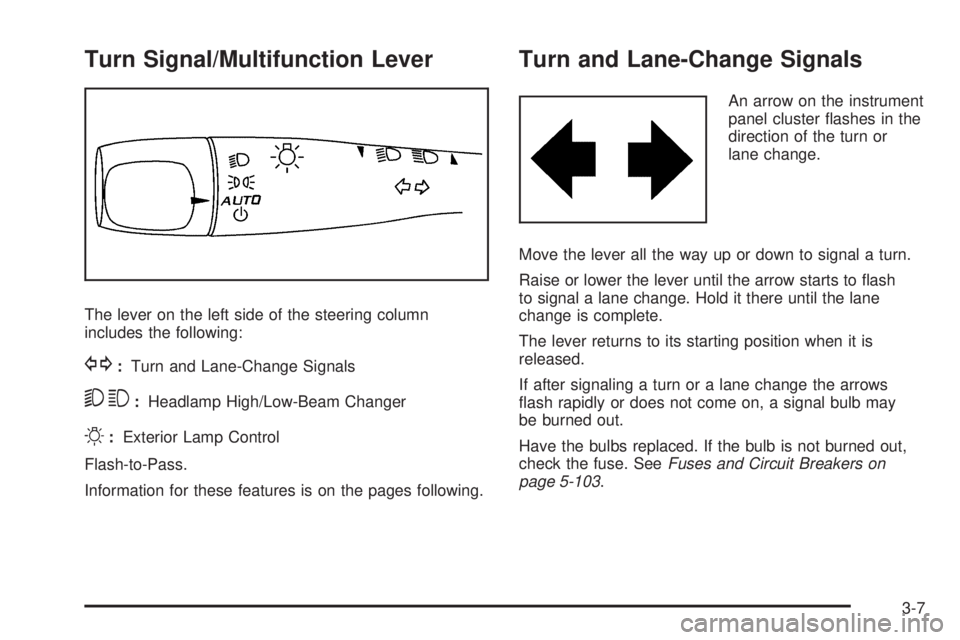
The lever on the left side of the steering column
includes the following:
G:Turn and Lane-Change Signals
53:Headlamp High/Low-Beam Changer
O:Exterior Lamp Control
Flash-to-Pass.
Information for these features is on the pages following.
Turn and Lane-Change Signals
An arrow on the instrument
panel cluster ashes in the
direction of the turn or
lane change.
Move the lever all the way up or down to signal a turn.
Raise or lower the lever until the arrow starts to ash
to signal a lane change. Hold it there until the lane
change is complete.
The lever returns to its starting position when it is
released.
If after signaling a turn or a lane change the arrows
ash rapidly or does not come on, a signal bulb may
be burned out.
Have the bulbs replaced. If the bulb is not burned out,
check the fuse. SeeFuses and Circuit Breakers on
page 5-103.
3-7
Page 122 of 402

Headlamp High/Low-Beam Changer
To change the headlamps from low beam to high
beam, push the turn signal lever away from you.
This indicator light appears
on the instrument panel
cluster when the high
beams are on.
To change the headlamps from high beam to low beam,
pull the turn signal lever toward you.
Flash-to-Pass
This feature lets you use your high-beam headlamps to
signal a driver in front of you that you want to pass.
To use it, pull the turn signal/multifunction lever toward
you until the high-beam headlamps come on, then
release the lever to turn them off.
Windshield Wipers
The windshield wiper lever is located on the right side of
the steering wheel.
Move the lever to control the windshield wipers.
9(Off):Turns off the windshield wipers.
&(Intermittent; Speed Sensitive Wipers):
For intermittent or speed sensitive operation.
The amount of delay time varies between wiping
cycles due to the delay setting selected or the speed
of the vehicle. As vehicle speed is increased or
decreased, the wiper interval also increases or
decreases.
3-8
Page 137 of 402
Instrument Panel Cluster
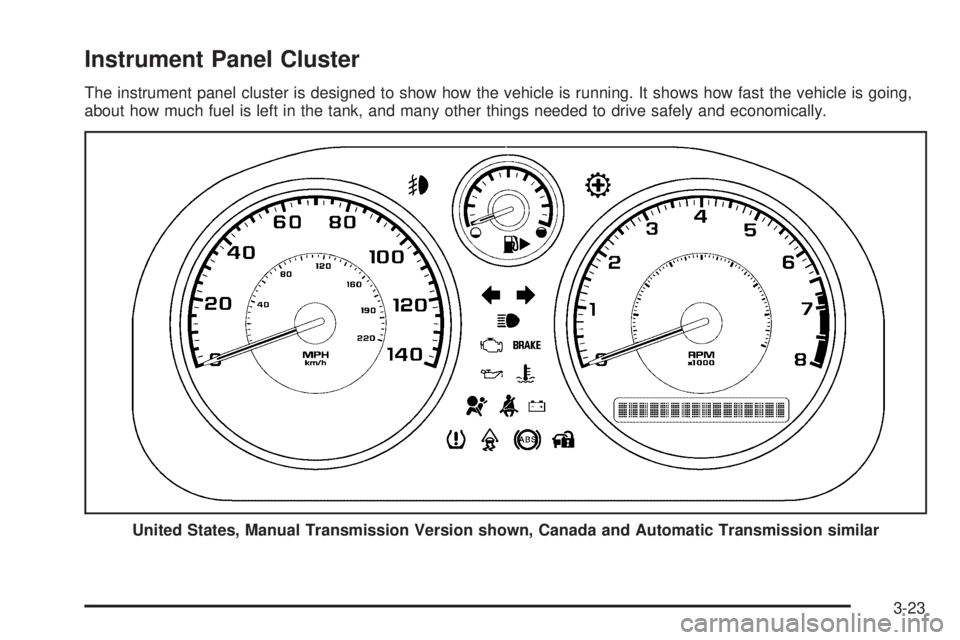
The instrument panel cluster is designed to show how the vehicle is running. It shows how fast the vehicle is going,
about how much fuel is left in the tank, and many other things needed to drive safely and economically.
United States, Manual Transmission Version shown, Canada and Automatic Transmission similar
3-23
Page 153 of 402

Driver Information Center (DIC)
Your vehicle has a Driver Information Center (DIC).
The DIC display gives you the status of many of your
vehicle’s systems. The DIC is also used to display
driver personalization menu modes and warning/status
messages. All messages will appear in the DIC display,
located at the bottom of the instrument panel cluster.
The DIC buttons are
located on the left side
of the steering wheel.
INFO (Information):Press this button to scroll through
the vehicle information mode displays.
r(Reset):Press this button to reset some vehicle
information mode displays, select a personalization
menu mode setting, or acknowledge a warning
message.Press and hold the information and reset buttons at the
same time for one second, then release the buttons
to enter the personalization menu. SeeDIC Vehicle
Personalization on page 3-47for more information.
DIC Operation and Displays
The DIC comes on when the ignition is on. The DIC has
different modes which can be accessed by pressing the
DIC buttons. The button functions are detailed in the
following.
Information Modes
INFO (Information):Press this button to scroll through
the following vehicle information modes:
Outside Air Temperature and Odometer
Press the information button until the outside air
temperature and the odometer display. This mode shows
the temperature outside of the vehicle in either degrees
Fahrenheit (°F) or degrees Celsius (°C) and the total
distance the vehicle has been driven in either miles (mi)
or kilometers (km). The outside air temperature appears
on the left side of the DIC display and the odometer
appears on the right side of the display.
To change the DIC display to English or metric units,
see “UNITS” underDIC Vehicle Personalization on
page 3-47.
3-39
Page 156 of 402
DIC Warnings and Messages
These messages appear if there is a problem detected
in one of your vehicle’s systems.
A message clears when the vehicle’s condition is
no longer present. To acknowledge a message and
clear it from the display, press and hold any of the
DIC buttons. If the condition is still present, the warning
message comes back on the next time the vehicle
is turned off and back on. With most messages,
a warning chime sounds when the message displays.
Your vehicle may have other warning messages.
AUTO (Automatic) LIGHTS OFF
This message displays if the automatic headlamp
system is disabled with the headlamp switch.
AUTO (Automatic) LIGHTS ON
This message displays if the automatic headlamp
system is enabled with the headlamp switch.
BRAKE FLUID
This message displays, while the ignition is on, when
the brake uid level is low. The brake system warning
light on the instrument panel cluster also comes on.
SeeBrake System Warning Light on page 3-29for
more information. Have the brake system serviced
by your dealer/retailer as soon as possible.
CHANGE OIL SOON
This message displays when the life of the engine oil
has expired and it should be changed.
When this message is acknowledged and cleared from
the display, the engine oil life system must still be reset
separately. SeeEngine Oil Life System on page 5-16
andScheduled Maintenance on page 6-4for more
information.
CHECK GAS CAP
This message displays if the fuel cap has not been fully
tightened. Recheck the fuel cap to make sure that it
is on properly. A few driving trips with the cap properly
installed should turn the message off.
CHECK TIRE PRESS (Pressure)
If your vehicle is equipped with a Tire Pressure
Monitoring System (TPMS), this message displays when
the pressure in one or more of the vehicle’s tires needs to
be checked. If a tire pressure message appears on the
DIC, stop as soon as you can. Have the tire pressures
checked and set to those shown on the Tire Loading
Information label. SeeTires on page 5-48,Loading the
Vehicle on page 4-22, andInflation - Tire Pressure on
page 5-55. The DIC also shows the tire pressure values.
SeeDIC Operation and Displays on page 3-39. If the tire
pressure is low, the low tire pressure warning light comes
on. SeeTire Pressure Light on page 3-33.
3-42
Page 157 of 402

COOLING MODE ON
This message may display on some vehicles. Under
severe conditions, hot ambient temperatures, steep
grades, and towing, your vehicle may experience more
transmission shifting. This is temporary and normal
under these conditions. This does not require engine
or transmission service.
CRUISE ENGAGED
This message displays when the cruise control system
is active. SeeCruise Control on page 3-10for more
information.
DOOR AJAR
This message displays if one or more of the vehicle’s
doors are open. Make sure that the door(s) are
closed completely.
ENGINE DISABLED
This message displays if the starting of the engine
is disabled. Have your vehicle serviced by your
dealer/retailer immediately.
ENG (Engine) PWR (Power) REDUCED
This message displays to inform you that the vehicle
has reduced engine power to avoid damaging the engine.
Reduced engine power can affect the vehicle’s ability
to accelerate. If this message is on, but there is no
reduction in performance, proceed to your destination.
The performance may be reduced the next time the
vehicle is driven. The vehicle may be driven at a reduced
speed while this message is on, but acceleration and
speed may be reduced. Anytime this message stays on,
the vehicle should be taken to your dealer/retailer for
service as soon as possible.
ESC (Electronic Stability Control) ACTIVE
If your vehicle has Electronic Stability Control (ESC),
this message displays and the ESC/TCS light on the
instrument panel cluster ashes when ESC is assisting
you with directional control of the vehicle. You may feel
or hear the system working and see this message
displayed in the DIC. Slippery road conditions may
exist when this message is displayed, so adjust your
driving accordingly. This message may stay on for
a few seconds after ESC stops assisting you with
directional control of the vehicle. This is normal when
the system is operating. SeeElectronic Stability Control
(ESC) on page 4-6andElectronic Stability Control
(ESC)/Traction Control System (TCS) Indicator/
Warning Light on page 3-31for more information.
3-43