ABS PONTIAC G5 2010 User Guide
[x] Cancel search | Manufacturer: PONTIAC, Model Year: 2010, Model line: G5, Model: PONTIAC G5 2010Pages: 422, PDF Size: 2.22 MB
Page 228 of 422

And, of course, actual stopping distances vary greatly
with the surface of the road, whether it is pavement or
gravel; the condition of the road, whether it is wet, dry, or
icy; tire tread; the condition of the brakes; the weight of
the vehicle; and the amount of brake force applied.
Avoid needless heavy braking. Some people drive
in spurts — heavy acceleration followed by heavy
braking — rather than keeping pace with traffic. This is a
mistake. The brakes might not have time to cool between
hard stops. The brakes will wear out much faster with a
lot of heavy braking. Keeping pace with the traffic and
allowing realistic following distances eliminates a lot of
unnecessary braking. That means better braking and
longer brake life.
If the engine ever stops while the vehicle is being driven,
brake normally but do not pump the brakes. If the brakes
are pumped, the pedal could get harder to push down.
If the engine stops, there will still be some power brake
assist but it will be used when the brake is applied. Once
the power assist is used up, it can take longer to stop and
the brake pedal will be harder to push.
Adding non-dealer/non-retailer accessories can affect
vehicle performance. SeeAccessories and Modications
on page 6-3.Antilock Brake System (ABS)
The vehicle might have the Antilock Brake System
(ABS), an advanced electronic braking system that helps
prevent a braking skid.
If the vehicle has ABS,
this warning light on the
instrument panel comes on
briefly when the vehicle is
started.
When the engine is started, or when the vehicle begins
to drive away, ABS checks itself. A momentary motor
or clicking noise might be heard while this test is going
on, and it might even be noticed that the brake pedal
moves or pulses a little. This is normal.
5-4
Page 229 of 422
Let us say the road is wet and you are driving safely.
Suddenly, an animal jumps out in front of you. You slam
on the brakes and continue braking. Here is what
happens with ABS:
A computer senses that the wheels are slowing down.
If one of the wheels is about to stop rolling, the computer
will separately work the brakes at each wheel.
ABS can change the brake pressure to each wheel, as
required, faster than any driver could. This can help
the driver steer around the obstacle while braking hard.
As the brakes are applied, the computer keeps
receiving updates on wheel speed and controls braking
pressure accordingly.
Remember: ABS does not change the time needed to get
a foot up to the brake pedal or always decrease stopping
distance. If you get too close to the vehicle in front of you,
there will not be enough time to apply the brakes if that
vehicle suddenly slows or stops. Always leave enough
room up ahead to stop, even with ABS.
Using ABS
Do not pump the brakes. Just hold the brake pedal
down firmly and let antilock work. A slight brake pedal
pulsation might be felt or some noise noticed, but this is
normal.
Braking in Emergencies
At some time, nearly every driver gets into a situation
that requires hard braking.
If the vehicle has ABS, it allows the driver to steer and
brake at the same time. However, if the vehicle does not
have ABS, the first reaction — to hit the brake pedal hard
and hold it down — might be the wrong thing to do. The
wheels can stop rolling. Once they do, the vehicle cannot
respond to the driver’s steering. Momentum will carry it in
whatever direction it was headed when the wheels
stopped rolling. That could be off the road, into the very
thing the driver was trying to avoid, or into traffic.
If the vehicle does not have ABS, use a “squeeze”
braking technique. This gives maximum braking while
maintaining steering control. Do this by pushing on
the brake pedal with steadily increasing pressure.
In an emergency, you will probably want to squeeze the
brakes hard without locking the wheels. If you hear or
feel the wheels sliding, ease off the brake pedal.
This helps retain steering control. With ABS, it is
different. SeeAntilock Brake System (ABS) on page 5-4 .
In many emergencies, steering can help more than
even the very best braking.
5-5
Page 234 of 422

Traction Control Operation
Traction control limits wheel spin by reducing engine
power to the wheels (engine speed management)
and by applying brakes to each individual wheel
(brake-traction control) as necessary.
The traction control system is enabled automatically
when the vehicle is started, and it will activate and flash
the ESC/TCS light and display the LOW TRACTION
message if it senses that either of the front wheels are
spinning or beginning to lose traction while driving.
For more information on the LOW TRACTION message,
seeDriver Information Center (DIC) on page 4-35 .
Notice: If the wheel(s) of one axle are allowed to
spin excessively while the ESC/TCS, ABS and Brake
warning lights and the SERVICE ESC and/or
SERVICE TRACTION messages are displayed, the
differential could be damaged. The repairs would not
be covered by the vehicle warranty. Reduce engine
power and do not spin the wheel(s) excessively
while these lights and this message are displayed. Notice:
When traction control is turned off, or
Competitive Driving Mode is active, it is possible to
lose traction. If you attempt to shift with the drive
wheels spinning with a loss of traction, it is possible
to cause damage to the transmission. Do not attempt
to shift when the drive wheels do not have traction.
Damage caused by misuse of the vehicle is not
covered. See the warranty book for additional
information.
The traction control system may activate on dry or
rough roads or under conditions such as heavy
acceleration while turning or abrupt upshifts/downshifts
of the transmission. When this happens, a reduction
in acceleration may be noticed or a noise or vibration
may be heard. This is normal.
If the vehicle is in cruise control while the system
activates, the ESC/TCS light flashes and the cruise
control automatically disengages. The cruise control can
be re-engaged when road conditions allow. See
Cruise Control on page 4-7 .
Adding non-dealer/non-retailer accessories can affect
the vehicle’s performance. See Accessories and
Modications on page 6-3 for more information.
5-10
Page 240 of 422

Skidding
In a skid, a driver can lose control of the vehicle.
Defensive drivers avoid most skids by taking reasonable
care suited to existing conditions, and by not overdriving
those conditions. But skids are always possible.
The three types of skids correspond to the vehicle’s three
control systems. In the braking skid, the wheels are not
rolling. In the steering or cornering skid, too much speed
or steering in a curve causes tires to slip and lose
cornering force. And in the acceleration skid, too much
throttle causes the driving wheels to spin.
If the vehicle has the Enhanced Traction System (ETS),
remember: It helps to avoid only the acceleration skid.
SeeEnhanced Traction System (ETS) on page 5-11 .
If the vehicle does not have the Enhanced Traction
System, or if the system is off, then an acceleration skid
is best handled by easing your foot off the accelerator
pedal.
If the vehicle starts to slide, ease your foot off the
accelerator pedal and quickly steer the way you want
the vehicle to go. If you start steering quickly enough,
the vehicle may straighten out. Always be ready for
a second skid if it occurs. Of course, traction is reduced when water, snow, ice,
gravel, or other material is on the road. For safety, slow
down and adjust your driving to these conditions. It is
important to slow down on slippery surfaces because
stopping distance will be longer and vehicle control more
limited.
While driving on a surface with reduced traction, try your
best to avoid sudden steering, acceleration, or braking,
including reducing vehicle speed by shifting to a lower
gear. Any sudden changes could cause the tires to
slide. You may not realize the surface is slippery until
the vehicle is skidding. Learn to recognize warning
clues — such as enough water, ice, or packed snow on
the road to make a mirrored surface — and slow down
when you have any doubt.
If the vehicle has the Antilock Brake System (ABS),
remember: It helps avoid only the braking skid. If the
vehicle does not have ABS, then in a braking skid, where
the wheels are no longer rolling, release enough pressure
on the brakes to get the wheels rolling again. This
restores steering control. Push the brake pedal down
steadily when you have to stop suddenly. As long as the
wheels are rolling, you will have steering control.
5-16
Page 245 of 422
Winter Driving
Driving on Snow or Ice
Drive carefully when there is snow or ice between the
tires and the road, creating less traction or grip. Wet ice
can occur at about 32°F (0°C) when freezing rain
begins to fall, resulting in even less traction. Avoid
driving on wet ice or in freezing rain until roads can be
treated with salt or sand.
Drive with caution, whatever the condition. Accelerate
gently so traction is not lost. Accelerating too quickly
causes the wheels to spin and makes the surface under
the tires slick, so there is even less traction.
Try not to break the fragile traction. If you accelerate too
fast, the drive wheels will spin and polish the surface
under the tires even more.
If the vehicle has theTraction Control System (TCS) on
page 5-8 orEnhanced Traction System (ETS) on
page 5-11, it improves the ability to accelerate on slippery
roads, but slow down and adjust your driving to the road
conditions. When driving through deep snow, turn off the
ETS, if equipped, to help maintain vehicle motion at lower
speeds. The
Antilock Brake System (ABS) on page 5-4 improves
vehicle stability during hard stops on a slippery roads,
but whether the vehicle has ABS or not, apply the
brakes sooner than when on dry pavement. Without
ABS, if the vehicle begins to slide, let up on the brake
pedal a little and apply steady pedal pressure to get the
most traction. On vehicles without ABS, braking so
hard that the wheels stop rolling can cause the vehicle
to slide — brake so the wheels always keep rolling
so you can still steer.
Allow greater following distance on any slippery road
and watch for slippery spots. Icy patches can occur on
otherwise clear roads in shaded areas. The surface
of a curve or an overpass can remain icy when
the surrounding roads are clear. Avoid sudden steering
maneuvers and braking while on ice.
Turn off cruise control, if equipped, on slippery surfaces.
5-21
Page 263 of 422

If parking the rig on a hill:1. Press the brake pedal, but do not shift into P (Park) yet for an automatic transmission, or into gear for a
manual transmission. Turn the wheels into the
curb if facing downhill or into traffic if facing uphill.
2. Have someone place chocks under the trailer wheels.
3. When the wheel chocks are in place, release the regular brakes until the chocks absorb the load.
4. Reapply the regular brakes. Then apply the parking brake, and then shift into P (Park) for an automatic
transmission or R (Reverse) for a manual
transmission.
5. Release the brake pedal.
Leaving After Parking on a Hill
1. Apply the regular brakes and hold the pedal down while you:
•Start the engine.
•Shift into a gear.
•Release the parking brake.
2. Let up on the brake pedal.
3. Drive slowly until the trailer is clear of the chocks.
4. Stop and have someone pick up and store the chocks.
Maintenance When Trailer Towing
The vehicle needs service more often when pulling a
trailer. See Scheduled Maintenance on page 7-3
for more on this. Things that are especially important in
trailer operation are automatic transmission fluid (do
not overfill), engine oil, drive belt, cooling system
and brake system.
Each of these is covered in this manual, and the Index
will help to find them quickly. When trailering, it is a good
idea to review this information before starting the trip.
Check periodically to see that all hitch nuts and bolts are
tight.
Engine Cooling When Trailer Towing
The cooling system may temporarily overheat during
severe operating conditions. See Engine Overheating on
page 6-27.
Towing a Trailer (Manual
Transmission)
Do not tow a trailer if the vehicle is equipped with a
manual transmission.
5-39
Page 307 of 422

5. Pull the headlamp assembly up at an angle andtowards the radiator to remove it.
6. Disconnect the bulb base from the wiring harness by lifting the locking tab.
7. Disconnect the wiring harness from the bulb socket.
8. Remove the retainer by turning it counterclockwise.
9. Turn the bulb socket for the headlamp, front turn signal, or parking lamp counterclockwise.
For the sidemarker bulb, use a tool to assist
in turning the bulb socket.
10. Pull the old bulb out of the socket.
11. Install a new bulb.
12. Reinstall the bulb assembly by reversing Steps 1 through 9.
When reinstalling the headlamp assembly, first
make sure that the wiring harness is in its original
position. If not, the headlamp assembly will not
fit correctly.
Align the two tabs on the bottom of the assembly
that fit into two slots in the headlamp assembly
bracket.Center High-Mounted Stoplamp
(CHMSL)
To replace a CHMSL bulb: 1. Open the trunk.
2. Press the tabs to release the bulb assembly.
3. Pull the bulb assembly down to access the bulbs.
4. Pull the old bulb straight out.
6-43
Page 308 of 422

5. Push the new bulb straight in until it clicks.
6. Align the tabs in the bulb assembly with theassembly in the trunk lid. Push the bulb assembly
back into place until it snaps in. You may need
to use a tool to guide the tabs into the assembly.
Taillamps and Turn Signal Lamps
(Coupe)
To replace a taillamp or rear turn signal bulb:
1. Open the trunk. See Trunk on page 3-11for more
information.
2. Remove the screw retaining the taillamp assembly.
3. Disconnect the wiring harness by lifting up on the tab to release and pull it straight out.
4. Hold and turn the bulb socket clockwise and then release it from the lamp housing.
5. Pull the old bulb straight out of the socket.
6. Install a new bulb.
7. Reverse Steps 2 through 4 to reinstall the taillamp assembly.
Taillamps, Turn Signal, Stoplamps
and Back-up Lamps (Sedan)
To replace one of these bulbs:
1. Open the trunk.
2. Remove the trunk trim and pull back fastener.
3. Remove the additional fastener.
4. Remove the outer two screws from the taillamp assembly.
5. Lift up on the tab and pull the wiring harness straight out.
6. Remove the taillamp assembly from the quarter panel.
6-44
Page 359 of 422

•Laundry detergents or dishwashing soaps with
degreasers can leave residue that streaks and
attracts dirt. For liquid cleaners, about 20 drops per
gallon (3.78 L) of water is a good guide. Use
only mild, neutral-pH soaps.
•Too much cleaner that saturates the upholstery.
•Organic solvents such as naptha, alcohol, etc. that
can damage the vehicle’s interior.
Fabric/Carpet
Use a vacuum cleaner with a soft brush attachment
frequently to remove dust and loose dirt. A canister
vacuum with a beater bar in the nozzle may only
be used on floor carpet and carpeted floor mats. For
any soil, always try to remove it first with plain water or
club soda. Before cleaning, gently remove as much
of the soil as possible using one of the following
techniques:
•For liquids: gently blot the remaining soil with a
paper towel. Allow the soil to absorb into the
paper towel until no more can be removed.
•For solid dry soils: remove as much as possible
and then vacuum.To clean:
1. Saturate a lint-free, clean white cloth with water or club soda.
2. Wring the cloth to remove excess moisture.
3. Start on the outside edge of the soil and gently rub toward the center. Continue cleaning, using a clean
area of the cloth each time it becomes soiled.
4. Continue to gently rub the soiled area until the cleaning cloth remains clean.
5. If the soil is not completely removed, use a mild soap solution and repeat the cleaning process
that was used with plain water.
If any of the soil remains, a commercial fabric cleaner or
spot lifter may be necessary. When a commercial
upholstery cleaner or spot lifter is to be used, test a
small hidden area for colorfastness first. If the locally
cleaned area gives any impression that a ring formation
may result, clean the entire surface.
After the cleaning process has been completed, a paper
towel can be used to blot excess moisture from the
fabric or carpet.
6-95
Page 370 of 422
FusesUsage
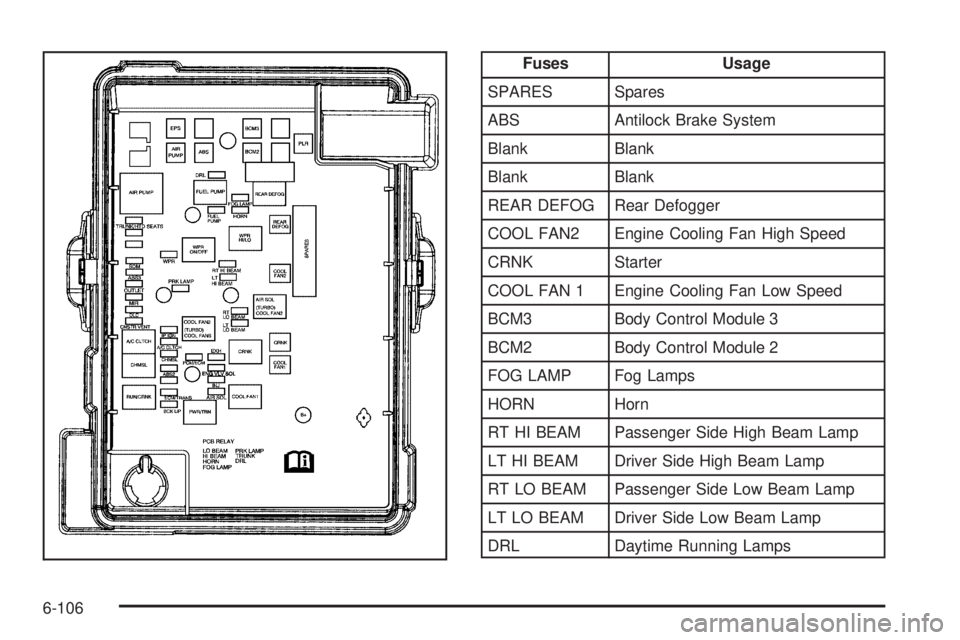
SPARES Spares
ABS Antilock Brake System
Blank Blank
Blank Blank
REAR DEFOG Rear Defogger
COOL FAN2 Engine Cooling Fan High Speed
CRNK Starter
COOL FAN 1 Engine Cooling Fan Low Speed
BCM3 Body Control Module 3
BCM2 Body Control Module 2
FOG LAMP Fog Lamps
HORN Horn
RT HI BEAM Passenger Side High Beam Lamp
LT HI BEAM Driver Side High Beam Lamp
RT LO BEAM Passenger Side Low Beam Lamp
LT LO BEAM Driver Side Low Beam Lamp
DRL Daytime Running Lamps
6-106