lock PONTIAC G5 2010 Workshop Manual
[x] Cancel search | Manufacturer: PONTIAC, Model Year: 2010, Model line: G5, Model: PONTIAC G5 2010Pages: 422, PDF Size: 2.22 MB
Page 134 of 422

If you still are unable to shift out of P (Park):1. Fully release the shift lever button.
2. While holding down the brake pedal, press the shift lever button again.
3. Move the shift lever to the desired position.
If you still cannot move the shift lever from P (Park),
consult your dealer/retailer or a professional towing
service.
Parking the Vehicle
(Manual Transmission)
Before leaving the vehicle, fully press the clutch pedal
down, move the shift lever into R (Reverse), and
firmly apply the parking brake. Once the shift lever has
been placed in R (Reverse) with the clutch pedal
pressed down, the ignition key can be turned to
LOCK/OFF, then remove the key and release the clutch
pedal. See Manual Transmission Operation on
page 3-27.
Parking Over Things That Burn
{WARNING:
Things that can burn could touch hot exhaust
parts under the vehicle and ignite. Do not park
over papers, leaves, dry grass, or other things that
can burn.
3-32
Page 135 of 422

Engine Exhaust
{WARNING:
Engine exhaust contains Carbon Monoxide (CO)
which cannot be seen or smelled. Exposure to CO
can cause unconsciousness and even death.
Exhaust may enter the vehicle if:
•The vehicle idles in areas with poor ventilation
(parking garages, tunnels, deep snow that
may block underbody airflow or tail pipes).
•The exhaust smells or sounds strange or
different.
•The exhaust system leaks due to corrosion or
damage.
•The vehicle’s exhaust system has been
modified, damaged or improperly repaired.WARNING: (Continued)
WARNING: (Continued)
•
There are holes or openings in the vehicle
body from damage or after-market
modifications that are not completely sealed.
If unusual fumes are detected or if it is suspected
that exhaust is coming into the vehicle:
•Drive it only with the windows
completely down.
•Have the vehicle repaired immediately.
Never park the vehicle with the engine running in
an enclosed area such as a garage or a building
that has no fresh air ventilation.
3-33
Page 141 of 422
Instrument Panel Overview...............................4-3
Hazard Warning Flashers ................................4-3
Horn ............................................................ .4-3
Tilt Wheel .................................................... .4-3
Turn Signal/Multifunction Lever .........................4-4
Turn and Lane-Change Signals ........................4-4
Headlamp High/Low-Beam Changer ..................4-5
Flash-to-Pass ................................................ .4-5
Windshield Wipers ......................................... .4-5
Windshield Washer ........................................ .4-6
Cruise Control ............................................... .4-7
Headlamps ................................................... .4-9
Wiper Activated Headlamps ............................4-10
Headlamps on Reminder ................................4-10
Daytime Running Lamps (DRL) .......................4-10
Fog Lamps ................................................. .4-11
Instrument Panel Brightness ...........................4-11
Dome Lamp ................................................ .4-11
Entry/Exit Lighting ........................................ .4-12
Mirror Reading Lamps .................................. .4-12
Electric Power Management ...........................4-12Battery Run-Down Protection
..........................4-13
Accessory Power Outlet(s) .............................4-13
Ashtray(s) and Cigarette Lighter ......................4-14
Climate Controls ........................................... .4-14
Climate Control System .................................4-14
Outlet Adjustment ........................................ .4-17
Passenger Compartment Air Filter ...................4-18
Warning Lights, Gages, and Indicators ............4-19
Instrument Panel Cluster ................................4-20
Speedometer and Odometer ...........................4-21
Tachometer ................................................ .4-21
Safety Belt Reminders .................................. .4-22
Airbag Readiness Light ................................. .4-23
Passenger Airbag Status Indicator ...................4-24
Charging
System Light ................................. .4-25
Up-Shift Light .............................................. .4-25
Brake System Warning Light ..........................4-26
Antilock Brake System (ABS) Warning Light .....4-27
Enhanced Traction System (ETS) Indicator/ Warning Light .......................................... .4-27
Section 4 Instrument Panel
4-1
Page 142 of 422
Electronic Stability Control (ESC)/TractionControl System (TCS) Indicator/Warning
Light ....................................................... .4-28
Engine Coolant Temperature Warning Light ......4-29
Tire Pressure Light ...................................... .4-29
Malfunction Indicator Lamp .............................4-30
Oil Pressure Light ........................................ .4-33
Security Light .............................................. .4-33
Fog Lamp Light ........................................... .4-34
Highbeam On Light ...................................... .4-34
Fuel Gage .................................................. .4-34
Driver Information Center (DIC) .......................4-35
DIC Operation and Displays ...........................4-36
DIC Warnings and Messages .........................4-38
DIC Vehicle Personalization ............................4-43Audio System(s)
............................................ .4-49
Setting the Clock ......................................... .4-50
Radio(s) ..................................................... .4-51
Using an MP3 ............................................. .4-63
XM Radio Messages .................................... .4-70
Bluetooth
®.................................................. .4-71
Theft-Deterrent Feature ................................. .4-81
Audio Steering Wheel Controls .......................4-82
Radio Reception .......................................... .4-83
Fixed Mast Antenna ..................................... .4-84
XM™ Satellite Radio Antenna System .............4-84
Section 4 Instrument Panel
4-2
Page 143 of 422
Instrument Panel Overview
Hazard Warning Flashers
|(Hazard Warning Flasher):Press this button
located on the instrument panel, to make the front and
rear turn signal lamps flash on and off. This warns
others that you are having trouble.
Press
|again to turn the flashers off.
Horn
To sound the horn, press the center pad on the steering
wheel.
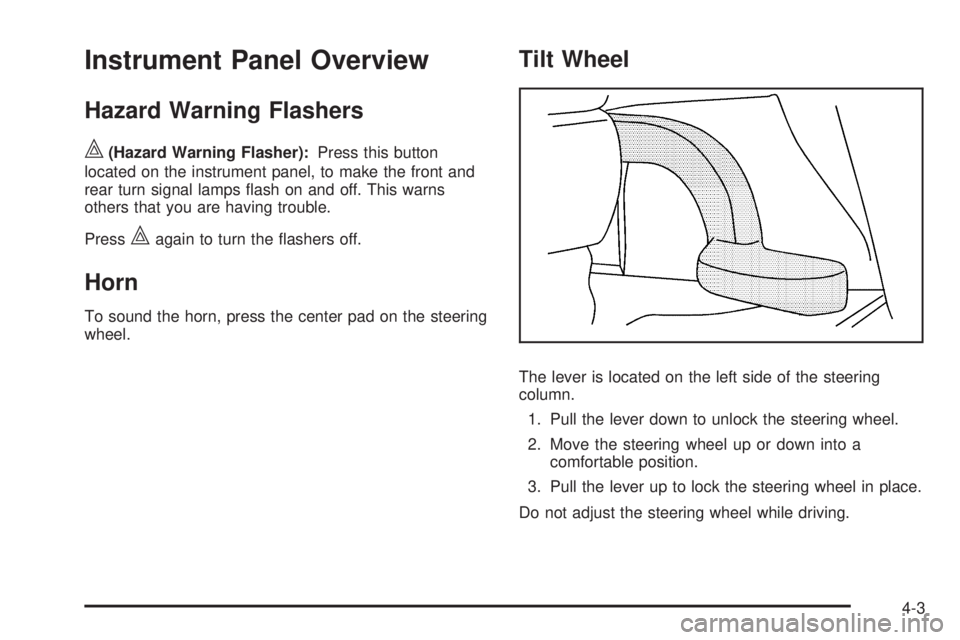
Tilt Wheel
The lever is located on the left side of the steering
column.
1. Pull the lever down to unlock the steering wheel.
2. Move the steering wheel up or down into a comfortable position.
3. Pull the lever up to lock the steering wheel in place.
Do not adjust the steering wheel while driving.
4-3
Page 146 of 422
x(Delay):Move the lever to the&position, then
turn the
xband up for more frequent wipes or down
for less frequent wipes.
6(Low Speed): Slow wipes.
1(High Speed): Fast wipes.
8(Mist):Single wipe, move the lever down, then
release it. Several wipes, hold the lever down.
Clear ice and snow from the wiper blades before
using them.
If frozen to the windshield, carefully loosen or thaw
them. Damaged wiper blades should be replaced.
Heavy snow or ice can overload the wiper motor.
A circuit breaker stops the motor until it cools. If the
motor gets stuck, turn the wipers off, clear away
the snow or ice, and then turn the wipers back on.
As an added safety feature, if the wipers are on for
more than 15 seconds, the vehicle’s headlamps turn
on automatically. They turn off 15 seconds after the
wipers are turned off.
Windshield Washer
Press the button at the end of the windshield wiper
lever until the washers begin.
{WARNING:
In freezing weather, do not use your washer until
the windshield is warmed. Otherwise the washer
fluid can form ice on the windshield, blocking your
vision.
When the button is released, the washers stop, but the
wipers continue to wipe about three times or resume
the previous speed.
4-6
Page 151 of 422

Fog Lamps
For vehicles with fog lamps, the button is located on the
instrument panel, to the left of the steering wheel.
The ignition must be on to use the fog lamps.
#:Press to turn the fog lamps on off. An indicator
light on the button comes on when the fog lamps are on.
The parking lamps automatically turn on and off when
the fog lamps are turned on and off.
The fog lamps will turn off while the high-beam
headlamps are turned on.
Some localities have laws that require the headlamps to
be on along with the fog lamps.
Instrument Panel Brightness
The control for this feature
is located on the instrument
panel to the left of the
steering wheel.
Turn the knob clockwise to brighten the lights or
counterclockwise to dim them.
Dome Lamp
The vehicle may have a dome lamp.
Move the lever to the following positions:
9(Off): Turns the lamp off, even when a door is
opened.
1(Door): Turns the lamp on whenever a door is
opened.
+(On): Turns the dome lamp on.
4-11
Page 152 of 422
Entry/Exit Lighting
The lamps inside the vehicle will go on when any door is
opened. These lamps fade out about 20 seconds after all
of the doors have been closed or when the ignition is
turned to ON/RUN. These lamps will also go on when
pressing the trunk release, unlock symbol, or the horn
symbol button on the Remote Keyless Entry System
(RKE) Transmitter.
After the key is removed from the ignition, the lamps
inside the vehicle stay on for about 20 seconds to
provide an illuminated exit.
Mirror Reading Lamps
The vehicle may have reading lamps on the rearview
mirror. Press the button near each lamp to turn the
reading lamps on and off.
Electric Power Management
This vehicle has Electric Power Management (EPM),
an advanced control system. It estimates the battery’s
temperature and state of charge and then adjusts
the voltage for best performance and extended life
of the battery.When the battery’s state of charge is low, the voltage is
raised slightly to quickly put the charge back in. When the
state of charge is high, the voltage is lowered slightly to
prevent overcharging. If the vehicle has a voltmeter gage
or voltage display on the Driver Information Center (DIC),
you may see the voltage move up or down. This is
normal. If there is a problem, an alert will be displayed.
The battery can be discharged at idle if the electrical
loads are very high. This is true for all vehicles. This is
because the generator (alternator) may not be spinning
fast enough at idle to produce all the power that is
needed for very high electrical loads.
A high electrical load occurs when several of the following
loads are on: headlamps, high beams, fog lamps, rear
window defogger, climate control fan at high speed,
heated seats, engine cooling fans, trailer loads, and
loads plugged into accessory power outlets.
EPM works to prevent excessive discharge of the battery.
It does this by balancing the generator’s output and the
vehicle’s electrical needs. It can increase engine idle
speed to generate more power, whenever needed.
It can temporarily reduce the power demands of some
accessories.
Normally, these actions occur in steps or levels, without
being noticeable. In rare cases at the highest levels
of corrective action, this action may be noticeable to
the driver.
4-12
Page 155 of 422

To change the current mode, select one of the following:
9(Off):Turn the fan control to this position to turn
the fan off.
Temperature Control: Turn clockwise or
counterclockwise to increase or decrease the
temperature.
9(Fan Control): Turn clockwise or counterclockwise to
increase or decrease the fan speed. In any setting other
than off, the fan will run continuously with the ignition on.
The fan must be turned on to run the air conditioning
compressor.
Air Delivery Mode Control: Turn clockwise or
counterclockwise to change the direction of the
airflow inside the vehicle.
Select from the following modes:
H(Vent): Air is directed to the instrument panel
outlets.
)(Bi-Level): Air is divided between the instrument
panel outlets and the floor outlets. Cooler air is directed
to the upper outlets and warmer air to the floor outlets.
6(Floor): Air is directed to the floor outlets, with some
air directed to the windshield and side windows.
-(Defog): This mode clears the windows of fog or
moisture. Air is directed to the windshield, side window,
and floor outlets. To defog the windows faster, turn the
temperature control knob clockwise to the warmest
setting. In this mode, the system runs the air conditioning
compressor.
0(Defrost): This mode removes fog or frost from
the windshield more quickly. Air is directed to the
windshield, with some air directed to the side window
outlets and the floor outlets. To defrost the windows
faster, turn the temperature control knob clockwise to
the warmest setting. In this mode, the system runs
the air conditioning compressor.
For best results, clear all snow and ice from the
windshield before defrosting.
#(Air Conditioning): For vehicles with air
conditioning, press this button to turn the air conditioning
system on or off. An indicator light comes on to show that
the air conditioning is on.
On hot days, open the windows to let hot inside air
escape; then close them. This helps to reduce the time
it takes for the vehicle to cool down. It also helps the
system to operate more efficiently.
4-15
Page 157 of 422

Rear Window Defogger
The rear window defogger uses a warming grid to
remove fog from the rear window.
The rear window defogger only works when the ignition
is in ON/RUN.
<(Rear):Press to turn the rear window defogger on or
off. Be sure to clear as much snow from the rear window
as possible. An indicator light comes on to show that the
rear window defogger is on.
The rear window defogger turns off about 15 minutes
after the button is pressed. If turned on again, the
defogger only runs for about seven minutes before
turning off. If the vehicle is moving faster than 50 mph
(80 kph), the rear defogger will stay on. The defogger
can also be turned off by turning off the engine.
Notice: Do not use anything sharp on the inside
of the rear window. If you do, you could cut or
damage the warming grid, and the repairs would
not be covered by the vehicle warranty. Do not
attach a temporary vehicle license, tape, a decal
or anything similar to the defogger grid.
Outlet Adjustment
Use the thumbwheels located next to and below the air
outlets to change the direction of the airflow and to
open and close the outlets.
Operation Tips
•
Clear away any ice, snow or leaves from the air
inlets at the base of the windshield that may
block the flow of air into the vehicle.
•Use of non-GM approved hood deflectors may
adversely affect the performance of the system.
•Keep the path under the front seats clear of objects
to help circulate the air inside of the vehicle more
effectively.
4-17