fuse PONTIAC G5 2010 Owners Manual
[x] Cancel search | Manufacturer: PONTIAC, Model Year: 2010, Model line: G5, Model: PONTIAC G5 2010Pages: 422, PDF Size: 2.22 MB
Page 5 of 422
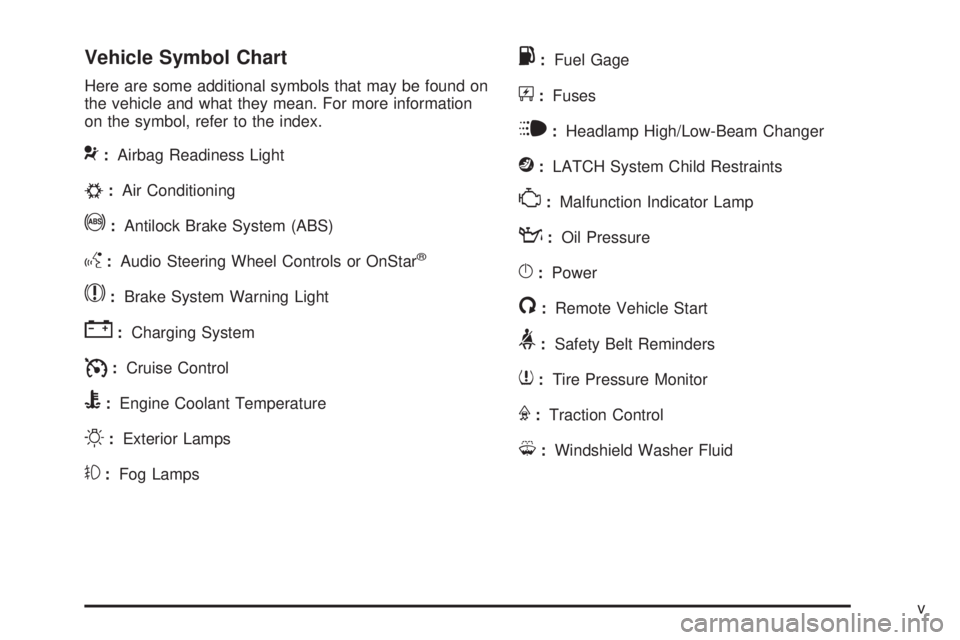
Vehicle Symbol Chart
Here are some additional symbols that may be found on
the vehicle and what they mean. For more information
on the symbol, refer to the index.
9:Airbag Readiness Light
#:Air Conditioning
!:Antilock Brake System (ABS)
g:Audio Steering Wheel Controls or OnStar®
$:Brake System Warning Light
":Charging System
I:Cruise Control
B:Engine Coolant Temperature
O:Exterior Lamps
#:Fog Lamps
.:Fuel Gage
+:Fuses
i:Headlamp High/Low-Beam Changer
j:LATCH System Child Restraints
*:Malfunction Indicator Lamp
::Oil Pressure
}:Power
/:Remote Vehicle Start
>:Safety Belt Reminders
7:Tire Pressure Monitor
F:Traction Control
M:Windshield Washer Fluid
v
Page 32 of 422
Front Seats
Manual Seats
{WARNING:
You can lose control of the vehicle if you try to
adjust a manual driver’s seat while the vehicle is
moving. The sudden movement could startle and
confuse you, or make you push a pedal when you
do not want to. Adjust the driver’s seat only when
the vehicle is not moving.If the vehicle has a manual seat, it can be moved
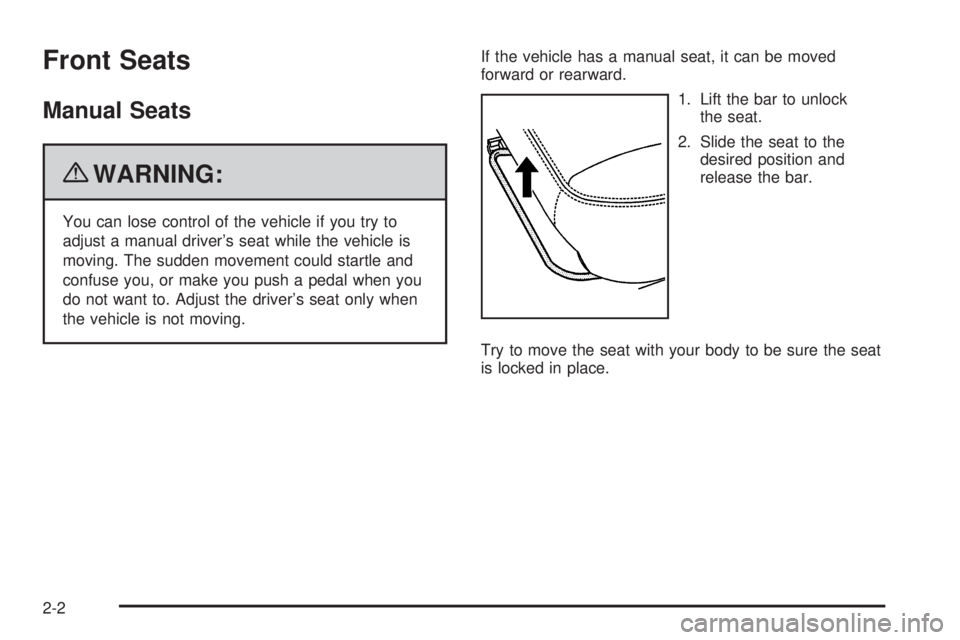
forward or rearward.
1. Lift the bar to unlockthe seat.
2. Slide the seat to the desired position and
release the bar.
Try to move the seat with your body to be sure the seat
is locked in place.
2-2
Page 34 of 422
Heated Seats
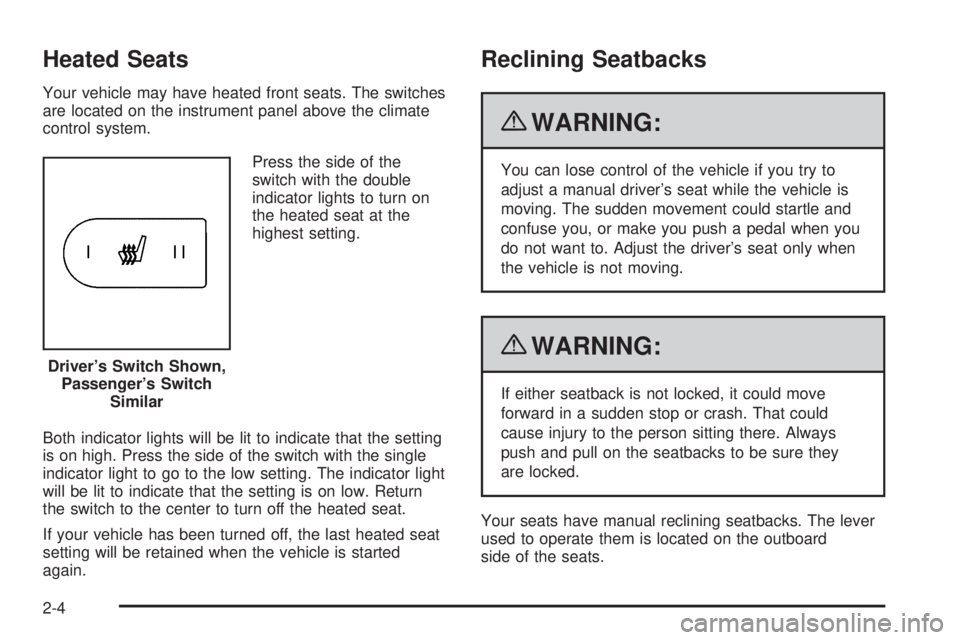
Your vehicle may have heated front seats. The switches
are located on the instrument panel above the climate
control system.Press the side of the
switch with the double
indicator lights to turn on
the heated seat at the
highest setting.
Both indicator lights will be lit to indicate that the setting
is on high. Press the side of the switch with the single
indicator light to go to the low setting. The indicator light
will be lit to indicate that the setting is on low. Return
the switch to the center to turn off the heated seat.
If your vehicle has been turned off, the last heated seat
setting will be retained when the vehicle is started
again.
Reclining Seatbacks
{WARNING:
You can lose control of the vehicle if you try to
adjust a manual driver’s seat while the vehicle is
moving. The sudden movement could startle and
confuse you, or make you push a pedal when you
do not want to. Adjust the driver’s seat only when
the vehicle is not moving.
{WARNING:
If either seatback is not locked, it could move
forward in a sudden stop or crash. That could
cause injury to the person sitting there. Always
push and pull on the seatbacks to be sure they
are locked.
Your seats have manual reclining seatbacks. The lever
used to operate them is located on the outboard
side of the seats.
Driver’s Switch Shown,
Passenger’s Switch Similar
2-4
Page 120 of 422

If the engine still does not start, and the key appears to
be undamaged, try another ignition key. At this time,
you may also want to check the fuse, seeFuses
and Circuit Breakers on page 6-103 . If the engine still
does not start with the other key, your vehicle needs
service. If your vehicle does start, the first key may be
faulty. See your dealer/retailer who can service the
PASS-Key
®III+ to have a new key made. In an
emergency, contact Roadside Assistance. See Roadside
Assistance Program on page 8-7 , for more information.
It may be possible for the PASS-Key
®III+ decoder
to “learn” the transponder value of a new or replacement
key. Up to 10 keys may be programmed for the
vehicle. The following procedure is for programming
additional keys only. If all the currently programmed
keys are lost or do not operate, you must see your
dealer/retailer or a locksmith who can service
PASS-Key
®III+ to have keys made and programmed to
the system.
See your dealer/retailer or a locksmith who can service
PASS-Key
®III+ to get a new key blank that is cut
exactly as the ignition key that operates the system.
To program the new key:
1. Verify that the new key has a
1stamped on it.
2. Insert the already programmed key in the ignition and start the engine. If the engine will not start,
see your dealer/retailer for service. 3. After the engine has started, turn the key to
LOCK/OFF, and remove the key.
4. Insert the key to be programmed and turn it to the ON/RUN position within five seconds of the original
key being turned to the LOCK/OFF position.
The security light will turn off once the key has
been programmed.
5. Repeat Steps 1 through 4 if additional keys are to be programmed.
If you are ever driving and the security light comes on
and stays on, you may be able to restart your engine if
you turn it off. Your PASS-Key
®III+ system, however,
is not working properly and must be serviced by
your dealer/retailer. Your vehicle is not protected by the
PASS-Key
®III+ system at this time.
If you lose or damage your PASS-Key
®III+ key, see
your dealer/retailer or a locksmith who can service
PASS-Key
®III+ to have a new key made.
Do not leave the key or device that disarms or
deactivates the theft deterrent system in the vehicle.
3-18
Page 144 of 422

Turn Signal/Multifunction Lever
The lever on the left side of the steering column
operates the following:
G:Turn and Lane-Change Signals
53:Headlamp High/Low-Beam Changer
O:Exterior Lamp Control
Flash-to-Pass.
Information for these features is on the pages following.
Turn and Lane-Change Signals
An arrow on the instrument
panel cluster flashes in the
direction of the turn or lane
change.
Move the lever all the way up or down to signal a turn.
Raise or lower the lever until the arrow starts to flash
to signal a lane change. Hold it there until the lane
change is complete.
The lever returns to its starting position when it is
released.
If after signaling a turn or a lane change the arrows
flash rapidly or do not come on, a signal bulb could be
burned out.
Have the bulbs replaced. If the bulb is not burned out,
check the fuse. See Fuses and Circuit Breakers on
page 6-103.
4-4
Page 153 of 422
Battery Run-Down Protection
The vehicle has a battery saver feature designed to
protect the vehicle’s battery.
When any interior lamp is left on and the ignition is
turned off, the battery rundown protection system
automatically turns the lamp off after 20 minutes.
This prevents draining of the battery.
Accessory Power Outlet(s)
Accessory power outlets can be used to connect
electrical equipment, such as a cellular phone.
The accessory power outlet is located in the center
console, rearward of the shift lever.
To use the accessory power outlet, remove the cover.
When not in use, always cover the accessory power
outlet with the protective cap.
Notice:Leaving electrical equipment on for
extended periods will drain the battery. Always
turn off electrical equipment when not in use and
do not plug in equipment that exceeds the maximum
amperage rating of 20 amperes. Certain electrical accessories may not be compatible
with the accessory power outlet and could result
in blown vehicle or adapter fuses. If you experience
a problem, see your dealer/retailer for additional
information on the accessory power outlet.
Notice:
Adding any electrical equipment to the
vehicle can damage it or keep other components
from working as they should. The repairs would
not be covered by the vehicle warranty. Do not use
equipment exceeding maximum amperage rating of
20 amperes. Check with your dealer/retailer before
adding electrical equipment.
When adding electrical equipment, be sure to follow the
installation instructions included with the equipment.
Notice: Improper use of the power outlet can
cause damage not covered by the vehicle warranty.
Do not hang any type of accessory or accessory
bracket from the plug because the power outlets
are designed for accessory power plugs only.
4-13
Page 154 of 422
Ashtray(s) and Cigarette Lighter
The vehicle may have an ashtray and cigarette lighter.
To use the lighter, located on the instrument panel
below the climate controls, push it in all the way and
let go. When it is ready, it will pop back out by itself.
Notice:Holding a cigarette lighter in while it is
heating will not allow the lighter to back away from
the heating element when it is hot. Damage from
overheating may occur to the lighter or heating
element, or a fuse could be blown. Do not hold a
cigarette lighter in while it is heating. Do not use
equipment exceeding maximum amperage rating
of 15 amperes.
To clean the center console ashtray, remove the entire
ashtray and empty it.
Notice: If papers, pins, or other ammable items
are put in the ashtray, hot cigarettes or other
smoking materials could ignite them and possibly
damage the vehicle. Never put ammable items
in the ashtray.
Climate Controls
Climate Control System
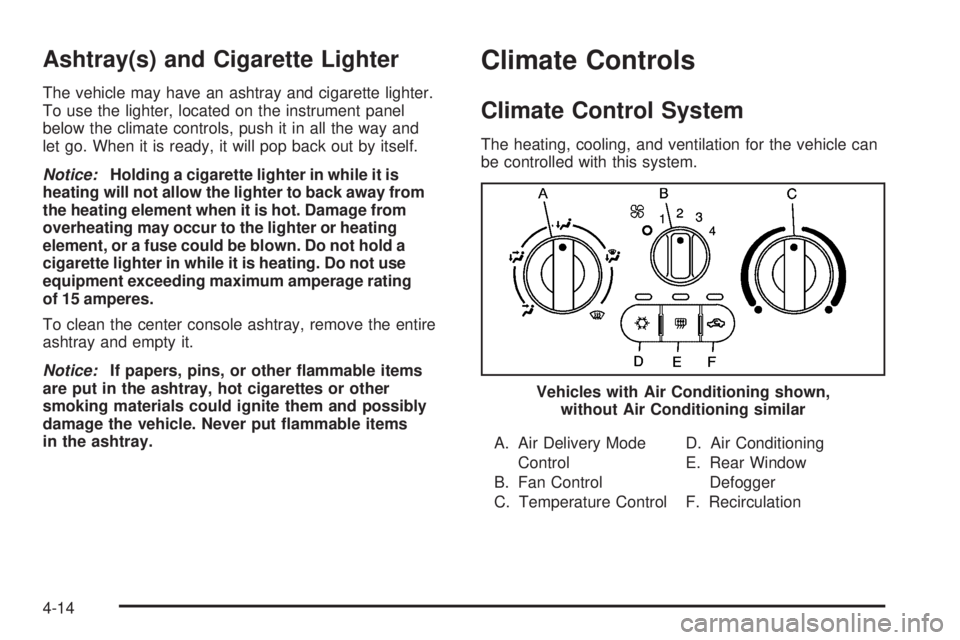
The heating, cooling, and ventilation for the vehicle can
be controlled with this system.
A. Air Delivery Mode Control
B. Fan Control
C. Temperature Control D. Air Conditioning
E. Rear Window
Defogger
F. Recirculation
Vehicles with Air Conditioning shown,
without Air Conditioning similar
4-14
Page 255 of 422
Dinghy Towing
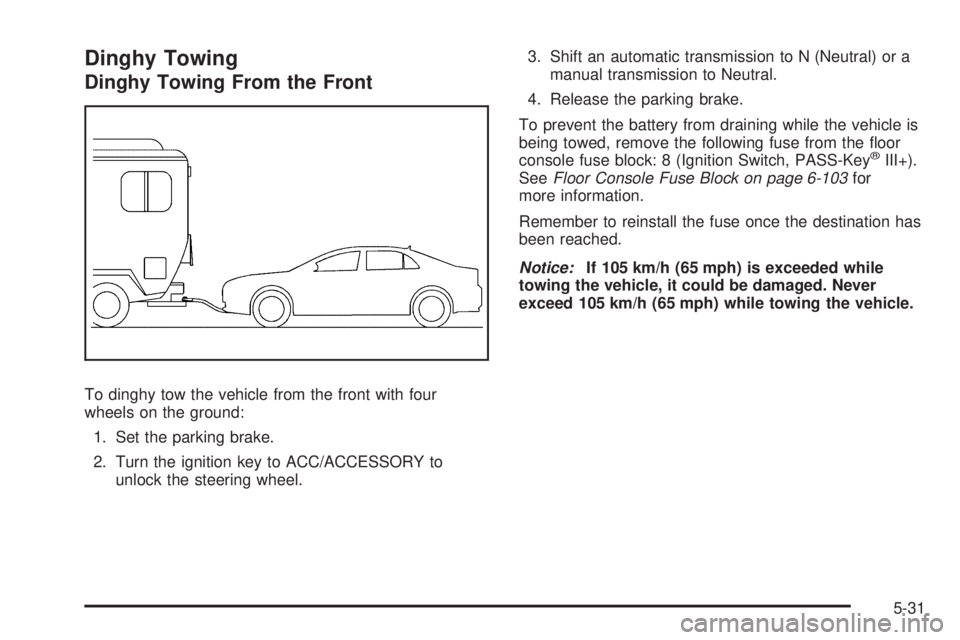
Dinghy Towing From the Front
To dinghy tow the vehicle from the front with four
wheels on the ground:1. Set the parking brake.
2. Turn the ignition key to ACC/ACCESSORY to unlock the steering wheel. 3. Shift an automatic transmission to N (Neutral) or a
manual transmission to Neutral.
4. Release the parking brake.
To prevent the battery from draining while the vehicle is
being towed, remove the following fuse from the floor
console fuse block: 8 (Ignition Switch, PASS-Key
®III+).
See Floor Console Fuse Block on page 6-103 for
more information.
Remember to reinstall the fuse once the destination has
been reached.
Notice: If 105 km/h (65 mph) is exceeded while
towing the vehicle, it could be damaged. Never
exceed 105 km/h (65 mph) while towing the vehicle.
5-31
Page 266 of 422

Buying New Tires........................................ .6-64
Different Size Tires and Wheels ......................6-66
Uniform Tire Quality Grading ..........................6-67
Wheel Alignment and Tire Balance ..................6-68
Wheel Replacement ..................................... .6-68
Tire Chains ................................................. .6-70
If a Tire Goes Flat ....................................... .6-70
Tire Sealant and Compressor Kit ....................6-72
Tire Sealant and Compressor Kit Storage .........6-79
Changing a Flat Tire .................................... .6-80
Removing the Spare Tire and Tools ................6-81
Removing the Flat Tire and Installing the Spare Tire ............................................... .6-86
Storing a Flat or Spare Tire and Tools ............6-90
Compact Spare Tire ..................................... .6-93
Appearance Care ........................................... .6-94
Interior Cleaning .......................................... .6-94
Fabric/Carpet .............................................. .6-95
Leather ...................................................... .6-96
Instrument Panel, Vinyl, and Other Plastic Surfaces ................................................. .6-96
Care of Safety Belts ..................................... .6-96
Weatherstrips .............................................. .6-97Washing Your Vehicle
.................................. .6-97
Cleaning Exterior Lamps/Lenses .....................6-97
Finish Care ................................................. .6-98
Windshield and Wiper Blades .........................6-98
Aluminum or Chrome-Plated Wheels and Trim ................................................. .6-99
Tires ........................................................ .6-100
Sheet Metal Damage .................................. .6-100
Finish Damage .......................................... .6-100
Underbody Maintenance ...............................6-100
Chemical Paint Spotting ...............................6-100
Vehicle Identication .................................... .6-101
Vehicle Identification Number (VIN) ................6-101
Service
Parts Identification Label ...................6-101
Electrical System ......................................... .6-102
Add-On Electrical Equipment .........................6-102
Headlamp Wiring ....................................... .6-102
Windshield Wiper Fuses ...............................6-102
Power Windows and Other Power Options ......6-102
Fuses and Circuit Breakers ..........................6-103
Floor Console Fuse Block ............................6-103
Engine Compartment Fuse Block ...................6-105
Capacities and Specications ........................6-109
Section 6 Service and Appearance Care
6-2
Page 268 of 422

California Proposition 65 Warning
Most motor vehicles, including this one, contain and/or
emit chemicals known to the State of California to
cause cancer and birth defects or other reproductive
harm. Engine exhaust, many parts and systems, many
fluids, and some component wear by-products
contain and/or emit these chemicals.
California Perchlorate Materials
Requirements
Certain types of automotive applications, such as
airbag initiators, seat belt pretensioners, and lithium
batteries contained in remote keyless transmitters,
may contain perchlorate materials. Special handling
may be necessary. For additional information, see
www.dtsc.ca.gov/hazardouswaste/perchlorate.
Doing Your Own Service Work
{WARNING:
You can be injured and the vehicle could be
damaged if you try to do service work on a vehicle
without knowing enough about it.
•Be sure you have sufficient knowledge,
experience, the proper replacement parts, and
tools before attempting any vehicle
maintenance task.
•Be sure to use the proper nuts, bolts, and
other fasteners. English and metric fasteners
can be easily confused. If the wrong fasteners
are used, parts can later break or fall off. You
could be hurt.
If doing some of your own service work, use the proper
service manual. It tells you much more about how to
service the vehicle than this manual can. To order
the proper service manual, see Service Publications
Ordering Information on page 8-15 .
This vehicle has an airbag system. Before attempting to
do your own service work, see Servicing Your
Airbag-Equipped Vehicle on page 2-69 .
6-4