steering PONTIAC G6 2006 User Guide
[x] Cancel search | Manufacturer: PONTIAC, Model Year: 2006, Model line: G6, Model: PONTIAC G6 2006Pages: 416, PDF Size: 2.66 MB
Page 139 of 416

Windshield Wipers
Use this lever, located on the right side of the steering
wheel, to operate the windshield wipers.
9(Off):Move the lever to this position to turn off the
windshield wipers.
&(Intermittent; Speed Sensitive Wipers):Move the
lever to this position for intermittent or speed sensitive
operation. When you select this position, the delay
will vary depending on the vehicles speed, as well as,
the manually selected delay.
x(Delay):When the lever is in the intermittent
position, turn the intermittent adjust band with this
symbol on it up or down to set for a shorter or longer
delay between wipes. To the left of the adjust band are
bars, increasing in size from bottom to top, that
indicate the frequency of the wipes. Smaller bars mean
the wipers movement is less frequent. Larger bars
mean the movement is more frequent.
6(Low Speed):Move the lever up to the rst
setting past intermittent, for steady wiping at low speed.
1(High Speed):Move the lever up to the second
setting past intermittent, for wiping at high speed.
8(Mist):Move the lever all the way down to this
position for a single wiping cycle. Hold it there until the
windshield wipers start; then let go. The windshield
wipers will stop after one wiping cycle. If you want
additional wiping cycles, hold the lever down longer.
Damaged wiper blades may prevent you from seeing
well enough to drive safely. To avoid damage, be sure to
clear ice and snow from the wiper blades before
using them.
If the wiper blades are frozen to the windshield, carefully
loosen or thaw them. If your blades do become
damaged, get new blades or blade inserts.
3-9
Page 141 of 416
Setting Cruise Control
{CAUTION:
If you leave your cruise control on when you
are not using cruise, you might hit a button
and go into cruise when you do not want to.
You could be startled and even lose control.
Keep the cruise control switch off until you
want to use cruise control.
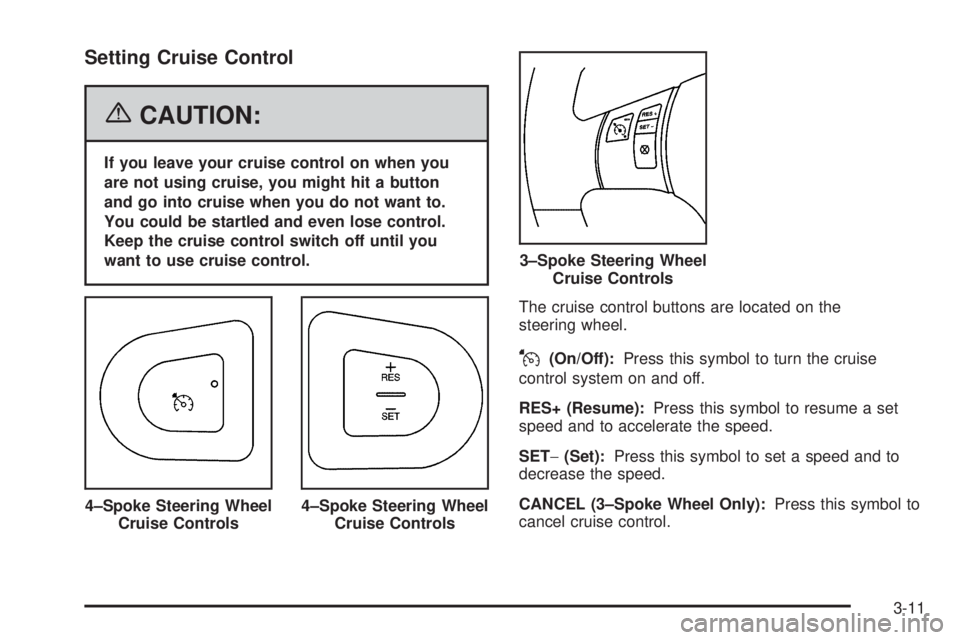
The cruise control buttons are located on the
steering wheel.
J(On/Off):Press this symbol to turn the cruise
control system on and off.
RES+ (Resume):Press this symbol to resume a set
speed and to accelerate the speed.
SET−(Set):Press this symbol to set a speed and to
decrease the speed.
CANCEL (3–Spoke Wheel Only):Press this symbol to
cancel cruise control. 4–Spoke Steering Wheel
Cruise Controls
4–Spoke Steering Wheel
Cruise Controls
3–Spoke Steering Wheel
Cruise Controls
3-11
Page 144 of 416

Headlamps
The lever on the left side of the steering column
operates the exterior lamps.
The exterior lamp switch has the following four positions:
2(Headlamps):This position turns on the
headlamps, parking lamps, and taillamps.
;(Parking Lamps):This position turns on the
parking lamps and taillamps only.
AUTO (Automatic Headlamp System):This position
automatically turns on the Daytime Running Lamps
during daytime, and the headlamps, parking lamps, and
taillamps at night.
P(Off/On):This position is the momentary Off/On
switch for the Automatic Headlamp System. In Canada,
this only works when a vehicle with an automatic
transaxle is in PARK (P).
When operating in AUTO, a momentary turn of the
switch to off/on will turn off the Automatic Headlamp
System. Rotating the switch to off/on again will turn the
Automatic Headlamp System back on. The Automatic
Headlamp System is always turned on at the beginning
of an ignition cycle.
Headlamps on Reminder
If you open the driver’s door and turn off the
ignition while leaving the lamps on, you will hear a
warning chime.
Headlamps Off in PARK (P)
This feature works for vehicles with an automatic
transaxle when the ignition is on and it is dark outside.
To turn the headlamps off when it is dark outside
but keep other exterior lights on, turn the exterior lamp
control to the parking lamp position. In this position,
the parking lamps, sidemarker lamps, taillamps, license
plate lamps and instrument panel lights will be on,
but the headlamps will be off.
To turn on the headlamps along with the other lamps
when it is dark outside, turn the exterior lamp control to
the AUTO or headlamp position.
3-14
Page 147 of 416

Fog Lamps
If equipped, the fog lamp
button is located on the
instrument panel, to the left
of the steering wheel.
The ignition must be on to turn you fog lamps on.
Push the button to turn the fog lamps on. An indicator
light in the button will glow when the fog lamps are
on. Push the button again to turn the fog lamps off.
The parking lamps will automatically turn on and
off when the fog lamps are turned on and off.
The fog lamps will turn off while the high-beam
headlamps are turned on.
Some localities have laws that require the headlamps to
be on along with the fog lamps.
Instrument Panel Brightness
The control for this feature
is located on the
instrument panel to the
right of the steering wheel.
Turn the knob clockwise to brighten the lights or
counterclockwise to dim them.
Courtesy Lamps
If your vehicle has a retractable hardtop, it will have
courtesy lamps in the rear passenger area of the
vehicle. These lamps come on to make it easier to see
while entering and exiting the vehicle. These lamps
will come on when any door is opened and will only turn
off when all doors are closed.
3-17
Page 174 of 416
Security Light
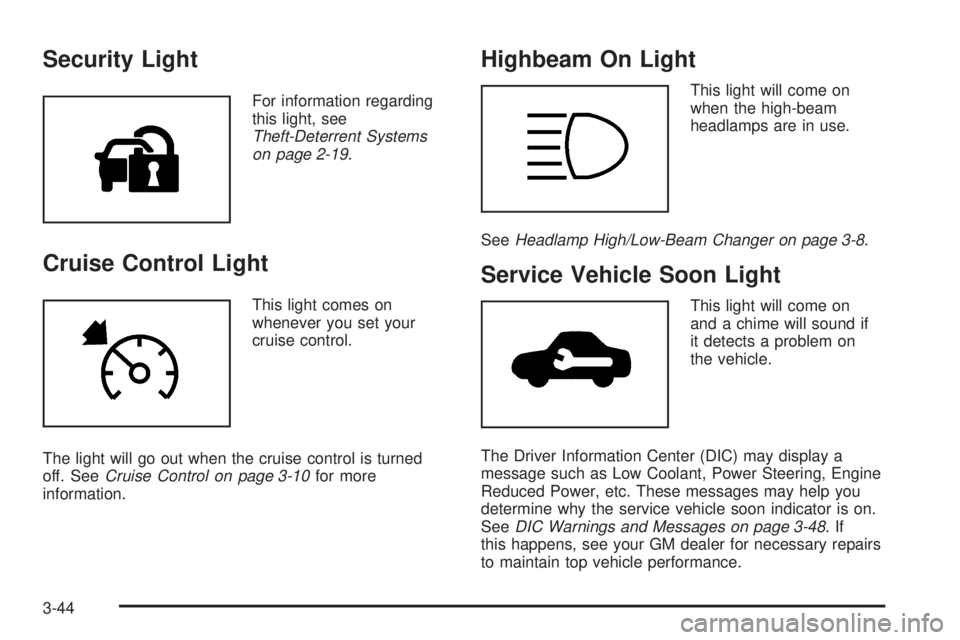
For information regarding
this light, see
Theft-Deterrent Systems
on page 2-19.
Cruise Control Light
This light comes on
whenever you set your
cruise control.
The light will go out when the cruise control is turned
off. SeeCruise Control on page 3-10for more
information.
Highbeam On Light
This light will come on
when the high-beam
headlamps are in use.
SeeHeadlamp High/Low-Beam Changer on page 3-8.
Service Vehicle Soon Light
This light will come on
and a chime will sound if
it detects a problem on
the vehicle.
The Driver Information Center (DIC) may display a
message such as Low Coolant, Power Steering, Engine
Reduced Power, etc. These messages may help you
determine why the service vehicle soon indicator is on.
SeeDIC Warnings and Messages on page 3-48.If
this happens, see your GM dealer for necessary repairs
to maintain top vehicle performance.
3-44
Page 180 of 416

LOW OIL LEVEL:This message may display on some
vehicles. For correct operation of the low oil sensing
system, your vehicle should be on a level surface.
A false LOW OIL LEVEL message may appear if the
vehicle is parked on a grade. The oil level sensing
system does not check for actual oil level if the engine
has been off for a short period of time, and the oil
level is never checked while the engine is running. If the
LOW OIL LEVEL message appears, and your vehicle
has been parked on level ground with the engine off for
at least 30 minutes, the oil level should be checked
by observing the oil dipstick. Prior to checking the
oil level, be sure the engine has been off for a few
minutes and your vehicle is on a level surface. Then
check the dipstick and add oil if necessary. SeeEngine
Oil on page 5-17.
LOW WASHER FLUID:This message will display
when your vehicle is low on windshield washer uid. You
should rell the windshield washer uid reservoir as
soon as possible. See “Adding Washer Fluid” under
Windshield Washer Fluid on page 5-38.
PARKING BRAKE:This message will display if the
parking brake is left engaged and you try to drive away.
SeeParking Brake on page 2-33for more information.
POWER STEERING:This message will display if
a problem has been detected with the electric power
steering, if equipped. Have your vehicle serviced
immediately by your GM dealer.SERVICE AIR BAG:There is a problem with the airbag
system when this message appears. Have your
vehicle serviced immediately by your GM dealer.
STABIL (StabiliTrak
®) NOT READY:When you rst
start your vehicle and drive away, especially during cold
winter weather, this message may display. This is
normal. The StabiliTrak
®performance is affected until
this message automatically clears from the DIC display.
If you acknowledge and clear this message by
pressing one of the DIC buttons, the StabiliTrak
®
system will not be ready. The system will only be ready
when this message clears from the DIC display on
its own. SeeStabiliTrak
®System on page 4-12for
more information.
TOP FAILED:If your vehicle has a retractable hardtop,
this message will display after ve unsuccessful
attempts at retractable hardtop operation. See your
GM dealer for service. SeeLowering the Retractable
Hardtop on page 2-49andRaising the Retractable
Hardtop on page 2-51for more information.
Top Inop (Inoperative) – Trunk:If your vehicle has a
retractable hardtop, this message will display if the
trunk lid is not completely closed when operating the
retractable hardtop. Make sure that the trunk lid is
closed when operating the retractable hardtop. See
Trunk on page 2-14,Lowering the Retractable Hardtop
on page 2-49, andRaising the Retractable Hardtop
on page 2-51for more information.
3-50
Page 184 of 416
EXT (Exterior) LIGHTS:If your vehicle has remote
keyless entry, this option which allows the vehicle’s
exterior perimeter lighting to turn on each time
the unlock button on the remote keyless entry
transmitter is pressed, can be enabled or disabled.
When EXT LIGHTS appears on the display, press the
enter button to move between ON and OFF. When
you have made your choice, press the MENU button to
record your selection. The initial setting from the
factory is ON.
LANGUAGE:To select your choice of language, press
the enter button to move between the optional
languages.
The languages are ENGLISH, FRENCH, SPANISH,
and GERMAN.
Choosing a language will display all of the information
on the DIC in the desired language.
When you have made your choice, press the MENU
button for at least one second to record your selection.
The initial setting from the factory is ENGLISH.Audio System(s)
Driving without distraction is a necessity for a safer
driving experience. SeeDefensive Driving on page 4-2.
By taking a few moments to read this manual and
get familiar with your vehicle’s audio system, you can
use it with less effort, as well as take advantage of
its features. While your vehicle is parked, program your
favorite radio stations and XM™ channels (if equipped).
Set the tone and balance the way you like them.
Then when driving conditions permit, you can tune to
your favorite stations using the presets and steering
wheel controls (if equipped).
Notice:Before adding any sound equipment to
your vehicle, such as an audio system, CD player,
CB radio, mobile telephone, or two-way radio, make
sure that it can be added by checking with your
dealer. Also, check federal rules covering mobile
radio and telephone units. If sound equipment can
be added, it is very important to do it properly.
Added sound equipment may interfere with
the operation of your vehicle’s engine, radio, or
other systems, and even damage them. Your
vehicle’s systems may interfere with the operation
of sound equipment that has been added.
3-54
Page 216 of 416
Theft-Deterrent Feature
THEFTLOCK®is designed to discourage theft of your
vehicle’s radio. The feature works automatically by
learning a portion of the Vehicle Identication
Number (VIN). If the radio is moved to a different
vehicle, it will not operate and LOCKED will appear on
the display.
With THEFTLOCK
®activated, the radio will not operate
if stolen.
Audio Steering Wheel Controls
(Three Spoke)
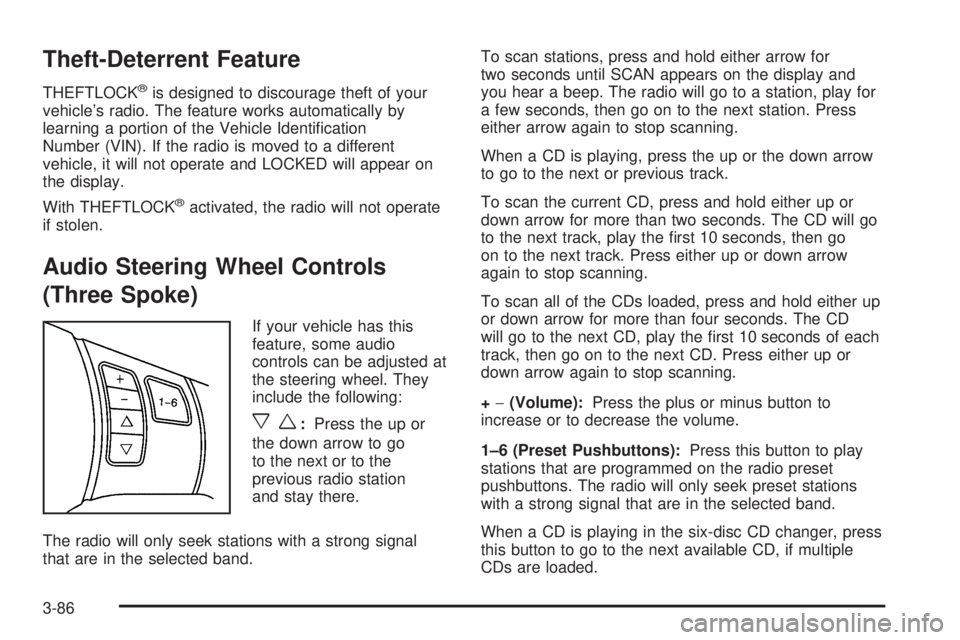
If your vehicle has this
feature, some audio
controls can be adjusted at
the steering wheel. They
include the following:
xw:Press the up or
the down arrow to go
to the next or to the
previous radio station
and stay there.
The radio will only seek stations with a strong signal
that are in the selected band.To scan stations, press and hold either arrow for
two seconds until SCAN appears on the display and
you hear a beep. The radio will go to a station, play for
a few seconds, then go on to the next station. Press
either arrow again to stop scanning.
When a CD is playing, press the up or the down arrow
to go to the next or previous track.
To scan the current CD, press and hold either up or
down arrow for more than two seconds. The CD will go
to the next track, play the rst 10 seconds, then go
on to the next track. Press either up or down arrow
again to stop scanning.
To scan all of the CDs loaded, press and hold either up
or down arrow for more than four seconds. The CD
will go to the next CD, play the rst 10 seconds of each
track, then go on to the next CD. Press either up or
down arrow again to stop scanning.
+−(Volume):Press the plus or minus button to
increase or to decrease the volume.
1–6 (Preset Pushbuttons):Press this button to play
stations that are programmed on the radio preset
pushbuttons. The radio will only seek preset stations
with a strong signal that are in the selected band.
When a CD is playing in the six-disc CD changer, press
this button to go to the next available CD, if multiple
CDs are loaded.
3-86
Page 217 of 416
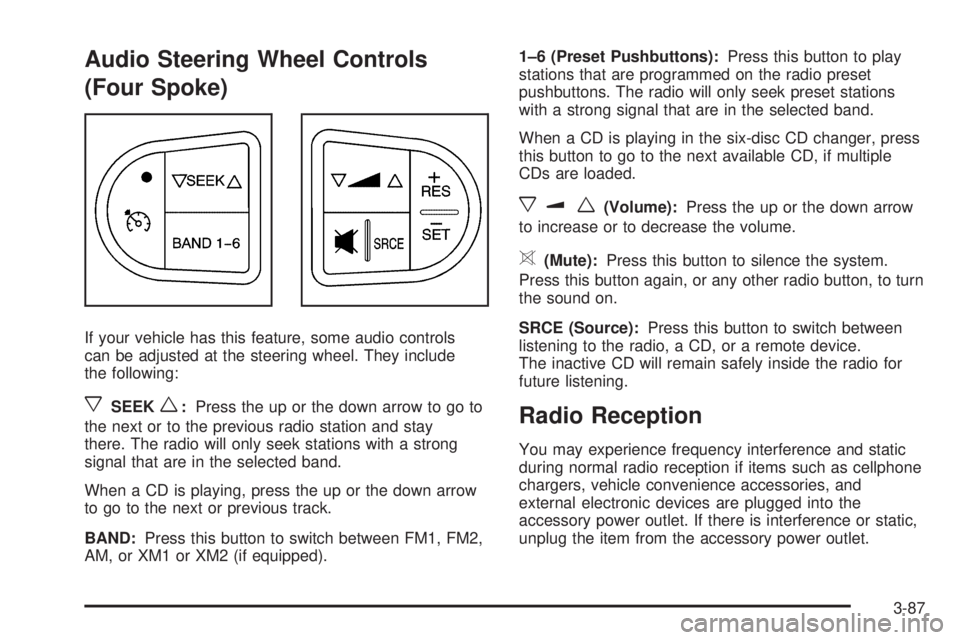
Audio Steering Wheel Controls
(Four Spoke)
If your vehicle has this feature, some audio controls
can be adjusted at the steering wheel. They include
the following:
xSEEKw:Press the up or the down arrow to go to
the next or to the previous radio station and stay
there. The radio will only seek stations with a strong
signal that are in the selected band.
When a CD is playing, press the up or the down arrow
to go to the next or previous track.
BAND:Press this button to switch between FM1, FM2,
AM, or XM1 or XM2 (if equipped).1–6 (Preset Pushbuttons):Press this button to play
stations that are programmed on the radio preset
pushbuttons. The radio will only seek preset stations
with a strong signal that are in the selected band.
When a CD is playing in the six-disc CD changer, press
this button to go to the next available CD, if multiple
CDs are loaded.
xuw(Volume):Press the up or the down arrow
to increase or to decrease the volume.
>(Mute):Press this button to silence the system.
Press this button again, or any other radio button, to turn
the sound on.
SRCE (Source):Press this button to switch between
listening to the radio, a CD, or a remote device.
The inactive CD will remain safely inside the radio for
future listening.
Radio Reception
You may experience frequency interference and static
during normal radio reception if items such as cellphone
chargers, vehicle convenience accessories, and
external electronic devices are plugged into the
accessory power outlet. If there is interference or static,
unplug the item from the accessory power outlet.
3-87
Page 221 of 416
Your Driving, the Road, and Your Vehicle..........4-2
Defensive Driving...........................................4-2
Drunken Driving.............................................4-3
Control of a Vehicle........................................4-5
Braking.........................................................4-6
Anti-Lock Brake System (ABS).........................4-7
Braking in Emergencies...................................4-8
Traction Control System (TCS).........................4-9
Enhanced Traction System (ETS)....................4-11
StabiliTrak
®System......................................4-12
Steering......................................................4-13
Off-Road Recovery.......................................4-15
Passing.......................................................4-16
Loss of Control.............................................4-17
Driving at Night............................................4-18
Driving in Rain and on Wet Roads..................4-20City Driving..................................................4-22
Freeway Driving...........................................4-23
Before Leaving on a Long Trip.......................4-24
Highway Hypnosis........................................4-25
Hill and Mountain Roads................................4-26
Winter Driving..............................................4-27
If Your Vehicle is Stuck in Sand, Mud,
Ice or Snow..............................................4-32
Rocking Your Vehicle to Get It Out.................4-32
Loading Your Vehicle....................................4-33
Towing..........................................................4-38
Towing Your Vehicle.....................................4-38
Recreational Vehicle Towing...........................4-38
Towing a Trailer...........................................4-40
Section 4 Driving Your Vehicle
4-1