audio PONTIAC G6 2006 Owner's Manual
[x] Cancel search | Manufacturer: PONTIAC, Model Year: 2006, Model line: G6, Model: PONTIAC G6 2006Pages: 416, PDF Size: 2.66 MB
Page 207 of 416
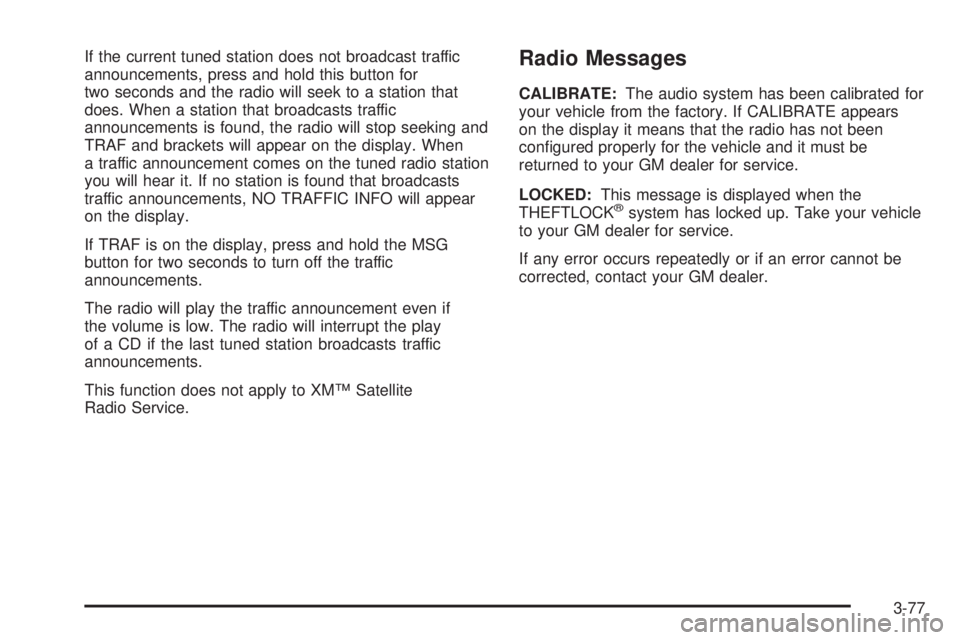
If the current tuned station does not broadcast traffic
announcements, press and hold this button for
two seconds and the radio will seek to a station that
does. When a station that broadcasts traffic
announcements is found, the radio will stop seeking and
TRAF and brackets will appear on the display. When
a traffic announcement comes on the tuned radio station
you will hear it. If no station is found that broadcasts
traffic announcements, NO TRAFFIC INFO will appear
on the display.
If TRAF is on the display, press and hold the MSG
button for two seconds to turn off the traffic
announcements.
The radio will play the traffic announcement even if
the volume is low. The radio will interrupt the play
of a CD if the last tuned station broadcasts traffic
announcements.
This function does not apply to XM™ Satellite
Radio Service.Radio Messages
CALIBRATE:The audio system has been calibrated for
your vehicle from the factory. If CALIBRATE appears
on the display it means that the radio has not been
congured properly for the vehicle and it must be
returned to your GM dealer for service.
LOCKED:This message is displayed when the
THEFTLOCK
®system has locked up. Take your vehicle
to your GM dealer for service.
If any error occurs repeatedly or if an error cannot be
corrected, contact your GM dealer.
3-77
Page 208 of 416
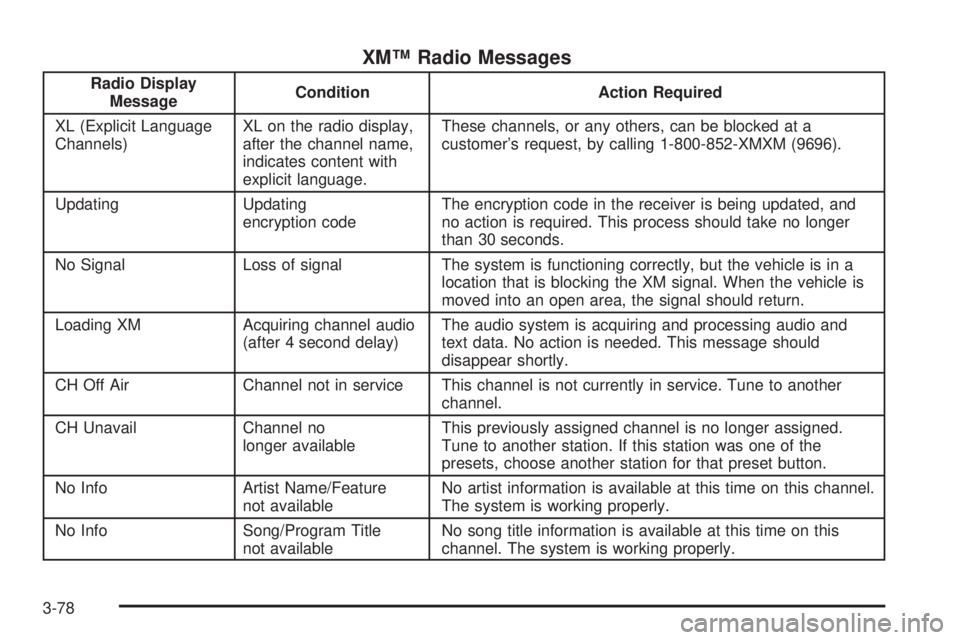
XM™ Radio Messages
Radio Display
MessageCondition Action Required
XL (Explicit Language
Channels)XL on the radio display,
after the channel name,
indicates content with
explicit language.These channels, or any others, can be blocked at a
customer’s request, by calling 1-800-852-XMXM (9696).
Updating Updating
encryption codeThe encryption code in the receiver is being updated, and
no action is required. This process should take no longer
than 30 seconds.
No Signal Loss of signal The system is functioning correctly, but the vehicle is in a
location that is blocking the XM signal. When the vehicle is
moved into an open area, the signal should return.
Loading XM Acquiring channel audio
(after 4 second delay)The audio system is acquiring and processing audio and
text data. No action is needed. This message should
disappear shortly.
CH Off Air Channel not in service This channel is not currently in service. Tune to another
channel.
CH Unavail Channel no
longer availableThis previously assigned channel is no longer assigned.
Tune to another station. If this station was one of the
presets, choose another station for that preset button.
No Info Artist Name/Feature
not availableNo artist information is available at this time on this channel.
The system is working properly.
No Info Song/Program Title
not availableNo song title information is available at this time on this
channel. The system is working properly.
3-78
Page 210 of 416

Playing a CD
If the ignition or radio is turned off, with a CD in the
player, it will stay in the player. When the ignition
or radio is turned on, the CD will start playing where it
stopped, if it was the last selected audio source.
When a CD is inserted, the CD symbol will appear on
the CD. As each new track starts to play, the track
number will appear on the display.
The CD player can play the smaller 3 inch (8 cm) single
CDs with an adapter ring. Full-size CDs and the
smaller CDs are loaded in the same manner.
If playing a CD-R the sound quality may be reduced
due to CD-R quality, the method of recording, the quality
of the music that has been recorded, and the way the
CD-R has been handled. There may be an increase
in skipping, difficulty in nding tracks, and/or difficulty in
loading and ejecting. If these problems occur try a
known good CD.
Do not add any label to a CD, it could get caught in the
CD player.Notice:If you add any label to a CD, insert more
than one CD into the slot at a time, or attempt
to play scratched or damaged CDs, you could
damage the CD player. When using the CD player,
use only CDs in good condition without any
label, load one CD at a time, and keep the CD player
and the loading slot free of foreign materials,
liquids, and debris.
If an error appears on the display, see “CD Messages”
later in this section.
LOAD:Press the LOAD button to load CDs into the CD
player. This CD player will hold up to six CDs.
To insert one CD, do the following:
1. Turn the ignition on.
2. Press and release the LOAD button.
3. Wait for INSERT CD to ash on the display.
4. Load a CD. Insert the CD partway into the slot,
label side up. The player will pull the CD in.
3-80
Page 216 of 416
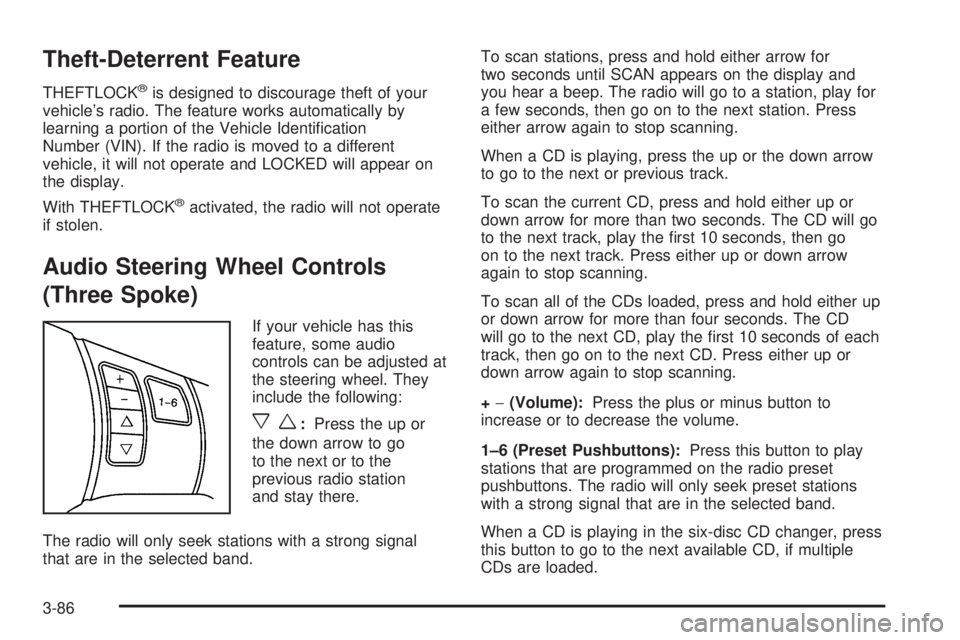
Theft-Deterrent Feature
THEFTLOCK®is designed to discourage theft of your
vehicle’s radio. The feature works automatically by
learning a portion of the Vehicle Identication
Number (VIN). If the radio is moved to a different
vehicle, it will not operate and LOCKED will appear on
the display.
With THEFTLOCK
®activated, the radio will not operate
if stolen.
Audio Steering Wheel Controls
(Three Spoke)
If your vehicle has this
feature, some audio
controls can be adjusted at
the steering wheel. They
include the following:
xw:Press the up or
the down arrow to go
to the next or to the
previous radio station
and stay there.
The radio will only seek stations with a strong signal
that are in the selected band.To scan stations, press and hold either arrow for
two seconds until SCAN appears on the display and
you hear a beep. The radio will go to a station, play for
a few seconds, then go on to the next station. Press
either arrow again to stop scanning.
When a CD is playing, press the up or the down arrow
to go to the next or previous track.
To scan the current CD, press and hold either up or
down arrow for more than two seconds. The CD will go
to the next track, play the rst 10 seconds, then go
on to the next track. Press either up or down arrow
again to stop scanning.
To scan all of the CDs loaded, press and hold either up
or down arrow for more than four seconds. The CD
will go to the next CD, play the rst 10 seconds of each
track, then go on to the next CD. Press either up or
down arrow again to stop scanning.
+−(Volume):Press the plus or minus button to
increase or to decrease the volume.
1–6 (Preset Pushbuttons):Press this button to play
stations that are programmed on the radio preset
pushbuttons. The radio will only seek preset stations
with a strong signal that are in the selected band.
When a CD is playing in the six-disc CD changer, press
this button to go to the next available CD, if multiple
CDs are loaded.
3-86
Page 217 of 416
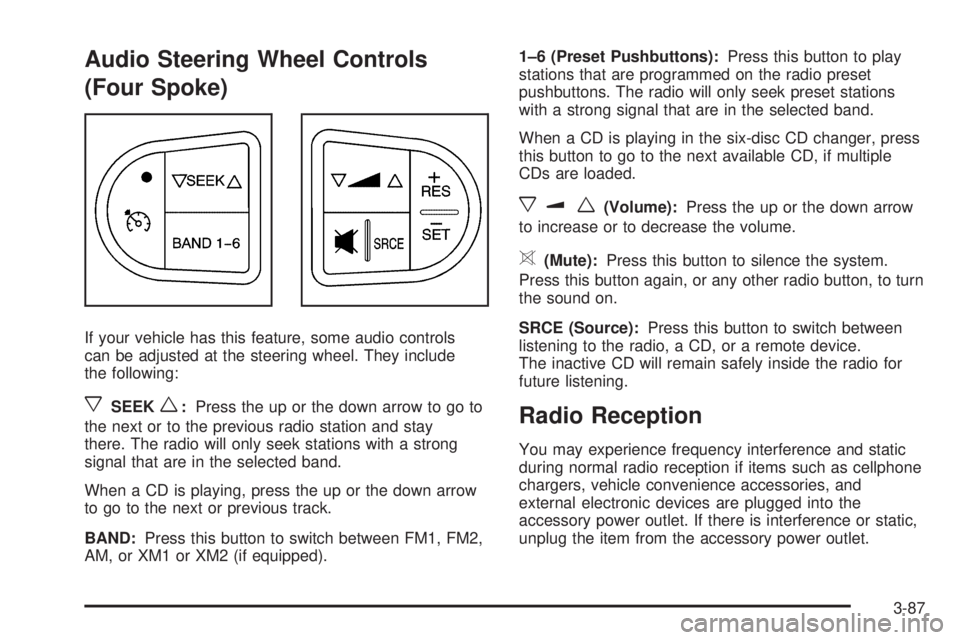
Audio Steering Wheel Controls
(Four Spoke)
If your vehicle has this feature, some audio controls
can be adjusted at the steering wheel. They include
the following:
xSEEKw:Press the up or the down arrow to go to
the next or to the previous radio station and stay
there. The radio will only seek stations with a strong
signal that are in the selected band.
When a CD is playing, press the up or the down arrow
to go to the next or previous track.
BAND:Press this button to switch between FM1, FM2,
AM, or XM1 or XM2 (if equipped).1–6 (Preset Pushbuttons):Press this button to play
stations that are programmed on the radio preset
pushbuttons. The radio will only seek preset stations
with a strong signal that are in the selected band.
When a CD is playing in the six-disc CD changer, press
this button to go to the next available CD, if multiple
CDs are loaded.
xuw(Volume):Press the up or the down arrow
to increase or to decrease the volume.
>(Mute):Press this button to silence the system.
Press this button again, or any other radio button, to turn
the sound on.
SRCE (Source):Press this button to switch between
listening to the radio, a CD, or a remote device.
The inactive CD will remain safely inside the radio for
future listening.
Radio Reception
You may experience frequency interference and static
during normal radio reception if items such as cellphone
chargers, vehicle convenience accessories, and
external electronic devices are plugged into the
accessory power outlet. If there is interference or static,
unplug the item from the accessory power outlet.
3-87
Page 367 of 416

Fuses Usage
POWER
MIRRORSPower Mirrors
EPS Electric Power Steering
RUN/CRANKCruise Control Switch, Passenger
Airbag Status Indicator, DSC Switch
HVAC
BLOWER HIGHHeating Ventilation Air Conditioning
Blower - High Speed Relay
CLUSTER/
THEFTInstrument Panel Cluster,
Theft Deterrent System
ONSTAR OnStar
®
NOT
INSTALLEDNot Used
AIRBAG (IGN) Airbag (Ignition)
HVAC CTRL
(BATT)Heating Ventilation Air Conditioning
Control Diagnostic Link Connector
(Battery)
PEDAL Adjustable Pedals
WIPER SW Windshield Wiper/Washer Switch
IGN SENSOR Ignition Switch
NOT
INSTALLEDNot Used
NOT
INSTALLEDNot Used
RADIO Audio System
INTERIOR
LIGHTSInterior Lamps
Fuses Usage
NOT
INSTALLEDNot Used
POWER
WINDOWSPower Windows (Sedan)
HVAC CTRL
(IGN)Heating Ventilation Air Conditioning
Control (Ignition)
HVAC
BLOWERHeating Ventilation Air Conditioning
Blower Switch
DOOR LOCK Door Locks
ROOF/HEAT
SEATSunroof, Heated Seat, Power
Windows (Coupe, Retractable
Hardtop)
NOT
INSTALLEDNot Used
NOT
INSTALLEDNot Used
AIRBAG
(BATT)Airbag (Battery)
SPARE FUSE
HOLDERSpare Fuse Holder
SPARE FUSE
HOLDERSpare Fuse Holder
SPARE FUSE
HOLDERSpare Fuse Holder
SPARE FUSE
HOLDERSpare Fuse Holder
FUSE PULLER Fuse Puller
5-99
Page 372 of 416
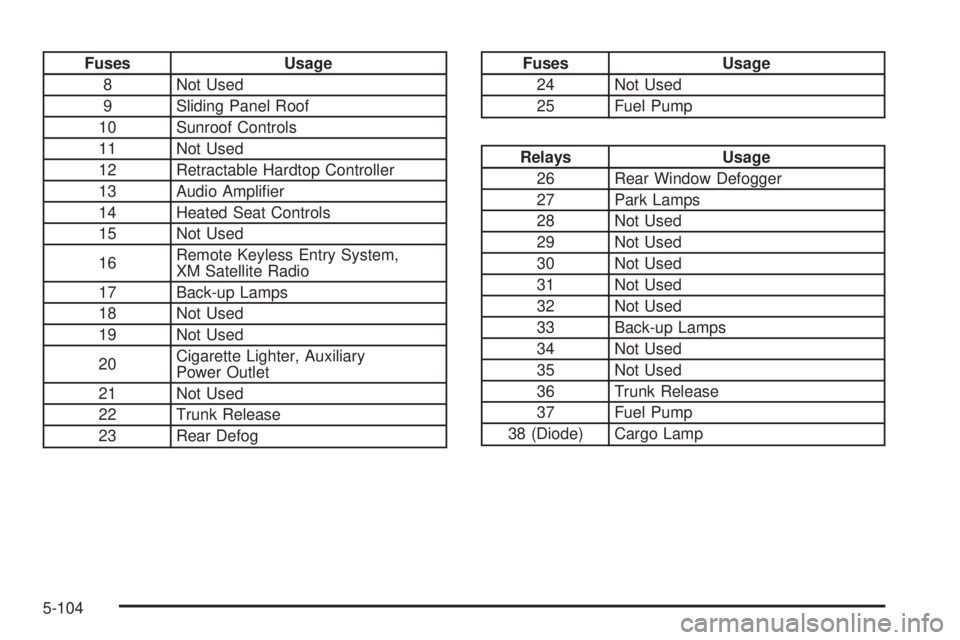
Fuses Usage
8 Not Used
9 Sliding Panel Roof
10 Sunroof Controls
11 Not Used
12 Retractable Hardtop Controller
13 Audio Amplier
14 Heated Seat Controls
15 Not Used
16Remote Keyless Entry System,
XM Satellite Radio
17 Back-up Lamps
18 Not Used
19 Not Used
20Cigarette Lighter, Auxiliary
Power Outlet
21 Not Used
22 Trunk Release
23 Rear DefogFuses Usage
24 Not Used
25 Fuel Pump
Relays Usage
26 Rear Window Defogger
27 Park Lamps
28 Not Used
29 Not Used
30 Not Used
31 Not Used
32 Not Used
33 Back-up Lamps
34 Not Used
35 Not Used
36 Trunk Release
37 Fuel Pump
38 (Diode) Cargo Lamp
5-104
Page 404 of 416

Audio System(s).............................................3-54
Audio Steering Wheel Controls..............3-86, 3-87
Backglass Antenna......................................3-89
Care of Your CD and DVD Player..................3-88
Care of Your CDs and DVDs........................3-88
Fixed Mast Antenna.....................................3-88
Radio with CD....................................3-56, 3-61
Radio with Six-Disc CD................................3-71
Setting the Time for Radios with Radio Data
Systems (RDS)........................................3-55
Setting the Time for Radios without Radio
Data Systems (RDS)................................3-55
Theft-Deterrent Feature................................3-86
Understanding Radio Reception.....................3-87
XM™ Satellite Radio Antenna System............3-89
Automatic Climate Control System.....................3-23
Automatic Door Lock.......................................2-12
Automatic Headlamp System............................3-16
Automatic Transaxle
Fluid..................................................5-23, 5-24
Operation...................................................2-28
B
Backglass Antenna..........................................3-89
Battery..........................................................5-42
Run-Down Protection...................................3-18
Before Leaving on a Long Trip.........................4-24Bench Seat, Split (60/40)................................... 1-9
Brake
Anti-Lock Brake System (ABS)........................ 4-7
Emergencies................................................ 4-8
Parking......................................................2-33
System Warning Light..................................3-36
Brake Pedal, Throttle.......................................2-26
Brakes..........................................................5-39
Braking........................................................... 4-6
Braking in Emergencies..................................... 4-8
Break-In, New Vehicle.....................................2-22
Bulb Replacement...........................................5-49
Center High-Mounted Stoplamp (CHMSL)........5-51
Halogen Bulbs............................................5-49
Headlamp Aiming........................................5-47
Headlamps, Front Turn Signal, Sidemarker,
and Parking Lamps..................................5-50
Replacement Bulbs......................................5-55
Taillamps, Turn Signal, Sidemarker, Stoplamps,
and Back-Up Lamps.................5-52, 5-53, 5-54
Buying New Tires...........................................5-68
C
California Fuel.................................................. 5-6
California Proposition 65 Warning....................... 5-3
Canadian Owners................................................ ii
2
Page 414 of 416

Shifting Out of Park (P)...................................2-36
Shoulder Belt Height Adjuster...........................1-22
Signals, Turn and Lane-Change.......................... 3-8
Spare Tire
Compact....................................................5-86
Installing....................................................5-78
Removing...................................................5-76
Storing.......................................................5-83
Specications, Capacities...............................5-105
Speedometer..................................................3-31
Split Bench Seat (60/40).................................... 1-9
StabiliTrak
®System.........................................4-12
StabiliTrak®Indicator Light................................3-39
StabiliTrak®Not Ready Light.............................3-39
Starting Your Engine.......................................2-24
Steering........................................................4-13
Steering Wheel Controls, Audio.................3-86, 3-87
Steering Wheel, Tilt Wheel................................. 3-6
Storage Areas
Center Console Storage Area........................2-45
Convenience Net.........................................2-46
Cupholder(s)...............................................2-45
Glove Box..................................................2-45
Stuck in Sand, Mud, Ice or Snow......................4-32
Sun Visors.....................................................2-19
Sunroof.........................................................2-46
Sunroof - Panoramic.......................................2-47
T
Tachometer....................................................3-31
Taillamps
Turn Signal, Sidemarker, Stoplamps, and
Back-Up Lamps.......................5-52, 5-53, 5-54
TCS Active Light.............................................3-38
TCS Warning Light..........................................3-38
Theft-Deterrent, Radio.....................................3-86
Theft-Deterrent Systems...................................2-19
Content Theft-Deterrent................................2-19
PASS-Key
®III+...........................................2-20
PASS-Key®III+ Operation.............................2-21
Throttle, Adjustable..........................................2-26
Tilt Wheel........................................................ 3-6
Tires.............................................................5-57
Aluminum Wheels, Cleaning..........................5-93
Buying New Tires........................................5-68
Chains.......................................................5-73
Changing a Flat Tire....................................5-74
Cleaning....................................................5-93
Compact Spare Tire.....................................5-86
Different Size..............................................5-69
If a Tire Goes Flat.......................................5-74
Ination -- Tire Pressure...............................5-64
Inspection and Rotation................................5-66
Installing the Spare Tire................................5-78
12