ECO mode PONTIAC G6 2007 User Guide
[x] Cancel search | Manufacturer: PONTIAC, Model Year: 2007, Model line: G6, Model: PONTIAC G6 2007Pages: 486, PDF Size: 2.78 MB
Page 226 of 486

To adjust both speaker controls to the middle
position, push and hold the tone button while no
speaker control is displayed. ALL CENTERED
displays and One beep sounds. The balance and
fade adjusts to the middle position.
Finding a Program Type (PTY) Station
(RDS and XM™)
To select and nd a desired PTY perform the
following:
1. Press the P-TYPE button to activate program
type select mode. PTY for FM or PTYPE for
XM™ and a program type displays.
2. Turn the ADJ knob to select a PTY.
3. Once the desired PTY is displayed, press the
SEEK up arrow to select the PTY and to take
you to the PTY’s rst station.
4. To go to another station within that PTY press
the SEEK up arrow again. If the radio cannot
nd the desired PTY, NONE FOUND
displays and the radio returns to the last
station you were listening to.
After 15 seconds of inactivity or if the P-TYPE
button is pressed again, the radio exits
program type select mode.BAND (Alternate Frequency):Alternate
frequency lets the radio switch to a stronger
station with the same program type. To turn
alternate frequency on, press and hold BAND for
two seconds. FM ALT FREQ ON and AF
displays. The radio can switch to stations with a
stronger frequency.
To turn alternate frequency off, press and hold
BAND again for two seconds. FM ALT FREQ OFF
displays and AF disappears from the display.
The radio does not switch to other stations.
This function does not apply for XM™ Satellite
Radio Service.
RDS Messages
ALERT!:Alert warns of local or national
emergencies. When an alert announcement
comes on the current radio station, ALERT!
displays. You will hear the announcement, even if
the volume is low or a CD is playing. If a CD is
playing, play stops during the announcement. Alert
announcements cannot be turned off.
226
Page 230 of 486

xSEEKw:Press the down arrow to go to the
start of the current track if more than eight seconds
have played. If this arrow is pressed more than
once, the player continues moving backward
through the CD.
Press the up arrow to go to the start of the next
track. If this arrow is pressed more than once, the
player continues moving forward through the CD.
If either arrow is held or pressed for more than
two seconds, the CD enters CD scan mode and the
CD plays the rst 10 seconds of each track. Press
either arrow again to stop scanning.
DISP (Display):Press this knob to see how long
the current track has been playing. T, the track
number, and the elapsed time of the track appears
on the display. To change the default on the
display, time or elapsed time, press the knob until
you see the desired display, then hold the knob
for two seconds. The radio produces one beep and
the selected display is now the default. Pressing
this button also displays text on commercially
recorded CDs (if available).AUTO TONE/AUTO EQ (Automatic
Equalization):Press this button to select the
desired equalization setting while playing a
CD. The equalization is automatically recalled
whenever a CD is played. For more information,
see AUTO TONE/AUTO EQ listed previously
in this section.
BAND:Press this button to listen to the radio
while a CD is playing. The inactive CD remains
safely inside the radio for future listening.
SRCE (Source):Press this button to play a CD
or to access a remote device (if installed)
while listening to the radio.
EJECT /
Z(Eject):Press this button to eject a
CD. Eject may be activated with either the
ignition or radio off. CDs may be loaded with the
ignition and radio off if this button is pressed rst.
230
Page 233 of 486
DISP (Display):Press this knob to switch the
display between time and temperature or
radio station frequency and temperature. When
the ignition is off, press this knob to display
the time.
For RDS, press the DISP knob to change what
appears on the display while using RDS. The
display options are station name, RDS station
frequency, PTY, and the name of the program
(if available).
For XM™ (if equipped), press the DISP knob
while in XM mode to retrieve four different
categories of information related to the current
song or channel: Artist, Song Title, Category
or PTY, Channel Number/Channel Name.
To change the default on the display, press the
DISP knob until you see the desired display, then
hold the knob for two seconds. A beep sounds
and the selected display is now the default.
AUTO
u(Automatic Volume):With automatic
volume, the audio system adjusts automatically
to make up for road and wind noise as you drive.Set the volume at the desired level. Press this
button to select LOW, MEDIUM, or HIGH. AUTO
VOL LOW, AUTO VOL MEDIUM, or AUTO
VOL HIGH displays. Each higher setting allows for
more volume compensation at faster vehicle
speeds. Then as you drive, automatic volume
increases the volume, as necessary, to overcome
noise at any speed. The volume level should
always sound the same to you as you drive. AUTO
VOL NONE displays if the radio cannot determine
the vehicle speed or if the engine is not running.
To turn automatic volume off, press this button
until AUTO VOL OFF displays.
Finding a Station
BAND:Press this button to switch between FM1,
FM2, AM, or XM1 or XM2 (if equipped). The
display shows the selection.
ADJ (Adjust):Turn this knob to select radio
stations.
233
Page 235 of 486
Setting the Tone
(Bass/Midrange/Treble)
TONE /P/Q(Bass/Treble):Press and release this
button until BASS, MID (midrange), or TREB
(treble) displays. Turn the ADJ (adjusts) knob to
increase or to decrease the tone. The display
shows the bass, mid, or treble level. If a station is
weak or has static, decrease the treble.
To adjust bass, midrange, or treble to the middle
position, select BASS, MID, or TREB. Then
press and hold the tone button for more than
two seconds. The display level adjusts to
the middle position and a beep sounds.
To adjust all tone controls to the middle position,
press and hold the tone button when no tone
control is displayed. ALL CENTERED displays and
a beep sounds.AUTO TONE/AUTO EQ (Automatic
Equalization):Press this button to select
customized equalization settings designed for
country, jazz, talk, pop, rock, and classical.
The equalization setting last chosen appears on
the display when you rst press this button.
Each time you press this button, another
equalization setting appears on the display and
automatic tone or automatic equalization switches
to that preset equalization setting.
To return to the manual mode, press the AUTO
TONE or AUTO EQ button until CUSTOM
displays. Then manually adjust the bass,
midrange, and treble using the tone button.
235
Page 236 of 486
Adjusting the Speakers (Balance/Fade)
BAL/FADE /S(Balance/Fade):To
adjust the balance between the right and the left
speakers, push and release the balance and
fade button until BAL displays. Turn the ADJ
(adjust) knob to move the sound toward the right
or the left speakers.
To adjust the fade between the front and rear
speakers, push and release the balance and fade
button until FADE displays. Turn the ADJ knob
to move the sound toward the front or the
rear speakers.
To adjust balance or fade to the middle position,
select BAL or FADE. Then press and hold
the balance and fade button for more than
two seconds. The display level adjusts to the
middle position and a beep sounds.
To adjust both speaker controls to the middle
position, press and hold the tone button while no
speaker control is displayed. ALL CENTERED
displays and a beep sounds.
Finding a Program Type (PTY) Station
(RDS and XM™)
To select and nd a desired PTY perform the
following:
1. Press the P-TYPE button to activate program
type select mode. PTY for FM or PTYPE for
XM™ and a program type displays.
2. Turn the ADJ knob to select a PTY.
3. Once the desired PTY is displayed, press the
SEEK up arrow to select and to take you to
the PTY’s rst station.
4. To go to another station within that PTY press
the SEEK up arrow again. If the radio cannot
nd the desired PTY, NONE FOUND
displays and the radio returns to the last
station you were listening to.
5. Press P-TYPE to exit program type
select mode.
If PTY times out and is no longer on the
display, go back to Step 1.
If both P-TYPE and TRAF are on, the radio
searches for stations with the selected PTY and
traffic announcements.
236
Page 243 of 486
Using Song List /RMode
The six-disc CD changer has a feature called
song list. This feature is capable of saving 20 track
selections.
To save tracks into the song list feature, perform
the following steps:
1. Turn the radio on and load it with at least
one CD. See “LOAD” listed previously in
this section for more information.
2. Check to see that the CD changer is not in
song list mode. S-LIST should not appear in
the display. If S-LIST is present, press
the SONG LIST button to turn it off.
3. Select the desired CD by pressing the
numbered pushbutton and then use the SEEK
left arrow to locate the track to be saved.
The track begins to play.4. Press and hold the song list button for two or
more seconds to save the track into memory.
When song list is pressed, one beep
sounds. After two seconds of pressing song
list continuously, two beeps sound to
conrm that the track has been saved and
TRACK number ADDED displays.
5. Repeat Steps 3 and 4 for saving other
selections.
SONG LIST FULL displays if you try to save more
than 20 selections.
To play the song list, press the song list button.
One beep sounds and SONG LIST displays.
The recorded tracks begins to play in the order
that they were saved.
Seek through the song list by using the SEEK
arrows. Seeking past the last saved track returns
you to the rst saved track.
243
Page 244 of 486

To delete tracks from the song list, perform the
following steps:
1. Turn the CD player on.
2. Press the song list button to turn song list on.
SONG LIST displays.
3. Press the SEEK arrows to select the desired
track to be deleted.
4. Press and hold the song list button for
two seconds. When song list is pressed,
one beep sounds. After two seconds of
continuously pressing the song list button,
two beeps sound to conrm that the track has
been deleted and TRACK number DELETED
displays.
After a track has been deleted, the remaining
tracks are moved up the list. When another track
is added to the song list, the track is added to
the end of the list.To delete the entire song list, perform the following
steps:
1. Turn the CD player on.
2. Press the song list button to turn song list on.
S-LIST displays.
3. Press and hold the song list button for more
than four seconds. A beep sounds, followed
by two beeps after two seconds, and a
nal beep sounds after four seconds. SONG
LIST EMPTY displays indicating that the
song list has been deleted.
If a CD is ejected, and the song list contains
saved tracks from that CD, those tracks are
automatically deleted from the song list. Any tracks
saved to the song list again are added to the
bottom of the list.
To end song list mode, press the song list button.
One beep sounds and S-LIST is removed from
the display.
244
Page 378 of 486

Occupant Distribution:Designated seating
positions.
Outward Facing Sidewall:The side of an
asymmetrical tire that has a particular side that
faces outward when mounted on a vehicle.
The side of the tire that contains a whitewall, bears
white lettering, or bears manufacturer, brand,
and/or model name molding that is higher
or deeper than the same moldings on the other
sidewall of the tire.
Passenger (P-Metric) Tire:A tire used on
passenger cars and some light duty trucks and
multipurpose vehicles.
Recommended Ination Pressure:Vehicle
manufacturer’s recommended tire ination pressure
as shown on the tire placard. SeeInation - Tire
Pressure on page 379andLoading Your Vehicle on
page 288.
Radial Ply Tire:A pneumatic tire in which
the ply cords that extend to the beads are laid
at 90 degrees to the centerline of the tread.
Rim:A metal support for a tire and upon which
the tire beads are seated.
Sidewall:The portion of a tire between the tread
and the bead.Speed Rating:An alphanumeric code assigned to
a tire indicating the maximum speed at which a tire
can operate.
Traction:The friction between the tire and the
road surface. The amount of grip provided.
Tread:The portion of a tire that comes into
contact with the road.
Treadwear Indicators:Narrow bands, sometimes
called wear bars, that show across the tread of a
tire when only 1/16 inch (1.6 mm) of tread remains.
SeeWhen It Is Time for New Tires on page 383.
UTQGS (Uniform Tire Quality Grading
Standards):A tire information system that
provides consumers with ratings for a tire’s
traction, temperature, and treadwear. Ratings are
determined by tire manufacturers using government
testing procedures. The ratings are molded into the
sidewall of the tire. SeeUniform Tire Quality
Grading on page 386.
Vehicle Capacity Weight:The number of
designated seating positions multiplied by 150 lbs
(68 kg) plus the rated cargo load. SeeLoading
Your Vehicle on page 288.
378
Page 392 of 486
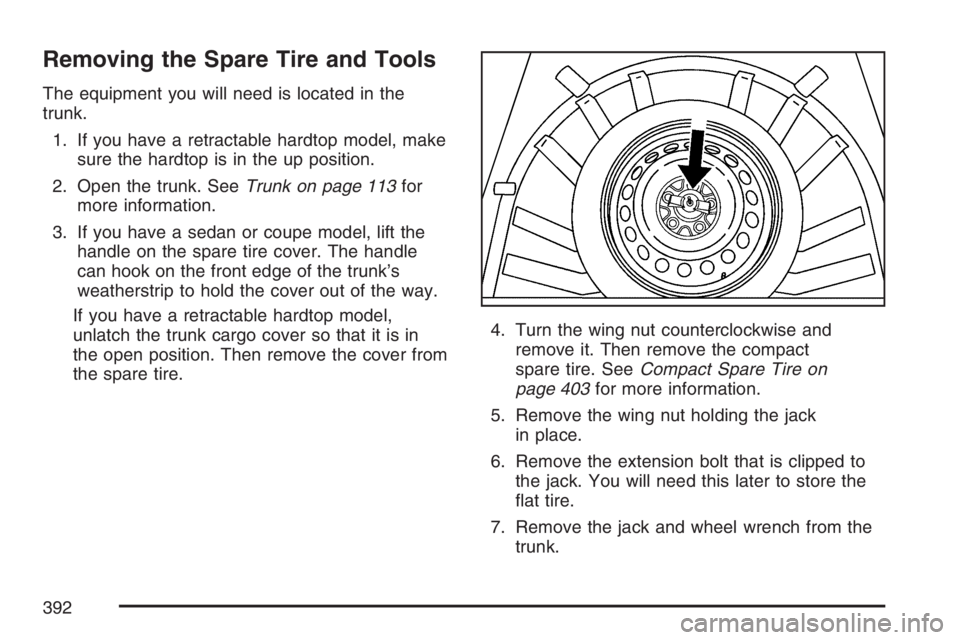
Removing the Spare Tire and Tools
The equipment you will need is located in the
trunk.
1. If you have a retractable hardtop model, make
sure the hardtop is in the up position.
2. Open the trunk. SeeTrunk on page 113for
more information.
3. If you have a sedan or coupe model, lift the
handle on the spare tire cover. The handle
can hook on the front edge of the trunk’s
weatherstrip to hold the cover out of the way.
If you have a retractable hardtop model,
unlatch the trunk cargo cover so that it is in
the open position. Then remove the cover from
the spare tire.4. Turn the wing nut counterclockwise and
remove it. Then remove the compact
spare tire. SeeCompact Spare Tire on
page 403for more information.
5. Remove the wing nut holding the jack
in place.
6. Remove the extension bolt that is clipped to
the jack. You will need this later to store the
at tire.
7. Remove the jack and wheel wrench from the
trunk.
392
Page 458 of 486
Alternative Service:There may be times,
when Roadside Assistance cannot provide
timely assistance, your advisor may authorize
you to secure local emergency road service,
and you will be reimbursed up to $100
upon submission of the original receipt to
Roadside Assistance.
In many instances, mechanical failures are
covered under Pontiac’s Bumper-to-Bumper
warranty, and the duration of the Base Warranty
Coverage for Canadian customers of the new
Vehicle Limited Warranty. However, any cost for
parts and labor for non-warranty repairs are
the responsibility of the driver.
For prompt and efficient assistance when calling,
please provide the following to the Roadside
Assistance Representative:
Your name, home address, and home
telephone number.
Telephone number of your location.
Location of the vehicle.
Model, year, color, and license plate number
of the vehicle.
Odometer reading, Vehicle Identication
Number (VIN), and delivery date of the vehicle.
Description of the problem.
While we hope you never have the occasion to
use our service, it is added security while traveling
for you and your family. Remember, we are
only a phone call away. Pontiac Roadside
Assistance:1-800-ROADSIDE (762-3743), text
telephone (TTY) users, call1-888-889-2438,
Canadian customers call1-800-268-6800.
Pontiac and General Motors of Canada Limited
reserve the right to limit services or reimbursement
to an owner or driver when, in their sole
discretion, the claims become excessive in
frequency or type of occurrence.
Roadside Assistance is not part of or included in
the coverage provided by the New Vehicle Limited
Warranty. Pontiac and General Motors of
Canada Limited reserve the right to make any
changes or discontinue the Roadside Assistance
program at any time without notication.
458