mirror PONTIAC G6 2007 Owners Manual
[x] Cancel search | Manufacturer: PONTIAC, Model Year: 2007, Model line: G6, Model: PONTIAC G6 2007Pages: 486, PDF Size: 2.78 MB
Page 1 of 486
Seats and Restraint Systems
....................... 7
Front Seats
.............................................. 9
Rear Seats
............................................. 20
Safety Belts
............................................ 22
Child Restraints
...................................... 46
Airbag System
........................................ 76
Restraint System Check
......................... 94
Features and Controls
................................ 97
Keys
....................................................... 99
Doors and Locks
.................................. 108
Windows
............................................... 115
Theft-Deterrent Systems
....................... 118
Starting and Operating Your Vehicle
..... 122
Mirrors
.................................................. 142
OnStar
®System
................................... 148Storage Areas
...................................... 150
Sunroof
................................................ 150
Retractable Hardtop
.............................. 153
Instrument Panel
....................................... 161
Instrument Panel Overview
................... 164
Climate Controls
................................... 182
Warning Lights, Gages, and
Indicators
.......................................... 192
Driver Information Center (DIC)
............ 209
Audio System(s)
................................... 219
Driving Your Vehicle
................................. 253
Your Driving, the Road, and
Your Vehicle
..................................... 254
Towing
................................................. 293
2007 Pontiac G6 Owner ManualM
1
Page 98 of 486
Mirrors......................................................... 142
Manual Rearview Mirror............................. 142
Manual Rearview Mirror with OnStar
®....... 142
Automatic Dimming Rearview Mirror with
OnStar
®and Compass........................... 143
Automatic Dimming Rearview Mirror with
Compass............................................... 145
Outside Power Mirrors............................... 147
Outside Convex Mirror............................... 147
OnStar
®System.......................................... 148Storage Areas............................................. 150
Glove Box................................................. 150
Cupholder(s).............................................. 150
Center Console Storage Area.................... 150
Convenience Net....................................... 150
Sunroof....................................................... 150
Sunroof - Panoramic................................. 151
Retractable Hardtop.................................... 153
Lowering the Retractable Hardtop.............. 154
Raising the Retractable Hardtop................ 157
Section 2 Features and Controls
98
Page 117 of 486
5. Repeat the procedure for each window,
including the rear quarter windows on
retractable hardtop models, until all
windows are initialized.
Express-Down Window
The express-down feature lowers the window all
the way without continuously pressing the
switch. The switch(es) is labeled AUTO.
On sedan and retractable hardtop models, the
driver’s window has the express-down feature.
On coupe models, both the driver’s and front
passenger’s window have the express-down
feature. The front passenger’s express-down is
activated by the driver’s side switch only. Press the
front of the switch all the way down and release it to
express open the window.
To stop the window while it is lowering, pull the
front of the switch up briey.
Window Lockout (Sedan Only)
o
(Window Lockout):This button prevents the
rear passengers from using their window
switches.
The window lockout button is located near the
driver’s power window switches. The driver can still
operate all the windows and the front passenger
can operate their own window with the lockout on.
Press the right side of the switch to turn the lockout
feature on. Press the left side to turn it off. The red
part of the switch is visible when you have returned
to normal window operation.
Sun Visors
Swing down the visors to block glare. The visors
can be removed from the center mount and swung
to the side. The visors also have extenders that
can be pulled out for additional blockage.
Your vehicle may have lighted vanity mirrors on
the driver’s and passenger’s visors. When
you lift the cover, the light will turn on.
117
Page 142 of 486
Mirrors
Manual Rearview Mirror
While sitting in a comfortable driving position, adjust
the rearview mirror so you can see clearly behind
your vehicle. Grip it in the center to move it up or
down and side to side. The day/night control,
located at the bottom of the mirror, adjusts the
mirror to reduce headlamp glare from behind during
evening or dark conditions. Move the control to the
right for night conditions. Return it to the center for
daytime use.
Manual Rearview Mirror with
OnStar
®
Your vehicle may have a rearview mirror with the
OnStar®system.
Control buttons for the OnStar
®system are at the
bottom of the mirror. See your dealer for more
information on the OnStar
®system and how
to subscribe to OnStar®. Also, seeOnStar®
System on page 148for more information
about the services OnStar®provides.
Mirror Operation
The manual mirror operation works the same as
the manual mirror described previously, with
the exception that the mirror has OnStar
®.
142
Page 143 of 486

Automatic Dimming Rearview Mirror
with OnStar
®and Compass
Your vehicle may have an automatic dimming
rearview mirror with a compass and OnStar®
controls. For more information about OnStar®,
seeOnStar®System on page 148.
The automatic dimming feature turns on each time
the vehicle is started. To turn automatic dimming
off or on, press the left button below the mirror.
A green indicator light will be on when automatic
dimming is on.
There are also three OnStar
®buttons located at
the bottom of the mirror. See your dealer for more
information on the system and how to subscribe
to OnStar
®. SeeOnStar®System on page 148for
more information about the service OnStar®
provides.
Compass Operation
Press the on/off button once to turn the compass
on or off.
When the ignition and the compass feature are
on, the compass will show two character boxes for
a few seconds. After a few seconds, the mirror
will display the current compass direction.
Compass Calibration
If after a few seconds the display does not show a
compass direction, (N for North for example), there
may be a strong magnetic eld interfering with the
compass. Such interference may be caused by a
magnetic antenna mount, note pad holder, or
similar object. If the letter C appears in the compass
window, the compass may need to be reset or
calibrated.
The mirror can be calibrated by driving the vehicle
in circles at 5 mph (8 km/h) or less until the
display reads a direction.
143
Page 144 of 486

Compass Variance
Compass variance is the difference between earth’s
magnetic north and true geographic north. If the
mirror is not adjusted for compass variance, the
compass could give false readings.
The mirror is set in zone eight upon leaving the
factory. It will be necessary to adjust the compass
to compensate for compass variance if the vehicle
is driven outside zone eight. Under certain
circumstances, such as a long distance,
cross-country trip, it will be necessary to
adjust the compass variance.
To adjust for compass variance, do the following:
1. Find your current location and variance
zone number on the zone map that follows.
2. Press and hold the on/off button until a zone
number appears on the display.
3. Once the zone number appears on the
display, press the on/off button quickly
until you reach the correct zone number.
If C appears in the compass window,
the compass may need calibration. See
“Compass Calibration” listed previously.
144
Page 145 of 486

Automatic Dimming Rearview Mirror
with Compass
Your vehicle may have an automatic dimming
rearview mirror with a compass. This feature
enables the mirror to sense nighttime glare from
vehicle headlamps from behind and automatically
dim to reduce the glare to a safe level.
The automatic dimming feature turns on each time
the vehicle is started. Press the OFF button once
and the green indicator light located to the left of the
button will go out indicating the feature is off. To
turn the feature back on, press and release the
AUTO button and the green indicator light will
come on.
Compass Operation
Press the on/off button once to turn the compass
on or off.
When the ignition and the compass feature are
on, the compass will show two character boxes for
a few seconds. After a few seconds, the mirror
will display the current compass direction.
Compass Calibration
If after a few seconds the display does not show a
compass direction, (N for North for example), there
may be a strong magnetic eld interfering with the
compass. Such interference may be caused by a
magnetic antenna mount, note pad holder, or
similar object. If the letter C appears in the compass
window, the compass may need to be reset or
calibrated.
The mirror can be calibrated by driving the vehicle
in circles at 5 mph (8 km/h) or less until the
display reads a direction.
145
Page 146 of 486
Compass Variance
Compass variance is the difference between earth’s
magnetic north and true geographic north. If the
mirror is not adjusted for compass variance, the
compass could give false readings.
The mirror is set in zone eight upon leaving the
factory. It will be necessary to adjust the compass
to compensate for compass variance if the
vehicle is driven outside zone eight. Under
certain circumstances, such as a long distance,
cross-country trip, it will be necessary to adjust
the compass variance.
To adjust for compass variance, do the following:
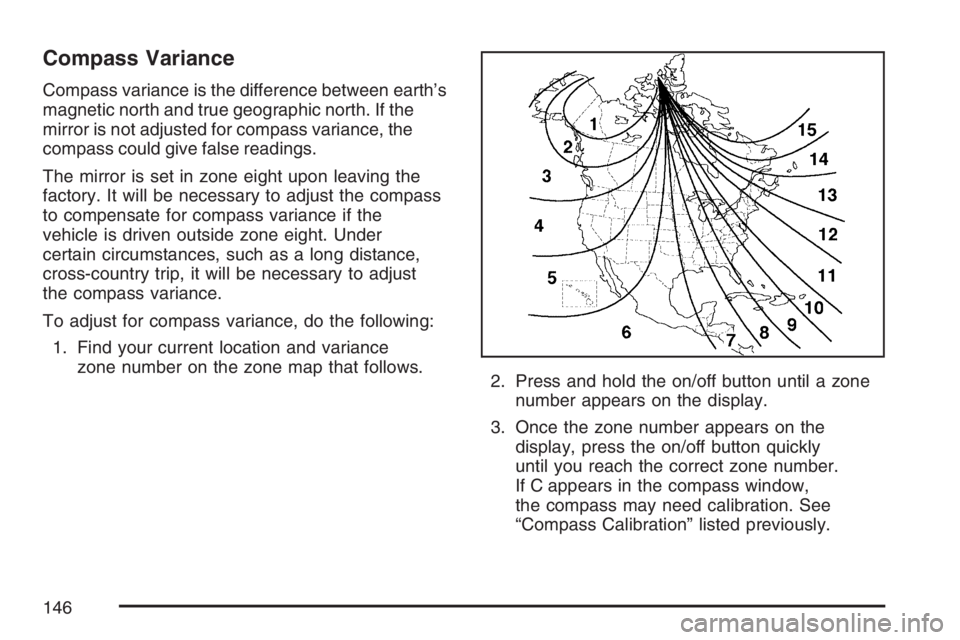
1. Find your current location and variance
zone number on the zone map that follows.
2. Press and hold the on/off button until a zone
number appears on the display.
3. Once the zone number appears on the
display, press the on/off button quickly
until you reach the correct zone number.
If C appears in the compass window,
the compass may need calibration. See
“Compass Calibration” listed previously.
146
Page 147 of 486
Outside Power Mirrors
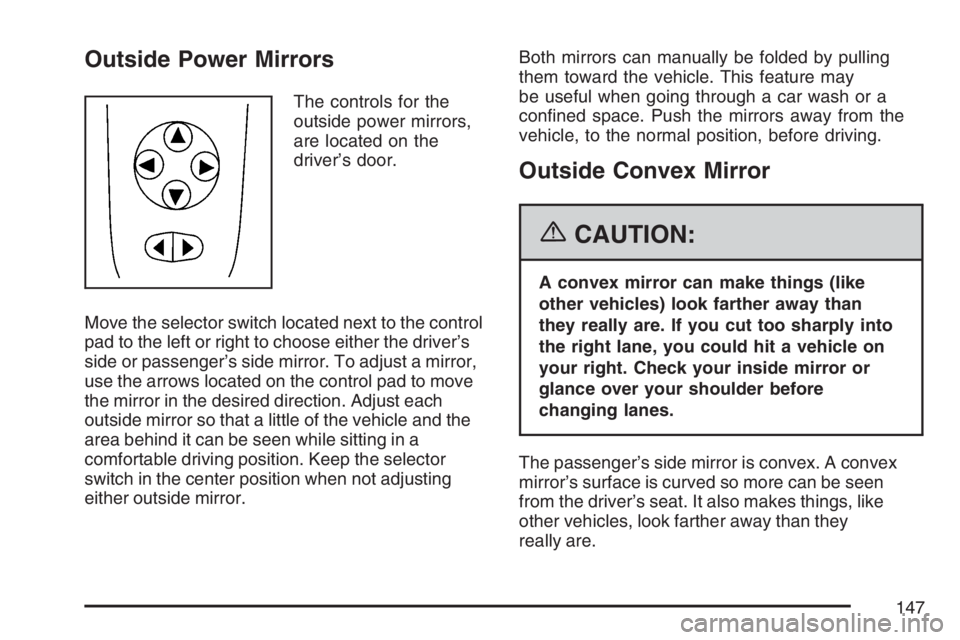
The controls for the
outside power mirrors,
are located on the
driver’s door.
Move the selector switch located next to the control
pad to the left or right to choose either the driver’s
side or passenger’s side mirror. To adjust a mirror,
use the arrows located on the control pad to move
the mirror in the desired direction. Adjust each
outside mirror so that a little of the vehicle and the
area behind it can be seen while sitting in a
comfortable driving position. Keep the selector
switch in the center position when not adjusting
either outside mirror.Both mirrors can manually be folded by pulling
them toward the vehicle. This feature may
be useful when going through a car wash or a
conned space. Push the mirrors away from the
vehicle, to the normal position, before driving.
Outside Convex Mirror
{CAUTION:
A convex mirror can make things (like
other vehicles) look farther away than
they really are. If you cut too sharply into
the right lane, you could hit a vehicle on
your right. Check your inside mirror or
glance over your shoulder before
changing lanes.
The passenger’s side mirror is convex. A convex
mirror’s surface is curved so more can be seen
from the driver’s seat. It also makes things, like
other vehicles, look farther away than they
really are.
147
Page 270 of 486

So here are some tips for passing:
Drive ahead. Look down the road, to the
sides, and to crossroads for situations
that might affect your passing patterns. If you
have any doubt whatsoever about making
a successful pass, wait for a better time.
Watch for traffic signs, pavement markings,
and lines. If you can see a sign up ahead
that might indicate a turn or an intersection,
delay your pass. A broken center line
usually indicates it is all right to pass, providing
the road ahead is clear. Never cross a solid
line on your side of the lane or a double solid
line, even if the road seems empty of
approaching traffic.
Do not get too close to the vehicle you want
to pass while you are awaiting an opportunity.
For one thing, following too closely reduces
your area of vision, especially if you are
following a larger vehicle. Also, you will not
have adequate space if the vehicle ahead
suddenly slows or stops. Keep back a
reasonable distance.
When it looks like a chance to pass is coming
up, start to accelerate but stay in the right
lane and do not get too close. Time your moveso you will be increasing speed as the time
comes to move into the other lane. If the way
is clear to pass, you will have a running
start that more than makes up for the distance
you would lose by dropping back. And if
something happens to cause you to cancel
your pass, you need only slow down and drop
back again and wait for another opportunity.
If other vehicles are lined up to pass a slow
vehicle, wait your turn. But take care that
someone is not trying to pass you as you pull
out to pass the slow vehicle. Remember to
glance over your shoulder and check the
blind spot.
Check your vehicle’s mirrors, glance over
your shoulder, and start your left lane
change signal before moving out of the right
lane to pass. When you are far enough ahead
of the passed vehicle to see its front in your
vehicle’s inside mirror, activate the right
lane change signal and move back into the
right lane. Remember that your vehicle’s
passenger side outside mirror is convex. The
vehicle you just passed may seem to be
farther away from you than it really is.
270