display PONTIAC G6 2008 User Guide
[x] Cancel search | Manufacturer: PONTIAC, Model Year: 2008, Model line: G6, Model: PONTIAC G6 2008Pages: 408, PDF Size: 5.61 MB
Page 134 of 408
StabiliTrak®Indicator Light..............................3-36
Engine Coolant Temperature Gage..................3-37
Tire Pressure Light.......................................3-37
Malfunction Indicator Lamp.............................3-38
Oil Pressure Light.........................................3-41
Security Light...............................................3-41
Cruise Control Light......................................3-42
Highbeam On Light.......................................3-42
Fuel Gage...................................................3-42
Low Fuel Warning Light.................................3-42
Driver Information Center (DIC).......................3-43
DIC Operation and Displays...........................3-43
DIC Warnings and Messages.........................3-46
DIC Vehicle Personalization............................3-50Audio System(s).............................................3-52
Setting the Clock..........................................3-53
Radio(s)......................................................3-54
XM Radio Messages.....................................3-66
Theft-Deterrent Feature..................................3-67
Audio Steering Wheel Controls.......................3-67
Radio Reception...........................................3-68
Fixed Mast Antenna......................................3-68
Backglass Antenna.......................................3-69
XM™ Satellite Radio Antenna System.............3-69
Section 3 Instrument Panel
3-2
Page 143 of 408

Setting Cruise Control
{CAUTION:
If you leave your cruise control on when you
are not using cruise, you might hit a button
and go into cruise when you do not want to.
You could be startled and even lose control.
Keep the cruise control switch off until you
want to use cruise control.
The cruise control buttons
are located on the steering
wheel.
J(On/Off):Press this button to turn the cruise
control system on and off.RES+ (Resume):Press this button to resume a set
speed and to accelerate the speed.
SET−(Set):Press this button to set a speed and to
decrease the speed.
[(Cancel):Press this button to cancel cruise control.
To set a speed do the following:
1. Press the on/off symbol to turn cruise control on.
The indicator light on the button comes on.
2. Get to the speed you want.
3. Press the SET−symbol and release it. The cruise
symbol displays in the instrument panel cluster to
show the system is engaged.
4. Take your foot off the accelerator pedal.
When the brakes are applied, the cruise control
shuts off.
If the vehicle is in cruise control and the Traction
Control System (TCS) or Enhanced Traction System
(ETS) begins to limit wheel spin, the cruise control
automatically disengages. SeeTraction Control System
(TCS) on page 4-5. When road conditions allow, the
cruise control can be used again.
3-11
Page 149 of 408

Dome Lamp
If the vehicle has a dome lamp with a switch, the
following are the settings.
9(Off):Move the lever to this position to turn the
lamp off, even when a door is open.
1(Door):Move the lever to this position so that the
lamp comes on when a door is opened.
+(On):Move the lever to this position to turn the
dome lamp on.
Entry/Exit Lighting
The lamps inside the vehicle come on when any door is
opened. These lamps fade out about 20 seconds after all
of the doors have been closed or when the ignition is
turned to ON/RUN. They also come on when the unlock
symbol button or the horn symbol is pressed on the
Remote Keyless Entry (RKE) system transmitter.
The lamps inside the vehicle stay on for about
20 seconds after the key is removed from the ignition
to provide light as you exit.
Parade Dimming
The instrument panel has an added feature called
parade mode. It automatically prohibits the dimming of
the instrument panel displays during the daylight
while the headlamps are on so that you will still be able
to see the displays.
Overhead Console Reading Lamps
The vehicle may have reading lamps on the overhead
console. These lamps come on when the doors are
opened if the lamp switch is not in the OFF position.
Press the side of each lamp to turn them on and
off, while the doors are closed.
Trunk Lamp
The trunk lamp comes on when the trunk is opened and
turns off when the trunk is closed.
3-17
Page 155 of 408
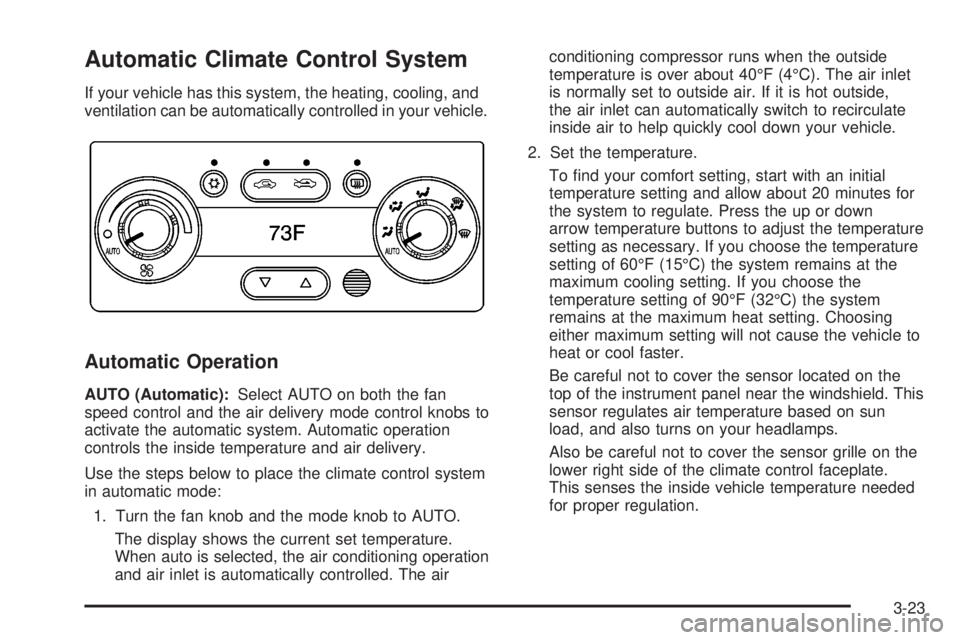
Automatic Climate Control System
If your vehicle has this system, the heating, cooling, and
ventilation can be automatically controlled in your vehicle.
Automatic Operation
AUTO (Automatic):Select AUTO on both the fan
speed control and the air delivery mode control knobs to
activate the automatic system. Automatic operation
controls the inside temperature and air delivery.
Use the steps below to place the climate control system
in automatic mode:
1. Turn the fan knob and the mode knob to AUTO.
The display shows the current set temperature.
When auto is selected, the air conditioning operation
and air inlet is automatically controlled. The airconditioning compressor runs when the outside
temperature is over about 40°F (4°C). The air inlet
is normally set to outside air. If it is hot outside,
the air inlet can automatically switch to recirculate
inside air to help quickly cool down your vehicle.
2. Set the temperature.
To nd your comfort setting, start with an initial
temperature setting and allow about 20 minutes for
the system to regulate. Press the up or down
arrow temperature buttons to adjust the temperature
setting as necessary. If you choose the temperature
setting of 60°F (15°C) the system remains at the
maximum cooling setting. If you choose the
temperature setting of 90°F (32°C) the system
remains at the maximum heat setting. Choosing
either maximum setting will not cause the vehicle to
heat or cool faster.
Be careful not to cover the sensor located on the
top of the instrument panel near the windshield. This
sensor regulates air temperature based on sun
load, and also turns on your headlamps.
Also be careful not to cover the sensor grille on the
lower right side of the climate control faceplate.
This senses the inside vehicle temperature needed
for proper regulation.
3-23
Page 156 of 408

To avoid blowing cold air at start-up in cold weather,
the system delays turning on the fan until warm air is
available. The length of delay depends on the engine
coolant temperature. Turning the fan knob overrides
this delay and change the fan to a selected speed.
If your vehicle has the remote start feature, the climate
control display initially shows “AS” in place of the
temperature to indicate the remote start has been
activated. The remote start system turns on using the
last temperature selected before the vehicle was
last turned off.
For best performance, turn the fan and mode knobs to
the AUTO position. The fan speed and air delivery
modes will change to achieve the best comfort.
If the outside air temperature is below 45°F and the air
delivery mode knob is set to AUTO, the automatic
climate control system starts in the defrost mode to clear
the window.
The automatic climate control changes back to manual
operation by turning the vehicle on with the key.
Manual Operation
The air delivery mode or fan speed can be manually
adjusted.
9(Off):Select this position on the fan knob to turn off
the entire climate control system. Outside air still
enters the vehicle, and is directed to the oor.This direction can be changed by changing the mode
position. The temperature can also be adjusted
using either the up or down arrow temperature buttons.
9(Fan):Turn the knob with the fan symbol to
manually adjust the fan speed.
H(Vent):Turn the knob to this position to direct air
to the instrument panel outlets.
)(Bi-Level):Turn the knob to this position to direct
half of the air to the instrument panel outlets, and
the remaining air to the oor outlets.
6(Floor):Turn the knob to this position to direct most
of the air to the oor outlets with some air directed to
the side window outlets and windshield.
The right knob can also be used to select defog or
defrost modes. See Defogging and Defrosting later in
this section.
:(Outside Air):Press the right side of this button
to turn the outside air mode on. Air from outside
the vehicle circulates throughout your vehicle. An
indicator light comes on to show that it is activated. The
outside air mode can be used with all modes, but it
cannot be used with the recirculation mode. Press this
button to cancel the recirculation mode.
3-24
Page 161 of 408
Speedometer and Odometer
The speedometer lets you see your speed in both miles
per hour (mph) and kilometers per hour (km/h).
The odometer shows how far your vehicle has been
driven, in either miles (used in the United States)
or kilometers (used in Canada).
When in manual shift mode, the odometer will change
from the vehicle’s mileage to the letter M, for manual
mode, and a number indicating the requested gear
range when moving the shift lever forward or rearward.
For more information seeAutomatic Transmission
Operation on page 2-27.
Your vehicle has a tamper resistant odometer.
Repair or replacement of your instrument panel cluster
should only be performed by your dealer/retailer.
Trip Odometer
The trip odometer can display how far you have driven
since you last reset it.
For more information seeDIC Operation and Displays
on page 3-43.
Tachometer
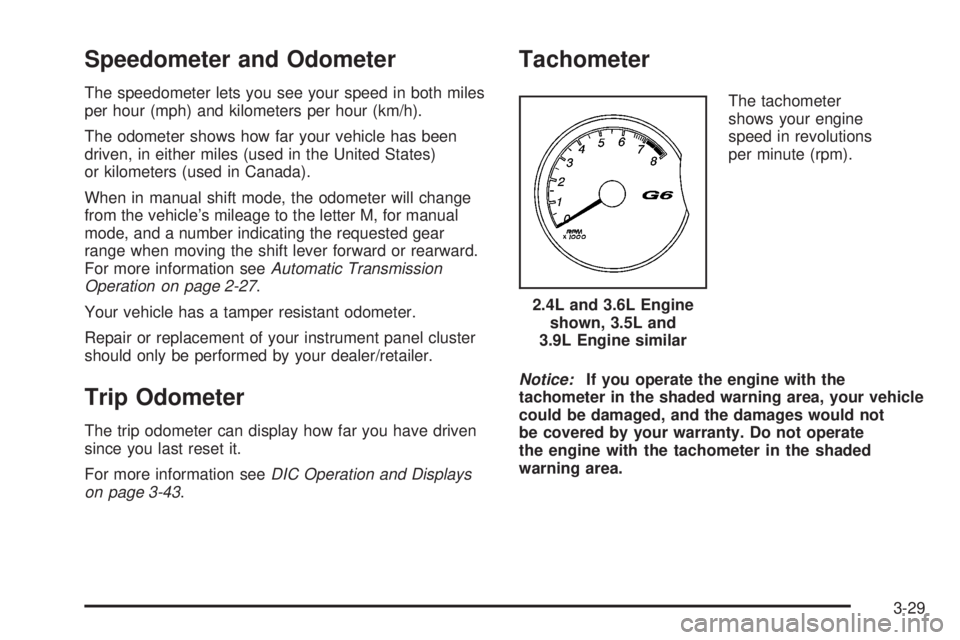
The tachometer
shows your engine
speed in revolutions
per minute (rpm).
Notice:If you operate the engine with the
tachometer in the shaded warning area, your vehicle
could be damaged, and the damages would not
be covered by your warranty. Do not operate
the engine with the tachometer in the shaded
warning area.2.4L and 3.6L Engine
shown, 3.5L and
3.9L Engine similar
3-29
Page 175 of 408

Driver Information Center (DIC)
The Driver Information Center (DIC) provides the
following:
A way to personalize your vehicle
Trip information
Warning messages
The buttons used to activate the DIC are located on the
left side of the vehicle’s audio system.
INFO/
4(Information):Press this button to scroll
through the vehicle information mode displays.
MENU:Press this button to enter and scroll through the
menu mode.ENTER/
r(Enter):Press this button to select a
menu option or to acknowledge a warning message.
The DIC messages will be read through your audio
system display.
DIC Operation and Displays
The DIC comes on when the ignition is on. If your
vehicle has the uplevel audio system, the time and
outside temperature is shown on the rst line of
the display and the DIC information is shown on the
second line of the display.
The DIC has different modes which can be accessed by
pressing the DIC buttons. The button functions are
detailed in the following section.
Information Modes
INFO/4(Information):Press this button to scroll
through the vehicle information mode displays in the
following order:
TRIP A
TRIP B
FUEL RANGE (Fuel Range Until Empty)
MPG (L/100 KM) AVG (Average Fuel Economy) United States
Canada
3-43
Page 176 of 408
MPG (L/100 KM) INST (Instantaneous Fuel
Economy)
AV SPEED (Average Vehicle Speed)
OIL LIFE (Engine Oil Life System)
Tire Pressure
TRIP A or TRIP B:Press the information button until
TRIP A or TRIP B display. These modes show the
current distance traveled since the last reset for each
trip odometer in either miles (mi) or kilometers (km).
Both odometers can be used at the same time.
To reset the trip odometer to zero, press and hold the
enter button for a few seconds while the desired
trip odometer is displayed.
FUEL RANGE:Press the information button until FUEL
RANGE displays. This mode shows the remaining
distance you can drive without refueling in either
miles (mi) or kilometers (km). It is based on fuel
economy and the fuel remaining in the tank.
When the fuel level is low, FUEL RANGE LOW displays.
The fuel economy data used to determine fuel range
is an average of recent driving conditions. As your
driving conditions change, this data is gradually updated.
The FUEL RANGE mode cannot be reset.MPG (L/100 KM) AVG (Average):Press the
information button until MPG (L/100 KM) AVG displays.
This mode shows how many miles per gallon (mpg)
or liters per 100 kilometers (L/100 km) your vehicle is
getting based on current and past driving conditions.
To reset the average fuel economy, press and hold the
enter button while MPG (L/100 KM) AVG is displayed.
Average fuel economy is then be calculated starting
from that point. If the average fuel economy is not reset,
it is continually updated each time you drive.
MPG (L/100 KM) INST (Instantaneous):Press the
information button until MPG (L/100 KM) INST displays.
This mode shows the current fuel economy at a
particular moment and changes frequently as driving
conditions change. This mode shows the instantaneous
fuel economy in miles per gallon (mpg) or liters per
100 kilometers (L/100 km). Unlike average fuel
economy, this screen cannot be reset.
AV (Average) SPEED:Press the information button
until AV SPEED displays. This mode shows the vehicle’s
average speed in miles per hour (mph) or kilometers
per hour (km/h).
To reset the average vehicle speed, press and hold the
enter button while AV SPEED is displayed.
3-44
Page 177 of 408
OIL LIFE:Press the information button until OIL LIFE
displays. The engine oil life system shows an estimate of
the oil’s remaining useful life. It shows 100% when
the system is reset after an oil change. It alerts you to
change the oil on a schedule consistent with your driving
conditions.
In addition to the engine oil life system monitoring the
oil life, additional maintenance is recommended in
the Maintenance Schedule in this manual. See
Scheduled Maintenance on page 6-4andEngine Oil on
page 5-21.
Always reset the engine oil life system after an oil
change. See “How to Reset the Engine Oil Life System”
underEngine Oil Life System on page 5-24.
Tire Pressure:The pressure for each tire can be
viewed in the DIC. The tire pressure is shown in either
pounds per square inch (psi) or kilopascals (kPa).
Press the information button until LF ## PSI (kPa) ## RF
displays for the front tires. Press the information
button again until LR ## PSI (kPa) ## RR displays for
the rear tires.
If a low tire pressure condition is detected by the system
while driving, a message advising you to check the tire
pressure appears in the display. SeeInflation - Tire
Pressure on page 5-68andDIC Warnings and Messages
on page 3-46for more information.Personalization
MENU:Press this button while the ignition is on to
scroll through each of the personalization options in the
following order. To avoid excessive drain on the
battery, it is recommended that the headlamps are
turned off. If the vehicle is moving faster than 2 mph
(3 km/h), the personalization menu options are not
available, except for the UNITS option. All of the
personalization options may not be available on your
vehicle. Only the options available display on the DIC.
Oil Life Reset
Units Selection (English/Metric)
Tire Learn?, on vehicles without the Remote
Keyless Entry (RKE) system
Remote Start Capability
Horn Chirp During Remote Keyless Entry Locking
Horn Chirp During Remote Keyless Entry Unlocking
Exterior Light Flash During Remote Keyless
Entry Locking or Unlocking
Delayed Locking
Automatic Vehicle Unlocking: Specic Doors
Automatic Vehicle Unlocking: When Key is Off or
When Shift To Park
3-45
Page 178 of 408
Exterior Perimeter Lighting During Remote Keyless
Entry Unlock
Select Language: (English, French, Spanish or
German)
When the desired option is reached, press the enter
button to toggle between the modes of that option. To
make a selection, press the MENU button again.
If no selection is made within 10 seconds, the display
reverts back to the previous information displayed.
The MENU mode is exited when the information button
is pressed, a 10 second time period has elapsed,
the ignition is turned off, or the end of the MENU list is
reached.
SeeDIC Vehicle Personalization on page 3-50for more
information on the personalization options.
Enter
ENTER/r(Enter):Press this button to reset certain
functions and to turn off or acknowledge messages
on the DIC display. This button also toggles through the
options available in each personalization menu.
DIC Warnings and Messages
These messages appear if there is a problem detected
in one of your vehicle’s systems.
A message clears when the vehicle’s condition is no
longer present. To acknowledge a message and clear it
from the display, press and hold any of the DIC
buttons. If the condition is still present, the warning
message comes back on the next time the vehicle is
turned off and back on. With most messages, a warning
chime sounds when the message displays. Your
vehicle may have other warning messages.
AUTO (Automatic) LIGHTS OFF
This message displays if the automatic headlamp
system is disabled with the headlamp switch.
AUTO (Automatic) LIGHTS ON
This message displays if the automatic headlamp
system is enabled with the headlamp switch.
BRAKE FLUID
This message displays, while the ignition is on, when
the brake uid level is low. The brake system warning
light on the instrument panel cluster also comes on. See
Brake System Warning Light on page 3-34for more
information. Have the brake system serviced by
your dealer/retailer as soon as possible.
3-46