steering PONTIAC G6 2008 User Guide
[x] Cancel search | Manufacturer: PONTIAC, Model Year: 2008, Model line: G6, Model: PONTIAC G6 2008Pages: 408, PDF Size: 5.61 MB
Page 139 of 408

To tilt and telescope the wheel, pull down the lever.
Then move the wheel up or down or back and forth to a
comfortable driving position. Pull up the lever to lock
the wheel in place.
Turn Signal/Multifunction Lever
The lever on the left side of the steering column
includes the following:
GTurn and Lane-Change Signals.SeeTurn
and Lane-Change Signals on page 3-8.
53Headlamp High/Low-Beam Changer.See
Headlamp High/Low-Beam Changer on page 3-8.
Flash-to-Pass. SeeFlash-to-Pass on page 3-8.
OExterior Lamp Control.SeeHeadlamps on
page 3-13.
3-7
Page 141 of 408
Windshield Wipers
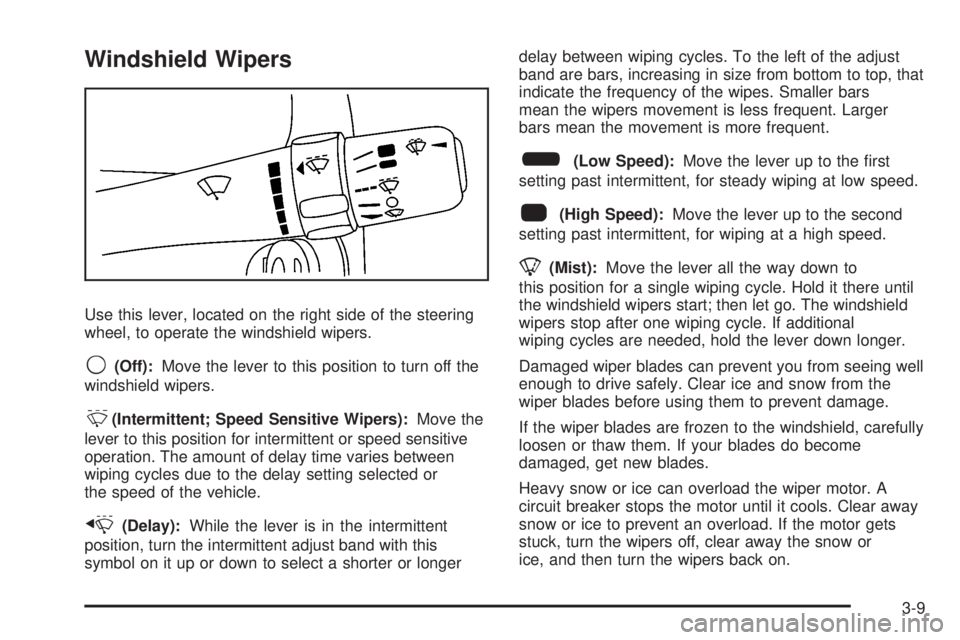
Use this lever, located on the right side of the steering
wheel, to operate the windshield wipers.
9(Off):Move the lever to this position to turn off the
windshield wipers.
&(Intermittent; Speed Sensitive Wipers):Move the
lever to this position for intermittent or speed sensitive
operation. The amount of delay time varies between
wiping cycles due to the delay setting selected or
the speed of the vehicle.
x(Delay):While the lever is in the intermittent
position, turn the intermittent adjust band with this
symbol on it up or down to select a shorter or longerdelay between wiping cycles. To the left of the adjust
band are bars, increasing in size from bottom to top, that
indicate the frequency of the wipes. Smaller bars
mean the wipers movement is less frequent. Larger
bars mean the movement is more frequent.
6(Low Speed):Move the lever up to the rst
setting past intermittent, for steady wiping at low speed.
1(High Speed):Move the lever up to the second
setting past intermittent, for wiping at a high speed.
8(Mist):Move the lever all the way down to
this position for a single wiping cycle. Hold it there until
the windshield wipers start; then let go. The windshield
wipers stop after one wiping cycle. If additional
wiping cycles are needed, hold the lever down longer.
Damaged wiper blades can prevent you from seeing well
enough to drive safely. Clear ice and snow from the
wiper blades before using them to prevent damage.
If the wiper blades are frozen to the windshield, carefully
loosen or thaw them. If your blades do become
damaged, get new blades.
Heavy snow or ice can overload the wiper motor. A
circuit breaker stops the motor until it cools. Clear away
snow or ice to prevent an overload. If the motor gets
stuck, turn the wipers off, clear away the snow or
ice, and then turn the wipers back on.
3-9
Page 143 of 408

Setting Cruise Control
{CAUTION:
If you leave your cruise control on when you
are not using cruise, you might hit a button
and go into cruise when you do not want to.
You could be startled and even lose control.
Keep the cruise control switch off until you
want to use cruise control.
The cruise control buttons
are located on the steering
wheel.
J(On/Off):Press this button to turn the cruise
control system on and off.RES+ (Resume):Press this button to resume a set
speed and to accelerate the speed.
SET−(Set):Press this button to set a speed and to
decrease the speed.
[(Cancel):Press this button to cancel cruise control.
To set a speed do the following:
1. Press the on/off symbol to turn cruise control on.
The indicator light on the button comes on.
2. Get to the speed you want.
3. Press the SET−symbol and release it. The cruise
symbol displays in the instrument panel cluster to
show the system is engaged.
4. Take your foot off the accelerator pedal.
When the brakes are applied, the cruise control
shuts off.
If the vehicle is in cruise control and the Traction
Control System (TCS) or Enhanced Traction System
(ETS) begins to limit wheel spin, the cruise control
automatically disengages. SeeTraction Control System
(TCS) on page 4-5. When road conditions allow, the
cruise control can be used again.
3-11
Page 145 of 408

Ending Cruise Control
There are three ways to disengage the cruise control:
Step lightly on the brake pedal.
Press the on/off button.
Press the cancel button.
The cruise symbol in the instrument panel cluster turns
off when the system is disengaged.
Erasing Speed Memory
The cruise control set speed memory is erased when
the cruise control or the ignition is turned off.
Headlamps
The band on the lever on the outboard side of the
steering column operates the exterior lamps.
The exterior lamp control has the following four
positions:
2(Headlamps):Turn the band to this position to turn
on the headlamps, parking lamps, and taillamps.
;(Parking Lamps):Turn the band to this position to
turn on the parking lamps and taillamps only.
AUTO (Automatic Headlamp System):Turn the band
to this position to automatically turn on the Daytime
Running Lamps during daytime, and the headlamps,
parking lamps, and taillamps at night.
3-13
Page 148 of 408

Fog Lamps
If your vehicle has fog
lamps, the fog lamp button
is located on the
instrument panel, to the
left of the steering wheel.
The ignition must be on for the fog lamps to work.
Push the button to turn the fog lamps on. An indicator
light in the button will glow when the fog lamps are
on. Push the button again to turn the fog lamps off.
The parking lamps automatically turn on and off when
the fog lamps are turned on and off.
The fog lamps turn off while the high-beam headlamps
are turned on.
Some localities have laws that require the headlamps to
be on along with the fog lamps.
Instrument Panel Brightness
The control for this
feature is located on the
instrument panel to the left
of the steering wheel.
Turn the knob clockwise or counterclockwise to brighten
or dim the lights.
Courtesy Lamps
If your vehicle has a retractable hardtop, it has courtesy
lamps in the rear passenger area of the vehicle.
These lamps make it easier to see while entering and
exiting the vehicle. These lamps come on when any
door is opened and only turn off when all the doors
are closed.
3-16
Page 180 of 408
acceleration and speed may be reduced. Anytime this
message stays on, the vehicle should be taken to
your dealer/retailer for service as soon as possible.
ICE POSSIBLE
This message displays when the outside air temperature
is cold enough to create icy road conditions. Adjust
your driving accordingly.
KEY FOB BATT (Battery) LOW
This message displays if the Remote Keyless Entry
(RKE) transmitter battery is low. Replace the battery in
the transmitter. See “Battery Replacement” under
Remote Keyless Entry (RKE) System Operation on
page 2-4.
LEARN COMPLETE
On vehicles without the Remote Keyless Entry (RKE)
system, this message displays when the Tire Pressure
Monitor System (TPMS) has completed the tire
learning process. SeeTire Pressure Monitor System on
page 5-70for more information.
LOW FUEL
This message displays along with a low fuel warning
light on the instrument panel cluster when your vehicle is
low on fuel. Rell the fuel tank as soon as possible.
SeeLow Fuel Warning Light on page 3-42,Fuel
on page 5-6, andFilling the Tank on page 5-9.
LOW WASHER FLUID
This message displays when the vehicle’s windshield
washer uid is low. Fill the windshield washer uid
reservoir to the proper level as soon as possible. See
Windshield Washer Fluid on page 5-41.
PARKING BRAKE
This message displays if the parking brake is left
engaged and you try to drive away. SeeParking Brake
on page 2-31for more information.
POWER STEERING
This message displays if a problem has been detected
with the electric power steering, if your vehicle has
this feature. Have your vehicle serviced immediately by
your dealer/retailer.
SERVICE AIR BAG
This message displays when there is a problem with the
airbag system. Have your vehicle serviced by your
dealer/retailer immediately.
SVC (Service) TIRE MONITOR
This message displays if a part on the Tire Pressure
Monitor System (TPMS) is not working properly. The tire
pressure light also ashes and then remains on during
the same ignition cycle. SeeTire Pressure Light on
page 3-37. Several conditions may cause this message
3-48
Page 185 of 408
Set up your audio system by presetting your
favorite radio stations, setting the tone, and
adjusting the speakers. Then, when driving
conditions permit, you can tune to your favorite
radio stations using the presets and steering wheel
controls if the vehicle has them.
Notice:Before adding any sound equipment to
your vehicle, such as an audio system, CD player,
CB radio, mobile telephone, or two-way radio, make
sure that it can be added by checking with your
dealer/retailer. Also, check federal rules covering
mobile radio and telephone units. If sound
equipment can be added, it is very important to do
it properly. Added sound equipment may interfere
with the operation of your vehicle’s engine, radio, or
other systems, and even damage them. Your
vehicle’s systems may interfere with the operation
of sound equipment that has been added.
Your vehicle has a feature called Retained Accessory
Power (RAP). With RAP, the audio system can be
played even after the ignition is turned off. SeeRetained
Accessory Power (RAP) on page 2-23for more
information.Setting the Clock
To set the hour, press the CLOCK button. The clock
symbol displays and the hour ashes. Turn the
ADJ (adjust) knob to increase or to decrease the hours.
To set the minutes, press the CLOCK button again.
The minutes ash. Turn the ADJ knob to increase or to
decrease the minutes. The time can be set with the
ignition on or off.
To synchronize the time with an FM station broadcasting
Radio Data System (RDS) information, press and
hold the clock button to enter the clock set mode, then
press and hold the clock button for three seconds
until UPDATED displays. If the time is not available from
the station, NO UPDATE displays.
RDS time is broadcast once a minute. After tuning to an
RDS broadcast station, it can take a few minutes for
the time to update.
3-53
Page 199 of 408

Theft-Deterrent Feature
THEFTLOCK®is designed to discourage theft of your
vehicle’s radio. The feature works automatically by
learning a portion of the Vehicle Identication Number
(VIN). If the radio is moved to a different vehicle, it does
not operate and LOC, LOCK, or LOCKED could display.
With THEFTLOCK
®activated, the radio does not
operate if stolen.
Audio Steering Wheel Controls
If your vehicle has this
feature, some audio
controls can be adjusted at
the steering wheel. They
include the following:
xw(Next/Previous):Press the down or up arrow to
go to the next or to the previous radio station and
stay there. The radio seeks stations only with a strong
signal that are in the selected band.To scan stations, press and hold either arrow for
two seconds until SCAN displays and a beep sounds.
The radio goes to a station, plays for a few seconds,
then goes to the next station. Press either arrow again
to stop scanning.
When a CD is playing, press the down or up arrow to
go to the next or to the previous track.
To scan the current CD, press and hold either arrow for
more than two seconds. The CD does go to the next
track, play the rst 10 seconds, then go on to the
next track. Press either arrow again to stop scanning.
To scan all of the CDs loaded, press and hold either
arrow for more than four seconds. The CD does goes to
the next CD, plays the rst 10 seconds of each track,
then goes to the next CD. Press either arrow again
to stop scanning.
+
e−e(Volume):Press the plus or minus volume
button to increase or to decrease the radio volume.
1–6 (Preset Pushbuttons):Press this button to play
stations that are programmed on the radio preset
pushbuttons. The radio only seeks preset stations with a
strong signal that are in the selected band.
3-67
Page 203 of 408

Your Driving, the Road, and Your Vehicle..........4-2
Defensive Driving...........................................4-2
Drunk Driving.................................................4-2
Control of a Vehicle........................................4-3
Braking.........................................................4-3
Antilock Brake System (ABS)...........................4-4
Braking in Emergencies...................................4-5
Traction Control System (TCS).........................4-5
StabiliTrak
®System........................................4-6
Steering........................................................4-7
Off-Road Recovery.......................................4-10
Passing.......................................................4-10
Loss of Control.............................................4-10
Driving at Night............................................4-12Driving in Rain and on Wet Roads..................4-12
Before Leaving on a Long Trip.......................4-13
Highway Hypnosis........................................4-14
Hill and Mountain Roads................................4-14
Winter Driving..............................................4-15
If Your Vehicle is Stuck in Sand, Mud,
Ice, or Snow.............................................4-19
Rocking Your Vehicle to Get It Out.................4-20
Loading Your Vehicle....................................4-20
Towing..........................................................4-25
Towing Your Vehicle.....................................4-25
Recreational Vehicle Towing...........................4-26
Towing a Trailer...........................................4-28
Section 4 Driving Your Vehicle
4-1
Page 205 of 408

For persons under 21, it is against the law in every
U.S. state to drink alcohol. There are good medical,
psychological, and developmental reasons for
these laws.
The obvious way to eliminate the leading highway
safety problem is for people never to drink alcohol
and then drive.
Medical research shows that alcohol in a person’s
system can make crash injuries worse, especially
injuries to the brain, spinal cord, or heart. This means
that when anyone who has been drinking — driver
or passenger — is in a crash, that person’s chance of
being killed or permanently disabled is higher than if the
person had not been drinking.
Control of a Vehicle
The following three systems help to control your vehicle
while driving — brakes, steering, and accelerator. At
times, as when driving on snow or ice, it is easy to ask
more of those control systems than the tires and
road can provide. Meaning, you can lose control of your
vehicle. SeeTraction Control System (TCS) on
page 4-5andStabiliTrak
®System on page 4-6.
Adding non-dealer/non-retailer accessories can affect
your vehicle’s performance. SeeAccessories and
Modifications on page 5-4.
Braking
SeeBrake System Warning Light on page 3-34.
Braking action involves perception time and reaction
time. First, you have to decide to push on the brake
pedal. That is perception time. Then you have to bring
up your foot and do it. That is reaction time.
Average reaction time is about three-fourths of a
second. But that is only an average. It might be less
with one driver and as long as two or three seconds or
more with another. Age, physical condition, alertness,
coordination, and eyesight all play a part. So do alcohol,
drugs, and frustration. But even in three-fourths of a
second, a vehicle moving at 60 mph (100 km/h) travels
66 feet (20 m). That could be a lot of distance in an
emergency, so keeping enough space between
your vehicle and others is important.
And, of course, actual stopping distances vary greatly
with the surface of the road, whether it is pavement
or gravel; the condition of the road, whether it is
wet, dry, or icy; tire tread; the condition of the brakes;
the weight of the vehicle; and the amount of brake force
applied.
Avoid needless heavy braking. Some people drive in
spurts — heavy acceleration followed by heavy
braking — rather than keeping pace with traffic. This is
a mistake. The brakes might not have time to cool
between hard stops. The brakes will wear out much
4-3