trunk PONTIAC G6 2008 User Guide
[x] Cancel search | Manufacturer: PONTIAC, Model Year: 2008, Model line: G6, Model: PONTIAC G6 2008Pages: 408, PDF Size: 5.61 MB
Page 128 of 408

As the switch is being pressed the windows and trunk
lid will open. The hardtop will automatically lower into the
trunk, and the trunk lid will close and latch. If the
engine is on, a chime will sound when the hardtop has
lowered completely. The Driver Information Center
(DIC) will display TOP MOVE COMPLT to signal the
procedure is complete. SeeDIC Warnings and
Messages on page 3-46for more information.After the hardtop has lowered completely, release the
switch. If you continue to press the switch for about
two seconds after the hardtop has completely lowered,
the windows will automatically close.
If pressure is released from the switch before the
hardtop cycle is complete, the cycle will stop and the
Driver Information Center (DIC) will display the
TOP NOT SECURE message. Always press and hold
the switch until a chime sounds, if the engine is on, and
the Driver Information Center (DIC) displays the TOP
MOVE COMPLT to signal the procedure is complete.
SeeDIC Warnings and Messages on page 3-46
for more information.
The hardtop will not operate if the vehicle has an
electrical failure. If an electrical failure occurs, see your
dealer/retailer for service.
If your vehicle has an electrical failure while operating
the hardtop, and must be towed to a dealer/retailer
for service, your vehicle should be towed by atbed with
the vehicle facing backwards. Consult your dealer/
retailer or professional towing service if you need to
have your disabled vehicle towed. SeeRoadside
Assistance Program on page 7-6.
2-48
Page 129 of 408

Raising the Retractable Hardtop
1. Park on a level surface, and shift the automatic
transmission into PARK (P). The vehicle must be
in PARK (P), and the engine must be running, or the
ignition turned to the ON position, to operate the
retractable hardtop.
2. The trunk cargo cover must be fully closed, and the
trunk must be closed before raising the hardtop.3. Make sure nothing or no one is on or around the
hardtop. Make sure there is no cargo on top of or
in front of the trunk cargo cover.
{CAUTION:
When the retractable hardtop is opened or
closed, people can be injured by the parts that
move: the hardtop and its mechanism, the
trunk lid, and the side windows. Keep people
away from these parts when you are lowering
or raising the top.
2-49
Page 131 of 408
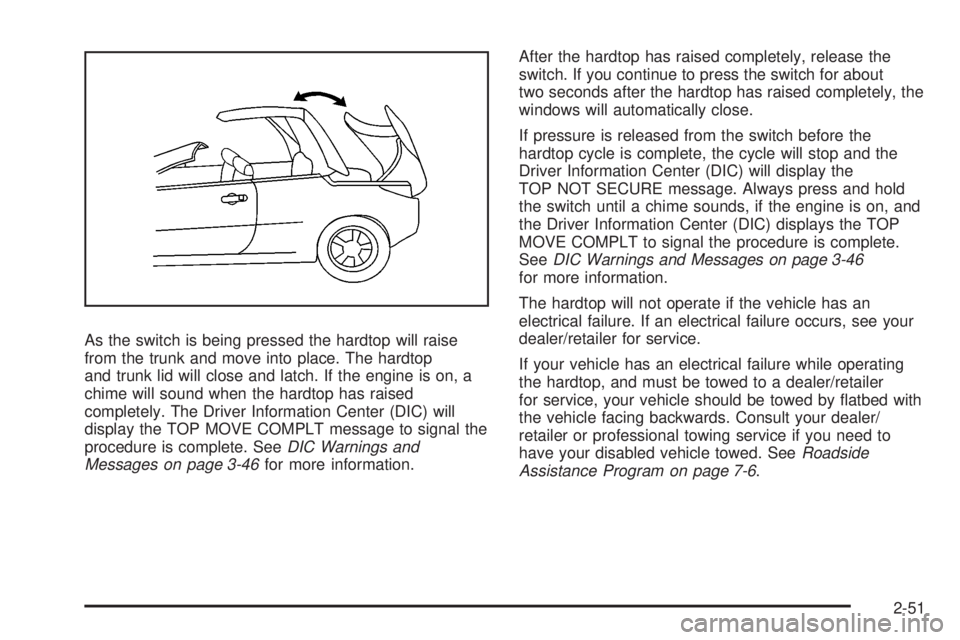
As the switch is being pressed the hardtop will raise
from the trunk and move into place. The hardtop
and trunk lid will close and latch. If the engine is on, a
chime will sound when the hardtop has raised
completely. The Driver Information Center (DIC) will
display the TOP MOVE COMPLT message to signal the
procedure is complete. SeeDIC Warnings and
Messages on page 3-46for more information.After the hardtop has raised completely, release the
switch. If you continue to press the switch for about
two seconds after the hardtop has raised completely, the
windows will automatically close.
If pressure is released from the switch before the
hardtop cycle is complete, the cycle will stop and the
Driver Information Center (DIC) will display the
TOP NOT SECURE message. Always press and hold
the switch until a chime sounds, if the engine is on, and
the Driver Information Center (DIC) displays the TOP
MOVE COMPLT to signal the procedure is complete.
SeeDIC Warnings and Messages on page 3-46
for more information.
The hardtop will not operate if the vehicle has an
electrical failure. If an electrical failure occurs, see your
dealer/retailer for service.
If your vehicle has an electrical failure while operating
the hardtop, and must be towed to a dealer/retailer
for service, your vehicle should be towed by atbed with
the vehicle facing backwards. Consult your dealer/
retailer or professional towing service if you need to
have your disabled vehicle towed. SeeRoadside
Assistance Program on page 7-6.
2-51
Page 133 of 408
Instrument Panel Overview...............................3-4
Hazard Warning Flashers................................3-6
Other Warning Devices...................................3-6
Horn.............................................................3-6
Tilt Wheel.....................................................3-6
Turn Signal/Multifunction Lever.........................3-7
Turn and Lane-Change Signals........................3-8
Headlamp High/Low-Beam Changer..................3-8
Flash-to-Pass.................................................3-8
Windshield Wipers..........................................3-9
Windshield Washer.......................................3-10
Cruise Control..............................................3-10
Headlamps..................................................3-13
Headlamps on Reminder................................3-14
Headlamps Off in PARK (P)...........................3-14
Delayed Headlamps......................................3-14
Daytime Running Lamps (DRL).......................3-14
Automatic Headlamp System..........................3-15
Fog Lamps..................................................3-16
Instrument Panel Brightness...........................3-16
Courtesy Lamps...........................................3-16
Dome Lamp.................................................3-17
Entry/Exit Lighting.........................................3-17
Parade Dimming...........................................3-17Overhead Console Reading Lamps.................3-17
Trunk Lamp.................................................3-17
Battery Run-Down Protection..........................3-18
Accessory Power Outlet(s).............................3-18
Climate Controls............................................3-19
Climate Control System.................................3-19
Automatic Climate Control System...................3-23
Outlet Adjustment.........................................3-26
Warning Lights, Gages, and Indicators............3-27
Instrument Panel Cluster...............................
.3-28
Speedometer and Odometer...........................3-29
Trip Odometer..............................................3-29
Tachometer.................................................3-29
Safety Belt Reminders...................................3-30
Airbag Readiness Light..................................3-30
Passenger Airbag Status Indicator...................3-31
Charging System Light..................................3-33
Brake System Warning Light..........................3-34
Antilock Brake System Warning Light...............3-35
Traction Control System (TCS)
Warning Light...........................................3-35
Traction Control System (TCS) Active Light......3-36
StabiliTrak
®Not Ready Light..........................3-36
Section 3 Instrument Panel
3-1
Page 149 of 408

Dome Lamp
If the vehicle has a dome lamp with a switch, the
following are the settings.
9(Off):Move the lever to this position to turn the
lamp off, even when a door is open.
1(Door):Move the lever to this position so that the
lamp comes on when a door is opened.
+(On):Move the lever to this position to turn the
dome lamp on.
Entry/Exit Lighting
The lamps inside the vehicle come on when any door is
opened. These lamps fade out about 20 seconds after all
of the doors have been closed or when the ignition is
turned to ON/RUN. They also come on when the unlock
symbol button or the horn symbol is pressed on the
Remote Keyless Entry (RKE) system transmitter.
The lamps inside the vehicle stay on for about
20 seconds after the key is removed from the ignition
to provide light as you exit.
Parade Dimming
The instrument panel has an added feature called
parade mode. It automatically prohibits the dimming of
the instrument panel displays during the daylight
while the headlamps are on so that you will still be able
to see the displays.
Overhead Console Reading Lamps
The vehicle may have reading lamps on the overhead
console. These lamps come on when the doors are
opened if the lamp switch is not in the OFF position.
Press the side of each lamp to turn them on and
off, while the doors are closed.
Trunk Lamp
The trunk lamp comes on when the trunk is opened and
turns off when the trunk is closed.
3-17
Page 150 of 408

Battery Run-Down Protection
Your vehicle has a battery run-down feature designed to
protect the vehicle’s battery.
When any interior lamp (trunk, reading lamps, or dome
lamp) is left on when the ignition is turned off, the
battery run-down protection system automatically shuts
the lamp off after 20 minutes. This prevents draining
of the battery.
To reactivate the interior lamps, do one of the following:
Open any door.
Press any Remote Keyless Entry (RKE) transmitter
button.
Press the power door lock switch.
Press the remote trunk release.
Turn the lamp that was left on to off and then to
on again.
Accessory Power Outlet(s)
Accessory power outlets can be used to connect
auxiliary electrical equipment, such as a cellular
telephone or CB radio.There are two accessory power outlets, located on the
center console below the climate controls. If the vehicle
has a Traction Control System (TCS), one accessory
power outlet is in the center storage console and the
other is on the center console below the climate controls.
To use an outlet, remove the protective cap. When not in
use, always cover the outlet with the protective cap. The
accessory power outlet is operational at all times.
Notice:If electrical devices are left plugged into a
power outlet, the battery may drain causing your
vehicle not to start or damage to the battery.
This would not be covered by the warranty. Always
unplug all electrical devices when turning off
your vehicle.
Certain electrical accessories are not compatible with
the accessory power outlet and could result in blown
vehicle or adapter fuses. If you experience a problem,
see your dealer/retailer for additional information on
the accessory power outlet.
Notice:Adding any electrical equipment to your
vehicle may damage it or keep other components
from working as they should. The repairs would not
be covered by your warranty. Do not use equipment
exceeding maximum amperage rating of 20 amperes.
Check with your dealer/retailer before adding
electrical equipment.
3-18
Page 179 of 408
CHANGE OIL SOON
This message displays when the life of the engine oil
has expired and it should be changed.
When this message is acknowledged and cleared from
the display, the engine oil life system must still be
reset separately. SeeEngine Oil Life System on
page 5-24,Engine Oil on page 5-21, andScheduled
Maintenance on page 6-4for more information.
CHECK CARGO TOP
If your vehicle has a retractable hardtop, this message
displays if the cargo divider is not in place when
operating the retractable hardtop. Open the trunk and
make sure the cargo divider is secure and no objects are
on the divider. SeeTrunk on page 2-13,Lowering the
Retractable Hardtop on page 2-46, andRaising the
Retractable Hardtop on page 2-49for more information.
CHECK GAS CAP
This message displays if the fuel cap has not been fully
tightened. Recheck the fuel cap to make sure that it
is on properly. A few driving trips with the cap properly
installed should turn the message off.
CHECK TIRE PRESS (Pressure)
This message displays when the pressure in one or
more of the vehicle’s tires needs to be checked. If a tire
pressure message appears on the DIC, stop as soonas you can. Have the tire pressures checked and set to
those shown on the Tire Loading Information label.
SeeTires on page 5-60,Loading Your Vehicle on
page 4-20, andInflation - Tire Pressure on page 5-68.
The DIC also shows the tire pressure values. See
DIC Operation and Displays on page 3-43. If the tire
pressure is low, the low tire pressure warning light
comes on. SeeTire Pressure Light on page 3-37.
DOOR AJAR
This message displays if one or more of the vehicle’s
doors are not closed properly. Make sure that the
door(s) are closed completely.
ENGINE DISABLED
This message displays if the starting of the engine is
disabled. Have your vehicle serviced by your
dealer/retailer immediately.
ENG (Engine) PWR (Power) REDUCED
This message displays to inform you that the vehicle
has reduced engine power to avoid damaging the
engine. Reduced engine power can affect the vehicle’s
ability to accelerate. If this message is on, but there
is no reduction in performance, proceed to your
destination. The performance may be reduced the next
time the vehicle is driven. The vehicle may be driven
at a reduced speed while this message is on, but
3-47
Page 181 of 408

to appear. SeeTire Pressure Monitor Operation on
page 5-72for more information. If the warning comes on
and stays on, there may be a problem with the TPMS.
See your dealer/retailer.
TIRE LEARN ON
On vehicles without the Remote Keyless Entry (RKE)
system, this message displays when the Tire Pressure
Monitor System (TPMS) is re-learning the tire
positions on your vehicle. The tire positions must be
re-learned after rotating the tires or after replacing a tire
or sensor. SeeTire Inspection and Rotation on
page 5-77,Tire Pressure Monitor System on page 5-70,
andInflation - Tire Pressure on page 5-68for more
information.
TOP INOP (Inoperative) – TRUNK
If your vehicle has a retractable hardtop, this message
displays if the trunk lid is not completely closed
when operating the retractable hardtop. Make sure that
the trunk lid is closed when operating the retractable
hardtop. SeeTrunk on page 2-13,Lowering the
Retractable Hardtop on page 2-46, andRaising the
Retractable Hardtop on page 2-49for more information.
TOP MOVE COMPLT (Complete)
If your vehicle has a retractable hardtop, this message
displays when the retractable hardtop has lowered
or raised completely. SeeLowering the Retractable
Hardtop on page 2-46andRaising the Retractable
Hardtop on page 2-49for more information.
TOP NOT ALLOWED
If your vehicle has a retractable hardtop, this message
displays if the retractable hardtop button is pressed
while the vehicle is not in PARK (P). Make sure that the
vehicle is in PARK (P) when operating the retractable
hardtop. SeeLowering the Retractable Hardtop on
page 2-46andRaising the Retractable Hardtop
on page 2-49for more information.
TOP NOT SECURE
If your vehicle has a retractable hardtop, this message
displays when the retractable hardtop button is
released before the top open or close operation is
complete. Press and hold the retractable hardtop button
to fully open or close the top. SeeLowering the
Retractable Hardtop on page 2-46andRaising the
Retractable Hardtop on page 2-49for more information.
3-49
Page 182 of 408
TOP OVER TEMP (Temperature)
If your vehicle has a retractable hardtop, this message
displays when the retractable hardtop button is
pressed and the hardtop pump motor temperature is too
hot. Wait for the hardtop pump motor to cool down
before using the retractable hardtop. SeeLowering the
Retractable Hardtop on page 2-46andRaising the
Retractable Hardtop on page 2-49for more information.
TOP TOO COLD
If your vehicle has a retractable hardtop, this message
displays when the retractable hardtop button is
pressed and the hardtop pump motor temperature is too
cold. Wait for the hardtop pump motor to warm up
before using the retractable hardtop. SeeLowering the
Retractable Hardtop on page 2-46andRaising the
Retractable Hardtop on page 2-49for more information.
TRUNK AJAR
This message displays when the trunk is not closed
completely. Make sure that the trunk is closed
completely. SeeTrunk on page 2-13for more
information.
DIC Vehicle Personalization
The following personalization options may appear on
your vehicle’s audio display by pressing the MENU
button.The default settings for the features were set when your
vehicle left the factory, but may have been changed
from their default state since that time.
OIL LIFE RESET:When this option is displayed, you
can reset the engine oil life system. To reset the system,
seeEngine Oil Life System on page 5-24.
UNITS:When UNITS appears on the display, press the
enter button to move between METRIC (default in
Canada) or ENGLISH (default in United States). When
you have made your choice, press the MENU button
to record your selection.
If you choose English, all information will be displayed
in English units.
If you choose metric, all information will be displayed in
metric units.
The unit measurement will also change the trip
odometer, temperature, and average fuel economy
displays.
TIRE LEARN?:This option is available on vehicles
without the Remote Keyless Entry (RKE) system. After
rotating the tires or after replacing a tire or sensor,
the Tire Pressure Monitor System (TPMS) must re-learn
the tire positions. To re-learn the tire positions, see
Tire Pressure Monitor System on page 5-70. SeeTire
Inspection and Rotation on page 5-77andDIC Warnings
and Messages on page 3-46for more information.
3-50
Page 183 of 408

REMOTE START:If your vehicle has this feature, the
remote start option can be enabled or disabled.
When REMOTE START appears on the display, press
the enter button to move between OFF and ON
(default). When you have made your choice, press the
MENU button to record your selection.
LOCK HORN:If your vehicle has Remote Keyless
Entry (RKE), this option which allows the vehicle’s horn
to chirp every time the lock button on the RKE
transmitter is pressed, can be enabled or disabled.
When LOCK HORN appears on the display, press the
enter button to move between ON and OFF (default).
When you have made your choice, press the MENU
button to record your selection.
UNLOCK HORN:If your vehicle has Remote Keyless
Entry (RKE), this option which allows the vehicle’s
horn to chirp every time the unlock button on the RKE
transmitter is pressed, can be enabled or disabled.
When UNLOCK HORN appears on the display, press
the enter button to move between ON and OFF (default).
When you have made your choice, press the MENU
button to record your selection.
LIGHT FLASH:If your vehicle has Remote Keyless
Entry (RKE), this option which allows the vehicle’s
exterior perimeter lighting to ash every time the lock,
unlock, or trunk release buttons on the RKE transmitter
are pressed, can be enabled or disabled. When
LIGHT FLASH appears on the display, press the enterbutton to move between OFF and ON (default). When
you have made your choice, press the MENU button
to record your selection.
DELAY LOCK:The delayed locking option, which
delays the actual locking of the vehicle, can be enabled
or disabled. When DELAY LOCK appears on the
display, press the enter button to move between OFF
and ON (default). When you have made your choice,
press the MENU button to record your selection.
AUTO UNLK (Unlock):The automatic door unlocking
option, which allows the vehicle to automatically
unlock certain doors can be enabled or disabled. When
AUTO UNLK appears on the display, press the enter
button to move between ALL (default), DRIVER,
or NONE. When you have made your choice, press the
MENU button to record your selection. See
Programmable Automatic Door Unlock on page 2-12for
more information.
UNLK (Unlock):This screen displays only if DRIVER or
ALL is selected for the AUTO UNLK option. This option
determines when the automatic door unlocking will occur,
when either the key is turned to OFF or the vehicle is
shifted into PARK (P). When UNLK appears on the
display, press the enter button to move between KEY
OFF and SHIFT TO P (Park) (default). When you have
made your choice, press the MENU button to record your
selection. SeeProgrammable Automatic Door Unlock on
page 2-12for more information.
3-51