light PONTIAC G6 2008 Owner's Manual
[x] Cancel search | Manufacturer: PONTIAC, Model Year: 2008, Model line: G6, Model: PONTIAC G6 2008Pages: 408, PDF Size: 5.61 MB
Page 111 of 408
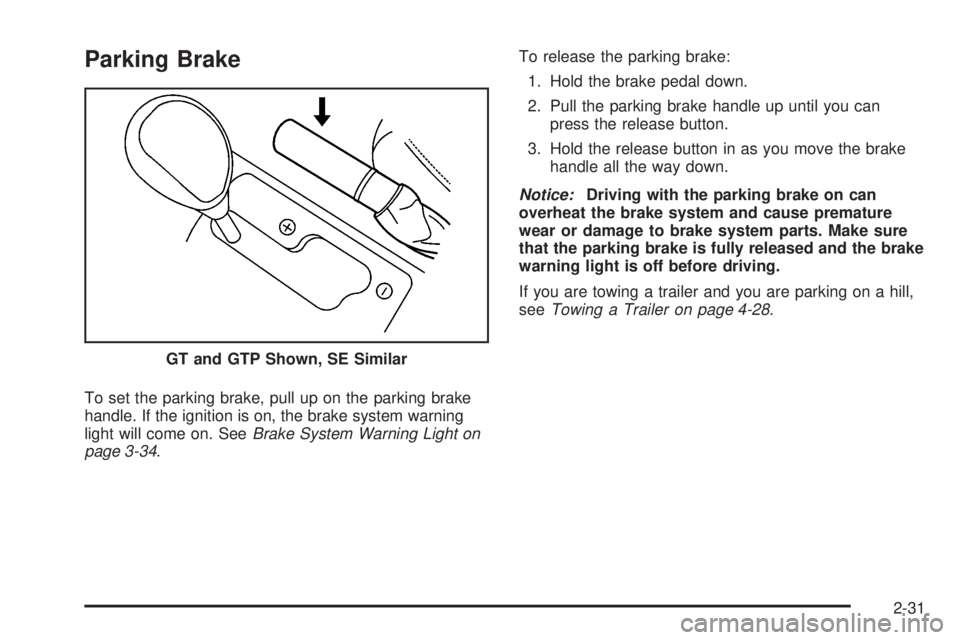
Parking Brake
To set the parking brake, pull up on the parking brake
handle. If the ignition is on, the brake system warning
light will come on. SeeBrake System Warning Light on
page 3-34.To release the parking brake:
1. Hold the brake pedal down.
2. Pull the parking brake handle up until you can
press the release button.
3. Hold the release button in as you move the brake
handle all the way down.
Notice:Driving with the parking brake on can
overheat the brake system and cause premature
wear or damage to brake system parts. Make sure
that the parking brake is fully released and the brake
warning light is off before driving.
If you are towing a trailer and you are parking on a hill,
seeTowing a Trailer on page 4-28.
GT and GTP Shown, SE Similar
2-31
Page 117 of 408
Mirrors
Manual Rearview Mirror
When you are sitting in a comfortable driving position,
adjust the mirror so you can see clearly behind your
vehicle. Grip the mirror in the center to move it up
or down and side to side. The day/night adjustment
allows you to adjust the mirror to avoid glare from the
lamps behind you. Move the lever to the right for
nighttime use and to the left for daytime use.
Manual Rearview Mirror with
OnStar
®
Your vehicle may have a rearview mirror with the
OnStar®system.
Control buttons for the OnStar system are at the bottom
of the mirror. See your dealer/retailer for more
information on the OnStar system and how to subscribe
to OnStar. Also, seeOnStar
®System on page 2-41
for more information about the services OnStar provides.
Mirror Operation
The manual mirror operation works the same as the
manual mirror described previously, with the exception
that the mirror has OnStar.
Automatic Dimming Rearview Mirror
with OnStar
®and Compass
Your vehicle may have an automatic dimming rearview
mirror with a compass and OnStar®controls. For
more information about OnStar, seeOnStar®System on
page 2-41.
The automatic dimming feature turns on each time the
vehicle is started. To turn automatic dimming off or
on, press the left button below the mirror. A green
indicator light will be on when automatic dimming is on.
There are also three OnStar buttons located at the
bottom of the mirror. See your dealer/retailer for more
information on the system and how to subscribe to
OnStar. SeeOnStar
®System on page 2-41for more
information about the service OnStar provides.
Compass Operation
Press the on/off button once to turn the compass on
or off.
When the ignition and the compass feature are on, the
compass will show two character boxes for a few
seconds. After a few seconds, the mirror will display the
current compass direction.
2-37
Page 119 of 408
Automatic Dimming Rearview Mirror
with Compass
Your vehicle may have an automatic dimming rearview
mirror with a compass. This feature enables the
mirror to sense nighttime glare from vehicle headlamps
from behind and automatically dim to reduce the
glare to a safe level.
The automatic dimming feature turns on each time the
vehicle is started. Press the OFF button once and
the green indicator light located to the left of the button
will go out indicating the feature is off. To turn the
feature back on, press and release the AUTO button
and the green indicator light will come on.
Compass Operation
Press the on/off button once to turn the compass on
or off.
When the ignition and the compass feature are on, the
compass will show two character boxes for a few
seconds. After a few seconds, the mirror will display the
current compass direction.
Compass Calibration
If after a few seconds the display does not show a
compass direction, (N for North for example), there may
be a strong magnetic eld interfering with the compass.
Such interference may be caused by a magnetic
antenna mount, note pad holder, or similar object. If the
letter C appears in the compass window, the compass
may need to be reset or calibrated.
The mirror can be calibrated by driving the vehicle in
circles at 5 mph (8 km/h) or less until the display reads a
direction.
Compass Variance
Compass variance is the difference between earth’s
magnetic north and true geographic north. If the mirror
is not adjusted for compass variance, the compass
could give false readings.
The mirror is set in zone eight upon leaving the factory.
It will be necessary to adjust the compass to
compensate for compass variance if the vehicle is
driven outside zone eight. Under certain circumstances,
such as a long distance, cross-country trip, it will be
necessary to adjust the compass variance.
2-39
Page 124 of 408

Location information about your vehicle is only available
if the GPS satellite signals are unobstructed and
available.
Your vehicle must have a working electrical system
(including adequate battery power) for the OnStar
equipment to operate. There are other problems OnStar
cannot control that may prevent OnStar from providing
OnStar service to you at any particular time or place.
Some examples are damage to important parts of your
vehicle in an accident, hills, tall buildings, tunnels,
weather or wireless phone network congestion.
Your Responsibility
Increase the radio volume if you cannot hear the OnStar
advisor. If the light next to the OnStar buttons is red,
this means that your system is not functioning properly
and should be checked by a dealer/retailer. If the
light appears clear (no light is appearing), your OnStar
subscription has expired. You can always press the
OnStar button to conrm that your OnStar equipment is
active.
Storage Areas
Glove Box
To open the glove box, lift up on the lever.
Cupholder(s)
There are two cupholders in the front center console of
the vehicle and two in the rear of the center console.
Pull down the door on the rear of the center console to
use the rear seat cupholders.
Center Console Storage
The center console has a separate storage area. To
open the compartment, which is also the armrest, pull up
the latch release handle on the front of the lid.
In the oor console is a power accessory outlet. See
Accessory Power Outlet(s) on page 3-18for more
information.
Convenience Net
Your vehicle may have a convenience net in the rear of
the vehicle. Store small loads as far forward as possible.
The net should not be used to store heavy loads.
2-44
Page 133 of 408
Instrument Panel Overview...............................3-4
Hazard Warning Flashers................................3-6
Other Warning Devices...................................3-6
Horn.............................................................3-6
Tilt Wheel.....................................................3-6
Turn Signal/Multifunction Lever.........................3-7
Turn and Lane-Change Signals........................3-8
Headlamp High/Low-Beam Changer..................3-8
Flash-to-Pass.................................................3-8
Windshield Wipers..........................................3-9
Windshield Washer.......................................3-10
Cruise Control..............................................3-10
Headlamps..................................................3-13
Headlamps on Reminder................................3-14
Headlamps Off in PARK (P)...........................3-14
Delayed Headlamps......................................3-14
Daytime Running Lamps (DRL).......................3-14
Automatic Headlamp System..........................3-15
Fog Lamps..................................................3-16
Instrument Panel Brightness...........................3-16
Courtesy Lamps...........................................3-16
Dome Lamp.................................................3-17
Entry/Exit Lighting.........................................3-17
Parade Dimming...........................................3-17Overhead Console Reading Lamps.................3-17
Trunk Lamp.................................................3-17
Battery Run-Down Protection..........................3-18
Accessory Power Outlet(s).............................3-18
Climate Controls............................................3-19
Climate Control System.................................3-19
Automatic Climate Control System...................3-23
Outlet Adjustment.........................................3-26
Warning Lights, Gages, and Indicators............3-27
Instrument Panel Cluster...............................
.3-28
Speedometer and Odometer...........................3-29
Trip Odometer..............................................3-29
Tachometer.................................................3-29
Safety Belt Reminders...................................3-30
Airbag Readiness Light..................................3-30
Passenger Airbag Status Indicator...................3-31
Charging System Light..................................3-33
Brake System Warning Light..........................3-34
Antilock Brake System Warning Light...............3-35
Traction Control System (TCS)
Warning Light...........................................3-35
Traction Control System (TCS) Active Light......3-36
StabiliTrak
®Not Ready Light..........................3-36
Section 3 Instrument Panel
3-1
Page 134 of 408
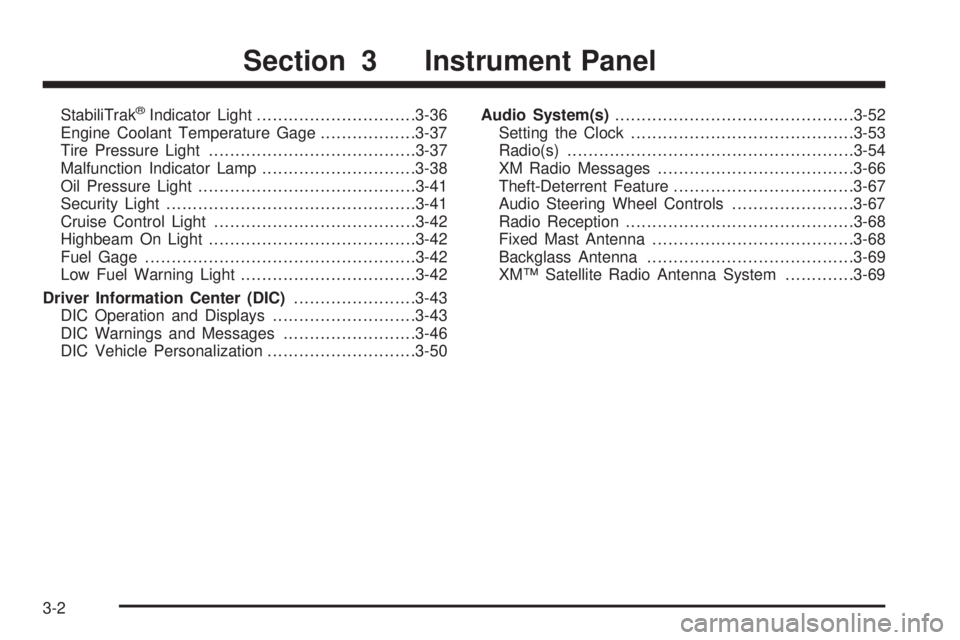
StabiliTrak®Indicator Light..............................3-36
Engine Coolant Temperature Gage..................3-37
Tire Pressure Light.......................................3-37
Malfunction Indicator Lamp.............................3-38
Oil Pressure Light.........................................3-41
Security Light...............................................3-41
Cruise Control Light......................................3-42
Highbeam On Light.......................................3-42
Fuel Gage...................................................3-42
Low Fuel Warning Light.................................3-42
Driver Information Center (DIC).......................3-43
DIC Operation and Displays...........................3-43
DIC Warnings and Messages.........................3-46
DIC Vehicle Personalization............................3-50Audio System(s).............................................3-52
Setting the Clock..........................................3-53
Radio(s)......................................................3-54
XM Radio Messages.....................................3-66
Theft-Deterrent Feature..................................3-67
Audio Steering Wheel Controls.......................3-67
Radio Reception...........................................3-68
Fixed Mast Antenna......................................3-68
Backglass Antenna.......................................3-69
XM™ Satellite Radio Antenna System.............3-69
Section 3 Instrument Panel
3-2
Page 140 of 408

Turn and Lane-Change Signals
The turn signal has two upward (for right) and two
downward (for left) positions. These positions let you
signal a turn or a lane change.
To signal a turn, move the lever all the way up or down.
When the turn is nished, the lever returns automatically
to the normal position.
An arrow on the instrument
panel cluster ashes in the
direction of the turn or
lane change.
To signal a lane change, raise or lower the lever until
the arrow starts to ash. Hold it there until you complete
your lane change. The lever returns by itself when it
is released.
If the arrows ash rapidly or do not go on at all as you
signal a turn or lane change, a signal bulb could be
burned out and other drivers will not see your turn
signal.
Replace burned out bulbs to help avoid an accident.
Also, check the appropriate fuses. SeeFuses on
page 5-110.
Headlamp High/Low-Beam Changer
To change the headlamps from low beam to high beam,
push the turn signal/multifunction lever away from you.
This light comes on in the
instrument panel cluster if
the high beam lamps
are turned on while the
ignition is in ON/RUN.
To change the headlamps from high beam to low beam,
pull the turn signal lever toward you.
Flash-to-Pass
This feature lets you use your high-beam headlamps to
signal a driver in front of you that you want to pass.
To use it, pull the turn signal/multifunction lever toward
you until the high-beam headlamps come on, then
release the lever to turn them off.
3-8
Page 143 of 408

Setting Cruise Control
{CAUTION:
If you leave your cruise control on when you
are not using cruise, you might hit a button
and go into cruise when you do not want to.
You could be startled and even lose control.
Keep the cruise control switch off until you
want to use cruise control.
The cruise control buttons
are located on the steering
wheel.
J(On/Off):Press this button to turn the cruise
control system on and off.RES+ (Resume):Press this button to resume a set
speed and to accelerate the speed.
SET−(Set):Press this button to set a speed and to
decrease the speed.
[(Cancel):Press this button to cancel cruise control.
To set a speed do the following:
1. Press the on/off symbol to turn cruise control on.
The indicator light on the button comes on.
2. Get to the speed you want.
3. Press the SET−symbol and release it. The cruise
symbol displays in the instrument panel cluster to
show the system is engaged.
4. Take your foot off the accelerator pedal.
When the brakes are applied, the cruise control
shuts off.
If the vehicle is in cruise control and the Traction
Control System (TCS) or Enhanced Traction System
(ETS) begins to limit wheel spin, the cruise control
automatically disengages. SeeTraction Control System
(TCS) on page 4-5. When road conditions allow, the
cruise control can be used again.
3-11
Page 145 of 408

Ending Cruise Control
There are three ways to disengage the cruise control:
Step lightly on the brake pedal.
Press the on/off button.
Press the cancel button.
The cruise symbol in the instrument panel cluster turns
off when the system is disengaged.
Erasing Speed Memory
The cruise control set speed memory is erased when
the cruise control or the ignition is turned off.
Headlamps
The band on the lever on the outboard side of the
steering column operates the exterior lamps.
The exterior lamp control has the following four
positions:
2(Headlamps):Turn the band to this position to turn
on the headlamps, parking lamps, and taillamps.
;(Parking Lamps):Turn the band to this position to
turn on the parking lamps and taillamps only.
AUTO (Automatic Headlamp System):Turn the band
to this position to automatically turn on the Daytime
Running Lamps during daytime, and the headlamps,
parking lamps, and taillamps at night.
3-13
Page 146 of 408

P(Off/On):Turn the band to this position to turn on
the Automatic Headlamp System. In Canada, this
position only works when a vehicle is in the PARK (P)
position.
To turn on the Automatic Headlamp System, turn the
switch to off/on. To turn them off, turn the switch to off/on
again. This is a momentary control switch that springs
back when released. The Automatic Headlamp System
always turns on at the beginning of an ignition cycle.
Headlamps on Reminder
A reminder tone sounds when the headlamps or parking
lamps are manually turned on, if the driver’s door is
open and the ignition is in the LOCK/OFF or ACC/
ACCESSORY position. To turn the tone off, turn the
knob all the way counterclockwise. In the automatic
mode, the headlamps turn off once the ignition key is in
the LOCK/OFF position.
Headlamps Off in PARK (P)
This feature works when the ignition is in the ON/RUN
position and it is dark outside. To turn the headlamps
off when it is dark outside but keep other exterior lights
on, turn the exterior lamp control to the parking lamp
position. In this position, the parking lamps, sidemarker
lamps, taillamps, license plate lamps and instrument
panel lights are on, but the headlamps are off.To turn on the headlamps along with the other lamps
when it is dark outside, turn the exterior lamp control to
the AUTO or headlamp position.
This feature will not work for Canadian vehicles.
Delayed Headlamps
The delayed headlamps feature keeps the headlamps
on for 20 seconds after the key is turned to LOCK/OFF,
then the headlamps automatically turn off.
To override the 20 second delayed headlamp feature
while it is active turn the turn signal/multifunction
lever up one position and then back to AUTO.
Daytime Running Lamps (DRL)
Daytime Running Lamps (DRL) can make it easier for
others to see the front of your vehicle during the
day. DRL are helpful in many different driving conditions,
but they can be especially helpful in the short periods
after dawn and before sunset. Fully functional DRL
are required on all vehicles rst sold in Canada. The
vehicle has a light sensor on top of the instrument panel
that controls the DRL. Make sure it is not covered, or
the head lamps will be on when they are not needed.
3-14