fuel PONTIAC G6 2009 User Guide
[x] Cancel search | Manufacturer: PONTIAC, Model Year: 2009, Model line: G6, Model: PONTIAC G6 2009Pages: 410, PDF Size: 2.33 MB
Page 175 of 410
ENTER/r(Enter):Press this button to select a
menu option or to acknowledge a warning message.
The DIC messages will be read through your audio
system display.
DIC Operation and Displays
The DIC comes on when the ignition is on. If your
vehicle has the uplevel audio system, the time and
outside temperature is shown on the rst line of
the display and the DIC information is shown on the
second line of the display.
The DIC has different modes which can be accessed by
pressing the DIC buttons. The button functions are
detailed in the following section.
Information Modes
INFO/4(Information):Press this button to scroll
through the vehicle information mode displays in the
following order:
TRIP A
TRIP B
FUEL RANGE (Fuel Range Until Empty)
MPG (L/100 KM) AVG (Average Fuel Economy)
MPG (L/100 KM) INST (Instantaneous Fuel
Economy)
AV SPEED (Average Vehicle Speed)
OIL LIFE (Engine Oil Life System)
Tire Pressure
TRIP A or TRIP B:Press the information button until
TRIP A or TRIP B display. These modes show the
current distance traveled since the last reset for each
trip odometer in either miles (mi) or kilometers (km).
Both odometers can be used at the same time.
To reset the trip odometer to zero, press and hold the
enter button for a few seconds while the desired
trip odometer is displayed.
FUEL RANGE:Press the information button until FUEL
RANGE displays. This mode shows the remaining
distance you can drive without refueling in either miles
(mi) or kilometers (km). It is based on fuel economy
and the fuel remaining in the tank.
When the fuel level is low, FUEL RANGE LOW displays.
The fuel economy data used to determine fuel range
is an average of recent driving conditions. As your
driving conditions change, this data is gradually updated.
The FUEL RANGE mode cannot be reset.
3-43
Page 176 of 410
MPG (L/100 KM) AVG (Average):Press the
information button until MPG (L/100 KM) AVG displays.
This mode shows how many miles per gallon (mpg)
or liters per 100 kilometers (L/100 km) your vehicle is
getting based on current and past driving conditions.
To reset the average fuel economy, press and hold the
enter button while MPG (L/100 KM) AVG is displayed.
Average fuel economy is then be calculated starting
from that point. If the average fuel economy is not reset,
it is continually updated each time you drive.
MPG (L/100 KM) INST (Instantaneous):Press the
information button until MPG (L/100 KM) INST displays.
This mode shows the current fuel economy at a
particular moment and changes frequently as driving
conditions change. This mode shows the instantaneous
fuel economy in miles per gallon (mpg) or liters per
100 kilometers (L/100 km). Unlike average fuel
economy, this screen cannot be reset.
AV (Average) SPEED:Press the information button
until AV SPEED displays. This mode shows the vehicle’s
average speed in miles per hour (mph) or kilometers
per hour (km/h).
To reset the average vehicle speed, press and hold the
enter button while AV SPEED is displayed.OIL LIFE:Press the information button until OIL LIFE
displays. The engine oil life system shows an estimate of
the oil’s remaining useful life. It shows 100% when
the system is reset after an oil change. It alerts you to
change the oil on a schedule consistent with your driving
conditions.
In addition to the engine oil life system monitoring the oil
life, additional maintenance is recommended in the
Maintenance Schedule in this manual. SeeScheduled
Maintenance on page 6-4andEngine Oil on page 5-21.
Always reset the engine oil life system after an oil
change. See “How to Reset the Engine Oil Life System”
underEngine Oil Life System on page 5-24.
Tire Pressure:On vehicles with the Tire Pressure
Monitor System (TPMS), the pressure for each tire can
be viewed in the DIC. The tire pressure is shown in
either pounds per square inch (psi) or kilopascals (kPa).
Press the information button until LF ## PSI (kPa) ## RF
displays for the front tires. Press the information
button again until LR ## PSI (kPa) ## RR displays for
the rear tires.
If a low tire pressure condition is detected by the system
while driving, a message advising you to check the tire
pressure appears in the display. SeeInflation - Tire
Pressure on page 5-67andDIC Warnings and Messages
on page 3-46for more information.
3-44
Page 178 of 410
DIC Warnings and Messages
These messages appear if there is a problem detected
in one of your vehicle’s systems.
A message clears when the vehicle’s condition is no
longer present. To acknowledge a message and clear it
from the display, press and hold any of the DIC buttons.
If the condition is still present, the warning message
comes back on the next time the vehicle is turned
off and back on. With most messages, a warning chime
sounds when the message displays. Your vehicle
may have other warning messages.
AUTO (Automatic) LIGHTS OFF
This message displays if the automatic headlamp
system is disabled with the headlamp switch.
AUTO (Automatic) LIGHTS ON
This message displays if the automatic headlamp
system is enabled with the headlamp switch.
BRAKE FLUID
This message displays, while the ignition is on, when
the brake uid level is low. The brake system warning
light on the instrument panel cluster also comes on.
SeeBrake System Warning Light on page 3-34for more
information. Have the brake system serviced by your
dealer/retailer as soon as possible.
CHANGE OIL SOON
This message displays when the life of the engine oil
has expired and it should be changed.
When this message is acknowledged and cleared from
the display, the engine oil life system must still be
reset separately. SeeEngine Oil Life System on
page 5-24,Engine Oil on page 5-21, andScheduled
Maintenance on page 6-4for more information.
CHECK CARGO TOP
If your vehicle has a retractable hardtop, this message
displays if the cargo cover is not in place when operating
the retractable hardtop. Open the trunk and make sure
the cargo cover is secure and no objects are in contact
with the cover. SeeTrunk on page 2-12,Lowering the
Retractable Hardtop on page 2-44, andRaising the
Retractable Hardtop on page 2-47for more information.
CHECK GAS CAP
This message displays if the fuel cap has not been fully
tightened. Recheck the fuel cap to make sure that it
is on properly. A few driving trips with the cap properly
installed should turn the message off.
3-46
Page 180 of 410
LEARN COMPLETE
On vehicles without the Remote Keyless Entry (RKE)
system, this message displays when the Tire Pressure
Monitor System (TPMS) has completed the tire
learning process. SeeTire Pressure Monitor System
on page 5-69for more information.
LOW FUEL
This message displays along with a low fuel warning
light on the instrument panel cluster when your vehicle is
low on fuel. Rell the fuel tank as soon as possible.
SeeLow Fuel Warning Light on page 3-42,Fuel
on page 5-6, andFilling the Tank on page 5-10.
LOW WASHER FLUID
This message displays when the vehicle’s windshield
washer uid is low. Fill the windshield washer uid
reservoir to the proper level as soon as possible.
SeeWindshield Washer Fluid on page 5-40.
PARKING BRAKE
This message displays if the parking brake is left
engaged and you try to drive away. SeeParking Brake
on page 2-31for more information.
POWER STEERING
This message displays if a problem has been detected
with the electric power steering, if your vehicle has
this feature. Have your vehicle serviced immediately by
your dealer/retailer.
SERVICE AIR BAG
This message displays when there is a problem with the
airbag system. Have your vehicle serviced by your
dealer/retailer immediately.
SVC (Service) TIRE MONITOR
On vehicles with the Tire Pressure Monitor System
(TPMS), this message displays if a part on the TPMS is
not working properly. The tire pressure light also ashes
and then remains on during the same ignition cycle. See
Tire Pressure Light on page 3-37. Several conditions may
cause this message to appear. SeeTire Pressure Monitor
Operation on page 5-71for more information. If the
warning comes on and stays on, there may be a problem
with the TPMS. See your dealer/retailer.
3-48
Page 182 of 410
TOP TOO COLD
If your vehicle has a retractable hardtop, this message
displays when the retractable hardtop button is
pressed and the hardtop pump motor temperature is
too cold. Wait for the hardtop pump motor to warm up
before using the retractable hardtop. SeeLowering
the Retractable Hardtop on page 2-44andRaising the
Retractable Hardtop on page 2-47for more information.
TRUNK AJAR
This message displays when the trunk is not closed
completely. Make sure that the trunk is closed
completely. SeeTrunk on page 2-12for more
information.
DIC Vehicle Personalization
The following personalization options may appear on your
vehicle’s audio display by pressing the MENU button.
The default settings for the features were set when your
vehicle left the factory, but may have been changed
from their default state since that time.
OIL LIFE RESET:When this option is displayed, you
can reset the engine oil life system. To reset the system,
seeEngine Oil Life System on page 5-24.UNITS:When UNITS appears on the display, press the
enter button to move between METRIC (default in
Canada) or ENGLISH (default in United States).
When you have made your choice, press the MENU
button to record your selection.
If you choose English, all information will be displayed
in English units.
If you choose metric, all information will be displayed in
metric units.
The unit measurement will also change the trip odometer,
temperature, and average fuel economy displays.
TIRE LEARN?:This option is available on vehicles
without the Remote Keyless Entry (RKE) system.
After rotating the tires or after replacing a tire or sensor,
the Tire Pressure Monitor System (TPMS) must
re-learn the tire positions. To re-learn the tire positions,
seeTire Pressure Monitor System on page 5-69.
SeeTire Inspection and Rotation on page 5-76and
DIC Warnings and Messages on page 3-46for more
information.
REMOTE START:If your vehicle has this feature,
the remote start option can be enabled or disabled.
When REMOTE START appears on the display, press
the enter button to move between OFF and ON
(default). When you have made your choice, press the
MENU button to record your selection.
3-50
Page 203 of 410
Your Driving, the Road, and the Vehicle............4-2
Driving for Better Fuel Economy.......................4-2
Defensive Driving...........................................4-2
Drunk Driving.................................................4-3
Control of a Vehicle........................................4-3
Braking.........................................................4-4
Antilock Brake System (ABS)...........................4-5
Braking in Emergencies...................................4-6
StabiliTrak
®System........................................4-6
Traction Control System (TCS).........................4-7
Steering........................................................4-9
Off-Road Recovery.......................................4-11
Passing.......................................................4-11
Loss of Control.............................................4-11Driving at Night............................................4-13
Driving in Rain and on Wet Roads..................4-14
Before Leaving on a Long Trip.......................4-15
Highway Hypnosis........................................4-15
Hill and Mountain Roads................................4-16
Winter Driving..............................................4-17
If Your Vehicle is Stuck in Sand, Mud, Ice,
or Snow...................................................4-19
Rocking Your Vehicle to Get It Out.................4-20
Loading the Vehicle......................................4-20
Towing..........................................................4-26
Towing Your Vehicle.....................................4-26
Recreational Vehicle Towing...........................4-26
Towing a Trailer...........................................4-30
Section 4 Driving Your Vehicle
4-1
Page 204 of 410
Your Driving, the Road, and
the Vehicle
Driving for Better Fuel Economy
Driving habits can affect fuel mileage. Here are some
driving tips to get the best fuel economy possible.
Avoid fast starts and accelerate smoothly.
Brake gradually and avoid abrupt stops.
Avoid idling the engine for long periods of time.
When road and weather conditions are appropriate,
use cruise control, if equipped.
Always follow posted speed limits or drive more
slowly when conditions require.
Keep vehicle tires properly inated.
Combine several trips into a single trip.
Replace the vehicle’s tires with the same TPC Spec
number molded into the tire’s sidewall near the size.
Follow recommended scheduled maintenance.
Defensive Driving
Defensive driving means “always expect the
unexpected.” The rst step in driving defensively is to
wear your safety belt — SeeSafety Belts: They Are for
Everyone on page 1-14.
{CAUTION:
Assume that other road users (pedestrians,
bicyclists, and other drivers) are going to be
careless and make mistakes. Anticipate what they
might do and be ready. In addition:
Allow enough following distance between you
and the driver in front of you.
Focus on the task of driving.
Driver distraction can cause collisions resulting in
injury or possible death. These simple defensive
driving techniques could save your life.
4-2
Page 217 of 410
Before Leaving on a Long Trip
To prepare your vehicle for a long trip, consider having
it serviced by your dealer/retailer before departing.
Things to check on your own include:
Windshield Washer Fluid:Reservoir full? Windows
clean — inside and outside?
Wiper Blades:In good shape?
Fuel, Engine Oil, Other Fluids:All levels checked?
Lamps:Do they all work and are lenses clean?
Tires:Are treads good? Are tires inated to
recommended pressure?
Weather and Maps:Safe to travel? Have
up-to-date maps?
Highway Hypnosis
Always be alert and pay attention to your surroundings
while driving. If you become tired or sleepy, nd a
safe place to park your vehicle and rest.
Other driving tips include:
Keep the vehicle well ventilated.
Keep interior temperature cool.
Keep your eyes moving — scan the road ahead
and to the sides.
Check the rearview mirror and vehicle instruments
often.
4-15
Page 221 of 410

To save fuel, run the engine for only short periods as
needed to warm the vehicle and then shut the engine
off and close the window most of the way to save heat.
Repeat this until help arrives but only when you feel really
uncomfortable from the cold. Moving about to keep warm
also helps.
If it takes some time for help to arrive, now and then
when you run the engine, push the accelerator
pedal slightly so the engine runs faster than the idle
speed. This keeps the battery charged to restart
the vehicle and to signal for help with the headlamps.
Do this as little as possible to save fuel.
If Your Vehicle is Stuck in Sand,
Mud, Ice, or Snow
Slowly and cautiously spin the wheels to free the
vehicle when stuck in sand, mud, ice, or snow.
SeeRocking Your Vehicle to Get It Out on page 4-20.If the vehicle has a traction system, it can often help to
free a stuck vehicle. Refer to the vehicle’s traction
system in the Index. If stuck too severely for the traction
system to free the vehicle, turn the traction system off
and use the rocking method.
{CAUTION:
If you let your vehicle’s tires spin at high speed,
they can explode, and you or others could be
injured. The vehicle can overheat, causing an
engine compartment re or other damage. Spin the
wheels as little as possible and avoid going above
35 mph (55 km/h) as shown on the speedometer.
For information about using tire chains on the vehicle,
seeTire Chains on page 5-84.
4-19
Page 226 of 410
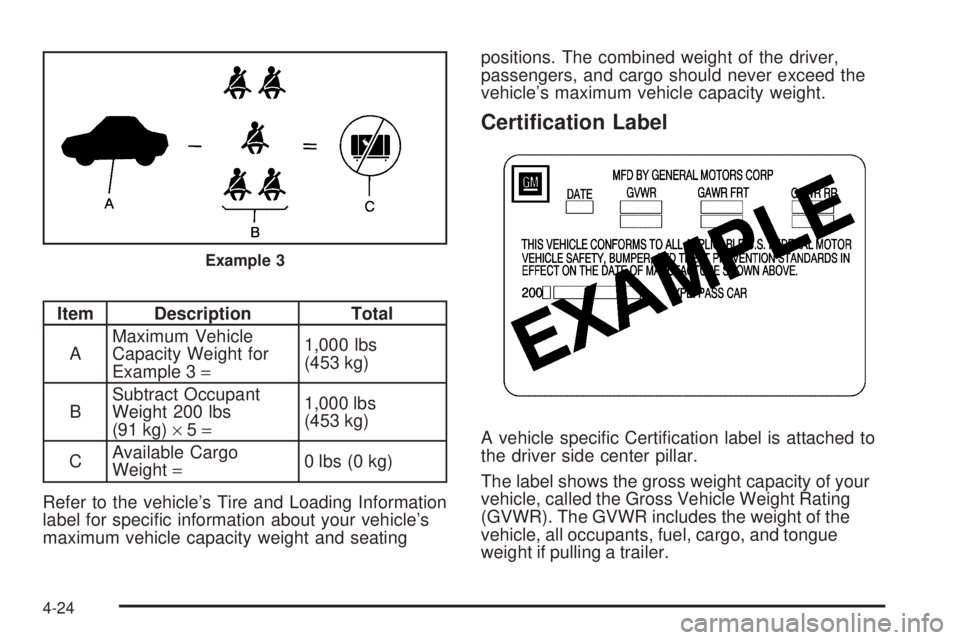
Item Description Total
AMaximum Vehicle
Capacity Weight for
Example 3=1,000 lbs
(453 kg)
BSubtract Occupant
Weight 200 lbs
(91 kg)×5=1,000 lbs
(453 kg)
CAvailable Cargo
Weight=0 lbs (0 kg)
Refer to the vehicle’s Tire and Loading Information
label for specic information about your vehicle’s
maximum vehicle capacity weight and seatingpositions. The combined weight of the driver,
passengers, and cargo should never exceed the
vehicle’s maximum vehicle capacity weight.
Certication Label
A vehicle specic Certication label is attached to
the driver side center pillar.
The label shows the gross weight capacity of your
vehicle, called the Gross Vehicle Weight Rating
(GVWR). The GVWR includes the weight of the
vehicle, all occupants, fuel, cargo, and tongue
weight if pulling a trailer.
Example 3
4-24