tow PONTIAC G6 2009 User Guide
[x] Cancel search | Manufacturer: PONTIAC, Model Year: 2009, Model line: G6, Model: PONTIAC G6 2009Pages: 410, PDF Size: 2.33 MB
Page 109 of 410

Press the shift lever button and then move the shift lever
into another gear. SeeShifting Out of Park on page 2-34
later in this section.
R (Reverse):Use this gear to back up.
Notice:Shifting to R (Reverse) while the vehicle is
moving forward could damage the transmission.
The repairs would not be covered by the vehicle
warranty. Shift to R (Reverse) only after the vehicle
is stopped.
To rock the vehicle back and forth to get out of snow,
ice, or sand without damaging the transmission, seeIf
Your Vehicle is Stuck in Sand, Mud, Ice, or Snow on
page 4-19.
N (Neutral):In this position, the engine does not
connect with the wheels. To restart the engine when
the vehicle is already moving, use N (Neutral) only.
Also, use N (Neutral) when the vehicle is being towed.
{CAUTION:
Shifting into a drive gear while the engine is
running at high speed is dangerous. Unless your
foot is rmly on the brake pedal, the vehicle could
move very rapidly. You could lose control and hit
people or objects. Do not shift into a drive gear
while the engine is running at high speed.
Notice:Shifting out of P (Park) or N (Neutral) with
the engine running at high speed may damage the
transmission. The repairs would not be covered
by the vehicle warranty. Be sure the engine is not
running at high speed when shifting the vehicle.
D (Drive):This position is for normal driving. It provides
the best fuel economy. If you need more power for
passing, and you are:
Going less than 35 mph (55 km/h), push the
accelerator pedal about halfway down.
Going about 35 mph (55 km/h) or more, push the
accelerator all the way down.
2-27
Page 110 of 410
Downshifting the transmission in slippery road conditions
could result in skidding, see “Skidding” underLoss of
Control on page 4-11.
Notice:If your vehicle seems to accelerate slowly
or not shift gears when you go faster, and you
continue to drive your vehicle that way, you could
damage the transmission. Have your vehicle serviced
right away. You can drive in L (Low) when you are
driving less than 35 mph (56 km/h) and D (Drive)
for higher speeds until then.
3 (Third):This position is also used for normal driving.
However, it reduces vehicle speed more than D (Drive)
without using the brakes. Here are some times you
might choose 3 (Third) instead of D (Drive):
When driving on hilly, winding roads.
When towing a trailer, so there is less shifting
between gears.
When going down a steep hill.
L (Low):This position reduces vehicle speed more
than 3 (Third) without using the brakes. You can
use L (Low) on hills. It can help control vehicle speed
going down steep mountain roads along with using
the brakes off and on.You can use L (Low) on very steep hills, in deep snow
or mud. If the shift lever is in L (Low), the transmission
will not shift into rst gear until the vehicle is going
slowly enough.
Notice:Driving in LOW (L) for more than 25 miles
(40 km) or at speeds over 55 mph (90 km/h) may
damage the transmission. Also, shifting into LOW (L)
at speeds above 65 mph (105 km/h) can cause
damage. Drive in THIRD (3) or DRIVE (D) instead
of LOW (L).
Notice:Spinning the tires or holding the vehicle in
one place on a hill using only the accelerator pedal
may damage the transmission. The repair will not be
covered by the vehicle warranty. If you are stuck, do
not spin the tires. When stopping on a hill, use the
brakes to hold the vehicle in place.
M (Manual Mode):This position allows you to change
gears similar to a manual transmission. If the vehicle
has this feature, see Manual Shift Mode (MSM)
following.
2-28
Page 113 of 410

2 (Second)/3 (Third) Gear Start Feature
Notice:If you attempt a third gear start while
trailering or towing a heavy load, you will notice
reduced engine power. This could overheat and
damage your transmission. Do not attempt a third
gear start while trailering or towing your vehicle.
Vehicles with a 6-speed transmission allow 2 (Second)
and 3 (Third) gear starts. When accelerating the vehicle
from a stop in snowy and icy conditions, you may want to
shift into 2 (Second), or 3 (Third) gear. A higher gear, and
light application of the gas pedal, may allow you to gain
more traction on slippery surfaces.
With the MSM, the vehicle can accelerate from a stop in
2 (Second) or 3 (Third).
1. Move the shift lever from D (Drive) into the
M (Manual Mode) position.
2. With the vehicle stopped, move the lever forward
towards the + (plus) to select 2 (Second) or 3 (Third)
gear. The vehicle will start from a stop position in
2 (Second) or 3 (Third) gear.
3. Once the vehicle is moving select the desired
drive gear.
Parking Brake
To set the parking brake, pull up on the parking brake
handle. If the ignition is on, the brake system warning
light will come on. SeeBrake System Warning Light
on page 3-34. GT and GTP Shown, SE Similar
2-31
Page 114 of 410

To release the parking brake:
1. Hold the brake pedal down.
2. Pull the parking brake handle up until you can
press the release button.
3. Hold the release button in as you move the brake
handle all the way down.
Notice:Driving with the parking brake on can
overheat the brake system and cause premature
wear or damage to brake system parts. Make sure
that the parking brake is fully released and the brake
warning light is off before driving.
If you are towing a trailer and you are parking on a hill,
seeTowing a Trailer on page 4-30.Shifting Into Park
{CAUTION:
It can be dangerous to get out of the vehicle if
the shift lever is not fully in P (Park) with the parking
brake rmly set. The vehicle can roll. If you have left
the engine running, the vehicle can move suddenly.
You or others could be injured. To be sure the
vehicle will not move, even when you are on fairly
level ground, use the steps that follow. If you are
pulling a trailer, seeTowing a Trailer on page 4-30.
1. Hold the brake pedal down and set the parking
brake. SeeParking Brake on page 2-31for more
information.
2. Move the shift lever into P (Park) by holding in the
button on the shift lever and pushing the shift lever
all the way toward the front of the vehicle.
3. Turn the ignition key to LOCK/OFF.
4. Remove the key and take it with you. If you can
leave the vehicle with the ignition key in your
hand, the vehicle is in P (Park).
2-32
Page 118 of 410

Running the Vehicle While Parked
It is better not to park with the engine running. But if you
ever have to, here are some things to know.
{CAUTION:
Idling a vehicle in an enclosed area with poor
ventilation is dangerous. Engine exhaust may
enter the vehicle. Engine exhaust contains Carbon
Monoxide (CO) which cannot be seen or smelled.
It can cause unconsciousness and even death.
Never run the engine in an enclosed area that
has no fresh air ventilation. For more information,
seeEngine Exhaust on page 2-35.
{CAUTION:
It can be dangerous to get out of the vehicle if
the automatic transmission shift lever is not fully
in P (Park) with the parking brake rmly set. The
vehicle can roll. Do not leave the vehicle when the
engine is running unless you have to. If you have
left the engine running, the vehicle can move
suddenly. You or others could be injured. To be
sure the vehicle will not move, even when you are
on fairly level ground, always set the parking brake
and move the shift lever to P (Park).
Follow the proper steps to be sure the vehicle will not
move. SeeShifting Into Park on page 2-32.
If parking on a hill and pulling a trailer, seeTowing a
Trailer on page 4-30.
2-36
Page 121 of 410
Outside Power Mirrors
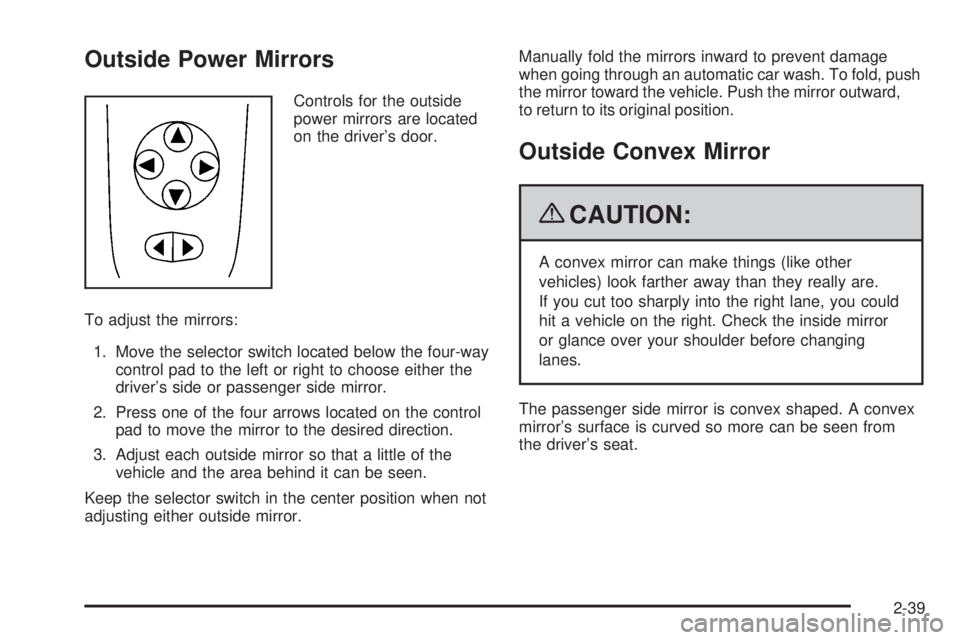
Controls for the outside
power mirrors are located
on the driver’s door.
To adjust the mirrors:
1. Move the selector switch located below the four-way
control pad to the left or right to choose either the
driver’s side or passenger side mirror.
2. Press one of the four arrows located on the control
pad to move the mirror to the desired direction.
3. Adjust each outside mirror so that a little of the
vehicle and the area behind it can be seen.
Keep the selector switch in the center position when not
adjusting either outside mirror.Manually fold the mirrors inward to prevent damage
when going through an automatic car wash. To fold, push
the mirror toward the vehicle. Push the mirror outward,
to return to its original position.
Outside Convex Mirror
{CAUTION:
A convex mirror can make things (like other
vehicles) look farther away than they really are.
If you cut too sharply into the right lane, you could
hit a vehicle on the right. Check the inside mirror
or glance over your shoulder before changing
lanes.
The passenger side mirror is convex shaped. A convex
mirror’s surface is curved so more can be seen from
the driver’s seat.
2-39
Page 129 of 410

If pressure is released from the switch before the
hardtop cycle is complete, the cycle will stop and the
Driver Information Center (DIC) will display the TOP
NOT SECURE message. Always press and hold the
switch until a chime sounds, if the engine is on, and the
Driver Information Center (DIC) displays the TOP MOVE
COMPLT to signal the procedure is complete. SeeDIC
Warnings and Messages on page 3-46for more
information.
The hardtop will not operate if the vehicle has an
electrical failure. If an electrical failure occurs, see
your dealer/retailer for service.
If your vehicle has an electrical failure while operating
the hardtop, and must be towed to a dealer/retailer for
service, your vehicle should be towed by atbed with the
vehicle facing backwards. Consult your dealer/retailer or
professional towing service if you need to have your
disabled vehicle towed. SeeRoadside Assistance
Program on page 7-7.Raising the Retractable Hardtop
1. Park on a level surface, and shift the transmission
into (P) Park. The vehicle must be in (P) Park,
and the engine must be running, or the ignition
turned to the ON/RUN position, to operate
the retractable hardtop.
2. The trunk cargo cover must be fully closed, and the
trunk must be closed before raising the hardtop.
2-47
Page 131 of 410

As the switch is being pulled, the hardtop will raise from
the trunk and move into place. The hardtop and trunk lid
will close and latch. If the engine is on, a chime will sound
when the hardtop has raised completely.
The Driver Information Center (DIC) will display the
TOP MOVE COMPLT message to signal the procedure
is complete. SeeDIC Warnings and Messages on
page 3-46for more information.After the hardtop has raised completely, release the
switch. If you continue to pull the switch for about
two seconds after the hardtop has raised completely,
the windows will automatically close.
If the switch is released before the hardtop cycle is
complete, the cycle will stop and the Driver Information
Center (DIC) will display the TOP NOT SECURE
message. Always pull and hold the switch until a chime
sounds, if the engine is on, and the Driver Information
Center (DIC) displays the TOP MOVE COMPLT to signal
the procedure is complete. SeeDIC Warnings and
Messages on page 3-46for more information.
The hardtop will not operate if the vehicle has an
electrical failure. If an electrical failure occurs, see
your dealer/retailer for service.
If your vehicle must be towed to a dealer/retailer for
service, your vehicle should be towed by atbed with the
vehicle facing backwards. Consult your dealer/retailer
or professional towing service if you need to have your
disabled vehicle towed. SeeRoadside Assistance
Program on page 7-7.
2-49
Page 140 of 410
Headlamp High/Low-Beam Changer
To change the headlamps from low beam to high beam,
push the turn signal/multifunction lever away from you.
This instrument panel cluster light
3comes on if
the high beam lamps are turned on while the ignition is
in ON/RUN.
To change the headlamps from high beam to low beam,
pull the turn signal lever toward you.
Flash-to-Pass
This feature lets the high-beam headlamps be used to
signal a driver in front of you that you want to pass.
Pull the turn signal/multifunction lever toward you until
the high-beam headlamps come on, then release
the lever to turn them off.
Windshield Wipers
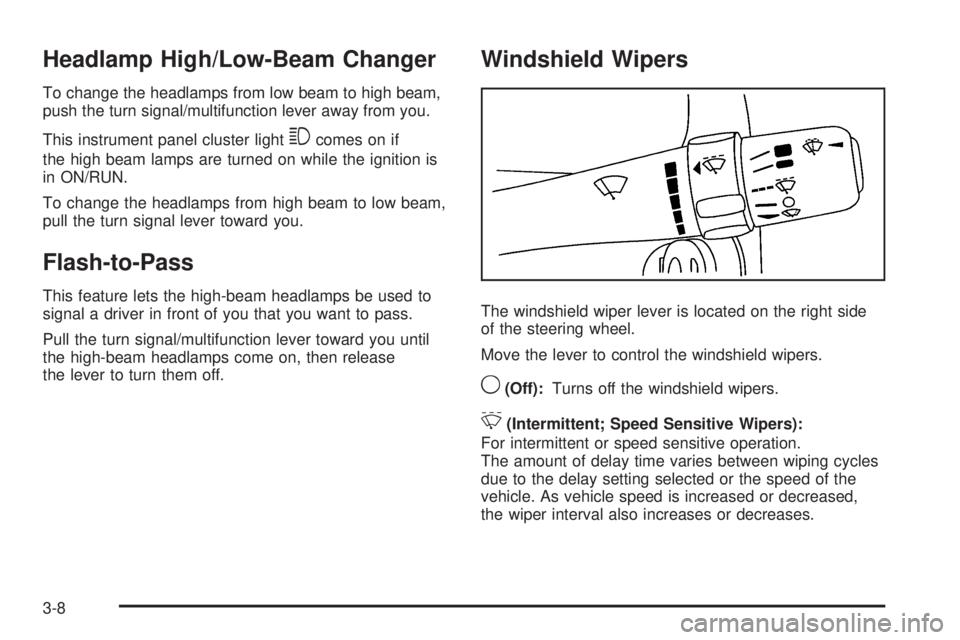
The windshield wiper lever is located on the right side
of the steering wheel.
Move the lever to control the windshield wipers.
9(Off):Turns off the windshield wipers.
&(Intermittent; Speed Sensitive Wipers):
For intermittent or speed sensitive operation.
The amount of delay time varies between wiping cycles
due to the delay setting selected or the speed of the
vehicle. As vehicle speed is increased or decreased,
the wiper interval also increases or decreases.
3-8
Page 152 of 410
Climate Controls
Climate Control System
The heating, cooling, and ventilation for the vehicle can
be controlled with this system. For vehicles with the
remote start feature, the climate control system functions
as part of the remote start feature. SeeRemote
Keyless Entry (RKE) System Operation on page 2-4.
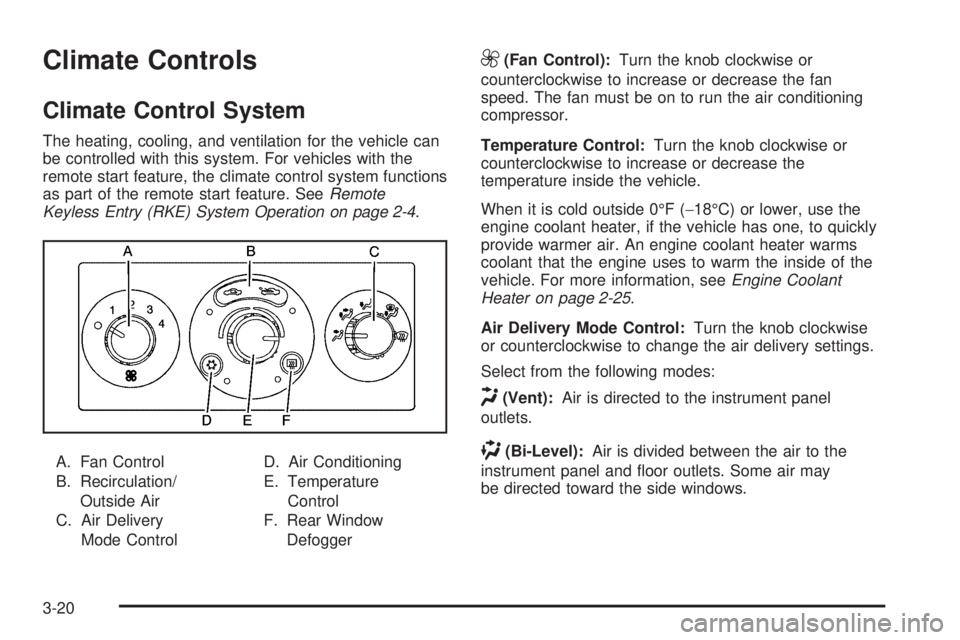
A. Fan Control
B. Recirculation/
Outside Air
C. Air Delivery
Mode ControlD. Air Conditioning
E. Temperature
Control
F. Rear Window
Defogger
9(Fan Control):Turn the knob clockwise or
counterclockwise to increase or decrease the fan
speed. The fan must be on to run the air conditioning
compressor.
Temperature Control:Turn the knob clockwise or
counterclockwise to increase or decrease the
temperature inside the vehicle.
When it is cold outside 0°F (−18°C) or lower, use the
engine coolant heater, if the vehicle has one, to quickly
provide warmer air. An engine coolant heater warms
coolant that the engine uses to warm the inside of the
vehicle. For more information, seeEngine Coolant
Heater on page 2-25.
Air Delivery Mode Control:Turn the knob clockwise
or counterclockwise to change the air delivery settings.
Select from the following modes:
H(Vent):Air is directed to the instrument panel
outlets.
)(Bi-Level):Air is divided between the air to the
instrument panel and oor outlets. Some air may
be directed toward the side windows.
3-20