trunk PONTIAC G6 2009 User Guide
[x] Cancel search | Manufacturer: PONTIAC, Model Year: 2009, Model line: G6, Model: PONTIAC G6 2009Pages: 410, PDF Size: 2.33 MB
Page 130 of 410
3. Make sure nothing or no one is on or around the
hardtop. Make sure there is no cargo on top of or
in front of the trunk cargo cover.
{CAUTION:
When the retractable hardtop is opened or closed,
people can be injured by the parts that move: the
hardtop and its mechanism, the trunk lid, and the
side windows. Keep people away from these parts
when you are lowering or raising the top.
{CAUTION:
If the retractable hardtop is not completely opened
or closed, the system will cause the retractable
hardtop to slowly descend after 3 minutes. You or
others could be injured. The retractable hardtop
will descend immediately if the ignition is turned to
LOCK/OFF during the opening or closing of the
retractable hardtop. Always completely open or
CAUTION: (Continued)
CAUTION: (Continued)
close the retractable hardtop and do not shut off
the ignition during the opening or closing of the
retractable hardtop.
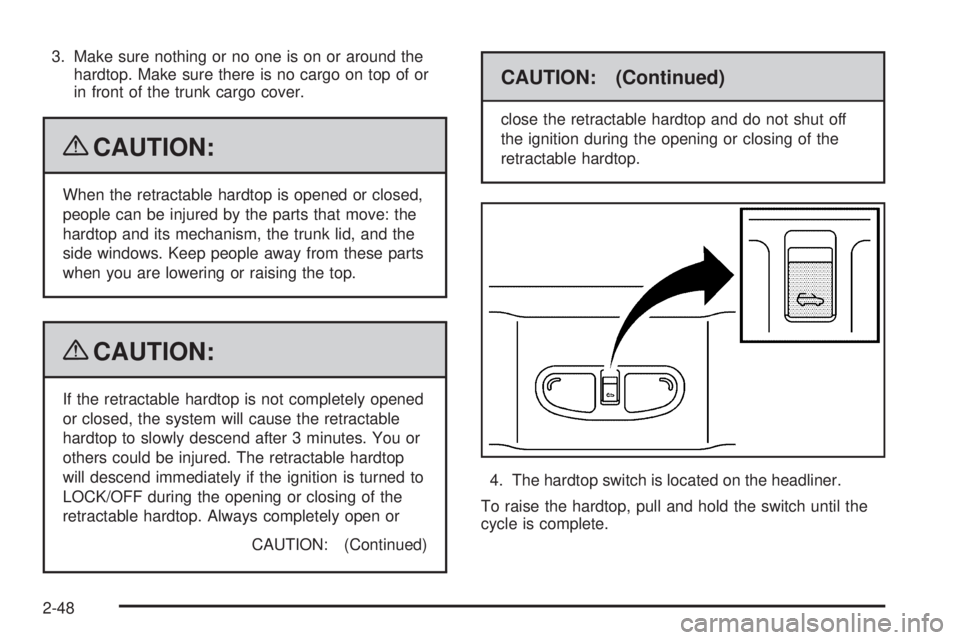
4. The hardtop switch is located on the headliner.
To raise the hardtop, pull and hold the switch until the
cycle is complete.
2-48
Page 131 of 410

As the switch is being pulled, the hardtop will raise from
the trunk and move into place. The hardtop and trunk lid
will close and latch. If the engine is on, a chime will sound
when the hardtop has raised completely.
The Driver Information Center (DIC) will display the
TOP MOVE COMPLT message to signal the procedure
is complete. SeeDIC Warnings and Messages on
page 3-46for more information.After the hardtop has raised completely, release the
switch. If you continue to pull the switch for about
two seconds after the hardtop has raised completely,
the windows will automatically close.
If the switch is released before the hardtop cycle is
complete, the cycle will stop and the Driver Information
Center (DIC) will display the TOP NOT SECURE
message. Always pull and hold the switch until a chime
sounds, if the engine is on, and the Driver Information
Center (DIC) displays the TOP MOVE COMPLT to signal
the procedure is complete. SeeDIC Warnings and
Messages on page 3-46for more information.
The hardtop will not operate if the vehicle has an
electrical failure. If an electrical failure occurs, see
your dealer/retailer for service.
If your vehicle must be towed to a dealer/retailer for
service, your vehicle should be towed by atbed with the
vehicle facing backwards. Consult your dealer/retailer
or professional towing service if you need to have your
disabled vehicle towed. SeeRoadside Assistance
Program on page 7-7.
2-49
Page 133 of 410
Instrument Panel Overview...............................3-4
Hazard Warning Flashers................................3-6
Horn .............................................................3-6
Tilt Wheel.....................................................3-6
Turn Signal/Multifunction Lever.........................3-7
Turn and Lane-Change Signals........................3-7
Headlamp High/Low-Beam Changer..................3-8
Flash-to-Pass.................................................3-8
Windshield Wipers..........................................3-8
Windshield Washer.........................................3-9
Cruise Control..............................................3-10
Headlamps..................................................3-13
Headlamps on Reminder................................3-13
Headlamps Off in Park..................................3-14
Delayed Headlamps......................................3-14
Daytime Running Lamps (DRL).......................3-14
Automatic Headlamp System..........................3-15
Fog Lamps ..................................................3-15
Instrument Panel Brightness...........................3-16
Courtesy Lamps...........................................3-16
Dome Lamps ...............................................3-16
Entry/Exit Lighting.........................................3-16
Parade Dimming...........................................3-17
Reading Lamps............................................3-17
Trunk Lamp.................................................3-17
Electric Power Management...........................3-17
Battery Run-Down Protection..........................3-18Accessory Power Outlet(s).............................3-19
Climate Controls............................................3-20
Climate Control System.................................3-20
Automatic Climate Control System...................3-24
Outlet Adjustment.........................................3-28
Warning Lights, Gages, and Indicators............3-28
Instrument Panel Cluster................................3-29
Speedometer and Odometer..........................
.3-30
Trip Odometer..............................................3-30
Tachometer.................................................3-30
Safety Belt Reminders...................................3-31
Airbag Readiness Light..................................3-32
Passenger Airbag Status Indicator...................3-33
Charging System Light..................................3-34
Brake System Warning Light..........................3-34
Antilock Brake System (ABS) Warning Light.....3-35
Traction Control System (TCS)
Warning Light...........................................3-36
Traction Control System (TCS)
Active Light..............................................3-36
StabiliTrak
®Not Ready Light..........................3-36
StabiliTrak®Indicator Light.............................3-36
Engine Coolant Temperature Gage..................3-37
Tire Pressure Light.......................................3-37
Malfunction Indicator Lamp.............................3-38
Oil Pressure Light.........................................3-40
Section 3 Instrument Panel
3-1
Page 149 of 410

Parade Dimming
Parade mode automatically prohibits the dimming of the
instrument panel displays during the daylight while
the headlamps are on so that the displays are still able
to be seen.
Reading Lamps
For vehicles with front and rear reading lamps, press
the lens to turn the lamp on and off, while the doors are
closed. These lamps come on automatically when
any door is opened.
Trunk Lamp
The trunk lamp comes on when the trunk is opened and
turns off when the trunk is closed.
Electric Power Management
The vehicle has Electric Power Management (EPM) that
estimates the battery’s temperature and state of charge.
It then adjusts the voltage for best performance and
extended life of the battery.
When the battery’s state of charge is low, the voltage
is raised slightly to quickly bring the charge back
up. When the state of charge is high, the voltage is
lowered slightly to prevent overcharging. If the vehicle
has a voltmeter gage or a voltage display on the
Driver Information Center (DIC), you may see the
voltage move up or down. This is normal. If there is a
problem, an alert will be displayed.
The battery can be discharged at idle if the electrical
loads are very high. This is true for all vehicles.
This is because the generator (alternator) may not be
spinning fast enough at idle to produce all the power that
is needed for very high electrical loads.
3-17
Page 150 of 410
A high electrical load occurs when several of the
following are on, such as: headlamps, high beams,
fog lamps, rear window defogger, climate control fan at
high speed, heated seats, engine cooling fans, trailer
loads, and loads plugged into accessory power outlets.
EPM works to prevent excessive discharge of the
battery. It does this by balancing the generator’s output
and the vehicle’s electrical needs. It can increase
engine idle speed to generate more power, whenever
needed. It can temporarily reduce the power demands of
some accessories.
Normally, these actions occur in steps or levels, without
being noticeable. In rare cases at the highest levels
of corrective action, this action may be noticeable to
the driver. If so, a Driver Information Center (DIC)
message might be displayed, such as BATTERY
SAVER ACTIVE, BATTERY VOLTAGE LOW, or
LOW BATTERY. If this message is displayed, it is
recommended that the driver reduce the electrical loads
as much as possible. SeeDIC Warnings and Messages
on page 3-46.Battery Run-Down Protection
The battery run-down feature is designed to protect the
vehicle’s battery.
When any interior lamp (trunk, reading lamps, or dome
lamp) is left on when the ignition is turned off, the
battery run-down protection system automatically shuts
the lamp off after 20 minutes. This prevents draining
of the battery.
To reactivate the interior lamps, do one of the following:
Open any door.
Press any Remote Keyless Entry (RKE) transmitter
button.
Press the power door lock switch.
Press the remote trunk release.
Turn the lamp that was left on to off and then to
on again.
3-18
Page 178 of 410
DIC Warnings and Messages
These messages appear if there is a problem detected
in one of your vehicle’s systems.
A message clears when the vehicle’s condition is no
longer present. To acknowledge a message and clear it
from the display, press and hold any of the DIC buttons.
If the condition is still present, the warning message
comes back on the next time the vehicle is turned
off and back on. With most messages, a warning chime
sounds when the message displays. Your vehicle
may have other warning messages.
AUTO (Automatic) LIGHTS OFF
This message displays if the automatic headlamp
system is disabled with the headlamp switch.
AUTO (Automatic) LIGHTS ON
This message displays if the automatic headlamp
system is enabled with the headlamp switch.
BRAKE FLUID
This message displays, while the ignition is on, when
the brake uid level is low. The brake system warning
light on the instrument panel cluster also comes on.
SeeBrake System Warning Light on page 3-34for more
information. Have the brake system serviced by your
dealer/retailer as soon as possible.
CHANGE OIL SOON
This message displays when the life of the engine oil
has expired and it should be changed.
When this message is acknowledged and cleared from
the display, the engine oil life system must still be
reset separately. SeeEngine Oil Life System on
page 5-24,Engine Oil on page 5-21, andScheduled
Maintenance on page 6-4for more information.
CHECK CARGO TOP
If your vehicle has a retractable hardtop, this message
displays if the cargo cover is not in place when operating
the retractable hardtop. Open the trunk and make sure
the cargo cover is secure and no objects are in contact
with the cover. SeeTrunk on page 2-12,Lowering the
Retractable Hardtop on page 2-44, andRaising the
Retractable Hardtop on page 2-47for more information.
CHECK GAS CAP
This message displays if the fuel cap has not been fully
tightened. Recheck the fuel cap to make sure that it
is on properly. A few driving trips with the cap properly
installed should turn the message off.
3-46
Page 181 of 410

TIRE LEARN ON
On vehicles without the Remote Keyless Entry (RKE)
system, this message displays when the Tire Pressure
Monitor System (TPMS) is re-learning the tire positions
on your vehicle. The tire positions must be re-learned
after rotating the tires or after replacing a tire or sensor.
SeeTire Inspection and Rotation on page 5-76,
Tire Pressure Monitor System on page 5-69, and
Inflation - Tire Pressure on page 5-67for more
information.
TOP INOP (Inoperative) – TRUNK
If your vehicle has a retractable hardtop, this message
displays if the trunk lid is not completely closed when
operating the retractable hardtop. Make sure that
the trunk lid is closed when operating the retractable
hardtop. SeeTrunk on page 2-12,Lowering the
Retractable Hardtop on page 2-44, andRaising the
Retractable Hardtop on page 2-47for more information.
TOP MOVE COMPLT (Complete)
If your vehicle has a retractable hardtop, this message
displays when the retractable hardtop has lowered
or raised completely. SeeLowering the Retractable
Hardtop on page 2-44andRaising the Retractable
Hardtop on page 2-47for more information.
TOP NOT ALLOWED
If your vehicle has a retractable hardtop, this message
displays if the retractable hardtop button is pressed
while the vehicle is not in P (Park). Make sure that the
vehicle is in P (Park) when operating the retractable
hardtop. SeeLowering the Retractable Hardtop
on page 2-44andRaising the Retractable Hardtop
on page 2-47for more information.
TOP NOT SECURE
If your vehicle has a retractable hardtop, this message
displays when the retractable hardtop button is
released before the top open or close operation is
complete. Press and hold the retractable hardtop button
to fully open or close the top. SeeLowering the
Retractable Hardtop on page 2-44andRaising the
Retractable Hardtop on page 2-47for more information.
TOP OVER TEMP (Temperature)
If your vehicle has a retractable hardtop, this message
displays when the retractable hardtop button is
pressed and the hardtop pump motor temperature is
too hot. Wait for the hardtop pump motor to cool down
before using the retractable hardtop. SeeLowering
the Retractable Hardtop on page 2-44andRaising the
Retractable Hardtop on page 2-47for more information.
3-49
Page 182 of 410
TOP TOO COLD
If your vehicle has a retractable hardtop, this message
displays when the retractable hardtop button is
pressed and the hardtop pump motor temperature is
too cold. Wait for the hardtop pump motor to warm up
before using the retractable hardtop. SeeLowering
the Retractable Hardtop on page 2-44andRaising the
Retractable Hardtop on page 2-47for more information.
TRUNK AJAR
This message displays when the trunk is not closed
completely. Make sure that the trunk is closed
completely. SeeTrunk on page 2-12for more
information.
DIC Vehicle Personalization
The following personalization options may appear on your
vehicle’s audio display by pressing the MENU button.
The default settings for the features were set when your
vehicle left the factory, but may have been changed
from their default state since that time.
OIL LIFE RESET:When this option is displayed, you
can reset the engine oil life system. To reset the system,
seeEngine Oil Life System on page 5-24.UNITS:When UNITS appears on the display, press the
enter button to move between METRIC (default in
Canada) or ENGLISH (default in United States).
When you have made your choice, press the MENU
button to record your selection.
If you choose English, all information will be displayed
in English units.
If you choose metric, all information will be displayed in
metric units.
The unit measurement will also change the trip odometer,
temperature, and average fuel economy displays.
TIRE LEARN?:This option is available on vehicles
without the Remote Keyless Entry (RKE) system.
After rotating the tires or after replacing a tire or sensor,
the Tire Pressure Monitor System (TPMS) must
re-learn the tire positions. To re-learn the tire positions,
seeTire Pressure Monitor System on page 5-69.
SeeTire Inspection and Rotation on page 5-76and
DIC Warnings and Messages on page 3-46for more
information.
REMOTE START:If your vehicle has this feature,
the remote start option can be enabled or disabled.
When REMOTE START appears on the display, press
the enter button to move between OFF and ON
(default). When you have made your choice, press the
MENU button to record your selection.
3-50
Page 183 of 410
LOCK HORN:If your vehicle has Remote Keyless
Entry (RKE), this option which allows the vehicle’s horn
to chirp every time the lock button on the RKE
transmitter is pressed, can be enabled or disabled.
When LOCK HORN appears on the display, press the
enter button to move between ON and OFF (default).
When you have made your choice, press the MENU
button to record your selection.
UNLOCK HORN:If your vehicle has Remote Keyless
Entry (RKE), this option which allows the vehicle’s
horn to chirp every time the unlock button on the
RKE transmitter is pressed, can be enabled or disabled.
When UNLOCK HORN appears on the display, press
the enter button to move between ON and OFF (default).
When you have made your choice, press the MENU
button to record your selection.
LIGHT FLASH:If your vehicle has Remote Keyless
Entry (RKE), this option which allows the vehicle’s
exterior perimeter lighting to ash every time the lock,
unlock, or trunk release buttons on the RKE transmitter
are pressed, can be enabled or disabled. When
LIGHT FLASH appears on the display, press the enter
button to move between OFF and ON (default).
When you have made your choice, press the MENU
button to record your selection.DELAY LOCK:The delayed locking option, which
delays the actual locking of the vehicle, can be enabled
or disabled. When DELAY LOCK appears on the
display, press the enter button to move between OFF
and ON (default). When you have made your choice,
press the MENU button to record your selection.
AUTO UNLK (Unlock):The automatic door unlocking
option, which allows the vehicle to automatically
unlock certain doors can be enabled or disabled.
When AUTO UNLK appears on the display, press the
enter button to move between ALL (default), DRIVER,
or NONE. When you have made your choice, press
the MENU button to record your selection. See
Programmable Automatic Door Unlock on page 2-10
for more information.
UNLK (Unlock):This screen displays only if DRIVER
or ALL is selected for the AUTO UNLK option.
This option determines when the automatic door
unlocking will occur, when either the key is turned to
OFF or the vehicle is shifted into P (Park). When UNLK
appears on the display, press the enter button to
move between KEY OFF and SHIFT TO P (Park)
(default). When you have made your choice,
press the MENU button to record your selection.
SeeProgrammable Automatic Door Unlock on
page 2-10for more information.
3-51
Page 227 of 410
Never exceed the GVWR for the vehicle or the
Gross Axle Weight Rating (GAWR) for either the
front or rear axle.
{CAUTION:
Do not load the vehicle any heavier than the
Gross Vehicle Weight Rating (GVWR), or
either the maximum front or rear Gross Axle
Weight Rating (GAWR). If you do, parts on the
vehicle can break, and it can change the way
your vehicle handles. These could cause you
to lose control and crash. Also, overloading
can shorten the life of the vehicle.
Notice
:Overloading your vehicle may cause
damage. Repairs would not be covered by your
warranty. Do not overload your vehicle.
If things like suitcases, tools, packages, or anything
else are put inside the vehicle, they will go as fast
as the vehicle goes. If you have to stop or turn
quickly, or if there is a crash, they will keep going.
{CAUTION:
Things you put inside the vehicle can strike
and injure people in a sudden stop or turn, or
in a crash.
Put things in the trunk of your vehicle. In
a trunk, put them as far forward as you
can. Try to spread the weight evenly.
Never stack heavier things, like
suitcases, inside the vehicle so that some
of them are above the tops of the seats.
Do not leave an unsecured child restraint
in the vehicle.
When you carry something inside the
vehicle, secure it whenever you can.
Do not leave a seat folded down unless
you need to.
4-25