battery PONTIAC G6 2009 Owners Manual
[x] Cancel search | Manufacturer: PONTIAC, Model Year: 2009, Model line: G6, Model: PONTIAC G6 2009Pages: 410, PDF Size: 2.33 MB
Page 78 of 410

Additional Factors Affecting System
Operation
Safety belts help keep the passenger in position on the
seat during vehicle maneuvers and braking, which helps
the passenger sensing system maintain the passenger
airbag status. See “Safety Belts” and “Child Restraints” in
the Index for additional information about the importance
of proper restraint use.
A thick layer of additional material, such as a blanket or
cushion, or aftermarket equipment such as seat covers,
seat heaters, and seat massagers can affect how well the
passenger sensing system operates. We recommend
that you not use seat covers or other aftermarket
equipment except when approved by GM for your specic
vehicle. SeeAdding Equipment to Your Airbag-Equipped
Vehicle on page 1-75for more information about
modications that can affect how the system operates.
{CAUTION:
Stowing of articles under the passenger seat or
between the passenger seat cushion and seatback
may interfere with the proper operation of the
passenger sensing system.
Servicing Your Airbag-Equipped
Vehicle
Airbags affect how the vehicle should be serviced.
There are parts of the airbag system in several places
around the vehicle. Your dealer/retailer and the
service manual have information about servicing the
vehicle and the airbag system. To purchase a service
manual, seeService Publications Ordering Information
on page 7-15.
{CAUTION:
For up to 10 seconds after the ignition is turned off
and the battery is disconnected, an airbag can still
inate during improper service. You can be injured
if you are close to an airbag when it inates. Avoid
yellow connectors. They are probably part of the
airbag system. Be sure to follow proper service
procedures, and make sure the person performing
work for you is qualied to do so.
1-74
Page 85 of 410

Remote Keyless Entry (RKE)
System
If this vehicle has the Remote Keyless Entry (RKE)
system, it operates on a radio frequency subject
to Federal Communications Commission (FCC) Rules
and with Industry Canada.
This device complies with Part 15 of the FCC Rules.
Operation is subject to the following two conditions:
1. This device may not cause interference.
2. This device must accept any interference received,
including interference that may cause undesired
operation of the device.
This device complies with RSS-210 of Industry Canada.
Operation is subject to the following two conditions:
1. This device may not cause interference.
2. This device must accept any interference received,
including interference that may cause undesired
operation of the device.Changes or modications to this system by other than
an authorized service facility could void authorization to
use this equipment.
If there is a decrease in the RKE operating range,
try this:
Check the distance. The transmitter may be too far
from the vehicle. Stand closer during rainy or snowy
weather.
Check the location. Other vehicles or objects may be
blocking the signal. Take a few steps to the left or
right, hold the transmitter higher, and try again.
Check the transmitter’s battery. See “Battery
Replacement” later in this section.
If the transmitter is still not working correctly, see
your dealer/retailer or a qualied technician for
service.
2-3
Page 88 of 410
Battery Replacement
Replace the battery if the KEY FOB BATT LOW
message displays in the DIC. See “KEY FOB BATT
LOW” underDIC Warnings and Messages on page 3-46.
Notice:When replacing the battery, do not touch
any of the circuitry on the transmitter. Static
from your body could damage the transmitter.
To replace the battery:
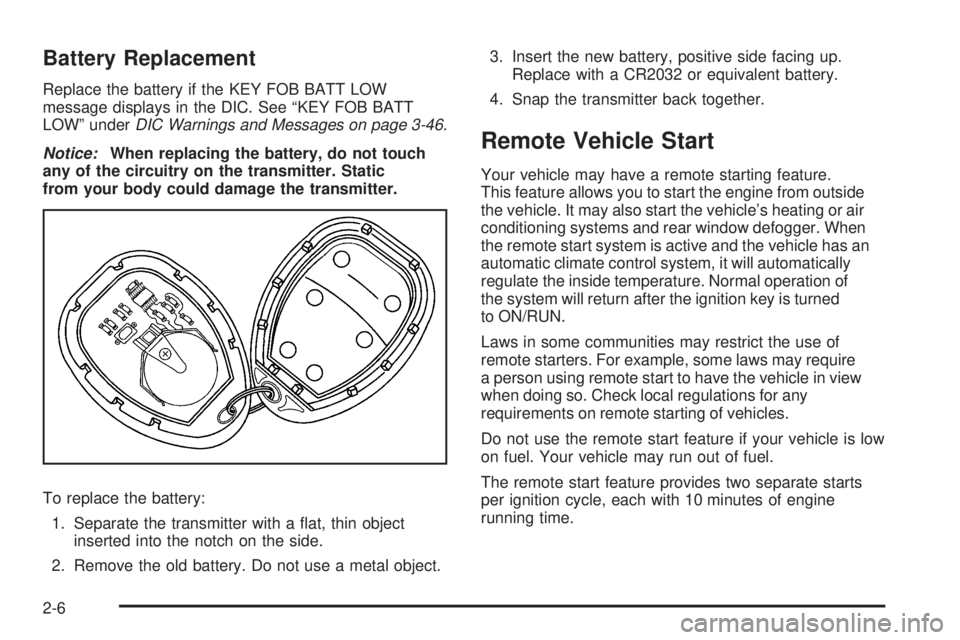
1. Separate the transmitter with a at, thin object
inserted into the notch on the side.
2. Remove the old battery. Do not use a metal object.3. Insert the new battery, positive side facing up.
Replace with a CR2032 or equivalent battery.
4. Snap the transmitter back together.
Remote Vehicle Start
Your vehicle may have a remote starting feature.
This feature allows you to start the engine from outside
the vehicle. It may also start the vehicle’s heating or air
conditioning systems and rear window defogger. When
the remote start system is active and the vehicle has an
automatic climate control system, it will automatically
regulate the inside temperature. Normal operation of
the system will return after the ignition key is turned
to ON/RUN.
Laws in some communities may restrict the use of
remote starters. For example, some laws may require
a person using remote start to have the vehicle in view
when doing so. Check local regulations for any
requirements on remote starting of vehicles.
Do not use the remote start feature if your vehicle is low
on fuel. Your vehicle may run out of fuel.
The remote start feature provides two separate starts
per ignition cycle, each with 10 minutes of engine
running time.
2-6
Page 98 of 410
Window Indexing (Coupe and
Retractable Hardtop)
This feature automatically lowers the window a small
amount when the door is opened. Then, when the door
is closed, the window will automatically raise fully.
If the vehicle loses power or the window freezes, this
feature may not work. From outside the vehicle, close the
door and push the window inward so that the glass goes
under the molding.
Power Window Initialize (Coupe and
Retractable Hardtop)
After a power reconnect, such as battery replacement,
the indexing feature will not function until the system
is initialized. This procedure needs to be done for each
individual window. Once power is restored:
1. Close the door.
2. Raise the window by pulling the power window
switch up.
3. Hold the window switch up for two seconds
after the window is closed. Release the switch.
Then hold the switch up again for two seconds.
4. Lower the window all the way down. Hold the
switch down for two seconds.
5. Repeat the procedure for each window, including
the rear quarter windows on retractable hardtop
models, until all windows are initialized.
Express-Down Window
The express-down feature lowers the window all the
way without continuously pressing the AUTO switch.
On sedan and retractable hardtop models, the driver’s
window has the express-down feature. On coupe
models, both the driver’s and front passenger window
have the express-down feature. The front passenger
express-down is activated by the driver’s side switch
only. Press the front of the switch all the way down
and release it to express open the window.
To stop the window while it is lowering, pull the front of
the switch up briey.
Window Lockout (Sedan Only)
o
(Window Lockout):This button prevents the rear
passengers from using their window switches.
The window lockout button is located near the driver’s
power window switches. The driver can still operate all
the windows and the front passenger can operate their
own window with the lockout on. Press the right side of
the switch to turn the lockout feature on. Press the left
side to turn it off. The red part of the switch is visible when
you have returned to normal window operation.
2-16
Page 104 of 410
ACC (ACC/ACCESSORY):This position unlocks the
transmission. It also lets you use things like the radio and
windshield wipers while the engine is not running. To use
ACC/ACCESSORY, turn the key clockwise to the rst
position. Use this position if your vehicle must be pushed
or towed. SeeRecreational Vehicle Towing on
page 4-26.
R(ON/RUN):This position can be used to operate the
electrical accessories and to display some instrument
panel warning lights. The ignition switch will stay in this
position while the engine is running.
The battery could be drained if you leave the key in the
ACC/ACCESSORY or ON/RUN position with the engine
off. You may not be able to start the vehicle if the battery
is allowed to drain for an extended period of time.
/(START):This position starts the engine. When
the engine starts, release the key. The ignition switch
will return to the ON/RUN position for normal driving.
A warning tone will sound when the driver door is
opened, the ignition is in ACC/ACCESSORY or
LOCK/OFF and the key is in the ignition.
Retained Accessory Power (RAP)
These vehicle accessories can be used for up to
10 minutes after the engine is turned off:
Audio System
Power Windows
Heated Seats (if equipped)
Sunroof (if equipped)
These features continue to work up to 10 minutes after
the ignition is turned to LOCK/OFF.
The power windows, heated seats, and sunroof will
work until any door is opened.
The radio continues to work until the driver door is
opened.
All these features operate when the key is in the
ON/RUN or ACC/ACCESSORY.
2-22
Page 105 of 410
Starting the Engine
Move the shift lever to P (Park) or N (Neutral).
The engine will not start in any other position.
To restart the engine when the vehicle is already
moving, use N (Neutral) only.
Notice:Do not try to shift to P (Park) if the
vehicle is moving. If you do, you could damage
the transmission. Shift to P (Park) only when the
vehicle is stopped.
Starting Procedure
1. With your foot off the accelerator pedal, turn the
ignition to START. When the engine starts, let go of
the key. The idle speed will slow down as the engine
warms. Do not race the engine immediately after
starting it. Operate the engine and transmission
gently to allow the oil to warm up and lubricate
all moving parts.The vehicle has a Computer-Controlled Cranking
System. This feature assists in starting the engine
and protects components. If the ignition key is turned
to the START position, and then released when the
engine begins cranking, the engine will continue
cranking for a few seconds or until the vehicle starts.
If the engine does not start and the key is held in
START, cranking will be stopped after 15 seconds
to prevent cranking motor damage. To prevent gear
damage, this system also prevents cranking if the
engine is already running. Engine cranking can
be stopped by turning the ignition switch to the
ACC/ACCESSORY or LOCK/OFF position.
Notice:Cranking the engine for long periods of
time, by returning the key to the START position
immediately after cranking has ended, can overheat
and damage the cranking motor, and drain the
battery. Wait at least 15 seconds between each
try, to let the cranking motor cool down.
2-23
Page 107 of 410

To Use the Engine Coolant Heater
1. Turn off the engine.
2. Open the hood and unwrap the electrical cord. On
the 2.4L L4 ECOTEC
®engine, the engine coolant
heater cord is located near the air cleaner box on the
passenger’ side of the engine compartment. On the
3.5L, 3.6L and 3.9L V6 engines, the engine coolant
heater cord is located on the driver side around the
battery box. SeeEngine Compartment Overview on
page 5-14for more information on location.
3. Plug the cord into a normal, grounded 110-volt AC
outlet.
{CAUTION:
Plugging the cord into an ungrounded outlet could
cause an electrical shock. Also, the wrong kind of
extension cord could overheat and cause a re.
You could be seriously injured. Plug the cord into a
properly grounded three-prong 110-volt AC outlet.
If the cord will not reach, use a heavy-duty
three-prong extension cord rated for at least
15 amps.
4. Before starting the engine, be sure to unplug and
store the cord as it was before to keep it away
from moving engine parts and prevent damage.
The length of time the heater should remain plugged
in depends on several factors. Ask a dealer/retailer
in the area where you will be parking your vehicle
for the best advice in this.
2-25
Page 116 of 410
Shifting Out of Park
This vehicle is equipped with an electronic shift lock
release system. The shift lock release is designed to:
Prevent ignition key removal unless the shift
lever is in P (Park) with the shift lever button fully
released, and
Prevent movement of the shift lever out of
P (Park), unless the ignition is in ON/RUN or ACC/
ACCESSORY and the regular brake pedal is applied.
The shift lock release is always functional except in the
case of an uncharged or low voltage (less than 9 volt)
battery.
If the vehicle has an uncharged battery or a battery with
low voltage, try charging or jump starting the battery.
SeeJump Starting on page 5-46for more information.
To shift out of P (Park) use the following:
1. Apply the brake pedal.
2. Press the shift lever button.
3. Move the shift lever to the desired position.If you still are unable to shift out of P (Park):
1. Fully release the shift lever button.
2. While holding down the brake pedal, press the shift
lever button again.
3. Move the shift lever to the desired position.
If you still cannot move the shift lever from P (Park),
consult your dealer/retailer.
Parking Over Things That Burn
{CAUTION:
Things that can burn could touch hot exhaust
parts under the vehicle and ignite. Do not park
over papers, leaves, dry grass, or other things
that can burn.
2-34
Page 124 of 410
OnStar Virtual Advisor
OnStar Virtual Advisor is a feature of OnStar
Hands-Free Calling that uses minutes to access
location-based weather, local traffic reports, and stock
quotes. Press the phone button and give a few simple
voice commands to browse through the various topics.
See the OnStar Owner’s Guide for more information.
This feature is only available in the continental U.S.
How OnStar Service Works
The OnStar system can record and transmit vehicle
information. This information is automatically sent to an
OnStar Call Center when the OnStar button is pressed,
the emergency button is pressed, or if the airbags or
AACN system deploy. This information usually includes
the vehicle’s GPS location and, in the event of a crash,
additional information regarding the crash that the vehicle
was involved in (e.g. the direction from which the vehicle
was hit). When the Virtual Advisor feature of OnStar
Hands-Free Calling is used, the vehicle also sends
OnStar the vehicle’s GPS location so they can provide
services where it is located.
OnStar service cannot work unless the vehicle is in a
place where OnStar has an agreement with a wireless
service provider for service in that area. OnStar service
also cannot work unless the vehicle is in a place wherethe wireless service provider OnStar has hired for that
area has coverage, network capacity and reception when
the service is needed, and technology that is compatible
with the OnStar service. Not all services are available
everywhere, particularly in remote or enclosed areas,
or at all times.
Location information about the vehicle is only available
if the GPS satellite signals are unobstructed and
available.
The vehicle must have a working electrical system,
including adequate battery power, for the OnStar
equipment to operate. There are other problems OnStar
cannot control that may prevent OnStar from providing
OnStar service at any particular time or place. Some
examples are damage to important parts of the vehicle
in a crash, hills, tall buildings, tunnels, weather or
wireless phone network congestion.
Your Responsibility
Increase the volume of the radio if the OnStar advisor
cannot be heard. If the light next to the OnStar buttons
is red, the system may not be functioning properly.
Press the OnStar button and request a vehicle
diagnostic. If the light appears clear (no light is
appearing), your OnStar subscription has expired and
all services have been deactivated. Press the OnStar
button to conrm that the OnStar equipment is active.
2-42
Page 126 of 410

Sunshade Operation
The sunshade will open automatically when opening the
sunroof.
However, it can manually be pulled shut after the
sunroof is closed. To adjust the sunshade, push it
backward or pull it forward to the desired position.
The sunshade cannot be adjusted further than
the current closed position of the sunroof.
Notice:If you force the sunshade forward of the
sliding glass panel, damage will occur and the
sunroof may not open or close properly. Always
close the glass panel before closing the sunshade.
Do not leave the sunroof open for long periods of
time. Debris can collect in the tracks and possibly
damage the sunroof operation and plug the water
draining system.
Retractable Hardtop
The following procedures explain the proper operation
of the retractable hardtop. The retractable hardtop
will not operate if the trunk cargo cover is not in place.
If the retractable hardtop is lowered or raised multiple
times, the engine should be running while doing
so to prevent drain on the vehicle’s battery.
Lowering the Retractable Hardtop
Notice:Leaving the retractable hardtop down and
exposing the interior of the vehicle to outdoor
conditions may cause damage. Always close the
retractable hardtop if leaving the vehicle outdoors.
Notice:Lowering the top if it is damp, wet, or
dirty can cause stains, mildew, and damage to
the inside of your vehicle. Dry off the top before
lowering it.
Notice:If you lower the retractable hardtop in cold
weather (32°F/0°C or lower), you may damage top
components. Do not lower the retractable hardtop
in cold weather.
1. Park on a level surface, and shift the transmission
into (P) Park. The vehicle must be in (P) Park, and
the engine must be running, or the ignition turned
to the ON/RUN position, to operate the retractable
hardtop.
2-44