reset PONTIAC G6 2009 Owners Manual
[x] Cancel search | Manufacturer: PONTIAC, Model Year: 2009, Model line: G6, Model: PONTIAC G6 2009Pages: 410, PDF Size: 2.33 MB
Page 89 of 410
The remote start feature needs to be reset after
your vehicle’s engine is started two times using the
transmitter’s remote start button. To reset the remote
start feature, insert the vehicle’s key into the ignition
switch and turn it to ON/RUN. SeeIgnition Positions
on page 2-21for information regarding the ignition
positions on your vehicle.
If your vehicle has the remote start feature, the RKE
transmitter functions will have an increased range
of operation. However, the range may be less while
the vehicle is running.
There are other conditions which can affect the
performance of the transmitter, seeRemote Keyless
Entry (RKE) System on page 2-3for additional
information.
/(Remote Start):This button will be on the RKE
transmitter if you have remote start.
To start the vehicle using the remote start feature:
1. Aim the transmitter at the vehicle.
2. Press and release the transmitter’s lock button,
then immediately press and hold the transmitter’s
remote start button until the vehicle’s turn signal
lamps ash.
When the vehicle starts, the parking lamps will turn
on and remain on while the engine is running.3. If it is the rst remote start since the vehicle has
been driven, repeat these steps, while the engine is
still running, to extend the engine running time by
10 minutes. Remote start can be extended one time.
After entering the vehicle during a remote start, insert
and turn the key to ON/RUN to drive the vehicle.
The engine will shut off automatically after 10 minutes,
unless a time extension has been done or the vehicle’s
key is inserted into the ignition switch and turned to
ON/RUN.
To manually shut off a remote start:
Aim the RKE transmitter at the vehicle and press
and release the remote start button.
Turn on the hazard warning ashers.
Turn the ignition switch ON/RUN and then
LOCK/OFF.
The parking lamps will turn off to indicate the engine
is off.
Your vehicle’s engine can be started two times, per
ignition cycle, using the transmitter’s remote start
feature.
If the remote start procedure is used again before the
rst 10 minute time frame has ended, the rst 10 minutes
will immediately expire and the second 10 minute time
frame will start.
2-7
Page 120 of 410
Compass
Compass Operation
PressOor depending on the vehicle, press AUTO/OFF
to turn the compass on or off.
When the ignition and the compass feature are on,
the compass displays the current compass direction
after a few seconds.
Compass Calibration
If after a few seconds the display does not show a
compass direction, (N for North for example), there may
be a strong magnetic eld interfering with the compass.
Interference can be caused by a magnetic antenna
mount, note pad holder, or similar object. If the letter C
appears in the compass window, the compass may need
to be reset or calibrated.
The mirror can be calibrated by driving the vehicle in
circles at 5 mph (8 km/h) or less until the display reads
a direction.
Compass Variance
The mirror is set to zone eight. If you do not live in zone
eight or drive out of the area, the compass variance
needs to be changed to the appropriate zone.To adjust for compass variance:
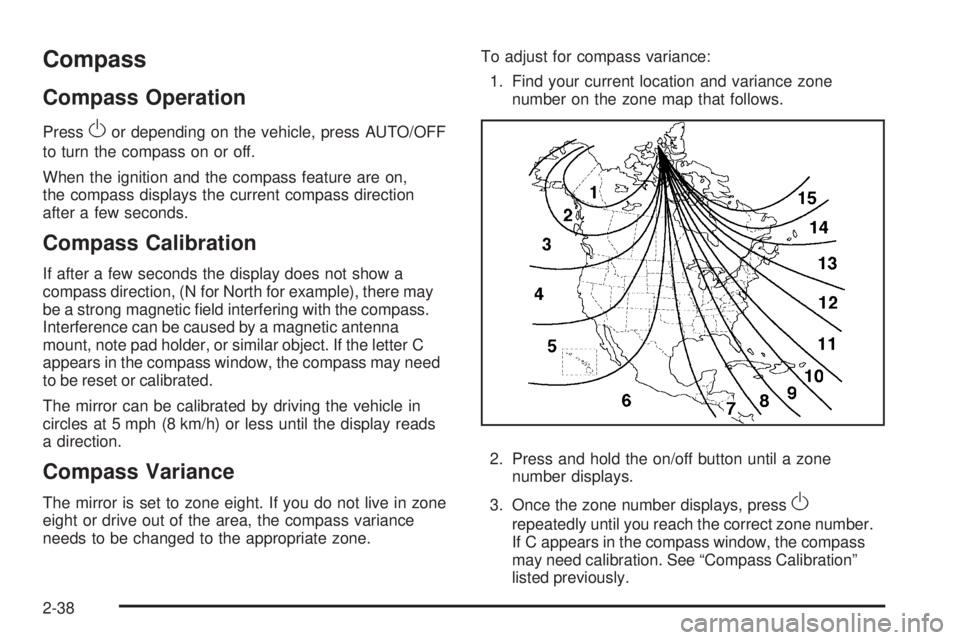
1. Find your current location and variance zone
number on the zone map that follows.
2. Press and hold the on/off button until a zone
number displays.
3. Once the zone number displays, pressO
repeatedly until you reach the correct zone number.
If C appears in the compass window, the compass
may need calibration. See “Compass Calibration”
listed previously.
2-38
Page 162 of 410

Speedometer and Odometer
The speedometer shows the vehicle speed in both miles
per hour (mph) and kilometers per hour (km/h).
The odometer shows how far the vehicle has been
driven, in either miles (used in the United States)
or kilometers (used in Canada).
When in manual shift mode, the odometer will change
from the vehicle’s mileage to the letter M, for manual
mode, and a number indicating the requested gear
range when moving the shift lever forward or rearward.
For more information seeAutomatic Transmission
Operation on page 2-26.
This vehicle has a tamper resistant odometer.
Repair or replacement of the instrument panel cluster
should only be performed by your dealer/retailer.
Trip Odometer
The trip odometer can display how far the vehicle has
been driven since it was last reset.
For more information seeDIC Operation and Displays
on page 3-43.
Tachometer
The tachometer shows the
engine speed in revolutions
per minute (rpm).
Notice:If the engine is operated with the tachometer
in the shaded warning area, the vehicle could be
damaged, and the damages would not be covered by
the vehicle warranty. Do not operate the engine with
the tachometer in the shaded warning area.2.4L and 3.6L Engine
shown, 3.5L and
3.9L Engine similar
3-30
Page 167 of 410

{CAUTION:
The brake system might not be working properly if
the brake system warning light is on. Driving with
the brake system warning light on can lead to a
crash. If the light is still on after the vehicle has
been pulled off the road and carefully stopped,
have the vehicle towed for service.
If the light comes on while driving, pull off the road and
stop carefully. The pedal can be harder to push, or
the pedal could go closer to the oor. It could take
longer to stop. Try turning off and restarting the vehicle
one or two times, if the light is still on, have the
vehicle towed for service. SeeTowing Your Vehicle on
page 4-26.
Antilock Brake System (ABS)
Warning Light
For vehicles with the
Antilock Brake System
(ABS), this light comes on
briey when the engine
is started.
If it does not, have the vehicle serviced by your
dealer/retailer. If the system is working normally the
indicator light then goes off.
If the ABS light stays on, turn the ignition off. If the light
comes on while driving, stop as soon as it is safely
possible and turn the ignition off. Then start the engine
again to reset the system. If the ABS light stays on,
or comes on again while driving, the vehicle needs
service. If the regular brake system warning light is not
on, the vehicle still has brakes, but not antilock brakes.
If the regular brake system warning light is also on,
the vehicle does not have antilock brakes and there is a
problem with the regular brakes. SeeBrake System
Warning Light on page 3-34.
For vehicles with a Driver Information Center (DIC),
seeDIC Warnings and Messages on page 3-46for all
brake related DIC messages.
3-35
Page 175 of 410
ENTER/r(Enter):Press this button to select a
menu option or to acknowledge a warning message.
The DIC messages will be read through your audio
system display.
DIC Operation and Displays
The DIC comes on when the ignition is on. If your
vehicle has the uplevel audio system, the time and
outside temperature is shown on the rst line of
the display and the DIC information is shown on the
second line of the display.
The DIC has different modes which can be accessed by
pressing the DIC buttons. The button functions are
detailed in the following section.
Information Modes
INFO/4(Information):Press this button to scroll
through the vehicle information mode displays in the
following order:
TRIP A
TRIP B
FUEL RANGE (Fuel Range Until Empty)
MPG (L/100 KM) AVG (Average Fuel Economy)
MPG (L/100 KM) INST (Instantaneous Fuel
Economy)
AV SPEED (Average Vehicle Speed)
OIL LIFE (Engine Oil Life System)
Tire Pressure
TRIP A or TRIP B:Press the information button until
TRIP A or TRIP B display. These modes show the
current distance traveled since the last reset for each
trip odometer in either miles (mi) or kilometers (km).
Both odometers can be used at the same time.
To reset the trip odometer to zero, press and hold the
enter button for a few seconds while the desired
trip odometer is displayed.
FUEL RANGE:Press the information button until FUEL
RANGE displays. This mode shows the remaining
distance you can drive without refueling in either miles
(mi) or kilometers (km). It is based on fuel economy
and the fuel remaining in the tank.
When the fuel level is low, FUEL RANGE LOW displays.
The fuel economy data used to determine fuel range
is an average of recent driving conditions. As your
driving conditions change, this data is gradually updated.
The FUEL RANGE mode cannot be reset.
3-43
Page 176 of 410
MPG (L/100 KM) AVG (Average):Press the
information button until MPG (L/100 KM) AVG displays.
This mode shows how many miles per gallon (mpg)
or liters per 100 kilometers (L/100 km) your vehicle is
getting based on current and past driving conditions.
To reset the average fuel economy, press and hold the
enter button while MPG (L/100 KM) AVG is displayed.
Average fuel economy is then be calculated starting
from that point. If the average fuel economy is not reset,
it is continually updated each time you drive.
MPG (L/100 KM) INST (Instantaneous):Press the
information button until MPG (L/100 KM) INST displays.
This mode shows the current fuel economy at a
particular moment and changes frequently as driving
conditions change. This mode shows the instantaneous
fuel economy in miles per gallon (mpg) or liters per
100 kilometers (L/100 km). Unlike average fuel
economy, this screen cannot be reset.
AV (Average) SPEED:Press the information button
until AV SPEED displays. This mode shows the vehicle’s
average speed in miles per hour (mph) or kilometers
per hour (km/h).
To reset the average vehicle speed, press and hold the
enter button while AV SPEED is displayed.OIL LIFE:Press the information button until OIL LIFE
displays. The engine oil life system shows an estimate of
the oil’s remaining useful life. It shows 100% when
the system is reset after an oil change. It alerts you to
change the oil on a schedule consistent with your driving
conditions.
In addition to the engine oil life system monitoring the oil
life, additional maintenance is recommended in the
Maintenance Schedule in this manual. SeeScheduled
Maintenance on page 6-4andEngine Oil on page 5-21.
Always reset the engine oil life system after an oil
change. See “How to Reset the Engine Oil Life System”
underEngine Oil Life System on page 5-24.
Tire Pressure:On vehicles with the Tire Pressure
Monitor System (TPMS), the pressure for each tire can
be viewed in the DIC. The tire pressure is shown in
either pounds per square inch (psi) or kilopascals (kPa).
Press the information button until LF ## PSI (kPa) ## RF
displays for the front tires. Press the information
button again until LR ## PSI (kPa) ## RR displays for
the rear tires.
If a low tire pressure condition is detected by the system
while driving, a message advising you to check the tire
pressure appears in the display. SeeInflation - Tire
Pressure on page 5-67andDIC Warnings and Messages
on page 3-46for more information.
3-44
Page 177 of 410
Personalization
MENU:Press this button while the ignition is on to
scroll through each of the personalization options in the
following order. To avoid excessive drain on the
battery, it is recommended that the headlamps are
turned off. If the vehicle is moving faster than 2 mph
(3 km/h), the personalization menu options are not
available, except for the UNITS option. All of the
personalization options may not be available on your
vehicle. Only the options available display on the DIC.
Oil Life Reset
Units Selection (English/Metric)
Tire Learn?, on vehicles without the Remote
Keyless Entry (RKE) system
Remote Start Capability
Horn Chirp During Remote Keyless Entry Locking
Horn Chirp During Remote Keyless Entry Unlocking
Exterior Light Flash During Remote Keyless
Entry Locking or Unlocking
Delayed Locking
Automatic Vehicle Unlocking: Specic Doors
Automatic Vehicle Unlocking: When Key is Off or
When Shift To Park
Exterior Perimeter Lighting During Remote Keyless
Entry Unlock
Select Language: (English, French, Spanish or
German)
When the desired option is reached, press the enter
button to toggle between the modes of that option.
To make a selection, press the MENU button again.
If no selection is made within 10 seconds, the display
reverts back to the previous information displayed.
The MENU mode is exited when the information button
is pressed, a 10 second time period has elapsed,
the ignition is turned off, or the end of the MENU list is
reached.
SeeDIC Vehicle Personalization on page 3-50for more
information on the personalization options.
Enter
ENTER/r(Enter):Press this button to reset certain
functions and to turn off or acknowledge messages
on the DIC display. This button also toggles through the
options available in each personalization menu.
3-45
Page 178 of 410
DIC Warnings and Messages
These messages appear if there is a problem detected
in one of your vehicle’s systems.
A message clears when the vehicle’s condition is no
longer present. To acknowledge a message and clear it
from the display, press and hold any of the DIC buttons.
If the condition is still present, the warning message
comes back on the next time the vehicle is turned
off and back on. With most messages, a warning chime
sounds when the message displays. Your vehicle
may have other warning messages.
AUTO (Automatic) LIGHTS OFF
This message displays if the automatic headlamp
system is disabled with the headlamp switch.
AUTO (Automatic) LIGHTS ON
This message displays if the automatic headlamp
system is enabled with the headlamp switch.
BRAKE FLUID
This message displays, while the ignition is on, when
the brake uid level is low. The brake system warning
light on the instrument panel cluster also comes on.
SeeBrake System Warning Light on page 3-34for more
information. Have the brake system serviced by your
dealer/retailer as soon as possible.
CHANGE OIL SOON
This message displays when the life of the engine oil
has expired and it should be changed.
When this message is acknowledged and cleared from
the display, the engine oil life system must still be
reset separately. SeeEngine Oil Life System on
page 5-24,Engine Oil on page 5-21, andScheduled
Maintenance on page 6-4for more information.
CHECK CARGO TOP
If your vehicle has a retractable hardtop, this message
displays if the cargo cover is not in place when operating
the retractable hardtop. Open the trunk and make sure
the cargo cover is secure and no objects are in contact
with the cover. SeeTrunk on page 2-12,Lowering the
Retractable Hardtop on page 2-44, andRaising the
Retractable Hardtop on page 2-47for more information.
CHECK GAS CAP
This message displays if the fuel cap has not been fully
tightened. Recheck the fuel cap to make sure that it
is on properly. A few driving trips with the cap properly
installed should turn the message off.
3-46
Page 182 of 410
TOP TOO COLD
If your vehicle has a retractable hardtop, this message
displays when the retractable hardtop button is
pressed and the hardtop pump motor temperature is
too cold. Wait for the hardtop pump motor to warm up
before using the retractable hardtop. SeeLowering
the Retractable Hardtop on page 2-44andRaising the
Retractable Hardtop on page 2-47for more information.
TRUNK AJAR
This message displays when the trunk is not closed
completely. Make sure that the trunk is closed
completely. SeeTrunk on page 2-12for more
information.
DIC Vehicle Personalization
The following personalization options may appear on your
vehicle’s audio display by pressing the MENU button.
The default settings for the features were set when your
vehicle left the factory, but may have been changed
from their default state since that time.
OIL LIFE RESET:When this option is displayed, you
can reset the engine oil life system. To reset the system,
seeEngine Oil Life System on page 5-24.UNITS:When UNITS appears on the display, press the
enter button to move between METRIC (default in
Canada) or ENGLISH (default in United States).
When you have made your choice, press the MENU
button to record your selection.
If you choose English, all information will be displayed
in English units.
If you choose metric, all information will be displayed in
metric units.
The unit measurement will also change the trip odometer,
temperature, and average fuel economy displays.
TIRE LEARN?:This option is available on vehicles
without the Remote Keyless Entry (RKE) system.
After rotating the tires or after replacing a tire or sensor,
the Tire Pressure Monitor System (TPMS) must
re-learn the tire positions. To re-learn the tire positions,
seeTire Pressure Monitor System on page 5-69.
SeeTire Inspection and Rotation on page 5-76and
DIC Warnings and Messages on page 3-46for more
information.
REMOTE START:If your vehicle has this feature,
the remote start option can be enabled or disabled.
When REMOTE START appears on the display, press
the enter button to move between OFF and ON
(default). When you have made your choice, press the
MENU button to record your selection.
3-50
Page 185 of 410
To minimize taking your eyes off the road while driving,
do the following while the vehicle is parked:
Become familiar with the operation and controls of
the audio system.
Set up the tone, speaker adjustments, and preset
radio stations.
For more information, seeDefensive Driving on
page 4-2.
Notice:Contact your dealer/retailer before adding
any equipment.
Adding audio or communication equipment could
interfere with the operation of the vehicle’s engine,
radio, or other systems, and could damage them.
Follow federal rules covering mobile radio and
telephone equipment.
The vehicle has Retained Accessory Power (RAP).
With RAP, the audio system can be played even after
the ignition is turned off. SeeRetained Accessory
Power (RAP) on page 2-22for more information.
Setting the Clock
To set the hour, press the CLOCK button. The clock
symbol displays and the hour ashes. Turn the
ADJ (adjust) knob to increase or to decrease the hours.
To set the minutes, press the CLOCK button again.
The minutes ash. Turn the ADJ knob to increase or to
decrease the minutes. The time can be set with the
ignition on or off.
To synchronize the time with an FM station broadcasting
Radio Data System (RDS) information, press and
hold the clock button to enter the clock set mode, then
press and hold the clock button for three seconds
until UPDATED displays. If the time is not available from
the station, NO UPDATE displays.
RDS time is broadcast once a minute. After tuning to an
RDS broadcast station, it can take a few minutes for
the time to update.
3-53