towing PONTIAC G6 2009 Owners Manual
[x] Cancel search | Manufacturer: PONTIAC, Model Year: 2009, Model line: G6, Model: PONTIAC G6 2009Pages: 410, PDF Size: 2.33 MB
Page 1 of 410
Seats and Restraint System............................. 1-1
Head Restraints
......................................... 1-2
Front Seats
............................................... 1-4
Rear Seats
..............................................1-12
Safety Belts
.............................................1-14
Child Restraints
.......................................1-36
Airbag System
.........................................1-61
Restraint System Check
............................1-76
Features and Controls..................................... 2-1
Keys
........................................................ 2-2
Doors and Locks
....................................... 2-9
Windows
.................................................2-14
Theft-Deterrent Systems
............................2-17
Starting and Operating Your Vehicle
...........2-21
Mirrors
....................................................2-37
OnStar
®System
......................................2-40
Storage Areas
.........................................2-43
Sunroof
..................................................2-43
Retractable Hardtop
..................................2-44
Instrument Panel............................................. 3-1
Instrument Panel Overview
.......................... 3-4
Climate Controls
......................................3-20
Warning Lights, Gages, and Indicators
........3-28Driver Information Center (DIC)
..................3-42
Audio System(s)
.......................................3-52
Driving Your Vehicle....................................... 4-1
Your Driving, the Road, and the Vehicle
....... 4-2
Towing
...................................................4-26
Service and Appearance Care.......................... 5-1
Service
..................................................... 5-4
Fuel
......................................................... 5-6
Checking Things Under the Hood
...............5-12
Headlamp Aiming
.....................................5-51
Bulb Replacement
....................................5-51
Windshield Wiper Blade Replacement
.........5-58
Tires
......................................................5-59
Appearance Care
...................................5-102
Vehicle Identication
...............................5-108
Electrical System
....................................5-109
Capacities and Specications
...................5-118
Maintenance Schedule..................................... 6-1
Maintenance Schedule
................................ 6-2
Customer Assistance Information.................... 7-1
Customer Assistance and Information
........... 7-2
Reporting Safety Defects
...........................7-14
Vehicle Data Recording and Privacy
...........7-16
Index................................................................ 1
2009 Pontiac G6 Owner ManualM
Page 78 of 410

Additional Factors Affecting System
Operation
Safety belts help keep the passenger in position on the
seat during vehicle maneuvers and braking, which helps
the passenger sensing system maintain the passenger
airbag status. See “Safety Belts” and “Child Restraints” in
the Index for additional information about the importance
of proper restraint use.
A thick layer of additional material, such as a blanket or
cushion, or aftermarket equipment such as seat covers,
seat heaters, and seat massagers can affect how well the
passenger sensing system operates. We recommend
that you not use seat covers or other aftermarket
equipment except when approved by GM for your specic
vehicle. SeeAdding Equipment to Your Airbag-Equipped
Vehicle on page 1-75for more information about
modications that can affect how the system operates.
{CAUTION:
Stowing of articles under the passenger seat or
between the passenger seat cushion and seatback
may interfere with the proper operation of the
passenger sensing system.
Servicing Your Airbag-Equipped
Vehicle
Airbags affect how the vehicle should be serviced.
There are parts of the airbag system in several places
around the vehicle. Your dealer/retailer and the
service manual have information about servicing the
vehicle and the airbag system. To purchase a service
manual, seeService Publications Ordering Information
on page 7-15.
{CAUTION:
For up to 10 seconds after the ignition is turned off
and the battery is disconnected, an airbag can still
inate during improper service. You can be injured
if you are close to an airbag when it inates. Avoid
yellow connectors. They are probably part of the
airbag system. Be sure to follow proper service
procedures, and make sure the person performing
work for you is qualied to do so.
1-74
Page 103 of 410
Starting and Operating Your
Vehicle
New Vehicle Break-In
Notice:The vehicle does not need an elaborate
break-in. But it will perform better in the long run
if you follow these guidelines:
Do not drive at any one constant speed,
fast or slow, for the rst 500 miles (805 km).
Do not make full-throttle starts. Do not exceed
5,000 engine rpm. Avoid downshifting to brake
or slow the vehicle.
Avoid making hard stops for the rst 200 miles
(322 km) or so. During this time the new brake
linings are not yet broken in. Hard stops with
new linings can mean premature wear and earlier
replacement. Follow this breaking-in guideline
every time you get new brake linings.
Do not tow a trailer during break-in. SeeTowing
a Trailer on page 4-30for the trailer towing
capabilities of your vehicle and more
information.
Following break-in, engine speed and load can be
gradually increased.
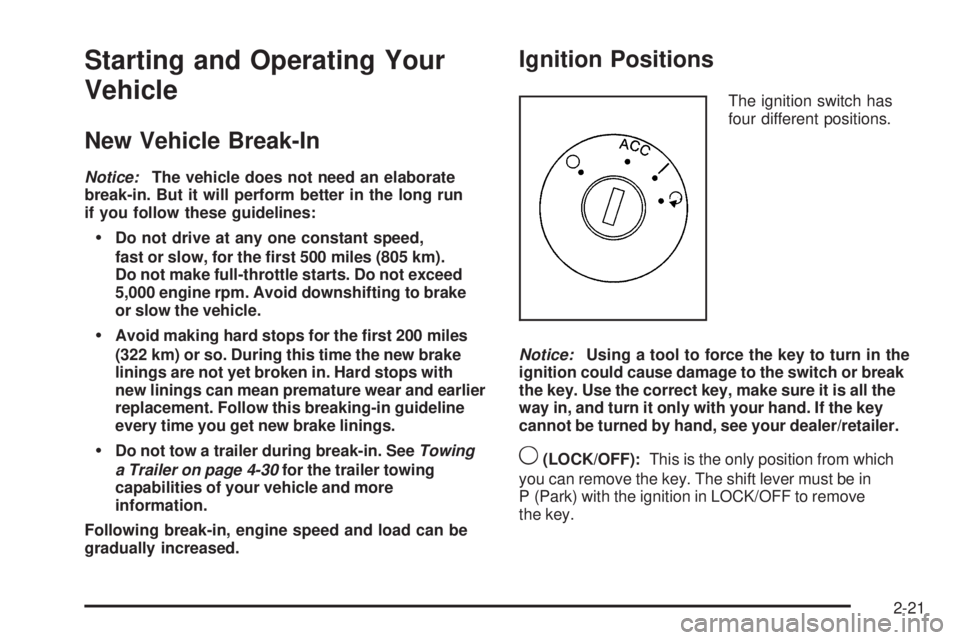
Ignition Positions
The ignition switch has
four different positions.
Notice:Using a tool to force the key to turn in the
ignition could cause damage to the switch or break
the key. Use the correct key, make sure it is all the
way in, and turn it only with your hand. If the key
cannot be turned by hand, see your dealer/retailer.
9(LOCK/OFF):This is the only position from which
you can remove the key. The shift lever must be in
P (Park) with the ignition in LOCK/OFF to remove
the key.
2-21
Page 104 of 410
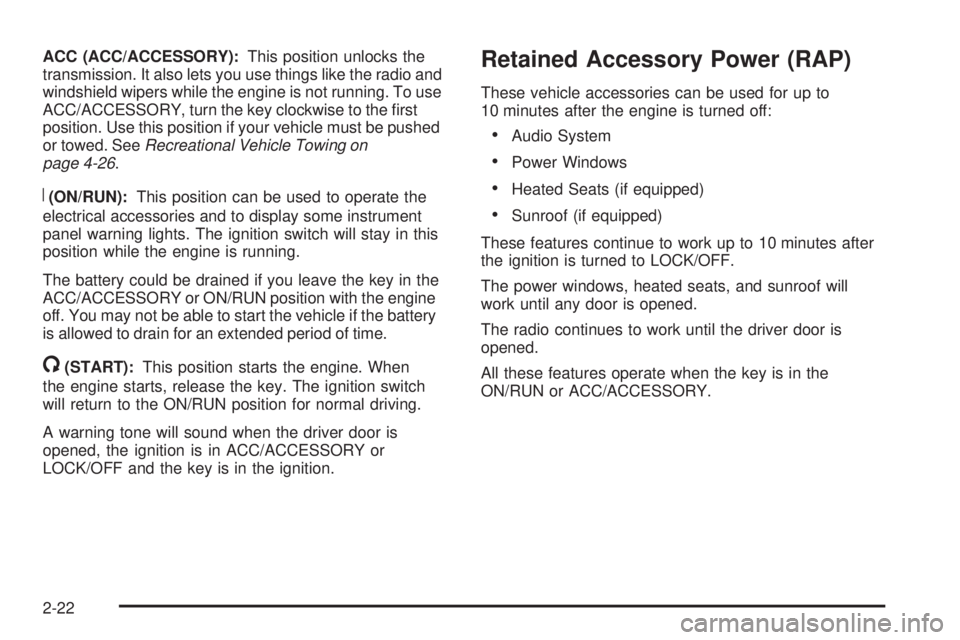
ACC (ACC/ACCESSORY):This position unlocks the
transmission. It also lets you use things like the radio and
windshield wipers while the engine is not running. To use
ACC/ACCESSORY, turn the key clockwise to the rst
position. Use this position if your vehicle must be pushed
or towed. SeeRecreational Vehicle Towing on
page 4-26.
R(ON/RUN):This position can be used to operate the
electrical accessories and to display some instrument
panel warning lights. The ignition switch will stay in this
position while the engine is running.
The battery could be drained if you leave the key in the
ACC/ACCESSORY or ON/RUN position with the engine
off. You may not be able to start the vehicle if the battery
is allowed to drain for an extended period of time.
/(START):This position starts the engine. When
the engine starts, release the key. The ignition switch
will return to the ON/RUN position for normal driving.
A warning tone will sound when the driver door is
opened, the ignition is in ACC/ACCESSORY or
LOCK/OFF and the key is in the ignition.
Retained Accessory Power (RAP)
These vehicle accessories can be used for up to
10 minutes after the engine is turned off:
Audio System
Power Windows
Heated Seats (if equipped)
Sunroof (if equipped)
These features continue to work up to 10 minutes after
the ignition is turned to LOCK/OFF.
The power windows, heated seats, and sunroof will
work until any door is opened.
The radio continues to work until the driver door is
opened.
All these features operate when the key is in the
ON/RUN or ACC/ACCESSORY.
2-22
Page 108 of 410

Automatic Transmission Operation
The vehicle will have one of these styles of shifter
located in the center console between the seats.
P (Park):This position locks your front wheels.
It is the best position to use when you start the
engine because your vehicle cannot move easily.{CAUTION:
It is dangerous to get out of the vehicle if the shift
lever is not fully in P (Park) with the parking brake
rmly set. The vehicle can roll.
Do not leave the vehicle when the engine is
running unless you have to. If you have left the
engine running, the vehicle can move suddenly.
You or others could be injured. To be sure the
vehicle will not move, even when you are on fairly
level ground, always set the parking brake and
move the shift lever to P (Park). SeeShifting Into
Park on page 2-32. If you are pulling a trailer, see
Towing a Trailer on page 4-30.
Make sure the shift lever is fully in P (Park) before
starting the engine. The vehicle has an automatic
transmission shift lock control system. You must apply
the regular brake rst, then press the shift lever button
before you can shift from P (Park) while the ignition key
is in ON/RUN. If you cannot shift out of P (Park), ease
pressure on the shift lever and push the shift lever all the
way into P (Park) as you maintain brake application.
2-26
Page 110 of 410
Downshifting the transmission in slippery road conditions
could result in skidding, see “Skidding” underLoss of
Control on page 4-11.
Notice:If your vehicle seems to accelerate slowly
or not shift gears when you go faster, and you
continue to drive your vehicle that way, you could
damage the transmission. Have your vehicle serviced
right away. You can drive in L (Low) when you are
driving less than 35 mph (56 km/h) and D (Drive)
for higher speeds until then.
3 (Third):This position is also used for normal driving.
However, it reduces vehicle speed more than D (Drive)
without using the brakes. Here are some times you
might choose 3 (Third) instead of D (Drive):
When driving on hilly, winding roads.
When towing a trailer, so there is less shifting
between gears.
When going down a steep hill.
L (Low):This position reduces vehicle speed more
than 3 (Third) without using the brakes. You can
use L (Low) on hills. It can help control vehicle speed
going down steep mountain roads along with using
the brakes off and on.You can use L (Low) on very steep hills, in deep snow
or mud. If the shift lever is in L (Low), the transmission
will not shift into rst gear until the vehicle is going
slowly enough.
Notice:Driving in LOW (L) for more than 25 miles
(40 km) or at speeds over 55 mph (90 km/h) may
damage the transmission. Also, shifting into LOW (L)
at speeds above 65 mph (105 km/h) can cause
damage. Drive in THIRD (3) or DRIVE (D) instead
of LOW (L).
Notice:Spinning the tires or holding the vehicle in
one place on a hill using only the accelerator pedal
may damage the transmission. The repair will not be
covered by the vehicle warranty. If you are stuck, do
not spin the tires. When stopping on a hill, use the
brakes to hold the vehicle in place.
M (Manual Mode):This position allows you to change
gears similar to a manual transmission. If the vehicle
has this feature, see Manual Shift Mode (MSM)
following.
2-28
Page 113 of 410

2 (Second)/3 (Third) Gear Start Feature
Notice:If you attempt a third gear start while
trailering or towing a heavy load, you will notice
reduced engine power. This could overheat and
damage your transmission. Do not attempt a third
gear start while trailering or towing your vehicle.
Vehicles with a 6-speed transmission allow 2 (Second)
and 3 (Third) gear starts. When accelerating the vehicle
from a stop in snowy and icy conditions, you may want to
shift into 2 (Second), or 3 (Third) gear. A higher gear, and
light application of the gas pedal, may allow you to gain
more traction on slippery surfaces.
With the MSM, the vehicle can accelerate from a stop in
2 (Second) or 3 (Third).
1. Move the shift lever from D (Drive) into the
M (Manual Mode) position.
2. With the vehicle stopped, move the lever forward
towards the + (plus) to select 2 (Second) or 3 (Third)
gear. The vehicle will start from a stop position in
2 (Second) or 3 (Third) gear.
3. Once the vehicle is moving select the desired
drive gear.
Parking Brake
To set the parking brake, pull up on the parking brake
handle. If the ignition is on, the brake system warning
light will come on. SeeBrake System Warning Light
on page 3-34. GT and GTP Shown, SE Similar
2-31
Page 114 of 410

To release the parking brake:
1. Hold the brake pedal down.
2. Pull the parking brake handle up until you can
press the release button.
3. Hold the release button in as you move the brake
handle all the way down.
Notice:Driving with the parking brake on can
overheat the brake system and cause premature
wear or damage to brake system parts. Make sure
that the parking brake is fully released and the brake
warning light is off before driving.
If you are towing a trailer and you are parking on a hill,
seeTowing a Trailer on page 4-30.Shifting Into Park
{CAUTION:
It can be dangerous to get out of the vehicle if
the shift lever is not fully in P (Park) with the parking
brake rmly set. The vehicle can roll. If you have left
the engine running, the vehicle can move suddenly.
You or others could be injured. To be sure the
vehicle will not move, even when you are on fairly
level ground, use the steps that follow. If you are
pulling a trailer, seeTowing a Trailer on page 4-30.
1. Hold the brake pedal down and set the parking
brake. SeeParking Brake on page 2-31for more
information.
2. Move the shift lever into P (Park) by holding in the
button on the shift lever and pushing the shift lever
all the way toward the front of the vehicle.
3. Turn the ignition key to LOCK/OFF.
4. Remove the key and take it with you. If you can
leave the vehicle with the ignition key in your
hand, the vehicle is in P (Park).
2-32
Page 118 of 410

Running the Vehicle While Parked
It is better not to park with the engine running. But if you
ever have to, here are some things to know.
{CAUTION:
Idling a vehicle in an enclosed area with poor
ventilation is dangerous. Engine exhaust may
enter the vehicle. Engine exhaust contains Carbon
Monoxide (CO) which cannot be seen or smelled.
It can cause unconsciousness and even death.
Never run the engine in an enclosed area that
has no fresh air ventilation. For more information,
seeEngine Exhaust on page 2-35.
{CAUTION:
It can be dangerous to get out of the vehicle if
the automatic transmission shift lever is not fully
in P (Park) with the parking brake rmly set. The
vehicle can roll. Do not leave the vehicle when the
engine is running unless you have to. If you have
left the engine running, the vehicle can move
suddenly. You or others could be injured. To be
sure the vehicle will not move, even when you are
on fairly level ground, always set the parking brake
and move the shift lever to P (Park).
Follow the proper steps to be sure the vehicle will not
move. SeeShifting Into Park on page 2-32.
If parking on a hill and pulling a trailer, seeTowing a
Trailer on page 4-30.
2-36
Page 129 of 410

If pressure is released from the switch before the
hardtop cycle is complete, the cycle will stop and the
Driver Information Center (DIC) will display the TOP
NOT SECURE message. Always press and hold the
switch until a chime sounds, if the engine is on, and the
Driver Information Center (DIC) displays the TOP MOVE
COMPLT to signal the procedure is complete. SeeDIC
Warnings and Messages on page 3-46for more
information.
The hardtop will not operate if the vehicle has an
electrical failure. If an electrical failure occurs, see
your dealer/retailer for service.
If your vehicle has an electrical failure while operating
the hardtop, and must be towed to a dealer/retailer for
service, your vehicle should be towed by atbed with the
vehicle facing backwards. Consult your dealer/retailer or
professional towing service if you need to have your
disabled vehicle towed. SeeRoadside Assistance
Program on page 7-7.Raising the Retractable Hardtop
1. Park on a level surface, and shift the transmission
into (P) Park. The vehicle must be in (P) Park,
and the engine must be running, or the ignition
turned to the ON/RUN position, to operate
the retractable hardtop.
2. The trunk cargo cover must be fully closed, and the
trunk must be closed before raising the hardtop.
2-47