USB PONTIAC G6 2010 User Guide
[x] Cancel search | Manufacturer: PONTIAC, Model Year: 2010, Model line: G6, Model: PONTIAC G6 2010Pages: 448, PDF Size: 2.5 MB
Page 220 of 448
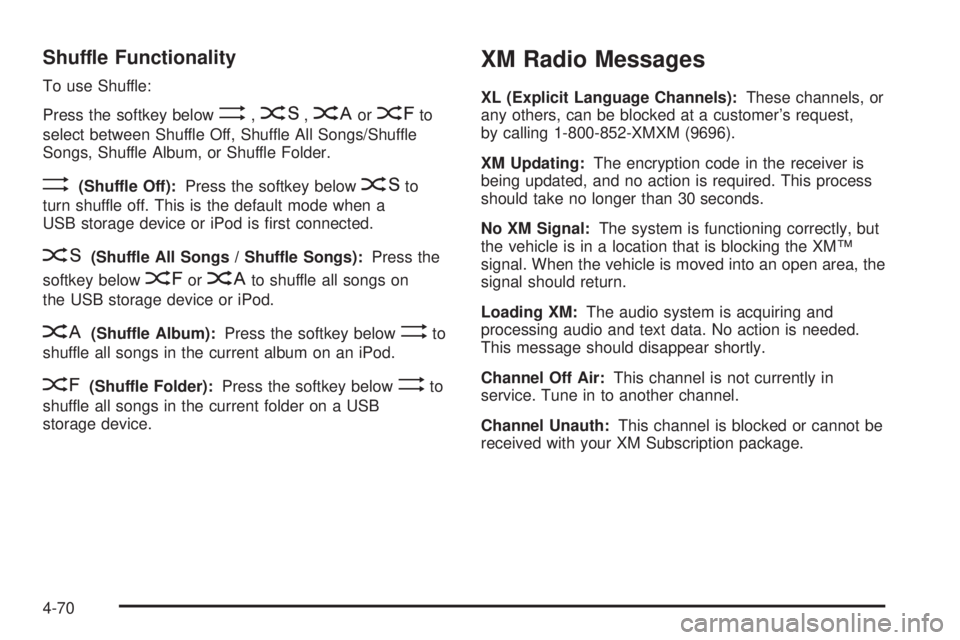
Shuffle Functionality
To use Shuffle:
Press the softkey below
>,2,
Songs, Shuffle Album, or Shuffle Folder.
>(Shuffle Off):Press the softkey below2to
turn shuffle off. This is the default mode when a
USB storage device or iPod is first connected.
2(Shuffle All Songs / Shuffle Songs):Press the
softkey below
=or
<(Shuffle Album):Press the softkey below>to
shuffle all songs in the current album on an iPod.
=(Shuffle Folder):Press the softkey below>to
shuffle all songs in the current folder on a USB
storage device.
XM Radio Messages
XL (Explicit Language Channels):These channels, or
any others, can be blocked at a customer’s request,
by calling 1-800-852-XMXM (9696).
XM Updating:The encryption code in the receiver is
being updated, and no action is required. This process
should take no longer than 30 seconds.
No XM Signal:The system is functioning correctly, but
the vehicle is in a location that is blocking the XM™
signal. When the vehicle is moved into an open area, the
signal should return.
Loading XM:The audio system is acquiring and
processing audio and text data. No action is needed.
This message should disappear shortly.
Channel Off Air:This channel is not currently in
service. Tune in to another channel.
Channel Unauth:This channel is blocked or cannot be
received with your XM Subscription package.
4-70
Page 232 of 448

Audio Steering Wheel Controls
Vehicles with audio
steering wheel controls
could differ depending on
the vehicle’s options.
Some audio controls can
be adjusted at the steering
wheel.
e+/e−(Volume):Press to increase or to decrease
the radio volume.
w/x(Next / Previous):Press to change radio
stations, select tracks on a CD, or to select tracks and
navigate folders on an iPod
®or USB device.
To change radio stations:
•Press and releaseworxto go to the next or
previous radio station stored as a preset.
•Press and holdworxto go to the next or
previous radio station in the selected band with a
strong signal.To select tracks on a CD:
Press and release
worxto go to the next or previous
track.
To select tracks on an iPod or USB device:
1. Press and hold
worxwhile listening to a song
until the contents of the current folder display on
the radio display.
2. Press and release
worxto scroll up or down the
list, then press and hold
wto play the highlighted
track.
To navigate folders on an iPod or USB device:
1. Press and hold
worxwhile listening to a song
until the contents of the current folder display on
the radio display.
2. Press and hold
xto go back to the previous
folder list.
3. Press and release
worxto scroll up or down
the list.
•To select a folder, press and holdwwhen the
folder is highlighted.
•To go back further in the folder list, press and
hold
x.
4-82
Page 434 of 448

Cleaning (cont.)
Underbody Maintenance.............................6-113
Washing Your Vehicle.................................6-110
Weatherstrips............................................6-110
Windshield and Wiper Blades......................6-112
Clearing the System........................................4-81
Climate Control System...................................4-16
Outlet Adjustment........................................4-24
Climate Control Systems
Automatic...................................................4-20
Climate Controls.............................................1-13
Clock, Setting.................................................4-53
Cold Temperature Operation.............................6-23
Collision Damage Repair..................................8-11
Collision Parts................................................8-12
Compact Spare Tire......................................6-106
Compass.......................................................3-35
Compass Calibration.......................................3-35
Compass Operation.........................................3-35
Compass Variance..........................................3-35
Compressor Kit, Tire Sealant............................6-82
Configurations for Use of Child Restraints
(Sedan Only)..............................................2-45
Connecting a USB Storage Device or iPod
®.......4-67
Content Theft-Deterrent....................................3-16
Control of a Vehicle.......................................... 5-3
Convenience Net............................................3-37Coolant
Engine.......................................................6-31
Engine Temperature Gage............................4-33
Engine Temperature Warning Light.................4-33
Cooling System..............................................6-30
Courtesy Lamps.............................................4-13
Courtesy Transportation Program......................8-10
Coverage........................................................ 8-8
Cruise Control.................................................. 4-7
Light..........................................................4-38
Cupholders....................................................3-37
Current and Past Model Order Forms................8-16
Customer Assistance......................................... 8-6
Offices......................................................... 8-6
Text Telephone (TTY) Users........................... 8-6
Customer Information
Service Publications Ordering Information........8-15
Customer Satisfaction Procedure........................ 8-2
D
Damage Repair, Collision.................................8-11
Data Recorders, Event....................................8-17
Daytime Running Lamps (DRL).........................4-11
Defensive Driving............................................. 5-2
Delayed Headlamps........................................4-11
4
Page 447 of 448
Turn and Lane-Change Signals.......................... 4-4
Turn Signal/Multifunction Lever........................... 4-4
Turn Signals When Towing a Trailer..................5-32
2 (Second)/3 (Third) Gear Start Feature..............3-28
U
Uniform Tire Quality Grading............................6-78
United States — Customer Assistance................. 8-6
Used Replacement Wheels..............................6-80
Using ABS....................................................... 5-5
Using Softkeys to Control a USB Storage Device
or iPod......................................................4-68
Using the Auxiliary Input Jack...........................4-62
Using the Radio to Control a USB Storage
Device or iPod............................................4-67
Using the Tire Sealant and Compressor Kit to
Temporarily Seal and Inflate a Punctured Tire.....6-84
Using the Tire Sealant and Compressor Kit
without Sealant to Inflate a Tire (Not
Punctured)..................................................6-87
Using the USB Port........................................4-63
V
Vehicle
Control........................................................ 5-3
Loading......................................................5-18
Remote Start................................................ 3-5
Running While Parked..................................3-33
Symbols......................................................... iv
Vehicle Data Recording and Privacy..................8-16
Vehicle Identification
Number (VIN)............................................6-114
Service Parts Identification Label..................6-115
Vehicle Personalization
DIC ...........................................................4-47
Vehicle Storage..............................................6-42
Ventilation Adjustment......................................4-24
Visors...........................................................3-16
Voice Pass-Thru.............................................4-80
Voice Recognition...........................................4-72
17