change wheel PONTIAC G6 2010 User Guide
[x] Cancel search | Manufacturer: PONTIAC, Model Year: 2010, Model line: G6, Model: PONTIAC G6 2010Pages: 448, PDF Size: 2.5 MB
Page 239 of 448

ABS can change the brake pressure to each wheel, as
required, faster than any driver could. This can help
the driver steer around the obstacle while braking hard.
As the brakes are applied, the computer keeps receiving
updates on wheel speed and controls braking pressure
accordingly.
Remember: ABS does not change the time needed to get
a foot up to the brake pedal or always decrease stopping
distance. If you get too close to the vehicle in front of you,
there will not be enough time to apply the brakes if that
vehicle suddenly slows or stops. Always leave enough
room up ahead to stop, even with ABS.
Using ABS
Do not pump the brakes. Just hold the brake pedal
down firmly and let antilock work. The antilock pump or
motor might be heard operating and the brake pedal
might be felt to pulsate, but this is normal.
Braking in Emergencies
ABS allows the driver to steer and brake at the same
time. In many emergencies, steering can help more than
even the very best braking.
Electronic Stability Control (ESC)
The vehicle has an Electronic Stability Control system
called StabiliTrak which combines antilock brake,
traction and stability control systems and helps the driver
maintain directional control of the vehicle in most driving
conditions.
StabiliTrak activates when the computer senses a
discrepancy between the intended path and the direction
the vehicle is actually traveling. StabiliTrak selectively
applies braking pressure at any one of the vehicle’s
brakes to help steer the vehicle in the intended direction.
This light comes on when
StabiliTrak is activated.
When you first start the vehicle and begin to drive away,
the system performs several diagnostic checks to ensure
there are no problems. The system may be heard or felt
while it is working. This is normal and does not mean
there is a problem with the vehicle.
5-5
Page 245 of 448

While driving on a surface with reduced traction,
try your best to avoid sudden steering, acceleration,
or braking, including reducing vehicle speed by shifting to
a lower gear. Any sudden changes could cause the tires
to slide. You may not realize the surface is slippery until
the vehicle is skidding. Learn to recognize warning
clues — such as enough water, ice, or packed snow on
the road to make a mirrored surface — and slow down
when you have any doubt.
If the vehicle has the Antilock Brake System (ABS),
remember: It helps avoid only the braking skid. If the
vehicle does not have ABS, then in a braking skid,
where the wheels are no longer rolling, release enough
pressure on the brakes to get the wheels rolling again.
This restores steering control. Push the brake pedal down
steadily when you have to stop suddenly. As long as the
wheels are rolling, you will have steering control.Driving at Night
Night driving is more dangerous than day driving
because some drivers are likely to be impaired — by
alcohol or drugs, with night vision problems, or by
fatigue.
Night driving tips include:
•Drive defensively.
•Do not drink and drive.
•Reduce headlamp glare by adjusting the inside
rearview mirror.
•Slow down and keep more space between you and
other vehicles because headlamps can only light up
so much road ahead.
•Watch for animals.
•When tired, pull off the road.
•Do not wear sunglasses.
•Avoid staring directly into approaching headlamps.
•Keep the windshield and all glass on your vehicle
clean — inside and out.
•Keep your eyes moving, especially during turns or
curves.
5-11
Page 252 of 448
Rocking Your Vehicle to Get It Out
Turn the steering wheel left and right to clear the area
around the front wheels. Turn off any traction or stability
system. Shift back and forth between R (Reverse) and a
forward gear, spinning the wheels as little as possible.
To prevent transmission wear, wait until the wheels stop
spinning before shifting gears. Release the accelerator
pedal while shifting, and press lightly on the accelerator
pedal when the transmission is in gear. Slowly spinning
the wheels in the forward and reverse directions causes a
rocking motion that could free the vehicle. If that does not
get the vehicle out after a few tries, it might need to be
towed out. If the vehicle does need to be towed out, see
Towing Your Vehicle on page 5-23.
Loading the Vehicle
It is very important to know how much weight your
vehicle can carry. This weight is called the vehicle
capacity weight and includes the weight of all
occupants, cargo, and all nonfactory-installed
options. Two labels on the vehicle show how much
weight it may properly carry, the Tire and Loading
Information label and the Vehicle Certification label.
{WARNING:
Do not load the vehicle any heavier than the
Gross Vehicle Weight Rating (GVWR), or
either the maximum front or rear Gross Axle
Weight Rating (GAWR). If you do, parts on the
vehicle can break, and it can change the way
your vehicle handles. These could cause you
to lose control and crash. Also, overloading
can shorten the life of the vehicle.
5-18
Page 261 of 448

Towing a Trailer
{WARNING:
The driver can lose control when pulling a trailer if
the correct equipment is not used or the vehicle is
not driven properly. For example, if the trailer is too
heavy, the brakes may not work well — or even at
all. The driver and passengers could be seriously
injured. The vehicle may also be damaged; the
resulting repairs would not be covered by the
vehicle warranty. Pull a trailer only if all the steps in
this section have been followed. Ask your dealer/
retailer for advice and information about towing a
trailer with the vehicle.
Notice:Pulling a trailer improperly can damage the
vehicle and result in costly repairs not covered by the
vehicle warranty. To pull a trailer correctly, follow the
advice in this section and see your dealer/retailer for
important information about towing a trailer with the
vehicle.The vehicle can tow a trailer if it is equipped with the
proper trailer towing equipment. To identify the trailering
capacity of the vehicle, read the information in “Weight of
the Trailer” that appears later in this section. Trailering is
different than just driving the vehicle by itself. Trailering
means changes in handling, acceleration, braking,
durability and fuel economy. Successful, safe trailering
takes correct equipment, and it has to be used properly.
The following information has many time-tested,
important trailering tips and safety rules. Many of
these are important for the safety of the driver and
the passengers. So please read this section carefully
before pulling a trailer.
Load-pulling components such as the engine,
transmission, axles, wheel assemblies and tires are
forced to work harder against the drag of the added
weight. The engine is required to operate at relatively
higher speeds and under greater loads, generating
extra heat. The trailer also adds considerably to wind
resistance, increasing the pulling requirements.
5-27
Page 309 of 448

Brake Wear
This vehicle has disc brakes. Disc brake pads have
built-in wear indicators that make a high-pitched warning
sound when the brake pads are worn and new pads
are needed. The sound can come and go or be heard
all the time the vehicle is moving, except when applying
the brake pedal firmly.
{WARNING:
The brake wear warning sound means that soon
the brakes will not work well. That could lead to an
accident. When the brake wear warning sound is
heard, have the vehicle serviced.
Notice:Continuing to drive with worn-out brake
pads could result in costly brake repair.
Some driving conditions or climates can cause a brake
squeal when the brakes are first applied or lightly applied.
This does not mean something is wrong with the brakes.
Properly torqued wheel nuts are necessary to help
prevent brake pulsation. When tires are rotated, inspect
brake pads for wear and evenly tighten wheel nuts in the
proper sequence to torque specifications inCapacities
and Specications on page 6-125.Brake linings should always be replaced as complete
axle sets.
Brake Pedal Travel
See your dealer/retailer if the brake pedal does not
return to normal height, or if there is a rapid increase
in pedal travel. This could be a sign that brake service
might be required.
Brake Adjustment
Every time the brakes are applied, with or without the
vehicle moving, the brakes adjust for wear.
Replacing Brake System Parts
The braking system on a vehicle is complex. Its many
parts have to be of top quality and work well together if
the vehicle is to have really good braking. The vehicle
was designed and tested with top-quality brake parts.
When parts of the braking system are replaced — for
example, when the brake linings wear down and new
ones are installed — be sure to get new approved
replacement parts. If this is not done, the brakes might
not work properly. For example, if someone puts in
brake linings that are wrong for the vehicle, the balance
between the front and rear brakes can change — for the
worse. The braking performance expected can change in
many other ways if the wrong replacement brake parts
are installed.
6-41
Page 325 of 448
Low-Prole Performance Tire
If your vehicle has P225/50R18 or P225/50R17 size
tires, they are classified as low-profile performance
tires. These tires are designed for very responsive
driving on wet or dry pavement. You may also
notice more road noise with low-profile performance
tires and that they tend to wear faster.
Notice:If the vehicle has low-prole tires,
they are more susceptible to damage from
road hazards or curb impact than standard
prole tires. Tire and/or wheel assembly
damage can occur when coming into contact
with road hazards like, potholes, or sharp edged
objects, or when sliding into a curb. The vehicle
warranty does not cover this type of damage.
Keep tires set to the correct ination pressure
and, when possible avoid contact with curbs,
potholes, and other road hazards.
Winter Tires
If your vehicle has P225/50R18 size tires, they are
classified as low-profile performance tires. These tires
are designed for very responsive driving on wet or dry
pavement. If you expect to drive on snow or ice covered
roads often, you may want to get winter tires for your
vehicle. The low-profile performance tires may not
offer the traction you would like or the same level of
performance as winter tires on snow or ice covered
roads.
Winter tires, in general, are designed for increased
traction on snow and ice covered roads. With winter
tires, there may be decreased dry road traction,
increased road noise and shorter tire tread life. After
switching to winter tires, be alert for changes in vehicle
handling and braking.
See your retailer for details regarding winter tire
availability and proper tire selection. Also, seeBuying
New Tires on page 6-75
6-57
Page 342 of 448
Reset the Tire Pressure Monitor System. SeeTire
Pressure Monitor Operation on page 6-67.
Make certain that all wheel nuts are properly
tightened. See “Wheel Nut Torque” under
Capacities and Specications on page 6-125.
{WARNING:
Rust or dirt on a wheel, or on the parts to
which it is fastened, can make wheel nuts
become loose after time. The wheel could
come off and cause an accident. When you
change a wheel, remove any rust or dirt from
places where the wheel attaches to the
vehicle. In an emergency, you can use a cloth
or a paper towel to do this; but be sure to use a
scraper or wire brush later, if needed, to get all
the rust or dirt off. SeeChanging a Flat Tire on
page 6-90.
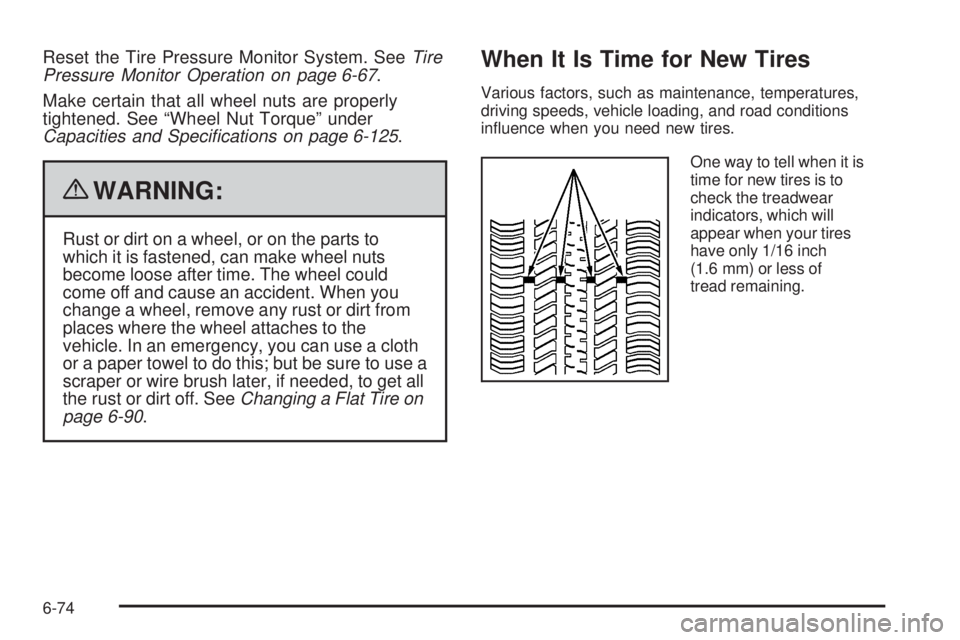
When It Is Time for New Tires
Various factors, such as maintenance, temperatures,
driving speeds, vehicle loading, and road conditions
influence when you need new tires.
One way to tell when it is
time for new tires is to
check the treadwear
indicators, which will
appear when your tires
have only 1/16 inch
(1.6 mm) or less of
tread remaining.
6-74
Page 358 of 448

Changing a Flat Tire
If a tire goes flat, avoid further tire and wheel damage
by driving slowly to a level place. Turn on the hazard
warning flashers. SeeHazard Warning Flashers
on page 4-3.
{WARNING:
Changing a tire can be dangerous. The vehicle
can slip off the jack and roll over or fall on you or
other people. You and they could be badly injured
or even killed. Find a level place to change your
tire. To help prevent the vehicle from moving:
1. Set the parking brake firmly.
2. Put the shift lever in P (Park).
WARNING: (Continued)
WARNING: (Continued)
3. Turn off the engine and do not restart while
the vehicle is raised.
4. Do not allow passengers to remain in the
vehicle.
To be even more certain the vehicle will not move,
you should put blocks at the front and rear of the
tire farthest away from the one being changed.
That would be the tire, on the other side, at the
opposite end of the vehicle.
When the vehicle has a flat tire (B), use the following
example as a guide to assist you in the placement
of wheel blocks (A).
6-90
Page 359 of 448
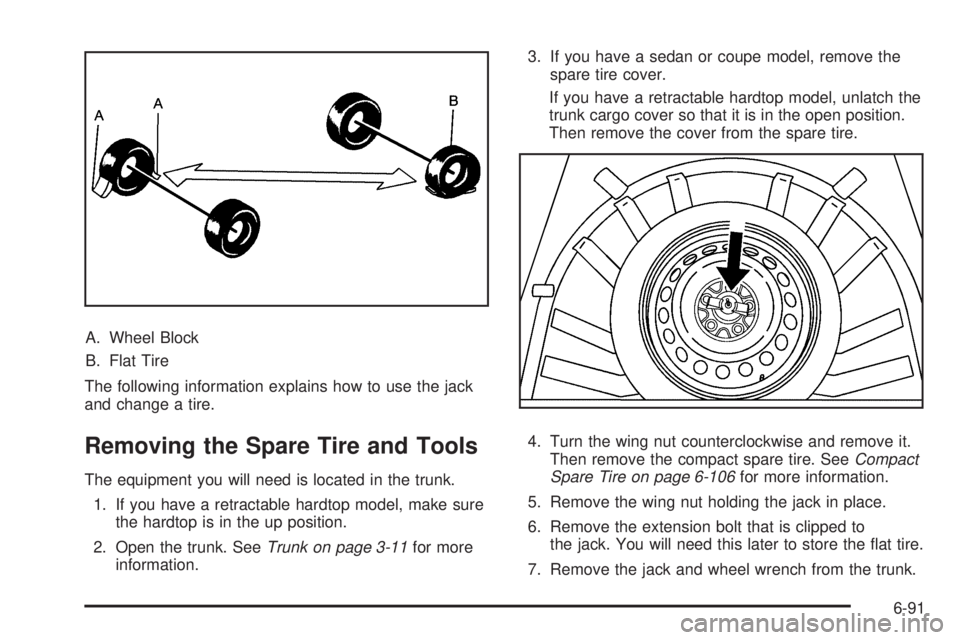
A. Wheel Block
B. Flat Tire
The following information explains how to use the jack
and change a tire.
Removing the Spare Tire and Tools
The equipment you will need is located in the trunk.
1. If you have a retractable hardtop model, make sure
the hardtop is in the up position.
2. Open the trunk. SeeTrunk on page 3-11for more
information.3. If you have a sedan or coupe model, remove the
spare tire cover.
If you have a retractable hardtop model, unlatch the
trunk cargo cover so that it is in the open position.
Then remove the cover from the spare tire.
4. Turn the wing nut counterclockwise and remove it.
Then remove the compact spare tire. SeeCompact
Spare Tire on page 6-106for more information.
5. Remove the wing nut holding the jack in place.
6. Remove the extension bolt that is clipped to
the jack. You will need this later to store the flat tire.
7. Remove the jack and wheel wrench from the trunk.
6-91
Page 362 of 448
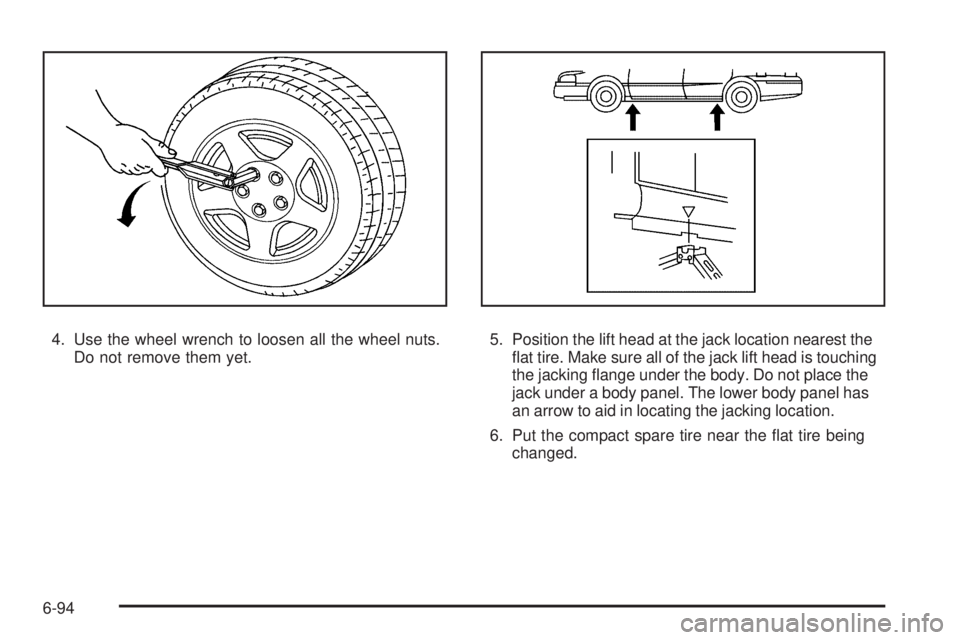
4. Use the wheel wrench to loosen all the wheel nuts.
Do not remove them yet.5. Position the lift head at the jack location nearest the
flat tire. Make sure all of the jack lift head is touching
the jacking flange under the body. Do not place the
jack under a body panel. The lower body panel has
an arrow to aid in locating the jacking location.
6. Put the compact spare tire near the flat tire being
changed.
6-94