instrument panel PONTIAC G6 2010 Owner's Manual
[x] Cancel search | Manufacturer: PONTIAC, Model Year: 2010, Model line: G6, Model: PONTIAC G6 2010Pages: 448, PDF Size: 2.5 MB
Page 152 of 448
Tire Pressure Light.......................................4-33
Malfunction Indicator Lamp.............................4-34
Oil Pressure Light.........................................4-37
Security Light...............................................4-37
Cruise Control Light......................................4-38
Highbeam On Light.......................................4-38
Fuel Gage...................................................4-38
Low Fuel Warning Light.................................4-39
Driver Information Center (DIC).......................4-39
DIC Operation and Displays...........................4-40
DIC Warnings and Messages.........................4-42
DIC Vehicle Personalization............................4-47Audio System(s).............................................4-53
Setting the Clock..........................................4-53
Radio(s)......................................................4-54
Using an MP3..............................................4-63
XM Radio Messages.....................................4-70
Bluetooth
®...................................................4-71
Theft-Deterrent Feature..................................4-81
Audio Steering Wheel Controls.......................4-82
Radio Reception...........................................4-83
Fixed Mast Antenna (Retractable Hardtop)........4-84
Backglass Antenna (Coupe and Sedan)...........4-84
XM™ Satellite Radio Antenna System.............4-84
Section 4 Instrument Panel
4-2
Page 153 of 448

Instrument Panel Overview
Hazard Warning Flashers
|(Hazard Warning Flasher):Press this button
located on the instrument panel, to make the front and
rear turn signal lamps flash on and off. This warns
others that you are having trouble.
Press
|again to turn the flashers off.
Horn
Press near or on the horn symbols on the steering
wheel pad to sound the horn.
Tilt and Telescopic Steering Wheel
A tilt and telescope wheel lets the steering wheel
be adjusted.
The lever is located on the left side of the steering
wheel column.To adjust the steering wheel:
1. Pull the lever down.
2. Move the steering wheel up or down or backward
or forward into a comfortable position.
3. Pull the lever up to lock the steering wheel in place.
Do not adjust the steering wheel while driving.
4-3
Page 154 of 448
Turn Signal/Multifunction Lever
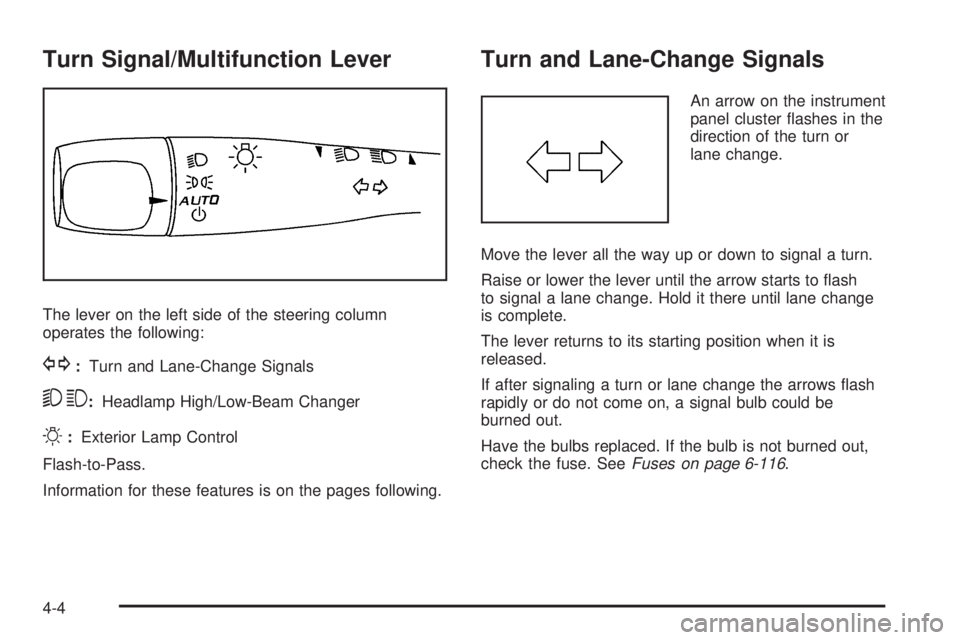
The lever on the left side of the steering column
operates the following:
G:Turn and Lane-Change Signals
53:Headlamp High/Low-Beam Changer
O:Exterior Lamp Control
Flash-to-Pass.
Information for these features is on the pages following.
Turn and Lane-Change Signals
An arrow on the instrument
panel cluster flashes in the
direction of the turn or
lane change.
Move the lever all the way up or down to signal a turn.
Raise or lower the lever until the arrow starts to flash
to signal a lane change. Hold it there until lane change
is complete.
The lever returns to its starting position when it is
released.
If after signaling a turn or lane change the arrows flash
rapidly or do not come on, a signal bulb could be
burned out.
Have the bulbs replaced. If the bulb is not burned out,
check the fuse. SeeFuses on page 6-116.
4-4
Page 155 of 448

Headlamp High/Low-Beam Changer
To change the headlamps from low beam to high
beam, push the turn signal/multifunction lever away
from you.
This instrument panel cluster light
3comes on if the
high beam lamps are turned on while the ignition is
in ON/RUN.
To change the headlamps from high beam to low beam,
pull the turn signal lever toward you.
Flash-to-Pass
This feature lets the high-beam headlamps be used to
signal a driver in front of you that you want to pass.
Pull the turn signal/multifunction lever toward you until
the high-beam headlamps come on, then release
the lever to turn them off.
Windshield Wipers
The windshield wiper lever is on the right side of the
steering wheel.
Move the lever to control the windshield wipers.
9(Off):Turns the windshield wipers off.
&(Intermittent; Speed Sensitive Wipers):For
intermittent or speed sensitive operation. The amount of
delay time varies between wiping cycles due to the
delay setting selected or the speed of the vehicle. As
vehicle speed is increased or decreased, the wiper
interval also increases or decreases.
4-5
Page 158 of 448

SET−(Set):Press this button to set a speed and to
decrease the speed.
To set a speed do the following:
1. Press the on/off symbol to turn cruise control on.
The indicator light on the button comes on.
2. Get to the speed you want.
3. Press the SET−symbol and release it. The cruise
symbol displays in the instrument panel cluster to
show the system is engaged.
4. Take your foot off the accelerator pedal.
When the brakes are applied, the cruise control
shuts off.
If the vehicle is in cruise control and the Traction
Control System (TCS) or Enhanced Traction System
(ETS) begins to limit wheel spin, the cruise control
automatically disengages. SeeTraction Control System
(TCS) on page 5-6. When road conditions allow, the
cruise control can be used again.Resuming a Set Speed
Suppose the cruise control is set at a desired speed
and the brakes are applied. This disengages the cruise
control. The cruise symbol in the instrument panel
cluster also goes out, indicating cruise is no longer
engaged. To return to the previously set speed, you do
not need to go through the set process again. Once
at a speed of about 40 km/h) (25 mph) or more, press
the RES+ symbol briefly.
This takes the vehicle back up and maintains the
previously chosen speed.
Increasing Speed While Using Cruise
Control
There are two ways to go to a higher speed.
•If the cruise control system is already engaged,
press the RES+ symbol. Hold it there until the
speed desired is reached and then release
the button.
•To increase the vehicle speed in very small
amounts, press the RES+ symbol briefly and then
release it. Each time this is done, the vehicle
goes about 1.6 km/h (1 mph) faster.
4-8
Page 159 of 448

Reducing Speed While Using Cruise
Control
If the cruise control system is already engaged,
•Push and hold the SET−symbol until the lower
speed desired is reached, then release it.
•To slow down in very small amounts, push the
SET−symbol briefly. Each time this is done,
the vehicle goes about 1.6 km/h (1 mph) slower.
Passing Another Vehicle While Using
Cruise Control
Use the accelerator pedal to increase the vehicle speed.
When you take your foot off the pedal, the vehicle will
slow down to the cruise control speed set earlier.
Using Cruise Control on Hills
How well the cruise control works on hills depends upon
the vehicle speed, load, and the steepness of the
hills. When going up steep hills, you might have to step
on the accelerator pedal to maintain your vehicle’sspeed. When going downhill, you might have to brake
or shift to a lower gear to keep your vehicle’s speed
down. Applying the brakes does turn off the cruise
control. Many drivers find this to be too much trouble
and do not use cruise control on steep hills.
Ending Cruise Control
There are two ways to disengage the cruise control:
•Step lightly on the brake pedal.
•Press the on/off button.
The cruise symbol in the instrument panel cluster turns
off when the system is disengaged.
Erasing Speed Memory
The cruise control set speed memory is erased when
the cruise control or the ignition is turned off.
4-9
Page 161 of 448

Headlamps Off in Park
This feature works when the ignition is in the ON/RUN
position and it is dark outside. To turn the headlamps
off when it is dark outside but keep other exterior lights
on, turn the exterior lamp control to the parking lamp
position.
To turn on the headlamps along with the other lamps
when it is dark outside, turn the exterior lamp control to
the AUTO or headlamp position.
This function does not work for vehicles first sold in
Canada.
Delayed Headlamps
The delayed headlamps feature keeps the headlamps
on for 20 seconds after the key is turned to LOCK/OFF,
then the headlamps automatically turn off.
To override the 20 second delayed headlamp feature
while it is active turn the turn signal/multifunction
lever up one position and then back to AUTO.
Daytime Running Lamps (DRL)
Daytime Running Lamps (DRL) can make it easier for
others to see the front of your vehicle during the
day. Fully functional DRL are required on all vehicles
first sold in Canada. The vehicle has a light sensor
on top of the instrument panel that controls the DRL.
Do not cover this sensor or the head lamps will be
on when they are not needed.
The DRL system makes the low-beam headlamps come
on at a reduced brightness when the following
conditions are met:
•The ignition is on.
•The exterior lamps control is in AUTO.
•The exterior lamps control is in the parking lamps
only position (This applies only to vehicles that
are first sold in Canada).
•The light sensor detects daytime light.
•The parking brake is released or the vehicle is not
in P (Park).
When the DRL system is on, the taillamps, sidemarker
lamps, parking lamps, and instrument panel lights
are not on unless you turn the exterior lamps control to
the parking lamp position.
The regular headlamp system should be turned on
when they are needed.
4-11
Page 162 of 448

Automatic Headlamp System
When it is dark enough outside, the automatic headlamp
system turns on the headlamps at the normal brightness
along with other lamps such as the taillamps,
sidemarker, parking lamps, and the instrument panel
lights. The radio lights will also be dim.
The vehicle has a light sensor on top of the instrument
panel that controls the automatic headlamp system.
Do not cover the sensor or the automatic headlamp
system will turn on when it is not needed.
There is a delay in the transition between the daytime
and nighttime operation of the DRL and the automatic
headlamp systems so that driving under bridges or
bright overhead street lights does not affect the system.
The DRL and automatic headlamp systems will only
be affected when the light sensor sees a change
in lighting lasting longer than this delay.
If vehicle is started in a dark garage, the automatic
headlamp system comes on immediately. Once
the vehicle leaves the garage, it takes about one minute
for the automatic headlamp system to change to DRL
if it is light outside. During that delay, the instrument
panel cluster may not be as bright as usual. Make sure
the instrument panel brightness control is in the full
bright position. SeeInstrument Panel Brightness
on page 4-13.To idle the vehicle with the automatic headlamp system
off, turn the ignition on and set the exterior light
switch to the off/on position. For vehicles first sold in
Canada, the transmission must stay in P (Park) for this
function.
The regular headlamps should be used when needed.
Fog Lamps
For vehicles with fog lamps, the button for this feature is
located on the instrument panel, to the left of the
steering wheel.
The ignition must be on for the fog lamps to work.
#:Press to turn the fog lamps on or off. An indicator
light comes on when the fog lamps are on.
The parking lamps automatically turn on and off when
the fog lamps are turned on and off.
The fog lamps turn off while the high-beam headlamps
are turned on.
Some localities have laws that require the headlamps to
be on along with the fog lamps.
4-12
Page 163 of 448

Instrument Panel Brightness
The knob with this symbol
is located on the
instrument panel to the left
of the steering column.
Turn the knob clockwise or counterclockwise to brighten
or dim the lights.
Turn the knob completely clockwise to turn on the
interior lamps.
Courtesy Lamps
If the vehicle has a retractable hardtop, it has courtesy
lamps in the rear passenger area of the vehicle.
These lamps make it easier to see while entering and
exiting the vehicle. These lamps come on when any
door is opened and only turn off when all the doors are
closed.
Dome Lamps
The dome lamps come on when any door is opened.
They turn off after all the doors are closed.
The dome lamps can also be turned on by turning the
instrument panel brightness knob, located on the
instrument panel to the left of the steering column,
clockwise to the farthest position. In this position, the
dome lamps remain on whether a door is opened
or closed.
Entry/Exit Lighting
The lamps inside the vehicle come on when any door is
opened. These lamps fade out about 20 seconds
after all of the doors have been closed or when the
ignition is turned to ON/RUN. They also come on when
the unlock symbol button or the horn symbol is
pressed on the Remote Keyless Entry (RKE) system
transmitter.
The lamps inside the vehicle stay on for about
20 seconds after the key is removed from the ignition to
provide light as you exit.
4-13
Page 164 of 448

Parade Dimming
Parade mode automatically prohibits the dimming of the
instrument panel displays during the daylight while
the headlamps are on so that the displays are still able
to be seen.
Reading Lamps
For vehicles with front and rear reading lamps, press
the lens to turn the lamp on and off, while the doors are
closed. These lamps come on automatically when
any door is opened.
Trunk Lamp
The trunk lamp comes on when the trunk is opened and
turns off when the trunk is closed.
Electric Power Management
The vehicle has Electric Power Management (EPM) that
estimates the battery’s temperature and state of
charge. It then adjusts the voltage for best performance
and extended life of the battery.When the battery’s state of charge is low, the voltage is
raised slightly to quickly bring the charge back up.
When the state of charge is high, the voltage is lowered
slightly to prevent overcharging. If the vehicle has a
voltmeter gage or a voltage display on the Driver
Information Center (DIC), you may see the voltage move
up or down. This is normal. If there is a problem, an
alert will be displayed.
The battery can be discharged at idle if the electrical
loads are very high. This is true for all vehicles. This is
because the generator (alternator) may not be
spinning fast enough at idle to produce all the power
that is needed for very high electrical loads.
A high electrical load occurs when several of the
following are on, such as: headlamps, high beams, fog
lamps, rear window defogger, climate control fan at
high speed, heated seats, engine cooling fans, trailer
loads, and loads plugged into accessory power outlets.
EPM works to prevent excessive discharge of the
battery. It does this by balancing the generator’s output
and the vehicle’s electrical needs. It can increase
engine idle speed to generate more power, whenever
needed. It can temporarily reduce the power demands of
some accessories.
4-14