reset PONTIAC G6 2010 Owner's Manual
[x] Cancel search | Manufacturer: PONTIAC, Model Year: 2010, Model line: G6, Model: PONTIAC G6 2010Pages: 448, PDF Size: 2.5 MB
Page 221 of 448
Channel Unavail:This previously assigned channel is
no longer assigned. Tune to another station. If this
station was one of the presets, choose another station
for that preset button.
No Artist Info:No artist information is available at this
time on this channel. The system is working properly.
No Title Info:No song title information is available
at this time on this channel. The system is working
properly.
No CAT Info:No category information is available at
this time on this channel. The system is working
properly.
No Information:No text or informational messages are
available at this time on this channel. The system is
working properly.
CAT Not Found:There are no channels available for
the selected category. The system is working properly.
XM Theftlocked:The XM receiver in the vehicle
could have previously been in another vehicle. For
security purposes, XM receivers cannot be swapped
between vehicles. If this message is received after
having the vehicle serviced, check with your
dealer/retailer.XM Radio ID:If tuned to channel 0, this message
alternates with the XM™ Radio 8 digit radio ID label.
This label is needed to activate the service.
Unknown:If this message is received when tuned to
channel 0, there could be a receiver fault. Consult
with your dealer/retailer.
Check XM Receivr:If this message does not clear
within a short period of time, the receiver could have a
fault. Consult with your dealer/retailer.
XM Not Available:If this message does not clear
within a short period of time, the receiver could have a
fault. Consult with your dealer/retailer.
Bluetooth®
Vehicles with a Bluetooth system can use a Bluetooth
capable cell phone with a Hands Free Profile to
make and receive phone calls. The system can be used
while the key is in ON/RUN or ACC/ACCESSORY
position. The range of the Bluetooth system can be up
to 9.1 m (30 ft.). Not all phones support all functions,
and not all phones are guaranteed to work with
the in-vehicle Bluetooth system. See gm.com/bluetooth
for more information on compatible phones.
4-71
Page 232 of 448

Audio Steering Wheel Controls
Vehicles with audio
steering wheel controls
could differ depending on
the vehicle’s options.
Some audio controls can
be adjusted at the steering
wheel.
e+/e−(Volume):Press to increase or to decrease
the radio volume.
w/x(Next / Previous):Press to change radio
stations, select tracks on a CD, or to select tracks and
navigate folders on an iPod
®or USB device.
To change radio stations:
•Press and releaseworxto go to the next or
previous radio station stored as a preset.
•Press and holdworxto go to the next or
previous radio station in the selected band with a
strong signal.To select tracks on a CD:
Press and release
worxto go to the next or previous
track.
To select tracks on an iPod or USB device:
1. Press and hold
worxwhile listening to a song
until the contents of the current folder display on
the radio display.
2. Press and release
worxto scroll up or down the
list, then press and hold
wto play the highlighted
track.
To navigate folders on an iPod or USB device:
1. Press and hold
worxwhile listening to a song
until the contents of the current folder display on
the radio display.
2. Press and hold
xto go back to the previous
folder list.
3. Press and release
worxto scroll up or down
the list.
•To select a folder, press and holdwwhen the
folder is highlighted.
•To go back further in the folder list, press and
hold
x.
4-82
Page 292 of 448

Engine Oil Additives / Engine Oil
Flushes
Do not add anything to the oil. The recommended
oils with the starburst symbol that meet GM Standard
GM6094M are all that is needed for good performance
and engine protection.
Engine oil system flushes are not recommended and
could cause engine damage not covered by the vehicle
warranty.
Engine Oil Life System
When to Change Engine Oil
This vehicle has a computer system that indicates when
to change the engine oil and filter. This is based on
engine revolutions and engine temperature, and not on
mileage. Based on driving conditions, the mileage at
which an oil change is indicated can vary considerably.
For the oil life system to work properly, the system must
be reset every time the oil is changed.When the system has calculated that oil life has been
diminished, it indicates that an oil change is necessary.
A CHANGE OIL SOON message comes on. SeeDIC
Warnings and Messages on page 4-42. Change the oil
as soon as possible within the next 600 miles (1 000 km).
It is possible that, if driving under the best conditions, the
oil life system might not indicate that an oil change is
necessary for over a year. However, the engine oil and
filter must be changed at least once a year and at this
time the system must be reset. Your dealer/retailer has
trained service people who will perform this work using
genuine parts and reset the system. It is also important to
check the oil regularly and keep it at the proper level.
If the system is ever reset accidentally, the oil must be
changed at 3,000 miles (5 000 km) since the last oil
change. Remember to reset the oil life system whenever
the oil is changed.
6-24
Page 293 of 448

How to Reset the Engine Oil Life
System
The Engine Oil Life System calculates when to change
the engine oil and filter based on vehicle use. Whenever
the oil is changed, reset the system so it can calculate
when the next oil change is required. If a situation occurs
where the oil is changed prior to a CHANGE OIL SOON
message being turned on, reset the system.
After changing the engine oil and filter, the system must
be reset. To reset the oil life system:
1. With the CHANGE OIL SOON message displayed,
press any of the three DIC buttons to clear the
CHANGE OIL SOON message. SeeDIC Warnings
and Messages on page 4-42.
2. Display OIL LIFE RESET on the DIC.
3. Press and hold the ENTER button for at least
one second. An ACKNOWLEDGED display
message will appear for three seconds or until the
next button is pressed. This tells you the system
has been reset. SeeDIC Vehicle Personalization
on page 4-47.
4. Turn the ignition to LOCK/OFF.
If the CHANGE OIL SOON message comes back on
when the vehicle is started, the engine oil life system
has not reset. Repeat the procedure.
What to Do with Used Oil
Used engine oil contains certain elements that can be
unhealthy for your skin and could even cause cancer.
Do not let used oil stay on your skin for very long. Clean
your skin and nails with soap and water, or a good hand
cleaner. Wash or properly dispose of clothing or rags
containing used engine oil. See the manufacturer’s
warnings about the use and disposal of oil products.
Used oil can be a threat to the environment. If you
change your own oil, be sure to drain all the oil from the
filter before disposal. Never dispose of oil by putting it
in the trash, pouring it on the ground, into sewers, or into
streams or bodies of water. Recycle it by taking it to a
place that collects used oil.
6-25
Page 305 of 448
Overheated Engine Protection
Operating Mode
This emergency operating mode lets the vehicle
be driven to a safe place in an emergency situation.
If an overheated engine condition exists, an overheat
protection mode which alternates firing groups of
cylinders helps prevent engine damage. In this mode,
there is a significant loss in power and engine
performance. The temperature gage indicates an
overheat condition exists. Driving extended distances
and/or towing a trailer in the overheat protection mode
should be avoided.
Notice:After driving in the overheated engine
protection operating mode, to avoid engine damage,
allow the engine to cool before attempting any
repair. The engine oil will be severely degraded.
Repair the cause of coolant loss, change the oil
and reset the oil life system. SeeEngine Oil
on page 6-21.
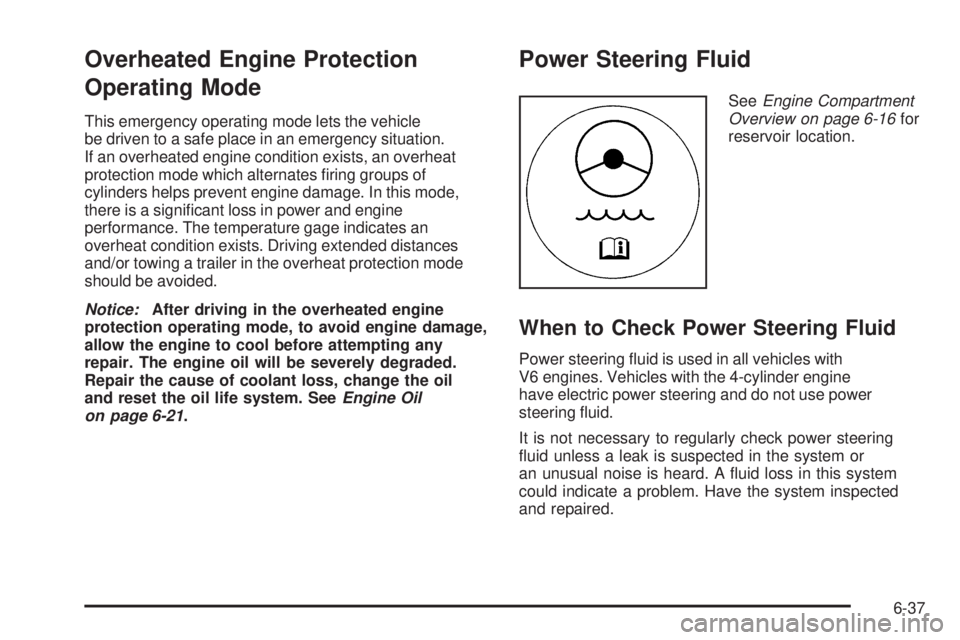
Power Steering Fluid
SeeEngine Compartment
Overview on page 6-16for
reservoir location.
When to Check Power Steering Fluid
Power steering fluid is used in all vehicles with
V6 engines. Vehicles with the 4-cylinder engine
have electric power steering and do not use power
steering fluid.
It is not necessary to regularly check power steering
fluid unless a leak is suspected in the system or
an unusual noise is heard. A fluid loss in this system
could indicate a problem. Have the system inspected
and repaired.
6-37
Page 315 of 448

To disconnect the jumper cables from both vehicles, do
the following:
1. Disconnect the black negative (−) cable from the
vehicle that had the dead battery.
2. Disconnect the black negative (−) cable from the
vehicle with the good battery.
3. Disconnect the red positive (+) cable from the
vehicle with the good battery.
4. Disconnect the red positive (+) cable from the other
vehicle.
Headlamp Aiming
Headlamp aim has been preset at the factory and
should need no further adjustment.
However, if your vehicle is damaged in a crash, the
headlamp aim may be affected. Aim adjustment to the
low-beam headlamps may be necessary if oncoming
drivers flash their high-beam headlamps at you
(for vertical aim).
If the headlamps need to be re-aimed, it is
recommended that you take the vehicle to your
dealer/retailer for service.
Bulb Replacement
For the proper type of replacement bulbs, see
Replacement Bulbs on page 6-54.
For any bulb changing procedure not listed in this
section, contact your dealer/retailer.
Halogen Bulbs
{WARNING:
Halogen bulbs have pressurized gas inside and
can burst if you drop or scratch the bulb. You or
others could be injured. Be sure to read and follow
the instructions on the bulb package.
6-47
Page 339 of 448

6. The passenger side front turn signal comes on to
indicate that corner sensor is ready to be learned.
Proceed to the passenger side front tire and
repeat the procedure in Step 5.
7. The passenger side rear turn signal comes on to
indicate that corner sensor is ready to be learned.
Proceed to the passenger side rear tire and
repeat the procedure in Step 5.
8. The driver side rear turn signal comes on to
indicate that corner sensor is ready to be learned.
Proceed to the driver side rear tire, and repeat
the procedure in Step 5.
9. After hearing the single horn chirp for the driver
side rear tire, two additional horn chirps sound
to indicate the tire learning process is done.
Turn the ignition switch to LOCK/OFF.
If no tires are learned after entering the TPMS learn
mode, or if communication with the receiver stops, or
if the time limit has expired, turn the ignition switch to
LOCK/OFF and start over beginning with Step 2.
10. Set all four tires to the recommended air pressure
level as indicated on the Tire and Loading
Information label.
11. Put the valve caps back on the valve stems.TPMS Matching Process for Vehicles
without Remote Keyless Entry (RKE)
1. Set the parking brake.
2. Turn the ignition switch to ON/RUN with the
engine off.
3. Using the Driver Information Center (DIC), press
the INFO and Set/Reset buttons at the same time
for about one second. Then press and release
the INFO button until the TIRE LEARN? message
displays.
4. Press and hold the Set/Reset DIC button for
approximately three seconds to start the TPMS
learn mode. The horn sounds twice to indicate the
TPMS receiver is ready and the TIRE LEARN ON
message displays. The driver side front turn signal
also comes on to indicate that corner sensor is ready
to be learned.
5. Start with the driver side front tire.
6-71
Page 342 of 448
Reset the Tire Pressure Monitor System. SeeTire
Pressure Monitor Operation on page 6-67.
Make certain that all wheel nuts are properly
tightened. See “Wheel Nut Torque” under
Capacities and Specications on page 6-125.
{WARNING:
Rust or dirt on a wheel, or on the parts to
which it is fastened, can make wheel nuts
become loose after time. The wheel could
come off and cause an accident. When you
change a wheel, remove any rust or dirt from
places where the wheel attaches to the
vehicle. In an emergency, you can use a cloth
or a paper towel to do this; but be sure to use a
scraper or wire brush later, if needed, to get all
the rust or dirt off. SeeChanging a Flat Tire on
page 6-90.
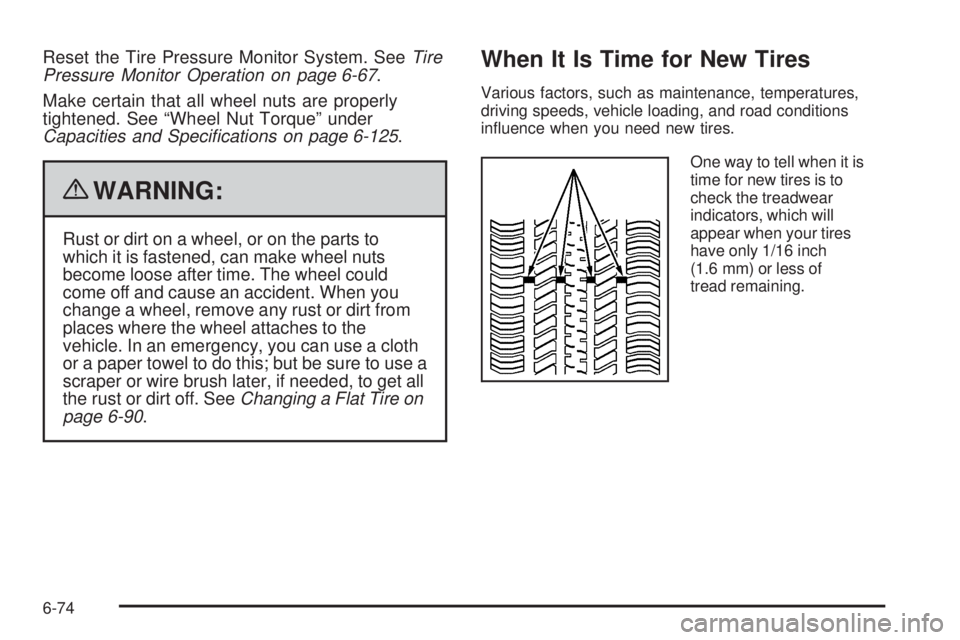
When It Is Time for New Tires
Various factors, such as maintenance, temperatures,
driving speeds, vehicle loading, and road conditions
influence when you need new tires.
One way to tell when it is
time for new tires is to
check the treadwear
indicators, which will
appear when your tires
have only 1/16 inch
(1.6 mm) or less of
tread remaining.
6-74
Page 399 of 448
Rotation of New Tires
To maintain ride, handling, and performance of the
vehicle, it is important that the first rotation service
for new tires be performed when they have
8 000 to 13 000 km (5,000 to 8,000 miles).
SeeTire Inspection and Rotation on page 6-73.
Scheduled Maintenance
When the Change Oil Soon Message
Displays
Change engine oil and filter. SeeEngine Oil on
page 6-21.An Emission Control Service.
When the Change Oil Soon message displays, service
is required for the vehicle as soon as possible, within
the next 1 000 km/600 miles. If driving under the
best conditions, the engine oil life system might not
indicate the need for vehicle service for more than a
year. The engine oil and filter must be changed at
least once a year and the oil life system must be reset.
Your dealer/retailer has trained service technicians
who will perform this work and reset the system. If the
engine oil life system is reset accidentally, service
the vehicle within 5 000 km/3,000 miles since the last
service. Reset the oil life system whenever the oil
is changed. SeeEngine Oil Life System on page 6-24.When the Change Oil Soon message displays, certain
services, checks, and inspections are required. The
services described for MaintenanceIshould be
performed at every engine oil change. The services
described for MaintenanceIIshould be performed when:
•MaintenanceIwas performed the last time the
engine oil was changed.
•It has been 10 months or more since the Change
Oil Soon message has displayed or since the last
service.
MaintenanceI
•Change engine oil and filter. SeeEngine Oil on
page 6-21.An Emission Control Service.
•Engine coolant level check. SeeEngine Coolant on
page 6-31.
•Windshield washer fluid level check. SeeWindshield
Washer Fluid on page 6-38.
•Tire inflation check. SeeInation - Tire Pressure on
page 6-64.
•Tire wear inspection. SeeTire Inspection and
Rotation on page 6-73.
•Rotate tires. SeeTire Inspection and Rotation on
page 6-73.
7-3
Page 403 of 448
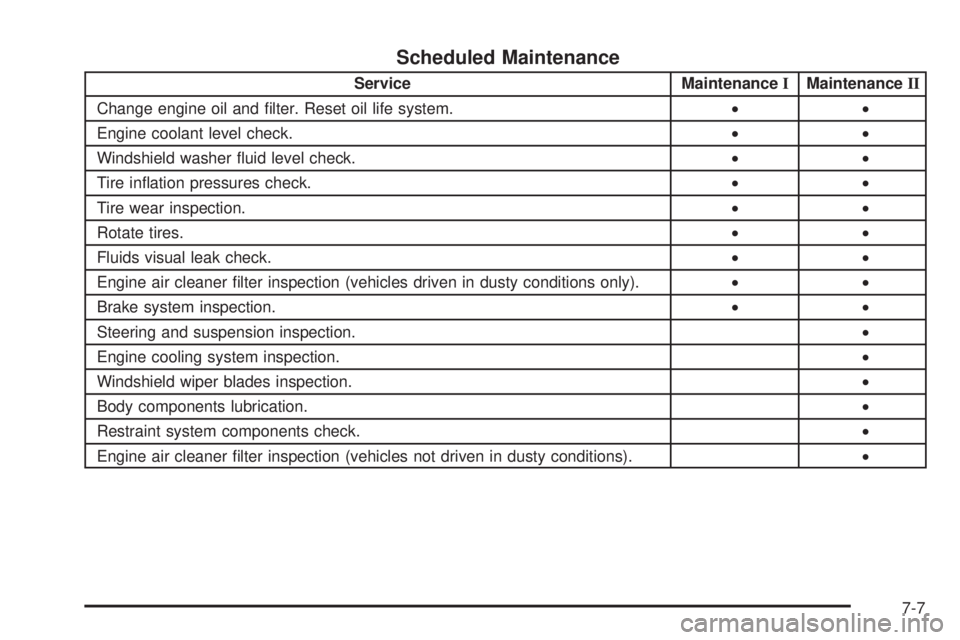
Scheduled Maintenance
Service MaintenanceIMaintenanceII
Change engine oil and filter. Reset oil life system.••
Engine coolant level check.••
Windshield washer fluid level check.••
Tire inflation pressures check.••
Tire wear inspection.••
Rotate tires.••
Fluids visual leak check.••
Engine air cleaner filter inspection (vehicles driven in dusty conditions only).••
Brake system inspection.••
Steering and suspension inspection.•
Engine cooling system inspection.•
Windshield wiper blades inspection.•
Body components lubrication.•
Restraint system components check.•
Engine air cleaner filter inspection (vehicles not driven in dusty conditions).•
7-7