infotainment PONTIAC G8 2008 Owner's Manual
[x] Cancel search | Manufacturer: PONTIAC, Model Year: 2008, Model line: G8, Model: PONTIAC G8 2008Pages: 334, PDF Size: 2.99 MB
Page 136 of 334
To record an MP3 disc:
Record the MP3 les onto a
CD-R or CD-RW disc.
Record playlists with an .m3u
or .wpl extension.
Do not mix standard audio and
MP3 les on the same disc.
Record the entire disc at once.
Finalize the disc when recording
an MP3 disc with multiple
sessions.
Root Directory
The root directory is treated as a
folder. All .mp3 les in the root
directory are accessed before
folders in the root directory.
Empty Directory or Folder
Empty folders and directories will
not show on the display. The system
will ignore empty directories and
folders and advance to the next
directory or folder that has .mp3
les in it.No Folder
On a CD that contains only .mp3
les in the root directory the
next and previous folder functions
do not work.
On a CD that contains playlists
and .mp3 les, the next and
previous folder functions search
playlists rst and then search
.mp3 les in the root folder.
Order of Play
Tracks are played in the following
order for CDs that have playlists:
1. The rst track in the rst playlist
and then continues sequentially
through all tracks in each
playlist
2. When the last track of the last
playlist has played, play restarts
from the rst track of the
rst playlist.Tracks are played in the following
order for CDs that do not have
playlists:
1. Play starts with the rst le in the
root directory.
2. After all les from the root
directory have played, les in the
folders will play.
3. After playing the last le from the
last folder, play restarts with the
rst le in the root directory.
File System and Naming
The radio shows track names that
are shorter than 39 characters,
names that are longer will be
shortened. The radio will show the
track name as:
The song name that is in the
ID3 tag.
The le name without the le
extension if the song name is
not in the ID3 tag.
6-20 Infotainment
2008 - Pontiac G8 Owner Manual
Page 137 of 334
Preprogrammed Playlists
Playlists are accessed before les
or folders in the root directory.
Preprogrammed playlists created by
WinAmp™, MusicMatch™, or
Real Jukebox™ software can be
accessed and are treated as special
folders containing compressed
audio song les.
Playing an MP3
The MP3 player cannot play the
smaller 3 inch (8 cm) single
CDs with an adapter ring.
To play an MP3 CD:
1. Press CD if an MP3 disc is
already in the player.
2. Refer toRadio(s) on page 6-3
for information on how to load
discs if the CD player is empty.MP3 CD Display:To change the
MP3 CD display, press the softkey
under the label Display Mode until
the desired display is shown.
The MP3 CD display modes are:
Normal mode with folder number,
track number, and elapsed time.
Folder and song info mode with
folder number, track number,
folder name and song name.
Folder name and song name can
only be displayed when the
appropriate data is stored on the
CD MP3 ID tag.
Artist and song info mode with
folder number, track number,
artist name, and song name.
Artist name and song name can
only be displayed when the
appropriate data is stored on the
CD MP3 ID tag.
Song info mode with folder
number, track number, and
folder name.RANDOM:Select to hear the tracks
in random order. The random
modes are RDM IN DISC (random
in disc) or RDM IN FOLDER
(random in folder).
To use RANDOM:
1. Press the softkey below the
Random label to display the
different random modes.
2. Press the softkey below RDM IN
DISC or RDM IN FOLDER.
3. Press
lto go to the next track.
4. Press
gto go to the previous
track.
5. Press the softkey below the
active random mode to cancel
the random mode.
Infotainment 6-21
2008 - Pontiac G8 Owner Manual
Page 138 of 334
REPEAT:Select to repeat tracks
or folders.
To use REPEAT:
1. Press the softkey below the
REPEAT label to display the
different repeat modes.
2. Press the softkey below REPEAT
TRACK, REPEAT DISC, or
REPEAT FOLDER to chose
that mode.
3. Press the softkey below the
active repeat mode to cancel
the repeat mode.
BROWSE MODE:Folders and
tracks of an MP3 disc can be found
easier by using the browse mode.
Finding a track in the current folder:
1. Press the softkey below
BROWSE MODE. The les in
the active folder display and the
active track is highlighted.
2. Turn the MENU knob to highlight
the desired track.3. Press the MENU knob to play
the highlighted track.
4. Press the softkey below EXIT to
exit browse mode.
Finding a track in a different folder:
1. Press the softkey below
BROWSE MODE. The les in
the active folder display and the
active track is highlighted.
2. Turn the MENU knob to highlight
‘Folder Listing’.
3. Press the MENU knob to list all
the folders on the CD.
4. Turn the MENU knob to highlight
the desired folder.
5. Press the MENU knob to list the
tracks in the highlighted folder.
6. Turn the MENU knob to highlight
the desired track.
7. Press the MENU knob to play
the highlighted track.
8. Press the softkey below EXIT to
exit browse mode.Finding a playlist:
1. Press the softkey below
BROWSE MODE. The les in
the active folder display and the
active track is highlighted.
2. Turn the MENU knob to highlight
‘Playlists’.
3. Press the MENU knob to list all
the playlists on the CD.
4. Turn the MENU knob to highlight
the desired playlist.
5. Press the MENU knob to play
the highlighted playlist.
6. Press the softkey below EXIT to
exit browse mode.
DISC
[(Next Folder):Press and
hold for more than two seconds
to go to the next folder.
DISC
r(Previous Folder):Press
and hold for more than two seconds
to go to the previous folder.
6-22 Infotainment
2008 - Pontiac G8 Owner Manual
Page 139 of 334
l(Forward):Press to go to the
next track or press
lmultiple times
until the desired track is reached.
g(Reverse):Press to go back to
the start of the current track or
press
gmultiple times until
the desired track is reached.
Theft-Deterrent Feature
The radio has an electronically
coded security system that links the
radio to the vehicle. When the
ignition is off, a ashing red light on
the upper left side of the radio
indicates the security system is on.
If the radio is moved to a different
vehicle, it will not operate and
Security Lockout Active displays.
Contact your dealer/retailer to
unlock the radio.
Audio Steering Wheel
Controls
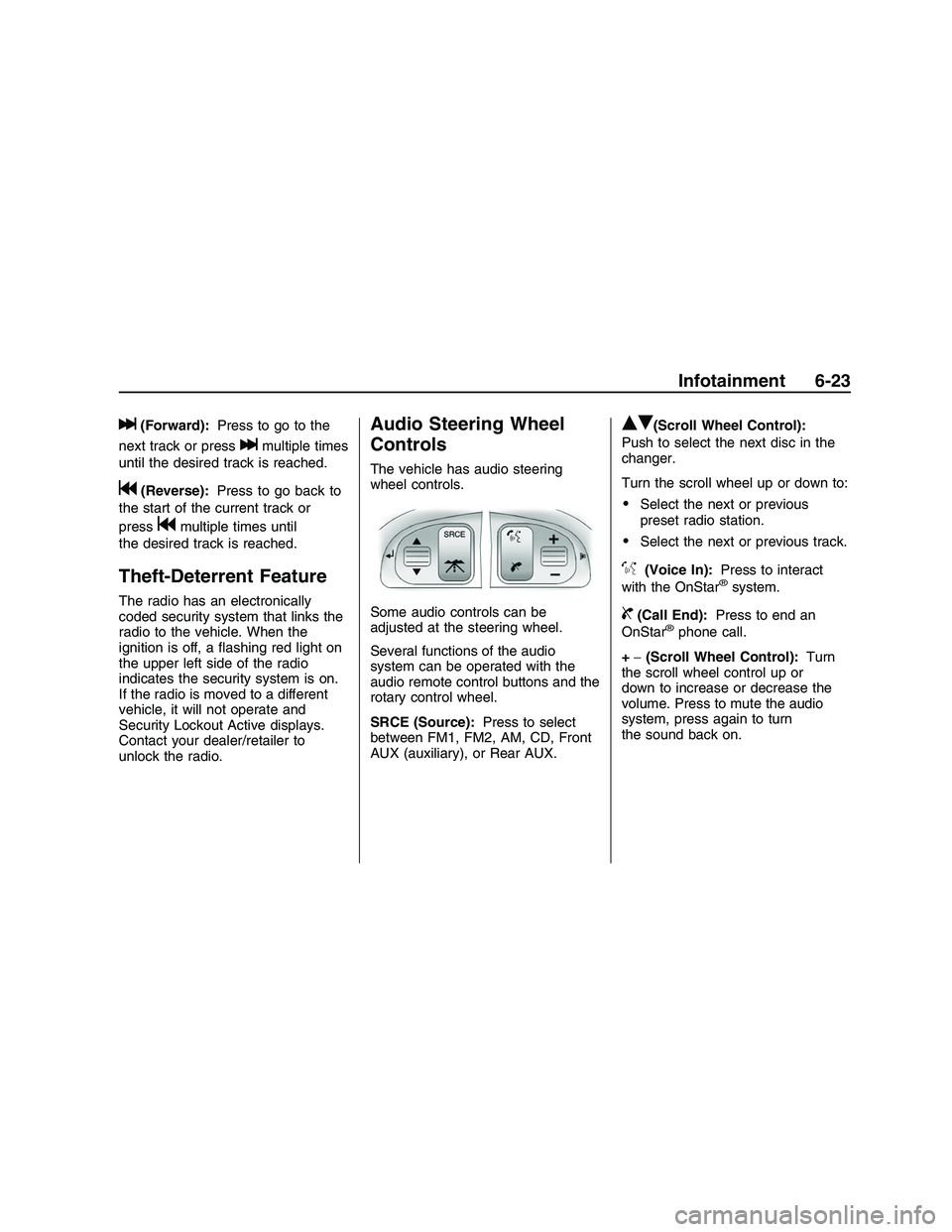
The vehicle has audio steering
wheel controls.
Some audio controls can be
adjusted at the steering wheel.
Several functions of the audio
system can be operated with the
audio remote control buttons and the
rotary control wheel.
SRCE (Source):Press to select
between FM1, FM2, AM, CD, Front
AUX (auxiliary), or Rear AUX.
QR(Scroll Wheel Control):
Push to select the next disc in the
changer.
Turn the scroll wheel up or down to:
Select the next or previous
preset radio station.
Select the next or previous track.
%(Voice In):Press to interact
with the OnStar®system.
{(Call End):Press to end an
OnStar®phone call.
+−(Scroll Wheel Control):Turn
the scroll wheel control up or
down to increase or decrease the
volume. Press to mute the audio
system, press again to turn
the sound back on.
Infotainment 6-23
2008 - Pontiac G8 Owner Manual
Page 140 of 334
Radio Reception
Frequency interference and static
can occur during normal radio
reception if items such as cell phone
chargers, vehicle convenience
accessories, and external electronic
devices are plugged into the
accessory power outlet. If there is
interference or static, unplug the item
from the accessory power outlet.
AM
The range for most AM stations is
greater than for FM, especially at
night. The longer range can cause
station frequencies to interfere with
each other. For better radio
reception, most AM radio stations
boost the power levels during the
day, and then reduce these levels
during the night. Static can also
occur when things like storms and
power lines interfere with radio
reception. When this happens, try
reducing the treble on the radio.
FM Stereo
FM signals only reach about
10 to 40 miles (16 to 65 km).
Although the radio has a built-in
electronic circuit that automatically
works to reduce interference,
some static can occur, especially
around tall buildings or hills.
Fixed Mast Antenna
The AM-FM antenna is located on
the roof of the vehicle.
Driving through an automatic car
wash without removing the antenna
could damage it.
To remove the antenna, turn it
counterclockwise. To replace the
antenna, turn it clockwise until hand
tightened.
6-24 Infotainment
2008 - Pontiac G8 Owner Manual