ignition PONTIAC G8 2008 Owner's Guide
[x] Cancel search | Manufacturer: PONTIAC, Model Year: 2008, Model line: G8, Model: PONTIAC G8 2008Pages: 334, PDF Size: 2.99 MB
Page 126 of 334
To insert multiple CDs:
1. Press and hold
#LOAD for
more than two seconds, a
beep sounds and Loading All
Discs displays.
2. The display, the beeps, and the
load indicator light prompts
when to insert each CD.
3. Insert a CD label side up
partway into the slot.
4. The CD player will pull the CD
in and begin playing if the
radio is on.
The load function is canceled when:
A CD has not been inserted
for 10 seconds.
ZEJECT is pressed.
The radio is turned off.Ejecting CDs
ZEJECT:Press to stop a CD
while it is playing or to eject a
CD when it is not playing. Eject can
be activated with the ignition and
the radio off. If an ejected CD is not
removed with 10 seconds, it will be
automatically pulled back into
the player.
To eject a single CD with the radio
with a six-disc CD player:
1. Press
ZEJECT.
2. Press the numbered or softkey
that the disc is assigned to
within 3 seconds.
To eject all CDs with the radio with
a six-disc CD player:
1. Press and hold
ZEJECT for
more than two seconds, a
beep sounds and Ejecting All
Discs displays.
2. The display, the beeps, and the
load indicator light prompts
when to remove each CD.The eject function is canceled when:
A CD has not been removed
for 10 seconds.
#LOAD is pressed.
The radio is turned off.
Playing CDs
RPT/ REPEAT:When Repeat is
selected, tracks or discs can
be repeated.
To use repeat with the radio with a
single CD player, press RPT to
replay the current track continuously.
Press it again to cancel repeat.
To use repeat with the radio with a
six-disc CD player, press the
softkey below REPEAT to select
between.
REPEAT TRACK
REPEAT DISC
RDM/RANDOM:When random is
selected, all tracks or discs are
played in random order.
6-10 Infotainment
2008 - Pontiac G8 Owner Manual
Page 135 of 334
Personal Identity Memories
(Radio with Six-Disc CD
Player)
Personal Identity Memories are
coded to the vehicle’s keys. Only
two keys can be coded. The settings
are stored by the vehicle and are
unique to each key.
For the audio system, the following
settings are individually memorized
by the key system and become
unique to the particular key:
Radio On or Off.
Last used volume level.
Last used source (FM, AM,
or CD).
Radio station presets.
Bass and treble settings.
Speaker balance and fade
settings.
Additional features such as SDV
settings, Beeps, DDL settings,
display priority settings, and tuner
seek sensitivity.
Equalizer and boost settings,
if the radio has this feature.
CD track and disc settings.
Radio memory presets that are
stored for the rst time, are
automatically stored for both
personal identity keys. If the presets
are changed later by using a
different personal identity key, they
become specic for that key only.
Independent Tone Memories
The radio is equipped with
Independent Tone Memories.
Bass and Treble settings are stored
independently for FM, AM, and CD.
After all independent tone memories
have been stored for the rst
ignition key, different settings can
be stored for the second ignition key
using the same procedure.
Using an MP3
MP3 CD-R / CD-RW Disc
MP3 Format
Only the radio with a six-disc CD
player can play MP3 CD’s.
The MP3 player is able to read and
play a maximum of:
50 folders.
11 folders in depth
50 playlists
10 sessions
255 les
All items over the maximum are
ignored.
Infotainment 6-19
2008 - Pontiac G8 Owner Manual
Page 139 of 334
l(Forward):Press to go to the
next track or press
lmultiple times
until the desired track is reached.
g(Reverse):Press to go back to
the start of the current track or
press
gmultiple times until
the desired track is reached.
Theft-Deterrent Feature
The radio has an electronically
coded security system that links the
radio to the vehicle. When the
ignition is off, a ashing red light on
the upper left side of the radio
indicates the security system is on.
If the radio is moved to a different
vehicle, it will not operate and
Security Lockout Active displays.
Contact your dealer/retailer to
unlock the radio.
Audio Steering Wheel
Controls
The vehicle has audio steering
wheel controls.
Some audio controls can be
adjusted at the steering wheel.
Several functions of the audio
system can be operated with the
audio remote control buttons and the
rotary control wheel.
SRCE (Source):Press to select
between FM1, FM2, AM, CD, Front
AUX (auxiliary), or Rear AUX.
QR(Scroll Wheel Control):
Push to select the next disc in the
changer.
Turn the scroll wheel up or down to:
Select the next or previous
preset radio station.
Select the next or previous track.
%(Voice In):Press to interact
with the OnStar®system.
{(Call End):Press to end an
OnStar®phone call.
+−(Scroll Wheel Control):Turn
the scroll wheel control up or
down to increase or decrease the
volume. Press to mute the audio
system, press again to turn
the sound back on.
Infotainment 6-23
2008 - Pontiac G8 Owner Manual
Page 143 of 334
Recirculation
/(Recirculation):Press to
change the air intake between
recirculated air and outside air.
An indicator light comes on when
the recirculation is on.
The recirculation mode recycles
interior air and is not recommended
for extended use. If it is used for
a long period of time, the system
automatically lets some fresh air into
the vehicle for ventilation.
The recirculation mode cannot be
turned on in defrost mode. If
/is
pressed, the indicator light ashes
three times and recirculation
stays off.
Rear Window Defogger
The rear window defogger uses a
warming grid to remove fog from the
rear window. It only works when
the ignition is in ON/RUN.
+(Rear Window Defogger):
Press to turn on or off. An indicator
comes on when the rear window
defogger is on. The rear window
defogger turns off automatically if it
is left on.
Notice:Do not use anything
sharp on the inside of the rear
window. If you do, you could cut
or damage the warming grid, and
the repairs would not be covered
by the vehicle warranty. Do not
attach a temporary vehicle
license, tape, a decal or anything
similar to the defogger grid.
Passenger Compartment
Air Filter
The vehicle has a passenger
compartment air lter that lters the
outside air entering the vehicle.
The lter removes contaminants,
such as pollen and dust. See
your dealer/retailer for more
information.
Climate Controls 7-3
2008 - Pontiac G8 Owner Manual
Page 145 of 334
Manual Operation
Fan Control
+
A−(Fan):Press + or−to
increase or decrease the fan speed.
The fan speed and indicator
appears in the display.
The climate control system sets
the fan speed automatically.
When the fan speed is adjusted the
system goes into semi-automatic
operation. Press the AUTO button to
return to automatic operation.
Temperature Control
Temperature Controls:The
temperature can be adjusted
separately for the driver and
the passenger. Turn the
temperature controls clockwise
or counterclockwise to increase or
decrease the temperature.
The temperature can be set
between 63°F (17°C) and
176°F (30°C). A setting between
72°F (22°C) and 75°F (24°C)
is recommended.The temperature settings for each
side are shown in the display.
If the temperature control is past
86°F (30°C), the display shows
H (hottest). Turning it past
63°F (17°C), shows C (coolest).
The EXT TEMP (Exterior
Temperature) can be displayed in
Fahrenheit (°F) or Celsius (°C).
SeeDIC Vehicle Customization
on page 4-32.
ZONE:Press to set the climate
control to single-zone (SZ) mode or
dual-zone (DZ) mode. SZ or DZ
appears in the display when a mode
is set.
Single-Zone (SZ) Mode:All zones
are set to the same temperature.
The temperature is shown in the
display. Turn the ZONE control to
set the temperature.
Dual-Zone (DZ) Mode:Allows
different temperatures to be set for
the driver and passenger sides
or to link them. When linked,the passenger side temperature
uses the same temperature setting
as the driver side.
Turn the AUTO control to set a
different temperature for the
passenger.
Press and hold the AUTO button
for at least three seconds to link
the passenger and driver side
temperatures. Linking automatically
occurs if the passenger and
driver sides are set to the same
temperature when the ignition
is turned on.
Air Delivery Mode Control
e*(Mode):Press to change the
current airow mode. The current
mode selection appears in the
display screen. Changing the mode
cancels the automatic operation and
the system goes into semi-automatic
operation. Press AUTO to return to
automatic operation.
Climate Controls 7-5
2008 - Pontiac G8 Owner Manual
Page 147 of 334
Do not use the recirculation mode if
occupants are smoking.
The recirculation mode cannot be
turned on in defrost mode. If
/is
pressed, the indicator light ashes
three times and recirculation
stays off.
Pollution Mode:Press and hold
the
/button for four seconds to
turn the pollution mode on or off.
When it is activated, Pollution Mode
Activated appears in the display.
When it is turned off, Pollution Mode
Inactive appears in the display.
This mode can be set when
the vehicle speed is less than
9 mph (15 km/h). Recirculation will
automatically turn on to help
prevent exhaust fumes from entering
the vehicle in slow moving traffic.
Rear Window Defogger
The rear window defogger uses a
warming grid to remove fog or
frost from the rear window. It only
works when the ignition is in
ON/RUN.
The rear window defogger will only
work when the ignition is in ON/RUN.
+(Rear Window Defogger):
Press to turn the rear window
defogger on or off. The
+indicator
appears in the display. The rear
window defogger turns off
automatically if it is left on.
Notice:Do not use anything
sharp on the inside of the rear
window. If you do, you could cut
or damage the warming grid, and
the repairs would not be covered
by the vehicle warranty. Do not
attach a temporary vehicle
license, tape, a decal or anything
similar to the defogger grid.
EXT TEMP
EXT TEMP (Exterior Temperature):
Press EXT TEMP to show the
temperature outside the vehicle or
the normal display.
Pressing any other climate control
button will change the display from
showing the outside temperature to
showing the normal display.
The units for the EXT TEMP can be
displayed in °F or °C. SeeDIC
Vehicle Customization on page 4-32.
Sensors
The climate control system uses
three different sensors to maintain
the desired temperature. The solar
sensor is located on the instrument
panel, near the windshield. The
interior temperature sensor is
located on the instrument panel
near the steering wheel and the
outside temperature sensor is
in front of the radiator.
Climate Controls 7-7
2008 - Pontiac G8 Owner Manual
Page 148 of 334
By monitoring the solar radiation,
the air inside the vehicle and
air moving across the outside
sensor, the selected temperature
can be maintained while using
the AUTO mode by adjusting the
temperature, fan speed, and
air delivery system. The system
may also supply cooler air to
the side of the vehicle facing the
sun. The recirculation mode will also
be activated, as necessary. Do not
cover the sensors or the automatic
climate control system will not
work properly.
Remote Start Climate Control
Operation
For vehicles with the remote start
feature and it is activated, the climate
control system will automatically set
the temperature to 73°F (23°C).
When the ignition is turned to
ON/RUN the climate control system
heats and cools the inside of the
vehicle using the modes that were
set before the vehicle was turned off.
Personal Identity Keys
For vehicles with the Personal
Identity Key Locking System,
the system remembers the last
climate control settings used with
different keys.
When the unlock button is pressed,
the system remembers the key
and sets the climate control system
to the last settings used with that
key. SeeRemote Keyless Entry
(RKE) System Operation on
page 2-4.
Passenger Compartment
Air Filter
The vehicle has a passenger
compartment air lter that lters the
outside air entering the vehicle.
The lter removes contaminants,
such as pollen and dust. See your
dealer/retailer for more information.
Outlet Adjustment
The air outlets have adjustable
vanes to move up or down and left
or right to change the direction
of the airow. Use the thumbwheels
located near the air outlets on
the instrument panel, to shut off
the airow.
Operation Tips
Clear away any ice, snow or
leaves from the air inlets at
the base of the windshield that
may block the ow of air into
the vehicle.
Use of non-GM approved hood
deectors may adversely affect
performance of the system.
Keep the path under the front
seats clear of objects to help
circulate the air inside of
the vehicle more effectively.
Outside air is drawn into the
vehicle, unless recirculation mode
is selected.
7-8 Climate Controls
2008 - Pontiac G8 Owner Manual
Page 149 of 334
Driving and
Operating
Starting and Operating
Your Vehicle
New Vehicle Break-In.........8-2
Ignition Positions................8-2
Retained Accessory
Power (RAP).....................8-3
Starting the Engine.............8-4
Engine Coolant Heater.......8-5
Automatic Transmission
Operation..........................8-6
Parking Brake.....................8-9
Shifting Into Park
(Automatic
Transmission)
..................8-10
Shifting Out of Park..........8-11
Parking Over Things
That Burn........................8-11
Engine Exhaust.................8-12
Running the Vehicle
While Parked..................8-12
Driving Your Vehicle
Defensive Driving..............8-13
Drunk Driving....................8-13
Control of a Vehicle..........8-14
Braking.............................8-14
Antilock Brake
System (ABS).................8-15
Electronic Stability
Program..........................8-16
Steering............................8-19
Off-Road Recovery............8-20
Passing.............................8-21
Loss of Control.................8-21
Driving at Night.................8-22
Driving in Rain and on
Wet Roads......................8-23
Before Leaving on a
Long Trip........................8-24
Highway Hypnosis.............8-24
Hill and Mountain Roads. . . .8-24
Winter Driving...................8-25
If Your Vehicle is Stuck
in Sand, Mud, Ice,
or Snow
..........................8-27
Rocking Your Vehicle to
Get It Out.......................8-28
Loading the Vehicle..........8-28
Fuel
Fuel..................................8-32
Gasoline Octane...............8-33
Gasoline Specications. . . . .8-33
California Fuel..................8-33
Additives...........................8-34
Fuels in Foreign
Countries........................8-34
Filling the Tank.................8-35
Filling a Portable Fuel
Container........................8-36
Driving and Operating 8-1
2008 - Pontiac G8 Owner Manual
Page 150 of 334
Starting and
Operating Your
Vehicle
New Vehicle Break-In
Notice:Your vehicle does not
need an elaborate break-in. But it
will perform better in the long
run if you follow these guidelines:
Do not drive at any one
constant speed, fast or slow,
for the rst 500 miles (805 km).
Do not make full-throttle
starts. Avoid downshifting to
brake or slow the vehicle.
During the rst 600 miles
(1 000 km), avoid using
more than moderate
acceleration in lower gears and
avoid vehicle speeds above
68 mph (110 km/h).
Between the rst 600 miles
(1 000 km) and 3,000 miles
(5 000 km), heavy acceleration
in lower gears can be used.
Vehicle speeds above 68 mph
(110 km/h) should be limited
to ve minutes per use.
Avoid making hard stops for the
rst 200 miles (322 km) or so.
During this time the new brake
linings are not yet broken in.
Hard stops with new linings can
mean premature wear and
earlier replacement. Follow this
breaking-in guideline every
time you get new brake linings.
Do not tow a trailer during
break-in. SeeTowing a Trailer
on page 9-85for the trailer
towing capabilities of your
vehicle and more information.
Following break-in, engine speed
and load can be gradually
increased.
Ignition Positions
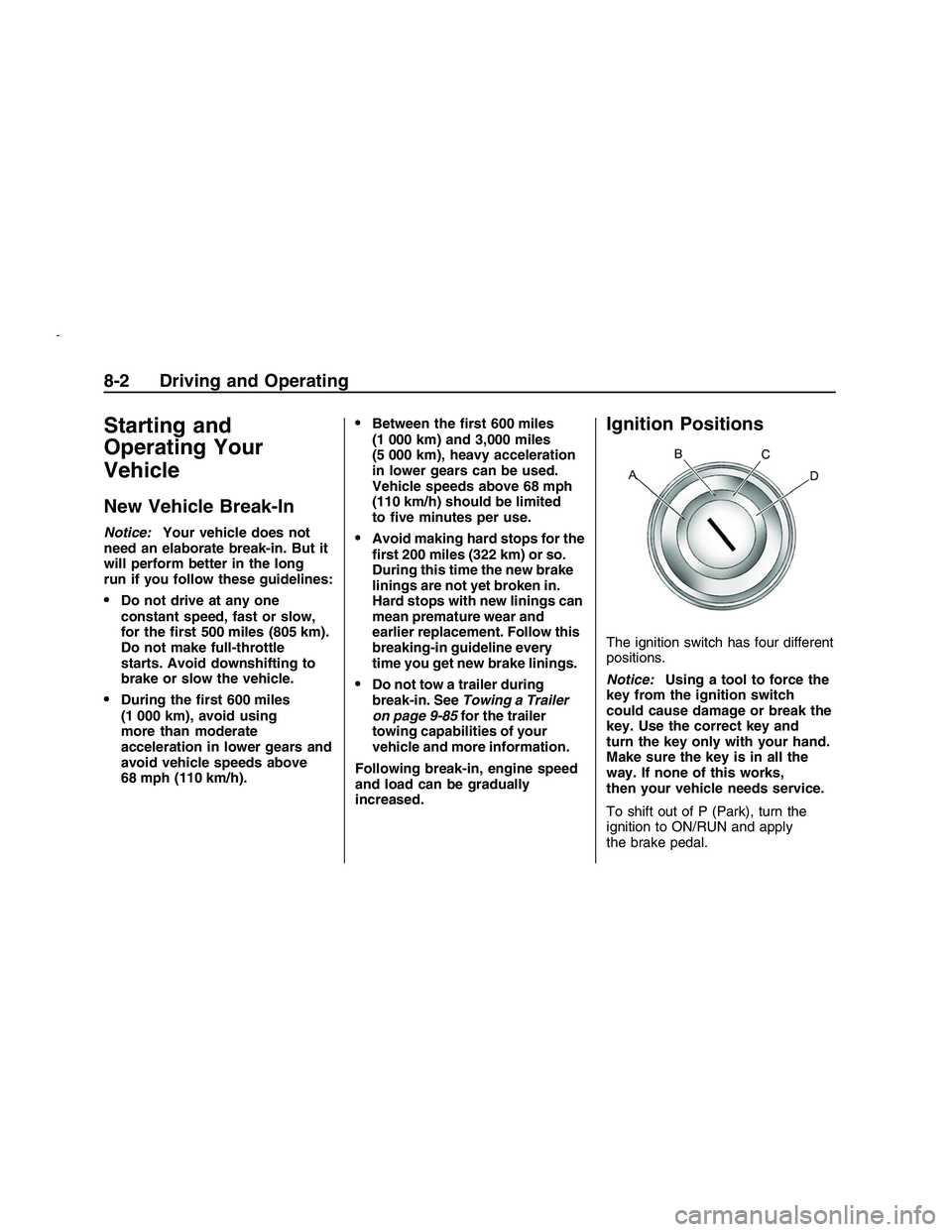
The ignition switch has four different
positions.
Notice:Using a tool to force the
key from the ignition switch
could cause damage or break the
key. Use the correct key and
turn the key only with your hand.
Make sure the key is in all the
way. If none of this works,
then your vehicle needs service.
To shift out of P (Park), turn the
ignition to ON/RUN and apply
the brake pedal.
8-2 Driving and Operating
2008 - Pontiac G8 Owner Manual
Page 151 of 334
A (LOCK/OFF):This is the only
position from which you can remove
the key. This locks the steering
wheel, ignition and automatic
transmission.
On vehicles with an automatic
transmission, the shift lever must be
in P (Park) to turn the ignition
switch to the LOCK/OFF position.
The ignition switch can bind in
the LOCK/OFF position with your
wheels turned off center. If this
happens, move the steering wheel
from right to left while turning the
key to ACC/ACCESSORY. If this
doesn’t work, then the vehicle needs
service.
B (ACC/ACCESSORY):This
position provides power to some
of the electrical accessories.
It unlocks the steering wheel and
ignition. The transmission is
also unlocked in this position
on automatic transmission
vehicles. To move the key from
ACC/ACCESSORY to LOCK/OFF,
push in the key and then turn it
to LOCK/OFF.C (ON/RUN):The ignition switch
stays in this position when the
engine is running. This position can
be used to operate the electrical
accessories, including the ventilation
fan and 12 volt power outlet, as
well as to display some warning and
indicator lights.
The battery could be drained
if you leave the key in the
ACC/ACCESSORY or ON/RUN
position with the engine off.
You may not be able to start the
vehicle if the battery is allowed
to drain for an extended period
of time.
D (START):This position starts the
engine. When the engine starts,
release the key. The ignition switch
will return to ON/RUN for normal
driving.
A warning tone will sound when the
driver door is opened when the
ignition is still in ACC/ACCESSORY
and the key is in the ignition.Retained Accessory
Power (RAP)
These vehicle accessories may be
used for up to 10 minutes after
the engine is turned off.
Audio System
Power Windows
The power windows will continue to
work for up to 10 minutes or until
any door is opened. The radio
will work when the key is in ON/RUN
or ACC/ACCESSORY. Once the
key is turned from ON/RUN to
LOCK/OFF, the radio will continue
to work for 10 minutes or until
the driver’s door is opened.
Driving and Operating 8-3
2008 - Pontiac G8 Owner Manual