light PONTIAC G8 2008 Workshop Manual
[x] Cancel search | Manufacturer: PONTIAC, Model Year: 2008, Model line: G8, Model: PONTIAC G8 2008Pages: 334, PDF Size: 2.99 MB
Page 130 of 334
The rear auxiliary input connector is
located on the back of the radio.
See your dealer/retailer for
more information about this feature.
To disable the rear auxiliary input
on the radio with a single CD player:
1. Press the volume knob to
enter the Option Menu, AUDIO is
highlighted.
2. Turn the volume knob until
REAR AUX highlights.
3. Press the volume knob to enter
the REAR AUX setting.
4. Turn the volume knob to turn the
rear auxiliary input ON or OFF.
5. Press the volume knob to save
and exit the setting.
6. Select the BACK option or wait
eight seconds to exit the menu.To disable the rear auxiliary input on
the radio with a six-disc CD player:
1. Press the MENU knob to enter
the Option Menu, Audio is
highlighted.
2. Turn the MENU knob until Rear
AUX highlights.
3. Press the MENU knob to enter
the Rear AUX setting.
4. Turn the MENU knob to turn the
rear auxiliary input On or Off.
5. Press the MENU knob to save
and exit the setting.
6. Select the Back option or wait
eight seconds to exit the menu.AUX (Auxiliary):Press AUX to
switch between the front and
rear AUX input jack.
Press the AUX button to start audio
playback from the portable audio
player that is connected to the front
AUX input jack, if this was the
last source.
Volume:Turn to increase or
decrease the volume of the portable
player. Additional volume
adjustments to the portable device
may be needed.
BAND:Press to listen to the radio
when a portable audio device is
playing.
6-14 Infotainment
2008 - Pontiac G8 Owner Manual
Page 131 of 334
Additional Features
Help Prompts:Allows help
information to be displayed for
eight seconds after the request for
that button or feature has been
made. To enable or disable help
prompts:
1. Press the MENU knob to enter
the Options Menu.
2. Turn the MENU knob until Help
Prompts highlights.
3. Press the MENU knob to access
the Help Prompts menu.
4. Turn the MENU knob to turn
change the setting to On or Off.
5. Press the MENU knob to save
the setting.
6. Select the BACK option or wait
eight seconds to exit the menu.
|(Help):Press to receive
information about how the radio
functions.To use help for a radio button on
the radio with a single CD player:
1. Press
|to enter the help menu.
2. Press the volume knob to
highlight the menu item.
3. Press any of the radio buttons to
display the help text.
4. Press
|again to go back
one level.
To use help for a radio button on
the radio with a six-disc CD player:
1. Press
|to enter the help menu.
2. Turn the MENU knob until “What
does each button do?” highlights,
and press the MENU knob.
3. Press any of the radio buttons to
display its help text. To go back
one level, press
|again.To use help for a radio function on
the radio with a single CD player:
1. Press
|to enter the help menu.
2. Press the volume knob to
highlight the menu item.
3. Turn the volume knob to highlight
a desired help topic to display
the help text.
4. Press
|again to go back
one level.
To use help for a radio function on
the radio with a six-disc CD player:
1. Press
|to enter the help menu.
2. Turn the MENU knob until
“Help Topics” highlights,
and press the MENU knob.
3. Turn the MENU knob to highlight
a desired help topic to display its
help text. To go back one level,
press
|again.
Infotainment 6-15
2008 - Pontiac G8 Owner Manual
Page 132 of 334
Startup Screen:To enable or
disable the startup screen on the
radio with a six-disc CD player:
1. Press the MENU knob to enter
the Options Menu.
2. Turn the MENU knob until
Welcome highlights.
3. Press the MENU knob to access
the Welcome menu.
4. Turn the MENU knob to change
the setting to On or Off.
5. Press the MENU knob to save
the setting.
6. Select the BACK option or wait
eight seconds to exit the menu.
Display Settings:The display
brightness and illumination can only
be adjusted while the radio is on.
The brightness adjustment range is
from−5 to +5 and the illumination
adjustment range is from STD
(standard) to−5.To change the brightness and
illumination settings on the radio
with a single CD player:
1. Press the volume knob to enter
the Options Menu.
2. Turn the volume knob until DISP
SETUP (display setup) highlights.
3. Press the volume enter the DISP
SETUP menu.
4. Turn the volume knob until either
ILLN MODE (illumination mode)
or BRIGHTNESS highlights.
5. Press the volume knob to enter
either setting.
6. Turn the volume knob to change
the setting.
7. Press the volume knob to save
and exit the setting.
8. Select the BACK option or wait
eight seconds to exit the menu.To change the brightness and
illumination settings on the radio
with a six-disc CD player:
1. Press the MENU knob to enter
the Options Menu.
2. Turn the MENU knob until
Display highlights.
3. Press the MENU knob to access
the Display setup menu and the
option for Brightness highlights.
4. Turn the MENU knob to change
the setting.
5. Press the MENU knob to save
the setting.
6. Select the BACK option or wait
eight seconds to exit the menu.
6-16 Infotainment
2008 - Pontiac G8 Owner Manual
Page 133 of 334
Speed Dependent Volume (SDV):
The SDV system automatically
adjusts the radio volume to
compensate for driving noise.
The SDV system can only be
adjusted while the radio is on.
As the speed of the vehicle
increases or decreases, the radio
volume increases or decreases.
The SDV adjustment range for the
radio with a single CD player is
between OFF and CUR 6, and the
adjustment range for the radio
with a six-disc CD player is
between 0 and 5.
To adjust the SDV setting on the
radio with a single CD player:
1. Press the volume knob to enter
the Options Menu.
2. Turn the volume knob until AUD
SETUP (audio setup) highlights.
3. Press the volume knob to enter
the AUD SETUP menu.4. Turn the volume knob until SD
VOLUME (speed dependent
volume) highlights.
5. Press the volume knob to enter
the SD VOLUME settings.
6. Turn the volume knob to adjust
the SD VOLUME setting.
7. Press the volume knob to save
and exit the setting.
8. Select the BACK option or wait
eight seconds to exit the menu.
To adjust the SDV setting on
the radio with a six-disc CD player:
1. Press the MENU knob to
enter the Options Menu.
2. Turn the MENU knob until Audio
Setup highlights.
3. Press the MENU knob to enter
the Audio Setup menu.
4. Turn the MENU knob until Speed
Vol (speed volume) highlights.
5. Press the MENU knob to enter
the Speed Vol settings.6. Turn the MENU knob to adjust
the Speed Vol setting.
7. Press the MENU knob to save
and exit the setting.
8. Select the BACK option or wait
eight seconds to exit the menu.
Dynamic Distortion Limiter (DDL):
The DDL system limits the amount
of audio distortion that can be heard.
The DDL system can only be
adjusted while the radio is on.
When the distortion level reaches a
preset limit, the radio automatically
reduces the volume until the
distortion is reduced. The DDL
adjustment range is between OFF
and CUR 3.
To adjust the DDL setting on the
radio with a single CD player:
1. Press the volume knob to enter
the Options Menu and the
option for AUDIO highlights.
2. Turn the volume knob until AUD
SETUP highlights.
Infotainment 6-17
2008 - Pontiac G8 Owner Manual
Page 134 of 334
3. Press the volume knob to enter
the AUD SETUP menu.
4. Turn the volume knob until DDL
highlights.
5. Press the volume knob to enter
the DDL setting.
6. Turn the volume knob to adjust
the DDL setting.
7. Press the volume knob to save
and exit the setting.
8. Select the BACK option or wait
eight seconds to exit the menu.
To adjust the DDL setting on
the radio with a six-disc CD player:
1. Press the MENU knob to
enter the Options Menu.
2. Turn the MENU knob until Audio
Setup highlights.
3. Press the MENU knob to enter
the Audio Setup menu.
4. Turn the MENU knob until DDL
highlights.5. Press the MENU knob to enter
the DDL setting.
6. Turn the MENU knob to change
the DDL setting.
7. Press the MENU knob to save
and exit the setting.
8. Select the BACK option or wait
eight seconds to exit the menu.
Conrmation Beeps:Conrmation
beeps are used to indicate various
actions by the radio. The beeps can
only be turned on or off on the
radio with a six-disc CD player while
it is on. The conrmation beep
options are:
On:The radio beeps when storing
radio a station, inserting or to
removing a CD, or when the LOAD
ALL or the EJECT ALL functions
have started.
CD Only:The radio beeps when
inserting or removing a CD.
Off:The radio does not beep.To change the options for the beeps:
1. Press the MENU knob to enter
the Options Menu.
2. Turn the MENU knob until Audio
Setup highlights.
3. Press the MENU knob to enter
the Audio Setup menu.
4. Turn the MENU knob until Beeps
highlights.
5. Press the MENU knob to enter
the Beeps setting.
6. Turn the MENU knob to change
the Beeps setting.
7. Press the MENU knob to save
and exit the setting.
8. Select the BACK option or wait
eight seconds to exit the menu.
6-18 Infotainment
2008 - Pontiac G8 Owner Manual
Page 138 of 334
REPEAT:Select to repeat tracks
or folders.
To use REPEAT:
1. Press the softkey below the
REPEAT label to display the
different repeat modes.
2. Press the softkey below REPEAT
TRACK, REPEAT DISC, or
REPEAT FOLDER to chose
that mode.
3. Press the softkey below the
active repeat mode to cancel
the repeat mode.
BROWSE MODE:Folders and
tracks of an MP3 disc can be found
easier by using the browse mode.
Finding a track in the current folder:
1. Press the softkey below
BROWSE MODE. The les in
the active folder display and the
active track is highlighted.
2. Turn the MENU knob to highlight
the desired track.3. Press the MENU knob to play
the highlighted track.
4. Press the softkey below EXIT to
exit browse mode.
Finding a track in a different folder:
1. Press the softkey below
BROWSE MODE. The les in
the active folder display and the
active track is highlighted.
2. Turn the MENU knob to highlight
‘Folder Listing’.
3. Press the MENU knob to list all
the folders on the CD.
4. Turn the MENU knob to highlight
the desired folder.
5. Press the MENU knob to list the
tracks in the highlighted folder.
6. Turn the MENU knob to highlight
the desired track.
7. Press the MENU knob to play
the highlighted track.
8. Press the softkey below EXIT to
exit browse mode.Finding a playlist:
1. Press the softkey below
BROWSE MODE. The les in
the active folder display and the
active track is highlighted.
2. Turn the MENU knob to highlight
‘Playlists’.
3. Press the MENU knob to list all
the playlists on the CD.
4. Turn the MENU knob to highlight
the desired playlist.
5. Press the MENU knob to play
the highlighted playlist.
6. Press the softkey below EXIT to
exit browse mode.
DISC
[(Next Folder):Press and
hold for more than two seconds
to go to the next folder.
DISC
r(Previous Folder):Press
and hold for more than two seconds
to go to the previous folder.
6-22 Infotainment
2008 - Pontiac G8 Owner Manual
Page 139 of 334
l(Forward):Press to go to the
next track or press
lmultiple times
until the desired track is reached.
g(Reverse):Press to go back to
the start of the current track or
press
gmultiple times until
the desired track is reached.
Theft-Deterrent Feature
The radio has an electronically
coded security system that links the
radio to the vehicle. When the
ignition is off, a ashing red light on
the upper left side of the radio
indicates the security system is on.
If the radio is moved to a different
vehicle, it will not operate and
Security Lockout Active displays.
Contact your dealer/retailer to
unlock the radio.
Audio Steering Wheel
Controls
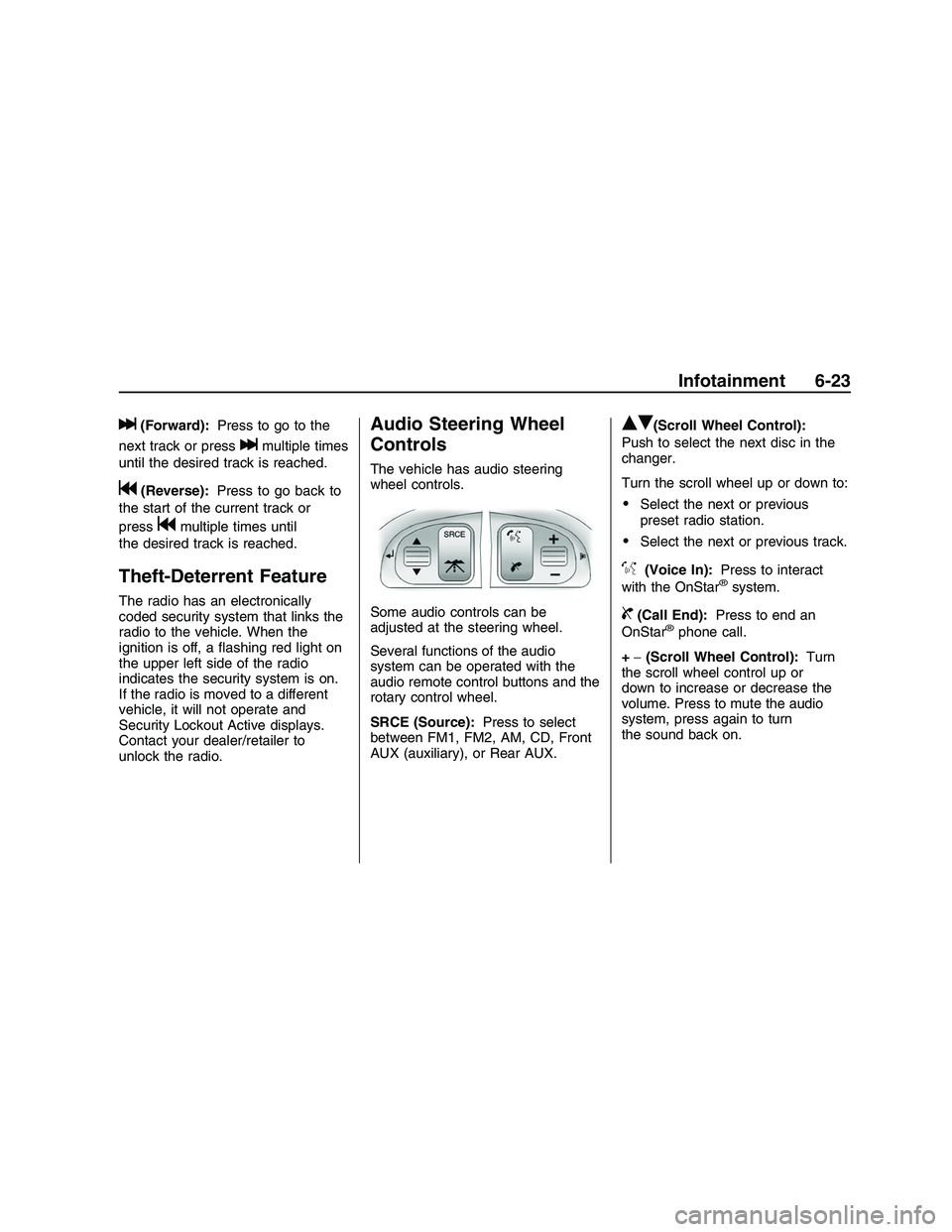
The vehicle has audio steering
wheel controls.
Some audio controls can be
adjusted at the steering wheel.
Several functions of the audio
system can be operated with the
audio remote control buttons and the
rotary control wheel.
SRCE (Source):Press to select
between FM1, FM2, AM, CD, Front
AUX (auxiliary), or Rear AUX.
QR(Scroll Wheel Control):
Push to select the next disc in the
changer.
Turn the scroll wheel up or down to:
Select the next or previous
preset radio station.
Select the next or previous track.
%(Voice In):Press to interact
with the OnStar®system.
{(Call End):Press to end an
OnStar®phone call.
+−(Scroll Wheel Control):Turn
the scroll wheel control up or
down to increase or decrease the
volume. Press to mute the audio
system, press again to turn
the sound back on.
Infotainment 6-23
2008 - Pontiac G8 Owner Manual
Page 142 of 334
Air Delivery Mode Control
Use the right knob to select from
the following modes.
0(Vent):Air is directed to the
instrument panel outlets.
1(Bi-Level):Air is divided
between the instrument panel
outlets and the oor outlets.
d(Floor):Air is directed to the
oor outlets with some air directed to
the windshield and side window
outlets.
4(Defog):Air is directed to the
windshield, oor outlets, and
side window vents. Use this mode
to clear the windows of fog or
moisture and warm the passengers.
5(Defrost):Air is directed to
the windshield, with some air
directed to the side window vents.
Use this mode to quickly remove
fog or frost from the windshield.When defrost is selected, the air
conditioning turns on automatically
to improve defrosting performance.
In this mode the air conditioning
cannot be turned off and the
recirculation mode cannot be
turned on.
Air Conditioning
#(Air Conditioning):Press to
turn on or off. An indicator comes on
when the air conditioning is on.
The fan must be on to use the
air conditioning.
The air conditioning cannot be turned
off in defrost mode. If
#is pressed,
the indicator light ashes three times
and the air conditioning stays on.
For quick cool down on hot days,
select the following settings together:
1. Press
#to turn on the air
conditioning.
2. Press
/to turn on the
recirculation.3. Select the coolest temperature
and highest fan speed.
4. Open the windows briey to
let hot air escape and then
close them.
5. Once the vehicle’s interior cools
down, turn off the recirculation,
and select
0. This maintains
the best comfort level during
extended driving.
The air conditioning system removes
moisture from the air, so a small
amount of water might drip under the
vehicle while idling or after turning off
the engine. This is normal.
The air conditioning should be
turned on for at least ve to
ten minutes once every two weeks
to lubricate the air conditioning
seals, even in the winter.
7-2 Climate Controls
2008 - Pontiac G8 Owner Manual
Page 143 of 334
Recirculation
/(Recirculation):Press to
change the air intake between
recirculated air and outside air.
An indicator light comes on when
the recirculation is on.
The recirculation mode recycles
interior air and is not recommended
for extended use. If it is used for
a long period of time, the system
automatically lets some fresh air into
the vehicle for ventilation.
The recirculation mode cannot be
turned on in defrost mode. If
/is
pressed, the indicator light ashes
three times and recirculation
stays off.
Rear Window Defogger
The rear window defogger uses a
warming grid to remove fog from the
rear window. It only works when
the ignition is in ON/RUN.
+(Rear Window Defogger):
Press to turn on or off. An indicator
comes on when the rear window
defogger is on. The rear window
defogger turns off automatically if it
is left on.
Notice:Do not use anything
sharp on the inside of the rear
window. If you do, you could cut
or damage the warming grid, and
the repairs would not be covered
by the vehicle warranty. Do not
attach a temporary vehicle
license, tape, a decal or anything
similar to the defogger grid.
Passenger Compartment
Air Filter
The vehicle has a passenger
compartment air lter that lters the
outside air entering the vehicle.
The lter removes contaminants,
such as pollen and dust. See
your dealer/retailer for more
information.
Climate Controls 7-3
2008 - Pontiac G8 Owner Manual
Page 146 of 334
Select from the following modes:
0(Vent):Air is directed to the
instrument panel outlets.
1(Bi-Level):Air is divided
between the instrument panel
outlets and the oor outlets. Cooler
air is directed to the upper outlets
and warmer air to the oor outlets.
d(Floor):Air is directed to
the oor outlets with some air
directed to the outer instrument
panel, windshield and side window
outlets.
4(Defog):Air is directed to the
windshield, oor and side window
outlets. Use this mode to clear
the windows of fog or moisture and
warm the passengers.
5(Defrost):Press to turn the
defrost on or off. The
5indicator
appears in the display. A portion of
the air is directed to the windshield,
with some air directed to the side
window vents.When defrost is selected, the air
conditioning turns on automatically to
improve defrosting performance. In
this mode the air conditioning cannot
be turned off and the recirculation
mode cannot be turned on.
Air Conditioning
#(Air Conditioning):Press to
turn the air conditioning system on or
off. The
#appears in the display
when the air conditioning is on.
When the air conditioning is turned
off
#OFF appears in the display.
The air conditioning cannot be turned
off in defrost mode. If
#is pressed,
the indicator light ashes three times
and the air conditioning stays on.
For quick cool down on hot days,
open the windows to let the hot air to
escape. After a few minutes, close
the windows so the system will work
more effectively.The air conditioning system removes
moisture from the air, so a small
amount of water might drip under the
vehicle while idling or after turning off
the engine. This is normal.
The air conditioning might
automatically turn off during heavy
acceleration or towing with your
vehicle, but the
#will still display.
Recirculation
/(Recirculation):Press to
change the air intake between
recirculated air and outside air.
An indicator light comes when the
recirculation is activated.
The recirculation mode recycles
interior air and is not recommended
for extended use. If it is used for
a long period of time, the system
automatically lets some fresh air into
the vehicle for ventilation.
7-6 Climate Controls
2008 - Pontiac G8 Owner Manual