reset PONTIAC G8 2008 Owners Manual
[x] Cancel search | Manufacturer: PONTIAC, Model Year: 2008, Model line: G8, Model: PONTIAC G8 2008Pages: 334, PDF Size: 2.99 MB
Page 63 of 334
The door lock cylinder turns freely
when either the wrong key is
used, or the correct key is not fully
inserted. The free turning door
lock feature prevents the lock from
being forced open.
To reset the lock, turn it to the
vertical position with the correct key
fully inserted. Remove the key
and insert it again.
If this does not reset the lock, turn
the key half-way around in the
cylinder and repeat the reset
procedure.Power Door Locks
The power door lock switch is
located on the center console.
K(Unlock):Press to unlock
the doors.
Q(Lock):Remove the key from
the ignition and press to lock
the doors.
Rear Door Security
Locks
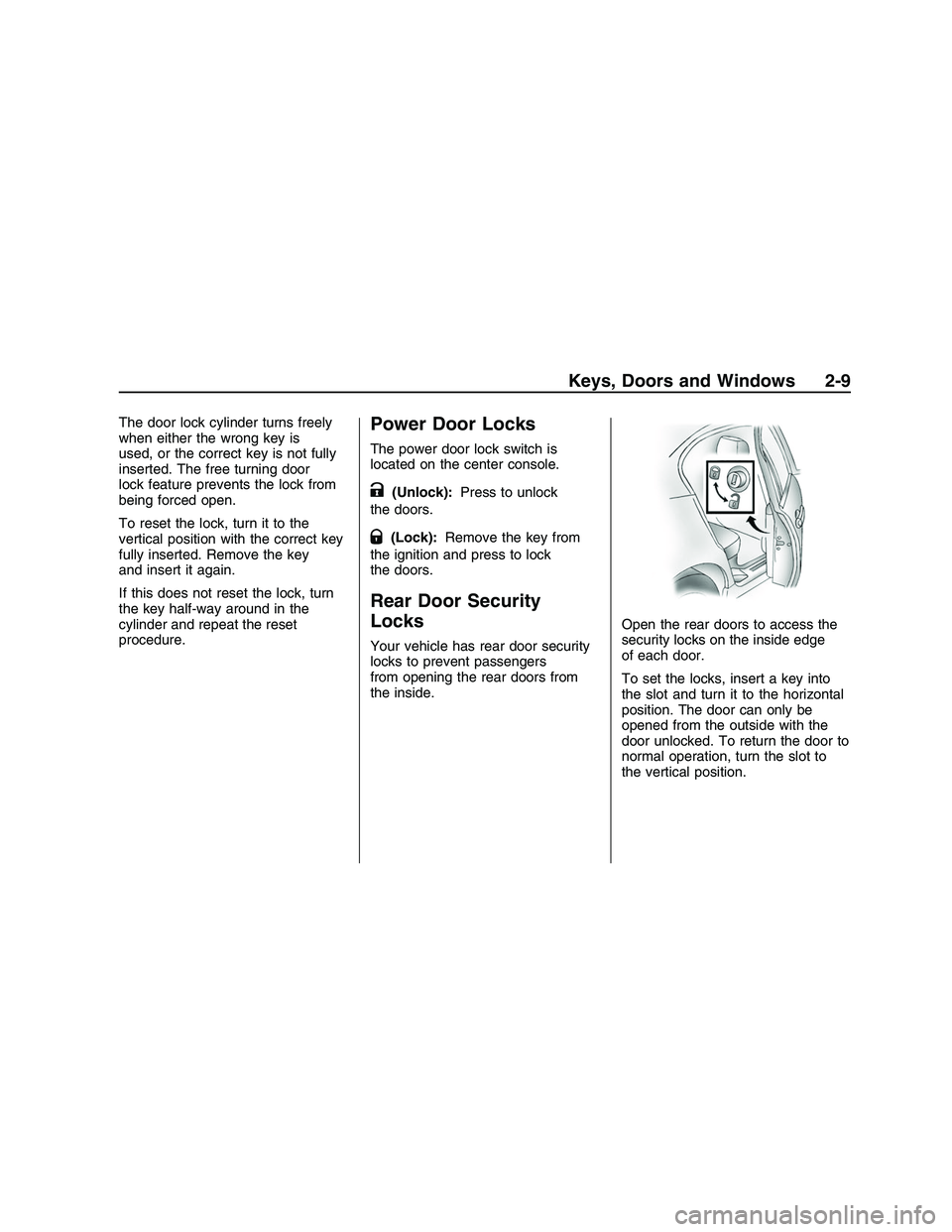
Your vehicle has rear door security
locks to prevent passengers
from opening the rear doors from
the inside.Open the rear doors to access the
security locks on the inside edge
of each door.
To set the locks, insert a key into
the slot and turn it to the horizontal
position. The door can only be
opened from the outside with the
door unlocked. To return the door to
normal operation, turn the slot to
the vertical position.
Keys, Doors and Windows 2-9
2008 - Pontiac G8 Owner Manual
Page 67 of 334
3. Insert and turn the new
section (A) to ON/RUN within
ve seconds of removing
the original key.
4. Turn the new section (A) to
LOCK/OFF. Section (A) is
now programmed.
To program a new section (B):
1. Turn the ignition to ON/RUN with
the new section (A).
The vehicle must be in
PARK (P).
2. Select Remote Key from the
personalization menu.
3. Select Program.
4. Press
QandWon the new
section (B), at the same time,
until you hear two beeps.
5. Repeat Step 4 for all other keys,
including keys that require
programming or ones previously
programmed to the vehicle.
Any key not reprogrammed will
be erased.6. Turn the ignition to LOCK/OFF.
7. Join sections (A) and (B)
until they click.
Do not join the two key sections
until programming is complete.
Do not leave the key or device that
disarms or deactivates the theft
deterrent system in the vehicle.
Content Theft-Deterrent
Your vehicle has a content
theft-deterrent alarm system.
Arming the System
To arm the system, either:
PressQon the RKE transmitter.
Or, lock the vehicle using the
key in the driver’s door.
The alarm will automatically arm
after about 30 seconds. The security
light, located on the instrument
panel, will ash.Press
Von the RKE transmitter
to open the trunk without setting
off the alarm. The system will rearm
when the trunk is closed.
Disarming the System
To disarm the system, do one of the
following:
PressKon the RKE transmitter.
Turn the ignition to ON/RUN.
Allow the alarm to time out after
about 30 seconds and reset
itself.
The alarm will automatically disarm.
If the system is armed and any
door is unlocked without pressing
K
on the RKE transmitter the alarm
will sound.
Keys, Doors and Windows 2-13
2008 - Pontiac G8 Owner Manual
Page 91 of 334
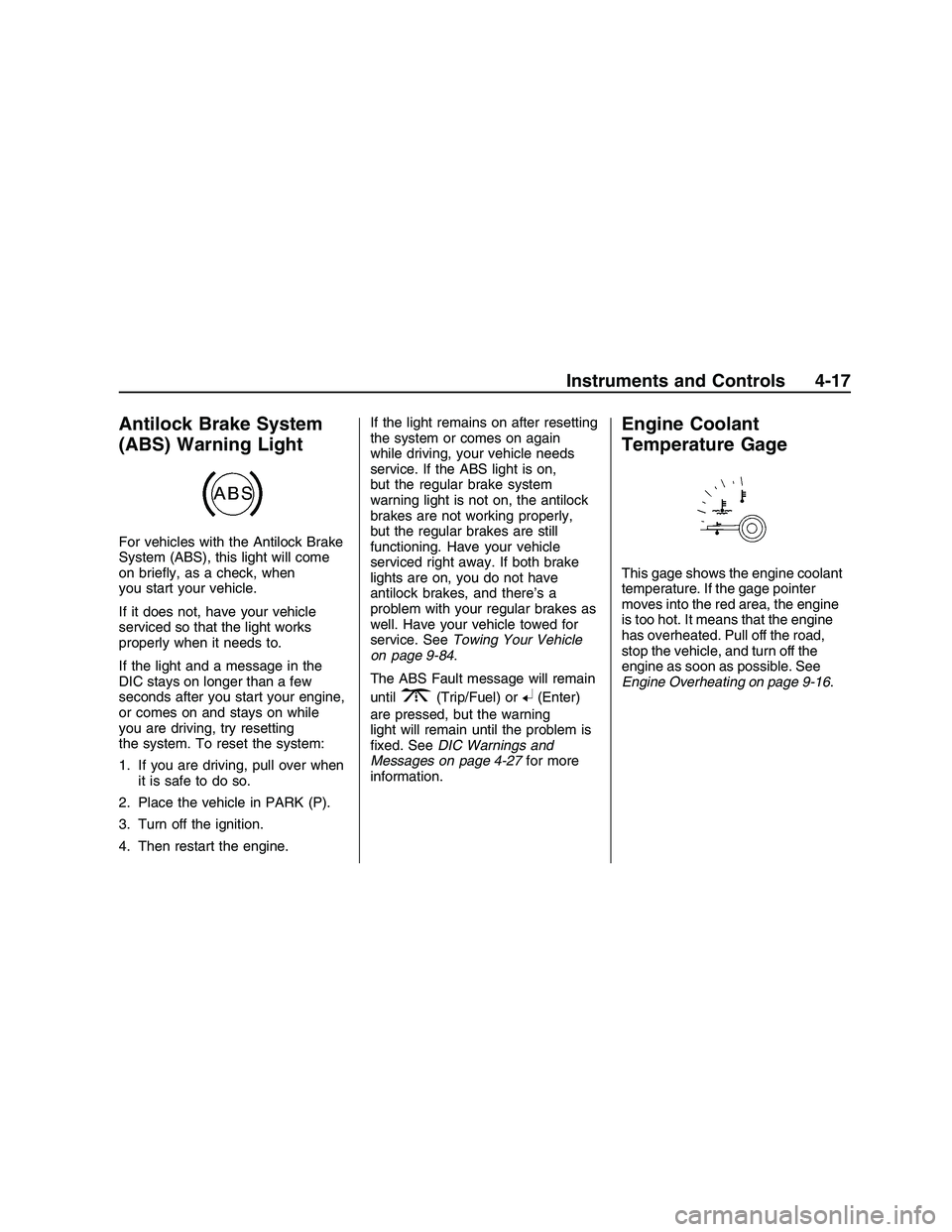
Antilock Brake System
(ABS) Warning Light
For vehicles with the Antilock Brake
System (ABS), this light will come
on briey, as a check, when
you start your vehicle.
If it does not, have your vehicle
serviced so that the light works
properly when it needs to.
If the light and a message in the
DIC stays on longer than a few
seconds after you start your engine,
or comes on and stays on while
you are driving, try resetting
the system. To reset the system:
1. If you are driving, pull over when
it is safe to do so.
2. Place the vehicle in PARK (P).
3. Turn off the ignition.
4. Then restart the engine.If the light remains on after resetting
the system or comes on again
while driving, your vehicle needs
service. If the ABS light is on,
but the regular brake system
warning light is not on, the antilock
brakes are not working properly,
but the regular brakes are still
functioning. Have your vehicle
serviced right away. If both brake
lights are on, you do not have
antilock brakes, and there’s a
problem with your regular brakes as
well. Have your vehicle towed for
service. SeeTowing Your Vehicle
on page 9-84.
The ABS Fault message will remain
until
3(Trip/Fuel) or8(Enter)
are pressed, but the warning
light will remain until the problem is
xed. SeeDIC Warnings and
Messages on page 4-27for more
information.
Engine Coolant
Temperature Gage
This gage shows the engine coolant
temperature. If the gage pointer
moves into the red area, the engine
is too hot. It means that the engine
has overheated. Pull off the road,
stop the vehicle, and turn off the
engine as soon as possible. See
Engine Overheating on page 9-16.
Instruments and Controls 4-17
2008 - Pontiac G8 Owner Manual
Page 97 of 334
Driver Information
Center (DIC)
The DIC displays information about
your vehicle. It also displays warning
messages if a system problem is
detected. The DIC also allows some
features to be customized. SeeDIC
Vehicle Customization on page 4-32
for more information. All messages
will appear in the DIC display located
in the center of the instrument panel
cluster.
When the ignition is turned on, a
vehicle system check is performed
and the status is shown on the
DIC display. If there are no warnings
or service reminders, the display
shows a series of welcome screens.
When the ignition is turned off,
the odometer appears on the display
for a short period of time unless a
service reminder is active. Active
service reminders are displayed for
10 seconds before the odometer
appears. The odometer will
reappear on the display when the
driver door is opened. For moreinformation on the warnings and
messages seeDIC Warnings
and Messages on page 4-27.DIC Operation and
Displays
The DIC has different displays
which can be accessed by pressing
the DIC buttons located on the
left side of the steering wheel. The
DIC displays trip, fuel, vehicle
system information, and warning
messages if a system problem
is detected.
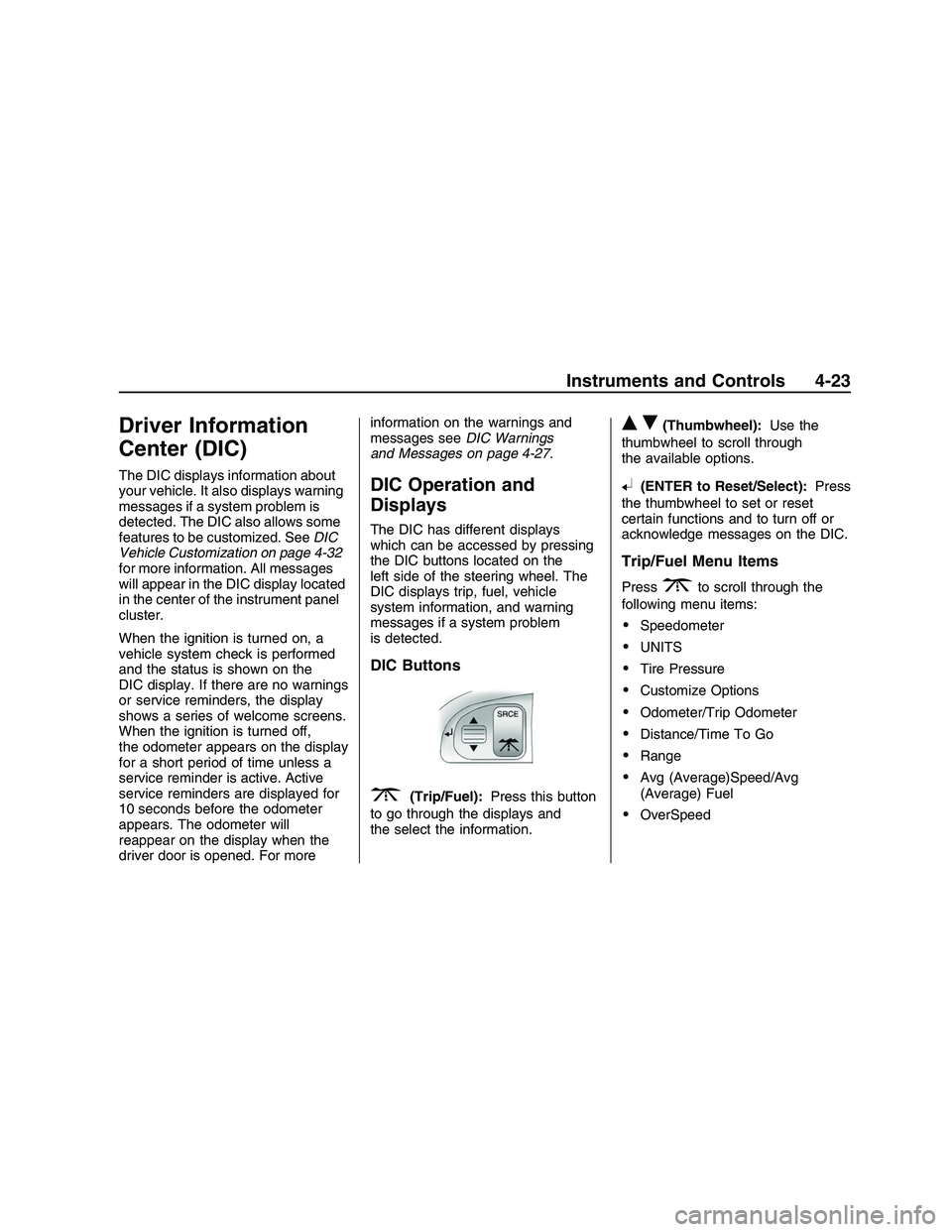
DIC Buttons
3(Trip/Fuel):Press this button
to go through the displays and
the select the information.
QR(Thumbwheel):Use the
thumbwheel to scroll through
the available options.
8(ENTER to Reset/Select):Press
the thumbwheel to set or reset
certain functions and to turn off or
acknowledge messages on the DIC.
Trip/Fuel Menu Items
Press3to scroll through the
following menu items:
Speedometer
UNITS
Tire Pressure
Customize Options
Odometer/Trip Odometer
Distance/Time To Go
Range
Avg (Average)Speed/Avg
(Average) Fuel
OverSpeed
Instruments and Controls 4-23
2008 - Pontiac G8 Owner Manual
Page 98 of 334
Speedometer
Press
3until the speedometer is
displayed.
The speedometer shows how fast
the vehicle is moving in either miles
per hour (MPH) or kilometers per
hour (km/h). To switch between
English and metric measurements,
see “UNITS” later in this section.
The digital speedometer display can
be enabled or disabled. See
“Digital Speedometer” underDIC
Vehicle Customization on page 4-32
for more information.
UNITS
Move the thumbwheel up
Qor down
Rto highlight English or Metric
when the UNITS display is active.
Press
8to conrm the setting. This
will change the displays on the
cluster, DIC, and the temperature
display in the mirror to either English
or metric measurements.Tire Pressure
Press
3until Tire Pressure is
displayed.
The display will show a vehicle and
the approximate pressures of all
four tires. Tire pressure is displayed
in either pounds per square
inch (PSI) or in kilopascal (kPa).
This display can be customized. See
DIC Vehicle Customization on
page 4-32for more information.
Customize Options
SeeDIC Vehicle Customization on
page 4-32for more information.
Odometer/Trip Odometer
Press
3until the Odometer/Trip
Odometer is displayed.
The odometer display shows the
distance the vehicle has been driven
in either miles (MI) or kilometers
(km). To switch between English
and metric measurements, see
“UNITS” earlier in this section.The Trip Odometer display shows
the current distance traveled
since the last reset for the trip
odometer. The trip odometer can be
reset to zero by pressing and
holding
8while the trip odometer
value is highlighted. If
8is only
pressed briey, the Avg Speed/Avg
Fuel will be reset as well.
Distance/Time To Go
Press
3until To Go is displayed.
If this item doesn’t display, check
that the display is turned on through
the Customize Options menu.
SeeDIC Vehicle Customization on
page 4-32for more information.
At the start of a trip, estimate
the distance to arrival (for example,
from maps, road signs). Move
the thumbwheel up or down until the
display shows the estimated trip
4-24 Instruments and Controls
2008 - Pontiac G8 Owner Manual
Page 99 of 334
distance. When driving, the
computer constantly updates the
time to arrival, based on changing
driving speeds. Use the thumbwheel
to adjust the distance any time
this display is shown. Time to go is
shown in hours and minutes and
is only shown if the distance to go is
more than zero.
This display can be turned on or off
and the default setting can be
changed.
Range
Press
3until Range is displayed.
This display shows the approximate
distance the vehicle can be
driven without refueling. The fuel
range estimate is based on an
average of the vehicle’s fuel
economy over recent driving history
and the amount of fuel remaining
in the fuel tank. Fuel range cannot
be reset.Avg (Average)Speed/Avg
(Average) Fuel
Press
3until Avg Speed/Avg
Fuel is displayed.
Avg Speed shows the average
speed (while the engine is running)
since the last reset.
Avg Fuel shows average fuel used
since the last reset.
To reset only the Avg Speed or Avg
Fuel, press and hold
8while
either value is highlighted. If
8is
only pressed briey, the Trip
Odometer will be reset as well.OverSpeed
OverSpeed allows the driver to set
a speed that they do not want
to exceed. OverSpeed will illuminate
in the display and a chime will
sound to warn that the vehicle’s
speed is equal or has exceeded the
preselected value. During an
OverSpeed warning, the OverSpeed
display is shown, allowing the
driver to make adjustments.
To set the OverSpeed warning
press3when OverSpeed
is displayed to highlight the
OverSpeed mode. Move the
thumbwheel up
Qor downRto
scroll through and highlight one
of the following options:
Off:No OverSpeed warning set.
Manual:Allows you to manually set
the OverSpeed warning. See
“Manual OverSpeed” following.
Preset 1:Default setting 30 MPH
(48 km/h)
Instruments and Controls 4-25
2008 - Pontiac G8 Owner Manual
Page 100 of 334
Preset 2:Default setting 45 MPH
(72 km/h)
Preset 3:Default setting 55 MPH
(89 km/h)
Preset 4:Default setting 70 MPH
(113 km/h)
The selection is set automatically
after a few seconds.
The corresponding value of the
presets will be shown on the display.
The preset OverSpeed warnings
can be reprogrammed. See
“Programming the OverSpeed
Presets” later in this section.
Manual OverSpeed
To manually set the OverSpeed
warning:
1. Use the thumbwheel to select
Manual for OverSpeed.
2. Press
8to highlight the current
value.3. Use the thumbwheel to adjust
the value in 5 MPH or km/h
increments and press
8
to conrm the setting.
To set the OverSpeed warning to
the vehicle’s current speed:
1. Use the thumbwheel to select
Manual as described in the
OverSpeed section.
2. Press
8to highlight the current
value.
3. Press and hold
8for more than
3 seconds to set the value to
the nearest 5 MPH or km/h
above the current vehicle’s
speed.
Programming the OverSpeed
Presets
While the vehicle’s speed is 6 MPH
(10 km/h) or below, each of the
presets can be altered and values
can be stored for future use.To reprogram the OverSpeed
presets:
1. Use the thumbwheel to select the
desired preset and press
8.
2. Move the thumbwheel up
Qor
down
Rto adjust the value in
1km/h increments.
3. Press
8to conrm the setting.
Adjusting the Setting During
an OverSpeed Warning
While the OverSpeed warning is
displayed move the thumbwheel up
Qor downRto adjust the
value when in Manual mode or to
select a different preset when
in Preset mode. Press and hold
8
for more than 3 seconds to set
the value to the nearest 5 MPH or
km/h above the current vehicle’s
speed. If Preset mode was selected,
this will change it to Manual mode.
4-26 Instruments and Controls
2008 - Pontiac G8 Owner Manual
Page 104 of 334
yOverSpeed
This message is displayed when the
vehicle’s speed is greater than
the set OverSpeed value. See
“OverSpeed” underDIC Operation
and Displays on page 4-23.
You can press
8or move the
thumbwheel up
Qor downRto
acknowledge that you received
the message, but OverSpeed will
continue to appear in the bottom of
the DIC display as long as the
vehicle’s speed exceeds the preset
value.
$Park Brake
This message is displayed if the
parking brake is applied when you
are driving. Release the parking
brake. SeeParking Brake on
page 8-9.
Replace Battery in
Remote Key
This message is displayed when the
battery in the remote keyless
entry transmitter needs to be
replaced. See your dealer/retailer to
replace the battery.
You can press
3or8to
acknowledge that you received the
message, but
QKey Batt will
continue to appear in the bottom of
the DIC display until the battery
has been replaced.
wRest Reminder
This feature reminds the driver that
they may have been driving for too
long without a break. When the
ignition is turned on, a timer starts
counting. After two hours of
continuous driving, the rest reminder
ashes to alert the driver. The Rest
Reminder message is displayed until
3or8are pressed. The rest
reminder reappears after 20 minutesaccompanied by a chime, unless the
ignition has been turned off. For
information on how to turn the rest
reminder on and off, seeDIC Vehicle
Customization on page 4-32.
{Safety Mode Active and
Power Reduced
These messages display alternately
when there is a problem with the
engine control system, see
your dealer/retailer.
You can press
3or8to
acknowledge that you received the
message, but
{Safety will
continue to appear in the bottom of
the DIC display until the vehicle
has been serviced.
4-30 Instruments and Controls
2008 - Pontiac G8 Owner Manual
Page 105 of 334
Service Charging System
This message is displayed when
there is a fault in the battery
charging system, see your
dealer/retailer.
You can press
3or8to
acknowledge that you received the
message, but
"Low Batt will
continue to appear in the bottom of
the DIC display until the vehicle
has been serviced.
:Service Engine Oil
This message is displayed when the
engine oil needs to be changed.
When you change the engine oil, be
sure to reset the Oil Life System.
SeeEngine Oil Life System on
page 9-10for information on how to
reset the message. SeeEngine
Oil on page 9-8andScheduled
Maintenance on page 11-4for more
information.
vService Vehicle Soon
This message is displayed when
there is a problem with the vehicle,
see your dealer/retailer.
You can press
3or8to
acknowledge that you received the
message, but
*Service will
continue to appear in the bottom of
the DIC display until the vehicle
has been serviced.
DSport Shift
This message is displayed when the
automatic transmission is operating
in sport shift mode.
SeeAutomatic Transmission
Operation on page 8-6.
LStability Ctrl (Control)
Assistance
This message is displayed when the
Electronic Stability Program
(ESP
®) is actively helping the
vehicle with road grip and stability.
ESP CTRL appears at the bottom
of the display and remains
illuminated as long as the ESP is
actively helping with road grip
and stability. SeeElectronic Stability
Program on page 8-16.
FStability Ctrl (Control) Off
This message is displayed when the
ESP has been turned off.
SeeElectronic Stability Program on
page 8-16. If this message is
displayed and you have not turned
off the ESP, it means there is a
problem with the ESP, see
your dealer/retailer.
Instruments and Controls 4-31
2008 - Pontiac G8 Owner Manual
Page 107 of 334
The following items are part of the
main customization menu.
Exit
Reset settings
Security
Lighting
Trip Computer
Language
Remote key
See the information following for
detailed descriptions of the
items available under each menu
item. There are also help screens
available to explain the features.
When selecting a menu item,
wait for a few seconds and a help
screen pops up with an explanation
of the selected feature.
Exit
To exit the customization menu
scroll to Exit and press
8.
You can also exit the customization
menu by:
Press3at any time to return
to the trip/fuel menu.
Drive the vehicle at more than
6 mph (10 km/h).
Turn the ignition off.
Reset settings
This item will reset all the
customization options to the factory
defaults.
Security
This item will allow you to
customize:
Auto unlock
Auto lock
Flash remote lck (lock)
Beep remote lck (lock)
Flash rem (remote) unlock
2 Stage unlock
Remote Start
Some of these work with your
Remote Keyless Entry (RKE)
transmitter. SeeRemote Keyless
Entry (RKE) System Operation
on page 2-4for more information.
Auto unlock
If you select Auto unlock you will be
able to choose when you want
the doors to unlock automatically.
Off:No automatic unlock of
any doors.
Driver door key out:The driver
door will unlock when the key
is removed.
Driver door in park:The driver
door will unlock when you put
the shift lever into PARK (P).
All doors at key out:All doors will
unlock when the key is removed.
Instruments and Controls 4-33
2008 - Pontiac G8 Owner Manual