audio PONTIAC GRAND-AM 1993 Owners Manual
[x] Cancel search | Manufacturer: PONTIAC, Model Year: 1993, Model line: GRAND-AM, Model: PONTIAC GRAND-AM 1993Pages: 306, PDF Size: 15.39 MB
Page 2 of 306
1993 Owner’s Manual
Table of Contents Pontiac Grand Am
Introduction How to Use this Manual .............. .3
Part 1 Seats &Safety Belts. ................ .7
Part 2 Features & Controls ............... .43
Part 3 Comfort Controls & Audio Systems. ...
Pert 4 Your Driving and the Road .......... .I~I
L
Part5 ProblemsontheRoad .............. 16s
Part 6 Service & Appearance Care ......... 197
r
I
Part 7 Maintenance Schedule. ............ 259
Part 8 Customer Assistance Information .... 27s
Part9 Index ........................... 293
Includes “Reporting Safety Defects” on page 284 c
I
Service Station Information .... Last Page
Printed in USA 10202167 B Second Printing . .
ProCarManuals.com
Page 4 of 306
How to Use this Manual
Using Your 1993 Pontiac
Owner’s Manual
Many people read their owner’s manual
from beginning to end when they first
receive their new vehicle. This will help
you learn about the features and controls
for your vehicle. In this manual, you’ll
find that pictures and words work
together to explain things quickly.
There are nine parts with color-tabbed
pages
in this manual. Each part begins
with a brief list of contents,
so you can
usually tell at a glance if that part
contains the information you want.
You can bend the manual slightly to
reveal the color tabs that help you find a
part.
Part 1: Seats & Safety Belts
This part tells you how to use your seats
and safety belts properly.
Part 2: Features & Controls
This part explains how to start and
operate your Pontiac.
Part 3: Comfort Controls & Audio
Systems
This part tells you how to adjust the
ventilation and comfort controls and
how to operate your audio system.
Part 4: Your Driving and the Road
Here you’ll find helpful information and
tips about the road and how to drive
under different conditions.
Part 5: Problems on the Road
This part tells you what to do if you
have a problem while driving, such as
a
flat tire or engine overheating. ’
Part 6: Service & Appearance Care
Here the manual tells you how to keep
your Pontiac running properly and
looking good.
Part 7: Maintenance Schedule
This part tells you when to perform
vehicle maintenance and what fluids and
lubricants
to use.
Part 8: Customer Assistance
Information
This part tells you how to contact
Pontiac for assistance and how to get
service publications. It also gives you
information on
Reporting Safety Defects.
Part 9: Index
Here’s an alphabetical listing of almost
every subject in this manual. You can
use
it to quickly find something you
want to read.
Service Station Information
This is a quick reference of service
information. You can find it
on the last
page
of this manual.
3
ProCarManuals.com
Page 79 of 306
Features & Controls
Trunk Light
This light comes on when you open
your trunk. It also comes on when you
open the doors or turn on the courtesy
lights.
78
Battery Rundown Protection
Your Pontiac is equipped with a Battery
Rundown Protection feature designed to
protect your vehicle’s battery.
When any interior light (trunk, reading,
footwell or glove box) is left on when
the ignition is turned off, the Battery
Rundown Protection system will
automatically shut the light off after
20
minutes. This will avoid draining the
battery.
To reactivate the interior lights, either:
The ignition must be turned on
The activated light switch must be
turned off and then on, OR
A front door must be opened. The Battery Rundown Protection feature
will
also be activated when any door of
your vehicle is left open.
Also,
if your vehicle is left with the
ignition turned
off for over 24 days,
battery power to your clock and audio
system will be turned off to reduce
battery drain. When the ignition is
turned on again, battery power will
be
resupplied. However, under these
conditions, it will be necessary to reset
the clock and audio system settings.
ProCarManuals.com
Page 88 of 306
The lnstrument Panel-
bur Information System
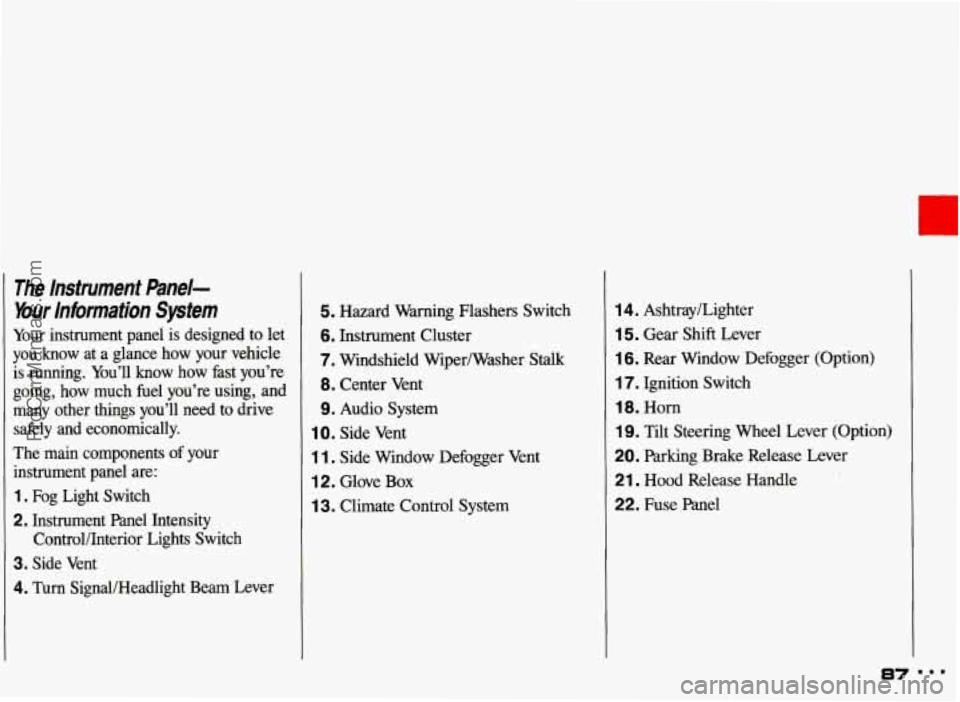
Your instrument panel is designed to let
you know at a glance how your vehicle
is running. You’ll know how fast you’re going, how much fuel you’re using, and
many other things you’ll need to drive
safely and economically.
The main components
of your
instrument panel are:
1. Fog Light Switch
2. Instrument Panel Intensity
3. Side Vent
4. Turn SignaUHeadlight Beam Lever Control/Interior Lights Switch
5. Hazard Warning Flashers Switch
6. Instrument
Cluster
7. Windshield Wiper/Washer Stalk
8. Center Vent
9. Audio System
1 0. Side Vent
1 1. Side Window Defogger Vent
12. Glove Box
1 3. Climate Control System
14. Ashtray/Lighter
15. Gear Shift Lever
16. Rear Window Defogger (Option)
17. Ignition Switch
18. Horn
1 9. Tilt Steering Wheel Lever (Option)
20. Parking Brake Release Lever
21. Hood Release Handle
22. Fuse Panel
I
ProCarManuals.com
Page 102 of 306
Part 3
In this part you’ll find out how to
operate the comfort control systems
and audio systems offered with your
Pontiac
. Be sure to read about the
particular system supplied with your
vehicle
.
Comfort Controls G
Audio Systems =
Climate Control System ............................................ 102
Air Conditioning System ........................................... 103
Setting the Clock ................................................. 107
AM/FM Stereo Radio ............................................. 108
AM/FM Stereo Radio with Cassette Tape Player ......................... 109
AM/FM Stereo Radio with Compact Disc Player ......................... 113
Understanding Radio Reception ...................................... 117
Care of Your Cassette Tape Player .................................... 118
Care of Your Compact Discs ........................................ 118
Power Antenna Mast Care .......................................... 119
AM/FM Stereo Radio with Cassette Tape Player and Graphic Equalizer ....... 111
FixedMastAntenna ............................................... 119
101 m..
ProCarManuals.com
Page 103 of 306
Comfort Controls & Audio Systems
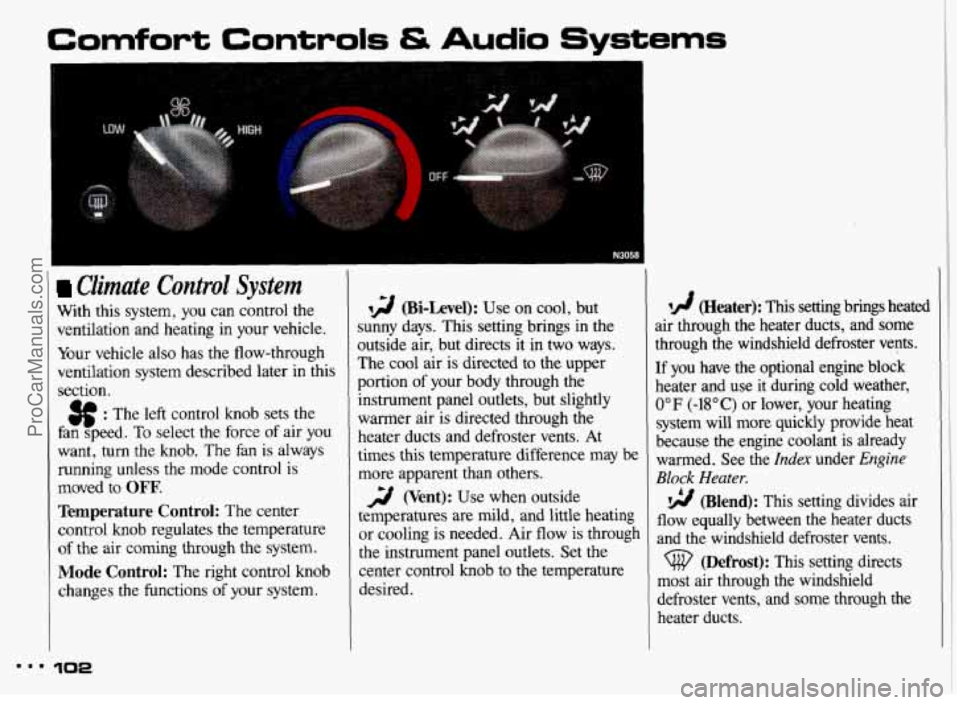
Climate Control System
With this system, you can control the
ventilation and heating in your vehicle.
Your vehicle also has the flow-through
ventilation system described later in this
section.
$$ : The left control knob sets the
fan speed.
To select the force of air you
want, turn the knob. The fan
is always
running unless the mode control
is
moved to OFF’.
Temperature Control: The center
control knob regulates the temperature
of the air coming through the system.
Mode Control: The right control knob
changes the functions
of your system.
N3058
12 (Bi-Level): Use on cool, but
;unny days. This setting brings in the
3utside air, but directs it in two ways.
rhe cool air is directed to the upper
2ortion
of your body through the
instrument panel outlets, but slightly
warmer air
is directed through the
heater ducts and defroster vents. At
times this temperature difference may be
more apparent than others.
temperatures are mild, and little heating
or cooling is needed. Air flow is through
the instrument panel outlets. Set the
center control
knob to the temperature
desired.
2 (Vent): Use when outside
lA (Heater): This setting brings heated
air through the heater ducts, and some
through the windshield defroster vents.
[f you have the optional engine block
heater and use it during cold weather,
0°F (-18°C) or lower, your heating
system will more quickly provide heat
because the engine coolant is already
warmed. See the
Index under Engine
Block Heater.
flow equally between the heater ducts
and the windshield defroster vents.
most air through the windshield
defroster vents, and some through the
heater ducts.
(Blend): This setting divides air
(Defrost): This setting directs
m.. 102
ProCarManuals.com
Page 105 of 306
Comfort Controls & Audio Systems
Air Conditionina (CONI) -.
qg (Bi-Level): Use on cool, but
sunny days. This setting brings in the
outside air, but directs it in two ways.
The cool air is directed to the upper
portion of your body through the
instrument panel outlets, but slightly
warmer air is directed through the
heater ducts and defroster vents. At
times this temperature difference may be
more apparent than others.
The air conditioner compressor operates
in all three air conditioning positions. It
also operates in (Defrost) when
the outside temperature is higher than
about
40°F (4.5"C).
Ventilation
Use when outside temperatures are
mild, and little heating or cooling is
needed. Turn the right control knob to
2 (Vent). Air flow is directed
through the instrument panel outlets. Set
the center control knob to the
temperature desired.
Heating
Turning the right control knob to
72 (Heater) and the center control
knob clockwise will send heated air
through the heater ducts, and some
through the defroster vents.
3 (Vent) and (Heater) are
economical positions because the air
conditioner compressor doesn't run in
these two settings. This reduces engine
load, resulting in improved fuel
economy. If either setting fails to keep you
comfortable, or causes your windows
to fog up, turn the right control knob to
one of the air conditioning positions, or
to
(j@ (Defrost).
If you have the optional engine block
heater and use it during cold weather,
0°F (-18°C) or lower, your heating
system will more quickly provide heat
because the engine coolant is already
warmed. See the
Index under Engine
Block Heater.
flow equally between the heater ducts
and the windshield defroster vents.
vg (Blend): This setting divides air
Defrosting
The (@ (Defrost) setting directs most
air through the defroster vents, and
some through the heater ducts.
8.8 104
ProCarManuals.com
Page 107 of 306
Comfort Controls & Audio Systems
I
Rear Window Defogger (CONT.:) I Flow-Through Ventilation System
Don’t use a razor blade or something
else
sharp on the inside of the rear
window. If you do,
you could cut
or damage the warming grid, and
the repairs wouldn’t be covered by
your warranty Your Pontiac’s
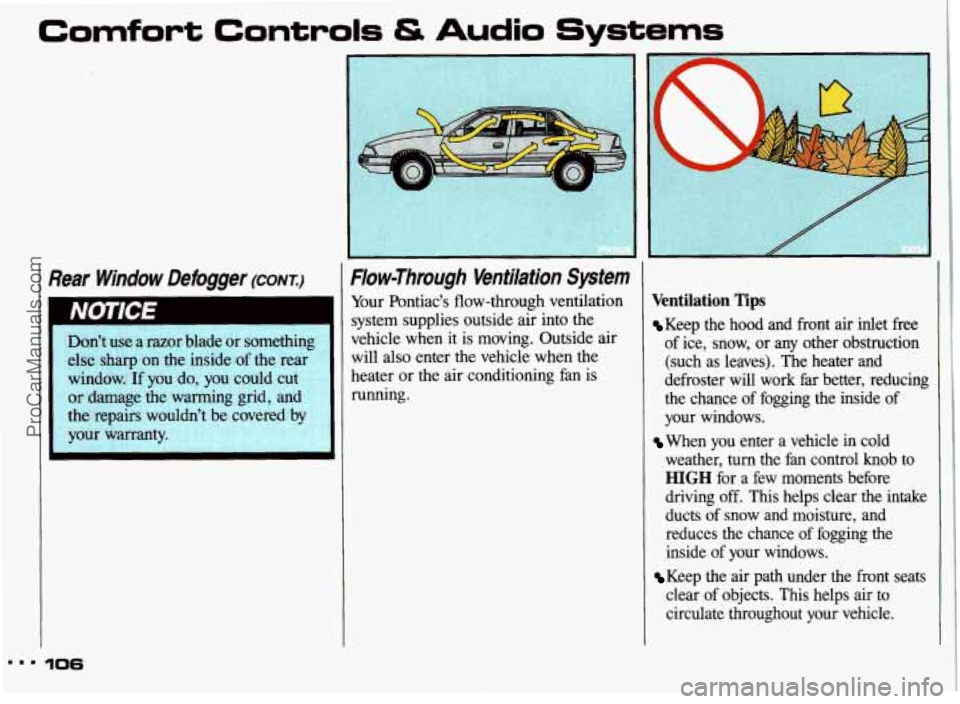
flow-through ventilation
system supplies outside air into the
vehicle when it is moving. Outside air
will also enter the vehicle when the
heater or the air conditioning fan is
running.
Ventilation Tips
Keep the hood and front air inlet free
of ice, snow, or any other obstruction
(such as leaves). The heater and
defroster will work far better, reducing the chance of fogging the inside of
your windows.
When you enter a vehicle in cold
weather,
turn the fan control knob to
HIGH for a few moments before
driving off. This helps clear the intake
ducts of snow and moisture, and
reduces the chance of fogging the
inside of your windows.
clear of objects. This helps air to
circulate throughout your vehicle.
Keep the air path under the front seats
ProCarManuals.com
Page 108 of 306
Audio Systems
The following pages describe the audio systems available for your Pontiac, and how
to get the best performance from them. Please read about the system in your
vehicle.
Hearing damage from loud noise is almost undetectable until it is too
- late. Your hearing can adapt to higher volumes of sound. Sound that
I st IS normal can be loud and harmful to your hearing. Take precautio\
ns by
1
adjusting the volume control on your radio to a safe sound le\
vel before your
hearing adapts
to it.
1 To help avoid hearing loss or damage:
I
1. Adjust the volume control to the lowest setting.
2. Increase volume slowly until you hear comfortably and clearly.
Before you add any sound equipment to your vehicle-like a tape player,
CB
radio, mobile telephone or two-way radio-be sure you can add what you
want.
If you can, it's very important to do it properly. Added sound equipment
may interfere with the operation of your vehicle's engine, Delco@ radio or
other systems, and even damage them. And, your vehicle's systems may
interfere with
the operation of sound equipment that has been added
improperly.
So, before adding sound equipment, check with your dealer and be sure to
check federal rules covering mobile radio and telephone units.
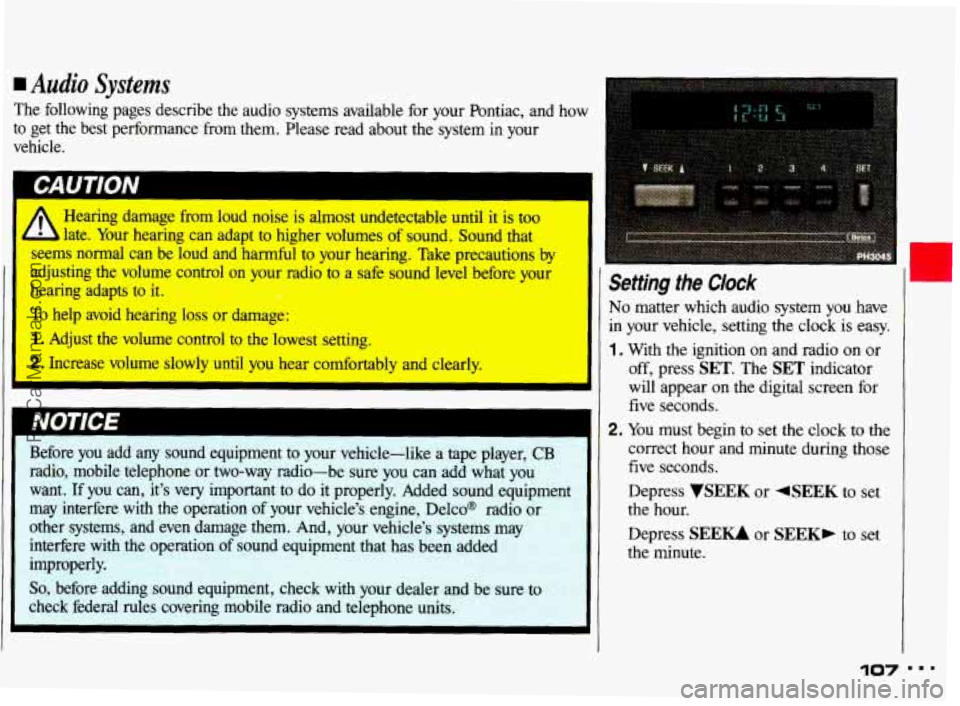
Setting the Clock
No matter which audio system you have
in your vehicle, setting the clock is easy.
1 , With the ignition on and radio on or
off, press SET. The SET indicator
will appear on the digital screen for
five seconds.
2. You must begin to set the clock to the
correct hour and minute during those
five seconds.
Depress
VSEEK or 4SEEK to set
the hour.
Depress
SEEU or SEEK, to set
the minute.
107 " '
ProCarManuals.com
Page 109 of 306
Comfort Controls & Audio Systems
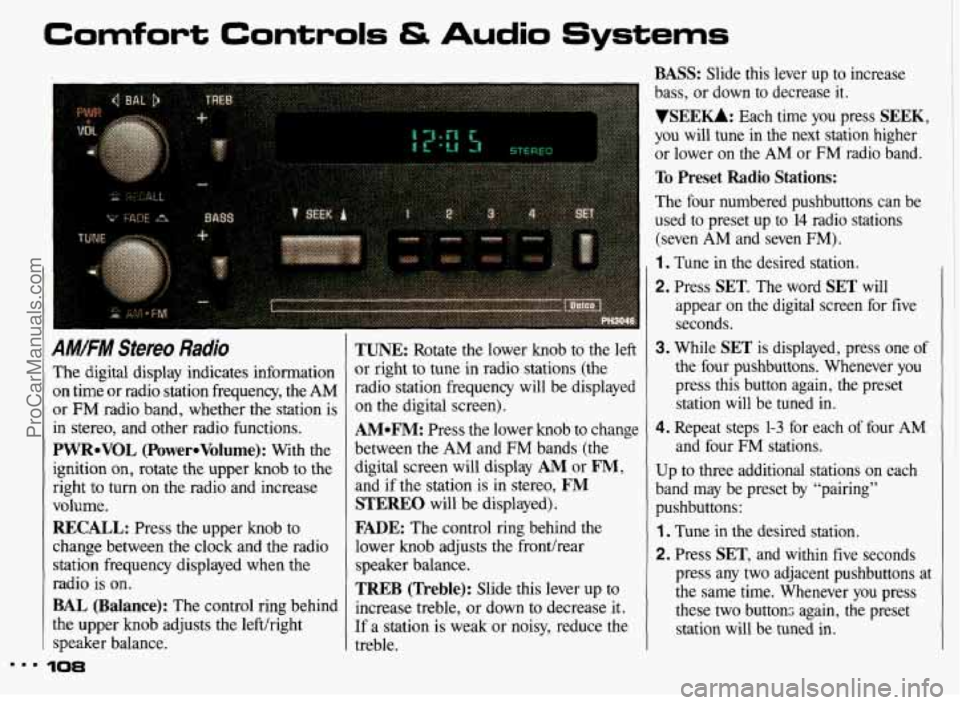
AM!FM Stereo Radio
The digital display indicates information
on time or radio station frequency, the AM
or FM radio band, whether the station is
in stereo, and other radio functions.
PWReVOL (PowereVolume): With the
ignition
on, rotate the upper knob to the
right to turn on the radio and increase
volume.
RECALL: Press the upper knob to
change between the clock and the radio
station frequency displayed when the
radio is on.
BAL (Balance): The control ring behind
the upper knob adjusts the left/right
speaker balance.
10%
TUNE: Rotate the lower knob to the left
or right to tune in radio stations (the
radio station frequency will be displayed
on the digital screen).
AMeFM: Press the lower knob to change
between
the AM and FM bands (the
digital screen will display
AM or FM,
and if the station is in stereo, FM
STEREO will be displayed).
FADE: The control ring behind the
lower knob adjusts the fronthear
speaker balance.
TREB (Treble): Slide this lever up to
increase treble, or down to decrease it.
If a station is weak or noisy, reduce the
treble.
BASS: Slide this lever up to increase
bass, or down to decrease
it.
VSEEKk Each time you press SEEK,
you will tune in the next station higher
or lower on the
AM or FM radio band.
To Preset Radio Stations:
The four numbered pushbuttons can be
used to preset
up to 14 radio stations
(seven
AM and seven FM).
1. Tune in the desired station.
2. Press SET. The word SET will
appear on the digital screen for five seconds.
3. While SET is displayed, press one of
the four pushbuttons. Whenever you
press this button again, the preset
station will be tuned in.
4. Repeat steps 1-3 for each of four AM
and four FM stations.
Up
to three additional stations on each
band may be preset by “pairing”
pushbuttons:
1. Tune in the desired station.
2. Press SET, and within five seconds
press any two adjacent pushbuttons at
the same time. Whenever you press
these two buttons again, the preset station will be tuned
in.
ProCarManuals.com