ECU PONTIAC GRAND-AM 1995 User Guide
[x] Cancel search | Manufacturer: PONTIAC, Model Year: 1995, Model line: GRAND-AM, Model: PONTIAC GRAND-AM 1995Pages: 354, PDF Size: 17.81 MB
Page 49 of 354
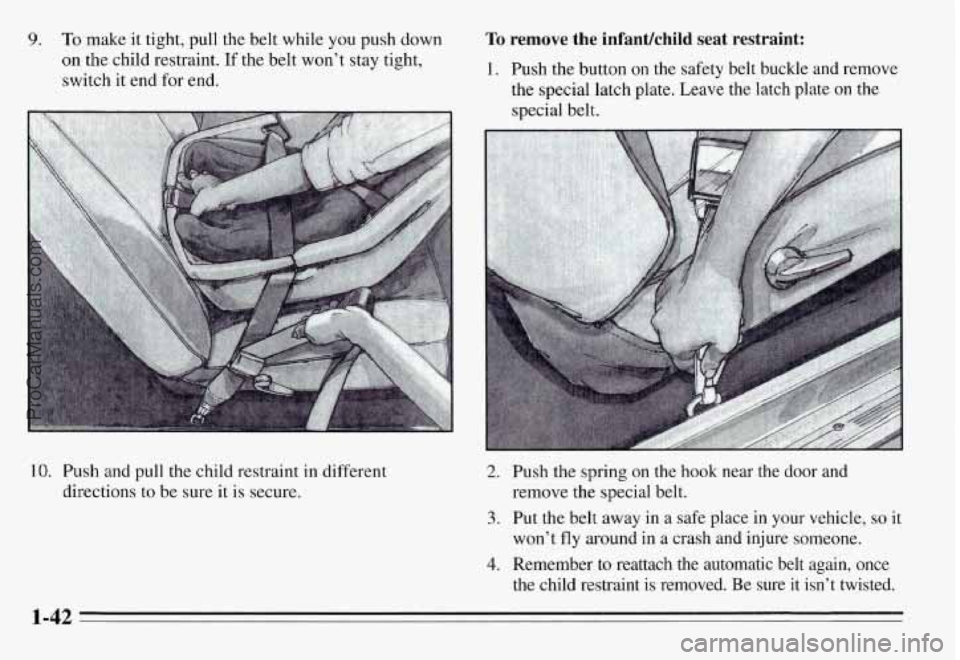
9. To make it tight, pull the belt while you push down
on the child restraint. If the belt won’t stay tight,
switch it end for end.
10. Push and pull the child restraint in different
directions to be sure it is secure.
To remove the infanuchild seat restraint:
1. Push the button on the safety belt buckle and remove
the special latch plate. Leave the latch plate on the
special belt.
2. Push the spring on the hook near the door and
remove the special belt.
3. Put the belt away in a safe place in your vehicle, so it
won’t fly around in a crash and injure someone.
4. Remember to reattach the automatic belt again, once
the child restraint is removed. Be sure
it isn’t twisted.
1-42
ProCarManuals.com
Page 60 of 354
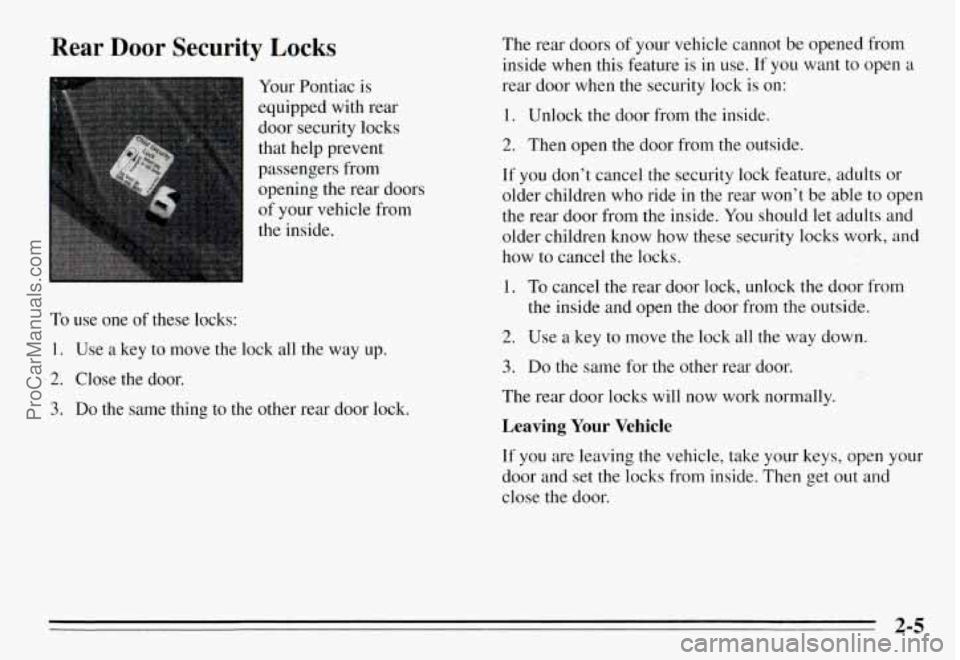
Rear Door Security Locks
Your Pontiac is
equipped with rear
door security locks
that help prevent
passengers from
opening the rear doors
of your vehicle from
the inside.
To use one of these locks:
1. Use a key to move the lock all the way up.
2. Close the door.
3. Do the same thing to the other rear door lock.
The rear doors of your vehicle cannot be opened from
inside when this feature
is in use. If you want to open a
rear door when the security lock is on:
1. Unlock the door from the inside.
2. Then open the door from the outside.
If you don’t cancel the security lock feature, adults or
older children who ride in the rear won’t
be able to open
the rear door from the inside. You should let adults and
older children know how these security locks work, and
how to cancel the locks.
1. To cancel the rear door lock, unlock the door from
the inside and open the door from the outside.
2. Use a key to move the lock all the way down.
3. Do the same for the other rear door.
The rear door locks will now work normally.
Leaving Your Vehicle
If you are leaving the vehicle, take your keys, open your
door and set
the locks from inside. Then get out and
close the door.
2-5
ProCarManuals.com
Page 139 of 354
CD Player Theft Deterrent Feature
Delco LOC II@ is an anti-theft feature for the compact
disc player. It can be used or ignored. If ignored, the
system plays normally. If it is used, your player won’t be
usable
if it is ever stolen because it will go to LOC mode
any time battery power is removed. It will also go to
LOC mode any time power from the battery is turned
off
by the Battery Protection feature (see “Battery Rundown
Protection” in the Index). Until an unlock code is
entered,
it will not turn on.
The instructions below tell you how to enter a secret
code into the system. If your vehicle loses battery power
for any reason, you must unlock the system with the
secret code before the radio will turn on.
Setting the Anti-Theft System
1. Write down any six-digit number and keep it in a
safe place. This is your secret code.
2. Turn the ignition to the ACC or RUN position.
3. Press the PWR button to turn the radio off.
4. Press station preset buttons 1 and 4 at the same time
and hold until “---” appears on the display.
NOTE:
You now have only 15 seconds between each
of the following steps.
5. Press SET, and “000” will appear on the display.
6. Press the SEEK left or right arrow buttons until the
first digit of your code appears.
7. Turn the TUNE knob clockwise or counterclockwise
until the second and third digits
of your code appear.
8. Press the BAND knob (“000” will appear again on
the display).
9. Press the SEEK left or right arrow button until the
fourth digit of your code appears.
10. Turn the TUNE knob clockwise or counterclockwise
until the fifth and sixth digits of your code appear.
11. Press the BAND knob (“rEP” will appear for five
seconds, then “000”).
indicating that Delco LOC II@ is set, and your audio
system is secure.
12. Repeat steps 6- 11. This time SEC will appear,
3-16
ProCarManuals.com
Page 140 of 354
Disabling the Anti-Theft System
Enter your secret code by following these steps (you
will have only
15 seconds between each step).
1.
2.
3.
4.
5.
6.
7.
8.
Turn the ignition to the ACC or RUN position, and
turn the radio off.
Press station preset buttons 1 and 4 at the same time
for five seconds. SEC will appear on the display,
indicating the audio system is secure.
Press SET, and “000’ will appear on the display.
Press the SEEK left or right arrow button until the
first digit of your code appears.
Turn the TUNE knob clockwise or counterclockwise
until the second and third digits of your code appear.
Press the BAND knob
(“000” will appear again on
the display).
Press the SEEK left or right arrow button until the
fourth digit of your code appears.
Turn the TUNE knob clockwise or counterclockwise
until the fifth
and sixth digits of your code appear.
9. Press the BAND knob. If the display shows “---,”
the disabling sequence was successful. The numbers
matched the user-selected code or the factory
back-up code and the audio system is in the
unsecured mode.
If the display shows SEC, the
disabling sequence was unsuccessful. The numbers
did not match either of the codes and the audio
system will remain in the secured mode.
To Unlock the System After a Power Loss
When battery power is reapplied to a secured audio
system after a loss of power, the audio system will not
turn on and LOC will appear on the digital display.
You
will need to unlock the Delco LOC 11” system.
1. Turn the ignition to the ACC or RUN position, and
2. Press SET, and “000” will appear on the display.
3. Follow steps 4-8 for disabling your anti-theft
4. Press the BAND knob. The time will appear on the
turn the radio off.
system.
digital display if you are successful. If SEC appears,
however, the numbers did not match, and your audio
system is still locked.
3-17
ProCarManuals.com
Page 165 of 354
Winter Driving
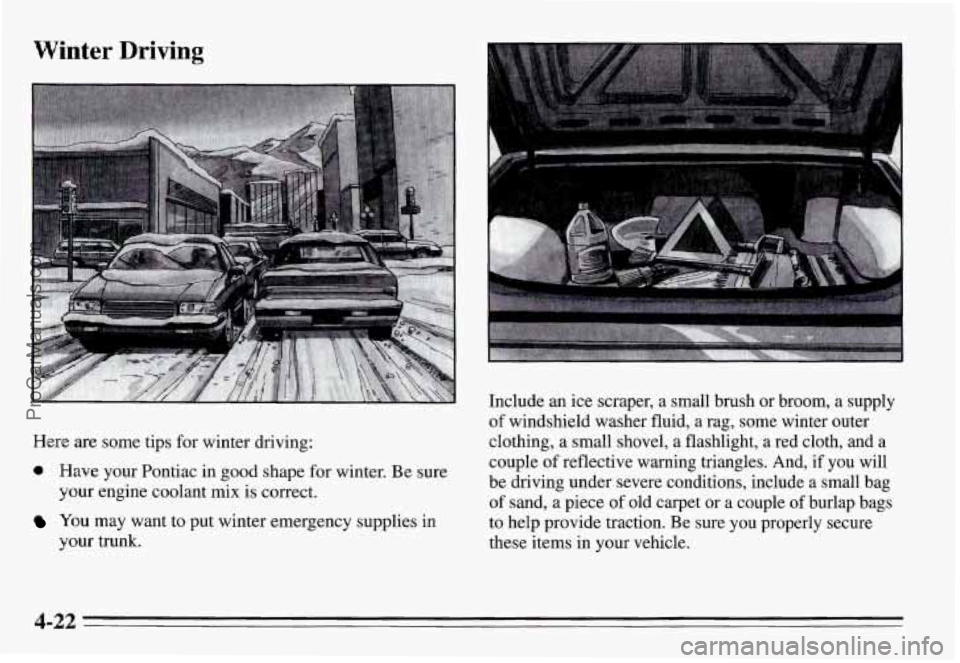
Here are some tips for winter driving:
a Have your Pontiac in good shape for winter. Be sure
your engine coolant mix is correct.
You may want to put winter emergency supplies in
your trunk.
Include an ice scraper, a small brush or broom, a supply
of windshield washer fluid, a rag, some winter outer
clothing, a small shovel, a flashlight, a red cloth, and a couple of reflective warning triangles. And, if you will
be driving under severe conditions, include a small bag
of sand, a piece
of old carpet or a couple of burlap bags
to help provide traction. Be sure you properly secure
these items in your vehicle.
4-22
ProCarManuals.com
Page 177 of 354
Safety Chains
You should always attach chains between your vehicle
and your trailer.
Cross the safety chains under the tongue
of the trailer so that the tongue will not drop to the road
if it becomes separated from the hitch. Instructions
about safety chains may be provided by the hitch
manufacturer or by the trailer manufacturer. Follow the
manufacturer’s recommendation for attaching safety
chains and do not attach them to the bumper. Always
leave just enough slack
so you can turn with your rig.
And, never allow safety chains to drag on the ground.
Trailer Brakes
Does your trailer have its own brakes?
Be sure to read and follow the instructions for the trailer
brakes
so you’ll be able to install, adjust and maintain
them properly. And because you have anti-lock brakes,
do not
try to tap into your vehicle’s brake system. If you
do, both brake systems won’t work well, or at all.
Driving with a Trailer
Towing a trailer requires a certain amount of experience.
Before setting out for the open road, you’ll want to get
to know your
rig. Acquaint yourself with the feel of
handling and braking with the added weight of the
trailer. And always keep in mind that the vehicle you are
driving is now a
good deal longer and not nearly as
responsive as your vehicle is by itself.
Before you start, check the trailer hitch and platform
(and attachments), safety chains, electrical connector,
lamps, tires and mirror adjustment.
If the trailer has
electric brakes, start your vehicle and trailer moving and
then apply the trailer brake controller by hand to be sure
the brakes
are working. This lets you check your
electrical connection at the same time.
During your trip, check occasionally to be sure that the
load is secure, and that the lamps and any trailer brakes
are still working.
4-34
ProCarManuals.com
Page 203 of 354
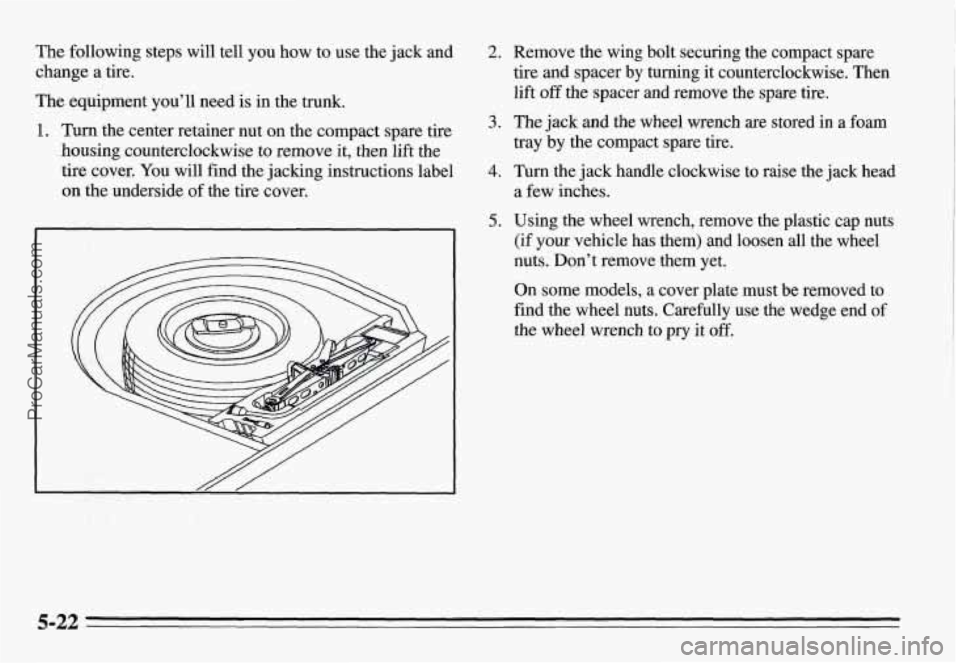
The following steps will tell you how to use the jack and
change a tire.
The equipment you’ll need is in the trunk.
1. Turn the center retainer nut on the compact spare tire
housing counterclockwise to remove it, then lift the
tire cover. You will find the jacking instructions label
on the underside of the tire cover,
2. Remove the wing bolt securing the compact spare
tire and spacer by turning it counterclockwise. Then
lift
off the spacer and remove the spare tire.
3. The jack and the wheel wrench are stored in a foam
tray by the compact spare tire.
a few inches.
4. Turn the jack handle clockwise to raise the jack head
5. Using the wheel wrench, remove the plastic cap nuts
(if your vehicle has them) and loosen all the wheel
nuts. Don’t remove them yet.
On some models, a cover plate must be removed to
find the wheel nuts. Carefully use the wedge end
of
the wheel wrench to pry it off.
5-22
ProCarManuals.com
Page 208 of 354
Don’t try to put a wheel cover on your compact spare
tire. It won’t fit. Store the wheel cover and plastic cap
nuts in the trunk
until you have the flat tire repaired or
replaced.
NOTICE:
Wheel covers won’t fit on your compact spare.
If you try to put a wheel cover on your compact
spare, you
could damage the cover or the spare.
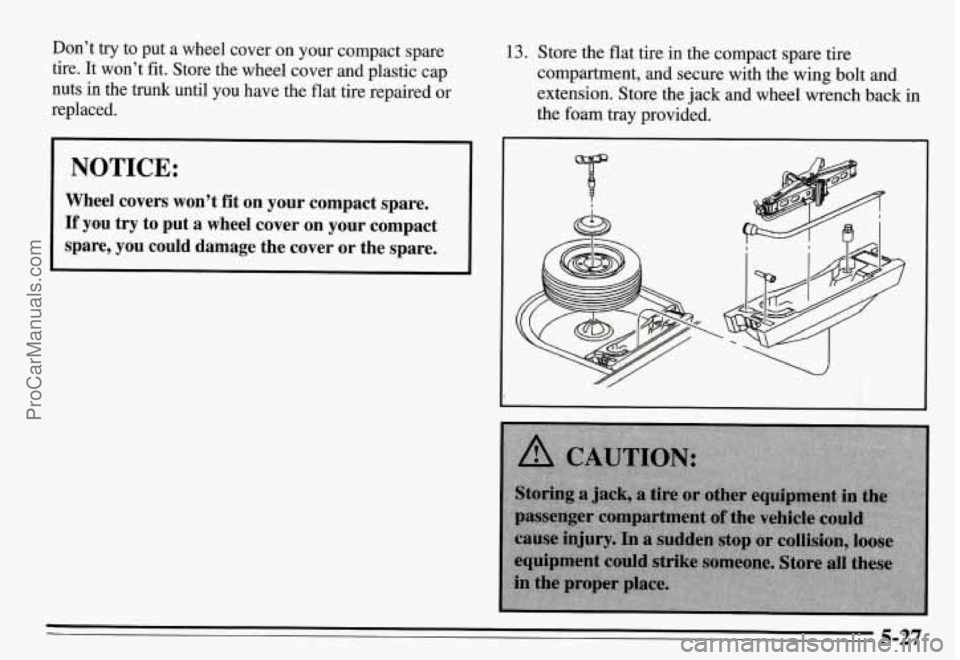
13. Store the flat tire in the compact spare tire
compartment, and secure with the wing bolt and
extension. Store the jack and wheel wrench back in
the foam tray provided.
I
5-27
ProCarManuals.com
Page 245 of 354
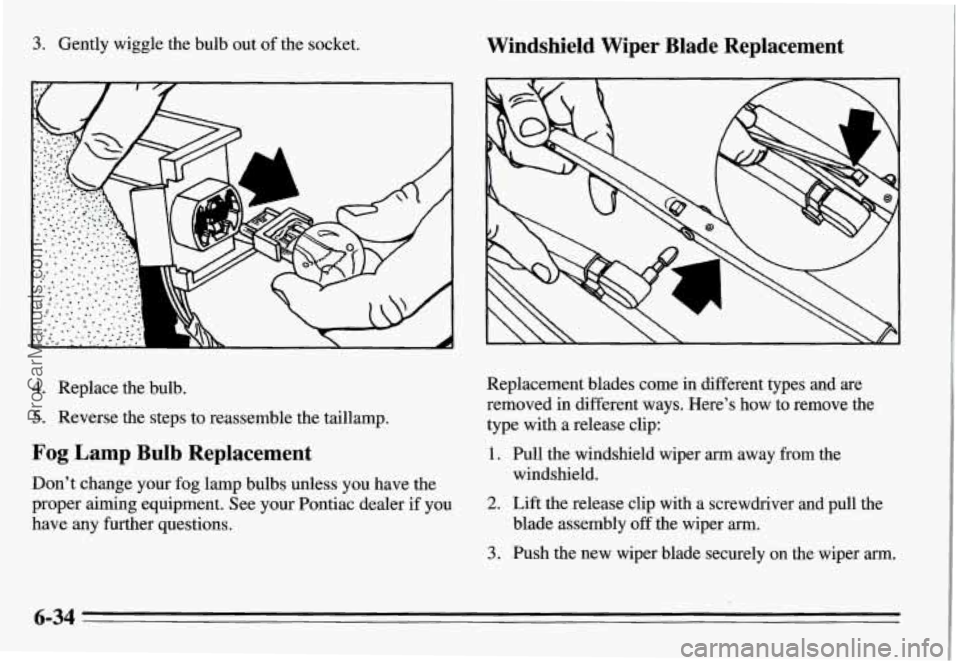
3. Gently wiggle the bulb out of the socket. Windshield Wiper Blade Replacement
Replacement blades come in different types and are
removed in different ways. Here’s how to remove the
type with a release clip:
1. Pull the windshield wiper arm away from the
windshield.
4. Replace the bulb.
5. Reverse the steps to reassemble the taillamp.
Fog Lamp Bulb Replacement
Don’t change your fog lamp bulbs unless you have the
proper aiming equipment. See your Pontiac dealer
if you
have any further questions. 2. Lift the release clip with a screwdriver and pull the
3. Push the new wiper blade securely on the wiper arm.
blade assembly off the wiper arm.
6-34
ProCarManuals.com
Page 323 of 354
Pontiac Roadside Assistance Program
Security While You Travel
As the proud owner of a new Pontiac vehicle, you are
automatically enrolled in the Pontiac Roadside
Assistance Program. This value-added service
is
intended to provide you with peace of mind as you drive
in the city or travel the open road.
Pontiac’s Roadside Assistance toll-free number is
staffed by a team of technically trained advisors who are
available
24 hours a day, 365 days a year.
We take anxiety out of uncertain situations by providing
minor repair information over the phone or making
arrangements to tow your vehicle to the nearest Pontiac
dealer.
We will provide the following services for
3 years/36,000 miles, at no expense to you:
Vehicle out of fuel
0 Keys locked in vehicle
0 Tow to nearest dealer for warranty
1-800-ROADSIDE 1-800-762-3743
0
0
0
Change a flat tire
Jump starts Courtesy Transportation. For warranty repairs during
the Bumper-to-Bumper coverage period, interim
transportation may be available under the Pontiac
Courtesy Transportation Program. Please consult
your dealer for details.
In Canada, please consult
your
GM dealer for information on Courtesy
Transportation.
We have quick, easy access to telephone numbers of the
following services depending on your needs:
Hotel
0 Glass replacement
0 Rental vehicles or taxis
0 Police, fire department or hospitals
In many instances, mechanical failures are covered
under Pontiac’s comprehensive warranty. However,
when other outside services are utilized, our advisors
will explain any payment obligations you might incur.
8-6
ProCarManuals.com