CD player PONTIAC GRAND-AM 1995 Owners Manual
[x] Cancel search | Manufacturer: PONTIAC, Model Year: 1995, Model line: GRAND-AM, Model: PONTIAC GRAND-AM 1995Pages: 354, PDF Size: 17.81 MB
Page 128 of 354
Audio Systems
The following pages describe the audio systems
available for your Pontiac, and how to get the best
performance
from them. Please read about the system in
your vehicle.
Setting the Clock
Radios with SEEK up and down arrow buttons:
1. With the ignition on and radio on or off, press SET.
The SET indicator will appear on the digital display
for five seconds.
2. Within five seconds, press the SEEK up arrow
button until the correct minute appears on the
display.
3. Press the SEEK down arrow button until the correct
hour appears on the display.
Radios with SEEK left and right arrow buttons
(CD Player):
1. With the ignition on and the radio on or off, press
SET. The
SET indicator will appear on the digital
display
for five seconds.
2. Within five seconds, press the SEEK right arrow
button until the correct minute appears on the
display.
3. Press and hold the SEEK left arrow button until the
correct hour appears on the display.
i- .. . .
. .,.. , ' ..
3-5
ProCarManuals.com
Page 131 of 354
AM/FM Stereo Radio with Cassette Tape
Player (Option)
VoL-OBAL TREBLE I
TUNE -0 FADE
LO
~PROG-RCL
R PAM-FM
B
BASS
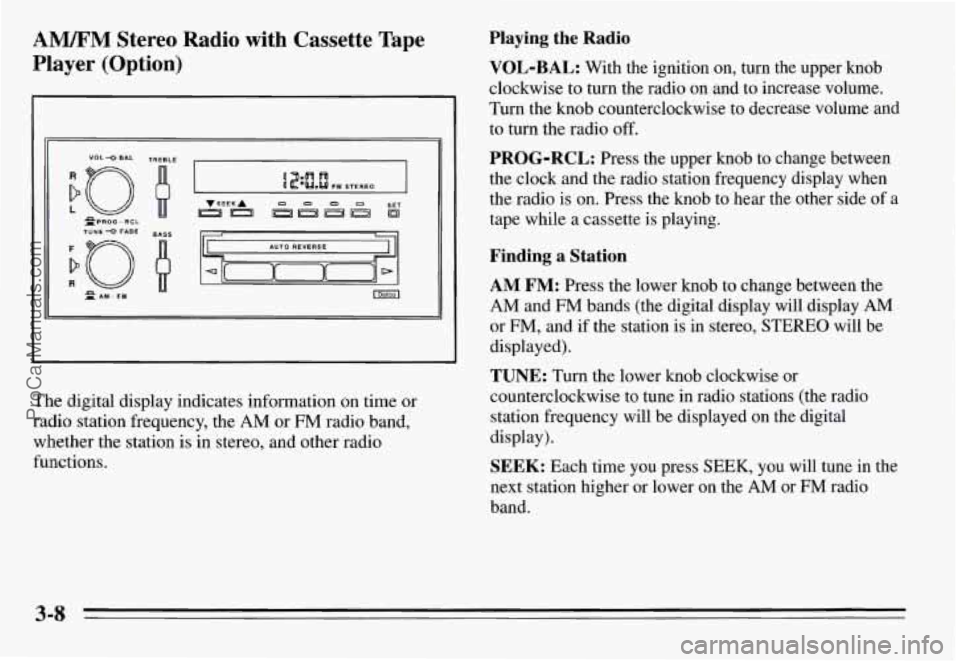
The digital display indicates information on time or
radio station frequency, the
AM or FM radio band,
whether the station is in stereo, and other radio
functions.
Playing the Radio
VOL-BAL: With the ignition on, turn the upper knob
clockwise to turn the radio on and to increase volume.
Turn the knob counterclockwise to decrease volume and
to turn the radio off.
PROG-RCL: Press the upper knob to change between
the clock and the radio station frequency display when
the radio is on. Press the knob to hear the other side of a
tape while a cassette is playing.
Finding a Station
AM FM: Press the lower knob to change between the
AM and FM bands (the digital display will display AM
or FM, and if the station is in stereo, STEREO will be
displayed).
TUNE: Turn the lower knob clockwise or
counterclockwise to tune in radio stations (the radio station frequency will be displayed on the digital
display).
SEEK: Each time you press SEEK, you will tune in the
next station higher or lower on the
AM or FM radio
band.
ProCarManuals.com
Page 133 of 354
Playing a Cassette Tape
With the power on, insert a tape into the cassette door.
Do not use tapes that are longer than 45 minutes on each
side.
When the left indicator arrow is lit, selections listed on
the top side of the cassette are playing. When the right
indicator mow is lit, selections listed on the bottom side
of the cassette are playing. Press the upper control knob
to change sides of a cassette while it is playing. The tape
player automatically begins playing the other side when
it reaches the end of a tape.
Fast Forward: To advance the tape rapidly, press the
button with the arrow pointing in the direction the tape
is playing.
To stop fast forward, press the center eject
button.
Reverse: To reverse the tape rapidly, press the button
with the arrow pointing
in the opposite direction the tape
is playing.
To stop reverse, press the center eject button.
Eject: To stop playing a tape, press the center button
below the cassette. The cassette
will be ejected, and the
radio will begin playing.
AWM Stereo Radio with Cassette Tape
Player and Graphic Equalizer (Option)
TUNE 0 FADE
n
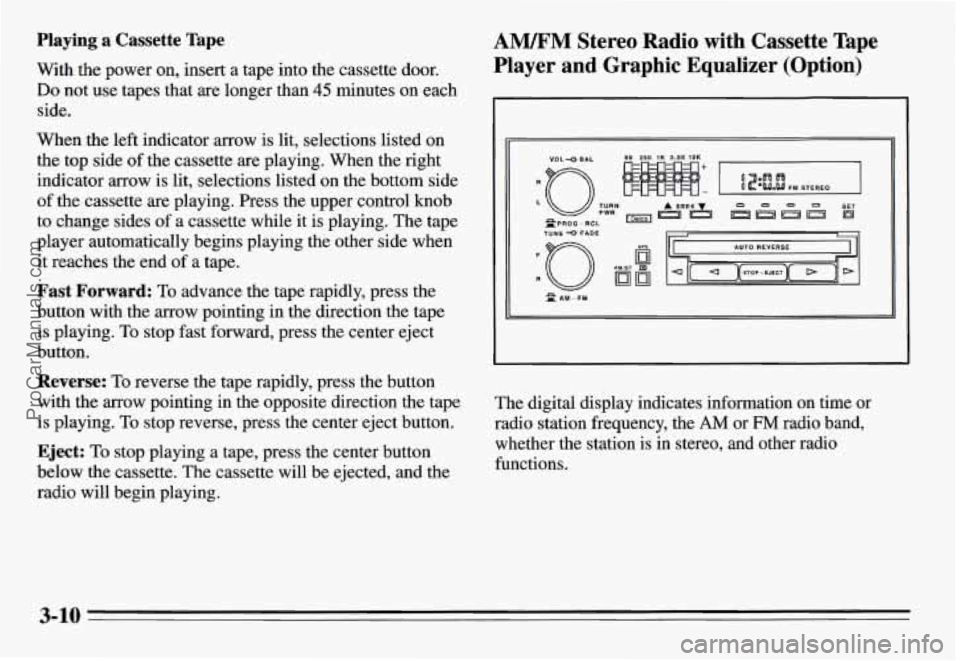
The digital display indicates information on time or
radio station frequency, the
AM or FM radio band,
whether the station is
in stereo, and other radio
functions.
3-10
ProCarManuals.com
Page 135 of 354
Setting the Tone
Graphic Equalizer Controls: Boost the bass,
emphasize a voice in a song, brighten the treble
-- your
equalizer allows you to adjust five .separate frequencies
of sound to your individual taste. Move a lever up to
emphasize a frequency, and move it down to
de-emphasize a frequency. It’s best to begin with the
levers in the middle position, then adjust each lever
as
you like. The 60 and 250 levers adjust the bass; 1K is
midrange; and
3.5K and 10K control the treble.
Adjusting the Speakers
BAL: The control ring behind the upper knob adjusts
the lefdright speaker balance.
FADE: The control ring behind the lower knob adjusts
the fronthear speaker balance.
Playing a Cassette Tape
With the power on, insert a tape into the cassette door. Do
not use tapes that are longer than 45 minutes on each side.
When the left indicator is lit, selections listed on the top
side of the cassette are playing. When the right indicator
arrow pointing down is lit, selections listed
on the
bottom side of the cassette are playing. Press the upper
control knob to change sides of a cassette while it is
playing. The tape player automatically begins playing
the other side when it reaches the end of a tape.
Fast Forward: Press the arrow button in the direction
the tape is playing to advance the tape rapidly. Press
again to play the tape.
Reverse: Press the arrow button in the opposite
direction the tape is playing to reverse the tape rapidly.
Press again to play the tape.
APS: Press the button to the recessed position and the
FWD and REV buttons will function as a “music
search,” stopping the cassette at the next or previous
selection on the tape.
STOP-EJECT: To stop playing a tape, press this
button. The cassette will be partially ejected, and the
radio will begin playing.
CrO2: This button sets tape bias. When playing high
bias chrome or metal tapes, press Cr02 to turn the
feature on. When playing standard tapes, press again to
turn the feature off.
3-12
ProCarManuals.com
Page 136 of 354
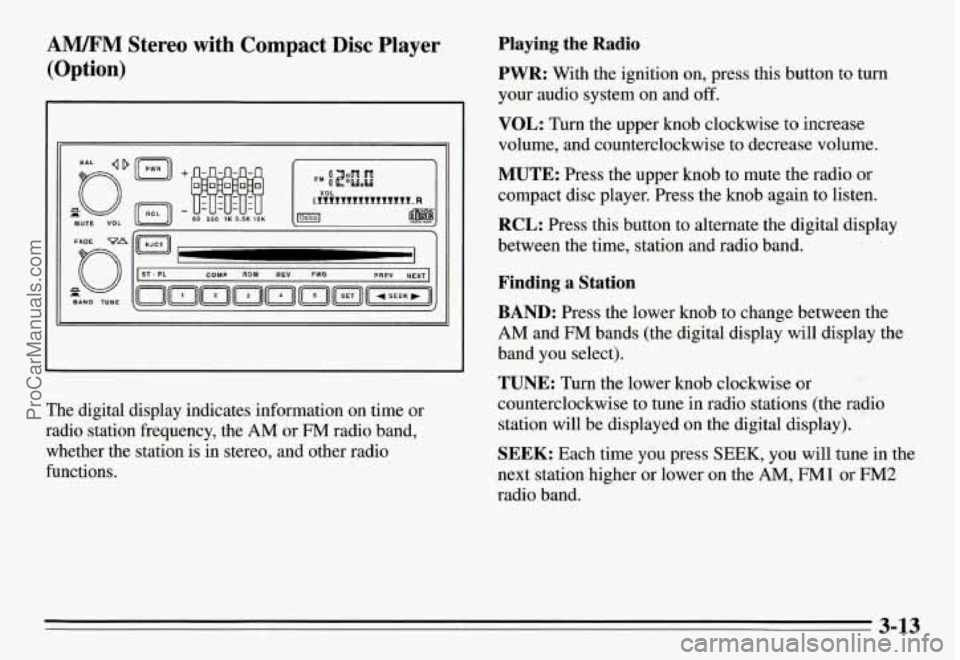
AM/FM Stereo with Compact Disc Player
(Option)
-1
The digital display indicates information on time or
radio station frequency, the
AM or FM radio band,
whether the station is
in stereo, and other radio
functions.
Playing the Radio
PWR:
With the ignition on, press this button to turn
your audio system on and off.
VOL: Turn the upper knob clockwise to increase
volume, and counterclockwise to decrease volume.
MUTE: Press the upper knob to mute the radio or
compact disc player. Press the knob again to listen.
RCL: Press this button to alternate the digital display
between the time, station and radio band.
Finding a Station
BAND: Press the lower knob to change between the
AM and FM bands (the digital display will display the
band you select).
TUNE: Turn the lower knob clockwise or
counterclockwise to tune in radio stations (the radio
station will be displayed on the digital display).
SEEK: Each time you press SEEK, you will tune in the
next station higher or lower on the
AM, FM1 or FM2
radio band.
3-13
ProCarManuals.com
Page 137 of 354
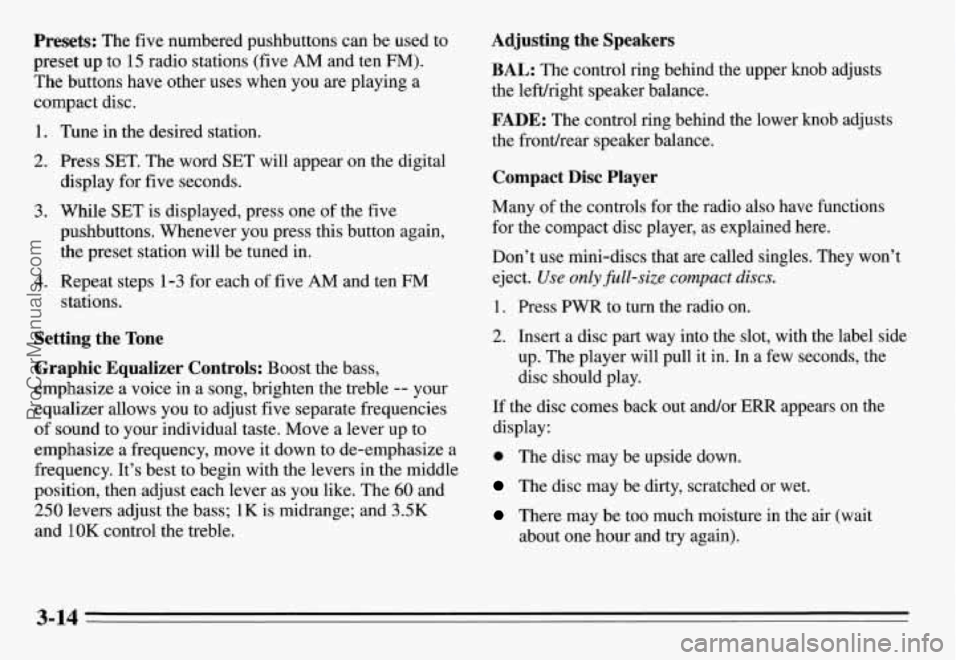
Presets: The five numbered pushbuttons can be used to
preset up to
15 radio stations (five AM and ten FM).
The buttons have other uses when you are playing a
compact disc.
1. Tune in the desired station.
2. Press SET. The word SET will appear on the digital
display for five seconds.
3. While SET is displayed, press one of the five
pushbuttons. Whenever you press this button again,
the preset station will be tuned in.
4. Repeat steps 1-3 for each of five AM and ten FM
stations.
Setting the Tone
Graphic Equalizer Controls: Boost the bass,
emphasize a voice in a song, brighten the treble
-- your
equalizer allows you
to adjust five separate frequencies
of sound to your individual taste. Move a lever up to
emphasize a frequency, move it down to de-emphasize a
frequency. It’s best to begin with the levers in the middle\
position, then adjust each lever as you like. The
60 and
250 levers adjust the bass; 1K is midrange; and 3.5K
and
1 OK control the treble.
Adjusting the Speakers
BAL: The control ring behind the upper knob adjusts
the lefuright speaker balance.
FADE: The control ring behind the lower knob adjusts
the fronthear speaker balance.
Compact Disc Player
Many of the controls for the radio also have functions
for the compact disc player, as explained here.
Don’t use mini-discs that
are called singles. They won’t
eject.
Use only @&size compact discs.
1. Press PWR to turn the radio on.
2. Insert a disc part way into the slot, with the label side
up, The player will pull it in. In a few seconds, the
disc should play.
If the disc comes back out and/or ERR appears on the
display:
0 The disc may be upside down.
The disc may be dirty, scratched or wet.
There may be too much moisture in the air (wait
about one hour and try again).
3-14
ProCarManuals.com
Page 138 of 354
The player may be too hot, too cold or the road may
be too rough for the disc to play. As soon as things
get back to normal, the disc should play.
While a disc is playing, the CD indicator is displayed on
the digital display, as is the clock.
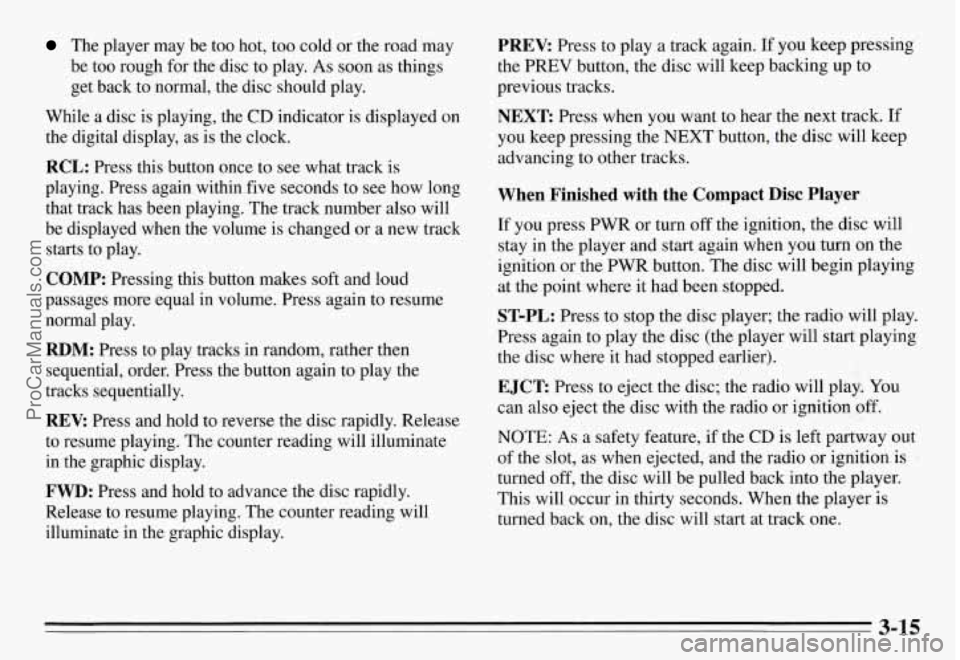
RCL: Press this button once to see what track is
playing. Press again within five seconds to see how long
that track has been playing. The track number also will
be displayed when the volume is changed or a new track
starts to play.
COMP: Pressing this button makes soft and loud
passages more equal in volume. Press again to resume
normal play.
RDM: Press to play tracks in random, rather then
sequential, order. Press the button again to play the
tracks sequentially.
REV: Press and hold to reverse the disc rapidly. Release
to resume playing. The counter reading will illuminate
in the graphic display.
FWD: Press and hold to advance the disc rapidly.
Release to resume playing. The counter reading will
illuminate in the graphic display.
PREV: Press to play a track again. If you keep pressing
the
PREV button, the disc will keep backing up to
previous tracks.
NEXT: Press when you want to hear the next track. If
you keep pressing the
NEXT button, the disc will keep
advancing to other tracks.
When Finished with the Compact Disc Player
If you press PWR or turn off the ignition, the disc will
stay in the player and start again when you turn on the
ignition or the PWR button. The disc will begin playing
at the point where it had been stopped.
ST-PL: Press to stop the disc player; the radio will play.
Press again to play the disc (the player will start playing
the disc where it had stopped earlier).
EJCT Press to eject the disc; the radio will play. You
can also eject the disc with the radio
or ignition off.
NOTE: As a safety feature, if the CD is left partway out
of the slot, as when ejected, and the radio
or ignition is
turned
off, the disc will be pulled back into the player.
This will occur in thirty seconds. When the player is
turned back on, the disc will start at track one.
3-15
ProCarManuals.com
Page 139 of 354
CD Player Theft Deterrent Feature
Delco LOC II@ is an anti-theft feature for the compact
disc player. It can be used or ignored. If ignored, the
system plays normally. If it is used, your player won’t be
usable
if it is ever stolen because it will go to LOC mode
any time battery power is removed. It will also go to
LOC mode any time power from the battery is turned
off
by the Battery Protection feature (see “Battery Rundown
Protection” in the Index). Until an unlock code is
entered,
it will not turn on.
The instructions below tell you how to enter a secret
code into the system. If your vehicle loses battery power
for any reason, you must unlock the system with the
secret code before the radio will turn on.
Setting the Anti-Theft System
1. Write down any six-digit number and keep it in a
safe place. This is your secret code.
2. Turn the ignition to the ACC or RUN position.
3. Press the PWR button to turn the radio off.
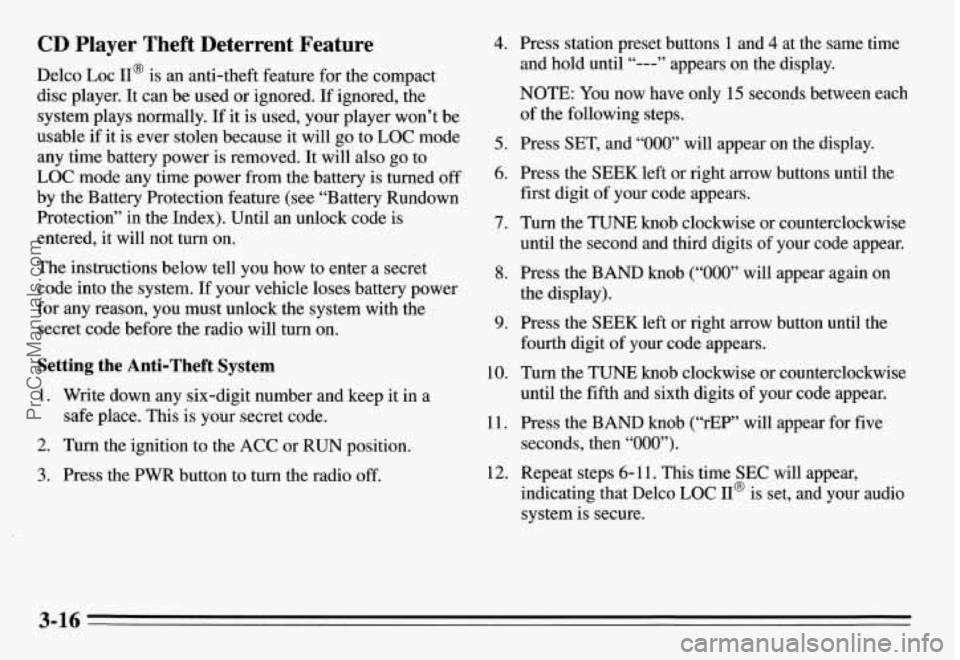
4. Press station preset buttons 1 and 4 at the same time
and hold until “---” appears on the display.
NOTE:
You now have only 15 seconds between each
of the following steps.
5. Press SET, and “000” will appear on the display.
6. Press the SEEK left or right arrow buttons until the
first digit of your code appears.
7. Turn the TUNE knob clockwise or counterclockwise
until the second and third digits
of your code appear.
8. Press the BAND knob (“000” will appear again on
the display).
9. Press the SEEK left or right arrow button until the
fourth digit of your code appears.
10. Turn the TUNE knob clockwise or counterclockwise
until the fifth and sixth digits of your code appear.
11. Press the BAND knob (“rEP” will appear for five
seconds, then “000”).
indicating that Delco LOC II@ is set, and your audio
system is secure.
12. Repeat steps 6- 11. This time SEC will appear,
3-16
ProCarManuals.com
Page 141 of 354
Understanding Radio Reception
FM Stereo
FM stereo will give you the best sound, but FM signals
will reach only about 10 to 40 miles ( 16 to 65 km). Tall
buildings or hills can interfere with
FM signals, causing
the sound to come and
go.
AM
The range for most AM stations is greater than for FM,
especially at night. The longer range, however, can
cause stations to interfere with each other.
AM can also
pick up noise from things like storms and power lines.
To lower this noise,
try reducing the treble level.
Hearing damage from loud noise is almost undetectable
until it
is too late. Your hearing can adapt to higher
volumes of sound. Sound that seems normal can be loud
and harmful to your hearing. Take precautions by
adjusting the volume control on your radio to a safe
sound level before your hearing adapts to it.
To help avoid hearing loss or damage:
Adjust the volume control to the lowest setting.
Increase volume slowly until you hear comfortably
and clearly.
NOTICE:
Before you add any sound equipment to your
vehicle
-- like a tape player, CB radio, mobile
telephone or two-way radio
-- be sure you can
add what you want.
If you can, it’s very
important to
do it properly. Added sound
equipment may interfere with the operation
of
your vehicle’s engine, Delco@ radio or other
systems, and even damage them. And, your
vehicle’s systems may interfere with the
operation
of sound equipment that has been
added improperly.
So, before adding sound equipment, check with
your dealer and be sure to check Federal rules
covering mobile radio and telephone units.
3-18
ProCarManuals.com
Page 142 of 354
Care of Your Cassette Tape Player
A tape player that is not cleaned regularly can cause
reduced sound quality, mined cassette, or a damaged
mechanism. Cassette tapes should be stored in their
cases away from contaminants, direct sunlight, and
extreme heat.
If they aren’t, they may not operate
properly or cause failure of the tape player.
Your tape player should be cleaned every 50 hours of
use. If you notice a reduction in sound quality,
try a
known good cassette to see if the tape or the tape player
is at fault. If this other cassette has no improvement in
sound quality, clean the tape player.
Cleaning may be done with a scrubbing action
non-abrasive cleaning cassette. This system uses a
cleaning cassette with pads which scrub the tape head as
the hubs of the cleaner cassette turn. It
is normal for the
cartridge to eject while cleaning. Insert the cassette at
least three times to ensure
a thorough cleaning. A
scrubbing action cleaning cassette is available through
your Pontiac dealership.
You may use a non-scrubbing action, wet-type cleaner
which uses a cassette with a fabric belt to clean the tape
head. This type of cleaning cassette will not eject. It may
not clean as thoroughly as the scrubbing type cleaner.
Cassettes are subject to wear and the sound quality may
degrade over time. Always make sure that the cassette
tape is in good condition before you have your tape
player serviced.
Care of Your Compact Discs
Handle discs carefully. Store them in their original cases
or other protective cases and away from direct sunlight
and dust. If the surface of a disc is soiled, dampen a
clean, soft cloth in a mild, neutral detergent solution and
clean it, wiping from the center to the edge.
Be sure never to touch the signal surface when handling
discs. Pick up discs by grasping the outer edges or the
edge of the hole and the outer edge.
Fixed Mast Antenna -+..
The fixed mast antenna can withstand most car washes
without being damaged. If the mast should ever become
slightly bent, you can straighten
it out by hand. If the
mast
is badly bent, as it might be by vandals, you should
replace it.
Check every once in a while to be sure the mast is still
tightened to the fender.
3-19
ProCarManuals.com