audio PONTIAC GRAND AM 2003 User Guide
[x] Cancel search | Manufacturer: PONTIAC, Model Year: 2003, Model line: GRAND AM, Model: PONTIAC GRAND AM 2003Pages: 354, PDF Size: 16.3 MB
Page 157 of 354
TRAF (Traffic): TRAF will appear on the display if the
tuned station broadcasts traffic announcements. To
receive the traffic announcement from the tuned station,
press this button. Brackets will be displayed around
TRAF and when a traffic announcement comes
on the
tuned radio station you will hear it.
If the current tuned station does not broadcast traffic
announcements, press this button and the radio
will seek to a station that does. When the radio finds a
station that broadcasts traffic announcements, it will
stop. Brackets will be displayed around TRAF and when
a traffic announcement comes on the tuned radio
station you will hear it.
If no station is found, NO
TRAFFIC will appear on the display.
For DAB (Canada only,
if your radio is equipped with
DAB), when the TRAF button is pressed, DAB does not
seek to a station that broadcasts traffic. DAB only
checks the current frequency for traffic support. Traffic Interrupt Feature:
Your radio can interrupt the
play of a CD, or XMTM, or DAB station. Press the
TRAF button. The radio will seek
to a station that
broadcasts traffic announcements. When the radio finds
a station that broadcasts traffic announcements, it
will stop. Brackets around TRAF will appear on the
display. When a traffic announcement comes on
the station that was found, you will hear it. When the
traffic announcement is over, the radio will resume play
of the CD, or XMTM, or DAB station.
If no station is
found, NO TRAFFIC will appear on the display.
Radio Messages
CALIBRATE: Your audio system has been calibrated
for your vehicle from the factory. If CALIBRATE appears
on the display, it means that your radio has not been
configured properly for your vehicle and must be
returned
to the dealership for service.
3-50
Page 158 of 354
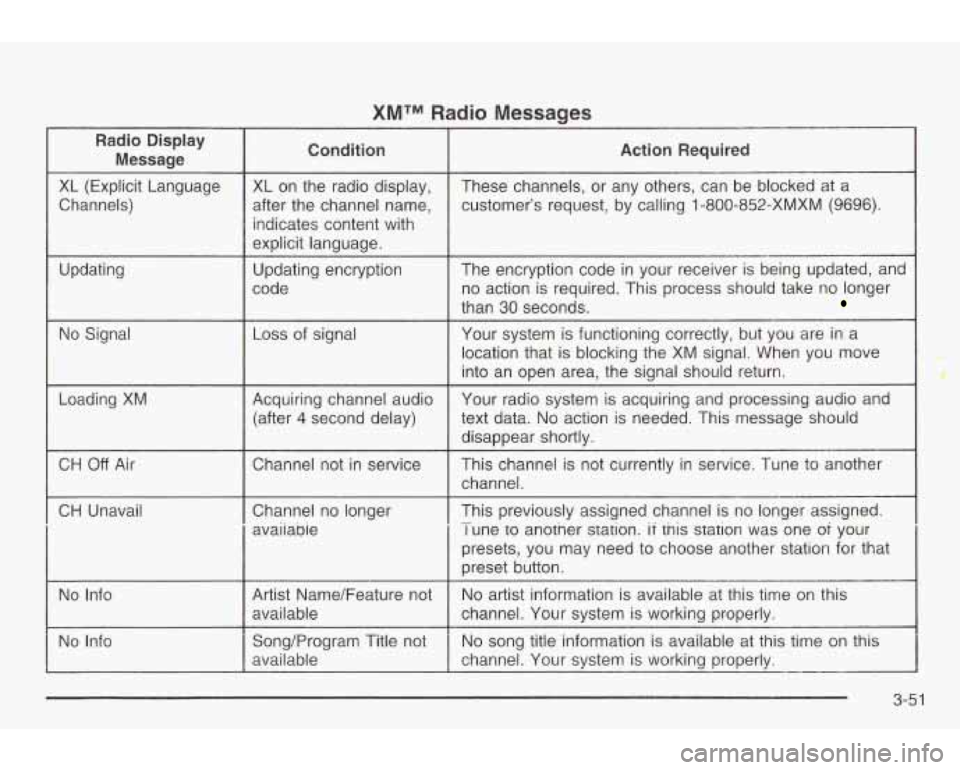
XMTM Radio Messages
Radio Display
Message condition Action Required
XL (Explicit Language
Channels)
Updating
No Signal
Loading
XM
XL on the radio display,
after the channel name, indicates content with
explicit language.
Updating encryption
code
Loss of signal
Acquiring channel audio (after
4 second delay) These channels,
or any others, can be blocked at a
customer’s request, by calling 1 -800-852-XMXM
(9696).
The encryption code in your receiver is being updated, and
no action is required. This process should take no longer
than 30 seconds.
Your system is functioning correctly, but you are in a
location that is blocking the XM signal. When you move
into an open area, the signal should return.
Your radio system
is acquiring and processing audio and
text data.
No action is needed. This message should
disappear shortly.
CH Off Air I Channel not in service
CH Unavail
I Channel no longer
I avaiiabie This channel
is not currently
in service. Tune to another
channel.
This previously assigned channel is no longer assigned.
I une to another station. if tnis station was one oi your
presets, you may need
to choose another station for that
preset button.
-
No Info Artist Name/Feature not
channel. Your system is working properly. available
No
artist information is available at this time on this
No Info No
song title information
is available at this time on this
Song/Program Title not
available channel. Your system is working properly.
--
3-51
Page 162 of 354
Radio with Cassette and CD
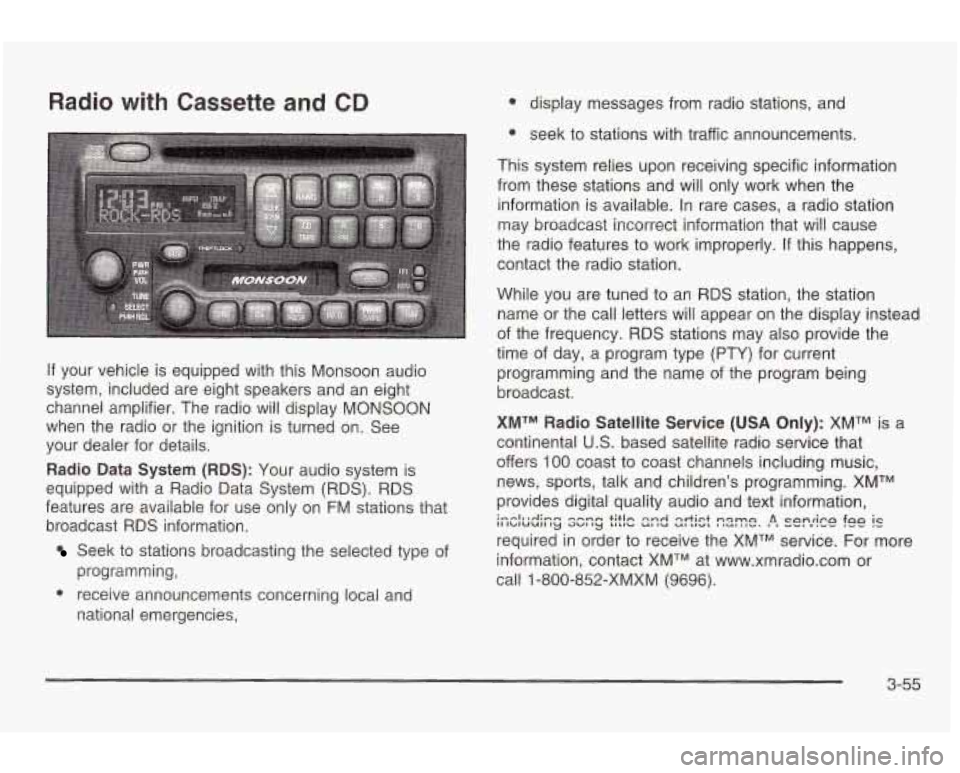
If your vehicle is equipped with this Monsoon audio
system, included are eight speakers and an eight
channel amplifier. The radio will display
MONSOON
when the radio or the ignition is turned on. See
your dealer for details.
Radio Data System (RDS): Your audio system is
equipped with a Radio Data System (RDS). RDS
features are available for use only on
FM stations that
broadcast RDS information.
Seek to stations broadcasting the selected type of
programming,
national emergencies,
e receive announcements concerning local and
0 display messages from radio stations, and
e seek to stations with traffic announcements.
This system relies upon receiving specific information
from these stations and will only work when the
information is available. In rare cases, a radio station
may broadcast incorrect information that will cause
the radio features
to work improperly. If this happens,
contact the radio station.
While you are tuned
to an RDS station, the station
name or the call letters will appear on the display instead
of the frequency. RDS stations may also provide the
time of day, a program type (PTY) for current
programming and the name of the program being
broadcast.
XMTM Radio Satellite Service (USA Only): XMTM is a
continental
U.S. based satellite radio service that
offers
100 coast to coast channels including music,
news, sports, talk and children's programming. XMTM
provides digital quality audio and text information,
required in order
to receive the XMTM service. For more
information, contact XMTM at www.xmradio.com or
call
1 -800-852-XMXM (9696).
i--lnuAimm -hmm +;tin nnrl qrtict n~mn A cnnrirn fa0 is I1 IbIUUII 'y 3UI ty LILIL, c(I IU ut ,,-I I NU" I I". , I VV. v I"- .--
3-55
Page 163 of 354
Digital Audio Broadcast (DAB) (Canada Only): DAB
is a Canadian land-based radio service that offers
digital quality audio and text information including song
title, artist name, traffic, weather, emergency
announcements and more. Digital Audio Broadcast
transmission services are currently available in Toronto,
Montreal, Vancouver, Ottawa, and Windsor. In fringe
areas signals may be interrupted by buildings, trees and
other obstructions. Additional services will be added in the future. For current DAB coverage and other
information consult the GM Canada website at
www.gmcanada.com, your dealer or call
1-800-263-3777.
Playing the Radio
PWR (Power): Push this knob to turn the system on
and off.
VOL (Volume): Turn the knob
to increase or to
decrease volume.
SCV (Speed-Compensated
Volume): With SCV, your
audio system adjusts automatically
to make up for
road and wind noise as you drive.
Set the volume at the desired level. Press this button
to
select MIN, MED or MAX. Each higher choice allows
for more volume compensation at faster vehicle speeds. Then, as you drive,
SCV automatically increases the
volume, as necessary,
to overcome noise at any speed.
The volume level should always sound the same
to
you as you drive. If you don’t want to use SCV,
select
OFF.
RCL (Recall): Push this knob to switch the display
between the radio station frequency and the time.
Pushing this knob with the ignition off will display
the time.
For XMTM (USA only,
if your radio is equipped with
XMTM Satellite Radio Service), pressing this button while
in XMTM mode
to retrieve various pieces of information
related
to the current song or channel. By pressing
and releasing the RCL button, you may retrieve
four different categories of information: Artist,
Song Title, Category or PTY, Channel Number/
Channel Name.
For DAB (Canada only,
if your radio is equipped with
DAB), pushing this knob switches the display between
channel name and PTY name.
To change the default on the display, push the knob
until you see the display you want, then hold the knob
until the display flashes. The selected display will
now be the default.
3-56
Page 168 of 354
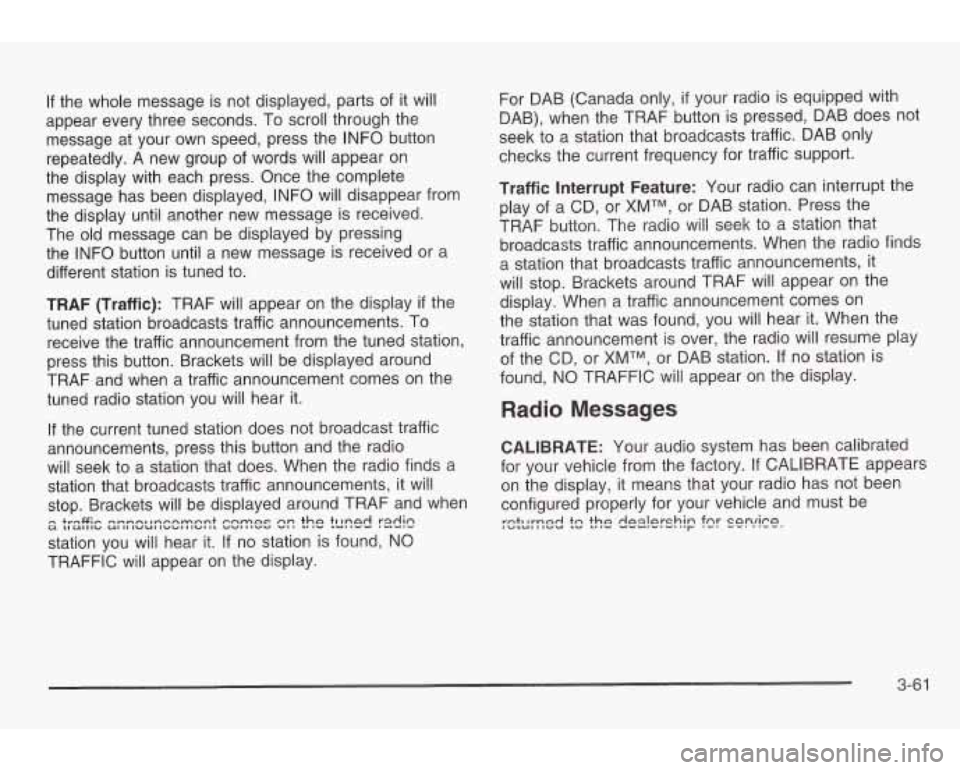
If the whole message is not displayed, parts of it will
appear every three seconds. To scroll through the
message at your own speed, press the INFO button
repeatedly. A new group of words will appear on
the display with each press. Once the complete
message has been displayed, INFO will disappear from
the display until another new message is received.
The old message can be displayed by pressing
the INFO button until a new message is received or a
different station is tuned to.
TRAF (Traffic): TRAF will appear on the display
if the
tuned station broadcasts traffic announcements. To
receive the traffic announcement from the tuned station,
press this button. Brackets will be displayed around
TRAF and when a traffic announcement comes on the
tuned radio station you will hear it.
If the current tuned station does not broadcast traffic
announcements, press this button and the radio
will seek to a station that does. When the radio finds a
station that broadcasts traffic announcements, it will
stop. Brackets will be displayed around TRAF and when
station you will hear it. If no station is found,
NO
TRAFFIC will appear on the display.
u tIUIIICI UIIII"L4II""IIIUIIL ""l#l"V "I, .#I" LUllVU I--.- - +rnG;- mmnnl~nrrnrnnnt cnmnc nn thn tllnnd radin
For DAB (Canada only, if your radio is equipped with
DAB), when the TRAF button is pressed, DAB does not
seek to a station that broadcasts traffic. DAB only
checks the current frequency for traffic support.
Traffic Interrupt Feature: Your radio can interrupt the
play of a CD, or
XMTM, or DAB station. Press the
TRAF button. The radio will seek to a station that
broadcasts traffic announcements. When the radio finds
a station that broadcasts traffic announcements, it
will stop. Brackets around TRAF will appear on the
display. When a traffic announcement comes on
the station that was found, you will hear it. When the
traffic announcement
is over, the radio will resume play
of the CD, or
XMTM, or DAB station. If no station is
found, NO TRAFFIC will appear on the display.
Radio Messages
CALIBRATE: Your audio system has been calibrated
for your vehicle from the factory.
If CALIBRATE appears
on the display, it means that your radio has not been
configured properly for your vehicle and must be
:&~yne-j ?c the dg-i!g-shjn fnr cnnrira r- "-I --. "'--.
3-6 1
Page 169 of 354
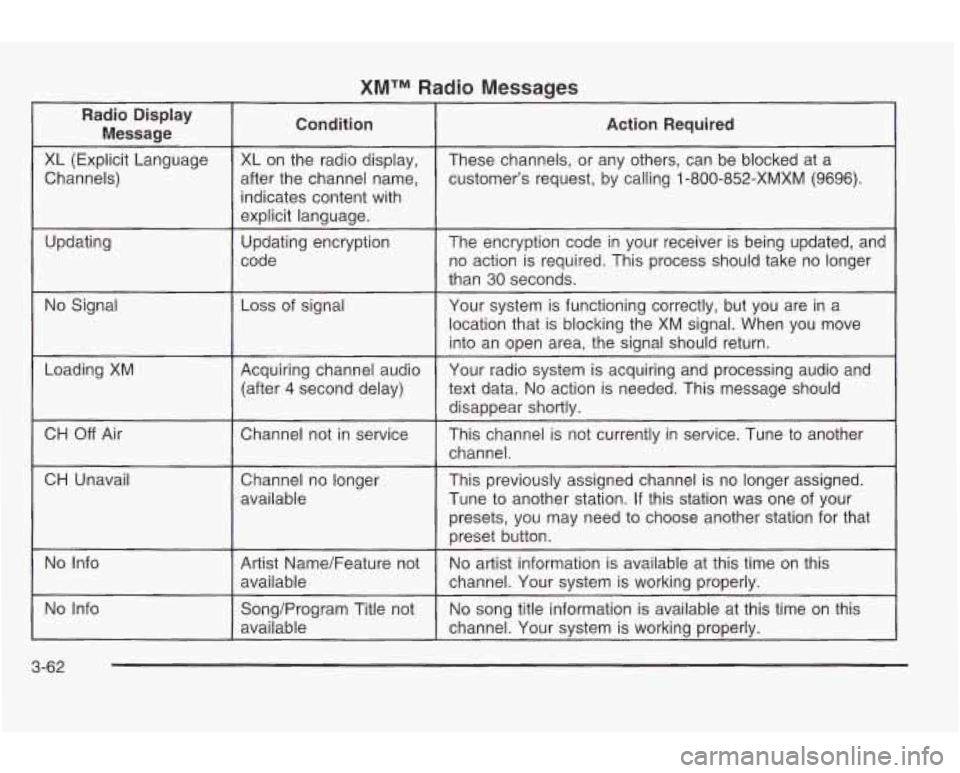
XMTM Radio Messages
Radio Display Message Condition
Action
Required
XL (Explicit Language
customer’s request, by calling
1-800-852-XMXM (9696).
after
the channel name,
Channels) These channels,
or any others, can be blocked at a
XL on the radio display,
indicates content with
explicit language.
code no action is required. This process should take no longer
Updating
The encryption code
in your receiver
is being updated, and
Updating encryption
than
30 seconds.
No Signal Loss
of signal
Your system is functioning correctly, but you are in a
location that is blocking the XM signal. When you move
into an open area, the signal should return.
Loading XM
CH
Off Air
CH Unavail Acquiring channel audio
text data.
No action is needed. This message should
(after 4 second delay) Your
radio system is acquiring and processing audio and
disappear shortlv.
..
Chatme1 not in service
This channel is not currently in service. Tune to another
channel.
Channel no longer
available This previously assigned channel
is no longer assigned.
Tune
to another station. If this station was one of your
presets, you may need
to choose another station for that
preset button.
No Info
No song title information is available at this time on this
Song/Program Title not
No Info
No artist information is available at this time on this
Artist Name/Feature not
available
channel. Your system is working properly.
available channel.
Your system is working properly.
3-62
Page 176 of 354
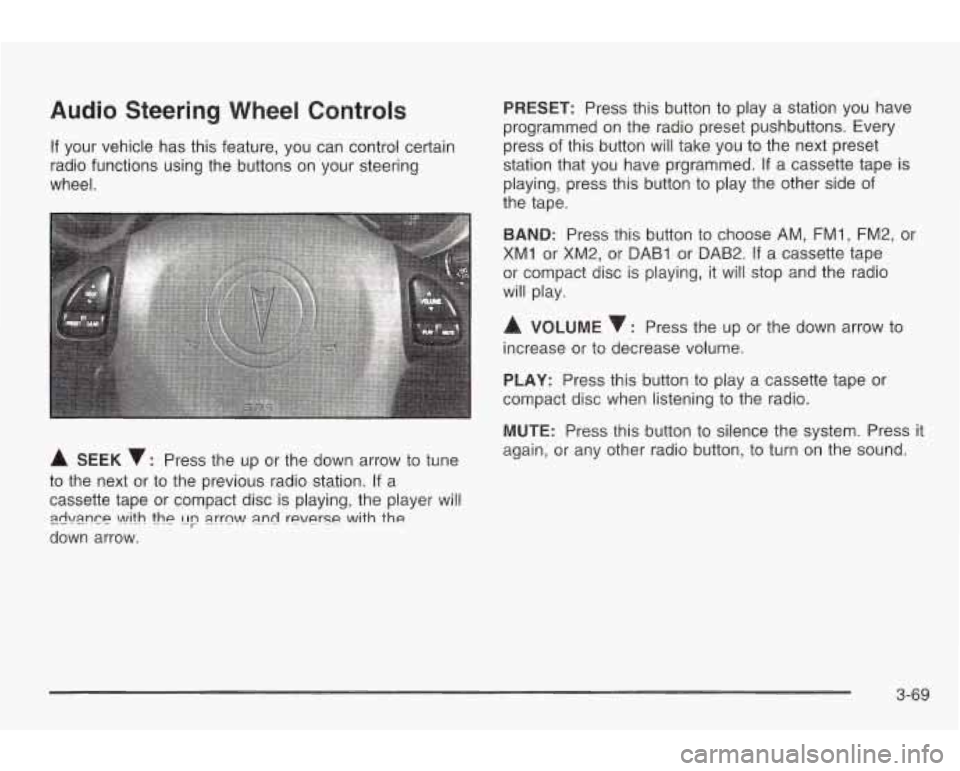
Audio Steering Wheel Controls
If your vehicle has this feature, you can control certain
radio functions using the buttons on your steering
wheel.
A SEEK v: Press the up or the down arrow to tune
to the next or to the previous radio station. If a
cassette tape or compact disc is playing, the player will
down arrow.
zwi\mn~~ \A!ith thp [Ip a.rrn\A/ a.nd reverse with the
PRESET: Press this button to play a station you have
programmed on the radio preset pushbuttons. Every
press of this button will take you to the next preset
station that you have prgrammed.
If a cassette tape is
playing, press this button to play the other side of
the tape.
BAND: Press this button to choose AM, FMI, FM2, or
XM1 or XM2, or DAB1 or DAB2. If a cassette tape
or compact disc is playing, it will stop and the radio
will play.
A VOLUME : Press the up or the down arrow to
increase or to decrease volume.
PLAY: Press this button to play a cassette tape or
compact disc when listening to the radio.
MUTE: Press this button
to silence the system. Press it
again, or any other radio button, to turn on the sound.
3-69
Page 266 of 354
Vehicle Storage
If you’re not going to drive your vehicle for 25 days or
more, remove the black, negative
(-) cable from
the battery.
This will help keep your battery from
running down.
Jump Starting
If your battery has run down, you may want to use
another vehicle
and some jumper cables to start your
vehicle. Be sure to follow the steps below to
do it safely.
Batteries have acid that can burn you and gas
that can explode. You can be badly hurt
if you
aren’t careful. See “Jump Starting”
in the Index
for tips on working around a battery without getting hurt.
Contact your dealer
to learn how to prepare your
vehicle for longer storage periods.
Also, for your audio system, see Theft-Deterrent
Feature (Non-RDS Radios) on page
3-68 or
T,4ef!-Y“e.)errer? .!=9&.v-t? (!?E .5Cl;E) e.!? ,P?,nP 3-68
I
Batteries can hurt you. They can be dangerous
because:
0 They contain acid that can burn you.
0 They contain gas that can explode or
They contain enough electricity to ignite.
burn you.
If you don’t follow these steps exactly, some
or all of these things can hurt you.
Notice: Ignoring these steps could result in costly
damage to your vehicle that wouldn’t be covered
by your warranty.
Trying to start your vehicle by pushing or pulling it
won’t work, and
it could damage your vehicle.
5-43
Page 305 of 354

Instrument Panel Fuse Block
(Driver’s Side)
f
A) WIPER E) TRUNKREL RADIO AMP C) TURN LPS D) PWR MIRROR E) AIR BAG
G) PCMACC F) BFCBATT
H)
DRLOCK I) IPC/ BFC ACC J) STOP LPS
L) IPC / HVAC BATT
OIL
= H)n?I DR UNLOCK
El pq DR UNLOCK
Fuses Usage
WIPER Windshield Wiper Motor,
TRUNK REU Trunk Release
Relay/Motor,
RADIO AMP Audio AmplifiedRFA
TURN LPS Turn
Signal Lamps
Washer Pump Fuses
PWR MIRROR
AIR BAG
BFC BATT
PCM ACC
DR LOCK
I PC/BFC ACC
STOP LPS
HAZARD LPS
I PC/HVAC
BATT
Circuit Breakers
PWR SEAT
Relay
TRUNK REL
DR UNLOCK DR LOCK
DRIVER DR
UNLOCK Usage
Power Mirrors
Air Bags Body Computer (BFC)
Power Control Module (PCM)
Door Lock Motors
Cluster, Body Computer (BFC)
Stop Lamps Hazard Lamps HVAC Head, Cluster, Data Link
Connector
Usage Power Seats
Usage
Trunk Relay
Door Unlock Relay Door Lock Relay
Driver’s Door Unlock Relay
5-82
Page 307 of 354

Engine Compartment Fuse Block
The engine compartment fuse block is located on the
driver’s side
of the engine compartment, near the
battery.
.
Fuse
1
2
Usage
Ignition Switch
Right Electrical Center-Fog Lamps,
Radio, Body Function Control
Module, Interior Lamps Fuse
3
4
5
6
7
8
Relays
9
10
11
12
13
14
15 Usage
Left Electrical Center-Stop Lamps,
Hazard Lamps, Body Function
Control Module, Cluster, Climate
Control System
Anti-Lock Brakes
Left Electrical Center-Power Seats,
Power Mirrors, Door Locks, Trunk
Release, Audio Amplifier, Remote
Keyless Entry
Not Used Ignition Switch
Cooling Fan
#I
Usage
Rear Defog
Not Used
Starter
Cooling Fan #1
HVAC Blower (Climate Control)
Cooling Fan #2
Cooling Fan
5-84