change time PONTIAC GRAND AM 2003 Owners Manual
[x] Cancel search | Manufacturer: PONTIAC, Model Year: 2003, Model line: GRAND AM, Model: PONTIAC GRAND AM 2003Pages: 354, PDF Size: 16.3 MB
Page 3 of 354
PONTIAC 11
GENERAL MOTORS, GM, the GM Emblem, PONTIAC,
the PONTIAC Emblem and the name
GRAND AM
are registered trademarks of General Motors
Corporation.
This manual includes the latest information at the time it
was printed. We reserve the right
to make changes
after that time without further notice. For vehicles first
sold in Canada, substitute the name “General Motors of
Canada Limited’’ for Pontiac Division whenever it
appears in this manual.
Please keep this manual in your vehicle,
so it will be
there
if you ever need it when you’re on the road. If you
sell the vehicle, please leave this manual in it so the
new owner can use it.
Canadian Owners
You can obtain a French copy of this manual from your
dealer or from:
Helm, Incorporated
P.O. Box 07130
Detroit, MI
48207
How to Use This Manual
Many people read their owner’s manual from beginning
to end when they first receive their new vehicle. If
you do this, it will help you learn about the features and
controls for your vehicle. In this manual, you’ll find
that pictures and words work together
to explain things.
Index
A good place to look for what you need is the Index in
back of the manual.
It’s an alphabetical list of what’s
in the manual, and the page number where you’ll find it.
Litho in U.S.A.
‘Copyright General Motors Corporation 06/03/02
Part
No. 22691531 A First Edition All Rights Reserved
II
Page 73 of 354
Changes or modifications to this system by other than
an authorized service facility could void authorization to
use this equipment.
At times you may notice a decrease in range. This is
normal for any remote keyless entry system. If the
transmitter does not work or
if you have to stand closer
to your vehicle for the transmitter to work, try this:
e
e
Check the distance. You may be too far from your
vehicle. You may need to stand closer during
rainy or snowy weather.
Check the location. Other vehicles or objects may
be blocking the signal. Take a few steps to the
left or right, hold the transmitter higher, and
try again.
Check to determine
if battery replacement is
necessary. See
“Battery Replacement” under
Remote Keyless Entry System Operation on
page
2-4.
If you are still having trouble, see your dealer or a
qualified technician for service.
Remote Keyless Entry System
Operation
If your vehicle has this feature, you can lock and unlock
your doors or unlock your trunk from about
3 feet
(1 m) up to 30 feet (9 m) away using the remote keyless
entry transmitter supplied with your vehicle.
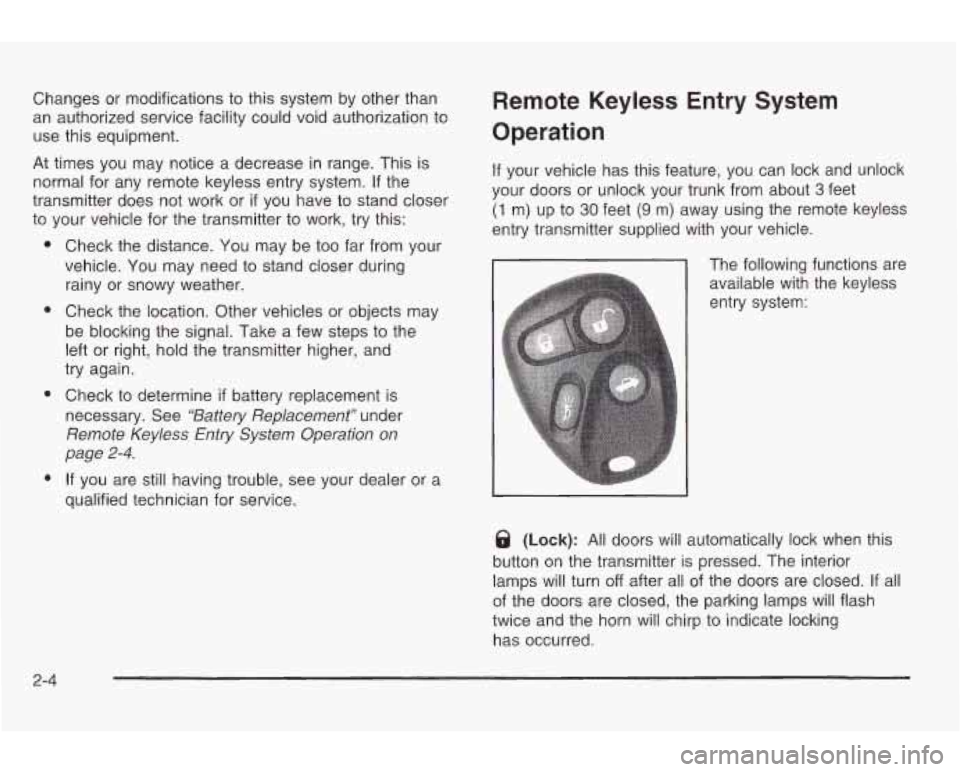
The following functions are
available with the keyless
entry system:
8 (Lock): All doors will automatically lock when this
button on the transmitter is pressed. The interior
lamps will turn
off after all of the doors are closed. If all
of the doors are closed, the parking lamps will flash
twice and the horn will chirp to indicate locking
has occurred.
2-4
Page 75 of 354
Battery Replacement
Under normal use, the battery in your remote keyless
entry transmitter should last about four years.
You can tell the battery
is weak if the transmitter won’t
work at the normal range
in any location. If you have
to get close to your vehicle before the transmitter works,
it’s probably time
to change the battery.
Notice: When replacing the battery, use care not to
touch any of the circuitry. Static from your body
transferred to these surfaces may damage the
transmitter.
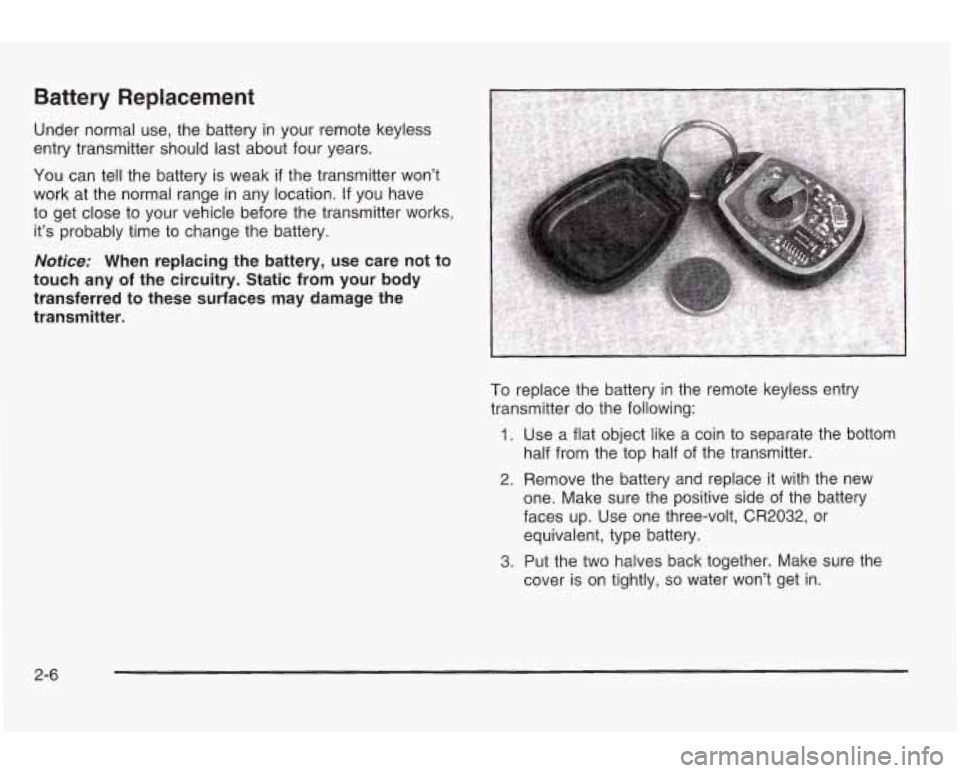
To replace the battery in the remote keyless entry
transmitter do the following:
1. Use a flat object like a coin to separate the bottom
half from the top half of the transmitter.
2. Remove the battery and replace it with the new
one. Make sure the positive side of the battery
faces up. Use one three-volt,
CR2032, or
equivalent, type battery.
3. Put the two halves back together. Make sure the
cover is on tightly,
so water won’t get in.
2-6
Page 89 of 354
Manual Transaxle
The gear selector should be in neutral and the parking
brake engaged. Hold the clutch pedal
to the floor
and start the engine. Your vehicle won’t start
if the clutch
pedal is not all the way down
- that’s a safety feature.
Starting Your 2.2L L4 ECOTECTM
Engine
1. With your foot off the accelerator pedal, turn your
ignition key
to START. When the engine starts, let
go of the key. The idle speed will
go down as
your engine gets warm.
Notice: Holding your key in START for longer than
15 seconds at a time will cause your battery to
be drained much sooner. And the excessive heat
can damage your starter motor. Wait about
15 seconds between each try to help avoid draining
your battery or damaging your starter.
2. If it doesn’t start, wait about 15 seconds and try
again to start the engine by turning the ignition
key to START. Wait about
15 seconds between
each
try.
When your engine has run about 10 seconds to
warm up, your vehicle is ready to be driven. Don’t
“race” your engine when it’s cold.
If the weather is below freezing (32°F or OOC), let
the engine run for a few minutes
to warm up.
3. If your engine still won’t start (or starts but then
stops),
it could be flooded with too much gasoline.
Try pushing your accelerator pedal all the way
to the
floor and holding
it there as you hold the key in
START for about three seconds. If the vehicle starts
briefly but then stops again, do the same thing,
but this time keep the pedal down for five or
six seconds. This clears the extra gasoline from
the engine.
Notice: Your engine is designed to work with the
electronics in your vehicle.
If you add electrical
parts or accessories, you could change the way
the
engine operates. Before adding electrical equipment,
check with your dealer.
If you don’t, your engine
might not perform properly.
2-20
Page 90 of 354
Starting Your 3400 V6 Engine
1. With your foot off the accelerator pedal, turn your
ignition key
to START. When the engine starts, let
go of the key. The idle speed will go down as
your engine warms up.
Notice: Holding your key in START for longer than
15 seconds at a time will cause your battery to
be drained much sooner. And the excessive heat
can damage your starter motor. Wait about
15
seconds between each try to help avoid draining
your battery or damaging your starter.
2. If the engine doesn’t start in 10 seconds, push the
accelerator pedal about one-quarter of the way
down while you turn the key to START. Do this until
the engine starts. As soon as it does, let go of
the key.
3. If your engine still won’t start (or starts but then
stops), it could be flooded with too much gasoline.
Try pushing your accelerator pedal all the way to the
floor and holding it there as you hold the key in
START for a maximum of
15 seconds. This clears
the extra gasoline from the engine.
If the engine
still won’t start or starts briefly but then stops again,
repeat Step
1 or 2, depending on temperature.
When the engine starts, release the key and the
accelerator pedal.
Notice: Your engine is designed to work with the
electronics in your vehicle.
If you add electrical
parts or accessories, you could change the way the
engine operates. Before adding electrical equipment,
check with your dealer. If you don’t, your engine
might not perform properly.
2-2 1
Page 108 of 354
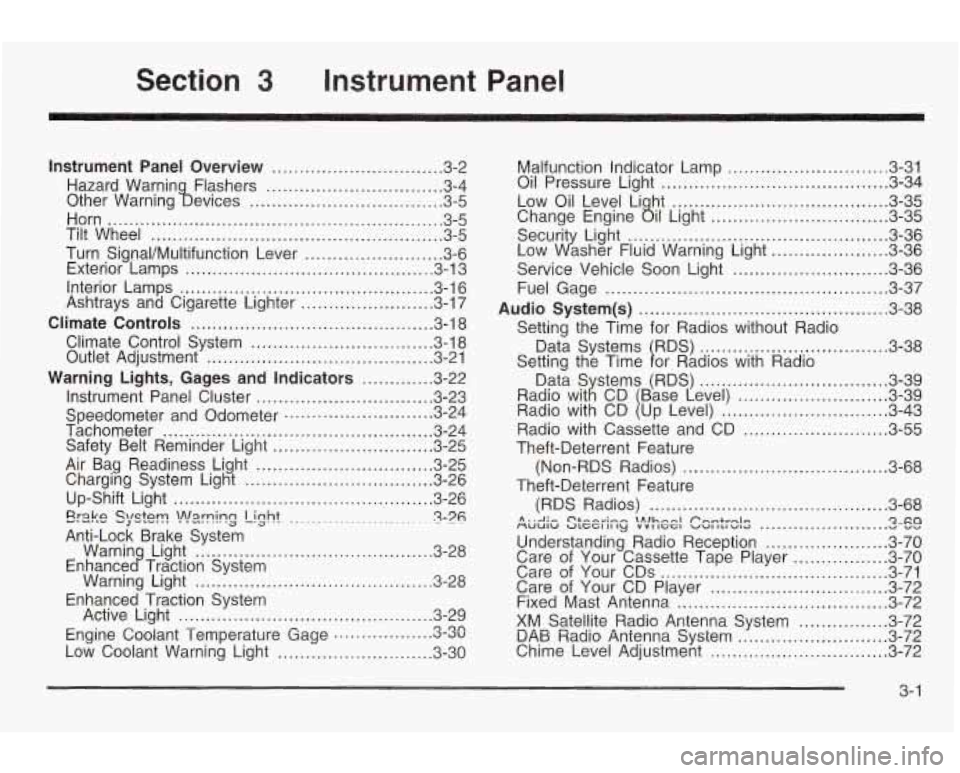
Section 3 Instrument Panel
Instrument Panel Overview ............................... 3.2
Hazard Warnin Flashers
................................ 3.4
Other Warning !bevices
................................... 3.5
Horn
............................................................. 3.5
Tilt Wheel
..................................................... 3.5
Turn Signal/Multifunction Lever
......................... 3.6
Exterior Lamps
............................................. 3.13
Interior Lamps
.............................................. 3.16
Ashtrays and Cigarette Lighter
........................ 3.17
Climate Controls
............................................ 3.18
Climate Control System
................................. 3.18
Outlet Adjustment
......................................... 3.21
Warning Lights, Gages and Indicators
............. 3-22
Instrument Panel Cluster
................................ 3.23
Speedometer and Odometer
........................... 3.24
Tachometer
................................................. 3.24
Safety Belt Reminder Light
............................. 3.25
Air Bag Readiness Light ................................ 3.25
Charging System Light
.................................. 3.26
Up-Shift Light
............................................... 3.26
Erake QlQtT! -J -.-. !n!=lrning Light ........................ ~ 3-76 .
Warnin Light ........................................... 3-28
Warning Light
........................................... 3.28
Active Light
.............................................. 3.29
Low Coolant Warning Light
............................ 3.30
Anti-Lock
Brake System
Enhance
c? Traction System
Enhanced Traction System
Engine Coolant Temperature Gage
3.3~ rl on ..................
Malfunction Indicator Lamp ............................. 3.31
Oil Pressure Light
......................................... 3.34
Low Oil Level Li ht
....................................... 3.35
Securit Light:
............................................... 3-36
Service Vehicle Soon Light
............................ 3-36
Fuel Gage
................................................... 3-37
Audio System(s)
............................................. 3-38
Data Systems RDS)
.................................. 3-38
Change Engine
ail Light ................................ 3-35
Low dsher Fluid Warning Light
..................... 3-36
Setting the Time for Radios without Radio
Setting the Time
1 or Radios with Radio 3-39
........................... 3-39
.............................. 3-43
Radio with Cassette and CD
.......................... 3-55
Theft-Deterrent Feature
Theft-Deterrent Feature (Non-RDS Radios)
..................................... 3-68
(RDS Radios)
........................................... 3-68
MUUIW ULCCI II ly VVI IGGI VU1 ILI WIG v vv A . .A .- C'&-A~;~~ \Alhnnl Pnmtrnlrr Qxa .......................
Understanding Radio Reception ...................... 3-70
Care of Your Cassette Tape Player
................. 3-70
Care of Your CDs ......................................... 3-71
Care of Your CD Player
................................ 3-72
Fixed Mast Antenna ...................................... 3-72
XM Satellite Radio Antenna System
................ 3-72
DAB Radio Antenna System 3-11 Chime Level Adjustment ................................ 3-72
n Tn ...........................
3- 1
Page 121 of 354

The DRL system will make your low-beam headlamps
come on at a reduced brightness when the following
conditions are met:
The ignition is on.
the exterior lamps control is in AUTO or the parking
the light sensor detects daytime light,
lamps
only position.
the parking brake is released, and
0 the shift lever is not in PARK (P) on vehicles with
When the DRL system is on, the taillamps, sidemarker
lamps, parking lamps and instrument panel lights
will not be illuminated unless you have turned the
exterior lamps control
to the parking lamp position.
As with any vehicle, you should turn on the regular
headlamp system when you need it.
an automatic transaxle only.
Automatic Headlamp System
When it
is dark enough outside, your automatic
headlamp system will turn on your headlamps at the
normal brightness along with other lamps such as
the taillamps, sidemarker, parking lamps and the
instrument panel lights. The radio lights will also be dim. Your
vehicle is equipped with a light sensor on the top
of the instrument panel under the defroster grill, so
be sure it is not covered which will cause the
automatic headlamp system
to be on whenever the
ignition is on.
The automatic headlamp system may also be on when
driving through a parking garage, heavy overcast
weather or a tunnel. This is normal.
There is a delay in the transition between the daytime
and nighttime operation
of the DRL and the automatic
headlamp systems
so that driving under bridges or
bright overhead street lights does not affect the system.
The DRL and automatic headlamp systems will only
be affected when the light sensor sees a change
in lighting lasting longer than this delay.
To idle your vehicle with the automatic headlamp
system
off, set the parking brake while the ignition is off.
Then start the vehicle. The automatic headlamp
system will stay
off until you release the parking brake.
As with any vehicle, you should turn on the regular
headlamps when you need them.
3-1 4
Page 142 of 354
Low Oil Level Light
LOW
OIL
If your vehicle is equipped
with a
3400 V6 engine,
then you will have a
LOW
OIL light in your
instrument panel cluster.
This light will come on briefly when you start your
vehicle.
If the light stays on after starting your vehicle, or comes
on and chimes while you are driving, your engine oil
level should be checked.
Prior to checking the oil level, be sure your vehicle has
been shut
off for several minutes and is on a level
surface. Check the oil level on your dipstick and bring it
to the proper level. See Engine Oil on page 5-15.
A false LOW OIL light may be generated when parking
on steep grades.
The oil level monitoring system only checks oil level
during the brief period between when the key is on and
the engine is cranking.
It does not monitor engine oil level
when the engine is running. Additionally, an oil
level check is only performed
if the engine has
been turned
off for a considerable period of time
allowing the
oil normally in circulation to drain back into
the oil pan.
CHANGE
OIL
The CHANGE OIL light
should come on briefly as
a bulb check when you start the engine. If the light
doesn’t come on, have it
serviced.
If the CHANGE OIL light comes on and stays on after
you start the engine, have the oil changed.
To reset the CHANGE
OIL light, see Engine oil On
page
5- 15.
3-35
Page 152 of 354
Playing the Radio
PWR (Power): Push this knob to turn the system on
and off.
VOL (Volume): Turn the knob
to increase or to
decrease volume.
SCV (Speed-Compensated Volume): With SCV, your
audio system adjusts automatically
to make up for
road and wind noise as you drive.
Set the volume at the desired level. Press this button
to
select MIN, MED or MAX. Each higher choice allows
for more volume compensation at faster vehicle speeds.
Then, as you drive, SCV automatically increases the
volume, as necessary,
to overcome noise at any speed.
The volume level should always sound the same
to
you as you drive. If you don’t want to use SCV,
select OFF.
RCL (Recall): Push this knob
to switch the display
between the radio station frequency and the time.
rusilirly iiris krlui, wiiil iile iyrliiivrl uii wiii dispiay
the time.
n
For XMTM (USA only, if your radio is equipped with
XMTM Satellite Radio Service), pressing this button while
in XMTM mode
to retrieve various pieces of information
related
to the current song or channel. By pressing
and releasing the RCL button, you may retrieve
four different categories of information: Artist,
Song Title, Category or
PTY, Channel Number/
Channel Name.
For DAB (Canada only,
if your radio is equipped with
DAB), pushing this knob switches the display between
channel name and PTY name.
To change the default on the display, push the knob
until you see the display you want, then hold the knob
until the display flashes. The selected display will
now be the default.
Finding a Station
BAND: Press this button to switch between AM, FMI,
FM2, or XMI, XM2 (USA only,
if your radio is
equipped with XMTM Satellite Radio Service) or DAB1 or
DAW (Canaaa oniy, it your raaio is equippea witn
DAB). The display will show your selection.
3-45
Page 161 of 354
A SCAN v : Press and hold one of the arrows for
more than two seconds until SCAN and the track
number appear on the display and you hear a beep.
The disc will go to the next track, play for a few seconds,
then go on to the next track. Press this button again
to stop scanning.
RCL (Recall): Push this button
to see how long the
current track has been playing.
To change the default on
the display (track and elapsed time), push the knob
until you see the display you want, then hold the knob
until the display flashes. The selected display will
now be the default. While elapsed time is showing, CD
TIME will appear on the display.
BAND: Press this button to listen
to the radio when a
CD is playing. The inactive CD will remain safely
inside the radio for future listening.
CD AUX (Auxiliary): Press this button
to play a
compact disc when listening to the radio. CD will appear
on the display when a compact disc is loaded.
A (Eject): Press this button to eject a CD. Eject may
be activated with either the ignition or radio
off. CDs
may be loaded with the radio and ignition
off if this
button is pressed first.
Compact Disc Messages
CHECK CD: If this message appears on the radio
display and the disc comes out, it could be for one
of
the following reasons:
You’re driving on a very rough road. When the road
becomes smoother, the disc should play.
The disc is dirty, scratched, wet or upside down.
The air is very humid. If so, wait about an hour and
try again.
If the CD is not playing correctly, for any other reason,
try a known good CD.
If any error occurs repeatedly or
if an error can’t be
corrected, contact your dealer. If your radio displays an
error message, write
it down and provide it to your
dealer when reporting the problem.
3-54