CD player PONTIAC GRAND AM 2004 User Guide
[x] Cancel search | Manufacturer: PONTIAC, Model Year: 2004, Model line: GRAND AM, Model: PONTIAC GRAND AM 2004Pages: 364, PDF Size: 2.48 MB
Page 172 of 364
If playing a CD-R the sound quality may be reduced
due to CD-R quality, the method of recording, the quality
of the music that has been recorded, and the way the
CD-R has been handled. You may experience an
increase in skipping, difficulty in finding tracks and/or
difficulty in loading and ejecting. If these problems occur
try a known good CD.
Do not add paper labels to CDs, they could get caught
in the CD player.
Do not play 3 inch CDs without a standard adapter CD.
If an error appears on the display, see “CD Messages”
later in this section.
\1 (Forward):Press and hold this pushbutton to
advance quickly within a track. Press and hold this
pushbutton for less than two seconds to advance at
10 times the normal playing speed. Press and hold it for
more than two seconds to advance at 20 times the
normal playing speed. Release the pushbutton to play
the track. The display will show FWD and the elapsed
time of the track.
RDM 2 (Random):To repeat the tracks in the current
folder or playlist, press and release this pushbutton.
FOLDER RANDOM will appear on the display. Once all
of the tracks in the current folder or playlist have
been played the system will move on to the next folder
or playlist and play all of the tracks in random order.To repeat the tracks on the CD, press and hold this
pushbutton for two seconds. You will hear a beep and
DISC RANDOM will appear on the display. This
feature will not work with playlists.
When in random, pressing and releasing either SEEK
arrow will take you to the next or previous random track.
Press and release this pushbutton again to turn off
random play. NO RANDOM will appear on the display.
3
#(Next Folder):Press this pushbutton to go
to the first track in the next folder or playlist. If the disc
contains playlists, it will go through the playlist, then
the folders. Pressing this button while in folder random
mode will take you to the next folder and random
the tracks in that folder. This function will not work on a
CD that does not contain folders or playlists.
4 REV (Reverse):Press and hold this pushbutton to
reverse quickly within a track. Press and hold this
pushbutton for less than two seconds to reverse at
10 times the normal playing speed. Press and hold it for
more than two seconds to reverse at 20 times the
normal playing speed. Release the pushbutton to play
the track. The display will show REV and the elapsed
time of the track. If this button is pressed for more than
20 seconds, the radio will stop reversing and begin
to play.
3-66
Page 174 of 364
EJECT:Press this button to eject a CD. Eject may be
activated with either the ignition or radio off. CDs
may be loaded with the radio and ignition off if this
button is pressed first.
CD Messages
CHECK CD:If this message appears on the radio
display and the CD comes out, it could be for one of the
following reasons:
•It is very hot. When the temperature returns to
normal, the CD should play.
•You are driving on a very rough road. When the
road becomes smoother, the CD should play.
•The CD is dirty, scratched, wet, or upside down.
•The air is very humid. If so, wait about an hour and
try again.
•The format of the CD may not be compatible. See
“MP3 Format” earlier in this section.
•There may have been a problem while burning
the CD.
•The label may be caught in the CD player.If the CD is not playing correctly, for any other reason,
try a known good CD.
If any error occurs repeatedly or if an error cannot be
corrected, contact your dealer. If your radio displays an
error message, write it down and provide it to your
dealer when reporting the problem.
Theft-Deterrent Feature
THEFTLOCK®is designed to discourage theft of your
vehicle’s radio. The feature works automatically by
learning a portion of the Vehicle Identification Number
(VIN). If the radio is moved to a different vehicle, it
will not operate and LOCKED will appear on the display.
When the radio and vehicle are turned off, the blinking
red light indicates that THEFTLOCK
®is armed.
With THEFTLOCK
®activated, the radio will not operate
if stolen.
3-68
Page 176 of 364
Radio Reception
AM
The range for most AM stations is greater than for FM,
especially at night. The longer range can cause
station frequencies to interfere with each other. Static
can occur on AM stations caused by things like
storms and power lines. Try reducing the treble to
reduce this noise.
FM Stereo
FM stereo will give the best sound, but FM signals will
reach only about 10 to 40 miles (16 to 65 km). Tall
buildings or hills can interfere with FM signals, causing
the sound to fade in and out.
XM™ Satellite Radio Service
XM™ Satellite Radio Service gives digital radio
reception from coast to coast. Just as with FM, tall
buildings or hills can interfere with satellite radio signals,
causing the sound to fade in and out. The radio may
display NO SIGNAL to indicate interference.
Care of Your CDs
Handle CDs carefully. Store them in their original cases
or other protective cases and away from direct
sunlight and dust. If the surface of a CD is soiled,
dampen a clean, soft cloth in a mild, neutral detergent
solution and clean it, wiping from the center to the edge.
Be sure never to touch the side without writing when
handling CDs. Pick up CDs by grasping the outer edges
or the edge of the hole and the outer edge.
Care of Your CD Player
The use of CD lens cleaners for CD players is not
advised, due to the risk of contaminating the lens of the
CD optics with lubricants internal to the CD mechanism.
3-70
Page 329 of 364
Engine Coolant Level Check
Check the engine coolant level and add
DEX-COOL®coolant mixture if necessary. SeeEngine
Coolant on page 5-23for further details.
Windshield Washer Fluid Level Check
Check the windshield washer fluid level in the windshield
washer tank and add the proper fluid if necessary.
At Least Once a Month
Tire Ination Check
Visually inspect your tires and make sure tires are
inflated to the correct pressures. Do not forget to check
your spare tire. SeeTires on page 5-51for further
details.
Cassette Tape Player Service
Clean cassette tape player. Cleaning should be done
every 50 hours of tape play. SeeAudio System(s)
on page 3-38for further details.
At Least Once a Year
Starter Switch Check
{CAUTION:
When you are doing this inspection, the
vehicle could move suddenly. If the vehicle
moves, you or others could be injured.
1. Before you start, be sure you have enough room
around the vehicle.
2. Firmly apply both the parking brake and the regular
brake. SeeParking Brake on page 2-29if
necessary.
Do not use the accelerator pedal, and be ready to
turn off the engine immediately if it starts.
3. Try to start the engine in each gear. The starter
should work only in PARK (P) or NEUTRAL (N).
If the starter works in any other position, contact
your GM Goodwrench dealer for service.
6-9
Page 349 of 364
A
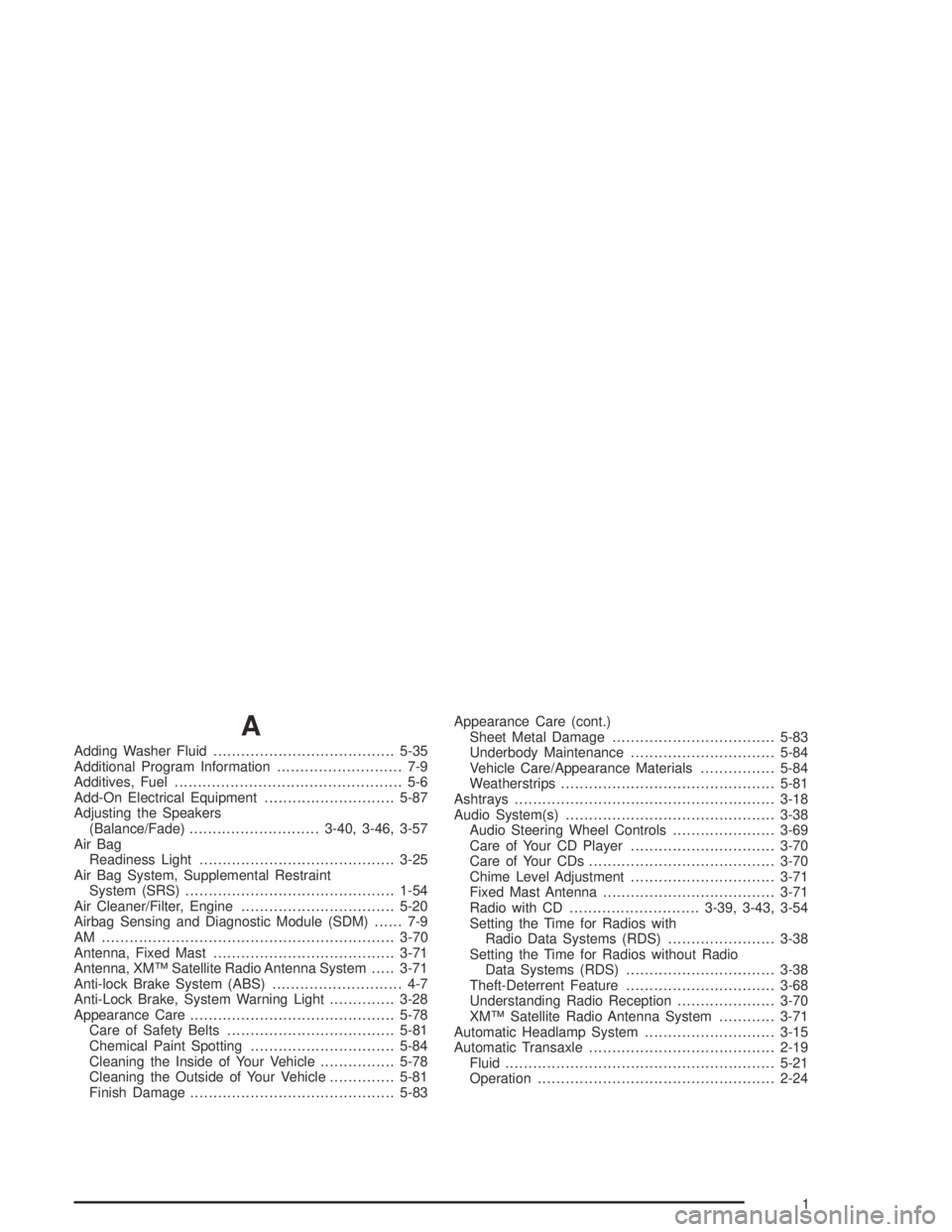
Adding Washer Fluid.......................................5-35
Additional Program Information........................... 7-9
Additives, Fuel................................................. 5-6
Add-On Electrical Equipment............................5-87
Adjusting the Speakers
(Balance/Fade)............................3-40, 3-46, 3-57
Air Bag
Readiness Light..........................................3-25
Air Bag System, Supplemental Restraint
System (SRS).............................................1-54
Air Cleaner/Filter, Engine.................................5-20
Airbag Sensing and Diagnostic Module (SDM)...... 7-9
AM ...............................................................3-70
Antenna, Fixed Mast.......................................3-71
Antenna, XM™ Satellite Radio Antenna System.....3-71
Anti-lock Brake System (ABS)............................ 4-7
Anti-Lock Brake, System Warning Light..............3-28
Appearance Care............................................5-78
Care of Safety Belts....................................5-81
Chemical Paint Spotting...............................5-84
Cleaning the Inside of Your Vehicle................5-78
Cleaning the Outside of Your Vehicle..............5-81
Finish Damage............................................5-83Appearance Care (cont.)
Sheet Metal Damage...................................5-83
Underbody Maintenance...............................5-84
Vehicle Care/Appearance Materials................5-84
Weatherstrips..............................................5-81
Ashtrays........................................................3-18
Audio System(s).............................................3-38
Audio Steering Wheel Controls......................3-69
Care of Your CD Player...............................3-70
Care of Your CDs........................................3-70
Chime Level Adjustment...............................3-71
Fixed Mast Antenna.....................................3-71
Radio with CD............................3-39, 3-43, 3-54
Setting the Time for Radios with
Radio Data Systems (RDS).......................3-38
Setting the Time for Radios without Radio
Data Systems (RDS)................................3-38
Theft-Deterrent Feature................................3-68
Understanding Radio Reception.....................3-70
XM™ Satellite Radio Antenna System............3-71
Automatic Headlamp System............................3-15
Automatic Transaxle........................................2-19
Fluid..........................................................5-21
Operation...................................................2-24
1
Page 350 of 364
B
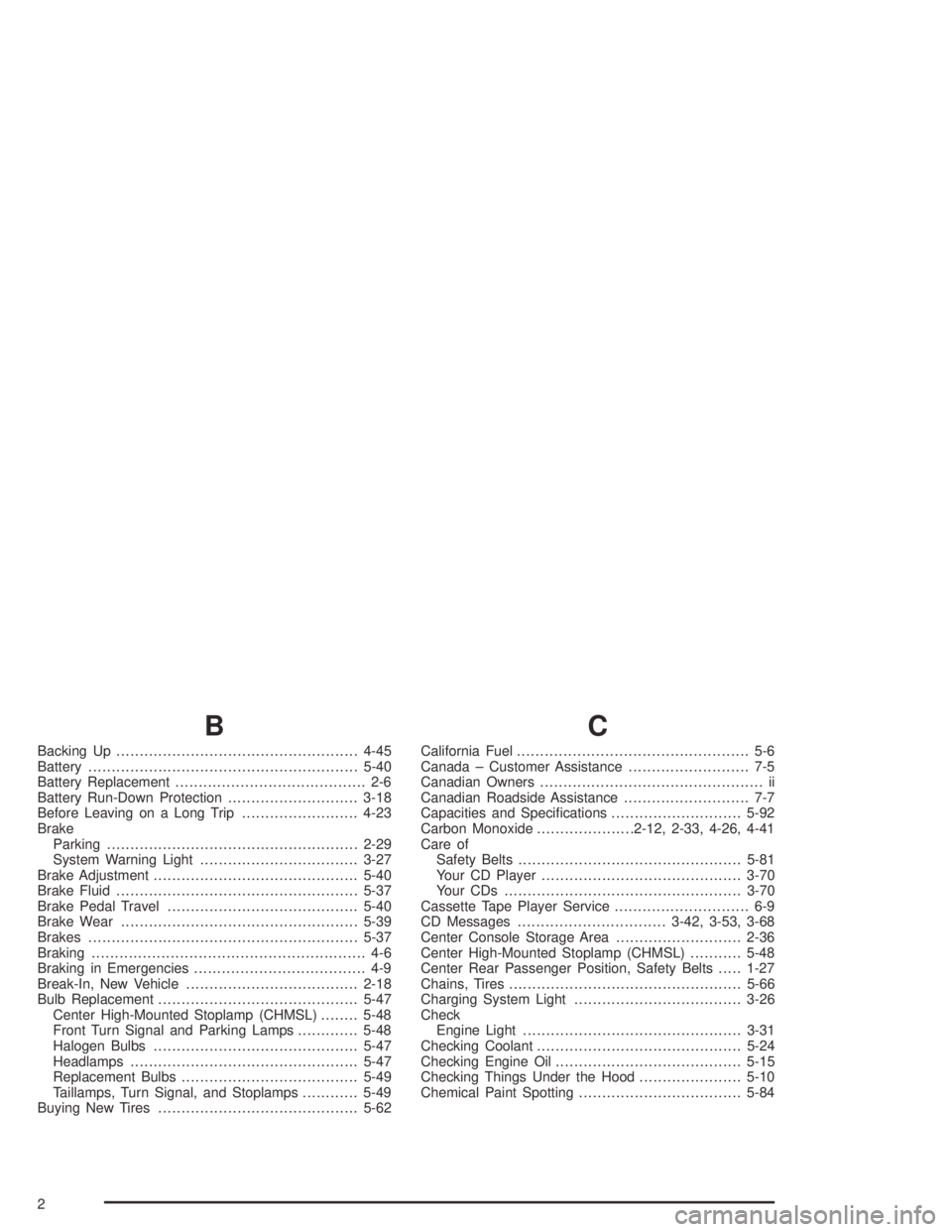
Backing Up....................................................4-45
Battery..........................................................5-40
Battery Replacement......................................... 2-6
Battery Run-Down Protection............................3-18
Before Leaving on a Long Trip.........................4-23
Brake
Parking......................................................2-29
System Warning Light..................................3-27
Brake Adjustment............................................5-40
Brake Fluid....................................................5-37
Brake Pedal Travel.........................................5-40
Brake Wear...................................................5-39
Brakes..........................................................5-37
Braking........................................................... 4-6
Braking in Emergencies..................................... 4-9
Break-In, New Vehicle.....................................2-18
Bulb Replacement...........................................5-47
Center High-Mounted Stoplamp (CHMSL)........5-48
Front Turn Signal and Parking Lamps.............5-48
Halogen Bulbs............................................5-47
Headlamps.................................................5-47
Replacement Bulbs......................................5-49
Taillamps, Turn Signal, and Stoplamps............5-49
Buying New Tires...........................................5-62
C
California Fuel.................................................. 5-6
Canada – Customer Assistance.......................... 7-5
Canadian Owners................................................ ii
Canadian Roadside Assistance........................... 7-7
Capacities and Specifications............................5-92
Carbon Monoxide.....................2-12, 2-33, 4-26, 4-41
Care of
Safety Belts................................................5-81
Your CD Player...........................................3-70
Your CDs ...................................................3-70
Cassette Tape Player Service............................. 6-9
CD Messages................................3-42, 3-53, 3-68
Center Console Storage Area...........................2-36
Center High-Mounted Stoplamp (CHMSL)...........5-48
Center Rear Passenger Position, Safety Belts.....1-27
Chains, Tires..................................................5-66
Charging System Light....................................3-26
Check
Engine Light...............................................3-31
Checking Coolant............................................5-24
Checking Engine Oil........................................5-15
Checking Things Under the Hood......................5-10
Chemical Paint Spotting...................................5-84
2
Page 359 of 364
Q
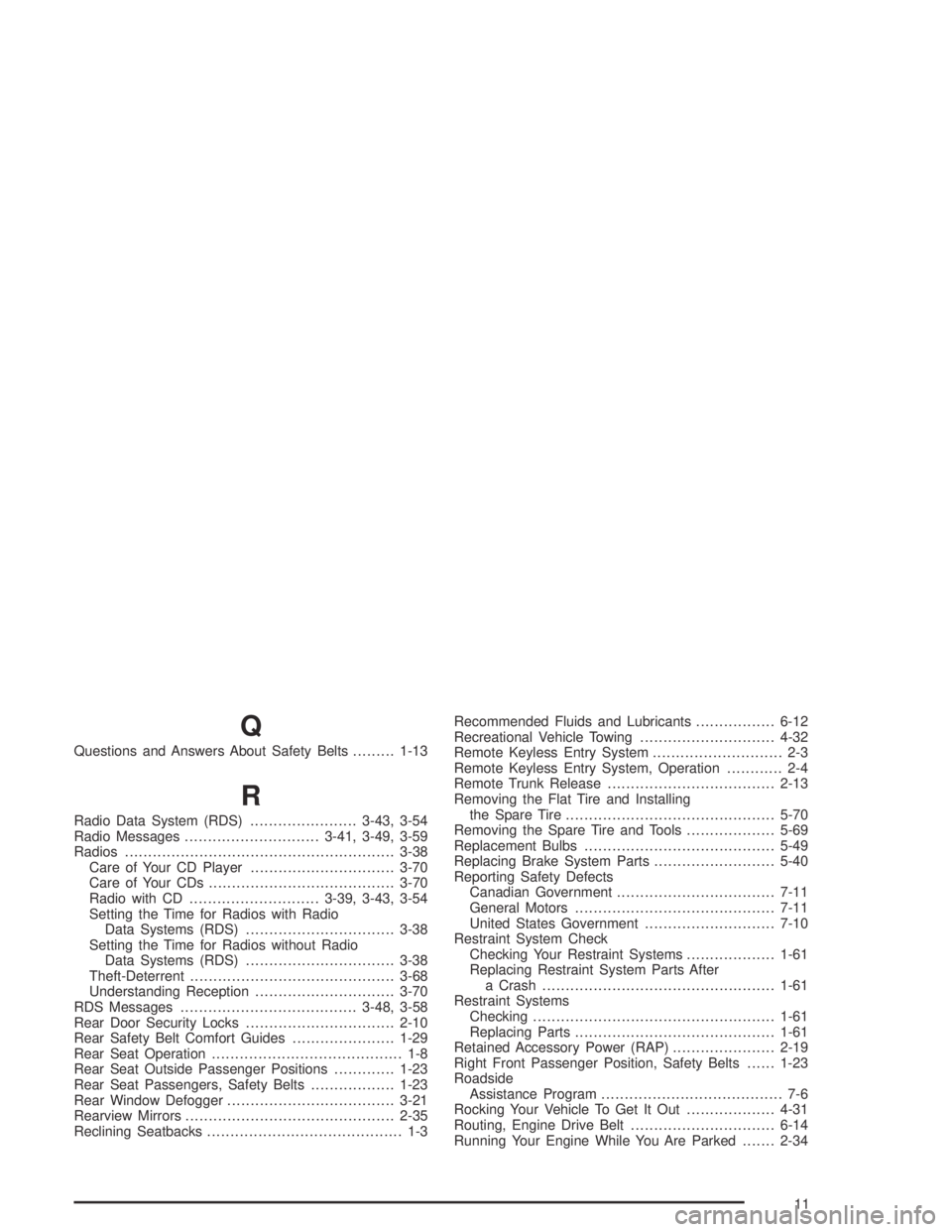
Questions and Answers About Safety Belts.........1-13
R
Radio Data System (RDS).......................3-43, 3-54
Radio Messages.............................3-41, 3-49, 3-59
Radios..........................................................3-38
Care of Your CD Player...............................3-70
Care of Your CDs........................................3-70
Radio with CD............................3-39, 3-43, 3-54
Setting the Time for Radios with Radio
Data Systems (RDS)................................3-38
Setting the Time for Radios without Radio
Data Systems (RDS)................................3-38
Theft-Deterrent............................................3-68
Understanding Reception..............................3-70
RDS Messages......................................3-48, 3-58
Rear Door Security Locks................................2-10
Rear Safety Belt Comfort Guides......................1-29
Rear Seat Operation......................................... 1-8
Rear Seat Outside Passenger Positions.............1-23
Rear Seat Passengers, Safety Belts..................1-23
Rear Window Defogger....................................3-21
Rearview Mirrors.............................................2-35
Reclining Seatbacks.......................................... 1-3Recommended Fluids and Lubricants.................6-12
Recreational Vehicle Towing.............................4-32
Remote Keyless Entry System............................ 2-3
Remote Keyless Entry System, Operation............ 2-4
Remote Trunk Release....................................2-13
Removing the Flat Tire and Installing
the Spare Tire.............................................5-70
Removing the Spare Tire and Tools...................5-69
Replacement Bulbs.........................................5-49
Replacing Brake System Parts..........................5-40
Reporting Safety Defects
Canadian Government..................................7-11
General Motors...........................................7-11
United States Government............................7-10
Restraint System Check
Checking Your Restraint Systems...................1-61
Replacing Restraint System Parts After
a Crash..................................................1-61
Restraint Systems
Checking....................................................1-61
Replacing Parts...........................................1-61
Retained Accessory Power (RAP)......................2-19
Right Front Passenger Position, Safety Belts......1-23
Roadside
Assistance Program....................................... 7-6
Rocking Your Vehicle To Get It Out...................4-31
Routing, Engine Drive Belt...............................6-14
Running Your Engine While You Are Parked.......2-34
11