ignition PONTIAC GRAND AM 2004 Workshop Manual
[x] Cancel search | Manufacturer: PONTIAC, Model Year: 2004, Model line: GRAND AM, Model: PONTIAC GRAND AM 2004Pages: 364, PDF Size: 2.48 MB
Page 171 of 364
When play enters a new folder, the display will not
automatically show the new folder name unless
you have chosen the folder mode as the default display,
see RCL later in this section. The new track name
will appear on the display.
File System and Naming
The song name that will be displayed will be the song
name that is contained in the ID3 tag. If the song name
is not present in the ID3 tag, then the radio will
display the file name without the extension (such
as.mp3) as the track name.
Track names longer than 32 characters or 4 pages will
be shortened. The display will not show parts of
words on the last page of text and the extension of the
filename will not be displayed.
Preprogrammed Playlists
You can access preprogrammed playlists which were
created by WinAmp™, MusicMatch™, or Real
Jukebox™ software, however, you will not have editing
capability. These playlists will be treated as special
folders containing compressed audio song files.
Playing a MP3
With the ignition on, insert a CD partway into the slot,
label side up. The player will pull it in and the CD
will begin to play after the player has read the table of
contents and the file structure and determined where the
first playable track is located. READING DISC will
appear on the display. After the MP3 has been read,
the number of folders and tracks will be displayed, then
the radio will go back to the default display. The CD
symbol will appear on the display. If you want to insert
an MP3 with the ignition off, first press the EJECT
button or push the RCL knob. If you insert a CD with
the radio off and the ignition on, it will start to play.
If you select an EQ setting for your CD, it will be
activated each time you play a CD.
If you turn off the ignition or the radio with a CD in the
player, it will stay in the player. When you turn on
the ignition or the radio, the CD will start to play if it was
the last selected audio source.
As each new track starts to play, the track number will
appear on the display.
The CD player can play the smaller 8cm single CDs
with an adapter ring. Full-size CDs and the smaller CDs
are loaded in the same manner.
3-65
Page 174 of 364
EJECT:Press this button to eject a CD. Eject may be
activated with either the ignition or radio off. CDs
may be loaded with the radio and ignition off if this
button is pressed first.
CD Messages
CHECK CD:If this message appears on the radio
display and the CD comes out, it could be for one of the
following reasons:
•It is very hot. When the temperature returns to
normal, the CD should play.
•You are driving on a very rough road. When the
road becomes smoother, the CD should play.
•The CD is dirty, scratched, wet, or upside down.
•The air is very humid. If so, wait about an hour and
try again.
•The format of the CD may not be compatible. See
“MP3 Format” earlier in this section.
•There may have been a problem while burning
the CD.
•The label may be caught in the CD player.If the CD is not playing correctly, for any other reason,
try a known good CD.
If any error occurs repeatedly or if an error cannot be
corrected, contact your dealer. If your radio displays an
error message, write it down and provide it to your
dealer when reporting the problem.
Theft-Deterrent Feature
THEFTLOCK®is designed to discourage theft of your
vehicle’s radio. The feature works automatically by
learning a portion of the Vehicle Identification Number
(VIN). If the radio is moved to a different vehicle, it
will not operate and LOCKED will appear on the display.
When the radio and vehicle are turned off, the blinking
red light indicates that THEFTLOCK
®is armed.
With THEFTLOCK
®activated, the radio will not operate
if stolen.
3-68
Page 177 of 364
Fixed Mast Antenna
The fixed mast antenna can withstand most car washes
without being damaged. If the mast should ever
become slightly bent, straighten it out by hand. If the
mast is badly bent, replace it.
Check occasionally to make sure the mast is still
tightened to the fender. If tightening is required, tighten
by hand, then with a wrench one quarter turn.
XM™ Satellite Radio Antenna
System
The XM™ Satellite Radio antenna is located on the roof
of your vehicle. Keep this antenna clear of snow and
ice build up for clear radio reception.
The performance of the XM system may be affected if
the sunroof is open.
Chime Level Adjustment
Chime level adjustment is only available on RDS radios.
The radio is the vehicle’s chime producer. To change
the volume level, press and hold pushbutton 6 with
the ignition on and the radio power off. The chime
volume level will change from the normal level to loud,
and LOUD will appear on the radio display. To
change back to the default or normal setting, press and
hold pushbutton 6 again. The chime level will change
from the loud level to normal, and NORMAL will appear
on the radio display. Removing the radio and not
replacing it with a factory radio or chime module will
disable vehicle chimes.
3-71
Page 203 of 364
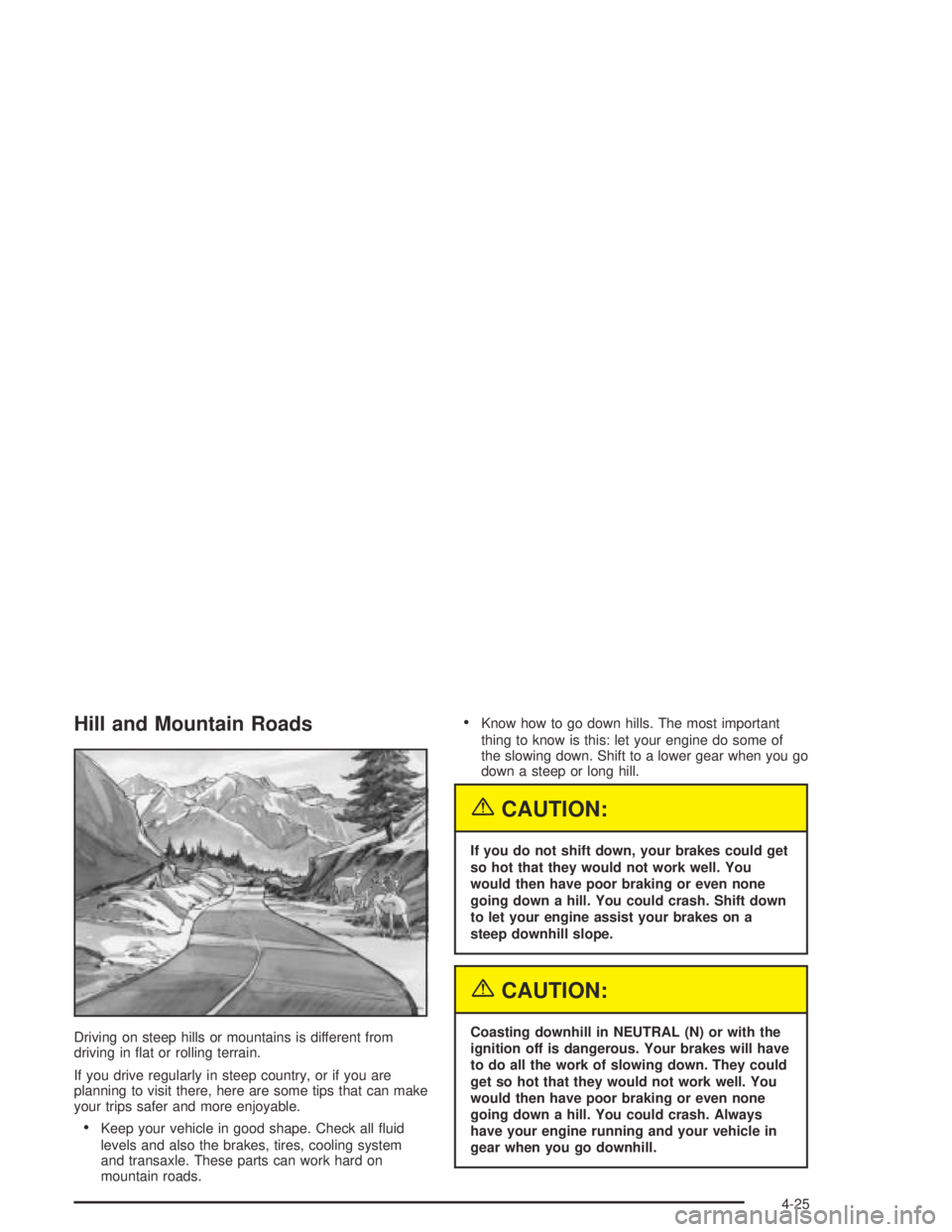
Hill and Mountain Roads
Driving on steep hills or mountains is different from
driving in flat or rolling terrain.
If you drive regularly in steep country, or if you are
planning to visit there, here are some tips that can make
your trips safer and more enjoyable.
•Keep your vehicle in good shape. Check all fluid
levels and also the brakes, tires, cooling system
and transaxle. These parts can work hard on
mountain roads.
•Know how to go down hills. The most important
thing to know is this: let your engine do some of
the slowing down. Shift to a lower gear when you go
down a steep or long hill.
{CAUTION:
If you do not shift down, your brakes could get
so hot that they would not work well. You
would then have poor braking or even none
going down a hill. You could crash. Shift down
to let your engine assist your brakes on a
steep downhill slope.
{CAUTION:
Coasting downhill in NEUTRAL (N) or with the
ignition off is dangerous. Your brakes will have
to do all the work of slowing down. They could
get so hot that they would not work well. You
would then have poor braking or even none
going down a hill. You could crash. Always
have your engine running and your vehicle in
gear when you go downhill.
4-25
Page 211 of 364
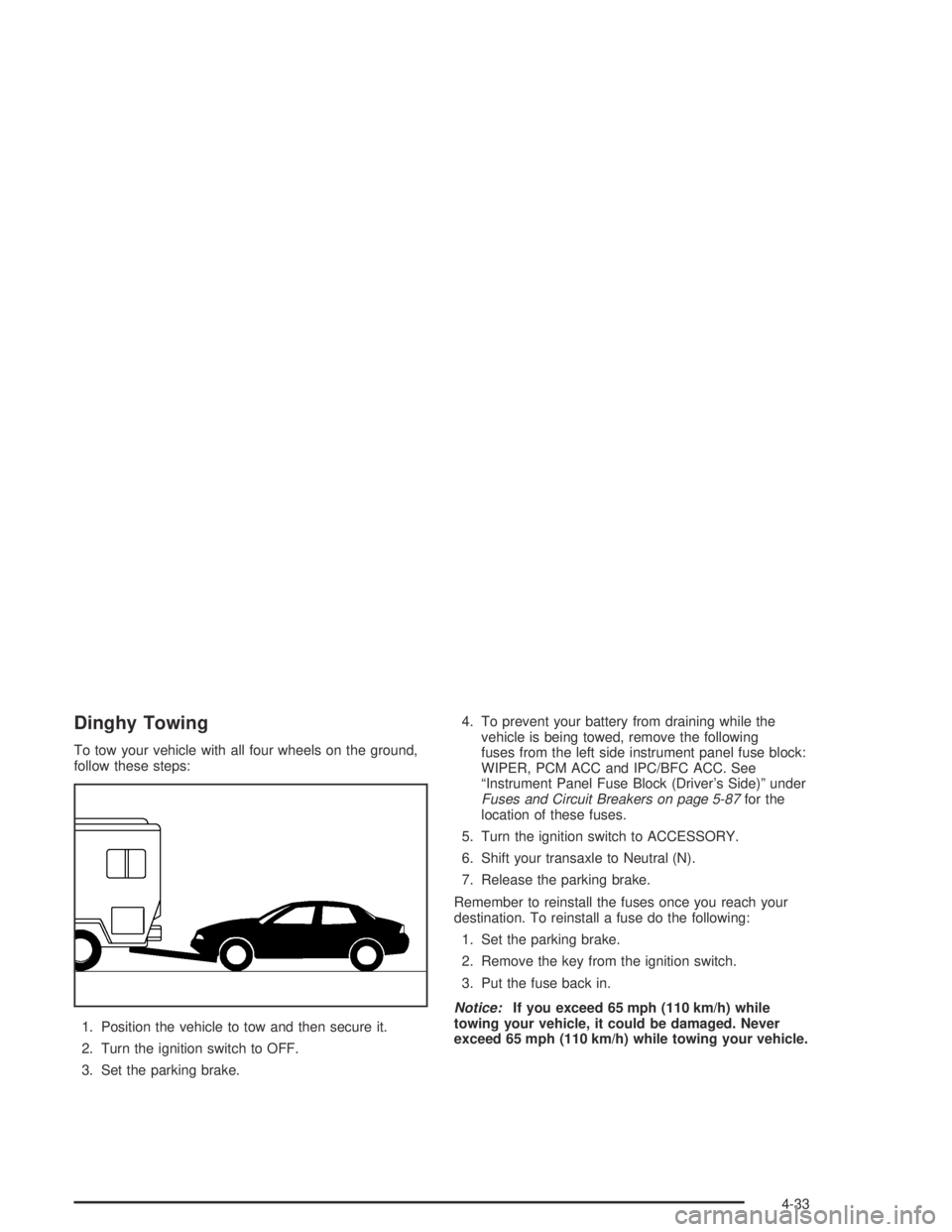
Dinghy Towing
To tow your vehicle with all four wheels on the ground,
follow these steps:
1. Position the vehicle to tow and then secure it.
2. Turn the ignition switch to OFF.
3. Set the parking brake.4. To prevent your battery from draining while the
vehicle is being towed, remove the following
fuses from the left side instrument panel fuse block:
WIPER, PCM ACC and IPC/BFC ACC. See
“Instrument Panel Fuse Block (Driver’s Side)” under
Fuses and Circuit Breakers on page 5-87for the
location of these fuses.
5. Turn the ignition switch to ACCESSORY.
6. Shift your transaxle to Neutral (N).
7. Release the parking brake.
Remember to reinstall the fuses once you reach your
destination. To reinstall a fuse do the following:
1. Set the parking brake.
2. Remove the key from the ignition switch.
3. Put the fuse back in.
Notice:If you exceed 65 mph (110 km/h) while
towing your vehicle, it could be damaged. Never
exceed 65 mph (110 km/h) while towing your vehicle.
4-33
Page 245 of 364
How to Reset the CHANGE OIL Light
The GM Oil Life System calculates when to change
your engine oil and filter based on vehicle use. Anytime
your oil is changed, reset the system so it can
calculate when the next oil change is required. If a
situation occurs where you change your oil prior to a
CHANGE OIL light being turned on, reset the system.
After changing the engine oil, the system must be reset.
To reset the CHANGE OIL light use the following
procedure:
Using the Accelerator Pedal
1. Turn the ignition to ON, with the engine off.
2. Fully press and release the accelerator pedal slowly
three times within five seconds.
The reset is complete when you hear the chimes
and the CHANGE OIL light goes out. However, if the
light stays on and no chime is heard, you will
need to repeat the reset procedure.
3. Turn the key to OFF.
If the CHANGE OIL light comes back on when you start
your vehicle, the engine oil life system has not reset.
Repeat the procedure.
What to Do with Used Oil
Used engine oil contains certain elements that may be
unhealthy for your skin and could even cause cancer.
Do not let used oil stay on your skin for very long. Clean
your skin and nails with soap and water, or a good
hand cleaner. Wash or properly dispose of clothing or
rags containing used engine oil. See the manufacturer’s
warnings about the use and disposal of oil products.
Used oil can be a threat to the environment. If you
change your own oil, be sure to drain all the oil from the
filter before disposal. Never dispose of oil by putting it
in the trash, pouring it on the ground, into sewers, or into
streams or bodies of water. Instead, recycle it by
taking it to a place that collects used oil. If you have a
problem properly disposing of your used oil, ask
your dealer, a service station or a local recycling center
for help.
5-19
Page 268 of 364
1. Check the other vehicle. It must have a 12-volt
battery with a negative ground system.
Notice:If the other vehicle’s system is not a 12-volt
system with a negative ground, both vehicles can
be damaged. Only use vehicles with 12-volt systems
with negative grounds to jump start your vehicle.
2. Get the vehicles close enough so the jumper cables
can reach, but be sure the vehicles aren’t touching
each other. If they are, it could cause a ground
connection you don’t want. You wouldn’t be able to
start your vehicle, and the bad grounding could
damage the electrical systems.
To avoid the possibility of the vehicles rolling, set
the parking brake firmly on both vehicles involved in
the jump start procedure. Put an automatic
transaxle in PARK (P) or a manual transaxle in
Neutral before setting the parking brake.
Notice:If you leave your radio or other accessories
on during the jump starting procedure, they could
be damaged. The repairs would not be covered
by your warranty. Always turn off your radio and
other accessories when jump starting your vehicle.3. Turn off the ignition on both vehicles. Unplug
unnecessary accessories plugged into the cigarette
lighter. Turn off the radio and all lamps that aren’t
needed. This will avoid sparks and help save
both batteries. And it could save your radio!
4. Open the hoods and locate the batteries. Find the
positive (+) and negative (−) terminal locations on
each vehicle. SeeEngine Compartment Overview
on page 5-12for more information on location.
{CAUTION:
An electric fan can start up even when the
engine is not running and can injure you. Keep
hands, clothing and tools away from any
underhood electric fan.
5-42
Page 316 of 364
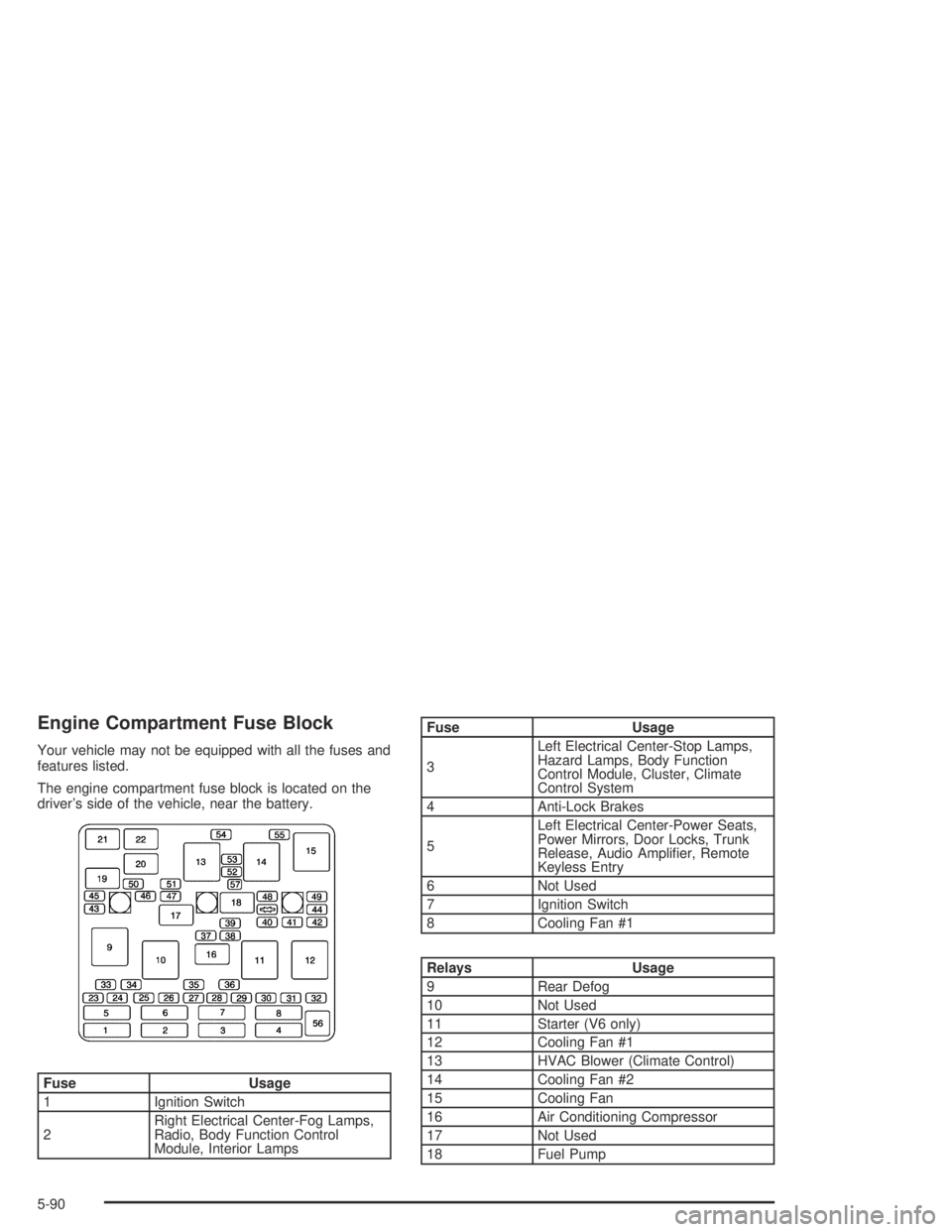
Engine Compartment Fuse Block
Your vehicle may not be equipped with all the fuses and
features listed.
The engine compartment fuse block is located on the
driver’s side of the vehicle, near the battery.
Fuse Usage
1 Ignition Switch
2Right Electrical Center-Fog Lamps,
Radio, Body Function Control
Module, Interior Lamps
Fuse Usage
3Left Electrical Center-Stop Lamps,
Hazard Lamps, Body Function
Control Module, Cluster, Climate
Control System
4 Anti-Lock Brakes
5Left Electrical Center-Power Seats,
Power Mirrors, Door Locks, Trunk
Release, Audio Amplifier, Remote
Keyless Entry
6 Not Used
7 Ignition Switch
8 Cooling Fan #1
Relays Usage
9 Rear Defog
10 Not Used
11 Starter (V6 only)
12 Cooling Fan #1
13 HVAC Blower (Climate Control)
14 Cooling Fan #2
15 Cooling Fan
16 Air Conditioning Compressor
17 Not Used
18 Fuel Pump
5-90
Page 317 of 364
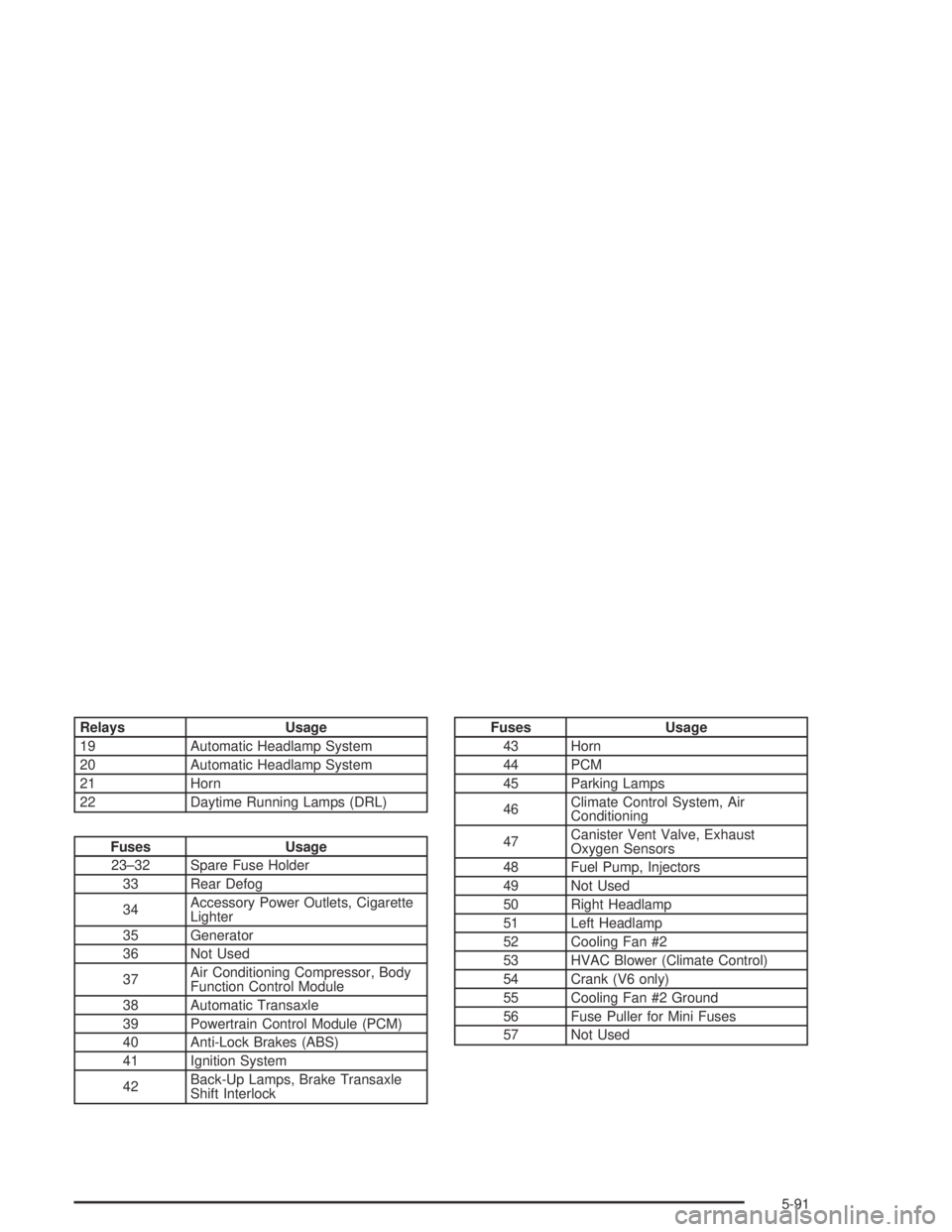
Relays Usage
19 Automatic Headlamp System
20 Automatic Headlamp System
21 Horn
22 Daytime Running Lamps (DRL)
Fuses Usage
23–32 Spare Fuse Holder
33 Rear Defog
34Accessory Power Outlets, Cigarette
Lighter
35 Generator
36 Not Used
37Air Conditioning Compressor, Body
Function Control Module
38 Automatic Transaxle
39 Powertrain Control Module (PCM)
40 Anti-Lock Brakes (ABS)
41 Ignition System
42Back-Up Lamps, Brake Transaxle
Shift Interlock
Fuses Usage
43 Horn
44 PCM
45 Parking Lamps
46Climate Control System, Air
Conditioning
47Canister Vent Valve, Exhaust
Oxygen Sensors
48 Fuel Pump, Injectors
49 Not Used
50 Right Headlamp
51 Left Headlamp
52 Cooling Fan #2
53 HVAC Blower (Climate Control)
54 Crank (V6 only)
55 Cooling Fan #2 Ground
56 Fuse Puller for Mini Fuses
57 Not Used
5-91
Page 330 of 364
Automatic Transaxle Shift Lock Control
System Check
{CAUTION:
When you are doing this inspection, the
vehicle could move suddenly. If the vehicle
moves, you or others could be injured.
1. Before you start, be sure you have enough room
around the vehicle. It should be parked on a level
surface.
2. Firmly apply the parking brake. SeeParking Brake
on page 2-29if necessary.
Be ready to apply the regular brake immediately if
the vehicle begins to move.3. With the engine off, turn the key to the ON position,
but do not start the engine. Without applying the
regular brake, try to move the shift lever out
of PARK (P) with normal effort. If the shift lever
moves out of PARK (P), contact your GM
Goodwrench dealer for service.Ignition Transaxle Lock Check
While parked, and with the parking brake set, try to turn
the ignition key to OFF in each shift lever position.
•With an automatic transaxle, the key should turn to
OFF only when the shift lever is in PARK (P). The
key should come out only in OFF.
•With a manual transaxle, the key should turn to
OFF only when the shift lever is in reverse. The
key should come out only in OFF.
Contact your GM Goodwrench dealer if service is
required.
6-10