lights PONTIAC GRAND PRIX 2005 User Guide
[x] Cancel search | Manufacturer: PONTIAC, Model Year: 2005, Model line: GRAND PRIX, Model: PONTIAC GRAND PRIX 2005Pages: 444, PDF Size: 2.6 MB
Page 141 of 444
Warning Lights, Gages, and
Indicators
This part describes the warning lights and gages that
may be on the vehicle. The pictures help to locate them.
Warning lights and gages can signal that something is
wrong before it becomes serious enough to cause
an expensive repair or replacement. Paying attention to
the warning lights and gages could also save you or
others from injury.
Warning lights come on when there may be or is a
problem with one of the vehicle’s functions. As
the details show on the next few pages, some warning
lights come on briey when the engine is started
just to indicate they are working. If you are familiar
with this section, you should not be alarmed when
this happens.Gages can indicate when there may be or is a problem
with one of the vehicle’s functions. Often gages and
warning lights work together to indicate when there is a
problem with the vehicle.
When one of the warning lights comes on and stays on
while the vehicle is being driven, or when one of the
gages shows there may be a problem, check the section
that tells you what to do about it. Follow this manual’s
advice. Waiting to do repairs can be costly – and
even dangerous. So please get to know the vehicle’s
warning lights and gages. They can be a big help.
The vehicle also has a Driver Information Center (DIC)
that works along with the warning lights and gages.
SeeDriver Information Center (DIC) on page 3-49for
more information.
3-35
Page 142 of 444

Instrument Panel Cluster
The instrument panel cluster is designed to show at a glance how the vehicle is running. It will show how fast the
vehicle is going, about how much fuel is in the fuel tank, and many other things needed to drive the vehicle safely
and economically.
The vehicle is equipped with this cluster or one very similar to it. It has indicator warning lights that are explained on
the following pages. Be sure to read about them.United States version shown, Canada similar
3-36
Page 148 of 444
Traction Control System (TCS)
Warning Light
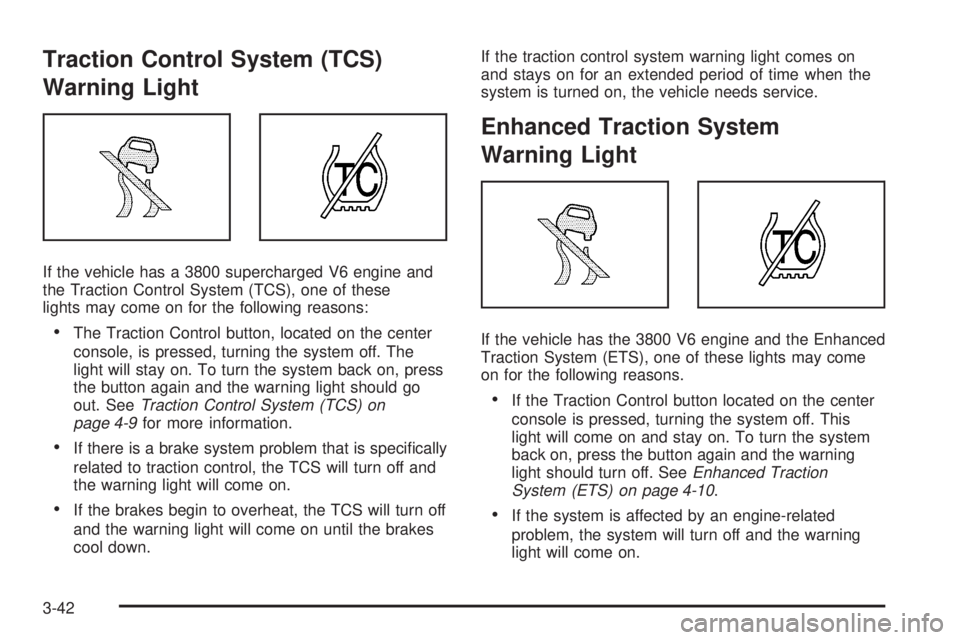
If the vehicle has a 3800 supercharged V6 engine and
the Traction Control System (TCS), one of these
lights may come on for the following reasons:
The Traction Control button, located on the center
console, is pressed, turning the system off. The
light will stay on. To turn the system back on, press
the button again and the warning light should go
out. SeeTraction Control System (TCS) on
page 4-9for more information.
If there is a brake system problem that is specically
related to traction control, the TCS will turn off and
the warning light will come on.
If the brakes begin to overheat, the TCS will turn off
and the warning light will come on until the brakes
cool down.If the traction control system warning light comes on
and stays on for an extended period of time when the
system is turned on, the vehicle needs service.
Enhanced Traction System
Warning Light
If the vehicle has the 3800 V6 engine and the Enhanced
Traction System (ETS), one of these lights may come
on for the following reasons.
If the Traction Control button located on the center
console is pressed, turning the system off. This
light will come on and stay on. To turn the system
back on, press the button again and the warning
light should turn off. SeeEnhanced Traction
System (ETS) on page 4-10.
If the system is affected by an engine-related
problem, the system will turn off and the warning
light will come on.
3-42
Page 155 of 444
Driver Information Center (DIC)
The Driver Information Center (DIC) gives important
safety and maintenance facts. When the vehicle’s
ignition is turned on, all of the DIC lights illuminate for a
few seconds and an introductory message will appear.
After this, the DIC will begin working.
DIC Controls and Displays
(Base Level DIC)
The Driver Information Center (DIC) control buttons and
the message display screen are located above the
radio. The DIC gives important safety and maintenance
facts concerning the vehicle. The status of many of
the vehicle’s systems along with driver personal
programming mode menus and warning messages
about the vehicle’s systems may display on the
DIC screen.The vehicle’s transaxle position will also appear.
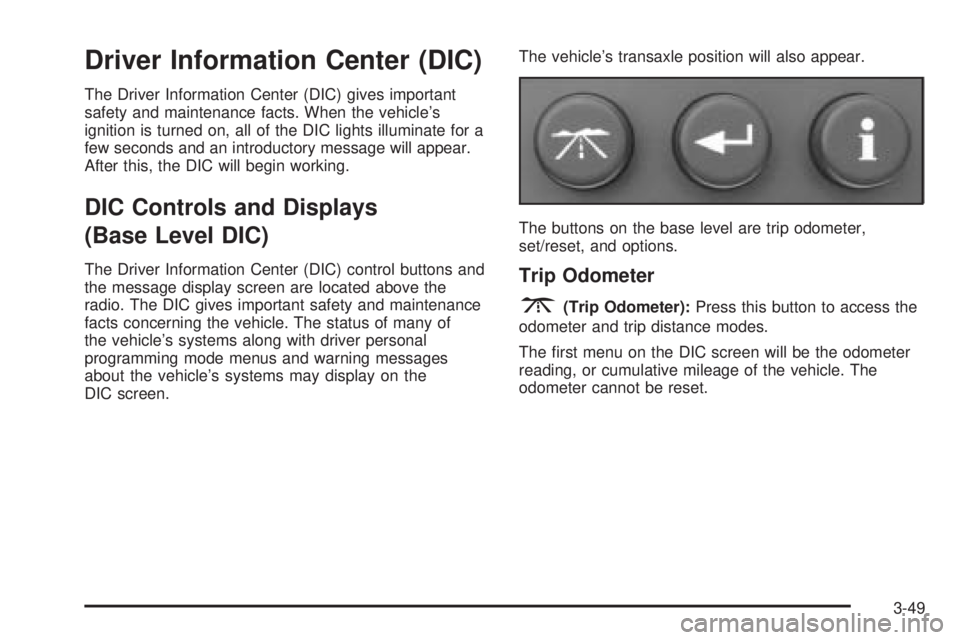
The buttons on the base level are trip odometer,
set/reset, and options.Trip Odometer
3(Trip Odometer):Press this button to access the
odometer and trip distance modes.
The rst menu on the DIC screen will be the odometer
reading, or cumulative mileage of the vehicle. The
odometer cannot be reset.
3-49
Page 159 of 444

If the Check Tire Pressure message did not appear
and the set/reset button is pressed, the system
will reset, but no acknowledgement message
will appear on the screen.
2. Press the options button again to advance to the
next screen.
Select the set/reset button to return to the main (date)
screen.
PERSONAL PROGRAMMING MODE:This menu
allows you to customize several features on your
vehicle. These adjustments can only be made while the
vehicle is in PARK (P). Press the set/reset button to
display the rst screen.
Personal Programming Mode Screens
Press the options button to access these modes:
EXTERIOR LIGHTING DELAY:This screen allows this
feature to be turned off or allows the selection of the
number of seconds the headlamps, sidelamps, taillamps,
fog lamps, and back-up lamps are turned on after the
key is removed from the ignition, or the vehicle is
unlocked using the remote keyless entry transmitter.
If OFF is selected, the exterior lamps will not turn on.If a time delay is chosen, the lamps will turn on for the
selected time. The time delay will be cancelled and
the exterior lamps will turn on automatically when the
key is removed from the ignition, or the vehicle is
unlocked using the remote keyless entry transmitter.
To program this mode, use the following procedure:
1. Press and release the set/reset button to scroll to
the selection to be programmed. Choose from
OFF, 15, 30, 60, or 90 seconds.
2. Press the options button again to advance to the
next screen.
INTERIOR LIGHTS WHEN DOOR CLOSED:This
screen allows this feature to be turned OFF or ON.
If OFF is selected, the interior lamps will turn off
immediately when the ignition is turned off and the last
door is closed.
If ON is selected, the interior lamps will stay on for
about 25 seconds after the vehicle’s ignition is turned off
and the last door is closed.
To program this mode, use the following procedure:
1. Press and release the set/reset button to scroll to
either OFF or ON.
2. Press the options button again to advance to the
next screen.
3-53
Page 160 of 444
INTERIOR LIGHTS WHEN KEY REMOVED:This
screen allows this feature to be turned OFF or ON.
This feature enables the interior lamps in the vehicle to
turn on for about 25 seconds after the key is removed
from the ignition.
If OFF is selected, removing the key from the ignition
will not cause the interior lamps to turn on.
If ON is selected, removing the key from the ignition will
cause the interior lamps to be turned on for about
25 seconds.
To program this mode, use the following procedure:
1. Press and release the set/reset button to scroll to
either OFF or ON.
2. Press the options button again to advance to the
next screen.
AUTO DOOR LOCK:This screen allows this feature to
be turned OFF or ON.
If OFF is selected, all automatic door locking is disabled.
The doors will always need to be locked manually
before driving, to increase occupant safety.
If ON is selected, the vehicle’s doors automatically lock
when the doors are closed and the vehicle is shifted
into DRIVE (D).To program this mode, use the following procedure:
1. Press and release the set/reset button to scroll to
either OFF or ON.
2. Press the options button again to advance to the
next screen.
AUTO DOOR UNLOCK:This screen can be used if
ON was selected for the AUTO DOOR LOCK feature.
This screen allows this feature to be turned off, used for
the driver’s door only, or for all the doors.
If OFF is selected, none of the doors will unlock when
the vehicle’s transaxle is shifted into PARK (P).
If DRIVER is selected, only the driver’s door will unlock
when the vehicle’s transaxle is shifted into PARK (P).
If ALL is selected, all the doors will unlock when
the vehicle’s transaxle is shifted into PARK (P).
To program this mode, use the following procedure:
1. Press and release the set/reset button to scroll to
either OFF, DRIVER, or ALL.
2. Press the options button again to advance to the
next screen.
AUTO DOOR UNLOCK ON:If DRIVER or ALL was
selected on the AUTO DOOR UNLOCK screen, this
screen allows selection of when the vehicle’s doors will
unlock. The choices are when the key is removed from
the ignition or when the vehicle is shifted into PARK (P).
3-54
Page 161 of 444
If KEY-OUT is selected, the auto door unlock will function
when the key is taken out of the ignition.
If PARK is selected, the auto door unlock will function
when the transaxle is shifted into PARK (P).
To program this mode, use the following procedure:
1. Press and release the set/reset button to scroll to
either KEY-OUT or PARK.
2. Press the options button again to advance to the
next screen.
DELAYED LOCKING:This screen allows this feature
to be turned OFF or ON. The key must be out of
the ignition for this feature to work.
If OFF is selected, there will be no delayed locking of
the vehicle’s doors.
If ON is selected, the locking of the vehicle’s doors will
be delayed by ve seconds after a power door lock
switch is pressed when a door is open, or the LOCK
button on the remote keyless entry transmitter is
pressed while a door is open.
To program this mode, use the following procedure:
1. Press and release the set/reset button to scroll to
either OFF or ON.
2. Press the options button again to advance to the
next screen.REMOTE LOCKS FEEDBACK:This screen allows
selection for this option to be turned OFF, or gives the
choice of two methods of verication; LIGHTS or
LIGHTS and HORN; that indicate the vehicle’s doors
are locked when the LOCK button on the remote keyless
entry transmitter is pressed.
If OFF is selected, this feature will not be programmed.
If LIGHTS is selected, the exterior lamps will ash
when the LOCK button on the remote keyless entry
transmitter is pressed.
If LIGHTS and HORN are selected, the exterior lamps
will ash when the LOCK button on the remote
keyless entry transmitter is pressed and the horn will
sound when the LOCK button on the remote keyless
entry transmitter is pressed again within ve seconds of
the previous command.
To program this mode, use the following procedure:
1. Press the set/reset button to scroll to OFF, LIGHTS,
or LIGHTS and HORN.
2. Press the options button again to advance to the
next screen.
If the vehicle does not have a content theft-deterrent
system, the next screens with PROGRAMMING
FINISHED and DISPLAY OFF will appear.
If the vehicle does have a content theft-deterrent
system, the next screen will appear.
3-55
Page 170 of 444

Personal Programming Mode Screens
PERSONAL PROGRAMMING MODE:This menu
allows you to customize several features on your
vehicle. These adjustments can only be made while the
vehicle is in PARK (P). Press the set/reset button to
display the rst screen.
Press the options button to access these modes:
EXTERIOR LIGHTING DELAY:This screen allows this
feature to be turned off, or allows the selection of the
number of seconds the headlamps, sidelamps, taillamps,
fog lamps, and back-up lamps are turned on after the
key is removed from the ignition, or the vehicle is
unlocked using the remote keyless entry transmitter.
If OFF is selected, the exterior lamps will not turn on.
If a time delay is chosen, the lamps will turn on for
the selected time. The time delay will be cancelled and
the exterior lamps will turn on automatically when
the key is removed from the ignition, or the vehicle is
unlocked using the remote keyless entry transmitter.
To program this mode, use the following procedure:
1. Press and release the set/reset button to scroll to
the selection you want to program. Choose from
OFF, 15, 30, 60, or 90 seconds.
2. Press the options button again to advance to the
next screen.INTERIOR LIGHTS WHEN DOOR CLOSED:This
screen allows this feature to be turned OFF or ON.
If OFF is selected, the interior lamps will turn off
immediately when the ignition is turned off and the last
open door is closed.
If ON is selected, the interior lamps will stay on for
about 25 seconds after the vehicle’s ignition is off and
the last open door is closed.
To program this mode, use the following procedure:
1. Press and release the set/reset button to scroll to
either OFF or ON.
2. Press the options button again to advance to the
next screen.
INTERIOR LIGHTS WHEN KEY REMOVED:This
screen allows this feature to be turned OFF or ON.
This feature enables the interior lamps in the vehicle to
turn on for about 25 seconds after the key is removed
from the ignition.
If OFF is selected, removing the key from the ignition
will not cause the interior lamps to turn on.
If ON is selected, removing the key from the ignition
will cause the interior lamps to be turned on for about
25 seconds.
3-64
Page 172 of 444
DELAYED LOCKING:This screen allows this feature
to be turned OFF or ON. The key must be out of
the ignition for this feature to work.
If OFF is selected, there will be no delayed locking of
the vehicle’s doors.
If ON is selected, the locking of the vehicle’s doors will
be delayed by ve seconds after a power door lock
switch is pressed while the door is open, or the LOCK
button on the remote keyless entry transmitter is
pressed while any door is open.
To program this mode, use the following procedure:
1. Press and release the set/reset button to scroll to
either OFF or ON.
2. Press the options button again to advance to the
next screen.
REMOTE LOCKS FEEDBACK:This screen allows this
option to be turned OFF, or gives the choice of two
methods of verication, LIGHTS or LIGHTS and HORN,
that indicate the vehicle’s doors are locked when the
LOCK button on the remote keyless entry transmitter is
pressed.
If OFF is selected, this feature will not be programmed.
If LIGHTS is selected, the exterior lamps will ash
when the LOCK button on the remote keyless entry
transmitter is pressed.If LIGHTS and HORN is selected, the exterior lamps will
ash when the LOCK button on the remote keyless
entry transmitter is pressed, and the horn will sound
when the LOCK button on the remote keyless entry
transmitter is pressed again within ve seconds of the
previous command.
To program this mode, use the following procedure:
1. Press the set/reset button to scroll to OFF, LIGHTS,
or LIGHTS and HORN.
2. Press the options button again to advance to the
next screen.
If the vehicle does not have a content theft-deterrent
system, the next screens with PROGRAMMING
FINISHED and DISPLAY OFF will appear.
If the vehicle does have a content theft-deterrent
system, the next screen will appear.
THEFT DETERRENT:The vehicle may have a content
theft-deterrent system. Once it is turned on, the
system will activate if someone tries to enter the vehicle
without using the remote keyless entry transmitter or
the correct key. It will also activate when an incorrect
key is used in the ignition. This screen allows this
feature to be turned OFF or ON.
If OFF is selected, the content theft-deterrent system
will not function.
3-66
Page 261 of 444

You can be temporarily blinded by approaching
headlamps. It can take a second or two, or even several
seconds, for your eyes to re-adjust to the dark. When
you are faced with severe glare, as from a driver
who does not lower the high beams, or a vehicle with
misaimed headlamps, slow down a little. Avoid
staring directly into the approaching headlamps.
Keep your windshield and all the glass on your vehicle
clean — inside and out. Glare at night is made much
worse by dirt on the glass. Even the inside of the glass
can build up a lm caused by dust. Dirty glass makes
lights dazzle and ash more than clean glass would,
making the pupils of your eyes contract repeatedly.
Remember that your headlamps light up far less
of a roadway when you are in a turn or curve. Keep
your eyes moving; that way, it is easier to pick out
dimly lighted objects. Just as your headlamps should
be checked regularly for proper aim, so should your
eyes be examined regularly. Some drivers suffer from
night blindness — the inability to see in dim light — and
are not even aware of it.Driving in Rain and on Wet Roads
Rain and wet roads can mean driving trouble. On a wet
road, you cannot stop, accelerate, or turn as well
because your tire-to-road traction is not as good as on
dry roads. And, if your tires do not have much tread
left, you will get even less traction. It is always wise to
go slower and be cautious if rain starts to fall while
you are driving. The surface may get wet suddenly when
your reexes are tuned for driving on dry pavement.
4-19