ECU PONTIAC GRAND PRIX 2006 Owner's Guide
[x] Cancel search | Manufacturer: PONTIAC, Model Year: 2006, Model line: GRAND PRIX, Model: PONTIAC GRAND PRIX 2006Pages: 472, PDF Size: 2.82 MB
Page 159 of 472
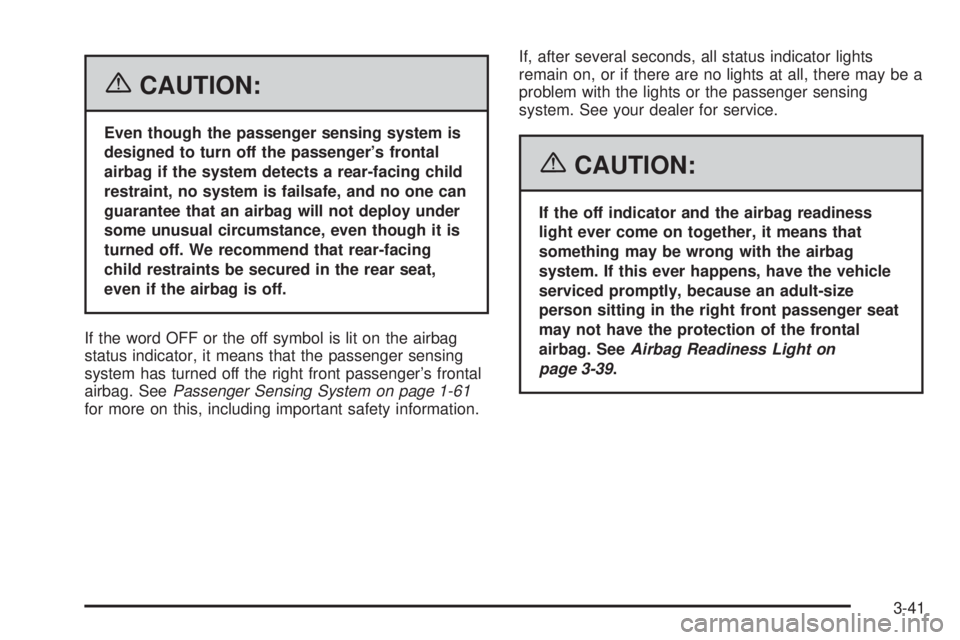
{CAUTION:
Even though the passenger sensing system is
designed to turn off the passenger’s frontal
airbag if the system detects a rear-facing child
restraint, no system is failsafe, and no one can
guarantee that an airbag will not deploy under
some unusual circumstance, even though it is
turned off. We recommend that rear-facing
child restraints be secured in the rear seat,
even if the airbag is off.
If the word OFF or the off symbol is lit on the airbag
status indicator, it means that the passenger sensing
system has turned off the right front passenger’s frontal
airbag. SeePassenger Sensing System on page 1-61
for more on this, including important safety information.If, after several seconds, all status indicator lights
remain on, or if there are no lights at all, there may be a
problem with the lights or the passenger sensing
system. See your dealer for service.
{CAUTION:
If the off indicator and the airbag readiness
light ever come on together, it means that
something may be wrong with the airbag
system. If this ever happens, have the vehicle
serviced promptly, because an adult-size
person sitting in the right front passenger seat
may not have the protection of the frontal
airbag. SeeAirbag Readiness Light on
page 3-39.
3-41
Page 222 of 472
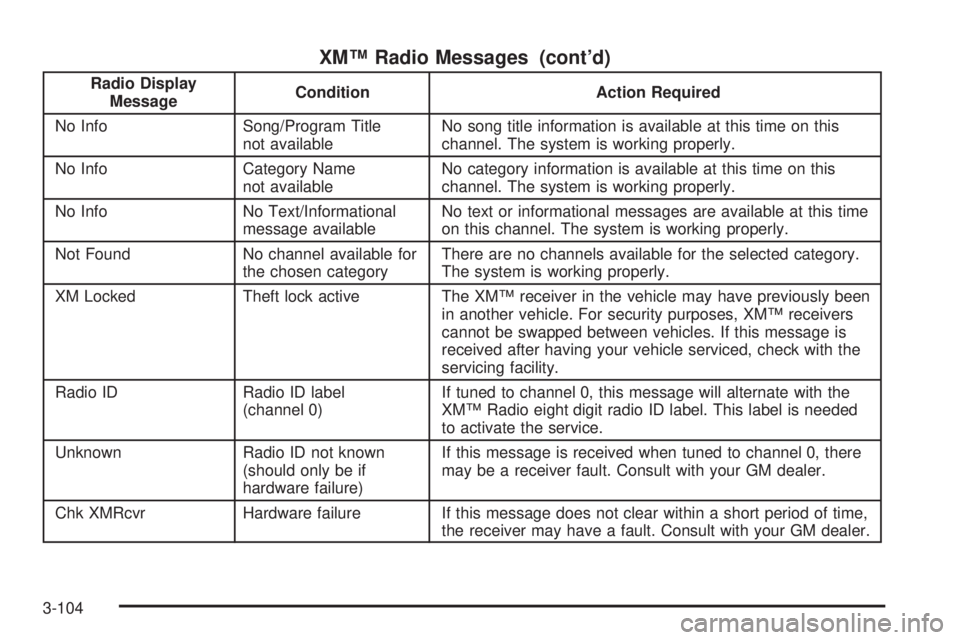
XM™ Radio Messages (cont’d)
Radio Display
MessageCondition Action Required
No Info Song/Program Title
not availableNo song title information is available at this time on this
channel. The system is working properly.
No Info Category Name
not availableNo category information is available at this time on this
channel. The system is working properly.
No Info No Text/Informational
message availableNo text or informational messages are available at this time
on this channel. The system is working properly.
Not Found No channel available for
the chosen categoryThere are no channels available for the selected category.
The system is working properly.
XM Locked Theft lock active The XM™ receiver in the vehicle may have previously been
in another vehicle. For security purposes, XM™ receivers
cannot be swapped between vehicles. If this message is
received after having your vehicle serviced, check with the
servicing facility.
Radio ID Radio ID label
(channel 0)If tuned to channel 0, this message will alternate with the
XM™ Radio eight digit radio ID label. This label is needed
to activate the service.
Unknown Radio ID not known
(should only be if
hardware failure)If this message is received when tuned to channel 0, there
may be a receiver fault. Consult with your GM dealer.
Chk XMRcvr Hardware failure If this message does not clear within a short period of time,
the receiver may have a fault. Consult with your GM dealer.
3-104
Page 233 of 472
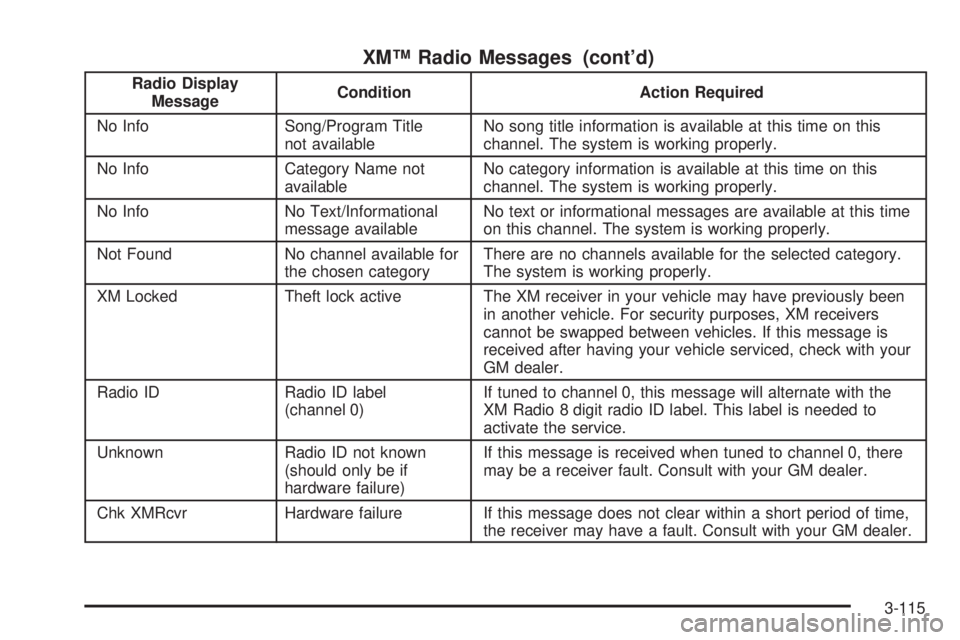
XM™ Radio Messages (cont’d)
Radio Display
MessageCondition Action Required
No Info Song/Program Title
not availableNo song title information is available at this time on this
channel. The system is working properly.
No Info Category Name not
availableNo category information is available at this time on this
channel. The system is working properly.
No Info No Text/Informational
message availableNo text or informational messages are available at this time
on this channel. The system is working properly.
Not Found No channel available for
the chosen categoryThere are no channels available for the selected category.
The system is working properly.
XM Locked Theft lock active The XM receiver in your vehicle may have previously been
in another vehicle. For security purposes, XM receivers
cannot be swapped between vehicles. If this message is
received after having your vehicle serviced, check with your
GM dealer.
Radio ID Radio ID label
(channel 0)If tuned to channel 0, this message will alternate with the
XM Radio 8 digit radio ID label. This label is needed to
activate the service.
Unknown Radio ID not known
(should only be if
hardware failure)If this message is received when tuned to channel 0, there
may be a receiver fault. Consult with your GM dealer.
Chk XMRcvr Hardware failure If this message does not clear within a short period of time,
the receiver may have a fault. Consult with your GM dealer.
3-115
Page 250 of 472
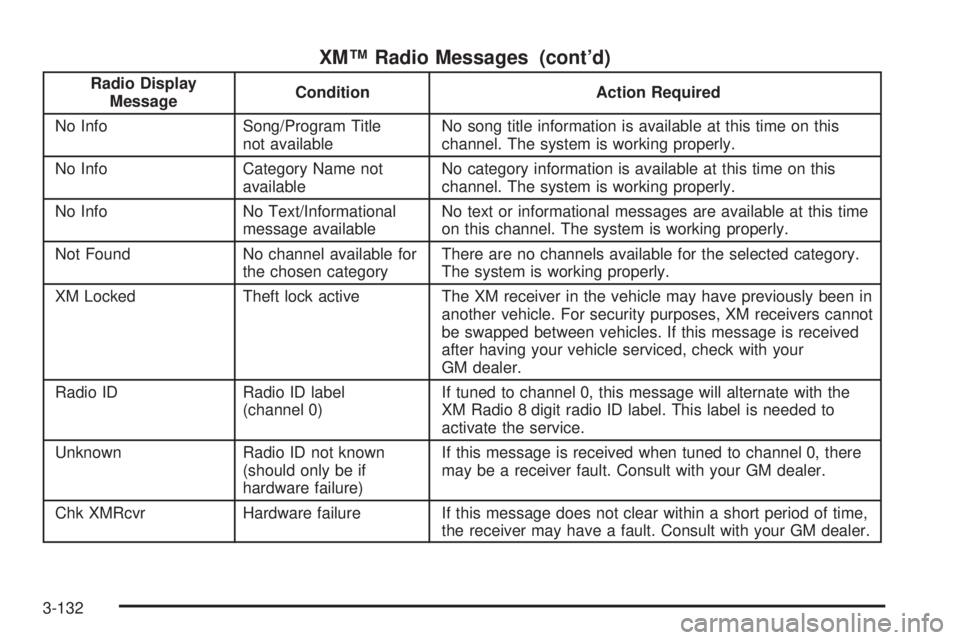
XM™ Radio Messages (cont’d)
Radio Display
MessageCondition Action Required
No Info Song/Program Title
not availableNo song title information is available at this time on this
channel. The system is working properly.
No Info Category Name not
availableNo category information is available at this time on this
channel. The system is working properly.
No Info No Text/Informational
message availableNo text or informational messages are available at this time
on this channel. The system is working properly.
Not Found No channel available for
the chosen categoryThere are no channels available for the selected category.
The system is working properly.
XM Locked Theft lock active The XM receiver in the vehicle may have previously been in
another vehicle. For security purposes, XM receivers cannot
be swapped between vehicles. If this message is received
after having your vehicle serviced, check with your
GM dealer.
Radio ID Radio ID label
(channel 0)If tuned to channel 0, this message will alternate with the
XM Radio 8 digit radio ID label. This label is needed to
activate the service.
Unknown Radio ID not known
(should only be if
hardware failure)If this message is received when tuned to channel 0, there
may be a receiver fault. Consult with your GM dealer.
Chk XMRcvr Hardware failure If this message does not clear within a short period of time,
the receiver may have a fault. Consult with your GM dealer.
3-132
Page 288 of 472
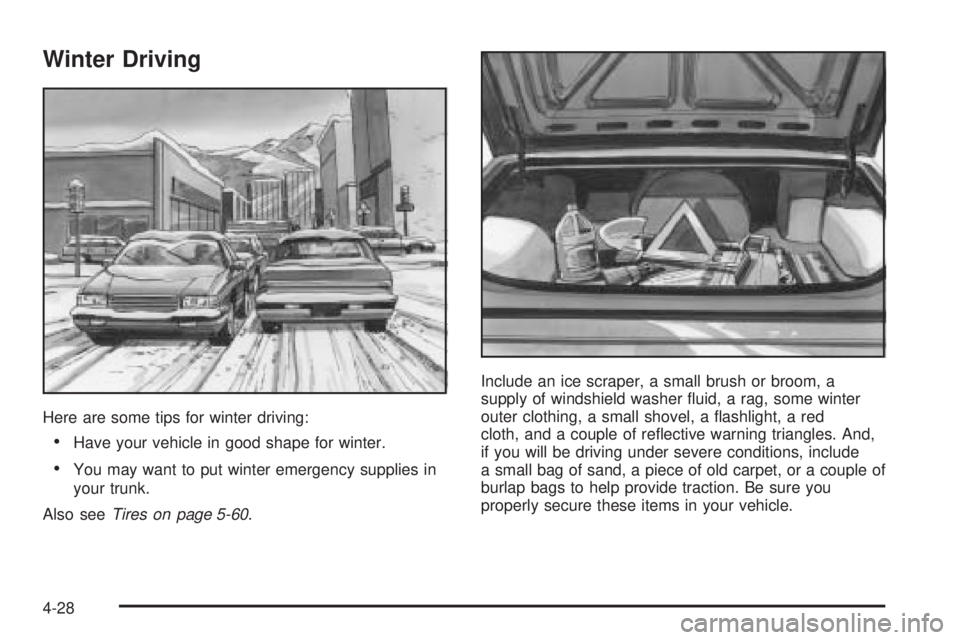
Winter Driving
Here are some tips for winter driving:
Have your vehicle in good shape for winter.
You may want to put winter emergency supplies in
your trunk.
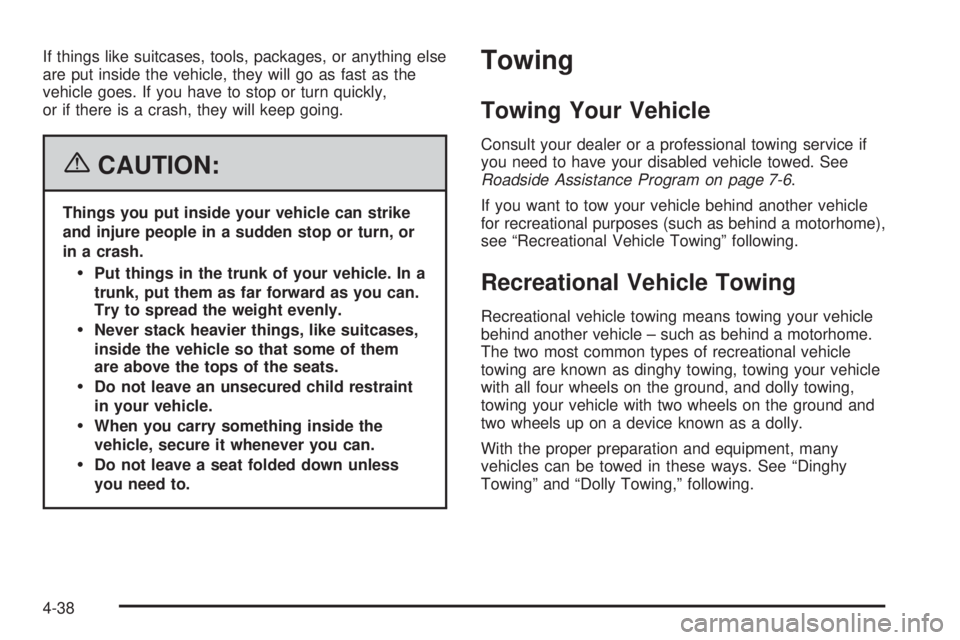
Also seeTires on page 5-60.Include an ice scraper, a small brush or broom, a
supply of windshield washer uid, a rag, some winter
outer clothing, a small shovel, a ashlight, a red
cloth, and a couple of reective warning triangles. And,
if you will be driving under severe conditions, include
a small bag of sand, a piece of old carpet, or a couple of
burlap bags to help provide traction. Be sure you
properly secure these items in your vehicle.
4-28
Page 298 of 472
If things like suitcases, tools, packages, or anything else
are put inside the vehicle, they will go as fast as the
vehicle goes. If you have to stop or turn quickly,
or if there is a crash, they will keep going.
{CAUTION:
Things you put inside your vehicle can strike
and injure people in a sudden stop or turn, or
in a crash.
Put things in the trunk of your vehicle. In a
trunk, put them as far forward as you can.
Try to spread the weight evenly.
Never stack heavier things, like suitcases,
inside the vehicle so that some of them
are above the tops of the seats.
Do not leave an unsecured child restraint
in your vehicle.
When you carry something inside the
vehicle, secure it whenever you can.
Do not leave a seat folded down unless
you need to.
Towing
Towing Your Vehicle
Consult your dealer or a professional towing service if
you need to have your disabled vehicle towed. See
Roadside Assistance Program on page 7-6.
If you want to tow your vehicle behind another vehicle
for recreational purposes (such as behind a motorhome),
see “Recreational Vehicle Towing” following.
Recreational Vehicle Towing
Recreational vehicle towing means towing your vehicle
behind another vehicle – such as behind a motorhome.
The two most common types of recreational vehicle
towing are known as dinghy towing, towing your vehicle
with all four wheels on the ground, and dolly towing,
towing your vehicle with two wheels on the ground and
two wheels up on a device known as a dolly.
With the proper preparation and equipment, many
vehicles can be towed in these ways. See “Dinghy
Towing” and “Dolly Towing,” following.
4-38
Page 304 of 472
Before starting, check the trailer hitch and platform (and
attachments), safety chains, electrical connector,
lamps, tires, and mirror adjustment. If the trailer has
electric brakes, start the vehicle and trailer moving and
then apply the trailer brake controller by hand to be
sure the brakes are working. This lets you check
the electrical connection at the same time.
During your trip, check occasionally to be sure that the
load is secure, and that the lamps and any trailer
brakes are still working.
Following Distance
Stay at least twice as far behind the vehicle ahead as
when driving the vehicle without a trailer. This can
prevent situations that require heavy braking and
sudden turns.
Passing
More passing distance is needed up ahead when
towing a trailer. And, because the vehicle and trailer are
a good deal longer, distances between any vehicles
that are passed must be greater, before returning to
the proper lane.
Backing Up
Hold the bottom of the steering wheel with one hand.
Then, to move the trailer to the left, move that hand
to the left. To move the trailer to the right, move that
hand to the right. Always back up slowly and, if possible,
have someone guide you.
Making Turns
Notice:Making very sharp turns while trailering
could cause the trailer to come in contact with the
vehicle. Your vehicle could be damaged. Avoid
making very sharp turns while trailering.
When turning with a trailer, make wider turns than
normal. Do this so the trailer will not strike soft
shoulders, curbs, road signs, trees, or other objects.
Avoid jerky or sudden maneuvers. Signal well
in advance.
Turn Signals When Towing a Trailer
When towing a trailer, the vehicle may need a different
turn signal asher and/or extra wiring. Check with
your dealer. The arrows on the instrument panel will
ash whenever signaling a turn or lane change. Properly
hooked up, the trailer lamps will also ash, telling
other drivers the vehicle and trailer are about to turn,
change lanes, or stop.
4-44
Page 334 of 472
Pressure Cap
Notice:If the pressure cap is not tightly installed,
coolant loss and possible engine damage may occur.
Be sure the cap is properly and tightly secured.
SeeEngine Compartment Overview on page 5-12for
more information on location.
Engine Overheating
There is a coolant temperature gage and a warning light
on the instrument panel that indicate an overheated
engine condition. SeeEngine Coolant Temperature
Gage on page 3-46andEngine Coolant Temperature
Warning Light on page 3-46.
If Steam Is Coming From Your Engine
{CAUTION:
Steam from an overheated engine can burn
you badly, even if you just open the hood. Stay
away from the engine if you see or hear steam
coming from it. Just turn it off and get
everyone away from the vehicle until it cools
down. Wait until there is no sign of steam or
coolant before you open the hood.
If you keep driving when your engine is
overheated, the liquids in it can catch re. You
or others could be badly burned. Stop your
engine if it overheats, and get out of the
vehicle until the engine is cool.
SeeOverheated Engine Protection Operating
Mode on page 5-30for information on driving
to a safe place in an emergency.
5-28
Page 362 of 472
9. Carefully reinstall the headlamp assembly.
10. Push down on the metal retaining clip while pushing
rearward on the headlamp, making sure the
headlamp assembly is secure.
11. Reinstall the bolt and tighten to secure.
Front Turn Signal, Parking and
Fog Lamps
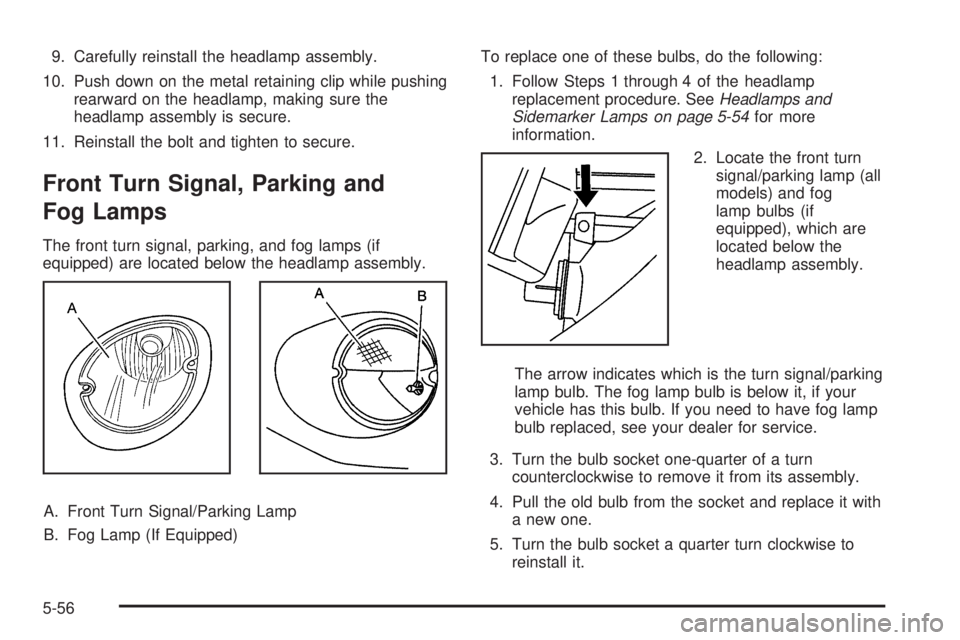
The front turn signal, parking, and fog lamps (if
equipped) are located below the headlamp assembly.
A. Front Turn Signal/Parking Lamp
B. Fog Lamp (If Equipped)To replace one of these bulbs, do the following:
1. Follow Steps 1 through 4 of the headlamp
replacement procedure. SeeHeadlamps and
Sidemarker Lamps on page 5-54for more
information.
2. Locate the front turn
signal/parking lamp (all
models) and fog
lamp bulbs (if
equipped), which are
located below the
headlamp assembly.
The arrow indicates which is the turn signal/parking
lamp bulb. The fog lamp bulb is below it, if your
vehicle has this bulb. If you need to have fog lamp
bulb replaced, see your dealer for service.
3. Turn the bulb socket one-quarter of a turn
counterclockwise to remove it from its assembly.
4. Pull the old bulb from the socket and replace it with
a new one.
5. Turn the bulb socket a quarter turn clockwise to
reinstall it.
5-56
Page 363 of 472
6. Reinstall the headlamp assembly.
7. Push down on the metal retaining clip while pushing
rearward on the headlamp, making sure the
headlamp assembly is secure.
8. Reinstall the bolt and tighten to secure.
Taillamps, Turn Signal, and
Stoplamps
A. Taillamp
B. Taillamps, Turn Signal
and Stoplamps
1. Open the trunk. SeeTrunk on page 2-13for more
information.2. Remove the convenience net, if equipped, by
removing the net hook attachments.
3. Remove the plastic cap from the trunk trim.
4. Pull the trunk trim and carpet away from the back of
the trunk.
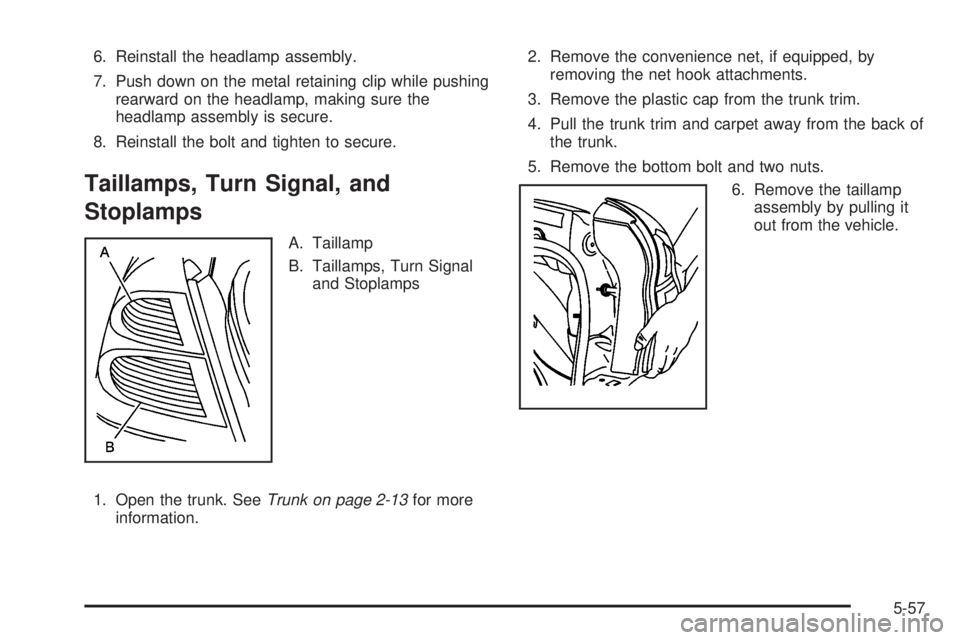
5. Remove the bottom bolt and two nuts.
6. Remove the taillamp
assembly by pulling it
out from the vehicle.
5-57