engine PONTIAC GRAND PRIX 2008 Owner's Manual
[x] Cancel search | Manufacturer: PONTIAC, Model Year: 2008, Model line: GRAND PRIX, Model: PONTIAC GRAND PRIX 2008Pages: 450, PDF Size: 2.64 MB
Page 117 of 450
Instrument Panel Overview...............................3-4
Hazard Warning Flashers................................3-6
Other Warning Devices...................................3-6
Horn .............................................................3-6
Tilt Wheel.....................................................3-7
Turn Signal/Multifunction Lever.........................3-7
Turn and Lane-Change Signals........................3-8
Headlamp High/Low-Beam Changer..................3-9
Flash-to-Pass.................................................3-9
Windshield Wiper Lever.................................3-10
Cruise Control..............................................3-12
Exterior Lamps.............................................3-16
Headlamps on Reminder................................3-17
Daytime Running Lamps (DRL).......................3-17
Fog Lamps ..................................................3-18
Exterior Lighting Battery Saver........................3-19
Interior Lamps..............................................3-19
Instrument Panel Brightness...........................3-19
Courtesy Lamps...........................................3-19
Dome Lamp .................................................3-20
Entry Lighting...............................................3-20
Delayed Entry Lighting...................................3-20
Delayed Exit Lighting.....................................3-21
Front Reading Lamps....................................3-21
Overhead Console Reading Lamps.................3-21
Rear Assist Handle Reading Lamps................3-21
Electric Power Management...........................3-22Battery Run-Down Protection..........................3-22
Head-Up Display (HUD).................................3-23
Accessory Power Outlet(s).............................3-26
Ashtray(s) and Cigarette Lighter......................3-27
Climate Controls............................................3-28
Climate Control System.................................3-28
Dual Automatic Climate Control System...........3-32
Outlet Adjustment.........................................3-36
Passenger Compartment Air Filter...................3-36
Warning Lights, Gages, and Indicators............3-38
Instrument Panel Cluster................................3-39
Speedometer and Odometer...........................3-40
Tachometer.................................................3-40
Safety Belt Reminders...................................3-41
Airbag Readiness Light..................................3-42
Passenger Airbag Status Indicator...................3-43
Up-Shift Light...............................................3-45
Brake System Warning Light..........................3-45
Anti-lock Brake System (ABS) Warning Light. . . .3-47
Traction Control System (TCS) Warning Light . . .3-47
Enhanced Traction System Warning Light.........3-48
Engine Coolant Temperature Warning Light......3-48
Engine Coolant Temperature Gage..................3-49
Tire Pressure Light.......................................3-49
Malfunction Indicator Lamp.............................3-50
Oil Pressure Light.........................................3-52
Section 3 Instrument Panel
3-1
Page 133 of 450
;(Parking Lamp):Turn the band to this position to
turn on the parking lamps together with the following:
Taillamps
License Plate Lamps
Instrument Panel Lights
The parking brake indicator light comes on and stays
on when the parking lamps are on with the engine
in LOCK/OFF and the ignition to ACC/ACCESSORY.
5(Headlamps):Turn the control to this position
to turn on the headlamps together with the following
lamps listed below. A warning chime sounds if the
driver’s door is opened while the ignition switch is off
and the headlamps are on.
Parking Lamps
Taillamps
License Plate Lamps
Instrument Panel Lights
Headlamps on Reminder
A warning chime will sound if the vehicle’s ignition is
off and the driver’s door is opened when the exterior
lamp control is left on in either the headlamp or
parking lamp position.
Daytime Running Lamps (DRL)
Daytime Running Lamps (DRL) can make it easier
for others to see the front of your vehicle during the day.
DRL can be helpful in many different driving conditions,
but they can be especially helpful in the short periods
after dawn and before sunset. Daytime running
lamps are required to function at all times on all
vehicles rst sold in Canada.
A light sensor on top of the instrument panel makes
the DRL work, so be sure it is not covered.
The DRL system will make the low-beam headlamps
come on at reduced brightness when the following
conditions are met:
The ignition is on.
The exterior lamps control is off.
The parking brake is released.
While the DRL are on, only the vehicle’s low-beam
headlamps will be on at reduced brightness. The turn
signal, taillamps, sidemarker and other lamps will not be
on. The instrument panel cluster will not be lit up either.
3-17
Page 138 of 450
Electric Power Management
The vehicle has Electric Power Management (EPM) that
estimates the battery’s temperature and state of charge.
It then adjusts the voltage for best performance and
extended life of the battery.
When the battery’s state of charge is low, the voltage is
raised slightly to quickly put the charge back in. When the
state of charge is high, the voltage is lowered slightly to
prevent overcharging. If the vehicle has a voltmeter gage
or voltage display on the Driver Information Center (DIC),
you may see the voltage move up or down. This is
normal. If there is a problem, an alert will be displayed.
The battery can be discharged at idle if the electrical
loads are very high. This is true for all vehicles.
This is because the generator (alternator) may not be
spinning fast enough at idle to produce all the power
that is needed for very high electrical loads.
A high electrical load occurs when several of the
following loads are on: headlamps, high beams, fog
lamps, rear window defogger, climate control fan at
high speed, heated seats, engine cooling fans, trailer
loads, and loads plugged into accessory power outlets.
EPM works to prevent excessive discharge of the
battery. It does this by balancing the generator’s output
and the vehicle’s electrical needs. It can increase
engine idle speed to generate more power, whenever
needed. It can temporarily reduce the power demands
of some accessories.Normally, these actions occur in steps or levels, without
being noticeable. In rare cases at the highest levels
of corrective action, this action may be noticeable to
the driver. If so, a Driver Information Center (DIC)
message might be displayed, such as Battery Saver
Active. If this message is displayed, it is recommended
that the driver reduce the electrical loads as much
as possible. SeeDIC Warnings and Messages
on page 3-67.
Battery Run-Down Protection
The vehicle has a feature to help prevent the battery
from draining in case the interior, trunk, or underhood
lamps are accidentally left on. If any of these lamps are
left on while the ignition is in LOCK/OFF, they will
automatically turn off after 10 minutes. The lamps will not
come back on again until any of the following are done:
The ignition is turned to ON/RUN or
ACC/ACCESSORY.
The interior lamps control is turned completely to
the right, then back slightly to the left.
Open, or close and reopen, a door that is closed.
If the vehicle has less than 15 miles (25 km) on the
odometer, the battery saver will turn off the lamps
after only three minutes.
3-22
Page 140 of 450
When the ignition key is turned to ON/RUN, the HUD
will display an introductory message for a short
time, until the HUD has warmed up.
The following indicator lights come on the instrument
panel when activated and will also appear on the HUD:
Turn Signal Indicators
High-Beam Indicator Symbol
The HUD will temporarily display CHECK TRIP
COMPUTER when there are messages on the
DIC trip computer.
The HUD will also display the following messages when
these systems, if the vehicle has them, are active:
TRACTION CONTROL ACTIVE
STABILITY CONTROL ACTIVE
The HUD will temporarily display the TRACTION
CONTROL OFF message when the traction control
system is turned off.
The HUD will temporarily display the CRUISE SET
message when cruise control is activated or cruise
speed is increased.
Notice:If you try to use the HUD image as a
parking aid, you may misjudge the distance and
damage your vehicle. Do not use the HUD image
as a parking aid.When the HUD is on, the speedometer reading will
continually be displayed. The current radio station or
CD track number will display for a short period of time
after the radio or CD track status changes. This will
happen whenever one of the radio controls is pressed.
The speedometer size will be reduced when radio,
CD information, warnings, or turn-by-turn guidance
information are displayed on the HUD.
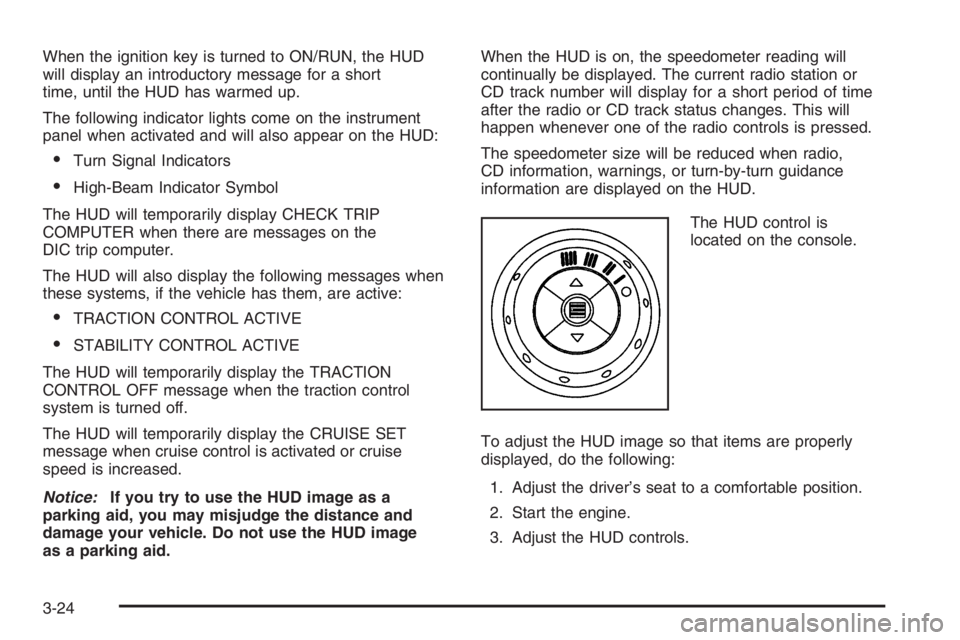
The HUD control is
located on the console.
To adjust the HUD image so that items are properly
displayed, do the following:
1. Adjust the driver’s seat to a comfortable position.
2. Start the engine.
3. Adjust the HUD controls.
3-24
Page 146 of 450
Temperature
The knob on the right of the climate control panel is the
temperature adjustment that can be used with any of
the climate control modes.
Turn the knob clockwise for warmer settings and
counterclockwise for colder settings.
Air Conditioning
#
(Air Conditioner):Press this button to turn the
air conditioning compressor on or off. An indicator light
to the right of the button will come on. This button
has no control over the air conditioning compressor
when in Floor/Defog and Defrost modes. The instrument
panel brightness control may have to be adjusted to
the highest setting in order to see the indicator.
SeeInstrument Panel Brightness on page 3-19for
additional information.
On hot days during the vehicle’s initial start-up, open
the windows to let hot inside air escape; then close
them. This helps to reduce the time it takes for
the vehicle to cool down. It also helps the system to
operate more efficiently.For quicker cool down on hot days, do the following:
1. Select any mode setting between vent and the
setting before defrost.
2. Select the air conditioner.
3. Select the coolest temperature.
4. Select the highest climate control fan speed.
Using these settings will set recirculation for quicker
cool down (the light indicator will not turn on). If outside
air is desired, press the recirculation button twice.
Using these settings together for long periods of time
may cause the air inside the vehicle to become too dry.
To prevent this from happening, after ve minutes
the recirculation door will open slightly to allow some
outside air into the vehicle.
The air conditioning system removes moisture from the
air, so sometimes there may be a small amount of
water dripping underneath the vehicle while it is idling
or after the engine is turned off. This is normal.
3-30
Page 147 of 450
Recirculation
h
(Recirculation):Press this button to activate the
recirculation mode. With this selection, inside air is
recirculated into the vehicle. This mode reduces outside
air and odors from entering the vehicle. It may also help
to heat or cool the air inside the vehicle more quickly.
An indicator light to the right of the button will come on
to show that the recirculation button has been pressed.
The instrument panel brightness control may have to be
adjusted to the highest setting to see the indicator.
The recirculation mode has a timer. After ve minutes,
the system’s air inlet door will move slightly to allow
for ten percent fresh outside air to maintain interior
air quality. The only way to reset the system to full
recirculation is to restart the ve minute timer by
selecting vent/outside air and recirculation again.
Rear Window Defogger
The rear window defogger uses a warming grid to
remove fog or frost from the rear window. Be sure to
clear as much snow from the rear window as possible.Notice:Do not use a razor blade or sharp object
to clear the inside rear window. Do not adhere
anything to the defogger grid lines in the rear glass.
These actions may damage the rear defogger.
Repairs would not be covered by your warranty.
=(Rear Window Defogger):Press this button to
turn the rear window defogger on or off.
An indicator light to the right of the button will come
on to show that the rear window defogger is on.
The instrument panel brightness control may have
to be adjusted to the highest setting during the daytime
in order to see the indicator light.
The rear window defogger will turn off about 20 minutes
after the button is pressed. If the button is pressed
again, it will run another 20 minutes. The defogger
can be turned off by pressing the button again or by
turning off the engine.
Do not drive the vehicle until all windows are clear.
z(Heated Seats):Press this button to turn the heated
seats on and off. The button on the left controls the
driver’s seat and the button on the right controls
the passenger’s seat. SeeHeated Seats on page 1-4
for additional information.
3-31
Page 151 of 450
-(Floor/Defog):This mode directs the air between
the windshield, oor outlets and side windows.
When you select this mode, the system turns off
recirculation and runs the air-conditioning compressor
unless the outside temperature is near or below
freezing. Pressing the recirculation button, while in this
mode, will have no effect other than turning on the
indicator light.
1(Defrost):This mode directs most of the air to the
windshield, with some air directed to the side windows.
In this mode, the system will automatically turn off
the recirculation and run the air conditioning compressor,
unless the outside temperature is near or below
freezing. Pressing the recirculation button, while in this
mode, will have no affect other than turning on the
indicator light.
Rear Window Defogger
The rear window defogger uses a warming grid to
remove fog or frost from the rear window.
The rear window defogger will only work when the
engine is running.
=(Rear Window Defogger):Press this button to
turn the rear window defogger on and off. Be sure
to clear as much snow from the rear window as possible.
The rear window defogger will turn off about 20 minutes
after the button is pressed. If turned on again, the
defogger will only run for about 20 minutes before
turning off. The defogger can also be turned off
by pressing the button again or by turning off the engine.
Do not drive the vehicle until all the windows are clear.
Notice:Do not use anything sharp on the inside
of the rear window. If you do, you could cut or
damage the warming grid, and the repairs would
not be covered by your warranty. Do not attach
a temporary vehicle license, tape, a decal or
anything similar to the defogger grid.
3-35
Page 152 of 450
Outlet Adjustment
Turn the air outlets, located in the middle and at each
outboard side of the instrument panel, to adjust the
direction of the airow.
Operation Tips
Clear away any ice, snow, or leaves from the air
inlets at the base of the windshield that may
block the ow of air into the vehicle.
Use of non-GM approved hood deectors may
adversely affect the performance of the system.
Keep the path under the front seats clear of objects
to help circulate the air inside of the vehicle more
effectively.
If the airow seems low when the fan is at the
highest setting, the passenger compartment air
lter may need to be replaced. See “Passenger
Compartment Air Filter” following, for more
information.
Passenger Compartment Air Filter
The passenger compartment air lter is located near the
passenger’s side windshield wiper arm, under the
inlet grille.
The lter traps most of the pollen from entering the
climate control system. Similar to the engine’s air lter,
it may need to be changed periodically to insure
system performance. SeeScheduled Maintenance on
page 6-4for more information.
To change the passenger compartment air lter,
1. Turn the ignition to ACC/ACCESSORY and the
windshield wipers on.
2. Turn the ignition to LOCK/OFF when the windshield
wipers are in the upright position.
3. Raise the hood.
4. Disconnect the windshield washer pump hose from
the fender rail and the air inlet grille.
5. Remove the hood weather-strip from the
passenger’s side of the vehicle, peeling it back
halfway.
3-36
Page 154 of 450
Warning Lights, Gages,
and Indicators
This part describes the warning lights and gages on
your vehicle. The pictures help to locate them.
Warning lights and gages can signal that something
is wrong before it becomes serious enough to cause
an expensive repair or replacement. Paying attention
to the warning lights and gages could also save
you or others from injury.
Warning lights come on when there may be or is
a problem with one of your vehicle’s functions. As the
details show on the next few pages, some warning lights
come on briey when you start the engine just to let
you know they are working. If you are familiar with
this section, you should not be alarmed when this
happens.Gages can indicate when there may be or is a problem
with one of your vehicle’s functions. Often gages
and warning lights work together to let you know when
there is a problem with your vehicle.
When one of the warning lights comes on and stays on
as you are driving, or when one of the gages shows
there may be a problem, check the section that tells
you what to do about it. Please follow this manual’s
advice. Waiting to do repairs can be costly and even
dangerous. So please get to know your vehicle’s
warning lights and gages. They can be a big help.
Your vehicle may also have a Driver Information
Center (DIC) that works along with the warning lights
and gages. SeeDriver Information Center (DIC)
on page 3-55for more information.
3-38
Page 156 of 450
Speedometer and Odometer
The speedometer shows the vehicle’s speed in both
miles per hour (mph) and kilometers per hour (km/h).
The odometer, located on the Driver Information Center
(DIC) display, shows how far the vehicle has been
driven, in either miles or kilometers. SeeDIC Operation
and Displays (Uplevel DIC with Trip Computer) on
page 3-55orDIC Operation and Displays (Base Level
DIC) on page 3-62for more information.
If the vehicle has the Head-Up Display (HUD) the speed
will also be displayed on the HUD screen.
If a vehicle has to have a new odometer installed, a
new one can be set to the mileage total of the old
odometer, if that can be done. If it cannot, than it will be
set at zero and a label must be put on the driver’s
door to show the old mileage reading when the new
odometer was installed.
Tachometer
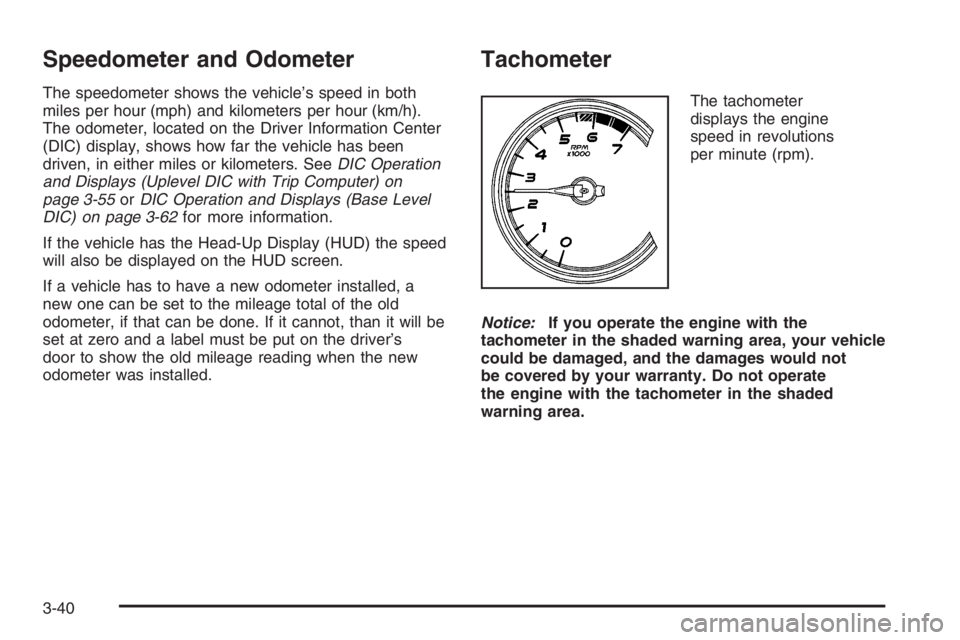
The tachometer
displays the engine
speed in revolutions
per minute (rpm).
Notice:If you operate the engine with the
tachometer in the shaded warning area, your vehicle
could be damaged, and the damages would not
be covered by your warranty. Do not operate
the engine with the tachometer in the shaded
warning area.
3-40