ignition PONTIAC GRAND PRIX 2008 Manual PDF
[x] Cancel search | Manufacturer: PONTIAC, Model Year: 2008, Model line: GRAND PRIX, Model: PONTIAC GRAND PRIX 2008Pages: 450, PDF Size: 2.64 MB
Page 211 of 450
Your vehicle may have a feature called Retained
Accessory Power (RAP). With RAP, the audio system
can be played even after the ignition is turned off.
SeeRetained Accessory Power (RAP) on page 2-24
for more information.
Setting the Clock
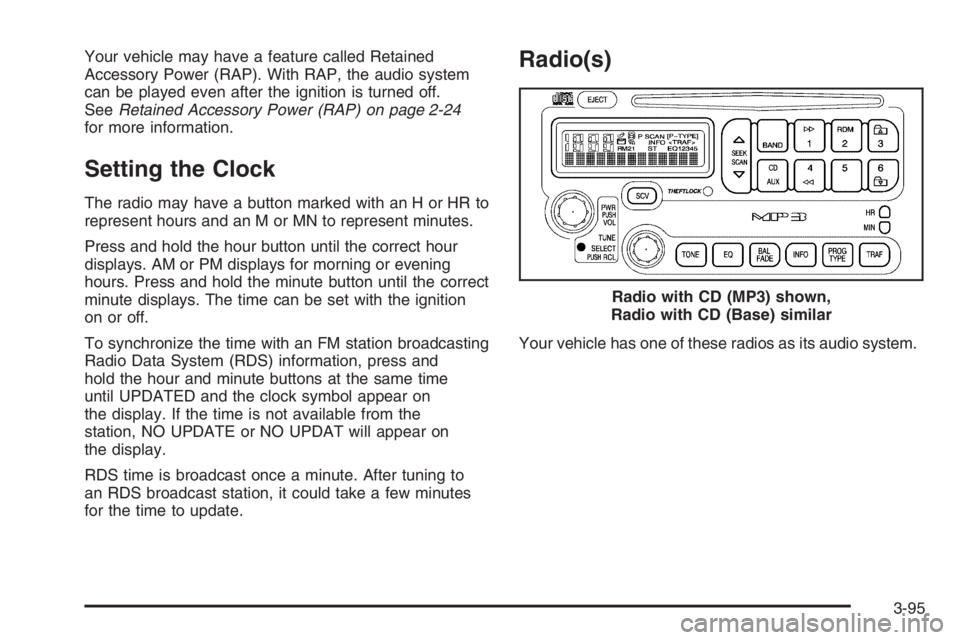
The radio may have a button marked with an H or HR to
represent hours and an M or MN to represent minutes.
Press and hold the hour button until the correct hour
displays. AM or PM displays for morning or evening
hours. Press and hold the minute button until the correct
minute displays. The time can be set with the ignition
on or off.
To synchronize the time with an FM station broadcasting
Radio Data System (RDS) information, press and
hold the hour and minute buttons at the same time
until UPDATED and the clock symbol appear on
the display. If the time is not available from the
station, NO UPDATE or NO UPDAT will appear on
the display.
RDS time is broadcast once a minute. After tuning to
an RDS broadcast station, it could take a few minutes
for the time to update.
Radio(s)
Your vehicle has one of these radios as its audio system.Radio with CD (MP3) shown,
Radio with CD (Base) similar
3-95
Page 212 of 450
Radio Data System (RDS)
The audio system has a Radio Data System (RDS).
RDS features are available for use only on FM stations
that broadcast RDS information.
With RDS, the radio can do the following:
Seek to stations broadcasting the selected type of
programming
Receive announcements concerning local and
national emergencies
Display messages from radio stations
Seek to stations with traffic announcements
This system relies upon receiving specic information
from these stations and only works when the information
is available. In rare cases, a radio station may
broadcast incorrect information that causes the radio
features to work improperly. If this happens, contact the
radio station.
While the radio is tuned to an RDS station, the station
name or the call letters appear on the display instead
of the frequency. RDS stations may also provide
the time of day, a program type (PTY) for current
programming, and the name of the program being
broadcast.
XM™ Satellite Radio Service
XM™ is a satellite radio service that is based in the
48 contiguous United States and 10 Canadian provinces.
XM™ Satellite Radio has a wide variety of programming
and commercial-free music, coast-to-coast, and in
digital-quality sound. During your trial or when you
subscribe, you will get unlimited access to XM™ Radio
Online for when you are not in your vehicle. A service
fee is required to receive the XM™ service. For more
information, contact XM™ at www.xmradio.com or
call 1-800-929-2100 in the U.S. and www.xmradio.ca
or call 1-877-438-9677 in Canada.
Playing the Radio
PWR (Power):Push this knob to turn the system
on and off.
VOL (Volume):Turn this knob clockwise or
counterclockwise to increase or to decrease the volume.
RCL (Recall):Push this knob to switch the display
between the radio station frequency and the time.
When the ignition is turned off, push this knob to display
the time.
For RDS, push the RCL knob to change what appears
on the display while using RDS. The display options
are station name, RDS station frequency, PTY, and the
name of the program (if available).
3-96
Page 219 of 450
Radio Messages for XM™ Only
SeeXM Radio Messages on page 3-114later in
this section for further detail.
Playing a CD
Radio with CD (Base)
Insert a CD partway into the slot, label side up. The
player pulls it in and the CD should begin playing. If you
want to insert a CD when the ignition is off, rst press
the eject button or push the RCL knob. If you insert a CD
with the radio off and the ignition on, it starts to play.
Radio with CD (MP3)
Insert a CD partway into the slot, label side up. The
player pulls it in and READING DISC and the CD symbol
appears on the display. If you want to insert a CD
with the ignition off, rst press the EJECT button or
push the RCL knob.
When a CD is inserted, the CD symbol appears on
the display. As each new track starts to play, the track
number appears on the display.
If the ignition or radio is turned off with a CD in the
player it stays in the player. When the ignition or radio
is turned on, the CD starts to play where it stopped,
if it was the last selected audio source.For vehicles that have a radio with a Six-Disc CD
player, see the following:
LOAD / CD
Z:Press the LOAD side of this button to
load CDs into the CD player. This CD player holds up
to six CDs.
To insert one CD, do the following:
1. Turn the ignition on.
2. Press and release the LOAD button.
3. Wait for the indicator light, located to the right of
the slot, to turn green.
4. Load a CD. Insert the CD partway into the slot,
label side up. The player pulls the CD in.
To insert multiple CDs, do the following:
1. Turn the ignition on.
2. Press and hold the LOAD button for two seconds.
A beep sounds and the indicator light, located to
the right of the slot, begins to ash.
3. Once the light stops ashing and turns green, load
a CD. Insert the CD partway into the slot, label side
up. The player pulls the CD in.
Once the CD is loaded, the light begins ashing
again. Once the light stops ashing and turns green
you can load another CD. The CD player takes
up to six CDs. Do not try to load more than six.
3-103
Page 227 of 450
Order of Play
Tracks are played in the following order:
Play begins from the rst track in the rst playlist
and continues sequentially through all tracks in
each playlist. When the last track of the last playlist
has played, play continues from the rst track of
the rst playlist.
If the CD does not contain any playlists, then play
begins from the rst track under the root directory.
When all tracks from the root directory have
played, play continues from les according to
their numerical listing. After playing the last track
from the last folder, play begins again at the
rst track of the rst folder or root directory.
When play enters a new folder, the display does not
automatically show the new folder name unless
you have chosen the folder mode as the default display.
See RCL later in this section for more information.
The new track name appears on the display.
File System and Naming
The song name that is displayed is the song name that is
contained in the ID3 tag. If the song name is not present
in the ID3 tag, then the radio displays the le name
without the extension (such as .mp3) as the track name.Track names longer than 32 characters or four pages
are shortened. Parts of words on the last page of
text and the extension of the lename does not display.
Preprogrammed Playlists
Preprogrammed playlists that were created by
WinAmp™, MusicMatch™, or Real Jukebox™ software
can be accessed, however, they cannot be edited
using the radio. These playlists are treated as special
folders containing compressed audio song les.
Playing an MP3
Insert a CD partway into the slot, label side up. The
player pulls it in, and READING displays. The CD
should begin playing and the CD symbol appears on the
display. If you want to insert a CD with the ignition off,
rst press the EJECT button or the RCL knob.
If the ignition or radio is turned off with a CD in the
player it stays in the player. When the ignition or radio
is turned on, the CD starts to play where it stopped,
if it was the last selected audio source.
As each new track starts to play, the track number
appears on the display.
3-111
Page 229 of 450
wSEEKx:Press the up arrow to go to the start of
the next track. Press the down arrow to go to the start of
the previous track. Pressing either arrow for more than
two seconds searches the previous or next tracks at
two tracks per second. When the track number that
you would like to play appears on the display, release
the arrow to stop searching and to play the track.
TUNE:Turn this knob to fast track reverse or advance
through tracks in all folders or playlists. The track
number and le name appears on the display for each
track. Turn this knob while in random to fast track
reverse or advance the tracks in sequential order.
RCL (Recall):Push this knob to switch between track
mode, folder/playlist mode, and time of day mode.
The display shows only 13 characters, but there can
be up to three pages of text. If there are more than
13 characters in the song, folder, or playlist name
pushing this knob within two seconds takes you to the
next page of text. If there are no other pages to be
shown, pushing this knob within two seconds takes
you to the next display mode.
Track mode displays the current track number and
the ID3 tag song name.Folder/playlist mode displays the current folder or
playlist number and the folder/playlist name.
Time of day mode displays the time of day and the
ID3 tag song name.
To change the default on the display, push this knob
until you see the desired display, then hold this knob
for two seconds. The radio produces one beep and the
selected display is now the default.
INFO (Information):INFO displays whenever a current
track has ID3 tag information. Press this button to
display the artist name and album contained in the tag.
INFO disappears from the display when the information
in the ID3 tag has nished.
BAND:Press this button to listen to the radio when a
CD is playing. The inactive CD remains inside the radio
for future listening.
CD AUX (Auxiliary):Press this button to play a CD
when listening to the radio. The CD symbol appears on
the display when a CD is loaded.
EJECT:Press this button to eject a CD. Eject may
be activated with either the ignition or radio off.
CDs may be loaded with the radio and ignition off if
this button is pressed rst.
3-113
Page 234 of 450
XM™ Satellite Radio Antenna
System
The XM™ Satellite Radio antenna is located on the
roof of the vehicle. Keep this antenna clear of snow
and ice build up for clear radio reception.
If the vehicle has a sunroof, the performance of the
XM™ system may be affected if the sunroof is open.
Loading items onto the roof of the vehicle can
interfere with the performance of the XM™ system.
Make sure the XM™ Satellite Radio antenna is
not obstructed.
Chime Level Adjustment
The radio is used to adjust the vehicle’s chime level.
To change the volume level of the chime, press and hold
pushbutton 6 with the ignition on and the radio power
off. The volume level will change from the normal
level to loud, and LOUD will appear on the radio display.
To change back to the default or normal setting,
press and hold pushbutton 6 again. The volume level
will change from the loud level to normal, and NORMAL
will appear on the radio display. Each time the chime
volume is changed, three chimes will sound to indicate
the new volume selected. Removing the radio and
not replacing it with a factory radio or chime module will
disable vehicle chimes.
3-118
Page 251 of 450
{CAUTION:
Coasting downhill in NEUTRAL (N) or with the
ignition off is dangerous. The brakes will have
to do all the work of slowing down and they
could get so hot that they would not work well.
You would then have poor braking or even
none going down a hill. You could crash.
Always have the engine running and your
vehicle in gear when you go downhill.
Stay in your own lane. Do not swing wide or cut
across the center of the road. Drive at speeds
that let you stay in your own lane.
Top of hills: Be alert — something could be in your
lane (stalled car, accident).
Pay attention to special road signs (falling rocks
area, winding roads, long grades, passing or
no-passing zones) and take appropriate action.
Winter Driving
Here are some tips for winter driving:
Have your vehicle in good shape for winter.
You might want to put winter emergency
supplies in your trunk.
Include an ice scraper, a small brush or broom,
a supply of windshield washer uid, a rag, some
winter outer clothing, a small shovel, a ashlight,
a red cloth, and a couple of reective warning triangles.
And, if you will be driving under severe conditions,
include a small bag of sand, a piece of old carpet,
or a couple of burlap bags to help provide traction.
Be sure you properly secure these items in your vehicle.
Also seeTires on page 5-62.
4-17
Page 315 of 450
Battery
Your vehicle has a maintenance free battery. When it is
time for a new battery, see your dealer/retailer for one
that has the replacement number shown on the original
battery’s label. SeeEngine Compartment Overview on
page 5-12for battery location.
Warning:Battery posts, terminals, and related
accessories contain lead and lead compounds,
chemicals known to the State of California to cause
cancer and reproductive harm. Wash hands after
handling.
If the battery has a very low charge or is dead, you
might not be able to remove the ignition key from the
ignition switch or shift out of PARK (P). SeeShifting Out
of PARK (P) on page 2-35.
Vehicle Storage
{CAUTION:
Batteries have acid that can burn you and gas
that can explode. You can be badly hurt if you
are not careful. SeeJump Starting on
page 5-46for tips on working around a battery
without getting hurt.
Infrequent Usage: If you drive your vehicle infrequently,
remove the black, negative (−) cable from the battery.
This will help keep the battery from running down.
Extended Storage: For extended storage of your vehicle,
remove the black, negative (−) cable from the battery or
use a battery trickle charger. This will help maintain the
charge of the battery over an extended period of time.
5-45
Page 317 of 450
3. Turn off the ignition on both vehicles. Unplug
unnecessary accessories plugged into the cigarette
lighter or the accessory power outlet. Turn off the
radio and all lamps that are not needed. This will
avoid sparks and help save both batteries. And it
could save the radio!
4. Open the hood on the other vehicle and locate the
positive (+) and negative (−) terminal locations on
that vehicle.
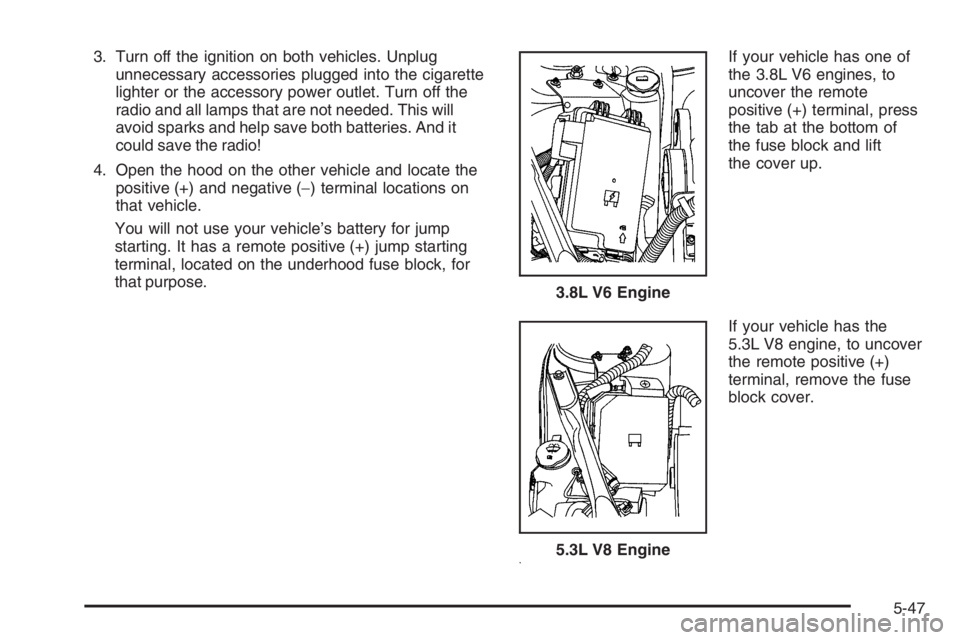
You will not use your vehicle’s battery for jump
starting. It has a remote positive (+) jump starting
terminal, located on the underhood fuse block, for
that purpose.If your vehicle has one of
the 3.8L V6 engines, to
uncover the remote
positive (+) terminal, press
the tab at the bottom of
the fuse block and lift
the cover up.
If your vehicle has the
5.3L V8 engine, to uncover
the remote positive (+)
terminal, remove the fuse
block cover. 3.8L V6 Engine
5.3L V8 Engine
5-47
Page 343 of 450
At the same time a message to check the pressure in a
specic tire appears on the Driver Information center
(DIC) display. The low tire pressure warning light and
the DIC warning message come on at each ignition cycle
until the tires are inated to the correct ination pressure.
Using the DIC buttons, tire pressure readings can be
viewed by the driver. For additional information and
details about the DIC operation and displays seeDIC
Operation and Displays (Uplevel DIC with Trip Computer)
on page 3-55orDIC Operation and Displays (Base Level
DIC) on page 3-62andDIC Warnings and Messages on
page 3-67.
The low tire pressure warning light may come on in cool
weather when the vehicle is rst started, and then turn
off as you start to drive. This could be an early indicator
that the air pressure in the tire(s) are getting low and
need to be inated to the proper pressure.A tire and Loading Information label, attached to your
vehicle, shows the size of your vehicle’s original
equipment tires and the correct ination pressure for your
vehicle’s tires when they are cold. SeeLoading Your
Vehicle on page 4-22, for an example of the Tire and
Loading Information label and its location on your vehicle.
Also seeInflation - Tire Pressure on page 5-69.
Your vehicle’s TPMS system can warn you about a low
tire pressure condition but it does not replace normal
tire maintenance. SeeTire Inspection and Rotation on
page 5-75andTires on page 5-62.
Your vehicle, when new, may have included a
factory-installed Tire Inator Kit. This kit uses a GM
approved liquid tire sealant. SeeTire Sealant and
Compressor Kit (GXP) on page 5-86.
Notice:Using non-approved tire sealants could
damage the Tire Pressure Monitor System (TPMS)
sensors. TPMS sensor damage caused by using
an incorrect tire sealant is not covered by the
vehicle warranty. Always use the GM approved tire
sealant available through your dealer/retailer.
5-73