phone PONTIAC GTO 2004 Owners Manual
[x] Cancel search | Manufacturer: PONTIAC, Model Year: 2004, Model line: GTO, Model: PONTIAC GTO 2004Pages: 326, PDF Size: 2.24 MB
Page 91 of 326
Cupholder(s)
The two cupholders are located in front of the center
console storage area.
Front Storage Area
There is a front storage compartment located under the
audio system and a rear storage compartment located
at the rear of the center console. These storage
compartments can be replaced by your vehicle’s dealer,
with an ashtray and cigarette lighter assembly.
An open storage bin is also provided under the front
storage compartment.
Center Console Storage Area
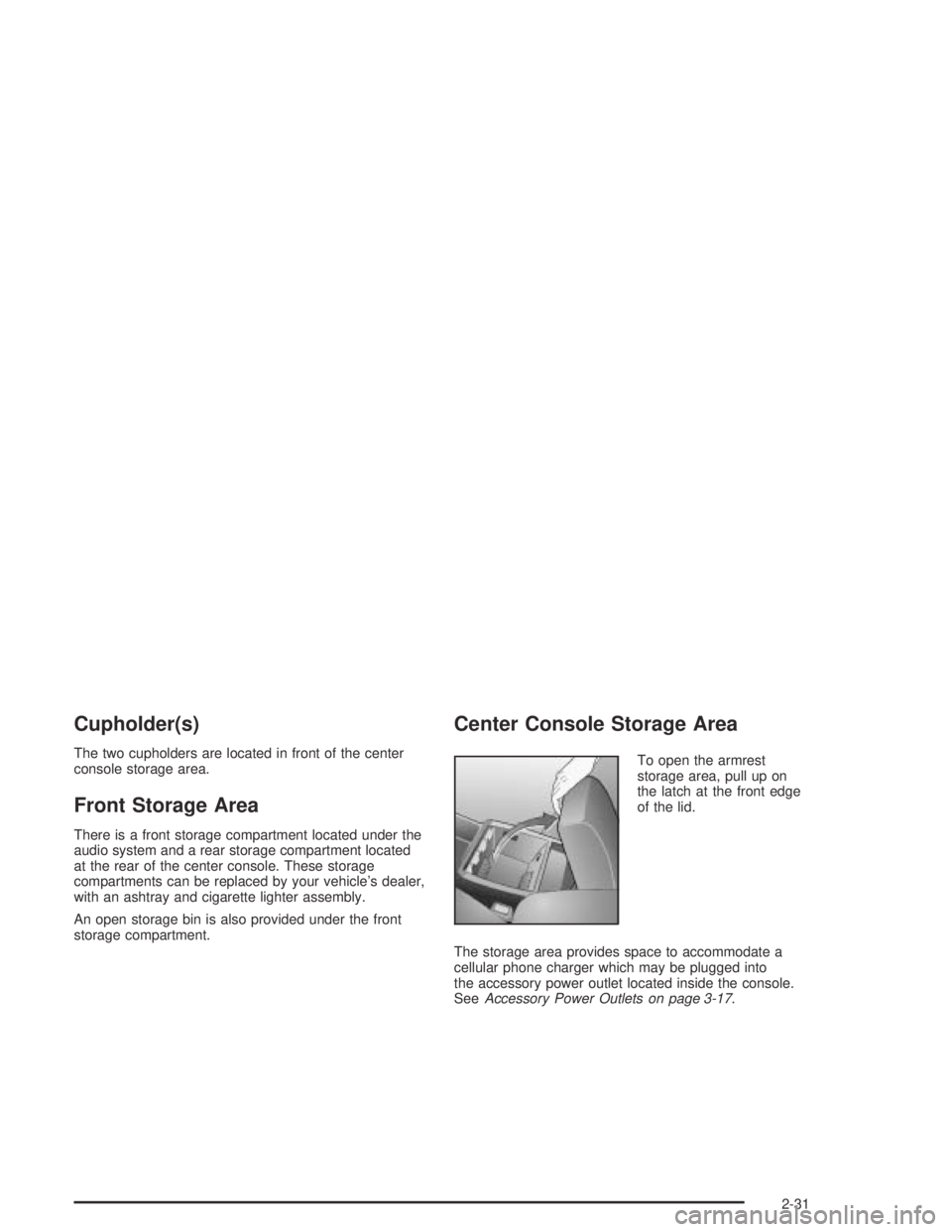
To open the armrest
storage area, pull up on
the latch at the front edge
of the lid.
The storage area provides space to accommodate a
cellular phone charger which may be plugged into
the accessory power outlet located inside the console.
SeeAccessory Power Outlets on page 3-17.
2-31
Page 115 of 326
Accessory Power Outlets
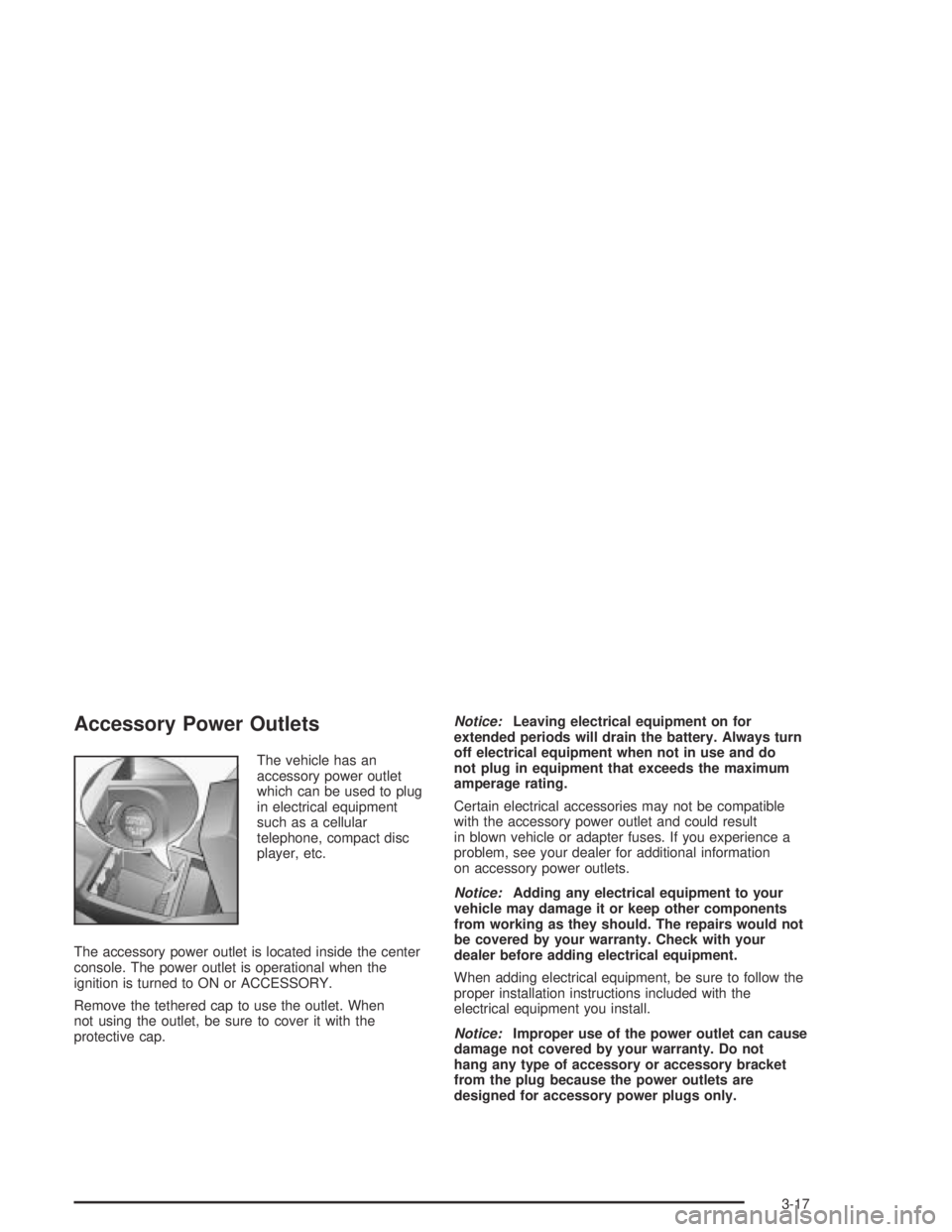
The vehicle has an
accessory power outlet
which can be used to plug
in electrical equipment
such as a cellular
telephone, compact disc
player, etc.
The accessory power outlet is located inside the center
console. The power outlet is operational when the
ignition is turned to ON or ACCESSORY.
Remove the tethered cap to use the outlet. When
not using the outlet, be sure to cover it with the
protective cap.Notice:Leaving electrical equipment on for
extended periods will drain the battery. Always turn
off electrical equipment when not in use and do
not plug in equipment that exceeds the maximum
amperage rating.
Certain electrical accessories may not be compatible
with the accessory power outlet and could result
in blown vehicle or adapter fuses. If you experience a
problem, see your dealer for additional information
on accessory power outlets.
Notice:Adding any electrical equipment to your
vehicle may damage it or keep other components
from working as they should. The repairs would not
be covered by your warranty. Check with your
dealer before adding electrical equipment.
When adding electrical equipment, be sure to follow the
proper installation instructions included with the
electrical equipment you install.
Notice:Improper use of the power outlet can cause
damage not covered by your warranty. Do not
hang any type of accessory or accessory bracket
from the plug because the power outlets are
designed for accessory power plugs only.
3-17
Page 140 of 326
Audio System(s)
Notice:Before you add any sound equipment to
your vehicle – like a tape player, CB radio, mobile
telephone or two-way radio – be sure you can
add what you want. If you can, it’s very important to
do it properly. Added sound equipment may
interfere with the operation of your vehicle’s engine,
radio or other systems, and even damage them.
Your vehicle’s systems may interfere with the
operation of sound equipment that has been added
improperly.
So, before adding sound equipment, check with
your dealer and be sure to check federal rules
covering mobile radio and telephone units.
Your audio system has been designed to operate easily
and to give years of listening pleasure. You will get
the most enjoyment out of it if you acquaint yourself with
it first. Figure out which radio you have in your vehicle,
find out what your audio system can do, and how to
operate all of its controls to be sure you are getting
the most out of the advanced engineering that went
into it.
Setting the Time
When the time is displayed and the radio is on, do the
following:
1. Press the TIME button for more than two seconds.
TIME ADJ or SET TIME will appear on the display
and the time will flash.
2. Press either SEEK arrow to adjust the hour.
3. Press either TUNE arrow to adjust the minutes.
4. Press the TIME button again to save the new time.
The radio will automatically exit the time setting mode
if no adjustments are made for eight seconds.
3-42
Page 149 of 326

Master Reset
Your radio has a reset feature that allows you to return
certain settings back to the factory default settings.
Use this feature when adjustments have been made that
affect the sound quality or operation of the radio and
you are unsure of how to return to the original settings.
This master reset feature will reset the following:
•Bass, Treble, Fade, and Balance
•Confirmation beeps to on
•SDV to setting 2
•DDL to on
•EQ to off.
To perform the master reset, do the following:
1. Turn off the radio by pressing the OFF button.
2. Press the ON button and pushbutton 4 at the same
time for about two seconds.
After the radio has finished resetting, the radio will
turn on with the original settings and no message
will appear on the display.
Mobile Telephone
Your radio includes a telephone adapter. The phone
adapter and the radio are connected. If a mobile phone
hands-free kit with the correct features, such as mute
line and wiring for a separate speaker has been
connected to it, the sound of the radio or CD will be
muted when the phone rings, the voice of the caller will
then be heard through the vehicle’s speakers, and
VOICE ON will appear on the display. When the call
ends, the radio or CD will come back on.
If the radio is off, it will turn on for a phone call if the
vehicle’s ignition is in ON or ACCESSORY.
If a call is in progress when the vehicle is turned off, the
radio will remain on until the call is completed.
You can adjust the volume, bass, treble, fade, and
balance when a phone call is in progress without
affecting the radio settings.
3-51
Page 153 of 326

Backglass Antenna
The AM-FM antenna is integrated with the rear window
defogger, located in the rear window. Be sure that
the inside surface of the rear window is not scratched
and that the lines on the glass are not damaged. If
the inside surface is damaged, it could interfere
with radio reception. Also, for proper radio reception,
the antenna connector at the top-center of the rear
window needs to be properly attached to the post on
the glass.
Notice:Using a razor blade or sharp object to
clear the inside rear window may damage the rear
window antenna and/or the rear window defogger.
Repairs would not be covered by your warranty.
Do not clear the inside rear window with sharp
objects.
Notice:Do not apply aftermarket glass tinting with
metallic lm. The metallic lm in some tinting
materials will interfere with or distort the incoming
radio reception. Any damage caused to your
backglass antenna due to metallic tinting materials
will not be covered by your warranty.Because this antenna is built into your rear window,
there is a reduced risk of damage caused by car washes
and vandals.
If you choose to add a cellular telephone to your
vehicle, and the antenna needs to be attached to the
glass, be sure that you do not damage the grid lines for
the AM-FM antenna. There is enough space between
the lines to attach a cellular telephone antenna
without interfering with radio reception.
Do not apply aftermarket glass tinting to the back glass.
The metallic film in some tinting materials will interfere
with or distort the incoming radio reception. Care
must be taken when cleaning the rear window because
it breaks in the resistive material heating element
and will adversely affect radio and defogger
performance. See your dealer for details.
3-55
Page 156 of 326
Your Driving, the Road, and
Your Vehicle
Defensive Driving
The best advice anyone can give about driving is: Drive
defensively.
Please start with a very important safety device in your
vehicle: Buckle up. SeeSafety Belts: They Are for
Everyone on page 1-6.
Defensive driving really means “be ready for anything.”
On city streets, rural roads or freeways, it means
“always expect the unexpected.”
Assume that pedestrians or other drivers are going to
be careless and make mistakes. Anticipate what
they might do. Be ready for their mistakes.
Rear-end collisions are about the most preventable of
accidents. Yet they are common. Allow enough following
distance. It is the best defensive driving maneuver, in
both city and rural driving. You never know when
the vehicle in front of you is going to brake or turn
suddenly.
Defensive driving requires that a driver concentrate on
the driving task. Anything that distracts from the
driving task — such as concentrating on a cellular
telephone call, reading, or reaching for something onthe floor — makes proper defensive driving more
difficult and can even cause a collision, with resulting
injury. Ask a passenger to help do things like this, or
pull off the road in a safe place to do them yourself.
These simple defensive driving techniques could
save your life.Drunken Driving
Death and injury associated with drinking and driving is
a national tragedy. It is the number one contributor
to the highway death toll, claiming thousands of victims
every year.
Alcohol affects four things that anyone needs to drive a
vehicle:
•Judgment
•Muscular Coordination
•Vision
•Attentiveness.
Police records show that almost half of all motor
vehicle-related deaths involve alcohol. In most cases,
these deaths are the result of someone who was
drinking and driving. In recent years, more than
16,000 annual motor vehicle-related deaths have been
associated with the use of alcohol, with more than
300,000 people injured.
4-2
Page 172 of 326
Hydroplaning
Hydroplaning is dangerous. So much water can build up
under your tires that they can actually ride on the
water. This can happen if the road is wet enough and
you are going fast enough. When your vehicle is
hydroplaning, it has little or no contact with the road.
Hydroplaning does not happen often. But it can if your
tires do not have much tread or if the pressure in
one or more is low. It can happen if a lot of water is
standing on the road. If you can see reflections
from trees, telephone poles or other vehicles, and
raindrops “dimple” the water’s surface, there could be
hydroplaning.
Hydroplaning usually happens at higher speeds. There
just is not a hard and fast rule about hydroplaning.
The best advice is to slow down when it is raining.
Driving Through Deep Standing Water
Notice:If you drive too quickly through deep
puddles or standing water, water can come in
through your engine’s air intake and badly damage
your engine. Never drive through water that is
slightly lower than the underbody of your vehicle.
If you can not avoid deep puddles or standing water,
drive through them very slowly.
Driving Through Flowing Water
{CAUTION:
Flowing or rushing water creates strong forces.
If you try to drive through owing water, as you
might at a low water crossing, your vehicle can
be carried away. As little as six inches of
owing water can carry away a smaller vehicle.
If this happens, you and other vehicle
occupants could drown. Do not ignore police
warning signs, and otherwise be very cautious
about trying to drive through owing water.
Some Other Rainy Weather Tips
•Besides slowing down, allow some extra following
distance. And be especially careful when you
pass another vehicle. Allow yourself more clear
room ahead, and be prepared to have your
view restricted by road spray.
•Have good tires with proper tread depth. SeeTires
on page 5-51.
4-18
Page 279 of 326

Fuses Usage
ACC HTR
CONT INST.
TRIP COMPHeater Controls, Trip Computer
CIGAR
LIGHTERCigarette Lighter
CRUISE CONT.
PWR STEER,
MIRRORSCruise Control System, Power
Steering, Power Mirrors
RADIO,
CELLPHONERadio System, Cellphone
ACC SOCKET Accessory Power Outlet
FRONT WIPER Front Windshield Wipers
SPARE Spare
PWR DOOR
LOCKS, ANT.
& WINDOWSPower Door Locks, Antenna, Power
Windows
INSTRUMENTS
THEFT HORNTheft System, Horn
HEATED REAR
WINDOWRear Window Defogger
RADIO Radio SystemFuses Usage
SUB WOOFER
& AMPLIFIERSub Woofer and Amplifier
SPARE Spare
AIRBAG Airbag
ABS Anti-Lock Brake System
SPARE Spare
SPARE Spare
SPARE Spare
Relays Usage
ACC RELAY Accessory Power Outlet
IGNITION
RELAYIgnition Switch
POWER
WINDOW
RELAYPower Windows
BLOWER
INHIBIT RELAYBlower
PARK LAMPS
RELAYParking Lamps
INTERIOR
ILLUM RELAYInterior Light Controls
5-89
Page 301 of 326
Customer Assistance and Information...............7-2
Customer Satisfaction Procedure......................7-2
Online Owner Center......................................7-3
Customer Assistance for Text
Telephone (TTY) Users................................7-4
Customer Assistance Offices............................7-4
GM Mobility Program for Persons
with Disabilities...........................................7-5
Roadside Assistance Program..........................7-5Courtesy Transportation...................................7-7
Vehicle Data Collection and Event
Data Recorders..........................................7-9
Reporting Safety Defects................................7-10
Reporting Safety Defects to the United
States Government....................................7-10
Reporting Safety Defects to General Motors.....7-10
Service Publications Ordering Information.........7-11
Section 7 Customer Assistance and Information
7-1
Page 303 of 326
The BBB Auto Line Program is an out of court program
administered by the Council of Better Business
Bureaus to settle automotive disputes regarding vehicle
repairs or the interpretation of the New Vehicle
Limited Warranty. Although you may be required to
resort to this informal dispute resolution program prior to
filing a court action, use of the program is free of
charge and your case will generally be heard within
40 days. If you do not agree with the decision given in
your case, you may reject it and proceed with any other
venue for relief available to you.
You may contact the BBB Auto Line Program using the
toll-free telephone number or write them at the
following address:
BBB Auto Line Program
Council of Better Business Bureaus, Inc.
4200 Wilson Boulevard
Suite 800
Arlington, VA 22203-1804
Telephone: 1-800-955-5100
This program is available in all 50 states and the District
of Columbia. Eligibility is limited by vehicle age,
mileage and other factors. General Motors reserves the
right to change eligibility limitations and/or discontinue
its participation in this program.Online Owner Center
The Owner Center is a resource for your GM ownership
needs. You can find your specific vehicle information
all in one place.
The Owner Center allows you to:
•Get e-mail service reminders.
•Access information about your specific vehicle,
including tips and videos and an electronic
version of this owner’s manual. (United States only)
•Keep track of your vehicle’s service history and
maintenance schedule.
•Find GM dealers for service nationwide.
•Receive special promotions and privileges only
available to members. (United States only)
Refer to the web for updated information.
To register your vehicle, visit www.MyGMLink.com.
(United States) or My GM Canada within
www.gmcanada.com (Canada).
7-3