light PONTIAC GTO 2005 User Guide
[x] Cancel search | Manufacturer: PONTIAC, Model Year: 2005, Model line: GTO, Model: PONTIAC GTO 2005Pages: 318, PDF Size: 2.06 MB
Page 68 of 318
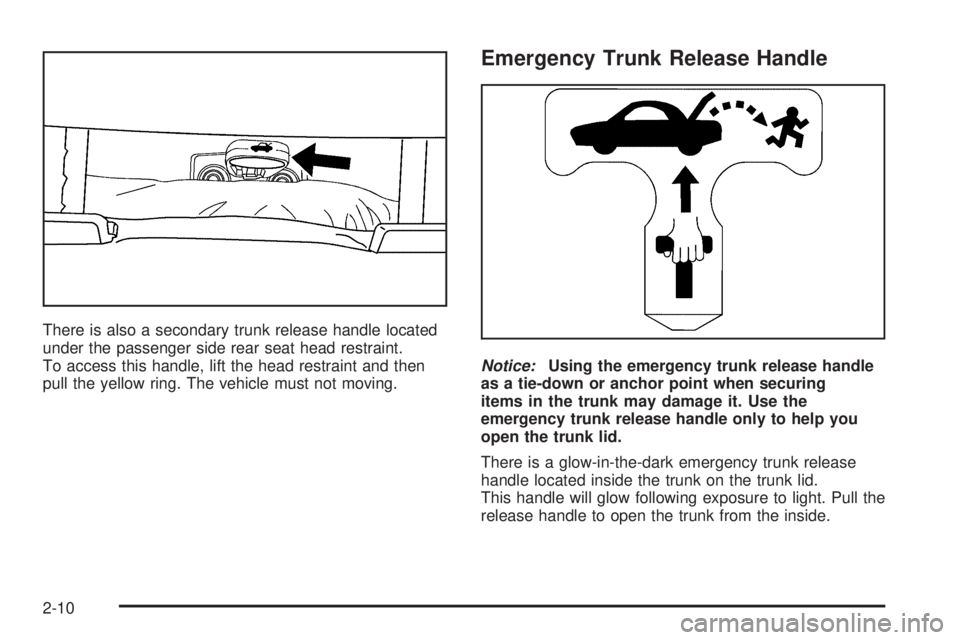
There is also a secondary trunk release handle located
under the passenger side rear seat head restraint.
To access this handle, lift the head restraint and then
pull the yellow ring. The vehicle must not moving.
Emergency Trunk Release Handle
Notice:Using the emergency trunk release handle
as a tie-down or anchor point when securing
items in the trunk may damage it. Use the
emergency trunk release handle only to help you
open the trunk lid.
There is a glow-in-the-dark emergency trunk release
handle located inside the trunk on the trunk lid.
This handle will glow following exposure to light. Pull the
release handle to open the trunk from the inside.
2-10
Page 70 of 318
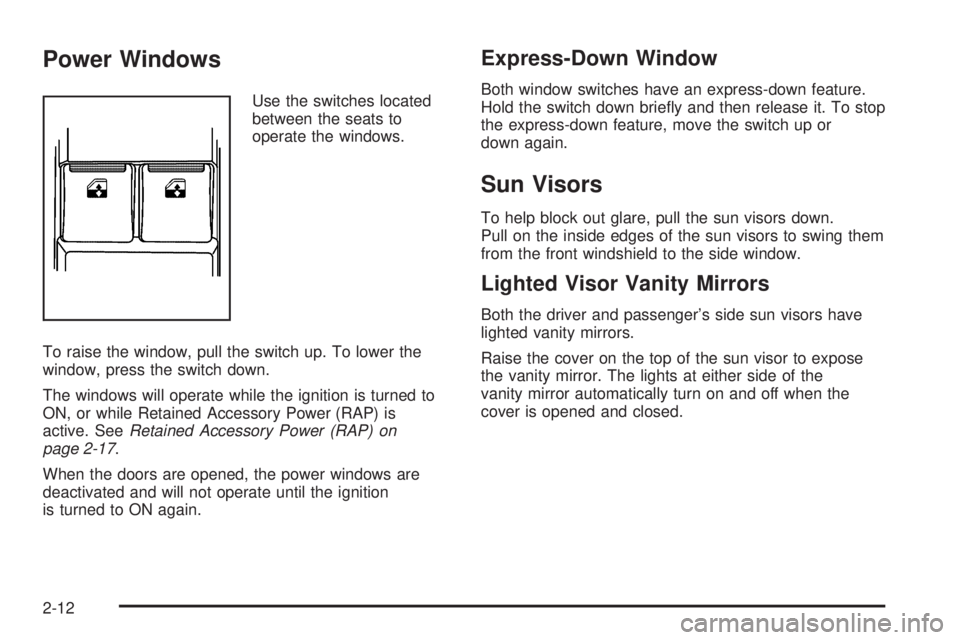
Power Windows
Use the switches located
between the seats to
operate the windows.
To raise the window, pull the switch up. To lower the
window, press the switch down.
The windows will operate while the ignition is turned to
ON, or while Retained Accessory Power (RAP) is
active. SeeRetained Accessory Power (RAP) on
page 2-17.
When the doors are opened, the power windows are
deactivated and will not operate until the ignition
is turned to ON again.
Express-Down Window
Both window switches have an express-down feature.
Hold the switch down briefly and then release it. To stop
the express-down feature, move the switch up or
down again.
Sun Visors
To help block out glare, pull the sun visors down.
Pull on the inside edges of the sun visors to swing them
from the front windshield to the side window.
Lighted Visor Vanity Mirrors
Both the driver and passenger’s side sun visors have
lighted vanity mirrors.
Raise the cover on the top of the sun visor to expose
the vanity mirror. The lights at either side of the
vanity mirror automatically turn on and off when the
cover is opened and closed.
2-12
Page 71 of 318

Theft-Deterrent Systems
Vehicle theft is big business, especially in some cities.
Although your vehicle has a number of theft-deterrent
features, we know that nothing we put on it can make it
impossible to steal.
Immobilizer
This device complies with Part 15 of the FCC Rules.
Operation is subject to the following two conditions:
1. This device may not cause interference.
2. This device must accept any interference
received, including interference that may cause
undesired operation.
Changes or modifications to this system by other than
an authorized service facility could void authorization to
use this equipment.
Immobilizer Operation
Your vehicle may have a passive theft-deterrent system.
The system is an electronic engine immobilizer,
which disables the car, when the key is removed from
the ignition.
The system works when you turn the key to ON. The
key uses a transponder that matches an immobilizer
control unit in your vehicle. The correct key will start
the vehicle.
Your vehicle has a special key that works with the
theft-deterrent system. There is a transponder in the key
head. If the key is ever damaged, you may not be
able to start your vehicle.
When trying to start the vehicle, if the engine does not
start and the security light comes on, the key may
have a damaged transponder. Turn the ignition off and
try again.
2-13
Page 72 of 318

If the engine still does not start, and the key appears to
be undamaged, try another ignition key. At this time,
you may also want to check the fuse. SeeFuses
and Circuit Breakers on page 5-86for more information
on fuses. If the engine still does not start with the
other key, your vehicle needs service. If your vehicle
does start, the first key may be faulty. See your dealer
who can service the theft-deterrent system to have
a new key made.
If you are ever driving and the security light comes on
and stays on, you will be able to restart your engine
if you turn it off. The theft-deterrent system, however, is
not working properly and must be serviced by your
dealer. Your vehicle is not protected by the
theft-deterrent system at this time.
In an emergency, contact Roadside Assistance.
SeeRoadside Assistance Program on page 7-6.Content Theft-Deterrent
Your vehicle has a theft-deterrent alarm system.
Arming the System
The alarm system is turned on when the LOCK button
on the key is pressed. Therefore, locking the doors
by pressing LOCK not only locks all the doors but, after
a short delay, also sets the alarm system. When the
system is armed, the alarm is triggered when any of the
doors, hood or trunk are opened or a hot-wire
attempted. The alarm system thinks a break-in has
occurred. An alarm sounds and the turn signals
and dome light will flash.
When the alarm system is turned on, you may open the
trunk by pressing the trunk symbol button on the key.
This does not set off the alarm, but leaves the alarm
system on and undisturbed. Closing the trunk re-arms
the trunk alarm after a short delay.
The LOCK button on the key will not function when the
ignition is turned ON or the driver’s door is open.
Disarming the System
To disarm the system, press UNLOCK on the key or
turn the ignition to ON.
2-14
Page 74 of 318
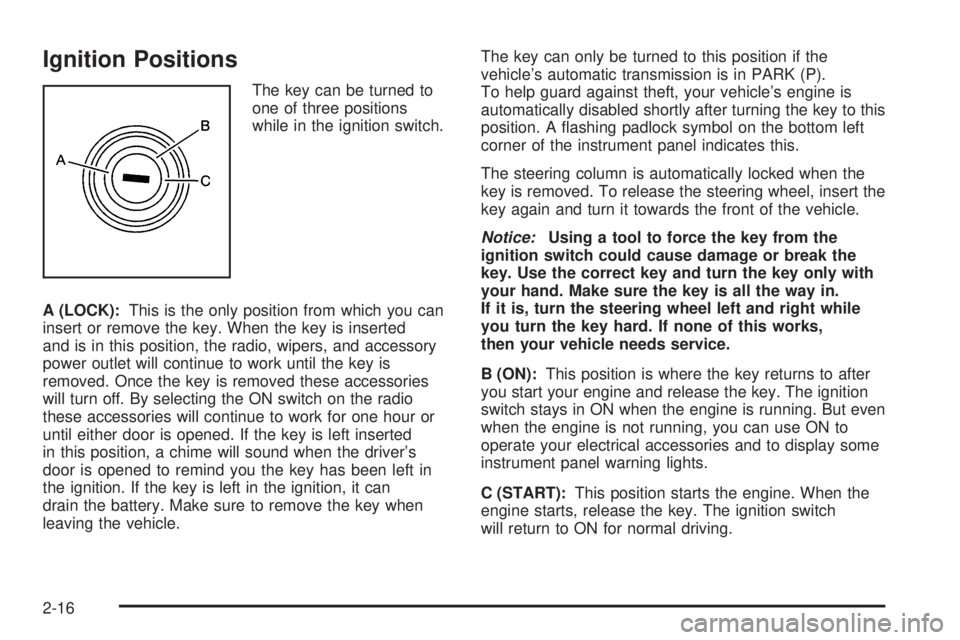
Ignition Positions
The key can be turned to
one of three positions
while in the ignition switch.
A (LOCK):This is the only position from which you can
insert or remove the key. When the key is inserted
and is in this position, the radio, wipers, and accessory
power outlet will continue to work until the key is
removed. Once the key is removed these accessories
will turn off. By selecting the ON switch on the radio
these accessories will continue to work for one hour or
until either door is opened. If the key is left inserted
in this position, a chime will sound when the driver’s
door is opened to remind you the key has been left in
the ignition. If the key is left in the ignition, it can
drain the battery. Make sure to remove the key when
leaving the vehicle.The key can only be turned to this position if the
vehicle’s automatic transmission is in PARK (P).
To help guard against theft, your vehicle’s engine is
automatically disabled shortly after turning the key to this
position. A flashing padlock symbol on the bottom left
corner of the instrument panel indicates this.
The steering column is automatically locked when the
key is removed. To release the steering wheel, insert the
key again and turn it towards the front of the vehicle.
Notice:Using a tool to force the key from the
ignition switch could cause damage or break the
key. Use the correct key and turn the key only with
your hand. Make sure the key is all the way in.
If it is, turn the steering wheel left and right while
you turn the key hard. If none of this works,
then your vehicle needs service.
B (ON):This position is where the key returns to after
you start your engine and release the key. The ignition
switch stays in ON when the engine is running. But even
when the engine is not running, you can use ON to
operate your electrical accessories and to display some
instrument panel warning lights.
C (START):This position starts the engine. When the
engine starts, release the key. The ignition switch
will return to ON for normal driving.
2-16
Page 80 of 318
Shift Speeds
{CAUTION:
If you skip a gear when you downshift, you
could lose control of your vehicle. You could
injure yourself or others. Do not shift down
more than one gear at a time when you
downshift.
This chart shows when to shift to the next gear for the
best fuel economy.
Manual Transmission Recommended
Shift Speeds
1to2 2to3 3to4 4to5 5to6
16 mph
(25 km/h)22 mph
(35 km/h)30 mph
(48 km/h)40 mph
(65 km/h)50 mph
(80 km/h)
If your speed drops below 20 mph (32 km/h), or if the
engine is not running smoothly, you should downshift to
the next lower gear.
One to Four Shift Light
(Manual Transmission)
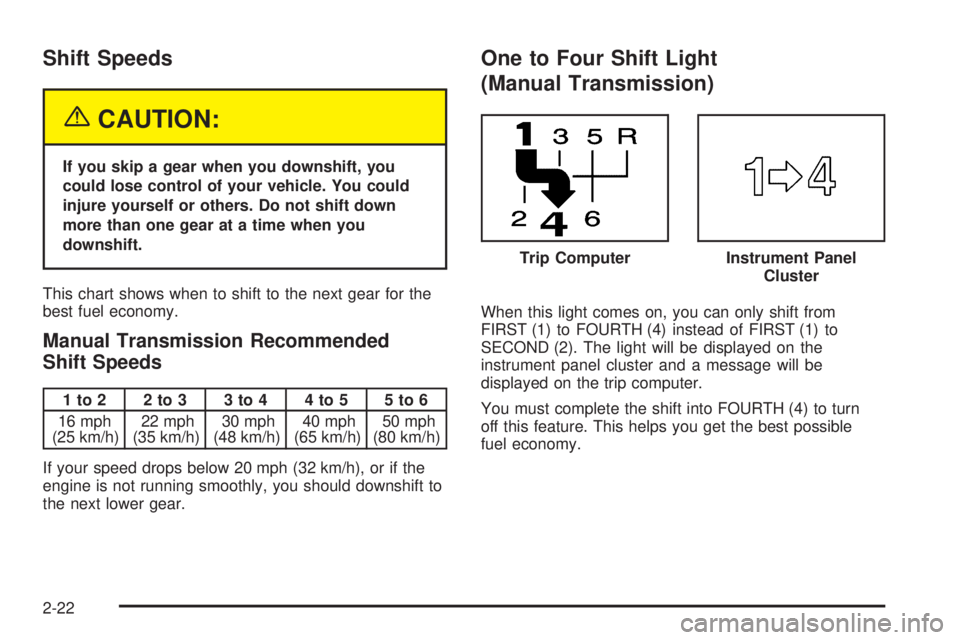
When this light comes on, you can only shift from
FIRST (1) to FOURTH (4) instead of FIRST (1) to
SECOND (2). The light will be displayed on the
instrument panel cluster and a message will be
displayed on the trip computer.
You must complete the shift into FOURTH (4) to turn
off this feature. This helps you get the best possible
fuel economy.Instrument Panel
Cluster
Trip Computer
2-22
Page 81 of 318

After shifting to FOURTH (4), you may downshift to a
lower gear if you prefer.
Notice:Forcing the shift lever into any gear except
FOURTH (4) when the 1 TO 4 SHIFT light comes
on may damage the transmission. Shift only from
FIRST (1) to FOURTH (4) when the light comes on.
This light will come on when:
•The engine coolant temperature is higher than
169°F (76°C),
•you are going 15 to 19 mph (24 to 31 km/h) and
•you are 21 percent throttle or less.
SeeOne-to-Four Shift Light (Manual Transmission) on
page 3-26andTrip Computer on page 3-33for more
information.
Parking Brake
To set the parking brake, pull up on the parking brake
handle without pressing the release button. If the ignition
is on, the brake system warning light will come on.
SeeBrake System Warning Light on page 3-27.
To release the parking brake, hold the regular brake
pedal down. Pull the parking brake handle up until you
can press the release button. Hold the release button
in as you move the brake handle all the way down.
Notice:Driving with the parking brake on can
overheat the brake system and cause premature
wear or damage to brake system parts. Verify that
the parking brake is fully released and the brake
warning light is off before driving.
2-23
Page 83 of 318

Torque Lock (Automatic Transmission)
If you are parking on a hill and you do not shift your
transmission into PARK (P) properly, the weight of the
vehicle may put too much force on the parking pawl
in the transmission. You may find it difficult to move
the shift lever out of PARK (P). This is called torque lock.
To prevent torque lock, set the parking brake and
then shift into PARK (P) properly before you leave the
driver’s seat. To find out how, seeShifting Into Park (P)
(Automatic Transmission) on page 2-24.
When you are ready to drive, move the shift lever out of
PARK (P) before you release the parking brake.
If torque lock does occur, you may need to have another
vehicle push your vehicle uphill. This should take some of
the pressure from the parking pawl in the transmission,
so you can move the shift lever out of PARK (P).
Shifting Out of Park (P)
(Automatic Transmission)
Your vehicle has an automatic transmission shift lock
control system. You must fully apply your regular brakes
before you can press the button on the shift lever to
shift from PARK (P) while the ignition is ON. See
Automatic Transmission Operation on page 2-18.If you cannot shift out of PARK (P), ease pressure on
the shift lever by pushing it all the way into PARK (P)
while keeping the brake pedal down. Release the
shift lever button. Then move the shift lever out of
PARK (P), being sure to press the shift lever button.
Shift Lock Release
If you ever hold the brake pedal down but still cannot
shift out of PARK (P), try this:
1. Turn the ignition to LOCK to remove the key.
2. Remove the front console rubber insert, located in
front of the shift lever, by lifting upwards.
3. Remove the screw slightly to the right of the
front center.
4. Open the console storage compartment and pry
the console cover assembly from the console.
The cover is attached in six places.
5. Insert a tool into the opening in front of the shift
lever and move the yellow release lever forward.
6. Press the button on the shift lever to move lever out
of park.
7. Replace the console cap.
8. Have the vehicle fixed as soon as possible.
2-25
Page 88 of 318

Vehicle Personalization
The vehicle personalization mode enables the driver to
customize some of the vehicle features using the
trip computer buttons and instrument panel center
display. Only features that are equipped on the vehicle
will be displayed.
The following list shows features that can be reset or
customized:
•RESTORE TO FACTORY SETTINGS
•UNDERSPEED CHIME
•DIST (Distance) TO ARRIVAL DISPLAY
•DIST (Distance) TO ARRIVAL DEFAULT
•TRIP COMPUTERA&B
•DIGITAL SPEEDO (Speedometer)
•REST REMINDER
•STOP WATCH
•RADIO DISPLAY
•CONFIRMATION BEEPS
•SPEED–DEPENDENT VOLUME
•AUDIO DISTORTION LIMITER
•HEADLIGHTS OFF DELAY TIME
•HEADLIGHTS APPROACH TIME
•AUTO HEADLIGHTS SENSITIVITY
•COURTESY LAMP TIMEOUT
•IGNITION OFF COURTESY LAMP
•TWO STAGE UNLOCK
•AUTO LOCK IN DRIVE
(Automatic Transmission Only)
•DOOR LOCK INDICATION
2-30
Page 92 of 318

CONFIRMATION BEEPS
This option is used to enable or disable the audio
system confirmation beeps function. This function is
explained further in the audio section. The audio system
option level fitted to your vehicle determines the
menu choices available. Use the up or down arrows to
select Beeps On, CD Load & Eject Only, or Beeps
Off. The default selection is On. If On is selected, the
audio system confirmation beeps function is activated.
Press the MODE button to continue. SeeRadio with
Six-Disc CD on page 3-46.
SPEED-DEPENDENT VOLUME
This option is used to enable or disable the audio
system speed–dependent volume function. This function
is explained further in the audio section. Use the
up or down arrows to adjust the setting to Off, 1, 2,
3, 4, or Max (maximum). The default selection is
2. Press the MODE button to continue. SeeRadio with
Six-Disc CD on page 3-46.
AUDIO DISTORTION LIMITER
This option is used to enable or disable the audio
system distortion limiting function. This function is
explained further in the audio section. Use the up or
down arrows to select On or Off. The default selection
is On. If On is selected, the audio distortion limiting
function is activated. Press the MODE button to
continue. SeeRadio with Six-Disc CD on page 3-46.
HEADLIGHTS OFF DELAY TIME
This option is used to adjust the headlights off delay
time. Use the up or down arrows to adjust the
delay setting between zero and 180 seconds.
The default selection is one second. Press the
MODE button to continue.
HEADLIGHTS APPROACH TIME
This option is used to adjust the headlights approach
time. Use the up or down arrows to adjust the delay
setting between zero and 90 seconds. The default
selection is 30 seconds. Press the MODE button to
continue. SeeHeadlamps on page 3-13.
2-34