change time PONTIAC GTO 2006 User Guide
[x] Cancel search | Manufacturer: PONTIAC, Model Year: 2006, Model line: GTO, Model: PONTIAC GTO 2006Pages: 326, PDF Size: 1.62 MB
Page 117 of 326

Climate Controls
Climate Control System
With this system you can control the heating, cooling,
and ventilation for your vehicle.
Operation
To change the current mode, turn the right control to
select one of the following:
Y(Vent):This mode directs air to the instrument
panel outlets.
%(Bi-Level):This mode directs the air to the
instrument panel outlets and the ¯oor outlets. This
position can be used for most winter driving.
[(Floor):This mode directs the air to the ¯oor
outlets.
The right control can also be used to select defog or
defrost modes. Information on defogging and defrosting
can be found later in this section.
9(Fan):Turn the left control clockwise or
counterclockwise to increase or decrease the fan speed.
The fan must be on to run the air-conditioning
compressor.
>(Recirculation):This mode keeps outside air from
coming into the vehicle. It can be used to prevent
outside air and odors from entering your vehicle or to
help heat or cool the air inside your vehicle more quickly.
Move the right control to this position to turn recirculation
on. Turn the air conditioning on when using recirculation.
Recirculation is not recommended for use over long
periods of time.
Temperature Control:Turn the center control
clockwise or counterclockwise to increase or decrease
the temperature inside your vehicle.
3-19
2006 - Pontiac GTO Owner Manual
Page 133 of 326

O/SPEED (Overspeed)
Overspeed sets the speed you do not want to exceed.
For example, if driving in a 45 mph zone, set
OVERSPEED to 45 mph by tapping the up or down
arrows. The overspeed setting is shown in the left
display. When your vehicle's speed exceeds the setting,
the overspeed warning message and an audible
chime warn you that you are speeding. At that time, the
trip computer automatically shows the overspeed
display, allowing you to make adjustments if desired. If
in the Overspeed preset mode, press and hold the
MODE button for two seconds to make adjustments.
Preset O/Speed (Overspeed)
Instead of adjusting overspeed up and down in
increments of 3 mph (5 km/h), you can set four
commonly used speeds. Hold down the MODE button
for two seconds when the overspeed display is
shown. The display changes from normal overspeed
operation to preset overspeed. Preset 1 has a default
setting of 25 mph (40 km/h). Tap the up arrow to see the
other three presets.
The overspeed preset display has now replaced the
normal overspeed display. Tap the MODE button
to scroll through the other displays.
To change the display back to normal overspeed, hold
down the MODE button for two seconds while the
overspeed preset display is shown.
Altering Overspeed Presets
The default overspeed settings can be changed for your
individual preference.
The vehicle must be stopped when changing a preset.
Ensure the preset you wish to change is showing.
Then brie¯y press the SET button. The display will start
to ¯ash. Use the up or down arrows to adjust the
setting. When at the desired speed, brie¯y press the
SET button. Each PRESET can be changed in this way.
The presets are automatically arranged in ascending
order.
One or more presets can be assigned to OFF, by
reducing the preset down to 0 (OFF). When driving, you
then only have three or less presets to choose from.
To turn back on, select the OFF preset when the vehicle
is stopped, brie¯y press the SET button, and use the
up arrow to increase the number.
If the up or down arrows are brie¯y pressed while
driving, the overspeed setting is changed to the speed
at which you are travelling.
If the SET button is pressed for two seconds, either
while driving or stopped, overspeed is turned completely
off or on.
3-35
2006 - Pontiac GTO Owner Manual
Page 135 of 326

Trip A/B
When the Time to Arrival/Distance to Arrival/Fuel
Remaining set of displays are turned on, using vehicle
personalization, and are showing on the display,
hold the MODE button down for two seconds. Now,
instead of the Time to Arrival set of displays, the
trip computer shows Trip B details.
Press the MODE button to view your displays. You now
have two different sets of trip displays counting, your
original set of trip displays Ð labelled A while B is turned
on Ð and a new set of trip displays, labelled B. This
is useful on a long trip, as Trip B can be reset at
the beginning of the journey and then locked away by
pressing the MODE button for two seconds when Trip B
is shown. Time to Arrival/Distance to Arrival/Fuel
Remaining will again be shown on the display, but Trip B
is still counting away in the background and the
original trip display can be used for short distances
during the journey. Trip B can be viewed at any time by
pressing the MODE button for two seconds when
Distance to Arrival is shown.
Trip A/B can also be enabled/disabled in vehicle
personalization. See
Vehicle Personalization on
page 2-31. If the Trip A and B function is selected,
the Average Speed and Average Fuel displays
indicate Trip A.
Trip Computer Notes:
·If the wrong buttons are accidentally pressed,
causing the display to show a display other
than normal, turn the ignition off and then on again
when the vehicle is stopped.
·Several warning lights are linked to the trip
computer displays. See
Warning Lights, Gages, and
Indicators on page 3-22.
·When the overspeed warning symbol is ®rst shown,
the overspeed trip computer display is automatically
shown for 10 seconds. This is to show what your
pre-selected speed is and allow you to adjust
it if desired. After 10 seconds, the trip computer
returns to its previous display.
·Some displays change the units of measurement
over time. For example, the Time to Arrival shows
hours only above 99 hours and 59 minutes, and
hours and minutes below. Time to Arrival also
shows 10 minute units above 2 hours, 5 minute
units below 2 hours and 1 minute units below
10 minutes.
3-37
2006 - Pontiac GTO Owner Manual
Page 143 of 326

{CAUTION:
This system provides you with a far greater
access to audio stations and song listings.
Giving extended attention to entertainment
tasks while driving can cause a crash and you
or others can be injured or killed. Always keep
your eyes on the road and your mind on the
drive Ð avoid engaging in extended searching
while driving.
Keeping your mind on the drive is important for safe
driving. For more information, see
Defensive Driving on
page 4-2.
Here are some ways in which you can help avoid
distraction while driving.
While your vehicle is parked:
·Familiarize yourself with all of its controls.
·Familiarize yourself with its operation.
·Set up your audio system by presetting your
favorite radio stations, setting the tone, and
adjusting the speakers. Then, when driving
conditions permit, you can tune to your favorite
radio stations using the presets and steering wheel
controls if the vehicle has them.
Notice:Before adding any sound equipment to
your vehicle, such as an audio system, CD player,
CB radio, mobile telephone, or two-way radio, make
sure that it can be added by checking with your
dealer. Also, check federal rules covering mobile
radio and telephone units. If sound equipment can
be added, it is very important to do it properly.
Added sound equipment may interfere with
the operation of your vehicle's engine, radio, or
other systems, and even damage them. Your
vehicle's systems may interfere with the operation
of sound equipment that has been added.
Setting the Time
To change the time, perform the following:
1. Turn the radio on and wait for the time to appear on
the display.
2. Press the TIME button for more than two seconds.
TIME ADJ will appear on the display and the time
will ¯ash.
3. Press either SEEK arrow to adjust the hour.
4. Press either TUNE arrow to adjust the minutes.
5. Press the TIME button again to save the new time.
The radio will automatically exit the time setting mode
if no adjustments are made for eight seconds.
3-45
2006 - Pontiac GTO Owner Manual
Page 150 of 326

CD Messages
CD ERROR PLAY:The CD cannot be read. The CD is
dirty, scratched, wet, or upside down.
CD ERROR MECH (Mechanism):If this message
appears on the display, it could be for one of the
following reasons:
·The CD is stuck in the player and cannot be
played, loaded, or ejected.
·It is very hot. When the temperature returns to
normal, the CD should play.
·You are driving on a very rough road. When the
road becomes smoother, the CD should play.
·The air is very humid. If so, wait about an hour and
try again.
·There may have been a problem while burning
the CD.
·The label may be caught in the CD player.
If the CD is not playing correctly, for any other reason,
try a known good CD.
If any error occurs repeatedly or if an error cannot be
corrected, contact your dealer. If the radio displays
an error message, write it down and provide it to your
dealer when reporting the problem.
Options Menu
The following features can be adjusted through the
vehicle's options menu located in the instrument panel
cluster in the trip computer display window.
Con®rmation Beeps
Beeps are used to con®rm various actions of the radio
such as storing a preset. The beeps can be turned
on or off using the options menu. See ªOptions Menu
Adjustmentº later in this section to adjust the
con®rmation beeps.
BEEPS ON:The radio will make a beep sound when
storing radio stations, when it is time to insert or remove
a CD from the CD changer, or to con®rm that the
LOAD ALL or EJECT ALL functions have started.
BEEP ONLY:The radio will make a beep sound when
it is time to insert or remove a CD from the CD
changer or to con®rm that the LOAD ALL or EJECT ALL
functions have started.
BEEPS OFF:The radio will not produce any beeps.
3-52
2006 - Pontiac GTO Owner Manual
Page 164 of 326
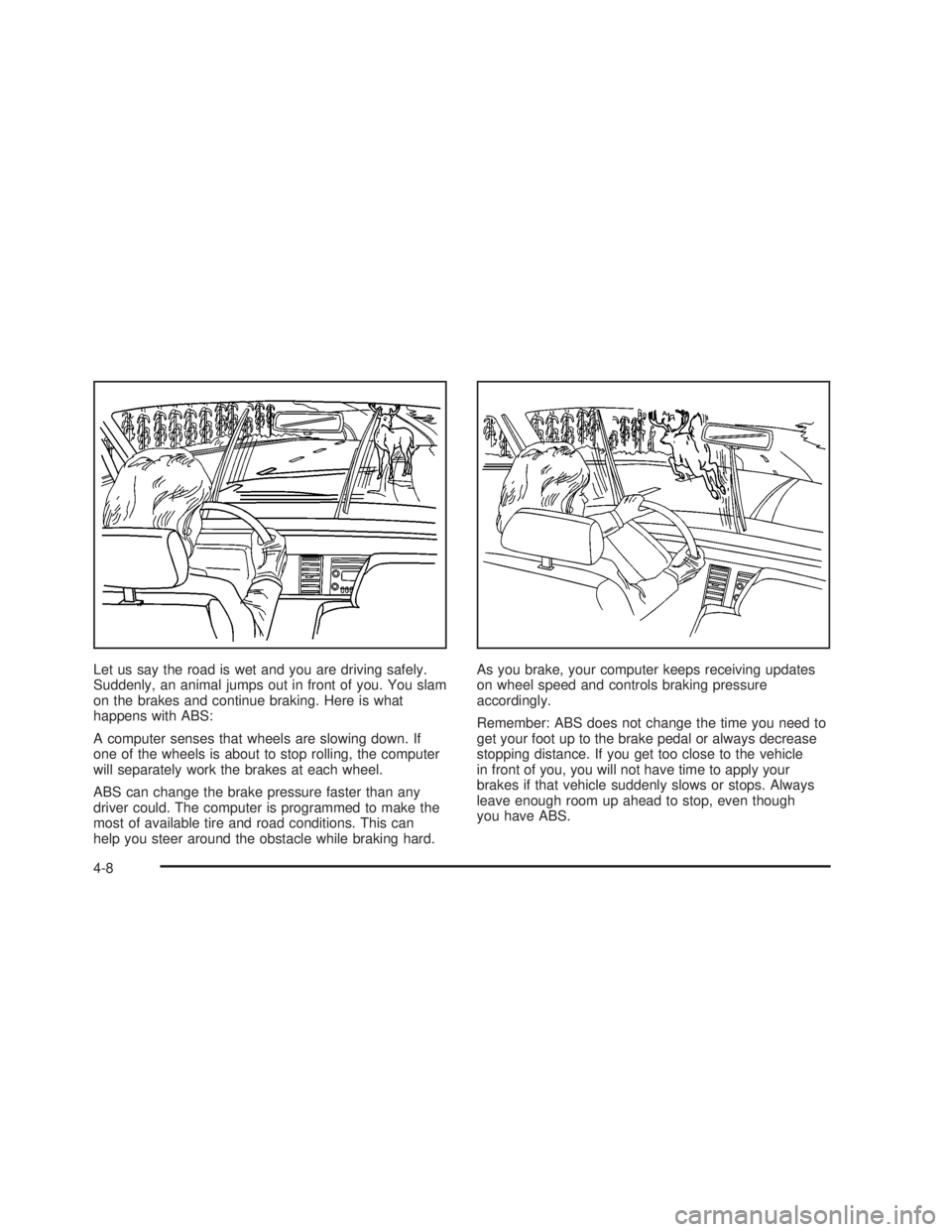
Let us say the road is wet and you are driving safely.
Suddenly, an animal jumps out in front of you. You slam
on the brakes and continue braking. Here is what
happens with ABS:
A computer senses that wheels are slowing down. If
one of the wheels is about to stop rolling, the computer
will separately work the brakes at each wheel.
ABS can change the brake pressure faster than any
driver could. The computer is programmed to make the
most of available tire and road conditions. This can
help you steer around the obstacle while braking hard.As you brake, your computer keeps receiving updates
on wheel speed and controls braking pressure
accordingly.
Remember: ABS does not change the time you need to
get your foot up to the brake pedal or always decrease
stopping distance. If you get too close to the vehicle
in front of you, you will not have time to apply your
brakes if that vehicle suddenly slows or stops. Always
leave enough room up ahead to stop, even though
you have ABS.
4-8
2006 - Pontiac GTO Owner Manual
Page 166 of 326
To turn the system off,
press the T/C button. On
manual transmission
vehicles, the button is
located on the driver's side
of the center console. On
automatic transmission
vehicles, the button is
located on the passenger's
side of the shift lever.
When you turn the system off, a Traction Ctrl Off
message is displayed on the trip computer. After
two seconds, the display goes back to the original trip
computer display with a small TRAC OFF message
on the right.
If the Traction Ctrl Off message does not display when
the button is pressed, or if it comes on during driving,
a problem is indicated in the system and traction
control is no longer operational. You should contact
your dealer for service.
Pressing the T/C button again or the next time the
ignition is turned on, will turn the system back on. The
Traction Ctrl On message is displayed on the trip
computer. After two seconds, the display goes back to
the original trip computer display. See
Trip Computer
on page 3-33for more information.Adding non-GM accessories can affect your vehicle's
performance. See
Accessories and Modi®cations
on page 5-3for more information.
Steering
Power Steering
If you lose power steering assist because the engine
stops or the system is not functioning, you can steer but
it will take much more effort.
Steering Tips
It is important to take curves at a reasonable speed.
A lot of the ªdriver lost controlº accidents mentioned on
the news happen on curves. Here is why:
Experienced driver or beginner, each of us is subject to
the same laws of physics when driving on curves.
The traction of the tires against the road surface makes
it possible for the vehicle to change its path when
you turn the front wheels. If there is no traction, inertia
will keep the vehicle going in the same direction. If
you have ever tried to steer a vehicle on wet ice, you
will understand this.
The traction you can get in a curve depends on the
condition of your tires and the road surface, the angle
at which the curve is banked, and your speed. While you
are in a curve, speed is the one factor you can control.
4-10
2006 - Pontiac GTO Owner Manual
Page 170 of 326
·Check your mirrors, glance over your shoulder, and
start your left lane change signal before moving out
of the right lane to pass. When you are far enough
ahead of the passed vehicle to see its front in your
inside mirror, activate your right lane change signal
and move back into the right lane. Remember that
your passenger side outside mirror is convex. The
vehicle you just passed may seem to be farther
away from you than it really is.
·Try not to pass more than one vehicle at a time on
two-lane roads. Reconsider before passing the
next vehicle.
·Do not overtake a slowly moving vehicle too rapidly.
Even though the brake lamps are not ¯ashing, it may
be slowing down or starting to turn.
·If you are being passed, make it easy for the
following driver to get ahead of you. Perhaps you
can ease a little to the right.
Loss of Control
Let us review what driving experts say about what
happens when the three control systems Ðbrakes,
steering, and acceleration Ð do not have enough friction
where the tires meet the road to do what the driver
has asked.
In any emergency, do not give up. Keep trying to steer
and constantly seek an escape route or area of
less danger.
Skidding
In a skid, a driver can lose control of the vehicle.
Defensive drivers avoid most skids by taking reasonable
care suited to existing conditions, and by not overdriving
those conditions. But skids are always possible.
The three types of skids correspond to your vehicle's
three control systems. In the braking skid, your wheels
are not rolling. In the steering or cornering skid, too much
speed or steering in a curve causes tires to slip and lose
cornering force. And in the acceleration skid, too much
throttle causes the driving wheels to spin.
4-14
2006 - Pontiac GTO Owner Manual
Page 206 of 326

Your vehicle's engine is ®lled at the factory with a
Mobil 1žsynthetic oil, which meets all requirements for
your vehicle.
Substitute Engine Oil: When adding oil to maintain
engine oil level, oil meeting GM Standard GM4718M
may not be available. You can add substitute oil
designated SAE 5W-30 with the starburst symbol at all
temperatures. Substitute oil not meeting GM Standard
GM4718M should not be used for an oil change.
Engine Oil Additives
Do not add anything to the oil. The recommended oils
with the starburst symbol that meet GM Standard
GM4718M are all you will need for good performance
and engine protection.
Engine Oil Life System
When to Change Engine Oil
Your vehicle has a computer system that lets you know
when to change the engine oil and ®lter. This is
based on engine revolutions and engine temperature,
and not on mileage. Based on driving conditions,
the mileage at which an oil change will be indicated can
vary considerably. For the oil life system to work
properly, you must reset the system every time the oil is
changed.
When the system has calculated that oil life has been
diminished, it will indicate that an oil change is
necessary. A Service Engine Oil message on the trip
computer display will come on. See
Trip Computer
on page 3-33. Change engine oil as soon as possible
within the next 600 miles (1 000 km). It is possible that, if
you are driving under the best conditions, the oil life
system may not indicate that an oil change is necessary
for over a year. However, the engine oil and ®lter
must be changed at least once a year and at this time
the system must be reset. Your dealer has GM-trained
service people who will perform this work using
genuine GM parts and reset the system. It is also
important to check engine oil regularly and keep it at
the proper level.
5-16
2006 - Pontiac GTO Owner Manual
Page 207 of 326
If the system is ever reset accidentally, you must
change the oil at 3,000 miles (5 000 km) since your last
oil change. Remember to reset the oil life system
whenever the oil is changed.
After changing the engine oil, reset the system by
performing the following steps:
How to Reset the Engine Oil Life
System
The Engine Oil Life System calculates when to change
the engine oil and ®lter based on vehicle use. Anytime
engine oil is changed, reset the system so it can
calculate when the next oil change is required. If a
situation occurs where you change your oil prior to the
Service Engine Oil message being turned on, reset
the system.
1. With the engine off, turn the ignition key to ON.
2. Fully press and release the accelerator pedal slowly
two times within ®ve seconds.
3. Turn the key to LOCK.
If the Service Engine Oil message comes back on
when you start your vehicle, the engine oil life
system has not reset. Repeat the procedure.
What to Do with Used Oil
Used engine oil contains certain elements that may be
unhealthy for your skin and could even cause cancer.
Do not let used oil stay on your skin for very long. Clean
your skin and nails with soap and water, or a good
hand cleaner. Wash or properly dispose of clothing or
rags containing used engine oil. See the manufacturer's
warnings about the use and disposal of oil products.
Used oil can be a threat to the environment. If you
change your own oil, be sure to drain all the oil from the
®lter before disposal. Never dispose of oil by putting it
in the trash, pouring it on the ground, into sewers, or into
streams or bodies of water. Instead, recycle it by
taking it to a place that collects used oil. If you have a
problem properly disposing of used oil, ask your
dealer, a service station, or a local recycling center
for help.
5-17
2006 - Pontiac GTO Owner Manual