fuel PONTIAC GTO 2006 Owners Manual
[x] Cancel search | Manufacturer: PONTIAC, Model Year: 2006, Model line: GTO, Model: PONTIAC GTO 2006Pages: 326, PDF Size: 1.62 MB
Page 1 of 326
Seats and Restraint Systems........................... 1-1
Front Seats
............................................... 1-2
Safety Belts
.............................................. 1-6
Child Restraints
.......................................1-25
Airbag System
.........................................1-46
Restraint System Check
............................1-53
Features and Controls..................................... 2-1
Keys
........................................................ 2-2
Doors and Locks
....................................... 2-7
Windows
.................................................2-12
Theft-Deterrent Systems
............................2-14
Starting and Operating Your Vehicle
...........2-16
Mirrors
....................................................2-29
Storage Areas
.........................................2-30
Vehicle Personalization
.............................2-31
Instrument Panel............................................. 3-1
Instrument Panel Overview
.......................... 3-4
Climate Controls
......................................3-19
Warning Lights, Gages, and Indicators
........3-22
Trip Computer
.........................................3-33
Audio System(s)
.......................................3-44Driving Your Vehicle....................................... 4-1
Your Driving, the Road, and Your Vehicle
..... 4-2
Towing
...................................................4-34
Service and Appearance Care.......................... 5-1
Service
..................................................... 5-3
Fuel
......................................................... 5-5
Checking Things Under the Hood
...............5-10
Headlamp Aiming
.....................................5-43
Bulb Replacement
....................................5-45
Windshield Wiper Blade Replacement
.........5-50
Tires
......................................................5-51
Appearance Care
.....................................5-76
Vehicle Identi®cation
.................................5-85
Electrical System
......................................5-85
Capacities and Speci®cations
.....................5-90
Maintenance Schedule..................................... 6-1
Maintenance Schedule
................................ 6-2
Customer Assistance and Information.............. 7-1
Customer Assistance and Information
........... 7-2
Reporting Safety Defects
...........................7-13
Index................................................................ 1
2006 Pontiac GTO Owner ManualM
2006 - Pontiac GTO Owner Manual
Page 57 of 326
{CAUTION:
When an airbag in¯ates, there is dust in the
air. This dust could cause breathing problems
for people with a history of asthma or other
breathing trouble. To avoid this, everyone in
the vehicle should get out as soon as it is safe
to do so. If you have breathing problems but
cannot get out of the vehicle after an airbag
in¯ates, then get fresh air by opening a
window or a door. If you experience breathing
problems following an airbag deployment, you
should seek medical attention.
Your vehicle has a feature that may automatically
unlock the doors, turn off the engine, turn off the fuel
pump, and turn the interior lamps on when the airbags
in¯ate (if battery power is available). You can operate
these features by switching the ignition off and then on.In many crashes severe enough to in¯ate an airbag,
windshields are broken by vehicle deformation.
Additional windshield breakage may also occur from the
right front passenger airbag.·Airbags are designed to in¯ate only once. After an
airbag in¯ates, you will need some new parts for
your airbag system. If you do not get them,
the airbag system will not be there to help protect
you in another crash. A new system will include
airbag modules and possibly other parts. The
service manual for your vehicle covers the need to
replace other parts.
·Your vehicle is equipped with a crash sensing and
diagnostic module, which records information after
a crash. See
Vehicle Data Collection and Event
Data Recorders on page 7-9.
·Let only quali®ed technicians work on your airbag
system. Improper service can mean that an
airbag system will not work properly. See your
dealer for service.
1-51
2006 - Pontiac GTO Owner Manual
Page 80 of 326

REVERSE (R):Use this gear to back up.
Notice:Shifting to REVERSE (R) while your vehicle
is moving forward could damage the transmission.
The repairs would not be covered by your warranty.
Shift to REVERSE (R) only after your vehicle is
stopped.
To rock your vehicle back and forth to get out of snow,
ice or sand without damaging your transmission,
see
If Your Vehicle is Stuck in Sand, Mud, Ice or Snow
on page 4-28.
NEUTRAL (N):In this position, your engine does not
connect with the wheels. To restart when you are
already moving, use NEUTRAL (N) only. Also, use
NEUTRAL (N) when your vehicle is being towed.
{CAUTION:
Shifting into a drive gear while your engine is
running at high speed is dangerous. Unless
your foot is ®rmly on the brake pedal, your
vehicle could move very rapidly. You could
lose control and hit people or objects. Do not
shift into a drive gear while your engine is
running at high speed.
Notice:Shifting out of PARK (P) or NEUTRAL (N)
with the engine running at high speed may damage
the transmission. The repairs would not be
covered by your warranty. Be sure the engine is not
running at high speed when shifting your vehicle.
DRIVE (D):This is the most effective position for normal
or freeway driving. This position gives maximum fuel
efficiency, as the transmission can choose the
appropriate gear (1 through 4) for the existing load and
driving conditions.
THIRD (3):This position is also used for normal driving.
However, it offers more power and lower fuel economy
than DRIVE (D). Here are some times you might choose
THIRD (3) instead of DRIVE (D):
·When driving on hilly, winding roads.
·When towing a trailer, so there is less shifting
between gears.
·When going down a steep hill.
SECOND (2):This position gives you more power but
lower fuel economy than THIRD (3). You can use
SECOND (2) on hills. It can help control your speed as
you go down steep mountain roads, but then you
would also want to use your brakes off and on.
2-20
2006 - Pontiac GTO Owner Manual
Page 81 of 326
FIRST (1):This position gives you even more power
but lower fuel economy than SECOND (2). You can use
it on very steep hills, or in deep snow or mud. If the
shift lever is put in FIRST (1), the transmission will not
shift into ®rst gear until the vehicle is going slowly
enough.
Remember to move the shift lever back to DRIVE (D) so
that the transmission again upshifts into higher gears.
Even though the shift lever may be in FIRST (1),
the transmission does not select ®rst gear until vehicle
speed is less that 35 mph (56 km/h).
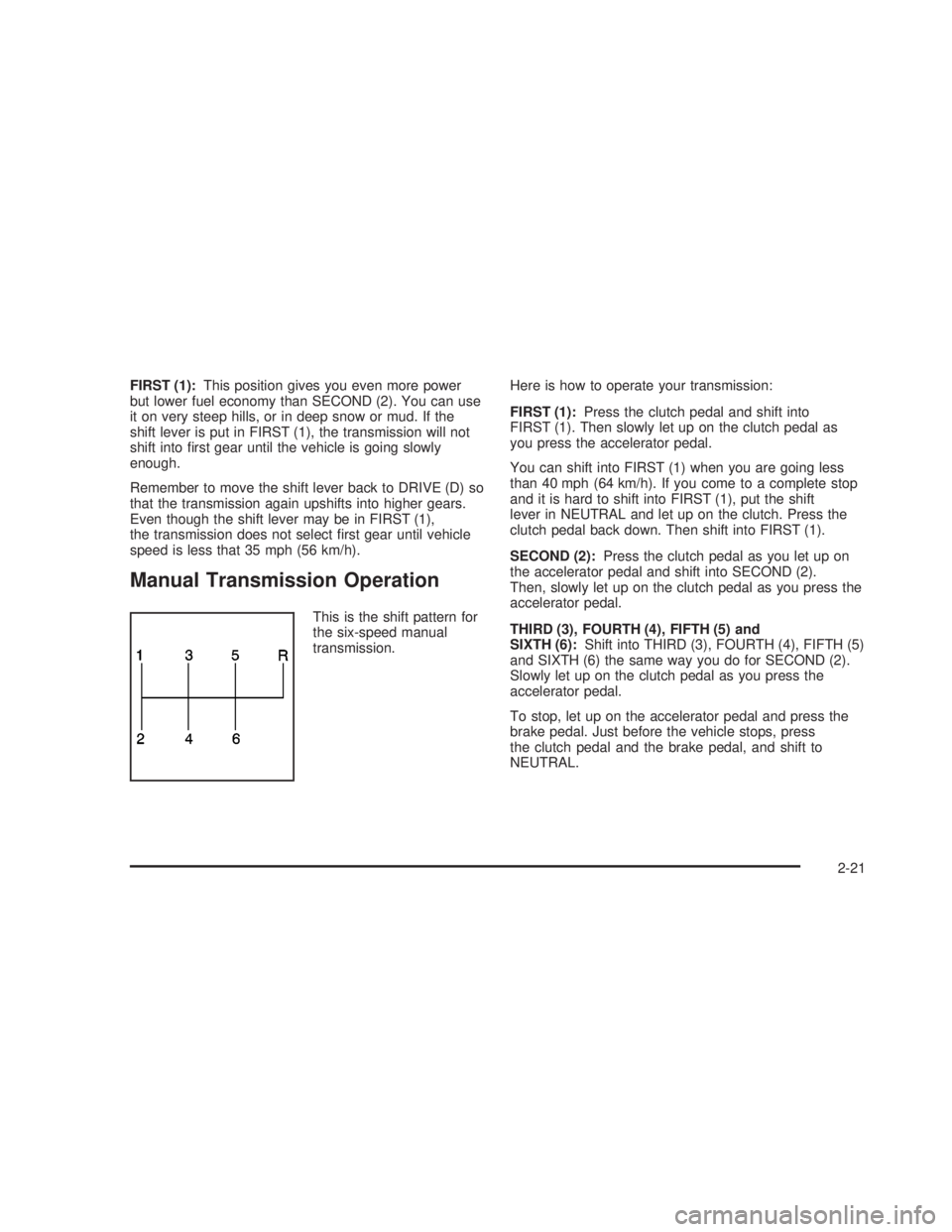
Manual Transmission Operation
This is the shift pattern for
the six-speed manual
transmission.Here is how to operate your transmission:
FIRST (1):Press the clutch pedal and shift into
FIRST (1). Then slowly let up on the clutch pedal as
you press the accelerator pedal.
You can shift into FIRST (1) when you are going less
than 40 mph (64 km/h). If you come to a complete stop
and it is hard to shift into FIRST (1), put the shift
lever in NEUTRAL and let up on the clutch. Press the
clutch pedal back down. Then shift into FIRST (1).
SECOND (2):Press the clutch pedal as you let up on
the accelerator pedal and shift into SECOND (2).
Then, slowly let up on the clutch pedal as you press the
accelerator pedal.
THIRD (3), FOURTH (4), FIFTH (5) and
SIXTH (6):Shift into THIRD (3), FOURTH (4), FIFTH (5)
and SIXTH (6) the same way you do for SECOND (2).
Slowly let up on the clutch pedal as you press the
accelerator pedal.
To stop, let up on the accelerator pedal and press the
brake pedal. Just before the vehicle stops, press
the clutch pedal and the brake pedal, and shift to
NEUTRAL.
2-21
2006 - Pontiac GTO Owner Manual
Page 82 of 326
NEUTRAL:Use this position when you start or idle
your engine. Your shift lever is in NEUTRAL when it is
centered in the shift pattern, not in any gear.
REVERSE (R):To back up, press down the clutch
pedal and shift into REVERSE (R). Apply pressure to
get the lever past FIFTH (5) and SIXTH (6) into
REVERSE (R). Let up on the clutch pedal slowly while
pressing the accelerator pedal.Shift Speeds
{CAUTION:
If you skip a gear when you downshift, you
could lose control of your vehicle. You could
injure yourself or others. Do not shift down
more than one gear at a time when you
downshift.
This chart shows when to shift to the next gear for the
best fuel economy.
Manual Transmission Recommended Shift
Speeds
1to2 2to3 3to4 4to5 5to6
16 mph
(25 km/h)22 mph
(35 km/h)30 mph
(48 km/h)40 mph
(65 km/h)50 mph
(80 km/h)
If your speed drops below 20 mph (32 km/h), or if the
engine is not running smoothly, you should downshift to
the next lower gear.
2-22
2006 - Pontiac GTO Owner Manual
Page 83 of 326

One to Four Shift Light
(Manual Transmission)
When this light comes on, you can only shift from
FIRST (1) to FOURTH (4) instead of FIRST (1) to
SECOND (2). The light will be displayed on the
instrument panel cluster and a message will be
displayed on the trip computer.
You must complete the shift into FOURTH (4) to turn off
this feature. This helps you get the best possible fuel
economy.After shifting to FOURTH (4), you may downshift to a
lower gear if you prefer.
Notice:Forcing the shift lever into any gear except
FOURTH (4) when the 1 TO 4 SHIFT light comes
on may damage the transmission. Shift only from
FIRST (1) to FOURTH (4) when the light comes on.
This light will come on when:
·The engine coolant temperature is higher than
169ÉF (76ÉC),
·you are going 15 to 19 mph (24 to 31 km/h) and
·you are 21 percent throttle or less.
See
One-to-Four Shift Light (Manual Transmission) on
page 3-26andTrip Computer on page 3-33for more
information. Instrument Panel
Cluster
Trip Computer
2-23
2006 - Pontiac GTO Owner Manual
Page 93 of 326

Navigating the Menu
To scroll through the different personalization features,
press the MODE button. To change the setting, use
the up or down arrows. To continue, press the MODE
button.
The following information shows how to reset or
customize features after entering the main menu:
RESTORE TO FACTORY SETTINGS
This option restores the instrument panel, audio system,
and other general vehicle systems to the factory default
settings. Use the up or down arrows to select Yes or No.
The default selection is No. If Yes is selected, the next
feature will be displayed after a two second delay. This
delay is to allow time for the default parameters to be set.
Press the MODE button to continue.
UNDERSPEED CHIME
This option is used to enable or disable the underspeed
chime. Overspeed provides a chime when your
vehicle's travelling speed exceeds the overspeed
chosen value, whereas underspeed provides an
additional chime to indicate when your vehicle's
travelling speed drops below the overspeed. Use the up
or down arrows to select Yes or No. The default
selection is No. If Yes is selected, the underspeed chime
is activated. Press the MODE button to continue. See
ªO/SPEED (Overspeed)º under
Trip Computer on
page 3-33for more information.
DIST (Distance) TO ARRIVAL DISPLAY
This option is used to enable or disable the Time to
Arrival/Distance to Arrival/Remaining Fuel set of
displays. Use the up or down arrows to select Yes or
No. The default selection is No. If Yes is selected,
the Time to Arrival/Distance to Arrival/Remaining Fuel
set of displays is activated. Press the MODE button
to continue.
2-33
2006 - Pontiac GTO Owner Manual
Page 94 of 326

DIST (Distance) TO ARRIVAL DEFAULT
This option displays only if the DIST TO ARRIVAL
DISPLAY is set to Yes. The Distance to Arrival, can be
reset, when not in personalization mode, by pressing
the SET button for less than two seconds. The distance
resets to 300 miles (500 km), which is the default
setting. When in personalization mode, the default
setting can be increased or decreased by tapping the
up or down arrows. When the desired distance is
set, press the MODE button to continue.
TRIP COMPUTERA&B
This option is used to select either one or two Trip
Time/Trip Distance/Fuel Used set of displays. Use the
up or down arrows to select Trip A or TripA&B.
The default selection is Trip A. Press the MODE button
to continue.
DIGITAL SPEEDO (Speedometer)
This option allows you to turn on a digital speedometer
that will appear on the center display. Use the up or
down arrows to select Yes or No. The default selection
is Yes. Press the MODE button to continue.
REST REMINDER
This option is to alert the driver that they may have
been travelling for too long without a break. Use the up
or down arrows to select No or Yes. The default
selection is Yes. Press the MODE button to continue.
STOP WATCH
This option is used to enable or disable the Stop Watch
display. Use the up or down arrows to select Yes or
No. The default selection is No. If Yes is selected, the
Stop Watch display is activated. Press the MODE button
to continue.
RADIO DISPLAY
This option is used to enable or disable the audio
system display on the instrument panel cluster. Detailed
information on the operation of the radio and CD is
provided in the audio section. Use the up or down
arrows to select On or Off. The default selection is On.
If On is selected, the Radio display is activated.
Press the MODE button to continue. See
Radio with
Six-Disc CD on page 3-46.
2-34
2006 - Pontiac GTO Owner Manual
Page 99 of 326
Instrument Panel Overview...............................3-4
Hazard Warning Flashers................................3-6
Other Warning Devices...................................3-6
Horn.............................................................3-6
Tilt Wheel.....................................................3-6
Turn Signal/Multifunction Lever.........................3-7
Turn and Lane-Change Signals........................3-8
Headlamp High/Low-Beam Changer..................3-8
Flash-to-Pass.................................................3-9
Windshield Wipers..........................................3-9
Windshield Washer.......................................3-10
Cruise Control..............................................3-10
Exterior Lamps.............................................3-13
Headlamps..................................................3-13
Daytime Running Lamps (DRL).......................3-14
Automatic Headlamp System..........................3-14
Fog Lamps..................................................3-15
Instrument Panel Brightness...........................3-15
Courtesy Lamps...........................................3-15
Dome Lamp.................................................3-16
Entry Lighting...............................................3-16
Front Reading Lamps....................................3-16
Trunk Lamp.................................................3-16Battery Run-Down Protection..........................3-16
Accessory Power Outlet(s).............................3-17
Ashtray(s) and Cigarette Lighter......................3-18
Climate Controls............................................3-19
Climate Control System.................................3-19
Outlet Adjustment.........................................3-21
Warning Lights, Gages, and Indicators............3-22
Instrument Panel Cluster................................3-23
Speedometer...............................................3-24
Tachometer.................................................3-24
Safety Belt Reminder Light.............................3-24
Airbag Readiness Light..................................3-25
Charging System Light..................................3-26
One-to-Four Shift Light (Manual Transmission). . . .3-26
Brake System Warning Light..........................3-27
Anti-Lock Brake System Warning Light.............3-27
Engine Coolant Temperature Gage..................3-28
Malfunction Indicator Lamp.............................3-28
Security Light...............................................3-31
Fog Lamp Light............................................3-31
Highbeam On Light.......................................3-31
Daytime Running Lamps (DRL) Indicator Light.....3-32
Fuel Gage...................................................3-32
Section 3 Instrument Panel
3-1
2006 - Pontiac GTO Owner Manual
Page 121 of 326
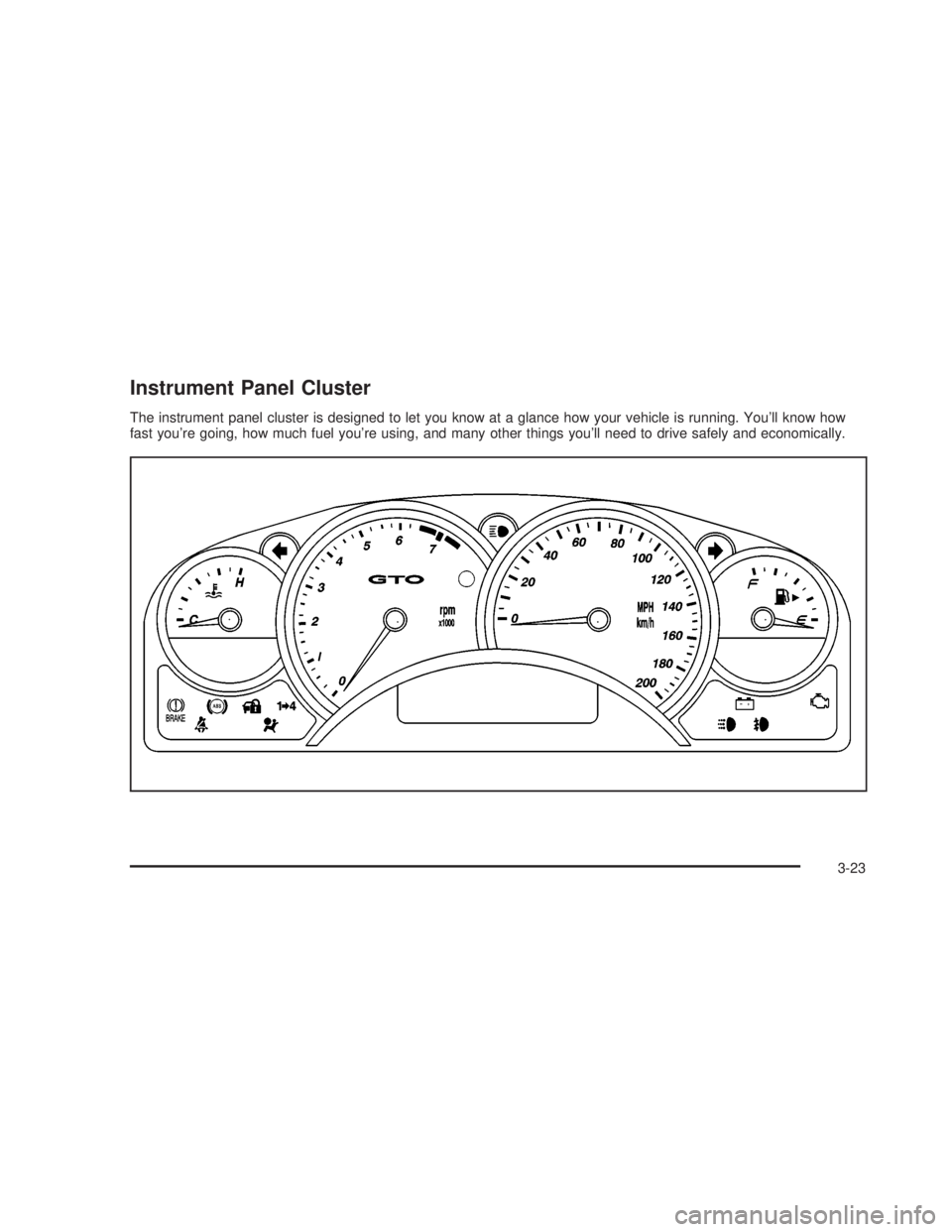
Instrument Panel Cluster
The instrument panel cluster is designed to let you know at a glance how your vehicle is running. You'll know how
fast you're going, how much fuel you're using, and many other things you'll need to drive safely and economically.
3-23
2006 - Pontiac GTO Owner Manual