change time PONTIAC SOLSTICE 2006 User Guide
[x] Cancel search | Manufacturer: PONTIAC, Model Year: 2006, Model line: SOLSTICE, Model: PONTIAC SOLSTICE 2006Pages: 328, PDF Size: 1.92 MB
Page 123 of 328

TRIP A or TRIP B
Press the information button until TRIP A or TRIP B is
displayed. These modes show the current distance
traveled since the last reset for each trip odometer in
either miles (mi) or kilometers (km). Both odometers can
be used at the same time.
Each trip odometer can be reset to zero separately by
pressing and holding the reset button for a few seconds
while the desired trip odometer is displayed.
FUEL RANGE
Press the information button until FUEL RANGE is
displayed. This mode shows the remaining distance you
can drive without refueling in either miles (mi) or
kilometers (km). It is based on fuel economy and the
fuel remaining in the tank.
When the fuel level is low, FUEL RANGE LOW will
display.
The fuel economy data used to determine fuel range is
an average of recent driving conditions. As your
driving conditions change, this data is gradually updated.
The FUEL RANGE mode cannot be reset.
ECON (Economy)
Press the information button until ECON is displayed.
This mode shows how many miles per gallon (mpg)
or liters per 100 kilometers (L/100 km) your vehicle is
getting based on current and past driving conditions.
Press and hold the reset button while ECON is displayed
to reset the average fuel economy. Average fuel
economy will then be calculated starting from that point.
If the average fuel economy is not reset, it will be
continually updated each time you drive.
AV (Average) SPEED
Press the information button until AV SPEED is
displayed. This mode shows the vehicle’s average
speed in miles per hour (mph) or kilometers per
hour (km/h).
Press and hold the reset button while AV SPEED is
displayed to reset the average vehicle speed.
3-37
Page 124 of 328

OIL LIFE
Press the information button until OIL LIFE is displayed.
The engine oil life system shows an estimate of the
oil’s remaining useful life. It will show 100% when the
system is reset after an oil change. It will alert you
to change your oil on a schedule consistent with your
driving conditions.
In addition to the engine oil life system monitoring the
oil life, additional maintenance is recommended in
the Maintenance Schedule in this manual. SeeEngine
Oil on page 5-13andPart A: Scheduled Maintenance
Services on page 6-4.
Always reset the engine oil life system after an oil
change. See “How to Reset the Engine Oil Life
System” underEngine Oil Life System on page 5-16
and “OIL–LIFE RESET” underDIC Vehicle
Personalization on page 3-40.
COOLANT
Press the information button until COOLANT is
displayed. This mode shows the temperature of the
engine coolant in either degrees Fahrenheit (°F)
or degrees Celsius (°C).
DIC Warnings and Messages
These warning messages will appear in the DIC display
if there is a problem detected in one of your vehicle’s
systems. With most messages, a warning chime
will sound when the message is displayed.
The messages will clear from the display when the
condition no longer exists. You can also acknowledge
and clear some messages from the display by pressing
and holding either the reset or information buttons.
The message will come back on the next time the
vehicle is turned off and back on if the condition still
exists. Your vehicle may have other warning messages.
AUTO (Automatic) LIGHTS OFF
This message will display if the automatic headlamp
system is disabled with the headlamp switch.
AUTO (Automatic) LIGHTS ON
This message will display if the automatic headlamp
system is enabled with the headlamp switch.
3-38
Page 126 of 328
LOW COOLANT
This message will display when there is a low level of
engine coolant. Have the cooling system serviced
by your GM dealer as soon as possible. SeeEngine
Coolant on page 5-19for more information.
PARKING BRAKE
This message will display if the parking brake is left
engaged. SeeParking Brake on page 2-24.
SERVICE AIR BAG
This message will display when there is a problem with
the airbag system. Have your vehicle serviced by
your GM dealer immediately.
TRUNK AJAR
This message will display when the trunk lid of your
vehicle is not closed completely. You should make sure
that the trunk lid is closed completely. SeeTrunk on
page 2-9.
DIC Vehicle Personalization
Your vehicle has personalization capabilities that allow
you to program certain features to a preferred setting.
All of the features listed may not be available on
your vehicle. Only the features available will be
displayed on your DIC.
The default settings for the features were set when your
vehicle left the factory, but may have been changed
from their default state since that time.
To change feature settings, use the following procedure:
Entering Personalization Menu
1. Turn the ignition on while the vehicle is stopped.
2. Press and hold the information and reset buttons at
the same time for several seconds, then release to
enter the personalization menu.
If the vehicle speed is greater than 2 mph (3 km/h),
only the UNITS menu will be accessible.
3. Press the information button to scroll through the
available personalization menu modes.
Press the reset button to scroll through the available
settings for each mode.
If you do not make a selection within ten seconds,
the display will go back to the previous information
displayed.
3-40
Page 133 of 328
Setting the Time (Without Date
Display)
If your vehicle has a base AM/FM radio with a single
CD player and preset buttons numbered one through
six, the radio will have a clock button for setting the time.
You can set the time by following these steps:
1. Press the clock button until the hour numbers begin
ashing on the display. Press the clock button a
second time and the minute numbers will begin
ashing on the display.
2. While either the hour or the minute numbers are
ashing, rotate the tune knob clockwise to increase
or counterclockwise to decrease the time. Instead
of using the tune knob, you can also press the
SEEK, FWD, or REV buttons to adjust the time.
3. Press the clock button again until, the clock
display stops ashing to set the currently displayed
time; otherwise, the ashing will stop after
ve seconds and the current time displayed will be
automatically set.
Setting the Time (With Date Display)
If your vehicle has a radio with a single CD player, the
radio will have a clock button for setting the time and
date. Press the clock button and the HR, MIN, MM, DD,
YYYY will appear on the display. Press the pushbutton
located under any one of the labels that you want to
change. Everytime the pushbutton is pressed again, the
time or the date if selected, will increase by one. Another
way to increase the time or date, is to press the right
SEEK arrow or FWD button. To decrease, press the left
SEEK arrow or REV button. You can also rotate the tune
knob to adjust the selected setting.
If your vehicle has a radio with a six-disc CD player, the
radio will have a MENU button instead of the clock button
to set the time and date. Press the MENU button. Once
the clock option is displayed, press the pushbutton
located under that label. The HR, MIN, MM, DD, YYYY
will appear on the display. To change the time or date,
follow the instructions given earlier in this section.
To change the time default setting from 12 hour to
24 hour or to change the date default setting from
month/day/year to day/month/year, press the clock button
and then the pushbutton located under the forward arrow
label. Once the time 12H and 24H, and the date
MM/DD/YYYY and DD/MM/YYYY are displayed, press
the pushbutton located under the desired option. Press
the clock or MENU button again to apply the selected
default, or let the screen time out.
3-47
Page 166 of 328
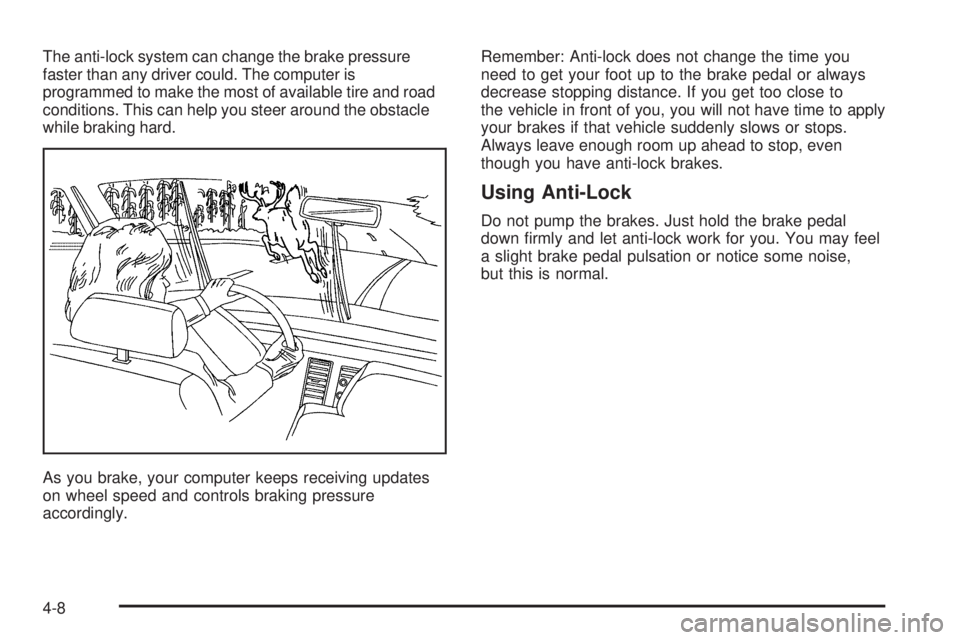
The anti-lock system can change the brake pressure
faster than any driver could. The computer is
programmed to make the most of available tire and road
conditions. This can help you steer around the obstacle
while braking hard.
As you brake, your computer keeps receiving updates
on wheel speed and controls braking pressure
accordingly.Remember: Anti-lock does not change the time you
need to get your foot up to the brake pedal or always
decrease stopping distance. If you get too close to
the vehicle in front of you, you will not have time to apply
your brakes if that vehicle suddenly slows or stops.
Always leave enough room up ahead to stop, even
though you have anti-lock brakes.
Using Anti-Lock
Do not pump the brakes. Just hold the brake pedal
down rmly and let anti-lock work for you. You may feel
a slight brake pedal pulsation or notice some noise,
but this is normal.
4-8
Page 171 of 328

Do not get too close to the vehicle you want to pass
while you are awaiting an opportunity. For one thing,
following too closely reduces your area of vision,
especially if you are following a larger vehicle. Also,
you will not have adequate space if the vehicle
ahead suddenly slows or stops. Keep back a
reasonable distance.
When it looks like a chance to pass is coming up,
start to accelerate but stay in the right lane and do
not get too close. Time your move so you will be
increasing speed as the time comes to move into the
other lane. If the way is clear to pass, you will have a
running start that more than makes up for the
distance you would lose by dropping back. And if
something happens to cause you to cancel your
pass, you need only slow down and drop back again
and wait for another opportunity.
If other vehicles are lined up to pass a slow vehicle,
wait your turn. But take care that someone is not
trying to pass you as you pull out to pass the slow
vehicle. Remember to glance over your shoulder and
check the blind spot.
Check your mirrors, glance over your shoulder, and
start your left lane change signal before moving out
of the right lane to pass. When you are far enough
ahead of the passed vehicle to see its front in your
inside mirror, activate your right lane change signal
and move back into the right lane. Remember that
your right outside mirror is convex. The vehicle you
just passed may seem to be farther away from you
than it really is.
Try not to pass more than one vehicle at a time on
two-lane roads. Reconsider before passing the next
vehicle.
Do not overtake a slowly moving vehicle too rapidly.
Even though the brake lamps are not ashing, it may
be slowing down or starting to turn.
If you are being passed, make it easy for the
following driver to get ahead of you. Perhaps you can
ease a little to the right.
4-13
Page 208 of 328

If you are in an area of extreme cold, where the
temperature falls below−20°F (−29°C), it is
recommended that you use either an SAE 5W-30
synthetic oil or an SAE 0W-30 oil. Both will provide
easier cold starting and better protection for your engine
at extremely low temperatures.
Engine Oil Additives
Do not add anything to your oil. The recommended oils
with the starburst symbol that meet GM Standard
GM6094M are all you will need for good performance
and engine protection.
When to Change Engine Oil (Vehicles
Without a Driver Information Center)
If your vehicle does not have a Driver Information
Center (DIC), change the engine oil and lter at the
intervals specied in the maintenance schedule. See
Scheduled Maintenance on page 6-4.
If your vehicle has a Driver Information Center, it has
the Engine Oil Life System. SeeEngine Oil Life System
on page 5-16for information on when to change your
engine oil.
Engine Oil Life System
When to Change Engine Oil (Vehicles
With Driver Information Center)
If your vehicle has a Driver Information Center (DIC), it
has the Engine Oil Life System, a computer system
that lets you know when to change the engine oil and
lter. This is based on engine revolutions and engine
temperature, and not on mileage. Based on driving
conditions, the mileage at which an oil change will be
indicated can vary considerably. For the oil life system to
work properly, you must reset the system every time
the oil is changed.
When the system has calculated that oil life has been
diminished, it will indicate that an oil change is
necessary. A CHANGE OIL SOON message will come
on. SeeDIC Warnings and Messages on page 3-38.
Change the oil as soon as possible within the next
600 miles (1 000 km). It is possible that, if you
are driving under the best conditions, the oil life system
may not indicate that an oil change is necessary for
over a year. However, the engine oil and lter must be
changed at least once a year and at this time the
system must be reset. Your dealer has GM-trained
service people who will perform this work using genuine
GM parts and reset the system. It is also important to
check your oil regularly and keep it at the proper level.
5-16
Page 209 of 328

If the system is ever reset accidentally, you must
change the oil at 3,000 miles (5 000 km) since the last
oil change. Remember to reset the oil life system
whenever the oil is changed.
How to Reset the Engine Oil
Life System
The Engine Oil Life System calculates when to change
your engine oil and lter based on vehicle use.
Anytime your oil is changed, reset the system so it can
calculate when the next oil change is required. If a
situation occurs where you change your oil prior to a
CHANGE OIL SOON message being turned on,
reset the system.
After changing the engine oil, the system must be reset
as follows:
1. Turn the ignition to RUN, with the engine off.
2. Press the information and reset buttons on the DIC
at the same time to enter the personalization menu.
SeeDIC Vehicle Personalization on page 3-40.3. Press the information button to scroll through the
available personalization menu modes until the
DIC display shows OIL-LIFE RESET.
4. Press and hold the reset button until the DIC
display shows ACKNOWLEDGED. This will tell you
the system has been reset.
5. Turn the key to LOCK.
If the CHANGE OIL SOON message comes back on
when you start your vehicle, the engine oil life system
has not reset. Repeat the reset procedure.
What to Do with Used Oil
Used engine oil contains certain elements that may be
unhealthy for your skin and could even cause cancer.
Do not let used oil stay on your skin for very long. Clean
your skin and nails with soap and water, or a good
hand cleaner. Wash or properly dispose of clothing or
rags containing used engine oil. See the manufacturer’s
warnings about the use and disposal of oil products.
Used oil can be a threat to the environment. If you
change your own oil, be sure to drain all the oil from the
lter before disposal. Never dispose of oil by putting it
in the trash, pouring it on the ground, into sewers, or into
streams or bodies of water. Instead, recycle it by
taking it to a place that collects used oil. If you have a
problem properly disposing of used oil, ask your
dealer, a service station or a local recycling center
for help.
5-17
Page 226 of 328
down and you need new ones put in — be sure you get
new approved GM replacement parts. If you do not,
your brakes may no longer work properly. For example,
if someone puts in brake linings that are wrong for
your vehicle, the balance between your front and rear
brakes can change — for the worse. The braking
performance you have come to expect can change in
many other ways if someone puts in the wrong
replacement brake parts.
Battery
Your vehicle has a maintenance free battery. When it is
time for a new battery, get one that has the replacement
number shown on the original battery’s label. We
recommend an ACDelco
®replacement battery. See
Engine Compartment Overview on page 5-12for
battery location.Warning:Battery posts, terminals, and related
accessories contain lead and lead compounds,
chemicals known to the State of California to
cause cancer and reproductive harm. Wash hands
after handling.
5-34
Page 244 of 328

Make certain that all wheel nuts are properly tightened.
See “Wheel Nut Torque” under Capacities and
Specications.
{CAUTION:
Rust or dirt on a wheel, or on the parts to
which it is fastened, can make wheel nuts
become loose after a time. The wheel could
come off and cause a crash. When you change
a wheel, remove any rust or dirt from places
where the wheel attaches to the vehicle. In an
emergency, you can use a cloth or a paper
towel to do this; but be sure to use a scraper
or wire brush later, if you need to, to get all the
rust or dirt off.
When It Is Time for New Tires
One way to tell when it is
time for new tires is to
check the treadwear
indicators, which will
appear when your tires
have only 1/16 inch
(1.6 mm) or less of
tread remaining.
You need a new tire if any of the following statements
are true:
You can see the indicators at three or more places
around the tire.
You can see cord or fabric showing through the
tire’s rubber.
The tread or sidewall is cracked, cut or snagged
deep enough to show cord or fabric.
The tire has a bump, bulge or split.
The tire has a puncture, cut or other damage that
cannot be repaired well because of the size or
location of the damage.
5-52