steering wheel PONTIAC SOLSTICE 2006 User Guide
[x] Cancel search | Manufacturer: PONTIAC, Model Year: 2006, Model line: SOLSTICE, Model: PONTIAC SOLSTICE 2006Pages: 328, PDF Size: 1.92 MB
Page 93 of 328

The lever that allows you to tilt the steering wheel is
located on the left side of the steering column.
To tilt the wheel, pull down the lever. Then move the
wheel to a comfortable position, pull up the lever to lock
the wheel in place.Turn Signal/Multifunction Lever
The lever on the left side of the steering column
includes the following:
GTurn and Lane-Change Signals. SeeTurn and
Lane-Change Signals on page 3-8.
3Headlamp High/Low-Beam Changer. See
Headlamp High/Low-Beam Changer on page 3-8.
Flash-to-Pass. SeeFlash-to-Pass on page 3-8.
2Exterior Light Control. SeeHeadlamps
on page 3-13.
3-7
Page 95 of 328

Windshield Wipers
Use this lever, located on the right side of the steering
wheel, to operate the windshield wipers.
9(Off):Move the lever to this position to turn off the
windshield wipers.
&(Intermittent):Move the lever to this position for
intermittent operation. When you select this position, the
delay will vary depending on the manually selected delay.
x(Delay):When the lever is in the intermittent
position, turn the intermittent adjust band with this symbol
on it up or down to set for a shorter or longer delay
between wipes. To the left of the adjust band are bars,
increasing in size from bottom to top, that indicate the
frequency of the wipes. Smaller bars mean the wipers
movement is less frequent. Larger bars mean the
movement is more frequent.
6(Low Speed):Move the lever up to the rst
setting past intermittent, for steady wiping at low speed.
1(High Speed):Move the lever up to the second
setting past intermittent, for wiping at high speed.
8(Mist):Move the lever all the way down to this
position for a single wiping cycle. Hold it there until the
windshield wipers start; then let go. The windshield
wipers will stop after one wiping cycle. If you want
additional wiping cycles, hold the lever down longer.
Damaged wiper blades may prevent you from seeing
well enough to drive safely. To avoid damage, be sure to
clear ice and snow from the wiper blades before
using them.
If the wiper blades are frozen to the windshield, carefully
loosen or thaw them. If your blades do become
damaged, get new blades or blade inserts.
3-9
Page 97 of 328
Setting Cruise Control
{CAUTION:
If you leave your cruise control on when you
are not using cruise, you might hit a button
and go into cruise when you do not want to.
You could be startled and even lose control.
Keep the cruise control switch off until you
want to use cruise control.
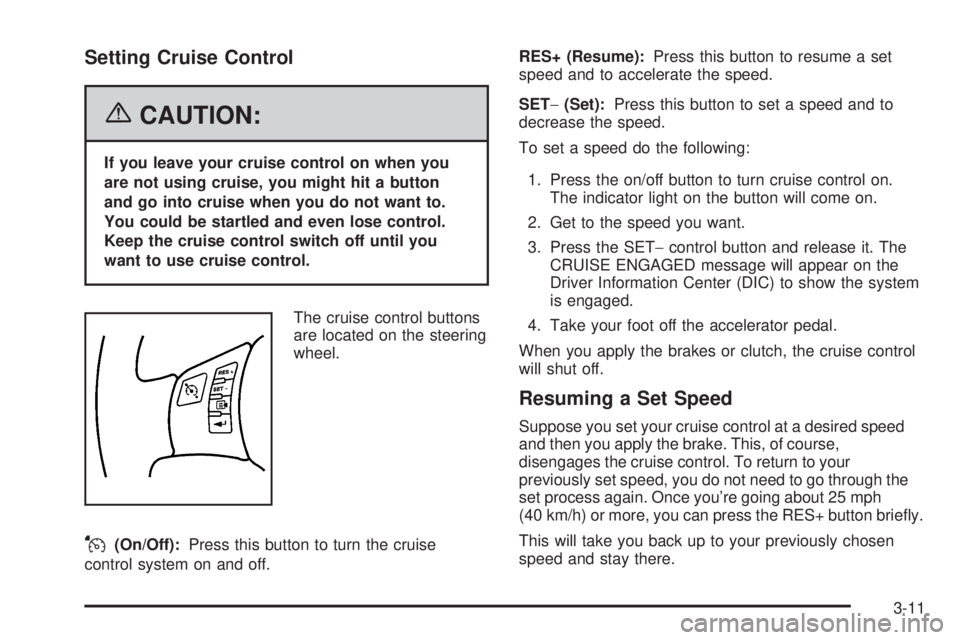
The cruise control buttons
are located on the steering
wheel.
J(On/Off):Press this button to turn the cruise
control system on and off.RES+ (Resume):Press this button to resume a set
speed and to accelerate the speed.
SET−(Set):Press this button to set a speed and to
decrease the speed.
To set a speed do the following:
1. Press the on/off button to turn cruise control on.
The indicator light on the button will come on.
2. Get to the speed you want.
3. Press the SET−control button and release it. The
CRUISE ENGAGED message will appear on the
Driver Information Center (DIC) to show the system
is engaged.
4. Take your foot off the accelerator pedal.
When you apply the brakes or clutch, the cruise control
will shut off.
Resuming a Set Speed
Suppose you set your cruise control at a desired speed
and then you apply the brake. This, of course,
disengages the cruise control. To return to your
previously set speed, you do not need to go through the
set process again. Once you’re going about 25 mph
(40 km/h) or more, you can press the RES+ button briey.
This will take you back up to your previously chosen
speed and stay there.
3-11
Page 100 of 328

Headlamps on Reminder
If you open the driver’s door with the ignition off and the
lamps on, you will hear a warning chime.
Daytime Running Lamps (DRL)
Daytime Running Lamps (DRL) can make it easier for
others to see the front of your vehicle during the
day. DRL can be helpful in many different driving
conditions, but they can be especially helpful in the short
periods after dawn and before sunset. Fully functional
daytime running lamps are required on all vehicles
rst sold in Canada.
Your vehicle has a light sensor on top of the instrument
panel. Make sure it is not covered or the headlamps
will come on when you do not need them.
The DRL system will make both front turn signal lamps
turn on when the following conditions are met:
The ignition is on.
The exterior lamp control is turned to AUTO.
The light sensor detects daytime light.
The shift lever is not in PARK (P).
While the DRL system is on, the taillamps, sidemarker
lamps, and instrument panel lights will not be
illuminated.The DRL system will be off any time your vehicle is in
PARK (P). The DRL system on U.S. vehicles can
also be turned off by using the off/on switch for one
ignition cycle.
As with any vehicle, you should turn on the regular
headlamp system when you need it.
The DRL system will turn off whenever the park brake is
engaged or if vehicle speed is less than 5 mph after
the vehicle is started.
Fog Lamps
If your vehicle is equipped
with a fog lamp button, it is
located on the instrument
panel, to the right of
the steering wheel.
The ignition must be on to turn your fog lamps on.
Push the button to turn the fog lamps on. An indicator
light on the switch will come on when the fog lamps are
on. Push the button again to turn the fog lamps off.
The parking lamps will automatically turn on and
off when the fog lamps are turned on and off.
3-14
Page 101 of 328

The fog lamps will turn off while the high-beam
headlamps are turned on.
Some localities have laws that require the headlamps to
be on along with the fog lamps.
Instrument Panel Brightness
DInstrument Panel Brightness:The control for this
feature is located on the instrument panel to the right
of the steering wheel.
Turn the knob clockwise to brighten the lights or
counterclockwise to dim them.
Entry/Exit Lighting
The lamps inside your vehicle will go on when you open
any door. These lamps will fade out after about
20 seconds after all of the doors have been closed or
when the ignition is turned on. These lamps will also go
on when you press the trunk release, unlock symbol
button or the horn symbol on the keyless entry system
transmitter.
The lamps inside your vehicle will stay on for about
20 seconds after your key is removed from the ignition
to provide an illuminated exit.
Mirror Reading Lamps
Your vehicle has reading lamps on the rearview mirror.
Push the button to turn the reading lamps on and off.
Battery Run-Down Protection
Your vehicle is equipped with a battery saver feature
designed to protect your vehicle’s battery.
When any interior lamp is left on and the ignition is
turned off, the battery rundown protection system will
automatically turn the lamp off after 20 minutes. This will
avoid draining the battery.
Accessory Power Outlet(s)
The accessory power outlet can be used to connect
electrical equipment such as a cellular phone or
CB radio. The outlet can accept electrical equipment
rated at a maximum of 20 amps.
The accessory power outlet is located on the instrument
panel, under the radio.
To use the outlet, remove the cover. When not in use,
always cover the outlet with the protective cap.
Notice:Leaving electrical equipment on for
extended periods will drain the battery. Always turn
off electrical equipment when not in use and do not
plug in equipment that exceeds the maximum
amperage rating.
3-15
Page 122 of 328

Driver Information Center (DIC)
Your vehicle may have a Driver Information Center
(DIC). The DIC display gives you the status of many of
your vehicle’s systems. The DIC is also used to
display driver personalization menu modes and
warning/status messages. All messages will appear in
the DIC display, located at the bottom of the tachometer
on the instrument panel cluster.
The DIC buttons are
located on the left side of
the steering wheel.
q(Information):Press this button to scroll through
the vehicle information mode displays.
r(Reset):Press this button to reset some vehicle
information mode displays, select a personalization
menu mode setting, or acknowledge a warning
message.Press and hold the information and reset buttons at the
same time for several seconds, then release the
buttons to enter the personalization menu. SeeDIC
Vehicle Personalization on page 3-40for more
information.
DIC Operation and Displays
The DIC comes on when the ignition is on. The DIC has
different modes which can be accessed by pressing
the DIC buttons. The button functions are detailed in the
following.
Information Modes
q
(Information):Press this button to scroll through
the following vehicle information modes:
Odometer
Press the information button until the odometer is
displayed. This mode shows the total distance the
vehicle has been driven in either miles (mi) or
kilometers (km).
To change the DIC display to English or metric units,
see “UNITS” underDIC Vehicle Personalization on
page 3-40.
3-36
Page 131 of 328

LANGUAGE
This feature allows you to select the language in which
the DIC will display. Press the reset button to scroll
through the available settings:
ENGLISH (default):The DIC will display all information
in English.
FRENCH:The DIC will display all information in
French.
SPANISH:The DIC will display all information in
Spanish.
GERMAN:The DIC will display all information in
German.
Choose one of the available settings and press the
information button to select it and exit out of the
personalization menu mode.
Exiting Personalization Menu
The personalization menu will be exited when any of the
following conditions occur:
A ten second time period has elapsed.
The ignition is turned off.
The end of the personalization menu list is reached.
Audio System(s)
Driving without distraction is a necessity for a safer
driving experience. SeeDefensive Driving on page 4-2.
By taking a few moments to read this manual and
get familiar with your vehicle’s audio system, you can
use it with less effort, as well as take advantage of
its features. While your vehicle is parked, set up your
audio system by presetting your favorite radio stations,
setting the tone and adjusting the speakers. Then,
when driving conditions permit, you can tune to your
favorite stations using the presets and steering
wheel controls (if equipped).
You also need to educate yourself about the importance
of avoiding distractions while you are driving.
While your vehicle is parked:
Familiarize yourself with all of its controls.
Familiarize yourself with its operation.
Set up your audio system by presetting your
favorite stations, setting the tone and adjusting the
speakers. Then, when driving conditions permit,
you can tune to your favorite stations using
the presets and steering wheel controls
(if equipped).
3-45
Page 141 of 328

Storing a Radio Station as a Favorite
Drivers are encouraged to set up their radio station
favorites while the vehicle is parked. Tune to your
favorite stations using the presets, favorites button, and
steering wheel controls (if equipped). SeeDefensive
Driving on page 4-2.
FAV (Favorites):A maximum of 36 stations can be
programmed as favorites using the six pushbuttons
positioned below the radio station frequency labels and
by using the radio favorites page button (FAV button).
Press the FAV button to go through up to six pages of
favorites, each having six favorite stations available per
page. Each page of favorites can contain any
combination of AM, FM, or XM™ (if equipped) stations.
To store a station as a favorite, perform the following
steps:
1. Tune to the desired radio station.
2. Press the FAV button to display the page where
you want the station stored.
3. Press and hold one of the six pushbuttons until you
hear a beep. Whenever that pushbutton is pressed
and released, the station that was set will return.
4. Repeat the steps for each pushbutton radio station
you want stored as a favorite.The number of favorites pages can be setup using the
MENU button. To setup the number of favorites
pages, perform the following steps:
1. Press the MENU button to display the radio
setup menu.
2. Press the pushbutton located below the
FAV 1-6 label.
3. Select the desired number of favorites pages by
pressing the pushbutton located below the
displayed page numbers.
4. Press the FAV button, or let the menu time out, to
return to the original main radio screen showing the
radio station frequency labels and to begin the
process of programming your favorites for the
chosen amount of numbered pages.
3-55
Page 155 of 328
Audio Steering Wheel Controls
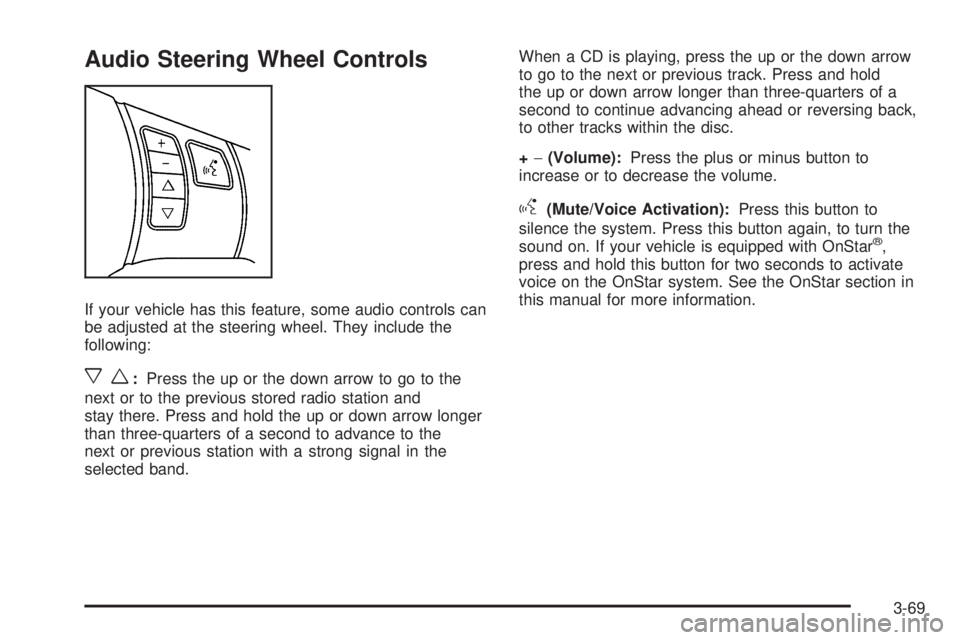
If your vehicle has this feature, some audio controls can
be adjusted at the steering wheel. They include the
following:
xw:Press the up or the down arrow to go to the
next or to the previous stored radio station and
stay there. Press and hold the up or down arrow longer
than three-quarters of a second to advance to the
next or previous station with a strong signal in the
selected band.When a CD is playing, press the up or the down arrow
to go to the next or previous track. Press and hold
the up or down arrow longer than three-quarters of a
second to continue advancing ahead or reversing back,
to other tracks within the disc.
+−(Volume):Press the plus or minus button to
increase or to decrease the volume.
g(Mute/Voice Activation):Press this button to
silence the system. Press this button again, to turn the
sound on. If your vehicle is equipped with OnStar
®,
press and hold this button for two seconds to activate
voice on the OnStar system. See the OnStar section in
this manual for more information.
3-69
Page 167 of 328

Braking in Emergencies
At some time, nearly every driver gets into a situation
that requires hard braking.
If you have anti-lock brakes, you can steer and brake at
the same time. However, if you do not have anti-lock
brakes, your rst reaction — to hit the brake pedal hard
and hold it down — may be the wrong thing to do.
Your wheels can stop rolling. Once they do, the vehicle
cannot respond to your steering. Momentum will
carry it in whatever direction it was headed when the
wheels stopped rolling. That could be off the road, into
the very thing you were trying to avoid, or into traffic.
If you do not have anti-lock brakes, use a “squeeze”
braking technique. This will give you maximum braking
while maintaining steering control. You can do this by
pushing on the brake pedal with steadily increasing
pressure.In an emergency, you will probably want to squeeze the
brakes hard without locking the wheels. If you hear or
feel the wheels sliding, ease off the brake pedal.
This will help you retain steering control. If you do have
anti-lock brakes, it is different. SeeAnti-Lock Brake
System (ABS) on page 4-7.
In many emergencies, steering can help you more than
even the very best braking.
Limited-Slip Rear Axle
Your vehicle may have this feature. A limited-slip rear
axle can give you additional traction on snow, mud, ice,
sand or gravel. It works like a standard axle most of
the time, but when one of the rear wheels has no
traction and the other does, this feature will allow the
wheel with traction to move the vehicle.
4-9