trunk PONTIAC SOLSTICE 2006 User Guide
[x] Cancel search | Manufacturer: PONTIAC, Model Year: 2006, Model line: SOLSTICE, Model: PONTIAC SOLSTICE 2006Pages: 328, PDF Size: 1.92 MB
Page 88 of 328
Service Vehicle Soon Light............................3-34
Fuel Gage...................................................3-35
Low Fuel Warning Light.................................3-35
Driver Information Center (DIC).......................3-36
DIC Operation and Displays...........................3-36
DIC Warnings and Messages.........................3-38
DIC Vehicle Personalization............................3-40
Audio System(s).............................................3-45
Setting the Time (Without Date Display)...........3-47
Setting the Time (With Date Display)...............3-47Radio with CD (Base)...................................3-48
Radio with CD (MP3)....................................3-53
Theft-Deterrent Feature..................................3-68
Audio Steering Wheel Controls.......................3-69
Radio Reception...........................................3-70
Care of Your CDs.........................................3-71
Care of the CD Player...................................3-71
Fixed Mast Antenna......................................3-71
XM™ Satellite Radio Antenna System
(Trunk Mounted)........................................3-71
Section 3 Instrument Panel
3-2
Page 91 of 328

The main components of your instrument panel are the following:
A. Side Window Outlets. SeeClimate Control System
on page 3-17.
B. Air Outlets. SeeOutlet Adjustment on page 3-20.
C. Turn Signal/Multifunction Lever. SeeTurn
Signal/Multifunction Lever on page 3-7.
D. Cruise Control Buttons (If Equipped). SeeCruise
Control on page 3-10.
E. Instrument Panel Cluster. SeeInstrument Panel
Cluster on page 3-21.
F. Audio Steering Wheel Controls (If Equipped). See
Audio Steering Wheel Controls on page 3-69.
G. Instrument Panel Brightness Control. SeeInstrument
Panel Brightness on page 3-15.
H. Passenger Air Bag Status Indicator. SeePassenger
Airbag Status Indicator on page 3-25.
I. Hazard Warning Flashers Button. SeeHazard
Warning Flashers on page 3-6.
J. Fog Lamp Button (If Equipped). SeeFog Lamps on
page 3-14.
K. Drive Information Center (DIC) Controls. SeeDriver
Information Center (DIC) on page 3-36.L. Horn. SeeHorn on page 3-6.
M. Windshield Wiper/Washer Controls. SeeWindshield
Wipers on page 3-9andWindshield Washer on
page 3-10.
N. Climate Controls. SeeClimate Control System on
page 3-17.
O. Cigarette Lighter (If Equipped). Accessory Power
Outlet (If Equipped). SeeAshtray(s) and Cigarette
Lighter on page 3-16andAccessory Power Outlet(s)
on page 3-15.
P. Shift Lever. SeeManual Transmission Operation on
page 2-23. SeeAutomatic Transmission Operation on
page 2-20(if equipped with automatic transmission).
Q. Parking Brake Lever. SeeParking Brake on
page 2-24.
R. Audio System. SeeAudio System(s) on page 3-45.
S. Cupholder. SeeCupholder(s) on page 2-33.
T. Trunk Release. SeeTrunk on page 2-9.
U. Glove Box. SeeGlove Box on page 2-33.
3-5
Page 101 of 328

The fog lamps will turn off while the high-beam
headlamps are turned on.
Some localities have laws that require the headlamps to
be on along with the fog lamps.
Instrument Panel Brightness
DInstrument Panel Brightness:The control for this
feature is located on the instrument panel to the right
of the steering wheel.
Turn the knob clockwise to brighten the lights or
counterclockwise to dim them.
Entry/Exit Lighting
The lamps inside your vehicle will go on when you open
any door. These lamps will fade out after about
20 seconds after all of the doors have been closed or
when the ignition is turned on. These lamps will also go
on when you press the trunk release, unlock symbol
button or the horn symbol on the keyless entry system
transmitter.
The lamps inside your vehicle will stay on for about
20 seconds after your key is removed from the ignition
to provide an illuminated exit.
Mirror Reading Lamps
Your vehicle has reading lamps on the rearview mirror.
Push the button to turn the reading lamps on and off.
Battery Run-Down Protection
Your vehicle is equipped with a battery saver feature
designed to protect your vehicle’s battery.
When any interior lamp is left on and the ignition is
turned off, the battery rundown protection system will
automatically turn the lamp off after 20 minutes. This will
avoid draining the battery.
Accessory Power Outlet(s)
The accessory power outlet can be used to connect
electrical equipment such as a cellular phone or
CB radio. The outlet can accept electrical equipment
rated at a maximum of 20 amps.
The accessory power outlet is located on the instrument
panel, under the radio.
To use the outlet, remove the cover. When not in use,
always cover the outlet with the protective cap.
Notice:Leaving electrical equipment on for
extended periods will drain the battery. Always turn
off electrical equipment when not in use and do not
plug in equipment that exceeds the maximum
amperage rating.
3-15
Page 126 of 328
LOW COOLANT
This message will display when there is a low level of
engine coolant. Have the cooling system serviced
by your GM dealer as soon as possible. SeeEngine
Coolant on page 5-19for more information.
PARKING BRAKE
This message will display if the parking brake is left
engaged. SeeParking Brake on page 2-24.
SERVICE AIR BAG
This message will display when there is a problem with
the airbag system. Have your vehicle serviced by
your GM dealer immediately.
TRUNK AJAR
This message will display when the trunk lid of your
vehicle is not closed completely. You should make sure
that the trunk lid is closed completely. SeeTrunk on
page 2-9.
DIC Vehicle Personalization
Your vehicle has personalization capabilities that allow
you to program certain features to a preferred setting.
All of the features listed may not be available on
your vehicle. Only the features available will be
displayed on your DIC.
The default settings for the features were set when your
vehicle left the factory, but may have been changed
from their default state since that time.
To change feature settings, use the following procedure:
Entering Personalization Menu
1. Turn the ignition on while the vehicle is stopped.
2. Press and hold the information and reset buttons at
the same time for several seconds, then release to
enter the personalization menu.
If the vehicle speed is greater than 2 mph (3 km/h),
only the UNITS menu will be accessible.
3. Press the information button to scroll through the
available personalization menu modes.
Press the reset button to scroll through the available
settings for each mode.
If you do not make a selection within ten seconds,
the display will go back to the previous information
displayed.
3-40
Page 157 of 328
Care of Your CDs
Handle CDs carefully. Store them in their original cases
or other protective cases and away from direct
sunlight and dust. The CD player scans the bottom
surface of the disc. If the surface of a CD is damaged,
such as cracked, broken, or scratched, the CD will
not play properly or not at all. If the surface of a CD is
soiled, take a soft, lint free cloth or dampen a clean, soft
cloth in a mild, neutral detergent solution mixed with
water, and clean it. Make sure the wiping process starts
from the center to the edge.
Do not touch the bottom side of a CD while handling it;
this could damage the surface. Pick up CDs by
grasping the outer edges or the edge of the hole and
the outer edge.
Care of the CD Player
The use of CD lens cleaners for CD players is not
advised, due to the risk of contaminating the lens of the
CD optics with lubricants internal to the CD mechanism.
Fixed Mast Antenna
The xed mast antenna can withstand most car washes
without being damaged. If the mast should ever
become slightly bent, straighten it out by hand. If the
mast is badly bent, replace it.
Check occasionally to make sure the mast is still
tightened to the fender. If tightening is required, tighten
by hand, then with a wrench one quarter turn.
XM™ Satellite Radio Antenna
System (Trunk Mounted)
Your vehicle may have the XM™ Satellite Radio
antenna that is located on the trunk of your vehicle.
Keep this antenna clear of snow and ice build up
for clear radio reception.
3-71
Page 182 of 328
Winter Driving
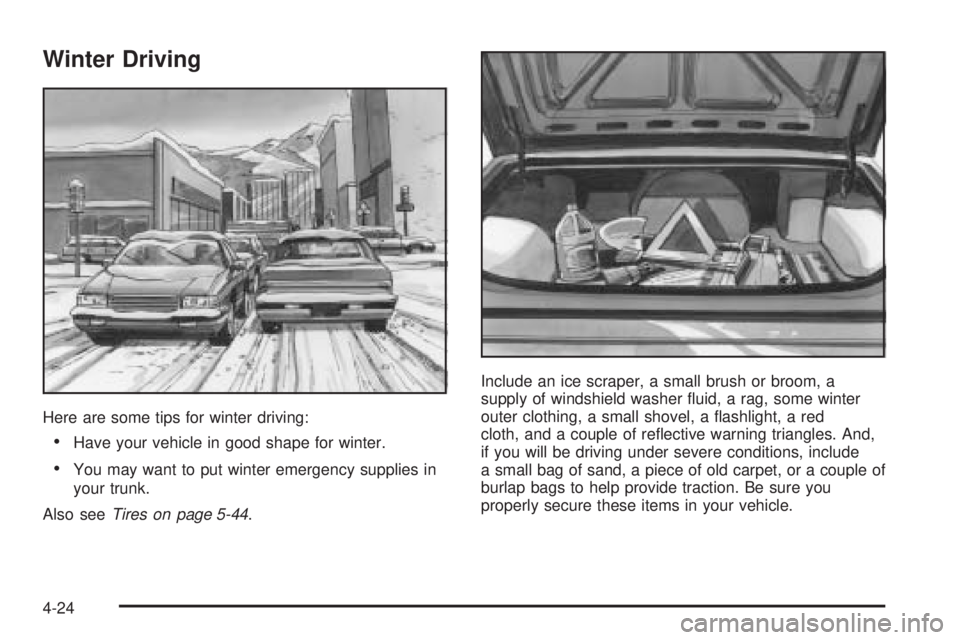
Here are some tips for winter driving:
Have your vehicle in good shape for winter.
You may want to put winter emergency supplies in
your trunk.
Also seeTires on page 5-44.Include an ice scraper, a small brush or broom, a
supply of windshield washer uid, a rag, some winter
outer clothing, a small shovel, a ashlight, a red
cloth, and a couple of reective warning triangles. And,
if you will be driving under severe conditions, include
a small bag of sand, a piece of old carpet, or a couple of
burlap bags to help provide traction. Be sure you
properly secure these items in your vehicle.
4-24
Page 202 of 328

Filling a Portable Fuel Container
{CAUTION:
Never ll a portable fuel container while it is in
your vehicle. Static electricity discharge from
the container can ignite the gasoline vapor.
You can be badly burned and your vehicle
damaged if this occurs. To help avoid injury to
you and others:
Dispense gasoline only into approved
containers.
Do not ll a container while it is inside a
vehicle, in a vehicle’s trunk, pickup bed, or
on any surface other than the ground.
Bring the ll nozzle in contact with the
inside of the ll opening before operating
the nozzle. Contact should be maintained
until the lling is complete.
Do not smoke while pumping gasoline.
Checking Things Under
the Hood
{CAUTION:
An electric fan under the hood can start up
and injure you even when the engine is not
running. Keep hands, clothing and tools away
from any underhood electric fan.
{CAUTION:
Things that burn can get on hot engine parts
and start a re. These include liquids like fuel,
oil, coolant, brake uid, windshield washer and
other uids, and plastic or rubber. You or
others could be burned. Be careful not to drop
or spill things that will burn onto a hot engine.
5-10
Page 234 of 328

Taillamps, Turn Signal, and
Stoplamps
To replace one of these bulbs, do the following:
1. Open the trunk. SeeTrunk on page 2-9for
more information.
2. Remove the
two screws, which
hold the taillamp
assembly, from
inside the vehicle.
3. Remove the taillamp assembly.
4. Turn the bulb socket counterclockwise to remove.
5. Pull the bulb from the socket.
6. Install a new bulb.
7. Reverse the steps to reinstall the taillamp assembly.
Back-Up Lamps
The back-up lamps are
located in the rear bumper.
To replace a bulb, do the following:
1. Reach behind, up and under the rear bumper and
locate the bulb socket.
2. Turn it counterclockwise to remove from the
bulb assembly.
3. Pull the bulb from the bulb socket.
4. Push in a new bulb into the bulb socket.
5. Reinstall the bulb socket by lining up the tabs in the
lamp assembly and turn it clockwise to secure it.
5-42
Page 253 of 328
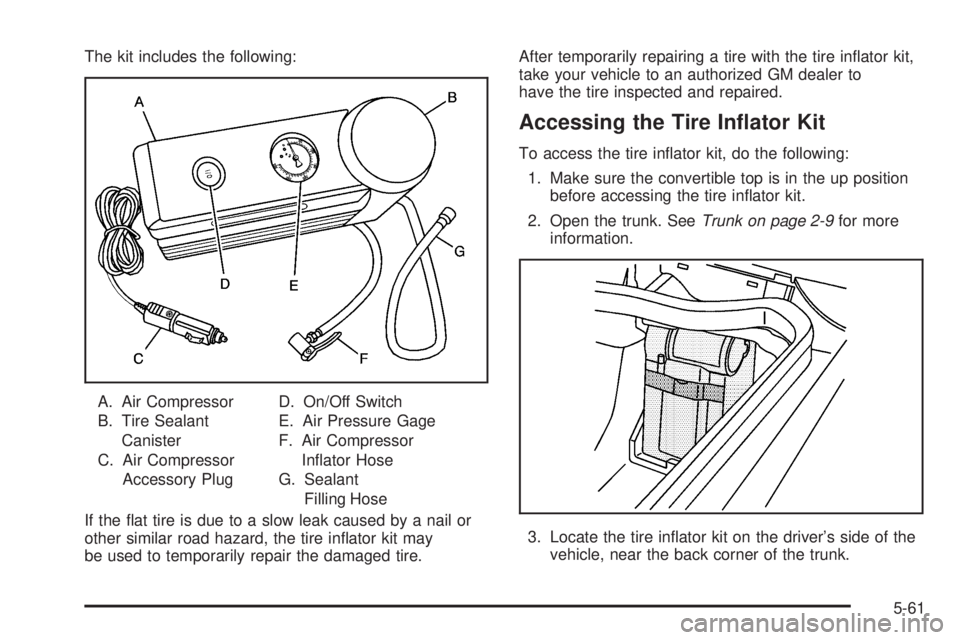
The kit includes the following:
A. Air Compressor
B. Tire Sealant
Canister
C. Air Compressor
Accessory PlugD. On/Off Switch
E. Air Pressure Gage
F. Air Compressor
Inator Hose
G. Sealant
Filling Hose
If the at tire is due to a slow leak caused by a nail or
other similar road hazard, the tire inator kit may
be used to temporarily repair the damaged tire.After temporarily repairing a tire with the tire inator kit,
take your vehicle to an authorized GM dealer to
have the tire inspected and repaired.
Accessing the Tire Inator Kit
To access the tire inator kit, do the following:
1. Make sure the convertible top is in the up position
before accessing the tire inator kit.
2. Open the trunk. SeeTrunk on page 2-9for more
information.
3. Locate the tire inator kit on the driver’s side of the
vehicle, near the back corner of the trunk.
5-61
Page 257 of 328

16. If the at tire was able
to inate to the
recommended ination
pressure, remove the
maximum speed label
from the sealant
canister and place in a
highly visible location
such as the inside of
the upper left corner of
the windshield or to the
face of the radio/clock.
The maximum speed label reminds you to drive
cautiously and not to exceed 55 mph (90 km/h) until
you have the damaged tire inspected and repaired.
{CAUTION:
Storing the tire inator kit or other equipment
in the passenger compartment of the vehicle
could cause injury. In a sudden stop or
collision, loose equipment could strike
someone. Store the tire inator kit in the
proper place.17. Return the equipment to the proper storage location
in the trunk of your vehicle. You may need to
loosen the retention strap to wrap it around the
inator kit and foam container. To do this, pull apart
the strap and loosen the strap at the quick release
buckle. Then snap the buckle together, pull the
strap tight, and secure the loose end of the strap by
mating the ends.
18. Immediately drive the vehicle 5 miles (8 km) to
distribute the sealant evenly in the tire. Stop at a
safe location and check the tire pressure, refer
to Steps 1 through 8 under “Using the Air
Compressor without Sealant” next in this section. If
the tire pressure has fallen more then 10 psi
(68 kPa), below the recommended ination
pressure, stop driving the vehicle. The tire is too
damaged for the sealant to work. SeeRoadside
Assistance Program on page 7-6.
If the tire pressure has not dropped more than
10 psi (68 kPa) from the recommended ination
pressure, you can inate the tire back up to
the recommended ination pressure.
19. Dispose of the sealant canister at a local GM dealer
or in accordance with your local state codes and
practices. After using the sealant canister, replace it
with a new canister from a GM dealer.
20. After temporarily repairing a tire with the emergency
at tire repair kit, take your vehicle to an authorized
GM dealer to have the tire inspected and repaired.
5-65