wheel PONTIAC SOLSTICE 2007 Owner's Manual
[x] Cancel search | Manufacturer: PONTIAC, Model Year: 2007, Model line: SOLSTICE, Model: PONTIAC SOLSTICE 2007Pages: 396, PDF Size: 2.27 MB
Page 150 of 396

Slippery road conditions may exist when this
message is displayed, so adjust your driving
accordingly. This message may stay on for a few
seconds after ESC stops assisting you with
directional control of the vehicle. This is normal
when the system is operating. SeeElectronic
Stability Control on page 200andElectronic
Stability Control (ESC)/Traction Control
System (TCS) Indicator/Warning Light (2.0L Engine
Only) on page 136for more information.
ESC (Electronic Stability Control) OFF
If your vehicle has Electronic Stability
Control (ESC), this message displays and the
ESC/TCS light on the instrument panel cluster
comes on solid when ESC is turned off. Adjust
your driving accordingly. SeeElectronic Stability
Control on page 200andElectronic Stability
Control (ESC)/Traction Control System (TCS)
Indicator/Warning Light (2.0L Engine Only) on
page 136for more information.
KEY FOB BATT (Battery) LOW
This message displays if the Remote Keyless
Entry (RKE) transmitter battery is low. Replace the
battery in the transmitter. See “Battery
Replacement” underRemote Keyless Entry (RKE)
System Operation on page 62.
LOW TRACTION
If your vehicle has the Traction Control System
(TCS), this message displays and the ESC/TCS
light on the instrument panel cluster ashes
when the system is actively limiting wheel spin.
Slippery road conditions may exist if this message
is displayed, so adjust your driving accordingly.
This message stays on for a few seconds after the
system stops limiting wheel spin. SeeTraction
Control System (TCS) on page 198and
Electronic Stability Control (ESC)/Traction Control
System (TCS) Indicator/Warning Light (2.0L
Engine Only) on page 136for more information.
PARKING BRAKE
This message displays if the parking brake is left
engaged. SeeParking Brake on page 86for
more information.
150
Page 157 of 396
Audio System(s)
Determine which radio your vehicle has and then
read the pages following to familiarize yourself
with its features.
Driving without distraction is a necessity for a
safer driving experience. SeeDefensive Driving on
page 190. By taking a few moments to read this
manual and get familiar with your vehicle’s
audio system, you can use it with less effort, as
well as take advantage of its features. While your
vehicle is parked, set up your audio system by
presetting your favorite radio stations, setting the
tone and adjusting the speakers. Then, when
driving conditions permit, you can tune to
your favorite stations using the presets and
steering wheel controls if the vehicle has them.{CAUTION:
This system provides you with a far greater
access to audio stations and song listings.
Giving extended attention to entertainment
tasks while driving can cause a crash and
you or others can be injured or killed.
Always keep your eyes on the road and
your mind on the drive — avoid engaging
in extended searching while driving.
Keeping your mind on the drive is important for
safe driving. For more information, seeDefensive
Driving on page 190.
157
Page 158 of 396
Here are some ways in which you can help avoid
distraction while driving.
While your vehicle is parked:
Familiarize yourself with all of its controls.
Familiarize yourself with its operation.
Set up your audio system by presetting your
favorite radio stations, setting the tone, and
adjusting the speakers. Then, when driving
conditions permit, you can tune to your favorite
radio stations using the presets and steering
wheel controls if the vehicle has them.
Notice:Before adding any sound equipment
to your vehicle, such as an audio system,
CD player, CB radio, mobile telephone,
or two-way radio, make sure that it can be
added by checking with your dealer. Also,
check federal rules covering mobile radio and
telephone units. If sound equipment can be
added, it is very important to do it properly.
Added sound equipment may interfere with the
operation of your vehicle’s engine, radio, or
other systems, and even damage them.
Your vehicle’s systems may interfere with the
operation of sound equipment that has
been added.Your vehicle has a feature called Retained
Accessory Power (RAP). With RAP, the audio
system can be played even after the ignition is
turned off. SeeRetained Accessory Power (RAP)
on page 80for more information.Setting the Time (Without Date
Display)
If your vehicle has an AM/FM base radio with a
single CD player and preset buttons numbered
one through six, the radio will have a clock button
for setting the time. You can set the time by
following these steps:
1. Turn the ignition key to ACC (accessory) or
RUN. Press the power knob, located in the
center of the radio, to turn the radio on.
2. Press the clock button until the hour numbers
begin ashing on the display. Press the clock
button a second time and the minute
numbers will begin ashing on the display.
158
Page 168 of 396
Finding a Station
BAND:Press this button to switch between AM,
FM, or XM™ (if equipped). The selection displays.
f(Tune):Turn this knob to select radio stations.
©SEEK¨:Press the right or left SEEK arrow
to go to the next or to the previous station and stay
there.
To scan stations, press and hold either SEEK
arrow for a few seconds until a beep sounds. The
radio goes to a station, plays for a few seconds,
then goes on to the next station. Press either
SEEK arrow again to stop scanning.
The radio only seeks and scans stations with a
strong signal that are in the selected band.
4(Information) (XM™ Satellite Radio Service,
MP3, and RDS Features):Press the information
button to display additional text information related
to the current FM-RDS or XM™ station, or MP3
song. A choice of additional information such as:
Channel, Song, Artist, and CAT (category) can
display. Continue pressing the information button to
highlight the desired label, or press the pushbutton
positioned under any one of the labels and the
information about that label displays.
While information is not available, No Info displays.
Storing a Radio Station as a Favorite
Drivers are encouraged to set up their radio station
favorites while the vehicle is parked. Tune to your
favorite stations using the presets, favorites button,
and steering wheel controls if the vehicle has this
feature. SeeDefensive Driving on page 190.
FAV (Favorites):A maximum of 36 stations
can be programmed as favorites using the
six pushbuttons positioned below the radio station
frequency labels and by using the radio favorites
page button (FAV button). Press the FAV button to
go through up to six pages of favorites, each
having six favorite stations available per page.
Each page of favorites can contain any
combination of AM, FM, or XM™ (if equipped)
stations. To store a station as a favorite, perform
the following steps:
1. Tune to the desired radio station.
2. Press the FAV button to display the page
where you want the station stored.
168
Page 185 of 396
Theft-Deterrent Feature
THEFTLOCK®is designed to discourage theft of
your vehicle’s radio. The feature works
automatically by learning a portion of the Vehicle
Identication Number (VIN). If the radio is
moved to a different vehicle, it will not operate and
LOCK or LOCKED will appear on the display.
With THEFTLOCK
®activated, the radio will
not operate if stolen.
Audio Steering Wheel Controls
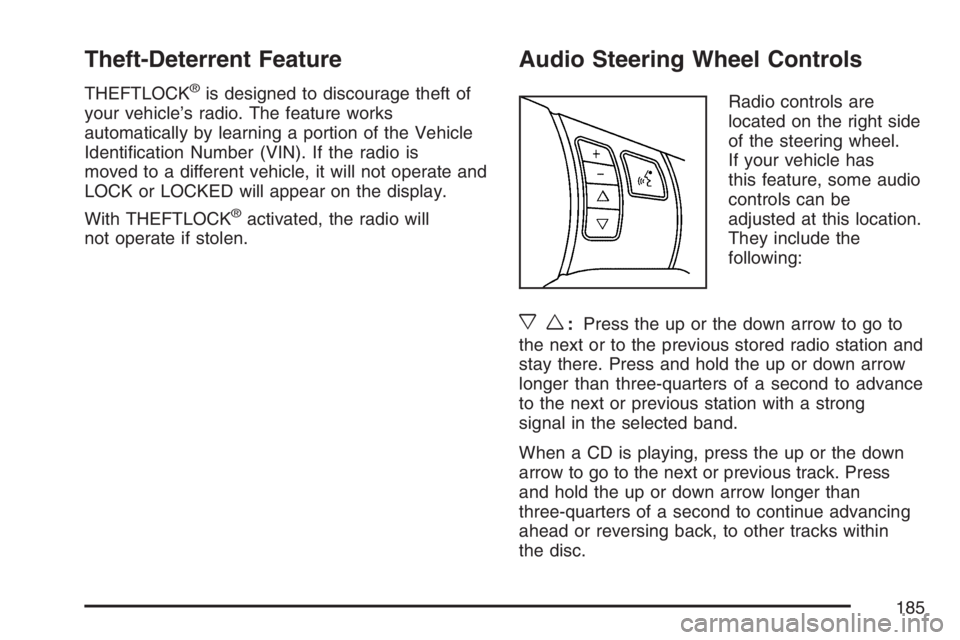
Radio controls are
located on the right side
of the steering wheel.
If your vehicle has
this feature, some audio
controls can be
adjusted at this location.
They include the
following:
xw:Press the up or the down arrow to go to
the next or to the previous stored radio station and
stay there. Press and hold the up or down arrow
longer than three-quarters of a second to advance
to the next or previous station with a strong
signal in the selected band.
When a CD is playing, press the up or the down
arrow to go to the next or previous track. Press
and hold the up or down arrow longer than
three-quarters of a second to continue advancing
ahead or reversing back, to other tracks within
the disc.
185
Page 196 of 396
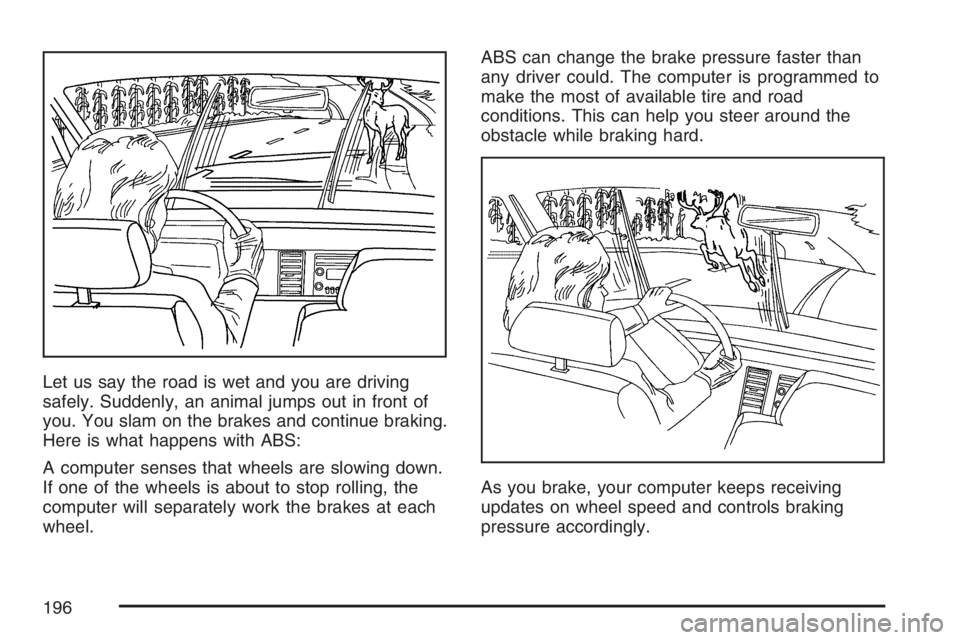
Let us say the road is wet and you are driving
safely. Suddenly, an animal jumps out in front of
you. You slam on the brakes and continue braking.
Here is what happens with ABS:
A computer senses that wheels are slowing down.
If one of the wheels is about to stop rolling, the
computer will separately work the brakes at each
wheel.ABS can change the brake pressure faster than
any driver could. The computer is programmed to
make the most of available tire and road
conditions. This can help you steer around the
obstacle while braking hard.
As you brake, your computer keeps receiving
updates on wheel speed and controls braking
pressure accordingly.
196
Page 197 of 396

Remember: ABS does not change the time you
need to get your foot up to the brake pedal
or always decrease stopping distance. If you get
too close to the vehicle in front of you, you will not
have time to apply your brakes if that vehicle
suddenly slows or stops. Always leave enough
room up ahead to stop, even though you
have ABS.
Using ABS
Do not pump the brakes. Just hold the brake
pedal down rmly and let anti-lock work for you.
You may feel a slight brake pedal pulsation
or notice some noise, but this is normal.
Braking in Emergencies
At some time, nearly every driver gets into a
situation that requires hard braking.
If you have ABS, you can steer and brake at the
same time. However, if you do not have ABS, your
rst reaction — to hit the brake pedal hard and
hold it down — may be the wrong thing to do.
Your wheels can stop rolling. Once they do, the
vehicle cannot respond to your steering.Momentum will carry it in whatever direction it was
headed when the wheels stopped rolling. That
could be off the road, into the very thing you were
trying to avoid, or into traffic.
If you do not have ABS, use a “squeeze” braking
technique. This will give you maximum braking
while maintaining steering control. You can do this
by pushing on the brake pedal with steadily
increasing pressure.
In an emergency, you will probably want to
squeeze the brakes hard without locking the
wheels. If you hear or feel the wheels sliding, ease
off the brake pedal. This will help you retain
steering control. If you do have ABS, it is different.
SeeAnti-Lock Brake System (ABS) on page 195.
In many emergencies, steering can help you
more than even the very best braking.
197
Page 198 of 396

Traction Control System (TCS)
Your vehicle may have a Traction Control System
(TCS) that limits wheel spin. This is especially
useful in slippery road conditions. The system
operates only if it senses that the rear wheels are
spinning too much or are beginning to lose
traction. When this happens, the system works the
rear brakes and reduces engine power by
closing the throttle and managing engine spark to
limit wheel spin.
This light will ash
when your traction
control system is limiting
wheel spin.
You may feel or hear the system working, but this
is normal.
SeeElectronic Stability Control (ESC)/Traction
Control System (TCS) Indicator/Warning Light
(2.0L Engine Only) on page 136for more
information.If your vehicle is in cruise control when TCS
begins to limit wheel spin, the cruise control will
automatically disengage. When road conditions
allow you to safely use it again, you may
re-engage the cruise control. SeeTurn
Signal/Multifunction Lever on page 111.
When this light is on
solid and either the
SERVICE TRACTION
or TRACTION OFF
message is displayed,
the system will not
limit wheel spin.
Adjust your driving accordingly. SeeDIC Warnings
and Messages on page 148for more information.
The Traction Control System is automatically
enabled whenever you start your vehicle. To limit
wheel spin, especially in slippery road conditions,
you should always leave the system enabled.
You can turn TCS off if you ever need to.
198
Page 199 of 396

It is recommended to leave the system on for
normal driving conditions, but it may be necessary
to turn the system off if your vehicle is stuck in
sand, mud, ice or snow, and you want to
“rock” your vehicle to attempt to free it. It may also
be necessary to turn off the system when driving
in extreme off-road conditions where high
wheel spin is required. SeeIf Your Vehicle is
Stuck in Sand, Mud, Ice, or Snow on page 224.
To turn the system off
or on, press and release
this button located on
the instrument panel.
The DIC will display the appropriate message as
described previously when you press the button.Traction Control Operation
Traction control limits wheel spin by reducing
engine power to the wheels (engine speed
management) and by applying brakes to each
individual wheel (brake-traction control) as
necessary.
The traction control system is enabled
automatically when you start your vehicle, and it
will activate and ash the ESC/TCS light and
display the LOW TRACTION message if it senses
that any of the wheels are spinning or beginning
to lose traction while driving. For more information
on the LOW TRACTION message, seeDriver
Information Center (DIC) on page 145.
Notice:If you allow the wheel(s) of one axle to
spin excessively while the ESC/TCS, ABS and
Brake warning lights and the SERVICE ESC
and/or SERVICE TRACTION messages are
displayed, you could damage the differential.
The repairs would not be covered by your
warranty. Reduce engine power and do not spin
the wheel(s) excessively while these lights and
this message are displayed.
199
Page 200 of 396

Notice:When traction control is turned off,
or Competitive Driving Mode is active, it is
possible to lose traction. If you attempt to shift
with the rear wheels spinning with a loss of
traction, it is possible to cause damage to the
transmission. Do not attempt to shift when the
rear wheels do not have traction. Damage
caused by misuse of the vehicle is not covered.
See your warranty book for additional
information.
The traction control system may activate on dry or
rough roads or under conditions such as heavy
acceleration while turning or abrupt upshifts/
downshifts of the transmission. When this
happens, you may notice a reduction in
acceleration, or may hear a noise or vibration.
This is normal.
If your vehicle is in cruise control when the system
activates, the ESC/TCS light will ash and the
cruise control will automatically disengage. When
road conditions allow you to use cruise control
again, you may re-engage the cruise control. See
Cruise Control on page 115.
Adding non-GM accessories can affect your
vehicle’s performance. SeeAccessories and
Modications on page 235for more information.Limited-Slip Rear Axle
Your vehicle may have a limited-slip rear
differential which provides maximum power and
performance. It is designed to give you additional
traction on snow, mud, ice, sand or gravel. It
works like a standard axle most of the time, but
when one of the rear wheels has no traction
and the other does, this feature will allow
the wheel with traction to move the vehicle.
During a sudden shift, such as shifting from
FIRST (1) to SECOND (2) gear at low engine
speeds or suddenly applying the clutch, you may
feel or hear a clunking or rattling noise. This is
normal.
Electronic Stability Control
Your vehicle may be equipped with an Electronic
Stability Control (ESC) system which combines
antilock brake, traction and stability control
systems and helps the driver maintain directional
control of the vehicle in most driving conditions.
When you rst start your vehicle and begin to drive
away, the system performs several diagnostic
checks to ensure there are no problems. You may
hear or feel the system working.
200