change time PONTIAC SOLSTICE 2008 User Guide
[x] Cancel search | Manufacturer: PONTIAC, Model Year: 2008, Model line: SOLSTICE, Model: PONTIAC SOLSTICE 2008Pages: 348, PDF Size: 5.23 MB
Page 141 of 348
The default settings for the features were set when your
vehicle left the factory, but may have been changed
from their default state since that time.
To change feature settings, use the following procedure:
Entering Personalization Menu
1. Turn the ignition on while the vehicle is stopped.
To avoid excessive drain on the battery, it is
recommended that the headlamps are turned off.
2. Press and hold the information and reset buttons
at the same time for one second, then release to
enter the personalization menu.
If the vehicle speed is greater than 2 mph (3 km/h),
only the UNITS menu will be accessible.
3. Press the information button to scroll through the
available personalization menu modes.
Press the reset button to scroll through the available
settings for each mode.
If you do not make a selection within ten seconds,
the display will go back to the previous information
displayed.
Personalization Menu Modes
OIL LIFE RESET
When this feature is displayed, you can reset the engine
oil life system. To reset the system, seeEngine Oil
Life System on page 5-19. See “OIL LIFE” under
DIC Operation and Displays on page 3-38for more
information.
UNITS
This feature allows you to select the units of
measurement in which the DIC will display the vehicle
information. When UNITS appears on the display,
press and hold the reset button for at least one second
to scroll through the available settings:
ENGLISH (default in United States):All information
will be displayed in English units.
METRIC (default in Canada):All information will be
displayed in metric units.
To select a setting and move on to the next feature,
press the information button while the desired setting
is displayed on the DIC.
3-45
Page 147 of 348
To change the time default setting from 12 hour to
24 hour, press the
Hbutton and then the pushbutton
located under the forward arrow label. Once the
time 12H and 24H are displayed, press the pushbutton
located under the desired option to select the default.
Press the
Hbutton again to apply the selected default,
or let the screen time out.
With Date Display
Single CD (MP3) Player
This type of radio has aHbutton for setting the time
and date.
To set the time and date, follow these instructions:
1. Turn the ignition key to ACC/ACCESSORY
or ON/RUN. Press the
Oknob, located in
the center of the radio, to turn the radio on.
2. Press the
Hbutton and the HR, MIN, MM, DD,
YYYY (hour, minute, month, day, and year)
displays.3. Press the pushbutton located under any one of
the labels that you want to change. Every time
the pushbutton is pressed again, the time or
the date if selected, increases by one.
Another way to increase the time or date,
is to press the right
¨SEEK arrow or
\FWD button.
To decrease the time or date, press the
left
©SEEK arrow orsREV button,
or turn the
fknob, located on the upper
right side of the radio.
The date does not automatically display. To see
the date press the
Hbutton while the radio is on.
The date with display times out after a few seconds
and goes back to the normal radio and time display.
3-51
Page 148 of 348
Six-Disc CD (MP3) Player
This type of radio has a MENU button instead of
the
Hbutton to set the time and date.
To set the time and date, follow these instructions:
1. Turn the ignition key to ACC/ACCESSORY
or ON/RUN. Press the
Oknob, located in the
center of the radio, to turn the radio on.
2. Press the MENU button. Once the clock option
is displayed.
3. Press the pushbutton located under that label.
The HR, MIN, MM, DD, YYYY displays.
4. Press the pushbutton located under any one of
the labels you want to change. Every time the
pushbutton is pressed again, the time or the
date if selected, increases by one.
Another way to increase the time or date,
is to press the right
¨SEEK arrow or
\FWD button.
To decrease the time or date, press the
left
©SEEK arrow orsREV button,
or turn the
fknob, located on the upper
right side of the radio.The date does not automatically display. To see the
date press the MENU button and then the
Hbutton
while the radio is on. The date with display times
out after a few seconds and goes back to the normal
radio and time display.
To change the time default setting from 12 hour to
24 hour or to change the date default setting from
month/day/year to day/month/year, follow these
instructions:
1. Press the
Hbutton and then the pushbutton located
under the forward arrow label. Once the time 12H
and 24H, and the date MM/DD/YYYY (month, day,
and year) and DD/MM/YYYY (day, month, and year)
displays.
2. Press the pushbutton located under the desired
option.
3. Press the
Hor MENU button again to apply the
selected default, or let the screen time out.
3-52
Page 150 of 348
Playing the Radio
O
(Power/Volume):Press this knob to turn the
system on and off.
Turn this knob clockwise or counterclockwise to increase
or decrease the volume.
Speed Compensated Volume (SCV):Radios with
the Speed Compensated Volume (SCV) feature will
automatically adjust the radio volume to compensate
for road and wind noise as the vehicle’s speed changes
while driving, so that the volume level is consistent.
To activate SCV:
1. Set the radio volume to the desired level.
2. Press the MENU button to display the radio
setup menu.
3. Press the pushbutton under the AUTO VOLUM
(automatic volume) label on the radio display.
4. Press the pushbutton under the desired Speed
Compensated Volume setting (OFF, Low, Med,
or High) to select the level of radio volume
compensation. The display times out after
approximately 10 seconds. Each higher setting
allows for more radio volume compensation at
faster vehicle speeds.
Finding a Station
BAND:Press this button to switch between FM1 and
FM2, AM, or XM™ (if equipped). The selection displays.
f(Tune):Turn to select radio stations.
©SEEK¨:Press the arrows to go to the previous
or to the next station and stay there.
To scan stations, press and hold either arrow for a
few seconds until a beep sounds. The radio goes to a
station, plays for a few seconds, then goes on to the next
station. Press either arrow again to stop scanning.
The radio only seeks and scans stations with a strong
signal that are in the selected band.
4(Information) (Radio with CD (Base)):Press to
switch the display between the radio station frequency
and the time. While the ignition is off, press this button
to display the time.
4(Information) (XM™ Satellite Radio Service, MP3,
and RDS Features):Press to display additional text
information related to the current FM-RDS or XM™
station, or MP3 song. A choice of additional information
such as: Channel, Song, Artist, and CAT (category) can
display. Continue pressing to highlight the desired label,
or press the pushbutton positioned under any one of the
labels and the information about that label displays.
While information is not available, No Info displays.
3-54
Page 171 of 348
ABS can change the brake pressure faster than any
driver could. The computer is programmed to make the
most of available tire and road conditions. This can
help you steer around the obstacle while braking hard.
As you brake, the computer keeps receiving updates
on wheel speed and controls braking pressure
accordingly.
Remember: ABS does not change the time you need to
get your foot up to the brake pedal or always decrease
stopping distance. If you get too close to the vehicle in
front of you, you will not have time to apply the brakes
if that vehicle suddenly slows or stops. Always leave
enough room up ahead to stop, even though you
have ABS.
Using ABS
Do not pump the brakes. Just hold the brake pedal
down rmly and let antilock work for you. You might
feel a slight brake pedal pulsation or notice some noise,
but this is normal.
Braking in Emergencies
At some time, nearly every driver gets into a situation
that requires hard braking.
If you have Electronic Stability Control (ESC) with
Antilock Brake System (ABS), you can steer and brake
at the same time. However, if you do not have ESC
with ABS, your rst reaction — to hit the brake pedal
hard and hold it down — might be the wrong thing to do.
Your wheels can stop rolling. Once they do, the
vehicle cannot respond to your steering. Momentum will
carry it in whatever direction it was headed when the
wheels stopped rolling. That could be off the road, into
the very thing you were trying to avoid, or into traffic.
If you do not have ABS, use a “squeeze” braking
technique. This will give you maximum braking while
maintaining steering control. You can do this by pushing
on the brake pedal with steadily increasing pressure.
In an emergency, you will probably want to squeeze the
brakes hard without locking the wheels. If you hear or feel
the wheels sliding, ease off the brake pedal. This will help
you retain steering control. If you do have ABS, it is
different. SeeAntilock Brake System (ABS) on page 4-4.
In many emergencies, steering can help you more than
even the very best braking.
4-5
Page 215 of 348
If you are in an area of extreme cold, where
the temperature falls below−20°F (−29°C), it is
recommended that you use either an SAE 5W-30
synthetic oil or an SAE 0W-30 oil. Both provide easier
cold starting and better protection for the engine at
extremely low temperatures.
Engine Oil Additives
Do not add anything to the oil. The recommended oils
with the starburst symbol that meet GM Standard
GM6094M are all you need for good performance
and engine protection.
Engine Oil Life System
When to Change Engine Oil
Your vehicle has the Engine Oil Life System, a computer
system that lets you know when to change the engine oil
and lter. This is based on engine revolutions and engine
temperature, and not on mileage. Based on driving
conditions, the mileage at which an oil change will be
indicated can vary considerably. For the oil life system to
work properly, you must reset the system every time the
oil is changed.When the system has calculated that oil life has been
diminished, it will indicate that an oil change is necessary.
A CHANGE OIL SOON message will come on. SeeDIC
Warnings and Messages on page 3-40. Change the oil as
soon as possible within the next 600 miles (1 000 km).
It is possible that, if you are driving under the best
conditions, the oil life system might not indicate that an oil
change is necessary for over a year. However, the engine
oil and lter must be changed at least once a year and at
this time the system must be reset. Your dealer/retailer
has trained service people who will perform this work
using genuine parts and reset the system. It is also
important to check the oil regularly and keep it at
the proper level.
If the system is ever reset accidentally, you must
change the oil at 3,000 miles (5 000 km) since the
last oil change. Remember to reset the oil life system
whenever the oil is changed.
5-19
Page 216 of 348
How to Reset the Engine Oil Life
System
The Engine Oil Life System calculates when to change
your engine oil and lter based on vehicle use. Whenever
the oil is changed, reset the system so it can calculate
when the next oil change is required. If a situation occurs
where you change the oil prior to a CHANGE OIL SOON
message being turned on, reset the system.
After changing the engine oil, the system must be reset:
1. Turn the ignition to ON/RUN, with the engine off.
2. Press the information and reset buttons on the
Driver Information Center (DIC) at the same
time to enter the personalization menu.
SeeDIC Vehicle Personalization on page 3-44.
3. Press the information button to scroll through the
available personalization menu modes until the
DIC display shows OIL-LIFE RESET.
4. Press and hold the reset button until the DIC
display shows ACKNOWLEDGED. This will tell
you the system has been reset.
5. Turn the key to LOCK/OFF.
If the CHANGE OIL SOON message comes back on
when you start your vehicle, the engine oil life system
has not reset. Repeat the reset procedure.
What to Do with Used Oil
Used engine oil contains certain elements that can be
unhealthy for your skin and could even cause cancer.
Do not let used oil stay on your skin for very long. Clean
your skin and nails with soap and water, or a good
hand cleaner. Wash or properly dispose of clothing or
rags containing used engine oil. See the manufacturer’s
warnings about the use and disposal of oil products.
Used oil can be a threat to the environment. If you
change your own oil, be sure to drain all the oil from
the lter before disposal. Never dispose of oil by putting
it in the trash, pouring it on the ground, into sewers,
or into streams or bodies of water. Instead, recycle it
by taking it to a place that collects used oil. If you have
a problem properly disposing of used oil, ask your
dealer/retailer, a service station, or a local recycling
center for help.
5-20
Page 236 of 348
Replacing Brake System Parts
The braking system on a vehicle is complex. Its many
parts have to be of top quality and work well together if
the vehicle is to have really good braking. Your vehicle
was designed and tested with top-quality brake parts.
When you replace parts of the braking system — for
example, when the brake linings wear down and you
need new ones put in — be sure you get new approved
replacement parts. If you do not, the brakes might not
work properly. For example, if someone puts in brake
linings that are wrong for your vehicle, the balance
between the front and rear brakes can change — for
the worse. The braking performance you have come to
expect can change in many other ways if someone puts
in the wrong replacement brake parts.
Battery
Your vehicle has a maintenance free battery. When it
is time for a new battery, see your dealer/retailer for
one that has the replacement number shown on
the original battery’s label. SeeEngine Compartment
Overview on page 5-12for battery location.
Warning:Battery posts, terminals, and related
accessories contain lead and lead compounds,
chemicals known to the State of California to cause
cancer and reproductive harm. Wash hands after
handling.
Vehicle Storage
{CAUTION:
Batteries have acid that can burn you and gas
that can explode. You can be badly hurt if you
are not careful. SeeJump Starting on page 5-41
for tips on working around a battery without
getting hurt.
Infrequent Usage: If you drive your vehicle infrequently,
remove the black, negative (−) cable from the battery.
This will help keep the battery from running down.
Extended Storage: For extended storage of your vehicle,
remove the black, negative (−) cable from the battery
or use a battery trickle charger. This will help maintain
the charge of the battery over an extended period
of time.
5-40
Page 262 of 348
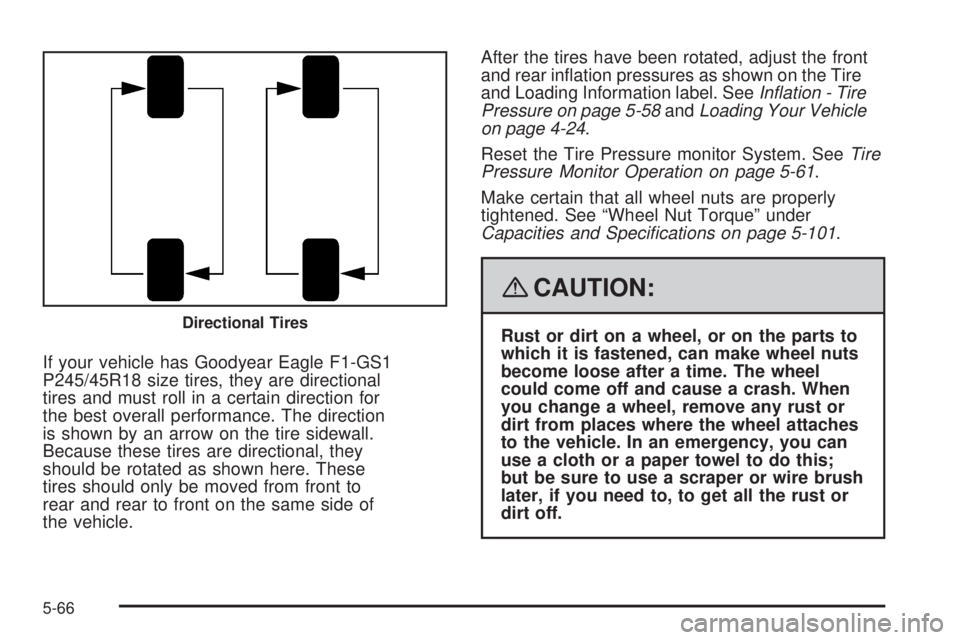
If your vehicle has Goodyear Eagle F1-GS1
P245/45R18 size tires, they are directional
tires and must roll in a certain direction for
the best overall performance. The direction
is shown by an arrow on the tire sidewall.
Because these tires are directional, they
should be rotated as shown here. These
tires should only be moved from front to
rear and rear to front on the same side of
the vehicle.After the tires have been rotated, adjust the front
and rear ination pressures as shown on the Tire
and Loading Information label. SeeInflation - Tire
Pressure on page 5-58andLoading Your Vehicle
on page 4-24.
Reset the Tire Pressure monitor System. SeeTire
Pressure Monitor Operation on page 5-61.
Make certain that all wheel nuts are properly
tightened. See “Wheel Nut Torque” under
Capacities and Specifications on page 5-101.
{CAUTION:
Rust or dirt on a wheel, or on the parts to
which it is fastened, can make wheel nuts
become loose after a time. The wheel
could come off and cause a crash. When
you change a wheel, remove any rust or
dirt from places where the wheel attaches
to the vehicle. In an emergency, you can
use a cloth or a paper towel to do this;
but be sure to use a scraper or wire brush
later, if you need to, to get all the rust or
dirt off.Directional Tires
5-66
Page 269 of 348
{CAUTION:
Rust or dirt on a wheel, or on the parts to
which it is fastened, can make wheel nuts
become loose after a time. The wheel
could come off and cause a crash. When
you change a wheel, remove any rust or
dirt from places where the wheel attaches
to the vehicle. In an emergency, you can
use a cloth or a paper towel to do this;
but be sure to use a scraper or wire brush
later, if you need to, to get all the rust or
dirt off.
{CAUTION:
Never use oil or grease on studs or the
threads of the wheel nuts. If you do, the wheel
nuts might come loose and the wheel could
fall off, causing a crash.
{CAUTION:
Incorrect wheel nuts or improperly tightened
wheel nuts can cause the wheel to become
loose and even come off. This could lead to a
crash. Be sure to use the correct wheel nuts.
If you have to replace them, be sure to get new
GM original equipment wheel nuts.
Notice:Improperly tightened wheel nuts can lead
to brake pulsation and rotor damage. To avoid
expensive brake repairs, evenly tighten the wheel
nuts in the proper sequence and to the proper
torque specication.
5-73