fuel PONTIAC SOLSTICE 2008 User Guide
[x] Cancel search | Manufacturer: PONTIAC, Model Year: 2008, Model line: SOLSTICE, Model: PONTIAC SOLSTICE 2008Pages: 348, PDF Size: 5.23 MB
Page 135 of 348
MPG (L/100 KM) INST (Instantaneous)
Press the information button until MPG (L/100 KM) INST
displays. This mode shows the current fuel economy
at a particular moment and changes frequently as
driving conditions change. This mode shows the
instantaneous fuel economy in miles per gallon (mpg)
or liters per 100 kilometers (L/100 km). Unlike average
fuel economy, this screen cannot be reset.
AV (Average) SPEED
Press the information button until AV SPEED displays.
This mode shows the vehicle’s average speed in
miles per hour (mph) or kilometers per hour (km/h).
To reset the average vehicle speed, press and hold
the reset button while AV SPEED is displayed.
OIL LIFE
Press the information button until OIL LIFE displays.
The engine oil life system shows an estimate of the oil’s
remaining useful life. It shows 100% when the system
is reset after an oil change. It alerts you to change the oil
on a schedule consistent with your driving conditions.
In addition to the engine oil life system monitoring
the oil life, additional maintenance is recommended
in the Maintenance Schedule in this manual. SeeEngine
Oil on page 5-15andScheduled Maintenance on
page 6-4.Always reset the engine oil life system after an oil
change. See “How to Reset the Engine Oil Life System”
underEngine Oil Life System on page 5-19.
COOLANT
Press the information button until COOLANT displays.
This mode shows the temperature of the engine coolant
in either degrees Fahrenheit (°F) or degrees Celsius (°C).
Tire Pressure
The pressure for each tire can be viewed in the DIC.
The tire pressure is shown in either pounds per square
inch (psi) or kilopascals (kPa). Press the information
button until LF ## PSI (kPa) ## RF displays for the
front tires. Press the information button again until
LR ## PSI (kPa) ## RR displays for the rear tires.
If a low tire pressure condition is detected by the system
while driving, a message advising you to check the
tire pressure appears in the display. SeeInflation - Tire
Pressure on page 5-58andDIC Warnings and
Messages on page 3-40for more information.
BOOST (Turbo Only)
If your vehicle has this feature, press the information
button until BOOST displays. This mode shows a
graphic that indicates the amount of boost the engine
is receiving in either pounds per square inch (psi)
or kilopascals (kPa).
3-39
Page 136 of 348
DIC Warnings and Messages
These messages appear if there is a problem detected
in one of your vehicle’s systems.
A message clears when the vehicle’s condition is no
longer present. To acknowledge a message and clear it
from the display, press and hold any of the DIC buttons.
If the condition is still present, the warning message
comes back on the next time the vehicle is turned off
and back on. With most messages, a warning chime
sounds when the message displays. Your vehicle may
have other warning messages.
AUTO (Automatic) LIGHTS OFF
This message displays if the automatic headlamp
system is disabled with the headlamp switch.
AUTO (Automatic) LIGHTS ON
This message displays if the automatic headlamp
system is enabled with the headlamp switch.
BRAKE FLUID
This message displays, while the ignition is on, when
the brake uid level is low. The brake system warning
light on the instrument panel cluster also comes on.
SeeBrake System Warning Light on page 3-27for
more information. Have the brake system serviced
by your dealer/retailer as soon as possible.
CHANGE OIL SOON
This message displays when the life of the engine oil
has expired and it should be changed.
When this message is acknowledged and cleared from
the display, the engine oil life system must still be
reset separately. SeeEngine Oil Life System on
page 5-19andScheduled Maintenance on page 6-4
for more information.
CHECK GAS CAP
This message displays if the fuel cap has not been fully
tightened. Recheck the fuel cap to make sure that it
is on properly. A few driving trips with the cap properly
installed should turn the message off.
CHECK TIRE PRESS (Pressure)
This message displays when the pressure in one or
more of the vehicle’s tires needs to be checked. If a tire
pressure message appears on the DIC, stop as soon
as you can. Have the tire pressures checked and set to
those shown on the Tire Loading Information label.
SeeTires on page 5-51,Loading Your Vehicle on
page 4-24, andInflation - Tire Pressure on page 5-58.
The DIC also shows the tire pressure values. See
DIC Operation and Displays on page 3-38. If the tire
pressure is low, the low tire pressure warning light
comes on. SeeTire Pressure Light on page 3-31.
3-40
Page 183 of 348
Hydroplaning
Hydroplaning is dangerous. Water can build up
under your vehicle’s tires so they actually ride on the
water. This can happen if the road is wet enough
and you are going fast enough. When your vehicle is
hydroplaning, it has little or no contact with the road.
There is no hard and fast rule about hydroplaning.
The best advice is to slow down when the road is wet.
Other Rainy Weather Tips
Besides slowing down, other wet weather driving tips
include:
Allow extra following distance.
Pass with caution.
Keep windshield wiping equipment in good shape.
Keep the windshield washer uid reservoir lled.
Have good tires with proper tread depth. SeeTires
on page 5-51.
Before Leaving on a Long Trip
To prepare your vehicle for a long trip, consider having
it serviced by your dealer/retailer before departing.
Things to check on your own include:
Windshield Washer Fluid:Reservoir full? Windows
clean — inside and outside?
Wiper Blades:In good shape?
Fuel, Engine Oil, Other Fluids:All levels checked?
Lamps:Do they all work and are lenses clean?
Tires:Are treads good? Are tires inated to
recommended pressure?
Weather and Maps:Safe to travel? Have up-to-date
maps?
4-17
Page 188 of 348
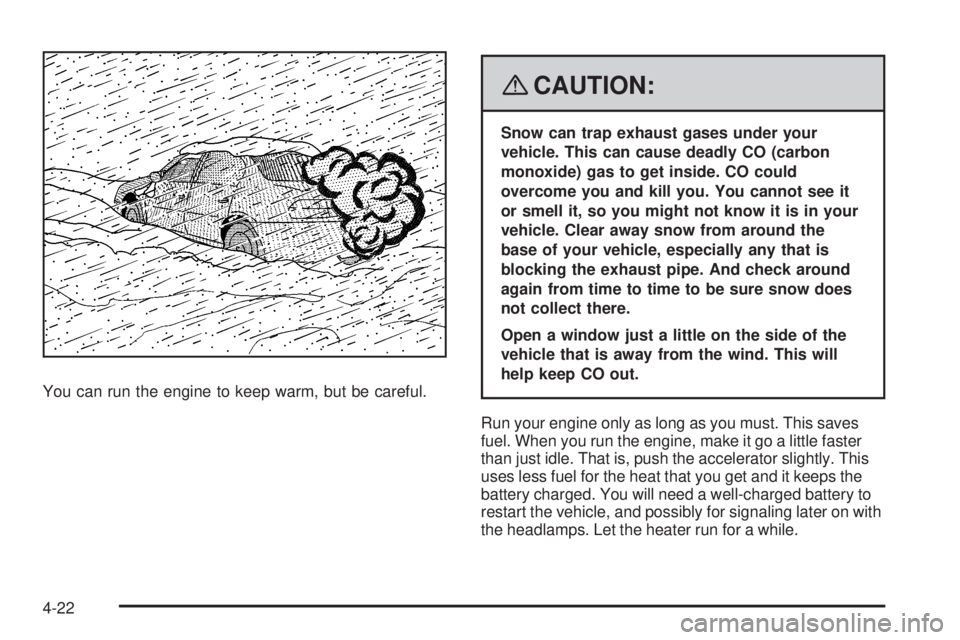
You can run the engine to keep warm, but be careful.
{CAUTION:
Snow can trap exhaust gases under your
vehicle. This can cause deadly CO (carbon
monoxide) gas to get inside. CO could
overcome you and kill you. You cannot see it
or smell it, so you might not know it is in your
vehicle. Clear away snow from around the
base of your vehicle, especially any that is
blocking the exhaust pipe. And check around
again from time to time to be sure snow does
not collect there.
Open a window just a little on the side of the
vehicle that is away from the wind. This will
help keep CO out.
Run your engine only as long as you must. This saves
fuel. When you run the engine, make it go a little faster
than just idle. That is, push the accelerator slightly. This
uses less fuel for the heat that you get and it keeps the
battery charged. You will need a well-charged battery to
restart the vehicle, and possibly for signaling later on with
the headlamps. Let the heater run for a while.
4-22
Page 189 of 348
Then, shut the engine off and close the window almost all
the way to preserve the heat. Start the engine again and
repeat this only when you feel really uncomfortable from
the cold. But do it as little as possible. Preserve the fuel
as long as you can. To help keep warm, you can get out
of the vehicle and do some fairly vigorous exercises
every half hour or so until help comes.
If Your Vehicle is Stuck in Sand,
Mud, Ice, or Snow
Slowly and cautiously spin the wheels to free your
vehicle when stuck in sand, mud, ice, or snow.
SeeRocking Your Vehicle to Get It Out on page 4-24.
If your vehicle has a traction system, it can often help
to free a stuck vehicle. Refer to your vehicle’s traction
system in the Index. If the stuck condition is too
severe for the traction system to free the vehicle, turn
the traction system off and use the rocking method.
{CAUTION:
If you let your vehicle’s tires spin at high
speed, they can explode, and you or others
could be injured. The vehicle can overheat,
causing an engine compartment re or other
damage. Spin the wheels as little as possible
and avoid going above 35 mph (55 km/h) as
shown on the speedometer.
For information about using tire chains on your vehicle,
seeTire Chains on page 5-74.
4-23
Page 194 of 348
Refer to your vehicle’s Tire and Loading
Information label for specic information about your
vehicle’s capacity weight and seating positions.
The combined weight of the driver, passengers,
and cargo should never exceed your vehicle’s
capacity weight.
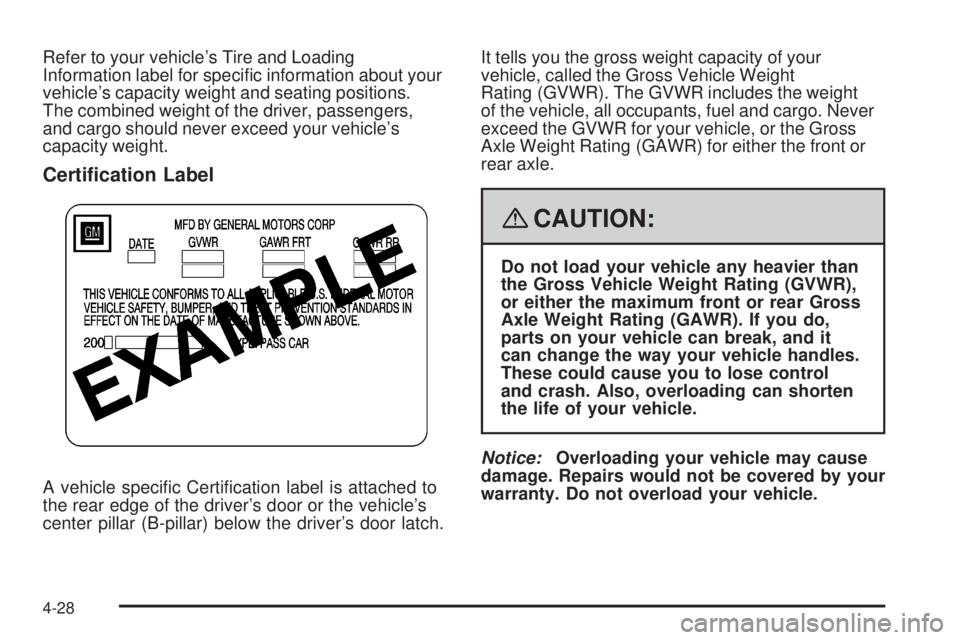
Certication Label
A vehicle specic Certication label is attached to
the rear edge of the driver’s door or the vehicle’s
center pillar (B-pillar) below the driver’s door latch.It tells you the gross weight capacity of your
vehicle, called the Gross Vehicle Weight
Rating (GVWR). The GVWR includes the weight
of the vehicle, all occupants, fuel and cargo. Never
exceed the GVWR for your vehicle, or the Gross
Axle Weight Rating (GAWR) for either the front or
rear axle.
{CAUTION:
Do not load your vehicle any heavier than
the Gross Vehicle Weight Rating (GVWR),
or either the maximum front or rear Gross
Axle Weight Rating (GAWR). If you do,
parts on your vehicle can break, and it
can change the way your vehicle handles.
These could cause you to lose control
and crash. Also, overloading can shorten
the life of your vehicle.
Notice:Overloading your vehicle may cause
damage. Repairs would not be covered by your
warranty. Do not overload your vehicle.
4-28
Page 197 of 348
Service............................................................5-3
Accessories and Modications..........................5-3
California Proposition 65 Warning.....................5-4
California Perchlorate Materials Requirements.....5-4
Doing Your Own Service Work.........................5-4
Adding Equipment to the Outside of
Your Vehicle..............................................5-5
Fuel................................................................5-5
Gasoline Octane............................................5-5
Gasoline Specications....................................5-5
California Fuel...............................................5-6
Additives.......................................................5-6
Fuels in Foreign Countries...............................5-7
Filling the Tank..............................................5-8
Filling a Portable Fuel Container.....................5-10
Checking Things Under the Hood....................5-10
Hood Release..............................................5-11
Engine Compartment Overview.......................5-12
Engine Oil...................................................5-15
Engine Oil Life System..................................5-19
Engine Air Cleaner/Filter................................5-21
Automatic Transmission Fluid.........................5-23
Manual Transmission Fluid.............................5-23Hydraulic Clutch...........................................5-23
Engine Coolant.............................................5-24
Coolant Surge Tank Pressure Cap..................5-27
Engine Overheating.......................................5-27
Cooling System............................................5-29
Power Steering Fluid.....................................5-35
Windshield Washer Fluid................................5-36
Brakes........................................................5-37
Battery........................................................5-40
Jump Starting...............................................5-41
Rear Axle.......................................................5-45
Headlamp Aiming
...........................................5-46
Bulb Replacement..........................................5-46
Halogen Bulbs..............................................5-46
Headlamps..................................................5-47
Front Turn Signal, Parking and Fog Lamps......5-47
Taillamps, Turn Signal, and Stoplamps............5-48
Back-Up Lamps............................................5-48
License Plate Lamp......................................5-49
Replacement Bulbs.......................................5-49
Windshield Wiper Blade Replacement..............5-50
Section 5 Service and Appearance Care
5-1
Page 201 of 348
Your vehicle has an airbag system. Before attempting
to do your own service work, seeServicing Your
Airbag-Equipped Vehicle on page 1-48.
You should keep a record with all parts receipts and
list the mileage and the date of any service work
you perform. SeeMaintenance Record on page 6-16.
Adding Equipment to the Outside
of Your Vehicle
Things you might add to the outside of your vehicle
can affect the airow around it. This can cause
wind noise and can affect fuel economy and windshield
washer performance. Check with your dealer/retailer
before adding equipment to the outside of your vehicle.
Fuel
Use of the recommended fuel is an important part of
the proper maintenance of your vehicle. To help keep the
engine clean and maintain optimum vehicle performance,
we recommend the use of gasoline advertised as TOP
TIER Detergent Gasoline.
Gasoline Octane
Use premium unleaded gasoline with a posted octane
rating of 91 or higher. You can also use regular unleaded
gasoline rated at 87 octane or higher, but your vehicle’s
acceleration could be slightly reduced, and you might
notice a slight audible knocking noise, commonly referred
to as spark knock. If the octane is less than 87, you might
notice a heavy knocking noise when you drive. If this
occurs, use a gasoline rated at 87 octane or higher as
soon as possible. Otherwise, you could damage the
engine. If you are using gasoline rated at 87 octane or
higher and you hear heavy knocking, the engine needs
service.
Gasoline Specications
At a minimum, gasoline should meet ASTM specication
D 4814 in the United States or CAN/CGSB-3.5 or 3.511 in
Canada. Some gasolines contain an octane-enhancing
additive called methylcyclopentadienyl manganese
tricarbonyl (MMT). We recommend against the use of
gasolines containing MMT. SeeAdditives on page 5-6
for additional information.
5-5
Page 202 of 348
California Fuel
If your vehicle is certied to meet California Emissions
Standards, it is designed to operate on fuels that
meet California specications. See the underhood
emission control label. If this fuel is not available
in states adopting California emissions standards,
your vehicle will operate satisfactorily on fuels meeting
federal specications, but emission control system
performance might be affected. The malfunction
indicator lamp could turn on and your vehicle might
fail a smog-check test. SeeMalfunction Indicator Lamp
on page 3-32. If this occurs, return to your authorized
dealer/retailer for diagnosis. If it is determined that
the condition is caused by the type of fuel used,
repairs might not be covered by your warranty.
Additives
To provide cleaner air, all gasolines in the United States
are now required to contain additives that help prevent
engine and fuel system deposits from forming, allowing
the emission control system to work properly. In most
cases, you should not have to add anything to the fuel.
However, some gasolines contain only the minimum
amount of additive required to meet U.S. Environmental
Protection Agency regulations. To help keep fuel injectors
and intake valves clean, or if your vehicle experiences
problems due to dirty injectors or valves, look for gasoline
that is advertised as TOP TIER Detergent Gasoline. Also,
your dealer/retailer has additives that will help correct and
prevent most deposit-related problems.
5-6
Page 203 of 348
Gasolines containing oxygenates, such as ethers and
ethanol, and reformulated gasolines might be available in
your area. We recommend that you use these gasolines,
if they comply with the specications described earlier.
However, E85 (85% ethanol) and other fuels containing
more than 10% ethanol must not be used in vehicles that
were not designed for those fuels.
Notice:Your vehicle was not designed for fuel
that contains methanol. Do not use fuel containing
methanol. It can corrode metal parts in the fuel
system and also damage plastic and rubber parts.
That damage would not be covered under your
warranty.
Some gasolines that are not reformulated for
low emissions can contain an octane-enhancing
additive called methylcyclopentadienyl manganese
tricarbonyl (MMT); ask the attendant where you buy
gasoline whether the fuel contains MMT. We recommend
against the use of such gasolines. Fuels containing MMT
can reduce the life of spark plugs and the performance
of the emission control system could be affected. The
malfunction indicator lamp might turn on. If this occurs,
return to your dealer/retailer for service.Fuels in Foreign Countries
If you plan on driving in another country outside the
United States or Canada, the proper fuel might be hard
to nd. Never use leaded gasoline or any other fuel
not recommended in the previous text on fuel. Costly
repairs caused by use of improper fuel would not
be covered by your warranty.
To check the fuel availability, ask an auto club, or
contact a major oil company that does business in
the country where you will be driving.
5-7