tire pressure reset PONTIAC SOLSTICE 2008 Owners Manual
[x] Cancel search | Manufacturer: PONTIAC, Model Year: 2008, Model line: SOLSTICE, Model: PONTIAC SOLSTICE 2008Pages: 348, PDF Size: 5.23 MB
Page 135 of 348
MPG (L/100 KM) INST (Instantaneous)
Press the information button until MPG (L/100 KM) INST
displays. This mode shows the current fuel economy
at a particular moment and changes frequently as
driving conditions change. This mode shows the
instantaneous fuel economy in miles per gallon (mpg)
or liters per 100 kilometers (L/100 km). Unlike average
fuel economy, this screen cannot be reset.
AV (Average) SPEED
Press the information button until AV SPEED displays.
This mode shows the vehicle’s average speed in
miles per hour (mph) or kilometers per hour (km/h).
To reset the average vehicle speed, press and hold
the reset button while AV SPEED is displayed.
OIL LIFE
Press the information button until OIL LIFE displays.
The engine oil life system shows an estimate of the oil’s
remaining useful life. It shows 100% when the system
is reset after an oil change. It alerts you to change the oil
on a schedule consistent with your driving conditions.
In addition to the engine oil life system monitoring
the oil life, additional maintenance is recommended
in the Maintenance Schedule in this manual. SeeEngine
Oil on page 5-15andScheduled Maintenance on
page 6-4.Always reset the engine oil life system after an oil
change. See “How to Reset the Engine Oil Life System”
underEngine Oil Life System on page 5-19.
COOLANT
Press the information button until COOLANT displays.
This mode shows the temperature of the engine coolant
in either degrees Fahrenheit (°F) or degrees Celsius (°C).
Tire Pressure
The pressure for each tire can be viewed in the DIC.
The tire pressure is shown in either pounds per square
inch (psi) or kilopascals (kPa). Press the information
button until LF ## PSI (kPa) ## RF displays for the
front tires. Press the information button again until
LR ## PSI (kPa) ## RR displays for the rear tires.
If a low tire pressure condition is detected by the system
while driving, a message advising you to check the
tire pressure appears in the display. SeeInflation - Tire
Pressure on page 5-58andDIC Warnings and
Messages on page 3-40for more information.
BOOST (Turbo Only)
If your vehicle has this feature, press the information
button until BOOST displays. This mode shows a
graphic that indicates the amount of boost the engine
is receiving in either pounds per square inch (psi)
or kilopascals (kPa).
3-39
Page 136 of 348
DIC Warnings and Messages
These messages appear if there is a problem detected
in one of your vehicle’s systems.
A message clears when the vehicle’s condition is no
longer present. To acknowledge a message and clear it
from the display, press and hold any of the DIC buttons.
If the condition is still present, the warning message
comes back on the next time the vehicle is turned off
and back on. With most messages, a warning chime
sounds when the message displays. Your vehicle may
have other warning messages.
AUTO (Automatic) LIGHTS OFF
This message displays if the automatic headlamp
system is disabled with the headlamp switch.
AUTO (Automatic) LIGHTS ON
This message displays if the automatic headlamp
system is enabled with the headlamp switch.
BRAKE FLUID
This message displays, while the ignition is on, when
the brake uid level is low. The brake system warning
light on the instrument panel cluster also comes on.
SeeBrake System Warning Light on page 3-27for
more information. Have the brake system serviced
by your dealer/retailer as soon as possible.
CHANGE OIL SOON
This message displays when the life of the engine oil
has expired and it should be changed.
When this message is acknowledged and cleared from
the display, the engine oil life system must still be
reset separately. SeeEngine Oil Life System on
page 5-19andScheduled Maintenance on page 6-4
for more information.
CHECK GAS CAP
This message displays if the fuel cap has not been fully
tightened. Recheck the fuel cap to make sure that it
is on properly. A few driving trips with the cap properly
installed should turn the message off.
CHECK TIRE PRESS (Pressure)
This message displays when the pressure in one or
more of the vehicle’s tires needs to be checked. If a tire
pressure message appears on the DIC, stop as soon
as you can. Have the tire pressures checked and set to
those shown on the Tire Loading Information label.
SeeTires on page 5-51,Loading Your Vehicle on
page 4-24, andInflation - Tire Pressure on page 5-58.
The DIC also shows the tire pressure values. See
DIC Operation and Displays on page 3-38. If the tire
pressure is low, the low tire pressure warning light
comes on. SeeTire Pressure Light on page 3-31.
3-40
Page 142 of 348
TIRE LEARN?
This mode is available on vehicles without the Remote
Keyless Entry (RKE) system. After rotating the tires
or after replacing a tire or sensor, the Tire Pressure
Monitor System (TPMS) must re-learn the tire positions.
To re-learn the tire positions, seeTire Pressure
Monitor System on page 5-59. SeeTire Inspection
and Rotation on page 5-65andDIC Warnings
and Messages on page 3-40for more information.
LOCK HORN
If your vehicle has Remote Keyless Entry (RKE),
this feature, which allows the vehicle’s horn to chirp
every time the lock button on the RKE transmitter
is pressed, can be enabled or disabled. When LOCK
HORN appears on the display, press and hold the
reset button for at least one second to scroll through
the available settings:
OFF (default):The horn will not chirp on the rst
press of the lock button on the RKE transmitter.
The horn will still chirp on the second press.
ON:The horn will chirp on the rst press of the lock
button on the RKE transmitter.SeeRemote Keyless Entry (RKE) System Operation
on page 2-4for more information.
To select a setting and move on to the next feature,
press the information button while the desired setting
is displayed on the DIC.
UNLOCK HORN
If your vehicle has Remote Keyless Entry (RKE),
this feature, which allows the vehicle’s horn to chirp
on the rst press of the unlock button on the RKE
transmitter, can be enabled or disabled. When UNLOCK
HORN appears on the display, press and hold the
reset button for at least one second to scroll through
the available settings:
OFF (default):The horn will not chirp when the unlock
button on the RKE transmitter is pressed.
ON:The horn will chirp on the rst press of the unlock
button on the RKE transmitter.
SeeRemote Keyless Entry (RKE) System Operation
on page 2-4for more information.
To select a setting and move on to the next feature,
press the information button while the desired setting
is displayed on the DIC.
3-46
Page 260 of 348
10. Set all four tires to the recommended air pressure
level as indicated on the Tire and Loading
Information label.
11. Put the valve caps back on the valve stems.
TPMS Matching Process for Vehicles
without Remote Keyless Entry (RKE)
1. Set the parking brake.
2. Turn the ignition switch to ON/RUN with the
engine off.
3. Using the Driver Information Center (DIC), press
the INFO and Set/Reset buttons at the same time
for about one second. Then press and release
the INFO button until the TIRE LEARN? message
displays.
4. Press and hold the Set/Reset DIC button for
approximately three seconds to start the TPMS
learn mode. The horn sounds twice to indicate
the TPMS receiver is ready and the TIRE LEARN
ON message displays. The driver side front
turn signal also comes on to indicate that
corner sensor is ready to be learned.
5. Start with the driver side front tire.
6. Remove the valve cap from the tire’s valve stem.
Activate the TPMS sensor by increasing or
decreasing the tire’s air pressure for about eight
seconds. The horn chirp, can take up to 30 secondsto sound. It chirps one time and then all the turn
signals ash one time to conrm the sensor
identication code has been matched to the
tire/wheel position.
7. The passenger side front turn signal comes on to
indicate that corner sensor is ready to be learned.
Proceed to the passenger side front tire and
repeat the procedure in Step 6.
8. The passenger side rear turn signal comes on to
indicate that corner sensor is ready to be learned.
Proceed to the passenger side rear tire and
repeat the procedure in Step 6.
9. The driver side rear turn signal comes on to
indicate that corner sensor is ready to be learned.
Proceed to the driver side rear tire, and repeat
the procedure in Step 6.
10. After hearing the single horn chirp for the driver
side rear tire, two additional horn chirps sound
to indicate the tire learning process is done.
The LEARN COMPLETE message displays if all
four tire positions are learned. Turn the ignition
switch to LOCK/OFF.
If no tires are learned after entering the TPMS learn
mode, or if communication with the receiver stops,
or if the time limit has expired, the TIRE LEARN?
message displays on the DIC. Turn the ignition
switch to LOCK/OFF and start over beginning
with Step 2.
5-64
Page 262 of 348
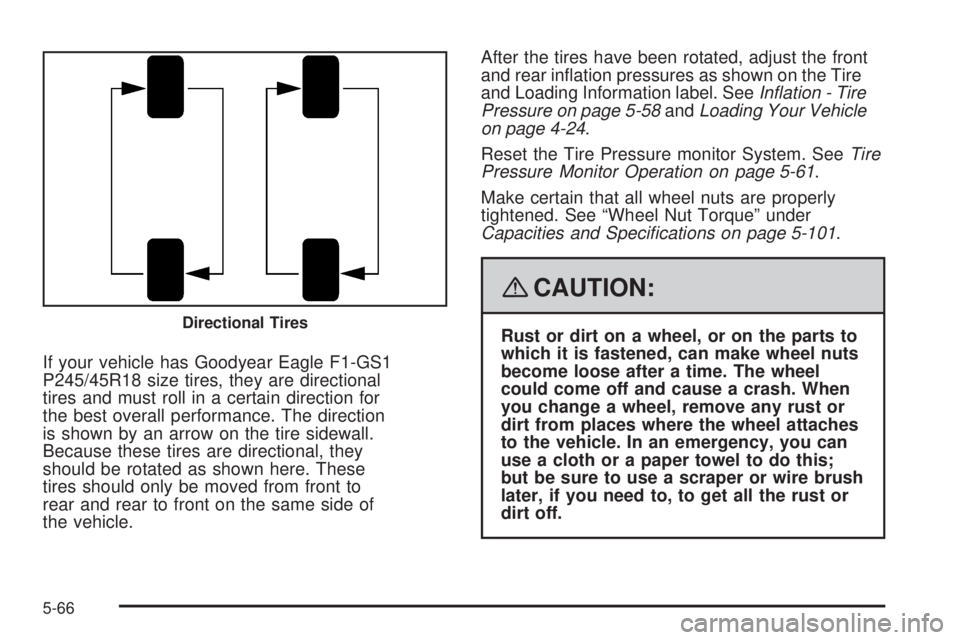
If your vehicle has Goodyear Eagle F1-GS1
P245/45R18 size tires, they are directional
tires and must roll in a certain direction for
the best overall performance. The direction
is shown by an arrow on the tire sidewall.
Because these tires are directional, they
should be rotated as shown here. These
tires should only be moved from front to
rear and rear to front on the same side of
the vehicle.After the tires have been rotated, adjust the front
and rear ination pressures as shown on the Tire
and Loading Information label. SeeInflation - Tire
Pressure on page 5-58andLoading Your Vehicle
on page 4-24.
Reset the Tire Pressure monitor System. SeeTire
Pressure Monitor Operation on page 5-61.
Make certain that all wheel nuts are properly
tightened. See “Wheel Nut Torque” under
Capacities and Specifications on page 5-101.
{CAUTION:
Rust or dirt on a wheel, or on the parts to
which it is fastened, can make wheel nuts
become loose after a time. The wheel
could come off and cause a crash. When
you change a wheel, remove any rust or
dirt from places where the wheel attaches
to the vehicle. In an emergency, you can
use a cloth or a paper towel to do this;
but be sure to use a scraper or wire brush
later, if you need to, to get all the rust or
dirt off.Directional Tires
5-66
Page 303 of 348
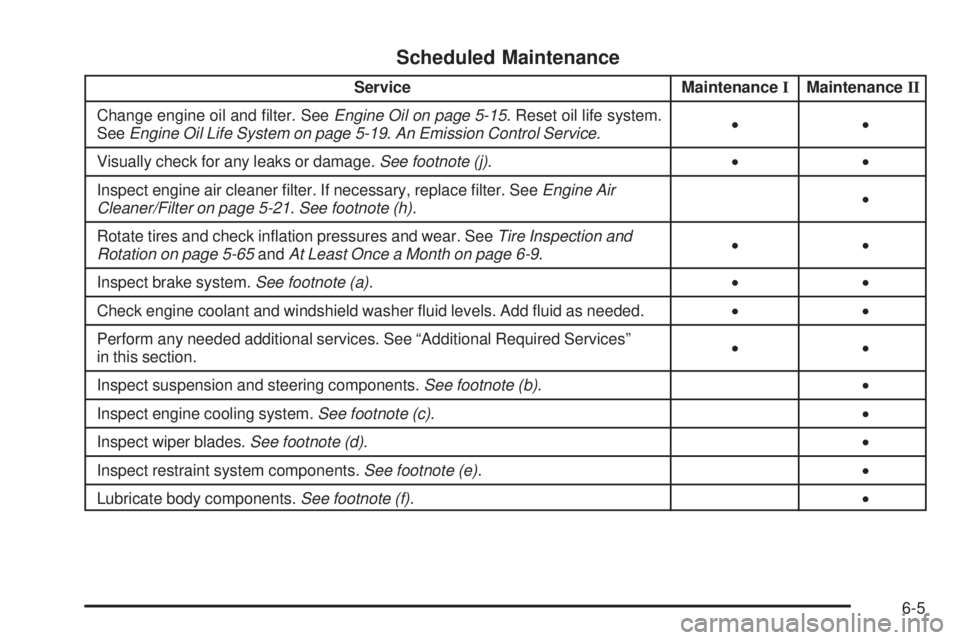
Scheduled Maintenance
Service MaintenanceIMaintenanceII
Change engine oil and lter. SeeEngine Oil on page 5-15. Reset oil life system.
SeeEngine Oil Life System on page 5-19.An Emission Control Service.••
Visually check for any leaks or damage.See footnote (j).••
Inspect engine air cleaner lter. If necessary, replace lter. SeeEngine Air
Cleaner/Filter on page 5-21.See footnote (h).•
Rotate tires and check ination pressures and wear. SeeTire Inspection and
Rotation on page 5-65andAt Least Once a Month on page 6-9.••
Inspect brake system.See footnote (a).••
Check engine coolant and windshield washer uid levels. Add uid as needed.••
Perform any needed additional services. See “Additional Required Services”
in this section.••
Inspect suspension and steering components.See footnote (b).•
Inspect engine cooling system.See footnote (c).•
Inspect wiper blades.See footnote (d).•
Inspect restraint system components.See footnote (e).•
Lubricate body components.See footnote (f).•
6-5