brake PONTIAC TORRENT 2006 User Guide
[x] Cancel search | Manufacturer: PONTIAC, Model Year: 2006, Model line: TORRENT, Model: PONTIAC TORRENT 2006Pages: 368, PDF Size: 2.37 MB
Page 111 of 368
Instrument Panel Overview...............................3-4
Hazard Warning Flashers................................3-6
Other Warning Devices...................................3-6
Horn.............................................................3-6
Tilt Wheel.....................................................3-7
Turn Signal/Multifunction Lever.........................3-7
Turn and Lane-Change Signals........................3-8
Headlamp High/Low-Beam Changer..................3-8
Flash-to-Pass.................................................3-8
Windshield Wipers..........................................3-8
Windshield Washer.......................................3-10
Rear Window Wiper/Washer...........................3-10
Cruise Control..............................................3-11
Headlamps..................................................3-14
Headlamps on Reminder................................3-14
Daytime Running Lamps (DRL).......................3-14
Automatic Headlamp System..........................3-15
Fog Lamps..................................................3-15
Instrument Panel Brightness...........................3-16
Dome Lamp.................................................3-16
Entry Lighting...............................................3-17
Map Lamps.................................................3-17
Cargo Lamp.................................................3-17
Battery Run-Down Protection..........................3-18
Accessory Power Outlet(s).............................3-18
Ashtray(s) and Cigarette Lighter......................3-19Climate Controls............................................3-19
Climate Control System.................................3-19
Outlet Adjustment.........................................3-22
Passenger Compartment Air Filter...................3-22
Warning Lights, Gages, and Indicators............3-23
Instrument Panel Cluster................................3-24
Speedometer and Odometer...........................3-25
Trip Odometer..............................................3-25
Tachometer.................................................3-25
Safety Belt Reminder Light.............................3-26
Airbag Readiness Light..................................3-26
Battery Warning Light....................................3-27
Brake System Warning Light..........................3-28
Anti-Lock Brake System Warning Light.............3-29
Traction Control System (TCS) Warning Light . . .3-30
Low Traction Light........................................3-30
Engine Coolant Temperature Warning Light......3-31
Engine Coolant Temperature Gage..................3-31
Malfunction Indicator Lamp.............................3-32
Oil Pressure Light.........................................3-35
Change Engine Oil Light................................3-36
Security Light...............................................3-36
Reduced Engine Power Light.........................3-36
Highbeam On Light.......................................3-37
Daytime Running Lamps (DRL)
Indicator Light...........................................3-37
Section 3 Instrument Panel
3-1
Page 122 of 368
RES+ (Resume):Press this symbol to resume a
set speed and to accelerate the speed.
SET−(Set):Press this symbol to set a speed and
to decrease the speed.
To set a speed do the following:
1. Press the on/off symbol to turn cruise control on.
The indicator light on the button will come on.
2. Get to the speed you want.
3. Press the SET−symbol and release it.
4. Take your foot off the accelerator pedal.
When the brakes are applied, the cruise control
shuts off.
If the vehicle is in cruise control and the Traction Control
System (TCS) begins to limit wheel spin, the cruise
control will automatically disengage. SeeTraction Control
System (TCS) on page 4-9. When road conditions allow,
the cruise control can be used again.Resuming a Set Speed
Suppose you set your cruise control at a desired
speed and then you apply the brakes. This, of course,
disengages the cruise control. The cruise symbol in the
instrument panel cluster will also go out indicating cruise
is no longer engaged. To return to your previously set
speed, you do not need to go through the set process
again. Once at a speed of about 25 mph (40 km/h) or
more, you can press the RES+ symbol briey.
This will take you back up to your previously chosen
speed and stay there.
Increasing Speed While Using
Cruise Control
There are two ways to go to a higher speed.
If the cruise control system is already engaged,
press the RES+ symbol. Hold it there until you
get up to the speed you want, and then release
the button.
To increase your speed in very small amounts,
press the RES+ symbol briey and then release
it. Each time you do this, your vehicle will go
about 1 mph (1.6 km/h) faster.
3-12
Page 123 of 368
Reducing Speed While Using
Cruise Control
If the cruise control system is already engaged,
Push and hold the SET−symbol until you reach
the lower speed you want, then release it.
To slow down in very small amounts, push the
SET−symbol briey. Each time you do this, you
will go about 1 mph (1.6 km/h) slower.
Passing Another Vehicle While Using
Cruise Control
Use the accelerator pedal to increase your speed.
When you take your foot off the pedal, your vehicle will
slow down to the cruise control speed you set earlier.
However, if you use the accelerator to increase the
vehicle’s speed for approximately 60 seconds, cruise
control will disengage.
Using Cruise Control on Hills
How well your cruise control will work on hills depends
upon your speed, load, and the steepness of the
hills. When going up steep hills, you may have to step
on the accelerator pedal to maintain your vehicle’s
speed. When going downhill, you may have to brake or
shift to a lower gear to keep your vehicle’s speed
down. Of course, applying the brakes ends cruise
control. Many drivers nd this to be too much trouble
and do not use cruise control on steep hills.
Ending Cruise Control
To end a cruise control session, step lightly on the
brake pedal.
Stepping on the brake will end the current cruise control
session only. Press the cruise on/off button to turn off
the system completely.
If the driver takes over the acceleration pedal for more
than sixty seconds, cruise control will shut off.
Erasing Speed Memory
When you turn off the cruise control or the ignition,
your cruise control set speed memory is erased.
3-13
Page 124 of 368
Headlamps
The exterior lamp control is located on the turn
signal/multifunction lever.
O(Exterior Lamp Control):Turn the control with
this symbol on it to operate the exterior lamps.
The exterior lamp control has the following positions:
AUTO (Off/Automatic Headlamps):Turn the control to
this position to put the headlamps in automatic mode.
Automatic mode will turn the exterior lamps on and
off depending upon how much light is available outside
of the vehicle.
;(Parking Lamps):Turn the control to this
position to turn on the parking lamps together with
the following:
Sidemarker Lamps
Taillamps
License Plate Lamps
Instrument Panel Lights
53(Headlamps):Turning the control to this
position turns on the headlamps, together with the
previously listed lamps and lights.
Headlamps on Reminder
If you open the driver’s door with the ignition off and the
lamps on, you will hear a warning chime.
Daytime Running Lamps (DRL)
Daytime Running Lamps (DRL) can make it easier for
others to see the front of your vehicle during the
day. DRL can be helpful in many different driving
conditions, but they can be especially helpful in the short
periods after dawn and before sunset. Fully functional
daytime running lamps are required on all vehicles
rst sold in Canada.
The DRL system will make your low-beam headlamps
come on at a reduced brightness in daylight when
the following conditions are met:
The ignition is on,
the exterior lamp band is in the automatic position,
the transaxle is not in PARK (P),
the light sensor determines it is daytime, and
the parking brake is released.
When the DRL are on, the low-beam headlamps will be
on at a reduced brightness. The taillamps, sidemarker
and other lamps will not be on. The instrument panel
will not be lit up either.
3-14
Page 138 of 368
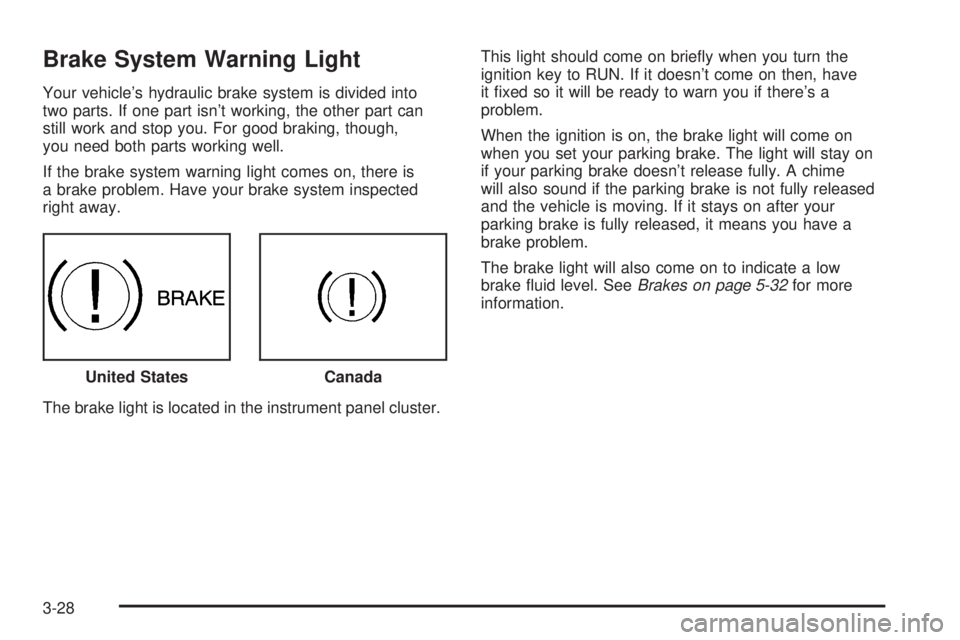
Brake System Warning Light
Your vehicle’s hydraulic brake system is divided into
two parts. If one part isn’t working, the other part can
still work and stop you. For good braking, though,
you need both parts working well.
If the brake system warning light comes on, there is
a brake problem. Have your brake system inspected
right away.
The brake light is located in the instrument panel cluster.This light should come on briey when you turn the
ignition key to RUN. If it doesn’t come on then, have
it xed so it will be ready to warn you if there’s a
problem.
When the ignition is on, the brake light will come on
when you set your parking brake. The light will stay on
if your parking brake doesn’t release fully. A chime
will also sound if the parking brake is not fully released
and the vehicle is moving. If it stays on after your
parking brake is fully released, it means you have a
brake problem.
The brake light will also come on to indicate a low
brake uid level. SeeBrakes on page 5-32for more
information.
United States
Canada
3-28
Page 139 of 368
If the light comes on while you are driving, pull off the
road and stop carefully. You may notice that the pedal
is harder to push. Or, the pedal may go closer to
the oor. It may take longer to stop. If the light is still
on, have the vehicle towed for service. SeeTowing
Your Vehicle on page 4-36.
{CAUTION:
Your brake system may not be working
properly if the brake system warning light is
on. Driving with the brake system warning
light on can lead to an accident. If the light
is still on after you have pulled off the road
and stopped carefully, have the vehicle towed
for service.
Anti-Lock Brake System
Warning Light
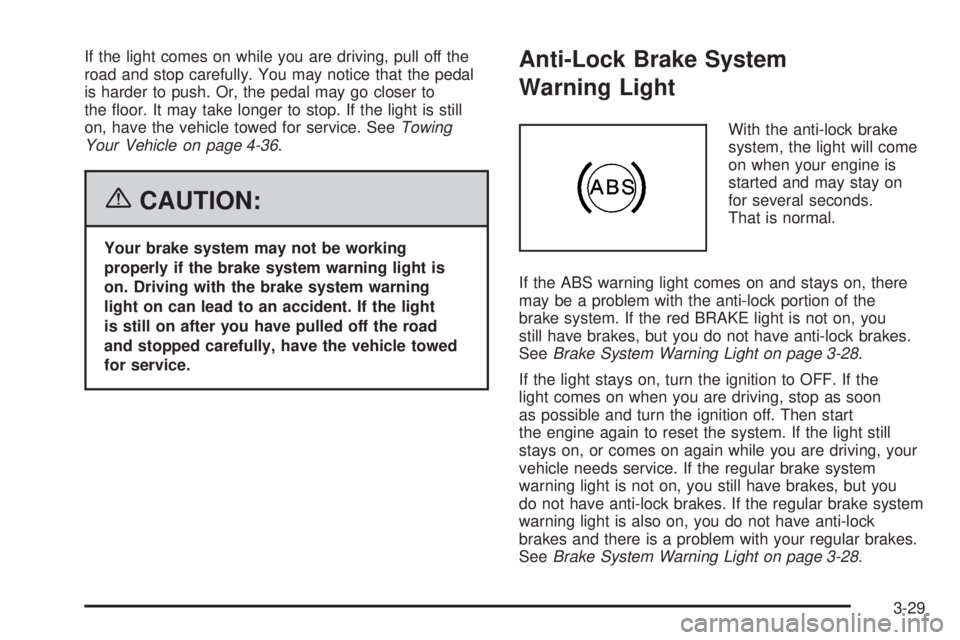
With the anti-lock brake
system, the light will come
on when your engine is
started and may stay on
for several seconds.
That is normal.
If the ABS warning light comes on and stays on, there
may be a problem with the anti-lock portion of the
brake system. If the red BRAKE light is not on, you
still have brakes, but you do not have anti-lock brakes.
SeeBrake System Warning Light on page 3-28.
If the light stays on, turn the ignition to OFF. If the
light comes on when you are driving, stop as soon
as possible and turn the ignition off. Then start
the engine again to reset the system. If the light still
stays on, or comes on again while you are driving, your
vehicle needs service. If the regular brake system
warning light is not on, you still have brakes, but you
do not have anti-lock brakes. If the regular brake system
warning light is also on, you do not have anti-lock
brakes and there is a problem with your regular brakes.
SeeBrake System Warning Light on page 3-28.
3-29
Page 140 of 368
Traction Control System (TCS)
Warning Light
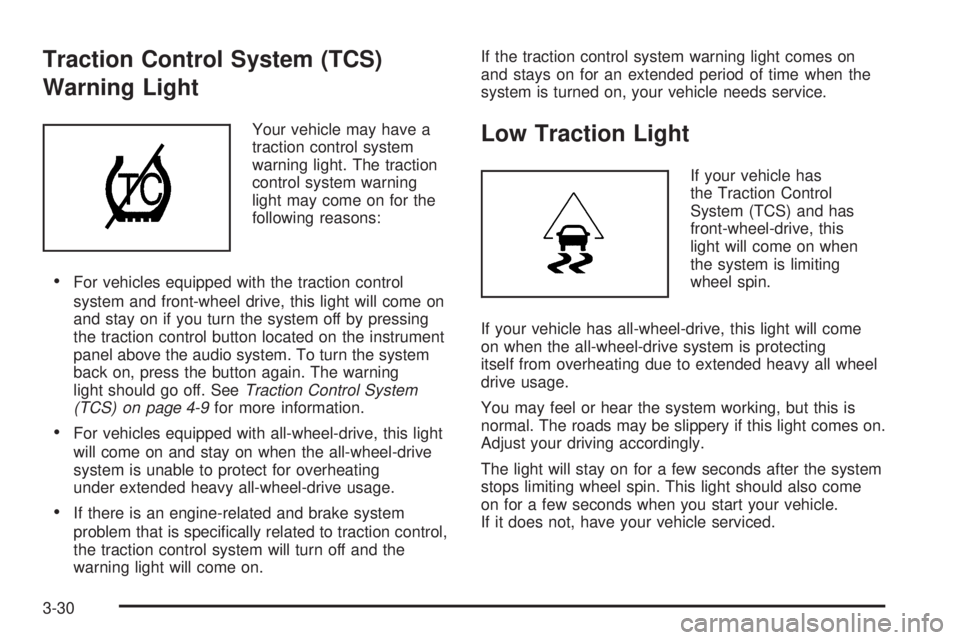
Your vehicle may have a
traction control system
warning light. The traction
control system warning
light may come on for the
following reasons:
For vehicles equipped with the traction control
system and front-wheel drive, this light will come on
and stay on if you turn the system off by pressing
the traction control button located on the instrument
panel above the audio system. To turn the system
back on, press the button again. The warning
light should go off. SeeTraction Control System
(TCS) on page 4-9for more information.
For vehicles equipped with all-wheel-drive, this light
will come on and stay on when the all-wheel-drive
system is unable to protect for overheating
under extended heavy all-wheel-drive usage.
If there is an engine-related and brake system
problem that is specically related to traction control,
the traction control system will turn off and the
warning light will come on.If the traction control system warning light comes on
and stays on for an extended period of time when the
system is turned on, your vehicle needs service.
Low Traction Light
If your vehicle has
the Traction Control
System (TCS) and has
front-wheel-drive, this
light will come on when
the system is limiting
wheel spin.
If your vehicle has all-wheel-drive, this light will come
on when the all-wheel-drive system is protecting
itself from overheating due to extended heavy all wheel
drive usage.
You may feel or hear the system working, but this is
normal. The roads may be slippery if this light comes on.
Adjust your driving accordingly.
The light will stay on for a few seconds after the system
stops limiting wheel spin. This light should also come
on for a few seconds when you start your vehicle.
If it does not, have your vehicle serviced.
3-30
Page 149 of 368
{CAUTION:
This system provides you with a far greater
access to audio stations and song listings.
Giving extended attention to entertainment
tasks while driving can cause a crash and you
or others can be injured or killed. Always keep
your eyes on the road and your mind on the
drive — avoid engaging in extended searching
while driving.
Keeping your mind on the drive is important for safe
driving. For more information, seeDefensive Driving
on page 4-2.
Here are some ways in which you can help avoid
distraction while driving.
While your vehicle is parked:
Familiarize yourself with all of its controls.
Familiarize yourself with its operation.
Set up your audio system by presetting your favorite
radio stations, setting the tone, and adjusting the
speakers. Then, when driving conditions permit, you
can tune to your favorite radio stations using the
presets and steering wheel controls (if equipped).Notice:Before adding any sound equipment to
your vehicle, such as an audio system, CD player,
CB radio, mobile telephone, or two-way radio, make
sure that it can be added by checking with your
dealer. Also, check federal rules covering mobile
radio and telephone units. If sound equipment
can be added, it is very important to do it properly.
Added sound equipment may interfere with the
operation of your vehicle’s engine, radio, or other
systems, and even damage them. Your vehicle’s
systems may interfere with the operation of sound
equipment that has been added.
Notice:The chime signals related to safety
belts, parking brake, and other functions of your
vehicle operate through the GM radio/entertainment
system. If that equipment is replaced or additional
equipment is added to your vehicle, the chimes may
not work. Make sure that replacement or additional
equipment is compatible with your vehicle before
installing it. SeeAccessories and Modifications
on page 5-3.
Your vehicle has a feature called Retained Accessory
Power (RAP). With RAP, the audio system can
be played even after the ignition is turned off.
SeeRetained Accessory Power (RAP) on page 2-17
for more information.
3-39
Page 193 of 368
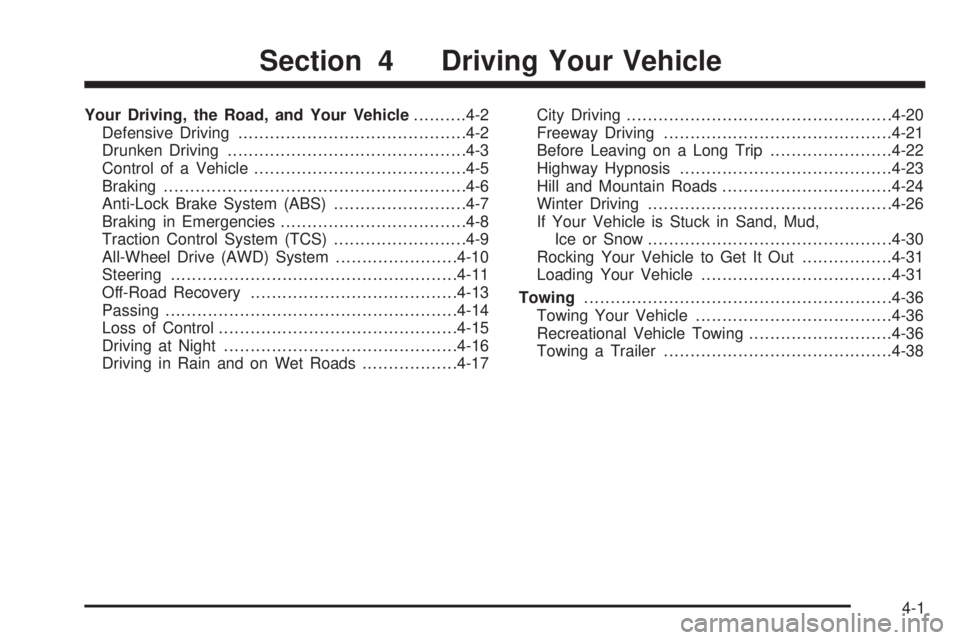
Your Driving, the Road, and Your Vehicle..........4-2
Defensive Driving...........................................4-2
Drunken Driving.............................................4-3
Control of a Vehicle........................................4-5
Braking.........................................................4-6
Anti-Lock Brake System (ABS).........................4-7
Braking in Emergencies...................................4-8
Traction Control System (TCS).........................4-9
All-Wheel Drive (AWD) System.......................4-10
Steering......................................................4-11
Off-Road Recovery.......................................4-13
Passing.......................................................4-14
Loss of Control.............................................4-15
Driving at Night............................................4-16
Driving in Rain and on Wet Roads..................4-17City Driving..................................................4-20
Freeway Driving...........................................4-21
Before Leaving on a Long Trip.......................4-22
Highway Hypnosis........................................4-23
Hill and Mountain Roads................................4-24
Winter Driving..............................................4-26
If Your Vehicle is Stuck in Sand, Mud,
Ice or Snow..............................................4-30
Rocking Your Vehicle to Get It Out.................4-31
Loading Your Vehicle....................................4-31
Towing..........................................................4-36
Towing Your Vehicle.....................................4-36
Recreational Vehicle Towing...........................4-36
Towing a Trailer...........................................4-38
Section 4 Driving Your Vehicle
4-1
Page 197 of 368
Statistics show that the chance of being in a collision
increases sharply for drivers who have a BAC of
0.05 percent or above. A driver with a BAC level of
0.06 percent has doubled his or her chance of having a
collision. At a BAC level of 0.10 percent, the chance
of this driver having a collision is 12 times greater; at a
level of 0.15 percent, the chance is 25 times greater!
The body takes about an hour to rid itself of the alcohol
in one drink. No amount of coffee or number of cold
showers will speed that up. “I will be careful” is not
the right answer. What if there is an emergency, a need
to take sudden action, as when a child darts into the
street? A person with even a moderate BAC might not
be able to react quickly enough to avoid the collision.
There is something else about drinking and driving that
many people do not know. Medical research shows
that alcohol in a person’s system can make crash
injuries worse, especially injuries to the brain, spinal
cord, or heart. This means that when anyone who
has been drinking — driver or passenger — is in
a crash, that person’s chance of being killed or
permanently disabled is higher than if the person
had not been drinking.
{CAUTION:
Drinking and then driving is very dangerous.
Your reexes, perceptions, attentiveness,
and judgment can be affected by even a
small amount of alcohol. You can have a
serious — or even fatal — collision if you
drive after drinking. Please do not drink and
drive or ride with a driver who has been
drinking. Ride home in a cab; or if you are with
a group, designate a driver who will not drink.
Control of a Vehicle
You have three systems that make your vehicle go where
you want it to go. They are the brakes, the steering, and
the accelerator. All three systems have to do their work at
the places where the tires meet the road.
Sometimes, as when you are driving on snow or ice, it is
easy to ask more of those control systems than the tires
and road can provide. That means you can lose control
of your vehicle. SeeTraction Control System (TCS)
on page 4-9.
Adding non-GM accessories can affect your vehicle’s
performance. SeeAccessories and Modications
on page 5-3.
4-5