ECU PONTIAC TORRENT 2006 Owner's Guide
[x] Cancel search | Manufacturer: PONTIAC, Model Year: 2006, Model line: TORRENT, Model: PONTIAC TORRENT 2006Pages: 368, PDF Size: 2.37 MB
Page 85 of 368
Passlock®
Your vehicle has the Passlock®theft-deterrent system.
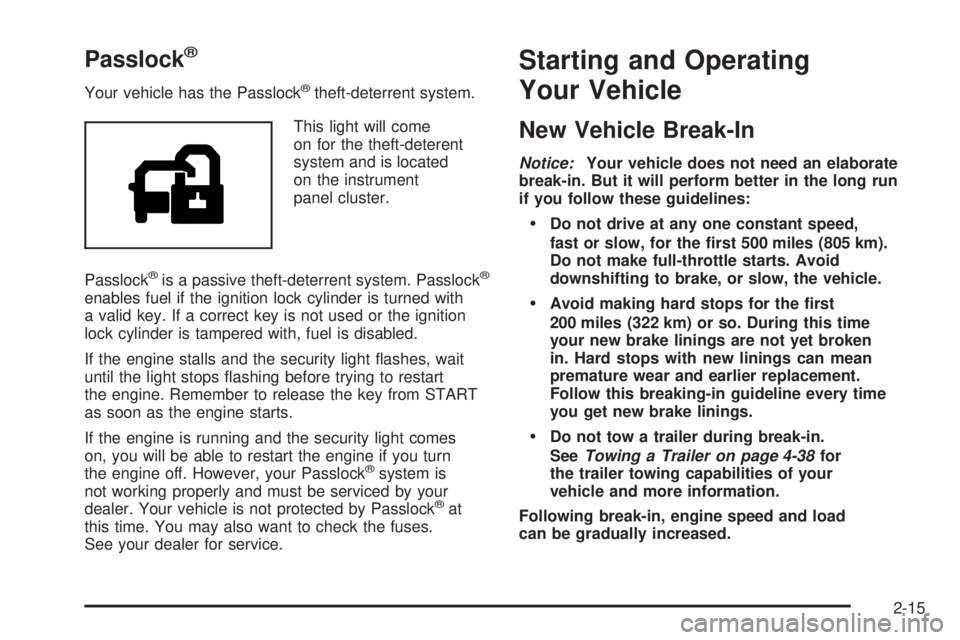
This light will come
on for the theft-deterent
system and is located
on the instrument
panel cluster.
Passlock
®is a passive theft-deterrent system. Passlock®
enables fuel if the ignition lock cylinder is turned with
a valid key. If a correct key is not used or the ignition
lock cylinder is tampered with, fuel is disabled.
If the engine stalls and the security light ashes, wait
until the light stops ashing before trying to restart
the engine. Remember to release the key from START
as soon as the engine starts.
If the engine is running and the security light comes
on, you will be able to restart the engine if you turn
the engine off. However, your Passlock
®system is
not working properly and must be serviced by your
dealer. Your vehicle is not protected by Passlock
®at
this time. You may also want to check the fuses.
See your dealer for service.
Starting and Operating
Your Vehicle
New Vehicle Break-In
Notice:Your vehicle does not need an elaborate
break-in. But it will perform better in the long run
if you follow these guidelines:
Do not drive at any one constant speed,
fast or slow, for the rst 500 miles (805 km).
Do not make full-throttle starts. Avoid
downshifting to brake, or slow, the vehicle.
Avoid making hard stops for the rst
200 miles (322 km) or so. During this time
your new brake linings are not yet broken
in. Hard stops with new linings can mean
premature wear and earlier replacement.
Follow this breaking-in guideline every time
you get new brake linings.
Do not tow a trailer during break-in.
SeeTowing a Trailer on page 4-38for
the trailer towing capabilities of your
vehicle and more information.
Following break-in, engine speed and load
can be gradually increased.
2-15
Page 102 of 368
Outside Convex Mirrors
The passenger’s side mirror is convex. A convex
mirror’s surface is curved, creating a wider area of
vision for the driver.
{CAUTION:
A convex mirror can make things (like other
vehicles) look farther away than they really are.
If you cut too sharply into the right lane, you
could hit a vehicle on your right. Check your
inside mirror or glance over your shoulder
before changing lanes.
OnStar®System
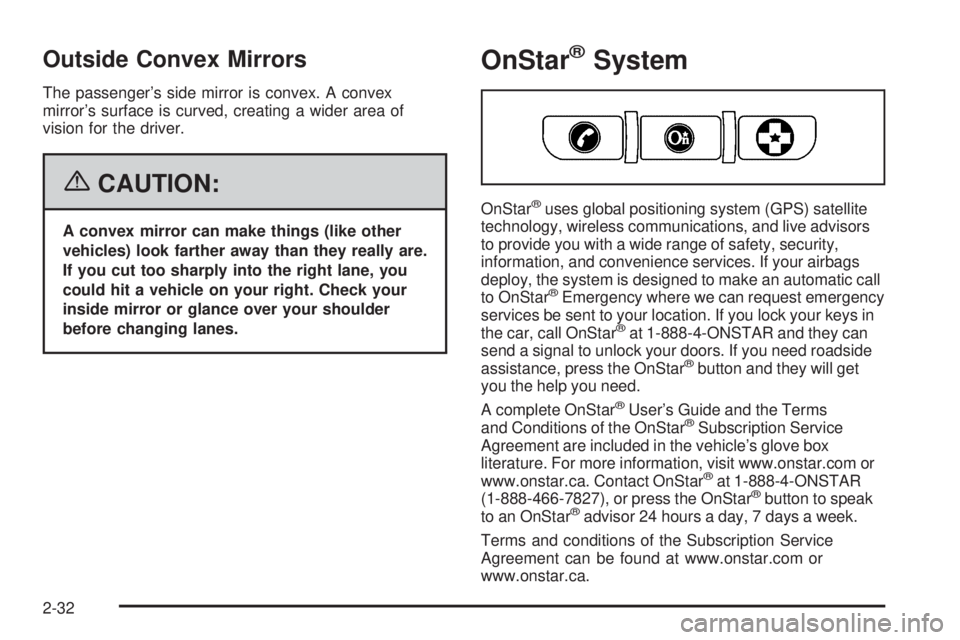
OnStar®uses global positioning system (GPS) satellite
technology, wireless communications, and live advisors
to provide you with a wide range of safety, security,
information, and convenience services. If your airbags
deploy, the system is designed to make an automatic call
to OnStar
®Emergency where we can request emergency
services be sent to your location. If you lock your keys in
the car, call OnStar
®at 1-888-4-ONSTAR and they can
send a signal to unlock your doors. If you need roadside
assistance, press the OnStar
®button and they will get
you the help you need.
A complete OnStar
®User’s Guide and the Terms
and Conditions of the OnStar®Subscription Service
Agreement are included in the vehicle’s glove box
literature. For more information, visit www.onstar.com or
www.onstar.ca. Contact OnStar
®at 1-888-4-ONSTAR
(1-888-466-7827), or press the OnStar®button to speak
to an OnStar®advisor 24 hours a day, 7 days a week.
Terms and conditions of the Subscription Service
Agreement can be found at www.onstar.com or
www.onstar.ca.
2-32
Page 106 of 368
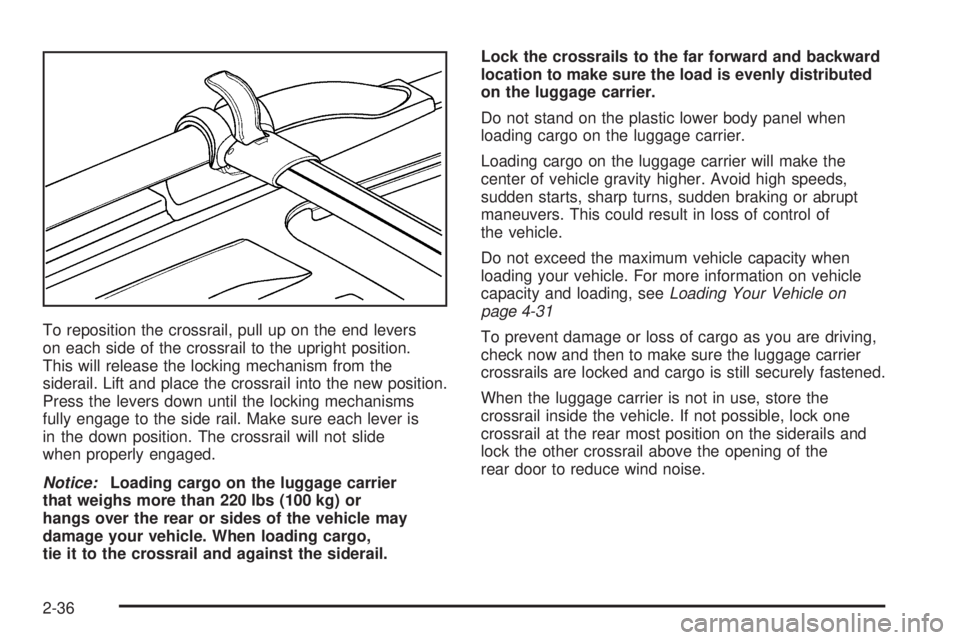
To reposition the crossrail, pull up on the end levers
on each side of the crossrail to the upright position.
This will release the locking mechanism from the
siderail. Lift and place the crossrail into the new position.
Press the levers down until the locking mechanisms
fully engage to the side rail. Make sure each lever is
in the down position. The crossrail will not slide
when properly engaged.
Notice:Loading cargo on the luggage carrier
that weighs more than 220 lbs (100 kg) or
hangs over the rear or sides of the vehicle may
damage your vehicle. When loading cargo,
tie it to the crossrail and against the siderail.Lock the crossrails to the far forward and backward
location to make sure the load is evenly distributed
on the luggage carrier.
Do not stand on the plastic lower body panel when
loading cargo on the luggage carrier.
Loading cargo on the luggage carrier will make the
center of vehicle gravity higher. Avoid high speeds,
sudden starts, sharp turns, sudden braking or abrupt
maneuvers. This could result in loss of control of
the vehicle.
Do not exceed the maximum vehicle capacity when
loading your vehicle. For more information on vehicle
capacity and loading, seeLoading Your Vehicle on
page 4-31
To prevent damage or loss of cargo as you are driving,
check now and then to make sure the luggage carrier
crossrails are locked and cargo is still securely fastened.
When the luggage carrier is not in use, store the
crossrail inside the vehicle. If not possible, lock one
crossrail at the rear most position on the siderails and
lock the other crossrail above the opening of the
rear door to reduce wind noise.
2-36
Page 108 of 368
{CAUTION:
If you were to carry things on the adjustable
panel when it is in the upper (cargo cover) or
center positions, during a sudden vehicle
movement or a crash, those things could be
thrown around in the vehicle. You or others
could be injured. When it is in the upper or
center position, always secure any cargo on
the oor beneath the panel/cover.
To use the panel in the center position, do the following:
1. Insert the front corners of the panel into the
middle guides.
2. Slide the panel forward.
3. Press down and pull rearward on the back of
the panel to lock it in place.
The panel can be used in this position when you have
to place a at or spare tire in the rear cargo area.To use the panel in the upper position, do the following:
1. Insert the front corners of the panel into the
top guides.
2. Slide the panel forward.
3. Press down and pull rearward on the back of
the panel to lock it in place.
This can be used as a cargo cover for the rear area.
The panel may be installed either carpet or plastic side
up. The panel may also be used as a table in this
position. See “Table” following for more information.
2-38
Page 109 of 368
Table
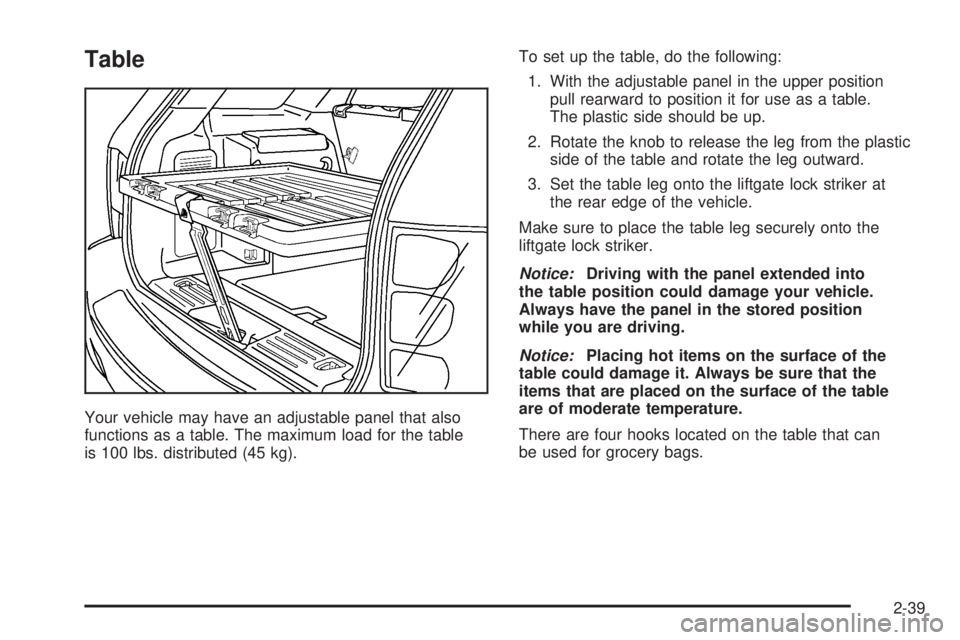
Your vehicle may have an adjustable panel that also
functions as a table. The maximum load for the table
is 100 lbs. distributed (45 kg).To set up the table, do the following:
1. With the adjustable panel in the upper position
pull rearward to position it for use as a table.
The plastic side should be up.
2. Rotate the knob to release the leg from the plastic
side of the table and rotate the leg outward.
3. Set the table leg onto the liftgate lock striker at
the rear edge of the vehicle.
Make sure to place the table leg securely onto the
liftgate lock striker.
Notice:Driving with the panel extended into
the table position could damage your vehicle.
Always have the panel in the stored position
while you are driving.
Notice:Placing hot items on the surface of the
table could damage it. Always be sure that the
items that are placed on the surface of the table
are of moderate temperature.
There are four hooks located on the table that can
be used for grocery bags.
2-39
Page 111 of 368
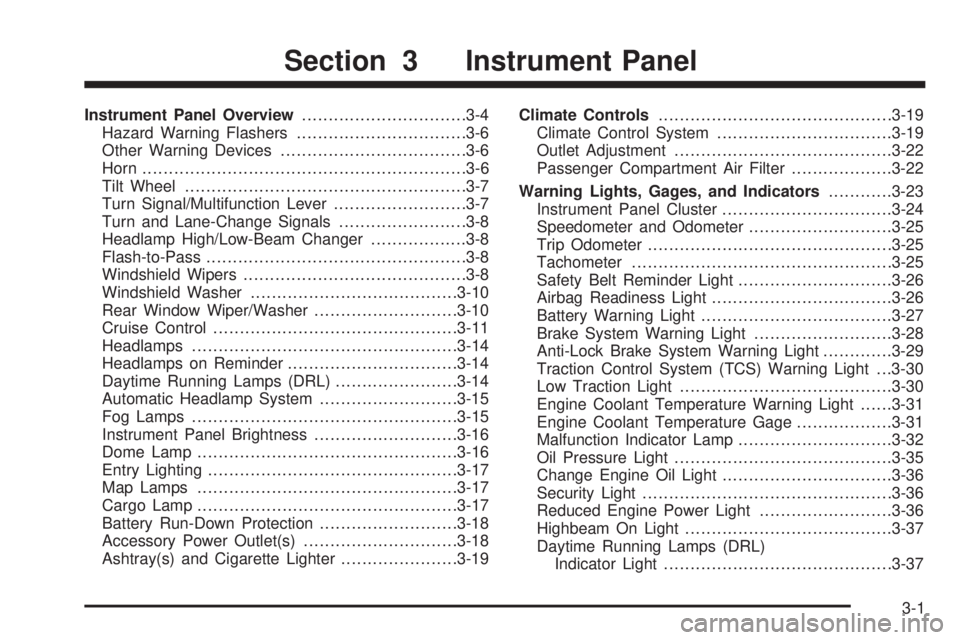
Instrument Panel Overview...............................3-4
Hazard Warning Flashers................................3-6
Other Warning Devices...................................3-6
Horn.............................................................3-6
Tilt Wheel.....................................................3-7
Turn Signal/Multifunction Lever.........................3-7
Turn and Lane-Change Signals........................3-8
Headlamp High/Low-Beam Changer..................3-8
Flash-to-Pass.................................................3-8
Windshield Wipers..........................................3-8
Windshield Washer.......................................3-10
Rear Window Wiper/Washer...........................3-10
Cruise Control..............................................3-11
Headlamps..................................................3-14
Headlamps on Reminder................................3-14
Daytime Running Lamps (DRL).......................3-14
Automatic Headlamp System..........................3-15
Fog Lamps..................................................3-15
Instrument Panel Brightness...........................3-16
Dome Lamp.................................................3-16
Entry Lighting...............................................3-17
Map Lamps.................................................3-17
Cargo Lamp.................................................3-17
Battery Run-Down Protection..........................3-18
Accessory Power Outlet(s).............................3-18
Ashtray(s) and Cigarette Lighter......................3-19Climate Controls............................................3-19
Climate Control System.................................3-19
Outlet Adjustment.........................................3-22
Passenger Compartment Air Filter...................3-22
Warning Lights, Gages, and Indicators............3-23
Instrument Panel Cluster................................3-24
Speedometer and Odometer...........................3-25
Trip Odometer..............................................3-25
Tachometer.................................................3-25
Safety Belt Reminder Light.............................3-26
Airbag Readiness Light..................................3-26
Battery Warning Light....................................3-27
Brake System Warning Light..........................3-28
Anti-Lock Brake System Warning Light.............3-29
Traction Control System (TCS) Warning Light . . .3-30
Low Traction Light........................................3-30
Engine Coolant Temperature Warning Light......3-31
Engine Coolant Temperature Gage..................3-31
Malfunction Indicator Lamp.............................3-32
Oil Pressure Light.........................................3-35
Change Engine Oil Light................................3-36
Security Light...............................................3-36
Reduced Engine Power Light.........................3-36
Highbeam On Light.......................................3-37
Daytime Running Lamps (DRL)
Indicator Light...........................................3-37
Section 3 Instrument Panel
3-1
Page 146 of 368
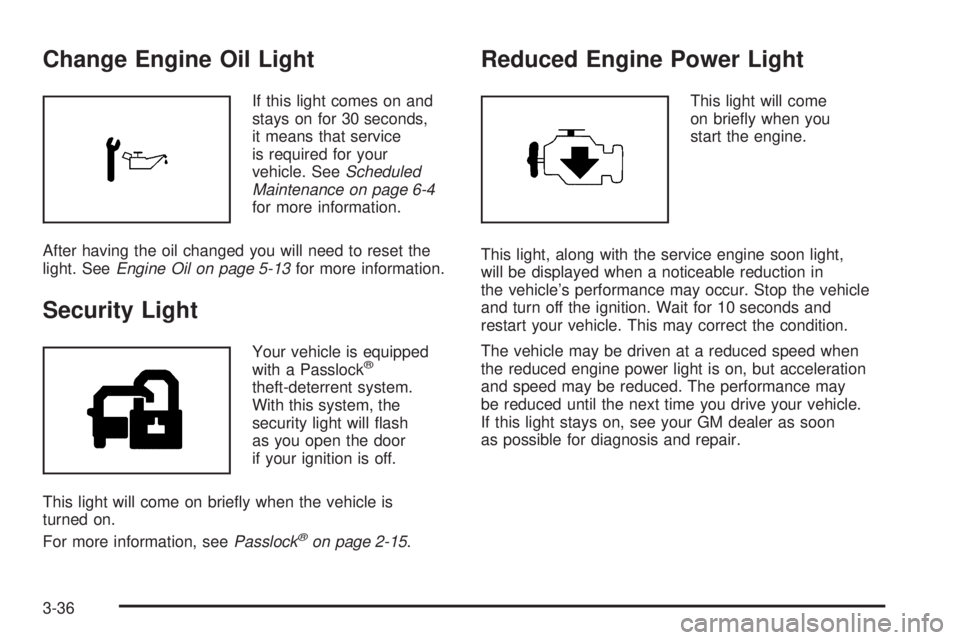
Change Engine Oil Light
If this light comes on and
stays on for 30 seconds,
it means that service
is required for your
vehicle. SeeScheduled
Maintenance on page 6-4
for more information.
After having the oil changed you will need to reset the
light. SeeEngine Oil on page 5-13for more information.
Security Light
Your vehicle is equipped
with a Passlock®
theft-deterrent system.
With this system, the
security light will ash
as you open the door
if your ignition is off.
This light will come on briey when the vehicle is
turned on.
For more information, seePasslock
®on page 2-15.
Reduced Engine Power Light
This light will come
on briey when you
start the engine.
This light, along with the service engine soon light,
will be displayed when a noticeable reduction in
the vehicle’s performance may occur. Stop the vehicle
and turn off the ignition. Wait for 10 seconds and
restart your vehicle. This may correct the condition.
The vehicle may be driven at a reduced speed when
the reduced engine power light is on, but acceleration
and speed may be reduced. The performance may
be reduced until the next time you drive your vehicle.
If this light stays on, see your GM dealer as soon
as possible for diagnosis and repair.
3-36
Page 157 of 368
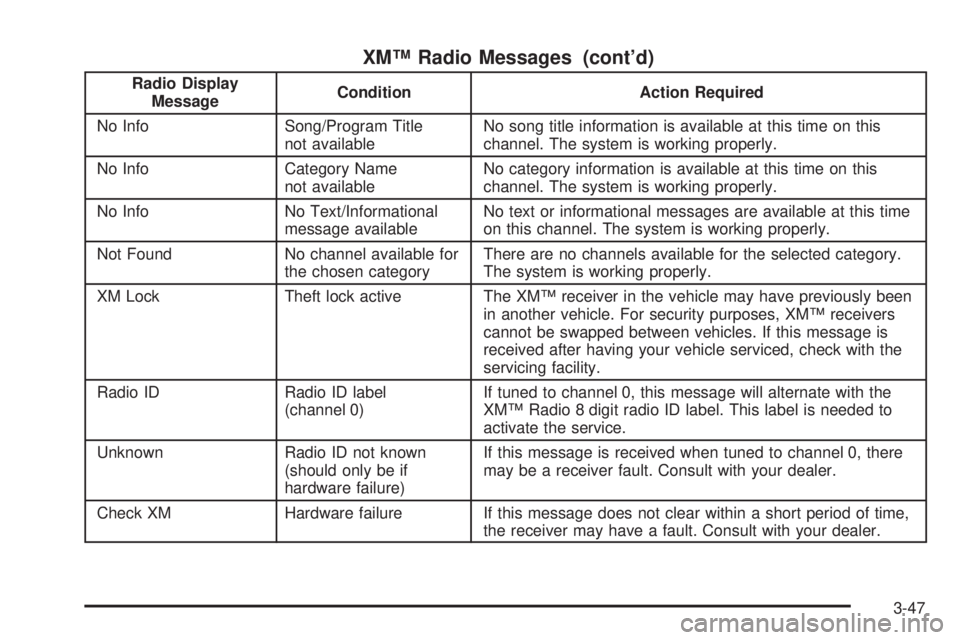
XM™ Radio Messages (cont’d)
Radio Display
MessageCondition Action Required
No Info Song/Program Title
not availableNo song title information is available at this time on this
channel. The system is working properly.
No Info Category Name
not availableNo category information is available at this time on this
channel. The system is working properly.
No Info No Text/Informational
message availableNo text or informational messages are available at this time
on this channel. The system is working properly.
Not Found No channel available for
the chosen categoryThere are no channels available for the selected category.
The system is working properly.
XM Lock Theft lock active The XM™ receiver in the vehicle may have previously been
in another vehicle. For security purposes, XM™ receivers
cannot be swapped between vehicles. If this message is
received after having your vehicle serviced, check with the
servicing facility.
Radio ID Radio ID label
(channel 0)If tuned to channel 0, this message will alternate with the
XM™ Radio 8 digit radio ID label. This label is needed to
activate the service.
Unknown Radio ID not known
(should only be if
hardware failure)If this message is received when tuned to channel 0, there
may be a receiver fault. Consult with your dealer.
Check XM Hardware failure If this message does not clear within a short period of time,
the receiver may have a fault. Consult with your dealer.
3-47
Page 167 of 368
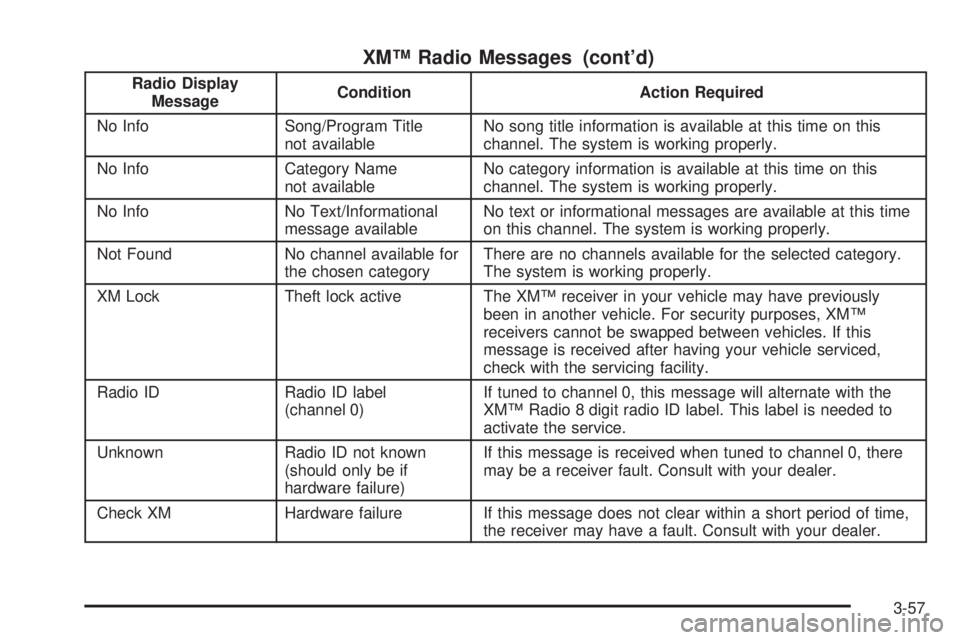
XM™ Radio Messages (cont’d)
Radio Display
MessageCondition Action Required
No Info Song/Program Title
not availableNo song title information is available at this time on this
channel. The system is working properly.
No Info Category Name
not availableNo category information is available at this time on this
channel. The system is working properly.
No Info No Text/Informational
message availableNo text or informational messages are available at this time
on this channel. The system is working properly.
Not Found No channel available for
the chosen categoryThere are no channels available for the selected category.
The system is working properly.
XM Lock Theft lock active The XM™ receiver in your vehicle may have previously
been in another vehicle. For security purposes, XM™
receivers cannot be swapped between vehicles. If this
message is received after having your vehicle serviced,
check with the servicing facility.
Radio ID Radio ID label
(channel 0)If tuned to channel 0, this message will alternate with the
XM™ Radio 8 digit radio ID label. This label is needed to
activate the service.
Unknown Radio ID not known
(should only be if
hardware failure)If this message is received when tuned to channel 0, there
may be a receiver fault. Consult with your dealer.
Check XM Hardware failure If this message does not clear within a short period of time,
the receiver may have a fault. Consult with your dealer.
3-57
Page 182 of 368
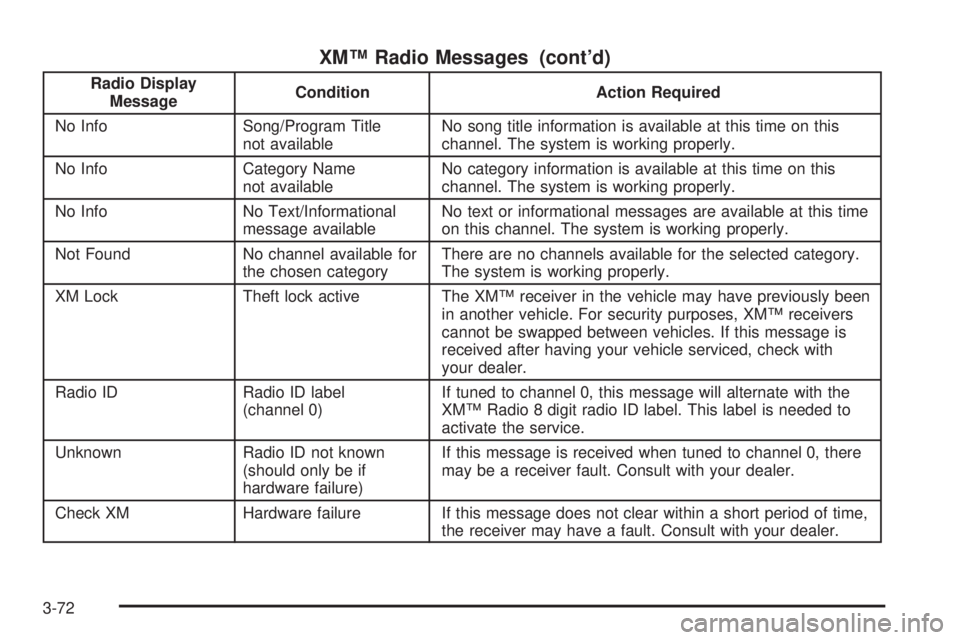
XM™ Radio Messages (cont’d)
Radio Display
MessageCondition Action Required
No Info Song/Program Title
not availableNo song title information is available at this time on this
channel. The system is working properly.
No Info Category Name
not availableNo category information is available at this time on this
channel. The system is working properly.
No Info No Text/Informational
message availableNo text or informational messages are available at this time
on this channel. The system is working properly.
Not Found No channel available for
the chosen categoryThere are no channels available for the selected category.
The system is working properly.
XM Lock Theft lock active The XM™ receiver in the vehicle may have previously been
in another vehicle. For security purposes, XM™ receivers
cannot be swapped between vehicles. If this message is
received after having your vehicle serviced, check with
your dealer.
Radio ID Radio ID label
(channel 0)If tuned to channel 0, this message will alternate with the
XM™ Radio 8 digit radio ID label. This label is needed to
activate the service.
Unknown Radio ID not known
(should only be if
hardware failure)If this message is received when tuned to channel 0, there
may be a receiver fault. Consult with your dealer.
Check XM Hardware failure If this message does not clear within a short period of time,
the receiver may have a fault. Consult with your dealer.
3-72